
Nessus Aggregator
Nessus Aggregator is a Python-based tool that automates aggregation of Nessus vulnerability scan results into consolidated Excel reports. The config.py script generates a run file that can be automated through crontab. This tool utilizes and builds upon LimberDuck's Nessus File Reader. If you're looking for another powerful GUI-based solution for Nessus file aggregation, check out LimberDuck's Nessus File Analyzer.
Prerequisites
- Python 3.7 or higher
python3-venv/python3-pip(install with apt if needed)- Linux operating system
- Nessus Essentials, Professional, or Expert
- API keys from your Nessus instance (see API key generation documentation)
Installation
- Ensure all prerequisites are met.
- Create and activate a virtual environment:
python-3 -m venv environment_name
source environment_name/bin/activate - Install with
pip install nessus-aggregator
Program Execution
- Run
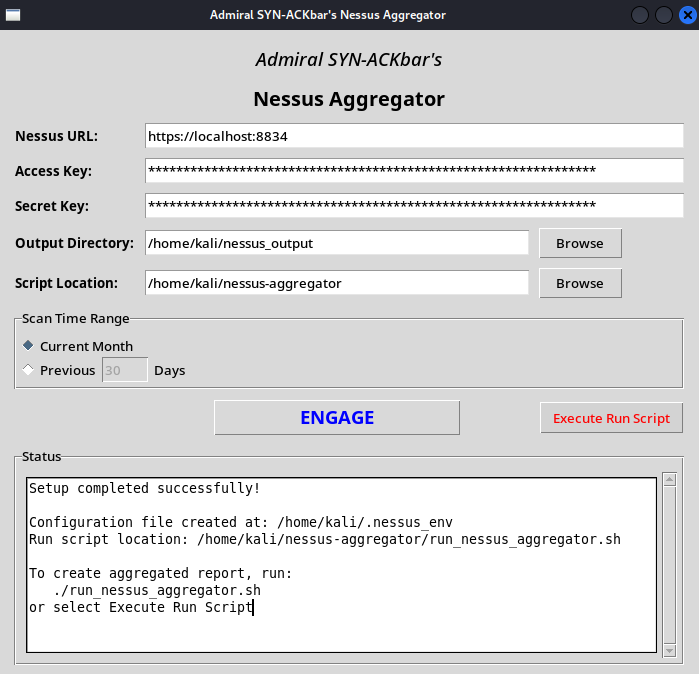
nessus-aggregator - Fill out the fields in the GUI and click "ENGAGE".
- Run the generated
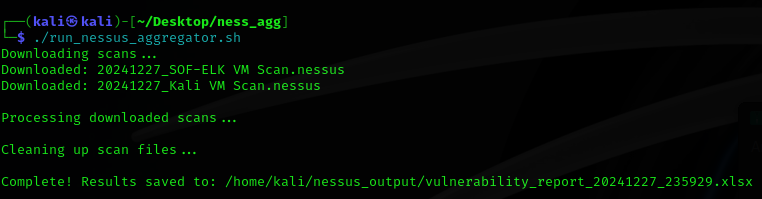
run_nessus_aggregator.shor click the “Execute Run Script” button in the GUI to generate the report.
Automation
- The
run_nessus_aggregator.shscript can be scheduled via cron.
How It Works
- API Authentication: Uses Nessus API keys to connect to Nessus.
- Scan Collection: Retrieves all scans from the current calendar month or from a previous user-defined number of days.
- Report Generation: Processes scans and generates an Excel file with 3 tabs:
- Scan Information: Overview of each scan.
- Vulnerability Summary: Summary of hosts and findings by severity.
- Vulnerability Details: Detailed findings with links to Tenable's plugin database.
Security Notes
- API keys are stored in
~/.nessus_envwith restricted permissions (chmod 600). Your Nessus API keys are stored in this file. Delete it after running if you do not want this to be stored. - SSL certificate verification is disabled by default due to common use of self-signed certificates.
- Downloads of scan files created through API calls are automatically deleted after processing.
Output Format
The generated Excel report includes:
- Scan metadata
- Vulnerability summary by host and severity (Critical, High, Medium and Low only)
- Detailed findings with clickable plugin IDs



1 maintainer

Metadata
1 maintainer
Release files for nessus-aggregator 0.2.3
For a detailed explanation of source distributions (sdists) and built distributions (wheels), please see the package formats documentation.
Source distribution (sdist)
| File | Size | Uploaded | |
|---|---|---|---|
| nessus_aggregator-0.2.3.tar.gz | 9.3 kB | Details |
Built distribution (wheel)
| File | Interpreter | ABI | Platform | Reset |
|---|---|---|---|---|
| nessus_aggregator-0.2.3-py3-none-any.whl | Python 3 | none | any | Details |
Total release size: 17.9 kB
Release files / nessus_aggregator-0.2.3.tar.gz
| Download URL | nessus_aggregator-0.2.3.tar.gz |
|---|---|
| Size | 9.3 kB |
| Tags | Source |
|
SHA-256 checksum How to use checksums |
f2d6f212d7a4ea20642cd097584d944d6bf41f7a9f0a492bd91194735c62aa5c
|
|
BLAKE2b-256 checksum How to use checksums |
0d719d090f0fc2f872326a5f778fedd84a9f79ee390cc31514dea1d546eb88ea
|
| Upload date | |
|
Uploaded using Trusted Publishing? What is trusted publishing? |
No |
| Uploaded via |
twine/6.0.1 CPython/3.12.8
|
Release files / nessus_aggregator-0.2.3-py3-none-any.whl
| Download URL | nessus_aggregator-0.2.3-py3-none-any.whl |
|---|---|
| Size | 8.5 kB |
| Tags | Python 3 |
|
SHA-256 checksum How to use checksums |
27ab4e51cf5c3fdcd540fcaf2ea1c35a61bc5ac957c3dac082c5dfd07a2376c2
|
|
BLAKE2b-256 checksum How to use checksums |
2f56ef83d94eae05f36f3494d8542c8d5edc40c7b57d44c428d5c441c20e036f
|
| Upload date | |
|
Uploaded using Trusted Publishing? What is trusted publishing? |
No |
| Uploaded via |
twine/6.0.1 CPython/3.12.8
|













