
netbox-checkmk
NetBox plugin that shows live Checkmk monitoring state on devices, virtual machines and clusters, in a dedicated "Checkmk" tab on each object's detail page.
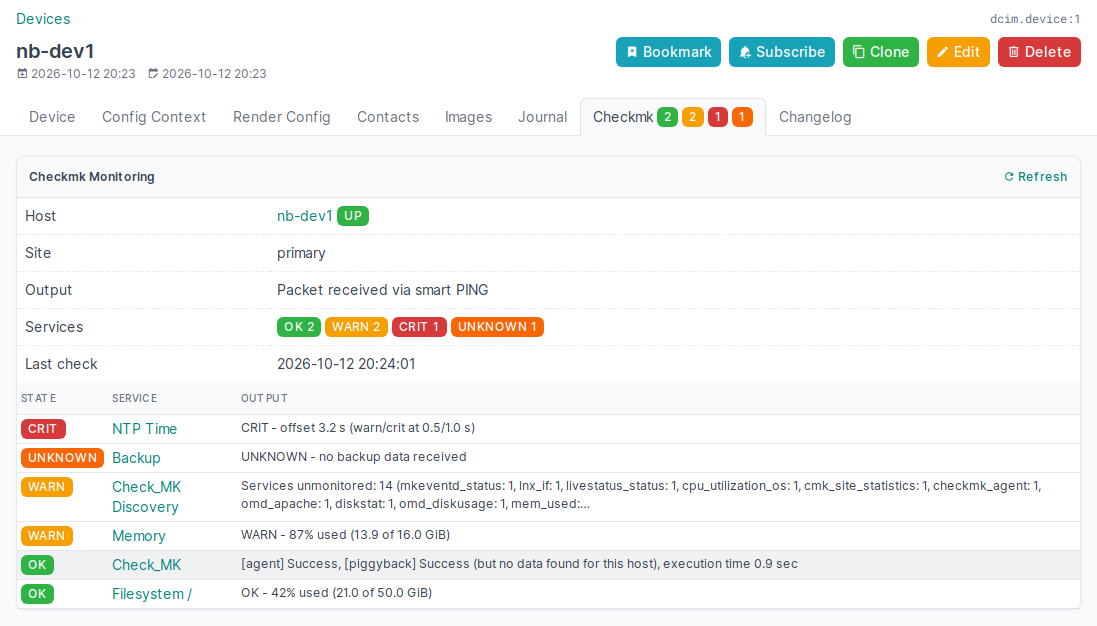
- Tab label badges: the "Checkmk" tab shows the number of OK / WARN / CRIT / UNKNOWN services as number-only badges in the state's color (zero counts hidden), plus a DOWN / UNREACH badge when the host is down. They are visible from every tab of the object.
- Device / Virtual machine tab: host state (UP/DOWN/UNREACH/PEND), acknowledgement and downtime flags, plugin output, service state counts, last check time, and the full service list (worst state first) with each service's output. The host and every service link straight to their views in Checkmk.
- Cluster tab: overall (worst) state across all member devices and VMs, the cluster's own Checkmk host (if one exists with that name), and a member table sorted worst-first. The tab label badges show the service counts summed over all members.
- List column: an optional "Checkmk" column for the device, virtual machine and cluster lists (host state + service counts), enabled per user via Configure Table.
- English and German: the UI follows the NetBox user's language setting.
- Checkmk sites in the NetBox UI or the configuration file, or both: sites can be managed
under Plugins → Checkmk sites (secret stored encrypted, connection test button) and/or in
PLUGINS_CONFIG. They are queried in order; the first site that knows a host wins. - Non-blocking: the tab loads its content asynchronously (htmx), so a slow or unreachable
Checkmk site never delays the NetBox page. State is fetched from Checkmk at most every
check_intervalseconds (default 300 = 5 min), and an open tab reloads itself at that interval. The tab's Refresh button bypasses the cache. - Read-only: the plugin only reads monitoring status from the Checkmk REST API.
- Standard plugin APIs only: an extra tab via
register_model_view/ViewTab, the list column viaregister_table_column, and the plugin's own model, views, REST API and menu entry. NetBox's code and templates are not touched.
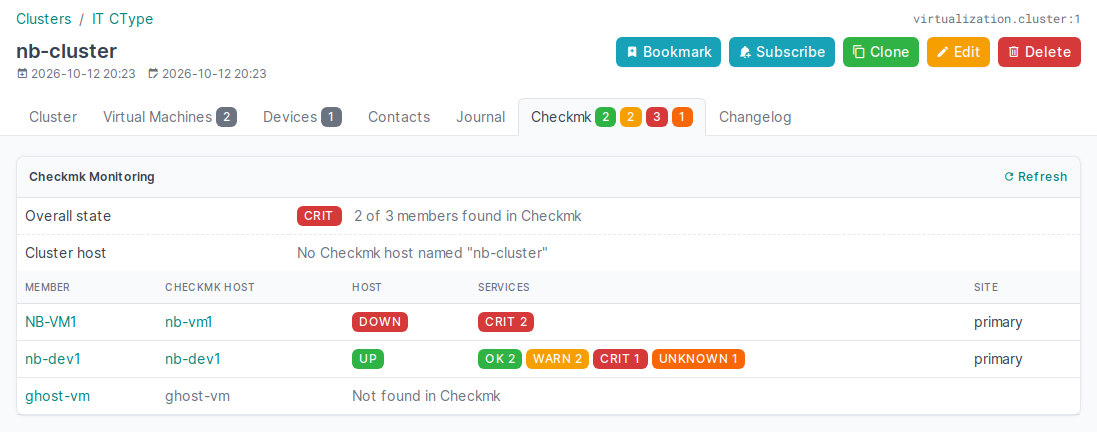
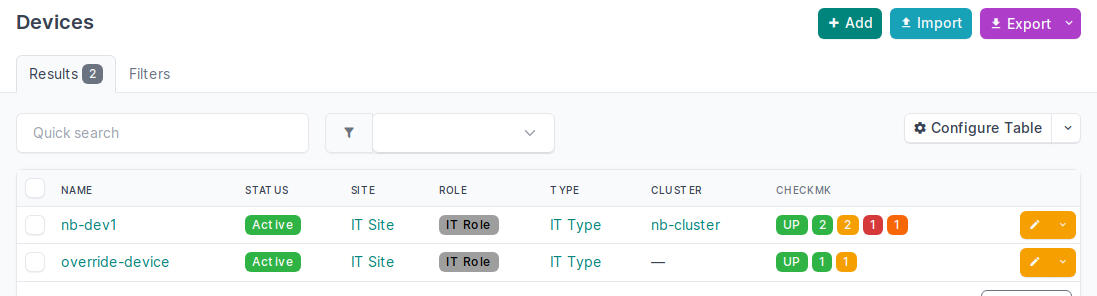
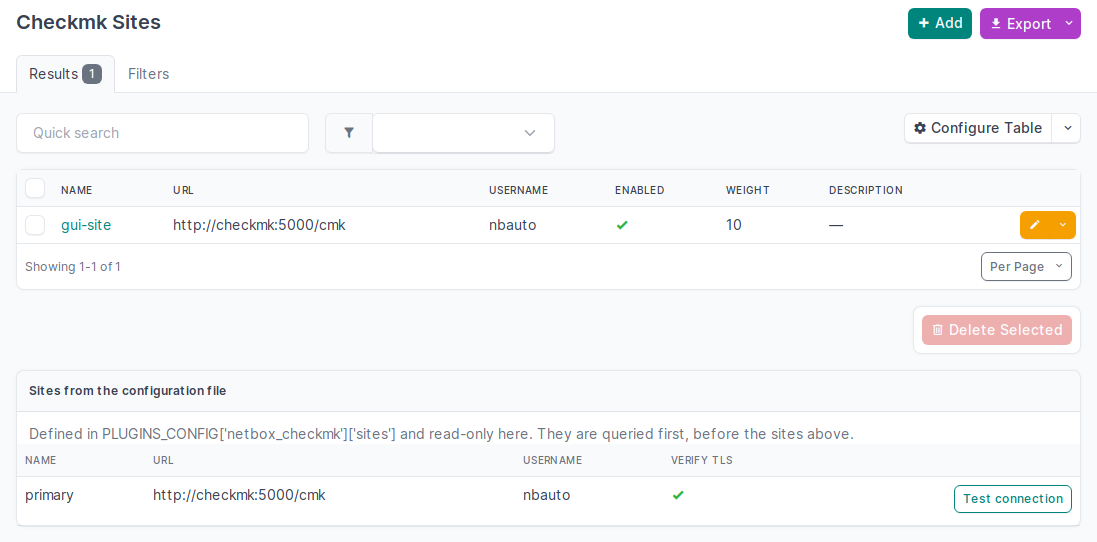
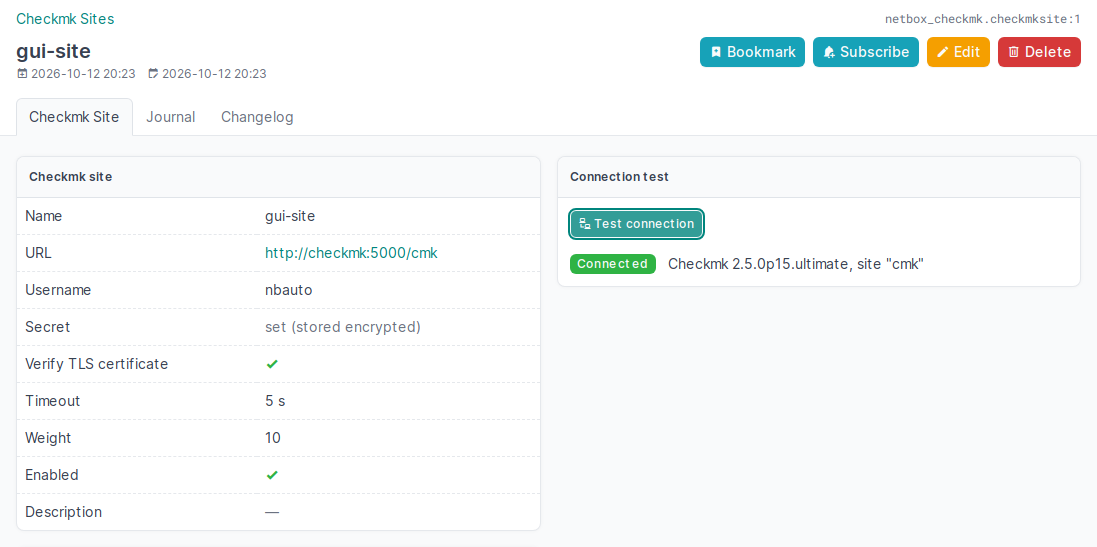
The screenshots are generated by the integration test against a throwaway Checkmk site with
demo services: SCREENSHOT_DIR=docs/screenshots NETBOX_VERSIONS=v4.7.2 scripts/integration_test.sh.
That mode needs python3 on the machine running the script.
Host name mapping
A NetBox object is matched to the Checkmk host with the same name, case-insensitively
(NB-VM1 in NetBox finds nb-vm1 in Checkmk). If the names differ, set the custom field
Checkmk host name (checkmk_hostname) on the object; its value is then used instead of the
object name.
The plugin creates this text custom field for devices, virtual machines and clusters on
manage.py migrate if it doesn't exist yet. An existing field with that name is never changed.
To name it differently, set hostname_custom_field; to create it yourself, set
create_custom_field: False.
Requirements
- NetBox 4.3 or newer
- Checkmk 2.5 or 3.0 (REST API), with a user per site for NetBox (see below).
Dependencies
| Package | Why | Notes |
|---|---|---|
requests |
HTTP calls to the Checkmk REST API | Already part of every NetBox installation |
cryptography |
Encrypting the secrets of sites managed in the UI | Already part of every NetBox installation |
So installing the plugin adds no further packages. It brings one database table (the Checkmk sites managed in the UI), no static files and no JavaScript of its own: the asynchronous loading uses the htmx library that NetBox already ships.
Checkmk user for NetBox
The plugin only reads, so a dedicated automation user with the built-in "Guest user" role is all it needs. That role may see all hosts and services, and can't change anything. Don't use a personal account: its password ends up in NetBox's configuration.
In each Checkmk site:
- Setup → Users → Users → Add user
- Username e.g.
netbox, Full name e.g.NetBox - Authentication: Automation secret for machine accounts, then generate a secret and copy it
- Roles: only Guest user; no contact groups, no notifications needed
- Save and activate changes
Or with the REST API, as an admin. This is the call the integration test uses:
curl -u 'cmkadmin:<password>' -X POST -H 'Content-Type: application/json' \
  https://cmk.example.com/mysite/check_mk/api/1.0/domain-types/user_config/collections/all \
  -d '{"username": "netbox", "fullname": "NetBox", "roles": ["guest"],
       "auth_option": {"auth_type": "automation", "secret": "<long random secret>"}}'
Then enter username and secret for the site, either in the UI under Plugins → Checkmk sites
or in the configuration file (see Configuration below).
Check it from the NetBox host:
curl -s -H 'Authorization: Bearer netbox <secret>' \
  https://cmk.example.com/mysite/check_mk/api/1.0/version
Installation
The plugin is on PyPI as netbox-checkmk. Each
GitLab release also carries the wheel. The plugin has one database table (the Checkmk sites
managed in the UI) and no static files, so manage.py migrate is required after installing and
after every update. That run also creates the custom field.
Classic installation (/opt/netbox, systemd)
These steps were used on a real NetBox 4.7.1 installation (Debian 13, /opt/netbox, services
netbox and netbox-rq):
# 1. Back up the configuration
cp -a /opt/netbox/netbox/netbox/configuration.py /root/configuration.py.bak-$(date +%F)

# 2. Install it into NetBox's venv
/opt/netbox/venv/bin/pip install netbox-checkmk

# 3. So that NetBox's own upgrade.sh reinstalls the plugin on NetBox upgrades
echo netbox-checkmk >> /opt/netbox/local_requirements.txt
- In
/opt/netbox/netbox/netbox/configuration.py, add"netbox_checkmk"toPLUGINS. Checkmk sites can go intoPLUGINS_CONFIGhere as well (see Configuration below), or be added in the UI after step 6. Without any site the plugin still loads; its tab then says that no site is configured.
# 5. Validate, create the plugin's table and custom field, restart, check
cd /opt/netbox/netbox && runuser -u netbox -- /opt/netbox/venv/bin/python manage.py check
runuser -u netbox -- /opt/netbox/venv/bin/python manage.py migrate
systemctl restart netbox netbox-rq
systemctl is-active netbox netbox-rq
- Open a device or VM: the tab bar now has a Checkmk tab. If no site is configured in the file yet, add one under Plugins → Checkmk sites → Add and click Test connection on it.
To update: /opt/netbox/venv/bin/pip install -U netbox-checkmk, then run migrate and restart
both services as in step 5.
To uninstall: delete the plugin's table first, while the plugin is still installed and enabled (this also deletes all sites managed in the UI), then remove it:
cd /opt/netbox/netbox && runuser -u netbox -- /opt/netbox/venv/bin/python manage.py migrate netbox_checkmk zero
/opt/netbox/venv/bin/pip uninstall netbox-checkmk
Then remove "netbox_checkmk" from PLUGINS (and its PLUGINS_CONFIG entry and the
local_requirements.txt line), and restart both services. The custom field checkmk_hostname
stays; delete it under Customization → Custom Fields if you don't need it anymore.
Without internet access on the NetBox host, copy the wheel there (e.g. to
/opt/netbox/local_plugins/), pip install that file, and put its path into
local_requirements.txt instead of the package name.
netbox-docker
Build a custom image with the plugin. plugin_requirements.txt:
netbox-checkmk
Dockerfile-Plugins:
FROM netboxcommunity/netbox:v4.7.2
COPY ./plugin_requirements.txt /opt/netbox/
RUN /usr/local/bin/uv pip install --python /opt/netbox/venv/bin/python \
    -r /opt/netbox/plugin_requirements.txt
docker-compose.override.yml:
services:
  netbox:
    image: netbox:latest-plugins
    pull_policy: never
    build:
      context: .
      dockerfile: Dockerfile-Plugins
  netbox-worker:
    image: netbox:latest-plugins
    pull_policy: never
  netbox-housekeeping:
    image: netbox:latest-plugins
    pull_policy: never
Put the configuration into configuration/plugins.py, then run
docker compose build --no-cache && docker compose up -d.
The Dockerfile-Plugins build was verified (the plugin installs into the image), and the
integration test runs the plugin in the same image with its config in plugins.py. The full
docker compose stack itself has not been run.
Configuration
Checkmk sites can be configured in two places, and both can be used together:
| NetBox UI (Plugins → Checkmk sites) | Configuration file (PLUGINS_CONFIG) |
|
|---|---|---|
| Managed by | users with the netbox_checkmk permissions |
whoever edits configuration.py (or automation) |
| Secret | stored encrypted in the database, never shown again | in the file (see below for keeping it out) |
| Takes effect | immediately | after restarting NetBox |
| Query order | after the file sites, by weight | first, in list order |
Sites from the file are shown read-only under Plugins → Checkmk sites. A UI site can't take the name of a file site. Each site has a Test connection button.
Sites in the NetBox UI
Plugins → Checkmk sites → Add: name, URL (site URL without /check_mk, e.g.
https://cmk.example.com/mysite), username and secret of the Checkmk user, plus optional TLS
verification, timeout, weight and an enabled switch. When editing, leave the secret empty to
keep the stored one.
How the secret is protected:
- It is encrypted (Fernet: AES-128 + HMAC) with a key derived from NetBox's
SECRET_KEY. - It is never displayed, exported, written to the change log, or returned by the REST API
(
/api/plugins/checkmk/sites/; the fieldsecretcan be written there, but never read). - If NetBox's
SECRET_KEYchanges, stored secrets can't be decrypted anymore. The tab then names the affected site, and the secret has to be entered again. - Only users with the matching object permissions (
netbox_checkmk.*_checkmksite, typically admins) can see or change the sites.
Settings in the configuration file
All settings, including sites; every key is optional:
PLUGINS = ["netbox_checkmk"]

PLUGINS_CONFIG = {
    "netbox_checkmk": {
        "sites": [                                          # sites in addition to the UI ones
            {
                "name": "main",                             # label shown in NetBox
                "url": "https://cmk.example.com/mysite",    # site URL, without /check_mk
                "username": "netbox",                       # automation user
                "secret": "…",                              # its automation secret
                "verify_ssl": True,                         # optional, default True
                "timeout": 5,                               # optional, seconds
            },
            # further sites …
        ],
        "check_interval": 300,       # seconds between Checkmk queries (cache + tab auto-reload)
        "hostname_custom_field": "checkmk_hostname",
        "create_custom_field": True,  # create it on `manage.py migrate` if missing
        "max_services": 500,         # services listed on a device/VM tab
        "max_cluster_members": 100,  # members evaluated on a cluster tab
    },
}
To keep the secret out of configuration.py, see Keeping the secret out of the configuration
below.
Before restarting, check that the NetBox host can reach each Checkmk site:
curl -s -u '<user>:<secret>' https://cmk.example.com/mysite/check_mk/api/1.0/version
Permissions follow NetBox: users only see the tab, and its data, for objects they are allowed to view.
Keeping the secret out of the configuration
The simplest way is to add the site in the NetBox UI instead: its secret is then stored encrypted in the database (see Sites in the NetBox UI). For sites in the configuration file:
configuration.py is plain Python, so the Checkmk secret doesn't have to be written into it. On
many installations that file is readable by every local user, and it often ends up in backups or
version control. Pick one of these:
Separate secret file (simplest). Only root and the netbox user, which NetBox runs as, can
read it:
install -m 640 -o root -g netbox /dev/null /etc/netbox/checkmk_secret
printf '%s' '<secret>' > /etc/netbox/checkmk_secret
from pathlib import Path

PLUGINS_CONFIG = {
    "netbox_checkmk": {
        "sites": [
            {
                "name": "main",
                "url": "https://cmk.example.com/mysite",
                "username": "netbox",
                "secret": Path("/etc/netbox/checkmk_secret").read_text().strip(),
            },
        ],
    },
}
Environment variable via systemd. Put CHECKMK_SECRET=<secret> into
/etc/netbox/checkmk.env (chmod 600), then add a drop-in for both netbox and netbox-rq
(systemctl edit netbox, then systemctl edit netbox-rq):
[Service]
EnvironmentFile=/etc/netbox/checkmk.env
In the configuration: "secret": os.environ["CHECKMK_SECRET"] (with import os). Commands
you run by hand, such as manage.py, don't get that variable, so the configuration fails to
load there unless you export it first.
systemd credentials (systemd 247 or newer). The secret is only handed to the running service. Drop-in for both services:
[Service]
LoadCredential=checkmk_secret:/etc/netbox/checkmk_secret
import os
from pathlib import Path

"secret": Path(os.environ["CREDENTIALS_DIRECTORY"], "checkmk_secret").read_text().strip(),
The same caveat applies to manage.py as with the environment variable.
netbox-docker: Docker secret. Define a secret checkmk_secret in
docker-compose.override.yml for the netbox and netbox-worker services. Docker mounts it
at /run/secrets/checkmk_secret, so in configuration/plugins.py:
from pathlib import Path

"secret": Path("/run/secrets/checkmk_secret").read_text().strip(),
Independent of where the secret lives:
- Use a read-only Checkmk user (see Checkmk user for NetBox). Even if the secret leaks, it can't change anything in Checkmk.
- Restrict
configuration.pyitself: it also holds NetBox's database password andSECRET_KEY.chown root:netboxandchmod 640keep it readable for NetBox but not for other local users.
Behaviour on errors
If a site cannot be queried (unreachable, wrong credentials, …), the tab shows a warning naming the site. Hosts that were not found on any reachable site are then reported as "could not be determined" rather than "not found", and that result is not cached.
Development
pip install ruff pytest requests
ruff check . && ruff format --check . && pytest -q          # unit tests (no NetBox needed)

# After editing netbox_checkmk/locale/de/LC_MESSAGES/django.po (no GNU gettext needed):
python scripts/compile_translations.py

# Integration test: real Checkmk site + NetBox per version, all in Docker
CHECKMK_VERSION=2.5.0p15 NETBOX_VERSIONS="v4.3.7 v4.7.2" scripts/integration_test.sh   # default: 4.3 … 4.7
The integration test creates hosts in a throwaway Checkmk site, forces their states via
Livestatus, and then checks the tabs and status content through NetBox's own Django stack:
automatic custom field creation, case-insensitive matching, the custom field override, cluster
aggregation, tab label badges, the list column, host and service links, the German translation,
multi-site fallback with a broken site, caching, and permissions.
It uses docker create/cp/exec only (no bind mounts, no published ports), so it also works
against a remote Docker daemon (DOCKER_CONTEXT/DOCKER_HOST).
CI runs lint and unit tests on every push. The integration test, package build and GitLab
release run on tag pushes (vX.Y.Z, which must match __version__).
Tested with
Plugin version 0.4.0, integration test (scripts/integration_test.sh), 2026-10-12:
| Checkmk | NetBox v4.3.7 |
v4.4.10 |
v4.5.10 |
v4.6.10 |
v4.7.2 |
|---|---|---|---|---|---|
2.5.0p15 (check-mk-ultimate) |
passed | passed | passed | passed | passed |
3.0.0-2026.10.12 (check-mk-ultimate daily) |
passed | passed | passed | passed | passed |
Also running on a real installation: NetBox 4.7.1 (classic install, Debian 13) with Checkmk
2.5.0p15. Version 0.1.0 was installed by hand via the classic path above, and later versions
were rolled out automatically with the same steps.
License
Copyright 2026 Christian Wirtz. Licensed under the Apache License 2.0. Forks and redistributions must keep the NOTICE file (section 4(d) of the license).
NetBox is a trademark of NetBox Labs, Inc. Checkmk is a trademark of Checkmk GmbH. This project is an unofficial, independent community project and is not affiliated with or endorsed by NetBox Labs or Checkmk GmbH.
1 maintainer

Metadata
1 maintainer
Release files for netbox-checkmk 0.4.0
For a detailed explanation of source distributions (sdists) and built distributions (wheels), please see the package formats documentation.
Source distribution (sdist)
| File | Size | Uploaded | |
|---|---|---|---|
| netbox_checkmk-0.4.0.tar.gz | 41.4 kB | Details |
Built distribution (wheel)
| File | Interpreter | ABI | Platform | Reset |
|---|---|---|---|---|
| netbox_checkmk-0.4.0-py3-none-any.whl | Python 3 | none | any | Details |
Total release size: 84.1 kB
Release files / netbox_checkmk-0.4.0.tar.gz
| Download URL | netbox_checkmk-0.4.0.tar.gz |
|---|---|
| Size | 41.4 kB |
| Tags | Source |
|
SHA-256 checksum How to use checksums |
d4b68f48660f94fc2b1ea8dc17a667897da5a93f037fc0eb216a4d7180f61b45
|
|
BLAKE2b-256 checksum How to use checksums |
2e8f22bb9101904e18c590e2719daf5429f22cf06c6655bc41d50721c586d7f1
|
| Upload date | |
|
Uploaded using Trusted Publishing? What is trusted publishing? |
Yes |
| Uploaded via |
twine/7.0.0 CPython/3.12.15
|
Release files / netbox_checkmk-0.4.0-py3-none-any.whl
| Download URL | netbox_checkmk-0.4.0-py3-none-any.whl |
|---|---|
| Size | 42.7 kB |
| Tags | Python 3 |
|
SHA-256 checksum How to use checksums |
445ca921e170d254429d508f7a5eb44f83ba9e1efb4076274afc8aa022d56789
|
|
BLAKE2b-256 checksum How to use checksums |
550f6ac20cb6a3f9aa3fabba958084f98af6d331311035e256a33fc08fc03e42
|
| Upload date | |
|
Uploaded using Trusted Publishing? What is trusted publishing? |
Yes |
| Uploaded via |
twine/7.0.0 CPython/3.12.15
|














