
NetBox plugin that adds a Custom Objects tab to object detail pages
Verified details
These details have been verified by PyPIProject links
GitHub Statistics
Maintainers


Project description
netbox-custom-objects-tab




A NetBox 4.5.x / 4.6.x plugin that adds Custom Objects tabs to object detail pages,
showing Custom Object instances from the netbox_custom_objects plugin that reference
those objects via OBJECT or MULTIOBJECT fields. Works on standard NetBox models (Device,
Site, Rack, …), third-party plugin models, and Custom Object detail pages themselves
(CO→CO relationships).
Two tab modes are available:
- Combined tab — a single tab showing all Custom Object Types in one table, with pagination, text search, column sorting, type/tag filtering, and HTMX partial updates.
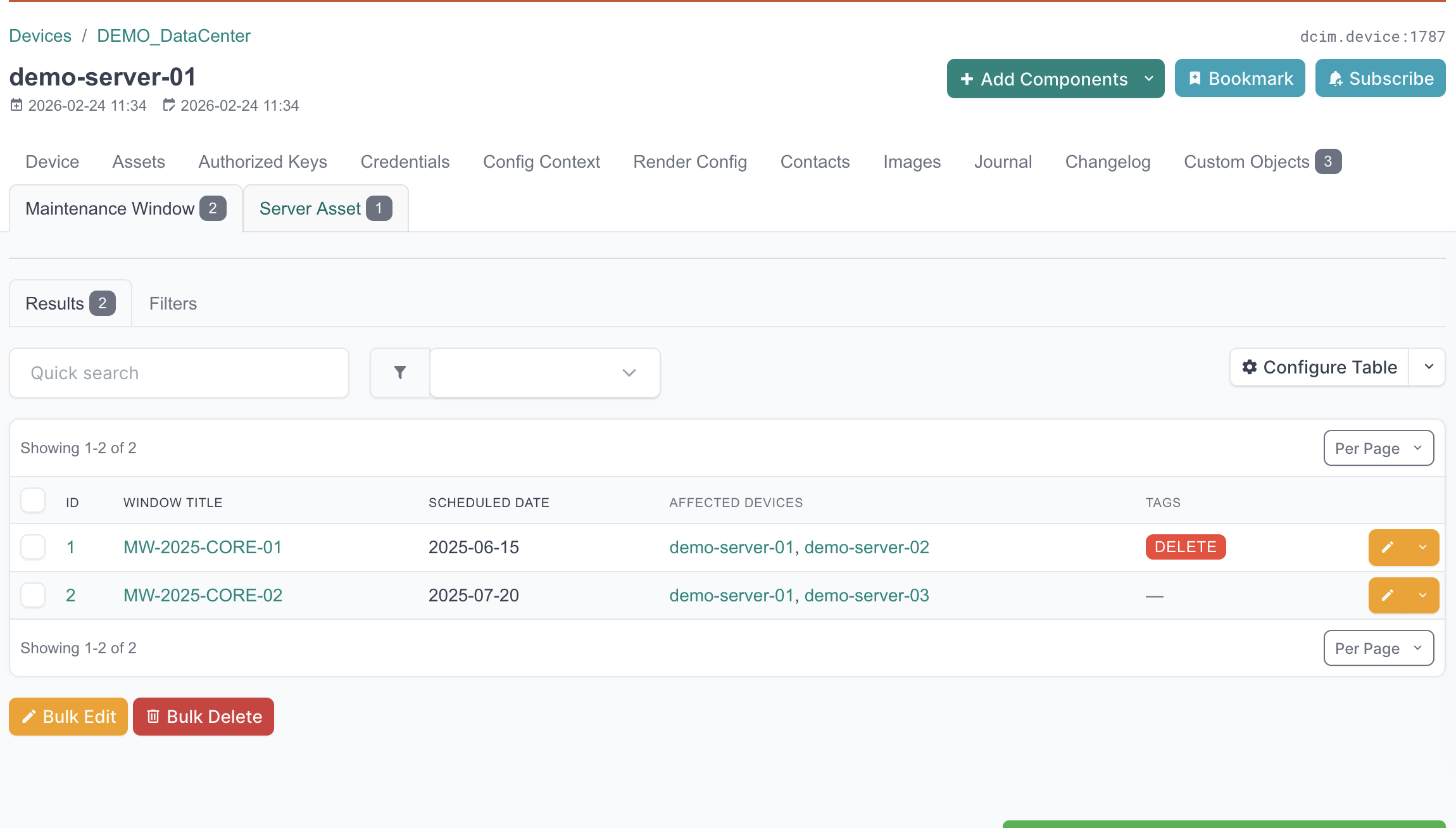
- Typed tabs — each Custom Object Type gets its own tab with a full-featured list view (type-specific columns, filterset sidebar, bulk actions, configure table) matching the native Custom Objects list page.
Screenshot
Requirements
- NetBox 4.5.0 – 4.6.99
netbox_custom_objectsplugin ≥ 0.4.6 installed and configured (≥ 0.5.0 recommended on NetBox 4.6)
Compatibility
| Plugin version | NetBox version | netbox_custom_objects version |
|---|---|---|
| 2.2.x | 4.5.4+ / 4.6.x | ≥ 0.4.6 (≥ 0.5.0 on 4.6) |
| 2.1.x | 4.5.4+ | ≥ 0.4.6 |
| 2.0.x | 4.5.x | ≥ 0.4.6 |
| 1.0.x | 4.5.x | ≥ 0.4.4 |
Installation
source /opt/netbox/venv/bin/activate
pip install netbox-custom-objects-tab
Add to NetBox configuration.py:
PLUGINS = [
    'netbox_custom_objects',
    'netbox_custom_objects_tab',
]

# Optional — defaults shown below
PLUGINS_CONFIG = {
    'netbox_custom_objects_tab': {
        'combined_models': ['dcim.*', 'ipam.*', 'virtualization.*', 'tenancy.*'],
        'combined_label': 'Custom Objects',
        'combined_weight': 2000,
        'typed_models': [],       # opt-in: e.g. ['dcim.*']
        'typed_weight': 2100,
    }
}
Restart NetBox. No database migrations required.
Configuration
| Setting | Default | Description |
|---|---|---|
combined_models |
['dcim.*', 'ipam.*', 'virtualization.*', 'tenancy.*'] |
Models that get the combined "Custom Objects" tab. Accepts app_label.model_name or app_label.* wildcards. |
combined_label |
'Custom Objects' |
Text displayed on the combined tab. |
combined_weight |
2000 |
Tab position for the combined tab; lower = further left. |
typed_models |
[] |
Models that get per-type tabs (opt-in, empty by default). Same format as combined_models. |
typed_weight |
2100 |
Tab position for all typed tabs. |
A model can appear in both combined_models and typed_models to get both tab styles.
Examples
# Combined tab only (default)
'combined_models': ['dcim.*', 'ipam.*', 'virtualization.*', 'tenancy.*']

# Per-type tabs for dcim models
'typed_models': ['dcim.*']

# Both modes for dcim, combined only for others
'combined_models': ['dcim.*', 'ipam.*', 'virtualization.*', 'tenancy.*'],
'typed_models': ['dcim.*'],

# Only specific models
'combined_models': ['dcim.device', 'dcim.site', 'ipam.prefix']

# Third-party plugin models work identically
'combined_models': ['dcim.*', 'ipam.*', 'inventory_monitor.*']

# Tabs on Custom Object detail pages (CO → CO relationships)
'typed_models': ['netbox_custom_objects.*']

# Combined tab on Custom Object pages + typed tabs on Device pages
'combined_models': ['dcim.*', 'netbox_custom_objects.*'],
'typed_models': ['dcim.*', 'netbox_custom_objects.*'],
Third-party plugin models are fully supported — Django treats plugin apps and built-in apps the same way in the app registry. Add the plugin's app label and restart NetBox once.
Tabs on Custom Object detail pages
Setting netbox_custom_objects.* in combined_models or typed_models enables tabs on
Custom Object detail pages themselves. This is useful when one Custom Object Type has a
field referencing another Custom Object Type — the referenced object will show a tab listing
all objects that link to it.
Because Custom Object model classes are generated dynamically (one per type, on-demand), a NetBox restart is required whenever a new Custom Object Type is added — the same requirement that applies to all typed tabs.
The tab is hidden automatically (hide_if_empty=True) when no custom objects reference
the object being viewed, so it only appears when relevant.
Features
Pagination
Results are paginated using NetBox's standard EnhancedPaginator. The page size respects
the user's personal NetBox preference and can be overridden with ?per_page=N in the URL.
Page controls appear at the top and bottom of the table.
Text search
A search box in the card header filters results by:
- Custom Object instance display name
- Custom Object Type name
- Field label
Filtering uses the ?q= query parameter and is applied before pagination.
Type filter
A dropdown (shown when 2 or more Custom Object Types are present) lets you narrow
results to a single type. Uses the ?type=<slug> query parameter. The dropdown
auto-submits on selection and is populated from the types actually present in the
current result set.
Tag filter
A dropdown (shown when at least one linked Custom Object has a tag) lets you narrow
results to objects with a specific tag. Uses the ?tag=<slug> query parameter. The
dropdown auto-submits on selection and is populated from the tags present across the
full result set. Tag data is pre-fetched in bulk so there is no N+1 query cost.
Column sorting
Clicking the Type, Object, or Field column header sorts the table in-memory. A second click on the same header reverses the direction. The active column shows an up/down arrow icon. Sort state is preserved when the search form is submitted.
HTMX / Partial updates
Pagination clicks, column sort clicks, search form submissions, type-dropdown changes,
and tag-dropdown changes all update the table zone in-place using HTMX — no full page
reload. The URL is updated via pushState so links stay shareable and the browser back
button returns to the previous filter/page state.
Value column
Each row includes a Value column showing the actual field value on the Custom Object instance:
- Object fields: a link to the related object.
- Multi-Object fields: comma-separated links to the related objects, truncated at 3 with an ellipsis when more are present.
Configure Table
A Configure Table button in the card header opens a NetBox modal that lets
authenticated users show, hide, and reorder the table columns (Type, Object, Value,
Field, Tags). Preferences are stored per-user in UserConfig and respected on every
subsequent page load, including HTMX partial updates. The Actions column is always
visible and cannot be hidden.
Action buttons
Each row has right-aligned action buttons, shown only when the user has the relevant permission:
- Edit (pencil icon) — links to the Custom Object instance's edit page. Shown when the user has
changepermission on the object. - Delete (trash icon) — links to the Custom Object instance's delete confirmation page. Shown when the user has
deletepermission on the object.
Users without either permission see no action buttons in the row. After completing either action, NetBox redirects back to the Custom Objects tab on the same parent object.
Efficient badge counts
The tab badge (shown in the tab bar on every detail page) is computed with a
COUNT(*) query per field — no object rows are fetched. Full object rows are only
loaded when the tab itself is opened. This keeps detail page loads fast even when
thousands of custom objects reference an object.
How It Works
When a Custom Object Type has a field of type Object or Multi-Object pointing to a NetBox model (e.g. Device), any Custom Object instances with that field set will appear in the "Custom Objects" tab on the referenced object's detail page.
The tab displays:
| Column | Content |
|---|---|
| Type | Custom Object Type name (sortable); links to the type detail page when the user has view permission |
| Object | Link to the Custom Object instance (sortable) |
| Value | The value stored in the linking field — a link for Object fields, comma-separated links for Multi-Object fields |
| Field | The field that holds the reference (sortable) |
| Tags | Colored tag badges assigned to the Custom Object instance; — when none |
| (actions) | Edit and Delete buttons, each shown only when the user has the corresponding permission |
Known Issues
Per-row Delete fails on the first attempt right after Create (upstream bug)
After creating a custom object via the 2.3.0 "Add Type" button on a
Typed tab, clicking the per-row Delete action in the list on the
very first attempt raises a ValueError inside upstream
netbox_custom_objects.CustomObjectDeleteView:
ValueError: Cannot query "<row title>": Must be "Table<N>Model" instance.
(at netbox_custom_objects/views.py:977, inside
_get_dependent_objects). Workarounds:
- Refresh the typed-tab list page between clicking Create and
clicking the per-row Delete. The second
/delete/GET succeeds. - Use Bulk Delete instead — it goes through a different upstream code path and is unaffected.
Pre-existing rows (created in earlier sessions or via the upstream
"Add" menu under Custom Objects → Type) are not affected. The bug
originates in dynamic-model class identity drift across the
Create → Delete request boundary in the upstream netbox_custom_objects
plugin: each Custom Object Type backs a dynamically-generated Django
model (Table<N>Model), the model class registry rebuilds during the
Create POST, and the immediately-following Delete GET still holds a
reference to the prior class object in some scope (queryset cache,
prefetch, or import-level reference) until a request boundary refreshes
it. Will be tracked and fixed upstream; this plugin's 2.3.0 release
ships with the workaround documented here.
Support
- Open an issue on GitHub
Contributing
Pull requests are welcome. For significant changes, please open an issue first.
License
Apache-2.0
Project details
Verified details
These details have been verified by PyPIProject links
GitHub Statistics
Maintainers
Release history Release notifications | RSS feed


Download files
Download the file for your platform. If you're not sure which to choose, learn more about installing packages.
Source Distribution
Built Distribution
Filter files by name, interpreter, ABI, and platform.
If you're not sure about the file name format, learn more about wheel file names.
Copy a direct link to the current filters
File details
Details for the file netbox_custom_objects_tab-2.3.0.tar.gz.
File metadata
- Download URL: netbox_custom_objects_tab-2.3.0.tar.gz
- Upload date:
- Size: 37.3 kB
- Tags: Source
- Uploaded using Trusted Publishing? Yes
- Uploaded via: twine/6.1.0 CPython/3.13.12
File hashes
| Algorithm | Hash digest | |
|---|---|---|
| SHA256 |
f977df288f648d52936397b3cab3280d6221f19a68fdb3ab14836ee8a074a2e2
|
|
| MD5 |
97b7ea905428599a046e1d65b8dabf91
|
|
| BLAKE2b-256 |
f93314343ecf57ad25d7856f0e6c569e71611e3817de41445a158b0030d6c954
|
Provenance
The following attestation bundles were made for netbox_custom_objects_tab-2.3.0.tar.gz:
Publisher:
release.yml on CESNET/netbox-custom-objects-tab
-
Statement:
-
Statement type:
https://in-toto.io/Statement/v1 -
Predicate type:
https://docs.pypi.org/attestations/publish/v1 -
Subject name:
netbox_custom_objects_tab-2.3.0.tar.gz -
Subject digest:
f977df288f648d52936397b3cab3280d6221f19a68fdb3ab14836ee8a074a2e2 - Sigstore transparency entry: 1518576610
- Sigstore integration time:
-
Permalink:
CESNET/netbox-custom-objects-tab@2ba90ebed47a45c1a6e1f894a5b896055d73cdb9 -
Branch / Tag:
refs/tags/v2.3.0 - Owner: https://github.com/CESNET
-
Access:
public
-
Token Issuer:
https://token.actions.githubusercontent.com -
Runner Environment:
github-hosted -
Publication workflow:
release.yml@2ba90ebed47a45c1a6e1f894a5b896055d73cdb9 -
Trigger Event:
release
-
Statement type:
File details
Details for the file netbox_custom_objects_tab-2.3.0-py3-none-any.whl.
File metadata
- Download URL: netbox_custom_objects_tab-2.3.0-py3-none-any.whl
- Upload date:
- Size: 30.8 kB
- Tags: Python 3
- Uploaded using Trusted Publishing? Yes
- Uploaded via: twine/6.1.0 CPython/3.13.12
File hashes
| Algorithm | Hash digest | |
|---|---|---|
| SHA256 |
a42e5550e2b81b2101e6699fcc717f0779dde15567818127273b78699f1d7a66
|
|
| MD5 |
719e6cfa3d5c19ac4e41710c46df0f91
|
|
| BLAKE2b-256 |
b4496c1615c338b7fba0e418aa53125e3d68e44b1f8e71a42c265e2fc1dc9d4a
|
Provenance
The following attestation bundles were made for netbox_custom_objects_tab-2.3.0-py3-none-any.whl:
Publisher:
release.yml on CESNET/netbox-custom-objects-tab
-
Statement:
-
Statement type:
https://in-toto.io/Statement/v1 -
Predicate type:
https://docs.pypi.org/attestations/publish/v1 -
Subject name:
netbox_custom_objects_tab-2.3.0-py3-none-any.whl -
Subject digest:
a42e5550e2b81b2101e6699fcc717f0779dde15567818127273b78699f1d7a66 - Sigstore transparency entry: 1518576637
- Sigstore integration time:
-
Permalink:
CESNET/netbox-custom-objects-tab@2ba90ebed47a45c1a6e1f894a5b896055d73cdb9 -
Branch / Tag:
refs/tags/v2.3.0 - Owner: https://github.com/CESNET
-
Access:
public
-
Token Issuer:
https://token.actions.githubusercontent.com -
Runner Environment:
github-hosted -
Publication workflow:
release.yml@2ba90ebed47a45c1a6e1f894a5b896055d73cdb9 -
Trigger Event:
release
-
Statement type:






