
NetBox Device Type Sync
A NetBox plugin that brings the components of a device in line with its device type.
Table of Contents
- Purpose
- How it works
- What is synchronized
- How components are created and updated
- Permissions
- Compatibility
- Installation
- Troubleshooting
- Limitations
- Development
- License
Purpose
NetBox creates the components of a device (interfaces, ports, bays and so on) from its device type only once, when the device is created. Later changes do not reach the device:
- A device is replaced by another model. After you change the device type of the device, its components still have the names, types and settings of the old model.
- A component is added to a device type. Existing devices of that type do not get it.
Deleting and recreating the device would lose its cables, IP addresses, VLANs and other settings. This plugin updates the device in place instead.
How it works
-
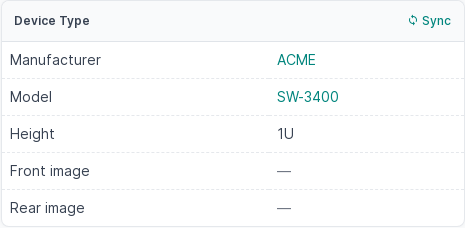
To replace a device, edit it and change its device type first. Then, on the Device page, click Sync in the header of the Device Type card.
-
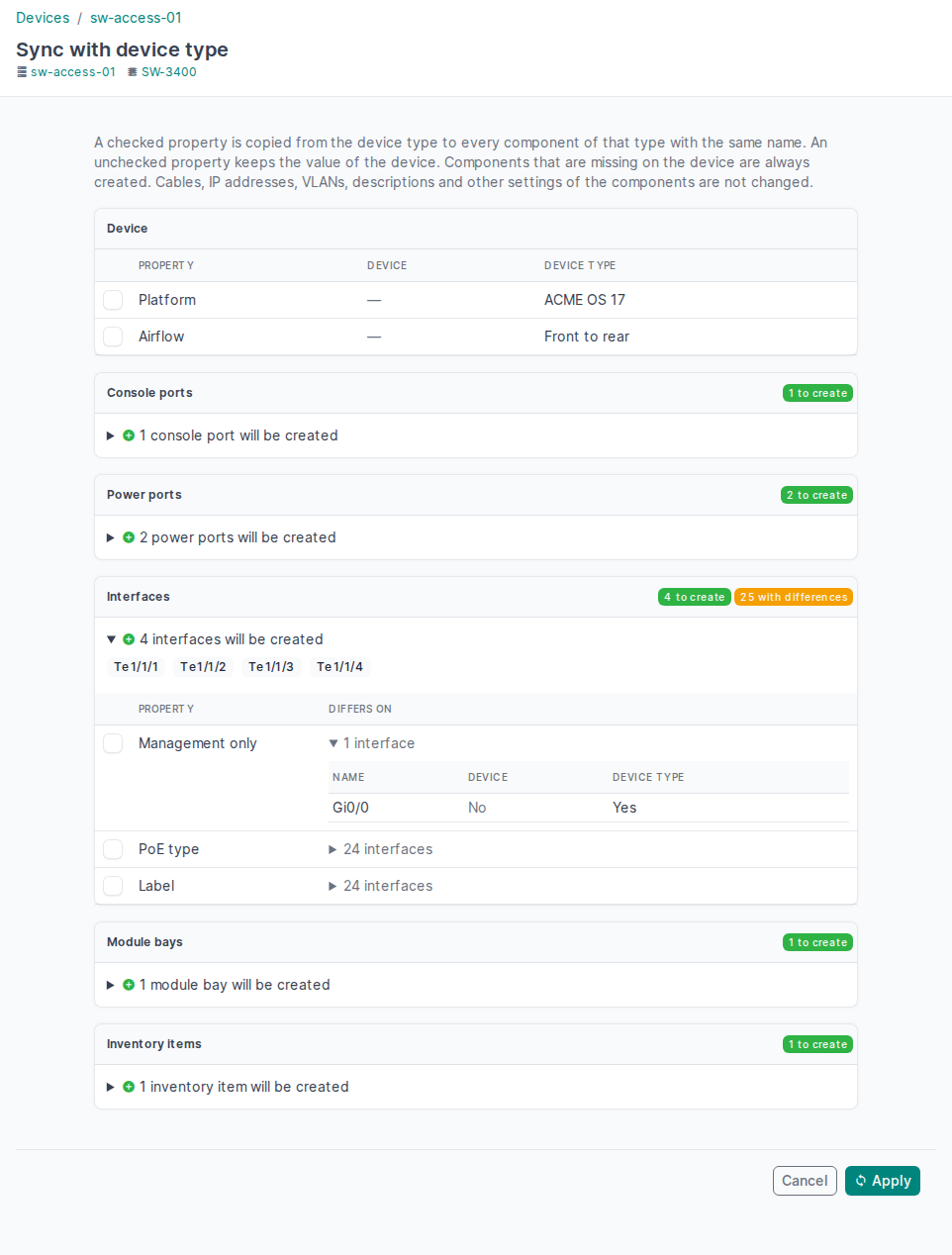
The plugin compares the component templates of the device type with the components of the device that have the same name, and shows:
- the device fields that NetBox copies from the device type only when a device is created (platform, airflow, cooling method);
- for each component type, the components that exist in the device type but not on the device — they will be created;
- for each component type, the properties that differ. Each property has a checkbox; expand a property to see the value on the device and in the device type for every component it differs on.
-
Check the properties to copy from the device type and click Apply.
- A checked property is copied to every component of that type with the same name.
- An unchecked property keeps the value of the device.
- All checkboxes are unchecked by default: if you check nothing, only the missing components are created.
All changes are made in one transaction. If any component fails validation,
nothing is changed and the page lists the errors. Every change is recorded in
the NetBox change log with the message Synced with device type <name>.
What is synchronized
Only the properties that a component template defines are compared:
| Component | Properties |
|---|---|
| Console port, console server port | type, label, description |
| Power port | type, maximum draw, allocated draw, label, description |
| Power outlet | type, color, power port, feed leg, label, description |
| Cooling intake | type, diameter, maximum flow, label, description |
| Cooling outflow | type, diameter, cooling intake, label, description |
| Interface | type, enabled, management only, PoE mode, PoE type, wireless role, channels, channel ID, parent, bridge, label, description |
| Rear port | type, color, positions, label, description |
| Front port | type, color, positions, port mappings, label, description |
| Module bay | position, enabled, module bay types, label, description |
| Device bay | enabled, label, description |
| Inventory item | parent, component, role, manufacturer, part ID, label, description |
Device fields: platform (from the default platform of the device type), airflow and cooling method. NetBox copies them from the device type only when a device is created. A field is offered only when the device type has a value and it differs from the device.
Never changed:
- cables, IP addresses, VLANs, MAC addresses, VRFs, MTU, mode, custom fields and tags of components — a device type does not define them;
- components installed by modules;
- components that exist on the device but not in the device type;
- device fields other than the three above. Height, weight, full depth and images are not stored on the device; NetBox always shows them from the device type.
How components are created and updated
- Matching. A device component matches a template with the same name.
Names with
{vc_position}are resolved for the virtual chassis position of the device. Inventory items are matched by their name and the names of their parents. - New components are created from the template the same way NetBox creates them for a new device, including custom field defaults, interface parents and bridges, power outlet power ports, front/rear port mappings and module bay types. Like NetBox, the plugin does not copy the description of the template to a new component; select Description on a later sync to copy it.
- Name conflicts. If the name of a template is used by a component of an installed module, the component is not created and the page shows a warning.
- Validation. Every component is validated by NetBox before it is saved. For example, an interface with a cable cannot become a virtual interface: remove the cable or leave Type unchecked.
- Inventory items are deprecated since NetBox 4.3 and planned for removal. The plugin syncs them while NetBox has them.
Permissions
- The Sync button and the sync page require the permission to change the
device (
dcim.change_device), including any constraints of the object permission. - Apply additionally requires the permission to add the components that
are created and to change the components that are updated (for example
dcim.add_interface,dcim.change_interface). If a permission is missing, nothing is changed and the page names the component.
Compatibility
| NetBox | netbox-device-type-sync |
|---|---|
| 4.7.4 | 1.0.0 |
Every NetBox version in this table has been tested with the plugin. Versions that are not listed are not guaranteed to work: the Sync button relies on the internal structure of the NetBox Device page (see Limitations).
NetBox 4.7 requires Python 3.12 or later, PostgreSQL 15 or later and Redis 6 or later.
Installation
-
Install the package into the NetBox virtual environment:
source /opt/netbox/venv/bin/activate
pip install netbox-device-type-sync
To keep the plugin across NetBox upgrades, add it to
/opt/netbox/local_requirements.txt:echo netbox-device-type-sync >> /opt/netbox/local_requirements.txt
-
Enable the plugin in
/opt/netbox/netbox/netbox/configuration.py:PLUGINS = [ 'netbox_device_type_sync', ]
-
Restart NetBox:
sudo systemctl restart netbox netbox-rq
The plugin has no settings and no database tables.
Troubleshooting
The Sync button is missing.
-
The button is shown only to users who may change the device.
-
If nobody sees it, the plugin could not find the Device Type card in this NetBox version. The plugin then logs a warning to the logger
netbox.plugins.netbox_device_type_syncwhen NetBox starts. With the default NetBox logging configuration the warning goes to the journal of the NetBox service:sudo journalctl -u netbox | grep netbox_device_type_sync
The sync page itself still works:
/plugins/device-type-sync/devices/<device ID>/sync/.
Apply shows errors. Nothing was changed. Each error names the component and the reason given by NetBox. Fix the component or leave the property unchecked, then apply again.
Limitations
- The Sync button relies on NetBox internals. NetBox has no plugin API to add a button to a built-in card. The plugin adds the button to the Device Type card of the Device page when NetBox starts. If a NetBox version changes that card, the button is not shown (see Troubleshooting); NetBox itself keeps working.
- Components are matched by name. A component that was renamed in the new
device type (for example
GigabitEthernet1/0/1→TenGigabitEthernet1/0/1) is treated as a new component; the old one, with its cable and IP addresses, is left as it is. - Devices only. Modules are not synced with their module types.
Development
The tests run against a NetBox source checkout; see Local test environment in CLAUDE.md for the setup. Run them from the NetBox directory:
python netbox/manage.py test netbox_device_type_sync.tests --parallel
License
1 maintainer

Metadata
1 maintainer
Release files for netbox-device-type-sync 1.0.0
For a detailed explanation of source distributions (sdists) and built distributions (wheels), please see the package formats documentation.
Source distribution (sdist)
| File | Size | Uploaded | Provenance | Actions |
|---|---|---|---|---|
| netbox_device_type_sync-1.0.0.tar.gz | 31.8 kB | With provenance | Details for netbox_device_type_sync-1.0.0.tar.gz |
Built distribution (wheel)
| File | Interpreter | ABI | Platform | Actions Reset |
|---|---|---|---|---|
| netbox_device_type_sync-1.0.0-py3-none-any.whl | Python 3 | none | any | Details for netbox_device_type_sync-1.0.0-py3-none-any.whl |
Total release size: 67.2 kB
Release files / netbox_device_type_sync-1.0.0.tar.gz
| Download URL | netbox_device_type_sync-1.0.0.tar.gz |
|---|---|
| Size | 31.8 kB |
| Tags | Source |
|
SHA-256 checksum How to use checksums |
d58825d4cba51fad6a170191de012c258c91eaf75ac58c754c4f4776798eac38
|
|
BLAKE2b-256 checksum How to use checksums |
131ecc573cefd67c45b94aaf4a0b2add76c42d35d0c813e42e0a65e600f6261f
|
| Upload date | |
|
Uploaded using Trusted Publishing? What is trusted publishing? |
Yes |
| Uploaded via |
twine/7.0.0 CPython/3.13.16
|
Provenance
Provenance describes where a file came from. On PyPI, provenance is shared via attestations, which provide a verifiable record of the build or publishing details. View details, limitations and caveats.


PyPI Publish Attestation
PyPI verified that this artifact, at this checksum, originated from the publisher listed below.
Signed by GitHub Actions, verified by PyPI on Nov 12, 2026.
Transparency logRelease files / netbox_device_type_sync-1.0.0-py3-none-any.whl
| Download URL | netbox_device_type_sync-1.0.0-py3-none-any.whl |
|---|---|
| Size | 35.3 kB |
| Tags | Python 3 |
|
SHA-256 checksum How to use checksums |
3a0f2903e4f5080d647f9d760a6f6a4f94154012c875d76f62f4c6446eb49ce9
|
|
BLAKE2b-256 checksum How to use checksums |
571379e40a945f6efd46859b7ec0b1e2db721c00f7a9baee1182f7cfde0f3207
|
| Upload date | |
|
Uploaded using Trusted Publishing? What is trusted publishing? |
Yes |
| Uploaded via |
twine/7.0.0 CPython/3.13.16
|
Provenance
Provenance describes where a file came from. On PyPI, provenance is shared via attestations, which provide a verifiable record of the build or publishing details. View details, limitations and caveats.
PyPI Publish Attestation
PyPI verified that this artifact, at this checksum, originated from the publisher listed below.
Signed by GitHub Actions, verified by PyPI on Nov 12, 2026.
Transparency logSecurity for netbox-device-type-sync 1.0.0
Provenance
Provenance describes where a file came from. On PyPI, provenance is shared via attestations, which provide a verifiable record of the build or publishing details. View details, limitations and caveats.
Full provenance
Both files in this release have been uploaded with provenance metadata.
Attestation for netbox_device_type_sync-1.0.0.tar.gz
PyPI Publish Attestation
PyPI verified that this artifact, at this checksum, originated from the publisher listed below.
Signed by GitHub Actions, verified by PyPI on Nov 12, 2026.
Transparency logA note on package security
PyPI is a repository for distributing packages, not a service for auditing them. While third-party security researchers and our staff do their best to detect and remove malicious packages, PyPI cannot guarantee the quality, security or suitability of any given package.
To learn more about protecting yourself from malicious actors, visit our package security documentation.














