
netbox-drawio
Draw network diagrams inside NetBox and link one diagram to many objects.
NetBox plugin for creating draw.io diagrams directly in NetBox and assigning them to multiple NetBox objects (Devices, Sites, Circuits, …).
A topology diagram usually touches many objects — unlike a per-object attachment, one Diagram here can be linked to every Device and Site it depicts.
Screenshots
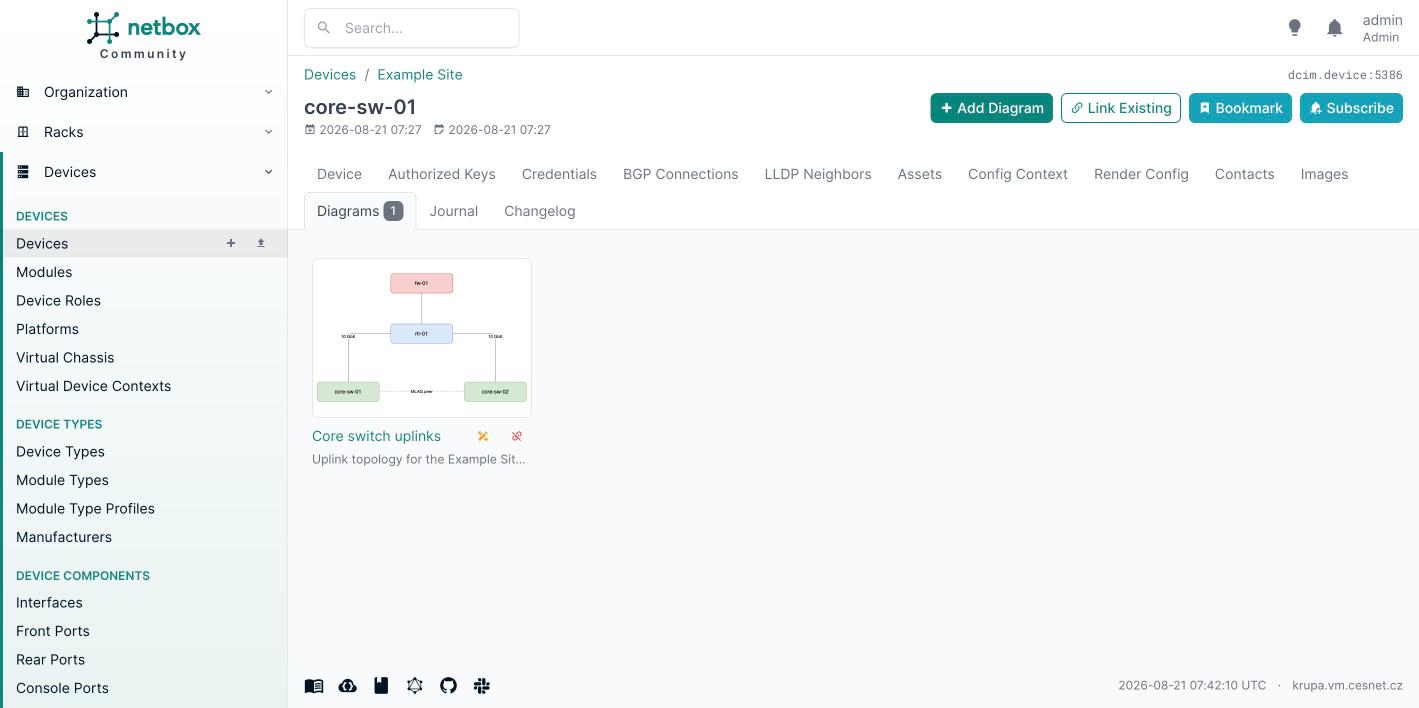
The Diagrams tab on a Device, with SVG preview cards:
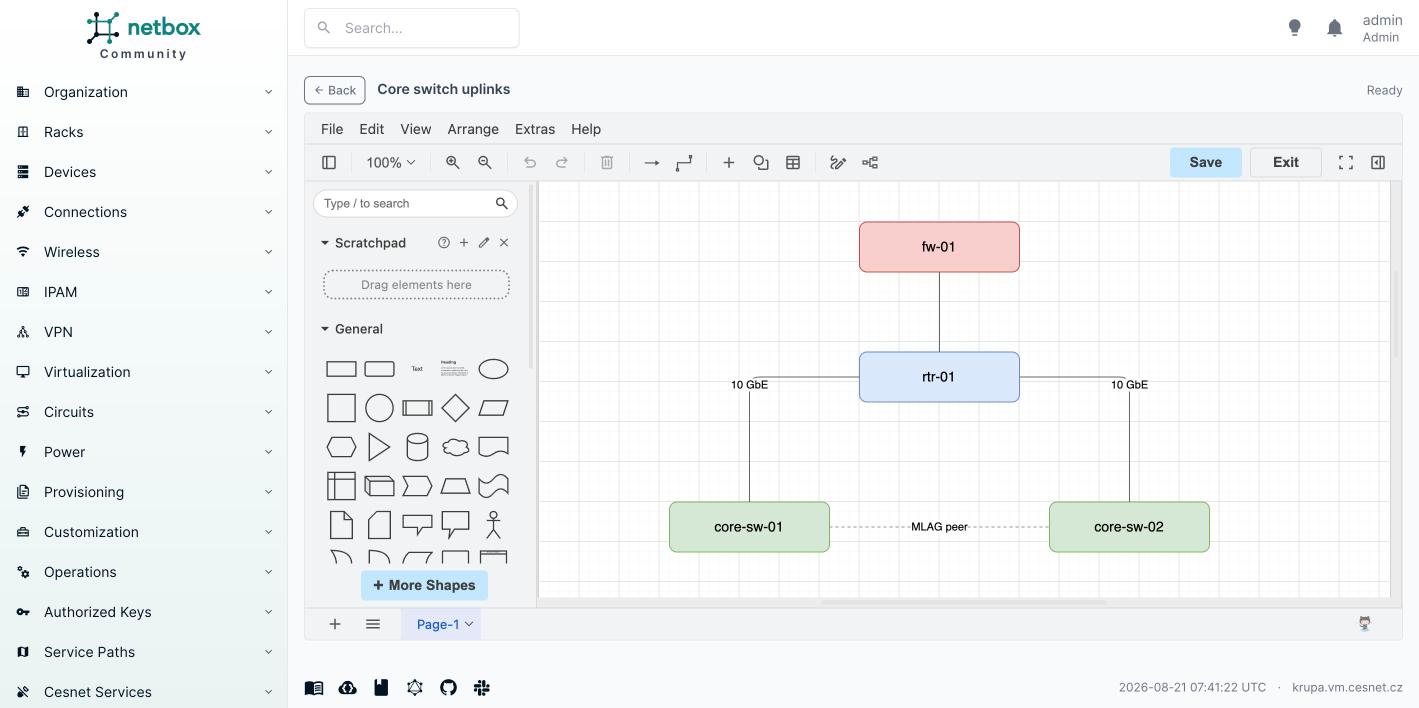
The draw.io editor embedded in NetBox:
Features
- Embedded draw.io editor — edit diagrams in an iframe using the draw.io embed protocol. Diagram XML travels only between your browser and NetBox; the editor host never receives it.
- Diagrams tab on object detail pages (like the Images feature) with SVG preview cards, per-card edit and unlink actions, and Add Diagram / Link Existing buttons.
- Many-to-many assignment — link one diagram to any number of objects of any enabled type.
- SVG previews served from a hardened endpoint (CSP,
sandbox,nosniff; rendered via<img>so embedded scripts can never execute). .drawiosource download, REST API for diagrams and assignments, global search, change logging (content blobs are excluded; acontent_hashrecords every content change), tags, custom fields, journaling, and object permissions.
Compatibility
| NetBox | Plugin |
|---|---|
| 4.6.4 – 4.6.x | ≥ 0.1.0 |
Python ≥ 3.12, < 3.15.
Installation
pip install netbox-drawio # or: pip install -e /opt/drawio-netbox-plugin
configuration.py:
PLUGINS = [
    # ...
    "netbox_drawio",
]
python manage.py migrate netbox_drawio
python manage.py collectstatic --no-input
# restart NetBox services
Configuration
All settings are optional (PLUGINS_CONFIG["netbox_drawio"] = {...}):
| Setting | Default | Description |
|---|---|---|
drawio_base_url |
https://embed.diagrams.net/ |
Editor URL loaded in the iframe. Point it at a self-hosted draw.io for offline/private setups. Also used as the postMessage origin allowlist, so it must be an absolute http(s) URL (a system check warns otherwise, netbox_drawio.W001). |
drawio_url_params |
{} |
Extra query params for the embed URL (ui, dark, libraries, lang, …). embed, proto and spin are always forced. |
autosave |
False |
Persist draw.io autosave events (save on every change instead of explicit Save). |
applied_scope |
model |
app or model — how scope_filter entries are interpreted (netbox-attachments semantics). |
scope_filter |
[] |
Empty = every non-excluded model gets the Diagrams tab. Non-empty = allow-list, e.g. ["dcim", "circuits.circuit"]. |
excluded_apps |
Django/NetBox internals (auth, core, extras, users, …) |
Deny-list of app labels; always wins. |
excluded_models |
[] |
Deny-list of app.model labels; always wins. |
tab_weight |
6500 |
Diagrams tab position (Images = 6000, Journal = 9000). |
hide_empty_tab |
False |
Hide the tab when the object has no diagrams. |
max_size |
10485760 |
Max size in bytes for diagram XML and SVG, each. Django's DATA_UPLOAD_MAX_MEMORY_SIZE (2.5 MB by default) also caps the save request body — raise it to at least 3× max_size in the NetBox configuration or saves fail with a 413 well below this limit (a system check warns when max_size is unreachable, netbox_drawio.W002). |
Self-hosted draw.io
PLUGINS_CONFIG = {
    "netbox_drawio": {
        "drawio_base_url": "https://drawio.example.com/",
        "drawio_url_params": {"ui": "min", "dark": "auto"},
    },
}
Usage
- From an object: open e.g. a Device → Diagrams tab → Add Diagram (creates the diagram already linked to the device) or Link Existing.
- Draw: on the diagram page click Edit Diagram — the embedded editor opens. Press the editor's Save button to store the XML and refresh the SVG preview. Exit returns to NetBox.
- Link more objects: diagram page → Assign to Object (or link from any object's tab). Unlinking never deletes the diagram.
REST API
/api/plugins/drawio/diagrams/— CRUD incl.source_xml/svg_cache. The list response intentionally omits both blob fields (they can reachmax_sizeper row); retrieve a diagram by id to get them.?brief=trueis unaffected./api/plugins/drawio/diagram-assignments/—object_typeas"app.model", e.g.{"diagram": 1, "object_type": "dcim.device", "object_id": 42}
Development
/opt/netbox/venv/bin/python /opt/netbox/netbox/manage.py test netbox_drawio --keepdb
Support
Bug reports and feature requests: GitHub Issues.
License
Apache-2.0 — see LICENSE. Copyright 2026 CESNET z.s.p.o.
1 maintainer

Release files for netbox-drawio 0.1.0
For a detailed explanation of source distributions (sdists) and built distributions (wheels), please see the package formats documentation.
Source distribution (sdist)
| File | Size | Uploaded | |
|---|---|---|---|
| netbox_drawio-0.1.0.tar.gz | 44.6 kB | Details |
Built distribution (wheel)
| File | Interpreter | ABI | Platform | Reset |
|---|---|---|---|---|
| netbox_drawio-0.1.0-py3-none-any.whl | Python 3 | none | any | Details |
Total release size: 99.8 kB
Release files / netbox_drawio-0.1.0.tar.gz
| Download URL | netbox_drawio-0.1.0.tar.gz |
|---|---|
| Size | 44.6 kB |
| Tags | Source |
|
SHA-256 checksum How to use checksums |
6ad85c0cafd0b37f684080c782e18c02c6fcac49ec886abc75b095a994aba5b0
|
|
BLAKE2b-256 checksum How to use checksums |
5577ba97bd1f22ba14b172d5488cfc6377a8eb2257bcf48d8095dc79f78fb56b
|
| Upload date | |
|
Uploaded using Trusted Publishing? What is trusted publishing? |
Yes |
| Uploaded via |
twine/7.0.0 CPython/3.13.14
|
Provenance
Provenance describes where a file came from. On PyPI, provenance is shared via attestations, which provide a verifiable record of the build or publishing details. View details, limitations and caveats.


PyPI Publish Attestation
PyPI verified that this artifact, at this checksum, originated from the publisher listed below.
Signed by GitHub Actions, verified by PyPI on Aug 21, 2026.
Transparency logRelease files / netbox_drawio-0.1.0-py3-none-any.whl
| Download URL | netbox_drawio-0.1.0-py3-none-any.whl |
|---|---|
| Size | 55.2 kB |
| Tags | Python 3 |
|
SHA-256 checksum How to use checksums |
2a466f2e70ee94e15f3097e73380efcf1804e33ad3c528af38fb31a6d8f6fe69
|
|
BLAKE2b-256 checksum How to use checksums |
5f24872569cf61b1be4ce24d9804fa000a94560c0913d3f3434aa92374a0fe70
|
| Upload date | |
|
Uploaded using Trusted Publishing? What is trusted publishing? |
Yes |
| Uploaded via |
twine/7.0.0 CPython/3.13.14
|
Provenance
Provenance describes where a file came from. On PyPI, provenance is shared via attestations, which provide a verifiable record of the build or publishing details. View details, limitations and caveats.
PyPI Publish Attestation
PyPI verified that this artifact, at this checksum, originated from the publisher listed below.
Signed by GitHub Actions, verified by PyPI on Aug 21, 2026.
Transparency log













