
netbox-iec62443
A NetBox plugin for OT networks: IEC 62443 zones and conduits, the flows that run through them, Purdue levels on devices and virtual machines, and an access map: every known flow into the controller zones, with an "allowed?" verdict per flow and who decided it.
It is meant for the people who run production networks: plant and maintenance engineers, OT/IT teams and the integrators who work for them. Keep your zones, conduits and industrial protocols in the same NetBox as the rest of your inventory, see at a glance who can reach the PLCs (including supplier remote access over 4G routers, TeamViewer, VPN or an MSP's jump host), and decide per flow whether that is allowed. It also records industrial services (Modbus, S7comm, PROFINET, EtherNet/IP, OPC UA, DNP3, ...) and serial fieldbuses.
Status: 0.2.0, alpha. Runs on NetBox 4.7 (tested in CI on 4.7.0 and the newest 4.7 release); see
Compatibility. To see it populated in a few minutes, run manage.py iec62443_demo.
What you get
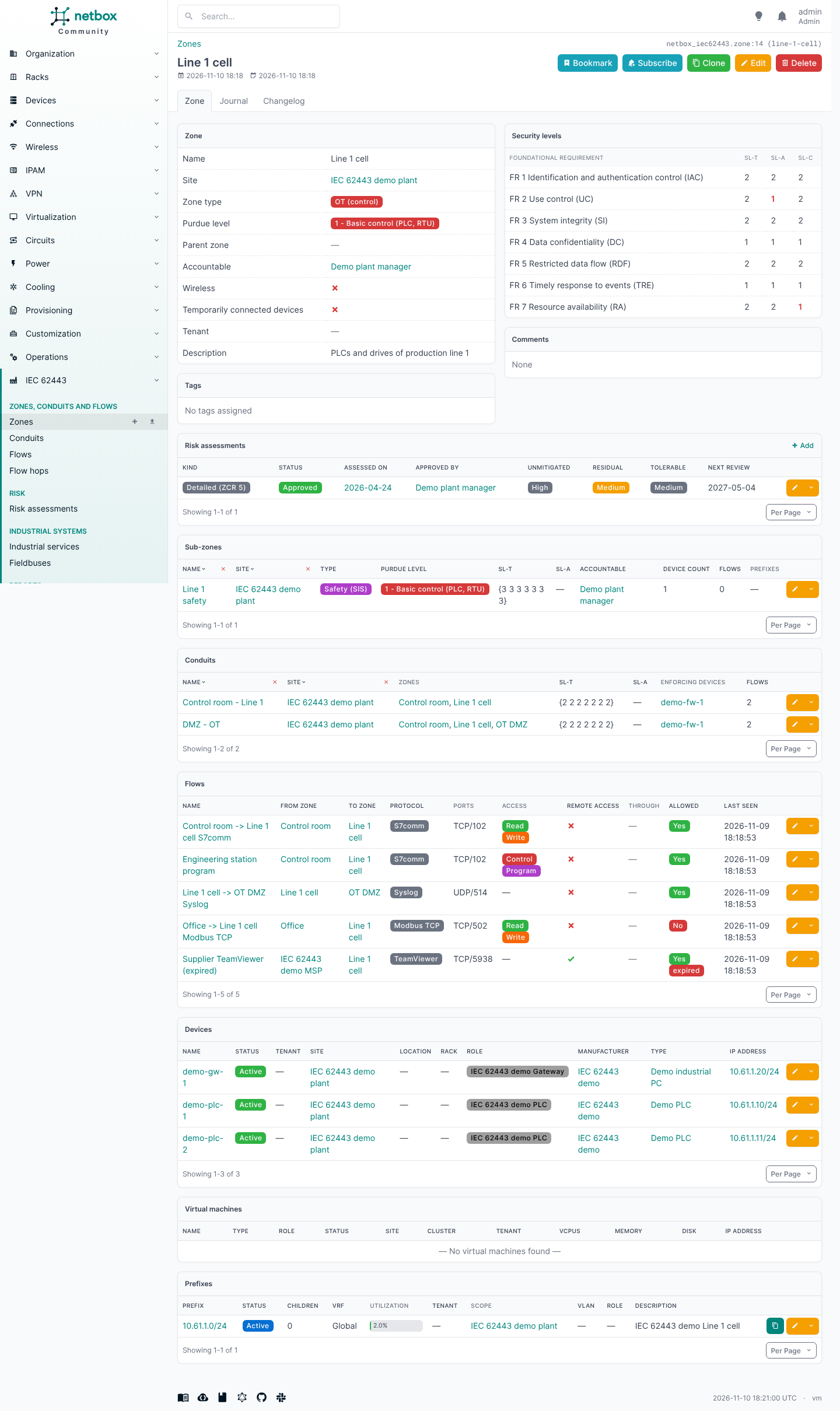
- Zone: name, slug, site, tenant, type (OT, safety/SIS, DMZ, enterprise, external/supplier), Purdue level (0, 1, 2, 3, 3.5 DMZ, 4, 5), SL-T and SL-A as vectors over the seven foundational requirements, the accountable person, parent zone (sub-zones), the IEC 62443-3-2 attributes wireless and temporarily connected devices, member devices, virtual machines and prefixes, description, tags, comments.
- Conduit (IEC 62443-3-2): the zones it joins (two or more), its own SL-T and SL-A vectors, the accountable person, and the devices and VMs that enforce it (firewalls, data diodes, gateways).
- Risk assessment (IEC 62443-3-2) of a zone or conduit: initial (ZCR 2) or detailed (ZCR 5), draft or approved, who assessed and approved it and when, next review, method, threats, vulnerabilities, consequences, countermeasures, unmitigated, residual and tolerable risk, a link to the report.
- Flow: what actually runs between two zones, in one direction: source and destination zone,
protocol and ports (
tcp/102), access (read, write, control, program), remote access flag, the ordered path it takes (hops: devices, VMs or tunnels), the conduit that carries it, first/last seen and evidence. Its verdict: allowed (yes / no / unknown), decided by (a NetBox contact) and on, review by and expires. - Purdue level on devices and VMs as a custom field (
iec62443_purdue_level, group "IEC 62443"), and SL-C (security level capability) on devices and device types (iec62443_sl_capability, e.g.2,2,2,1,2,1,1; a device's own value overrides its type's). - Consistency checks (IEC 62443 > Consistency checks, REST
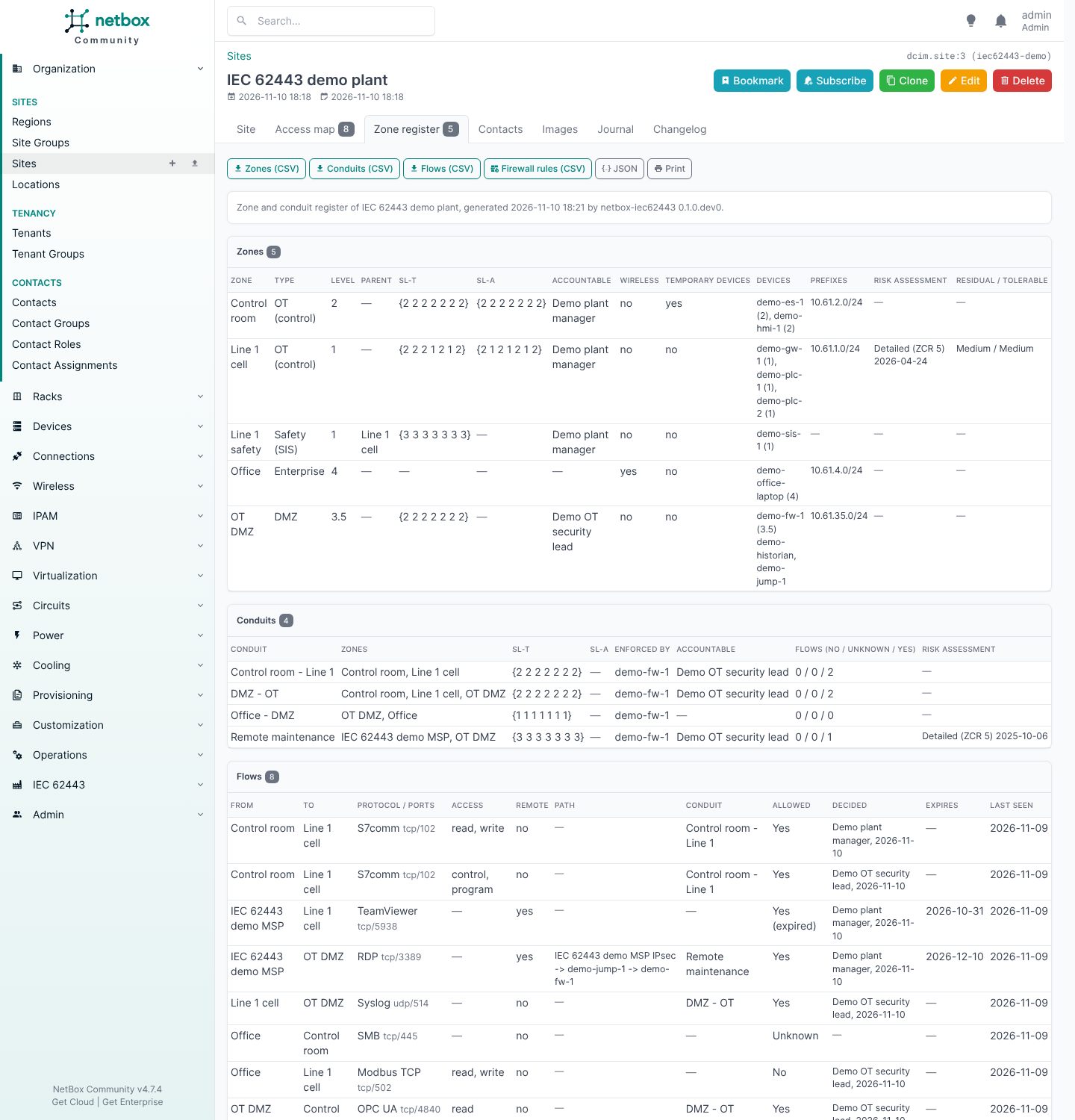
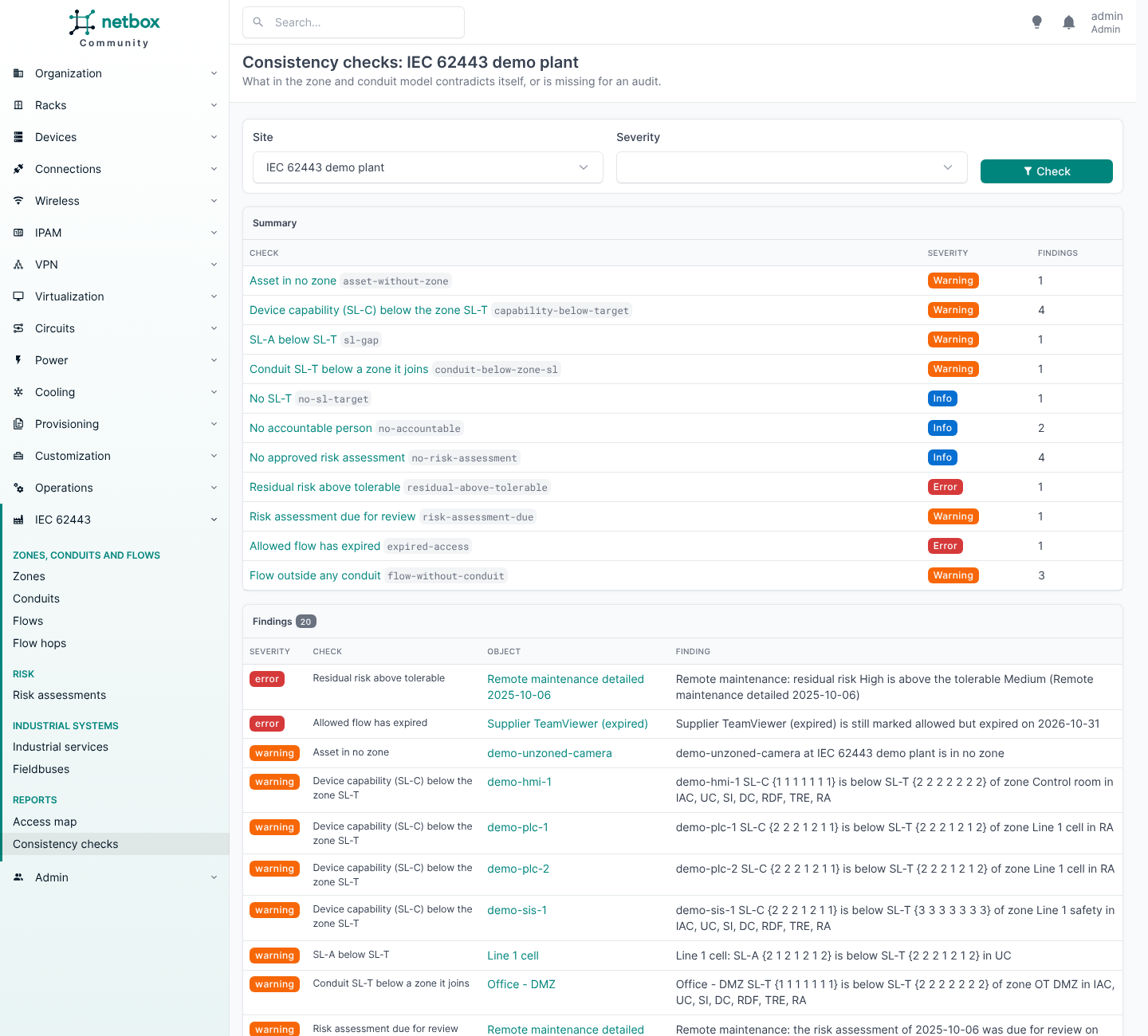
checks/,manage.py iec62443_check): an address in another zone's prefix, an asset below its zone's level or in the wrong kind of zone, assets in no zone or in two, SL-A below SL-T, member SL-C below the zone's SL-T, a conduit below a zone it joins, conduits nobody enforces, expired or open-ended remote access, flows outside any conduit, verdicts without a decider, stale flows, residual risk above tolerable, overdue risk assessments, and what an audit will ask for and is missing (no SL-T, no accountable person, no approved risk assessment). - Zone register per site (a "Zone register" tab on the site, REST
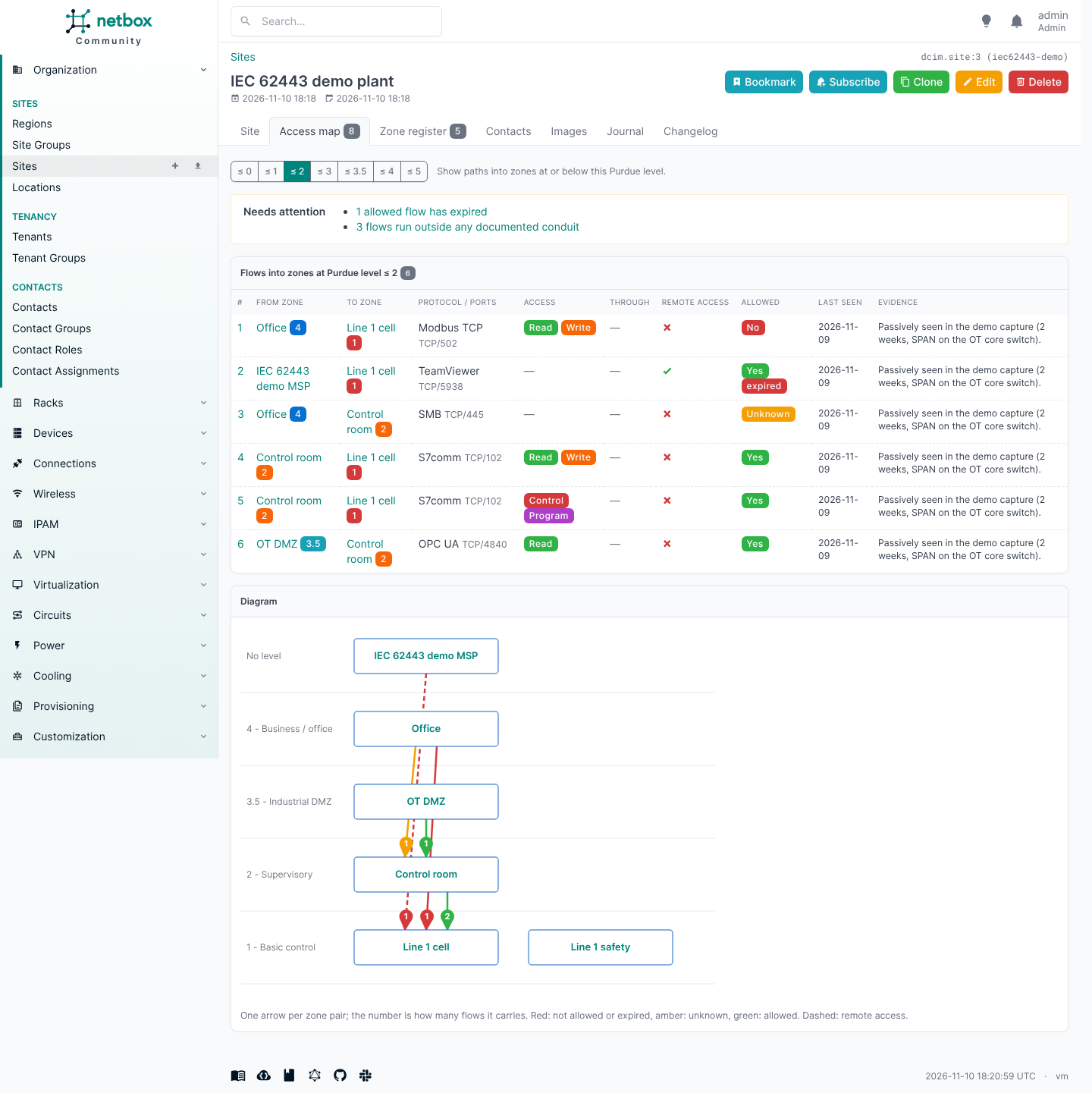
register/): zones, conduits and flows with their security levels, owners, risk and verdicts, plus the check results. Printable, and exported as CSV per table or as JSON. This is the audit deliverable. - Access map: per site, all flows into zones at Purdue level <= 2 (selectable): not allowed first, then allowed-but-expired, unknown and allowed, with what needs attention (expired access, verdicts due for review, flows not seen for a while, flows outside any documented conduit) and a small server-rendered diagram. Available as an "Access map" tab on the site page and under IEC 62443 > Access map.
- An IEC 62443 panel on device and VM pages: the asset's Purdue level, its zones and their flows, the conduits it enforces and the flows that run through it.
- The usual NetBox plumbing: list/detail/edit/delete, bulk import/edit/delete, filters, global search,
change log, journal, REST API (
/api/plugins/iec62443/zones/,/conduits/,/flows/,/flow-hops/), GraphQL (iec62443_zone_list,iec62443_conduit_list,iec62443_flow_list, ...). - An importer for passive captures: Zeek logs directly (with or without the CISA ICSNPP parsers) or observation files any tool can write, with a report of the hosts NetBox does not know (see below).
- A vendor-neutral firewall rule export from the allowed flows: per site or per enforcing firewall, as CSV or JSON.
Mapping a remote-access path
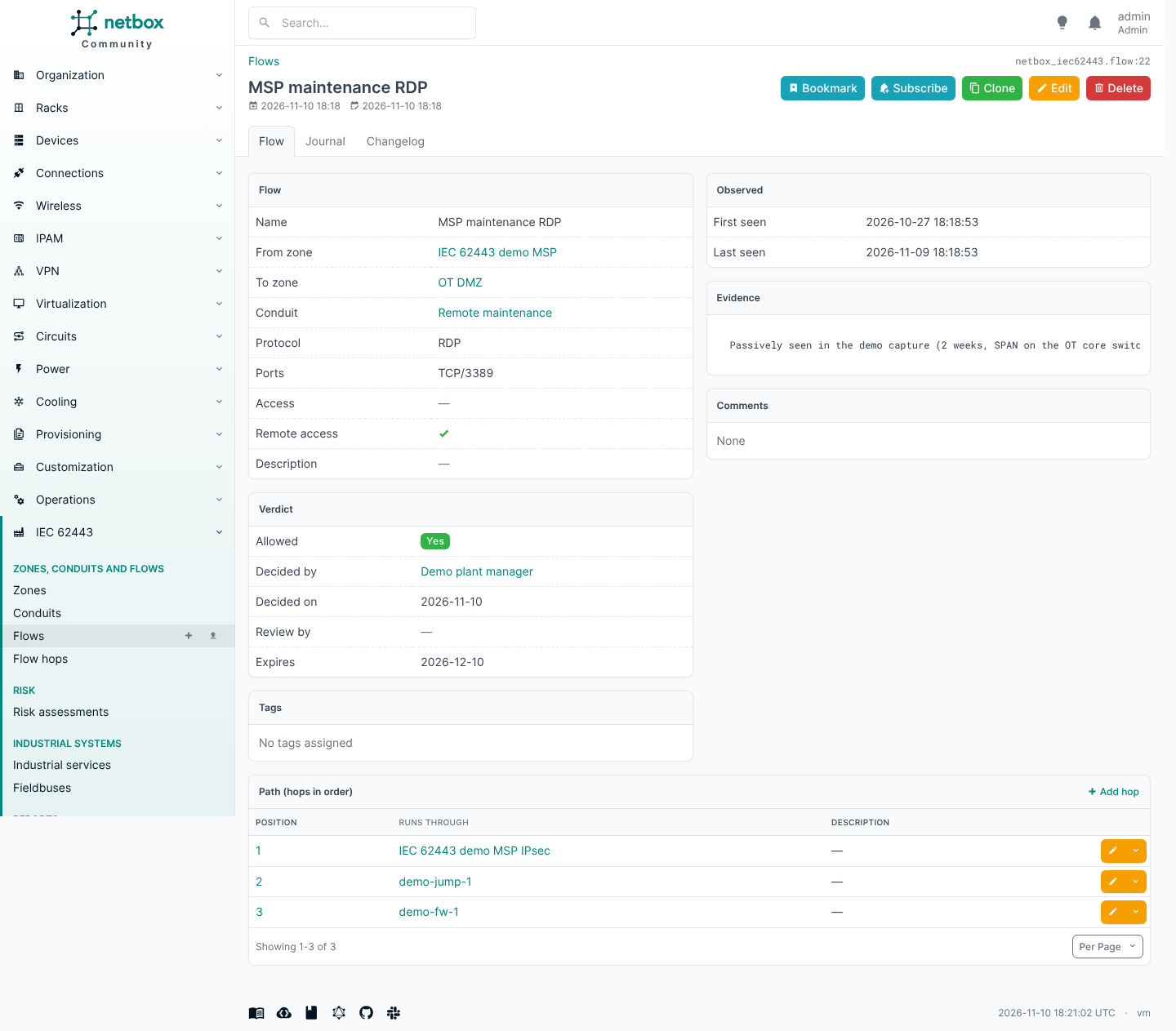
The flow model is also how you map a whole path, for example an MSP that reaches a PLC:
- Make a zone of type external / supplier for the MSP.
- Add a flow from that zone into the PLC's zone, protocol RDP or S7comm, remote access on.
- Give it hops in order: the IPsec tunnel (a NetBox VPN tunnel), the jump host, the OT firewall.
- Put it in the conduit that the firewall enforces.
"Every flow through the jump host" and "every remote flow that writes to a controller" are then plain
filters on the flow list (hop_device_id, remote_access, modifying).
Setup
Requires NetBox 4.7 (see Compatibility).
NetBox installed from source (/opt/netbox):
cd /opt/netbox
echo "netbox-iec62443" | sudo tee -a local_requirements.txt
sudo venv/bin/pip install netbox-iec62443
For a build that is not released yet, install from GitHub instead:
pip install "netbox-iec62443 @ git+https://github.com/Packetflow-be/netbox-iec62443.git".
Add to /opt/netbox/netbox/netbox/configuration.py:
PLUGINS = ["netbox_iec62443"]
PLUGINS_CONFIG = {
    "netbox_iec62443": {
        "create_custom_fields": True,     # create the Purdue level custom field after migrate
        "access_map_max_level": "2",      # default level filter of the access map
        "stale_after_days": 90,           # a flow not seen for this long needs attention
    },
}
sudo venv/bin/python netbox/manage.py migrate
sudo venv/bin/python netbox/manage.py collectstatic --no-input
sudo systemctl restart netbox netbox-rq
netbox-docker (custom image, see its wiki on plugins):
echo "netbox-iec62443" >> plugin_requirements.txt
cat >> configuration/plugins.py <<'PY'
PLUGINS = ["netbox_iec62443"]
PLUGINS_CONFIG = {"netbox_iec62443": {}}
PY
docker compose build --no-cache
docker compose up -d
Check:
curl -s -H "Authorization: Token $TOKEN" https://netbox.example.com/api/status/ | grep netbox_iec62443
Try it with a fictional plant (zones, conduits, flows, an MSP remote-access path, services, risk
assessments and a few things the checks will flag); --delete removes exactly what it created:
sudo /opt/netbox/venv/bin/python /opt/netbox/netbox/manage.py iec62443_demo
Import a capture (Zeek logs, see docs/zeek.md, or observation files, see docs/import-format.md):
sudo /opt/netbox/venv/bin/python /opt/netbox/netbox/manage.py iec62443_import ./observations --site <site-slug> --dry-run
sudo /opt/netbox/venv/bin/python /opt/netbox/netbox/manage.py iec62443_import ./observations --site <site-slug>
Remove: take netbox_iec62443 out of PLUGINS, restart, then
pip uninstall netbox-iec62443. The plugin's tables stay until you drop them.
Permissions: users who view flows also need view permission on zones (a flow shows its zones); the
access map needs view_flow. For development against netbox-docker, see
docs/development.md.
Upgrading from a 0.1.0.dev0 development build
Earlier builds had a single "conduit" model that was really a directed zone pair with a verdict. The migrations turn it into the model above; nothing is deleted:
- Every old conduit becomes a flow with the same id, verdict, evidence, tags, journal and change history. Its free-text "protocols" and "via" cannot become structured ports or hops, so they are kept in the flow's comments. A two-way conduit becomes two flows. A yes/no verdict is dated with its last change.
- For every pair of zones that had flows, one conduit is created joining both zones, and the flows are put in it. Rename or merge them to match your 62443-3-2 design.
- Zones get a type from their Purdue level (3.5: DMZ, 4-5: enterprise, the rest: OT). Set supplier and safety zones by hand.
- A single SL-T number on a zone or conduit becomes the vector with that level for every FR.
- Industrial services that listen get a NetBox application service with their ports (bound to the IP addresses of their interface) and are linked to it. Ports on clients are dropped (noted in comments when they were not the protocol's defaults).
Permissions, saved filters, export templates and event rules that pointed at the old conduit now point at
flows. Right after migrate, the plugin gives every permission on flows the new conduit and flow hop
models too (a permission with constraints is left alone and logged: extend it by hand) and rebuilds the
search index of its models. Risk assessments are new: grant permissions on them yourself.
The REST endpoint access-map/ now returns flows (structured protocol, ports, access and hops) where it
returned conduits with free text, and no longer carries the SVG diagram; the diagram is on the access map
page.
Compatibility
| Plugin | NetBox | Python |
|---|---|---|
| 0.1.x | 4.7.0 and later 4.7 releases; 4.8 allowed | 3.12, 3.13 |
CI runs the full test suite on NetBox 4.7.0, on the newest 4.7 release, and every week on NetBox's
development branch for the next release, so a NetBox change that breaks the plugin shows up before it ships.
max_version admits 4.8 on the strength of that weekly run; it is lowered again if the next release breaks
the plugin.
Access map API
GET /api/plugins/iec62443/access-map/?site_id=<id>[&max_level=<level>] returns the site's access map as
data, for reports and other tools: the flows into zones at that Purdue level or below, in access-map order,
as full flow objects with their hops. Needs view_flow and view access to the site.
Firewall rules
The flows a person allowed become vendor-neutral firewall rules: source and destination zone with their networks (the zone's prefixes, else its members' addresses), transport, ports, the protocol, what the requests do, and the devices that enforce the conduit. One rule per flow and transport. Flows without a verdict are not exported; not-allowed and expired flows become deny rules on request. Ports the capture did not show are filled in from the protocol's defaults and flagged; a layer-2 protocol (GOOSE, EtherCAT) is flagged as not enforceable by a routed firewall. The plugin writes no vendor syntax and reads no vendor configuration.
- Firewall rules (CSV) on a site's Zone register tab.
GET /api/plugins/iec62443/firewall-rules/?site_id=<id>[&device_id=<id>][&include_denied=true].manage.py iec62443_rules [--site <slug>] [--device <firewall>] [--include-denied] [--format csv|json] [--output FILE].
Checks and register API
GET /api/plugins/iec62443/checks/?site_id=<id>[&severity=error,warning][&check=<id>,...]: the consistency check findings of a site (check id, severity, message, object). Needsview_zone.GET /api/plugins/iec62443/register/?site_id=<id>: the site's zone and conduit register as JSON.manage.py iec62443_check [--site <slug>] [--severity ...] [--check ...] [--fail-on error|warning|info|never] [--json]runs the same checks from the command line and exits with status 1 when there is a finding at--fail-onor worse (default: error), so a nightly job or a CI pipeline can watch the model.
Industrial systems and protocols
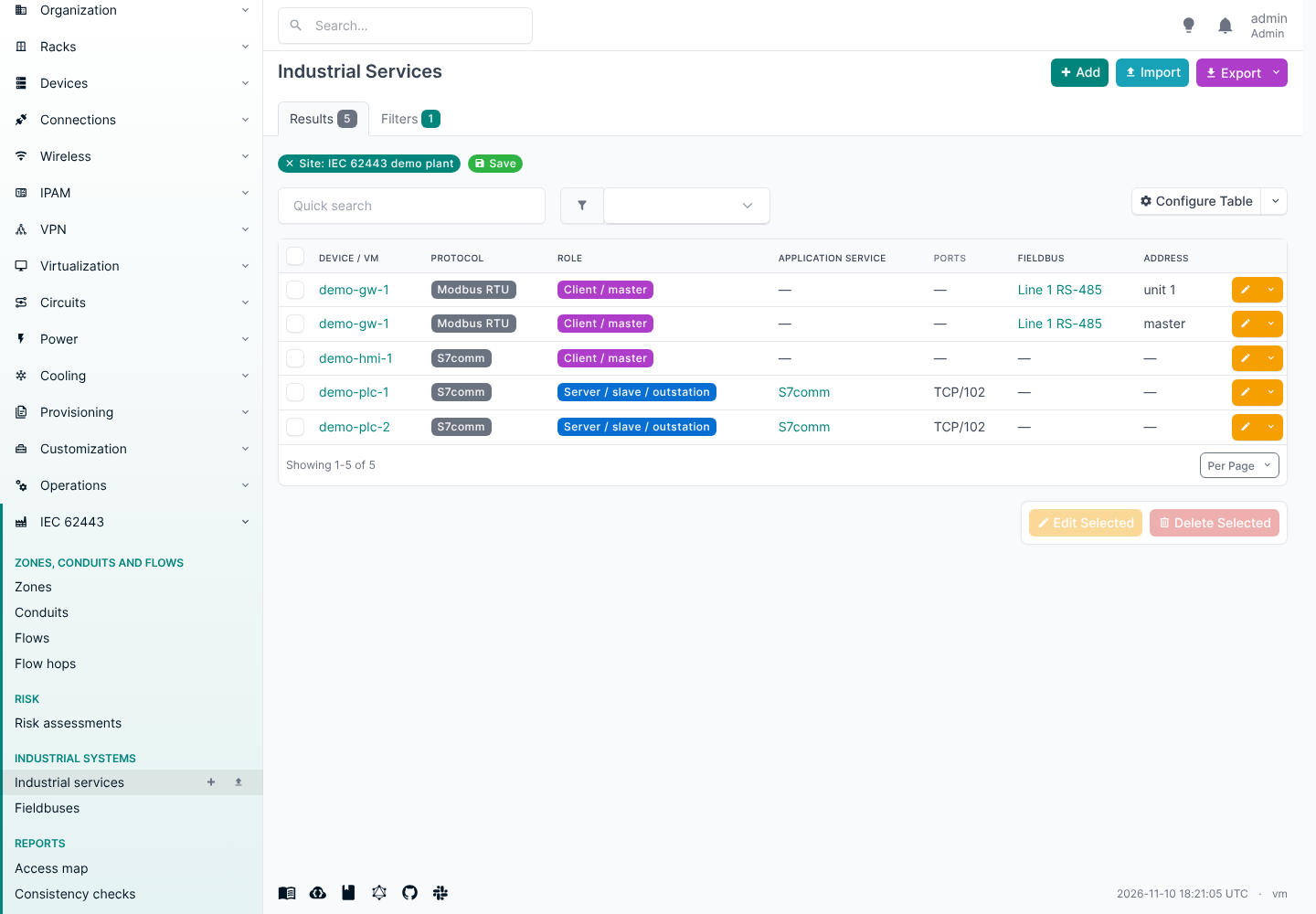
- Industrial services: which industrial protocol a device or VM speaks, and as what: server (slave, outstation), client (master), both, publisher or subscriber. Over the network its ports and IP addresses are those of a NetBox application service it links to, so they are stored once and show up in NetBox's own service views. On a serial bus it sits on a fieldbus at an address (Modbus unit ID, PROFIBUS station, rack/slot).
- Fieldbuses: RS-485/422/232, PROFIBUS, CAN, HART, AS-i, IO-Link segments, with the protocol, the zone they belong to and the gateway that bridges them to Ethernet (a serial device server or protocol gateway). A passive network capture can't see these, so they are usually entered by hand. Commissioning settings such as baud rate and frame format are deliberately not recorded here.
- Protocols: Modbus TCP/RTU/ASCII, S7comm(-plus), PROFINET IO, PROFIBUS DP, EtherNet/IP (CIP), OPC UA/DA, DNP3, IEC 60870-5-101/104, IEC 61850 MMS/GOOSE, BACnet/IP and MS/TP, KNXnet/IP, MQTT, HART-IP, EtherCAT, CANopen, Omron FINS, MELSEC. Flows also take the IT protocols seen on OT paths (RDP, SSH, VNC, TeamViewer, AnyDesk, IPsec, OpenVPN, WireGuard, HTTP(S), SMB, DNS, NTP, SNMP, Syslog).
- Both have the usual list/detail/edit/bulk views, filters (by protocol, role, port, zone, site,
fieldbus), REST API (
/api/plugins/iec62443/industrial-services/,/fieldbuses/) and GraphQL. The device and VM panel lists an asset's services and the buses it is gateway for. - The importer creates services from the analysis: a server for every protocol an asset answered or that the input names for it, a client for every protocol it sent requests in. An open port alone creates no service, because a port does not identify the protocol (port 102 is S7comm on a Siemens PLC and IEC 61850 MMS on a protection relay); the importer lists such ports for you to resolve.
Design choices
- A conduit is not a flow. An IEC 62443-3-2 conduit groups the communication channels between two or more zones that share security requirements; it has its own SL-T and is enforced by devices. A flow is one directed path through it: protocol, ports, what the requests do, and a verdict. The access map and the importer work on flows; conduits are a design decision a person makes. A flow without a conduit is a path nobody documented, and the access map says so.
- Flows are directed. The source starts the conversation. A path that is opened from both ends is two flows, each with its own verdict, which is also what a firewall rule needs.
- Zone members are plain many-to-many fields (
devices,virtual_machines,prefixes) rather than a generic assignment model. That is the simplest thing NetBox supports end to end (forms, REST API, GraphQL, change log) and it lets an asset sit in more than one zone when reality is messy. The plugin does not enforce one zone per asset; the device panel shows all of them. - Security levels are vectors. SL-T and SL-A have one level (0-4) per foundational requirement, in
order IAC, UC, SI, DC, RDF, TRE, RA, written
{2 2 2 1 2 1 1}. Forms and CSV take one number for all FRs ("2") or seven ("2,2,2,1,2,1,1"); the REST API takes a list of seven. SL-C is a property of products, so it is a custom field on device types (with a per-device override), and the zone page shows the lowest SL-C of its members per FR next to the zone's SL-T and SL-A. - The safety (SIS) attribute is the zone type, not a separate flag: a safety zone is its own zone type.
- IEC 62443-3-3 requirement texts are not included. They are copyrighted; the plugin does not track system requirements (SR 1.1 ...) yet.
- A zone's Purdue level is its most critical (lowest) level. A zone may hold a PLC (1) and an HMI (2); it counts as level 1, and the access map filters zones by it. The zone type says what kind of zone it is.
- Purdue level on devices/VMs is a custom field, created by the plugin after
migrateif it does not exist (never overwritten afterwards, so you may relabel it). Nothing is added to core tables, and you get filtering, bulk edit and CSV import of that field for free. Setcreate_custom_fields: Falseto manage it yourself. - Purdue level values are strings ("0" ... "5", "3.5"), so the DMZ level fits; "at or below level N" is computed from the choice list.
- "Allowed" defaults to unknown. Tools fill in evidence; a person decides yes or no. A verdict carries who decided it (a NetBox contact, so it can be someone without a NetBox login) and when; the date is filled in when the verdict changes. An allowed flow can expire (temporary supplier access) and can have a review date. Setting a flow back to unknown clears who and when.
- Ports use NetBox's own
protocol/portformat (tcp/502,udp/47808), the same as application services, and are empty for layer-2 protocols (PROFINET RT, GOOSE). - A zone with flows cannot be deleted. Delete or move its flows first, so verdicts and evidence are never lost as a side effect. Deleting a conduit leaves its flows without one.
- Risk assessments are records, not fields. A zone or conduit keeps every assessment; the latest approved one is the one that counts for the register and the checks. A zone or conduit with risk assessments cannot be deleted.
- Zone and conduit names are unique per site (and globally for those without a site).
Importer: Zeek logs and observation files
manage.py iec62443_import <dir> --site <slug> [--vrf <name or RD>] [--user <name>] [--dry-run]
    [--format auto|zeek|observations] [--zone-map CSV] [--unknown-report CSV] [--unknown-import DIR]
    [--outside-zone NAME] [--split ZONE ... | --split-all]
Reads either a directory of Zeek logs (conn.log plus the protocol logs of Zeek and the CISA ICSNPP
parsers, TSV or JSON, as Zeek or Malcolm write them; see docs/zeek.md), or observation
files in the format described in docs/import-format.md (assets.json,
flows.json, optionally summary.json) that any other tool or a spreadsheet can produce. For Zeek logs the
zones come from NetBox (zone prefixes and members), plus an optional --zone-map for zones NetBox does not
have yet.
One import covers one site and one routing domain. The same machine network (say 192.168.0.0/24
behind every OEM machine) is normal in OT, so the importer only matches devices, VMs and prefixes at
--site and in --vrf (default: the global table). Import captures from different VRFs separately.
It creates:
- a zone per zone name in the input, with the assets found there (matched to NetBox devices/VMs by primary IPv4 at the site and in the VRF; an address that matches more than one is skipped and reported), Purdue level = the lowest level among its assets, type as declared in the input or from its level (addresses outside the input go to an external zone);
- links to the prefixes NetBox already has for those assets (the most specific one, not a container). It never creates prefixes, and it leaves a prefix unlinked when it holds assets of more than one zone;
- a flow per source zone, destination zone and protocol seen, with the ports the input gives (none
are assumed), first/last seen, and the requests as evidence. Every request is classified as read,
write, control or program by an explicit table per protocol (
netbox_iec62443/importers/functions.py); the senders of write, control and program requests are listed in the evidence, and remote access is set when an asset markedremote_accessin the input sent requests across. A flow is put in a conduit only when exactly one conduit joins both of its zones; - industrial services, and for a server whose port is known, a link to a NetBox application service with that port (found or created on the asset);
- the Purdue level custom field on the matched assets (only where it is still empty).
Every import ends with the observed hosts that match no device or VM in NetBox at the site, hosts inside
a zone first, and --unknown-report FILE.csv writes them all with what was seen of them: finding these is
the point of passive discovery. Flows out of an external zone are marked as remote access.
The importer never creates devices: a capture shows an address and what it talks, not what the machine is.
--unknown-import DIR writes the unknown hosts inside a zone of the plant (not those in an external zone)
as three files for NetBox's own bulk import: 1-devices.csv, 2-interfaces.csv and 3-ip-addresses.csv.
Fill in role, manufacturer and device_type in the first, import the three in that order (Devices,
Interfaces, IP addresses > Import), and run the import again: the new devices now get their zone, Purdue
level and services. Rename them in NetBox afterwards; the files name them unknown-<address>.
Options:
--vrf NAME_OR_RDmatches devices, VMs and prefixes in this VRF instead of the global table.--outside-zone NAMEnames the zone for addresses not in assets.json (defaultOutside).--split ZONEsplits a zone that mixes Purdue bands into one zone per band, namedZONE (control)(levels 0-1),ZONE (supervisory)(2) andZONE (operations)(3 and up), so the paths between them become flows (e.g. an engineering laptop writing to a PLC in the same cell). Traffic counted for the whole zone goes to the part its OT requests point at, else to the most critical part.--split-alldoes this for every mixed zone.
Re-running adds ports and access classes, widens first/last seen and refreshes evidence, but never
touches a flow's verdict, conduit or hops, or a level someone set. Changes are recorded in the change log
under --user (default: the first superuser).
Other sources. The importer is split in two: build_plan() turns observations into an ImportPlan
(zones with member IPs, flows with evidence, services, per-asset levels, observed hosts), and apply_plan()
writes any plan to NetBox, resolving addresses to devices, VMs and prefixes within the site and VRF. The Zeek
adapter (importers/zeek.py) only turns logs into observations; another source needs the same and nothing
else.
Language
The plugin is written in English and every user-facing string goes through Django's translation
functions, so it follows the language of the NetBox install (LANGUAGE_CODE, or each user's
language preference) as soon as a translation exists. No translations ship yet; they would go in
netbox_iec62443/locale/<lang>/LC_MESSAGES/django.po (manage.py makemessages -l <lang> in the
plugin directory).
Development
Tests follow NetBox's own test classes (APIViewTestCases, ViewTestCases, filterset mixins) and run
inside a NetBox installation with the plugin enabled:
python manage.py test netbox_iec62443 --keepdb
Query-count baselines live in netbox_iec62443/tests/query_counts.json, recorded on the newest 4.7 release
(re-record with UPDATE_QUERY_COUNTS=1). See docs/development.md for a source or
netbox-docker setup, CI and releasing.
License
Apache License 2.0, see LICENSE.
1 maintainer

Metadata
1 maintainer
Release files for netbox-iec62443 0.2.0
For a detailed explanation of source distributions (sdists) and built distributions (wheels), please see the package formats documentation.
Source distribution (sdist)
| File | Size | Uploaded | Provenance | Actions |
|---|---|---|---|---|
| netbox_iec62443-0.2.0.tar.gz | 139.1 kB | With provenance | Details for netbox_iec62443-0.2.0.tar.gz |
Built distribution (wheel)
| File | Interpreter | ABI | Platform | Actions Reset |
|---|---|---|---|---|
| netbox_iec62443-0.2.0-py3-none-any.whl | Python 3 | none | any | Details for netbox_iec62443-0.2.0-py3-none-any.whl |
Total release size: 298.2 kB
Release files / netbox_iec62443-0.2.0.tar.gz
| Download URL | netbox_iec62443-0.2.0.tar.gz |
|---|---|
| Size | 139.1 kB |
| Tags | Source |
|
SHA-256 checksum How to use checksums |
0a9b42cbe11d0f22a2f6c8a2e9fa144221fe610aa0079c49504df580485bb858
|
|
BLAKE2b-256 checksum How to use checksums |
dade5623988c50de6d9d04f42c4281a36e72578a20b1e12b89a319f5cc9b8f8d
|
| Upload date | |
|
Uploaded using Trusted Publishing? What is trusted publishing? |
Yes |
| Uploaded via |
twine/7.0.0 CPython/3.13.16
|
Provenance
Provenance describes where a file came from. On PyPI, provenance is shared via attestations, which provide a verifiable record of the build or publishing details. View details, limitations and caveats.


PyPI Publish Attestation
PyPI verified that this artifact, at this checksum, originated from the publisher listed below.
Signed by GitHub Actions, verified by PyPI on Nov 11, 2026.
Transparency logRelease files / netbox_iec62443-0.2.0-py3-none-any.whl
| Download URL | netbox_iec62443-0.2.0-py3-none-any.whl |
|---|---|
| Size | 159.1 kB |
| Tags | Python 3 |
|
SHA-256 checksum How to use checksums |
d785aa159a45c4f95c7a8dbc6dfbc4217a80da4ab2919f653327416baae8c748
|
|
BLAKE2b-256 checksum How to use checksums |
37acad4b578e035368c3d3329a93670f1efe7cfb7005aade4332a89850088b76
|
| Upload date | |
|
Uploaded using Trusted Publishing? What is trusted publishing? |
Yes |
| Uploaded via |
twine/7.0.0 CPython/3.13.16
|
Provenance
Provenance describes where a file came from. On PyPI, provenance is shared via attestations, which provide a verifiable record of the build or publishing details. View details, limitations and caveats.
PyPI Publish Attestation
PyPI verified that this artifact, at this checksum, originated from the publisher listed below.
Signed by GitHub Actions, verified by PyPI on Nov 11, 2026.
Transparency logSecurity for netbox-iec62443 0.2.0
Provenance
Provenance describes where a file came from. On PyPI, provenance is shared via attestations, which provide a verifiable record of the build or publishing details. View details, limitations and caveats.
Full provenance
Both files in this release have been uploaded with provenance metadata.
Attestation for netbox_iec62443-0.2.0.tar.gz
PyPI Publish Attestation
PyPI verified that this artifact, at this checksum, originated from the publisher listed below.
Signed by GitHub Actions, verified by PyPI on Nov 11, 2026.
Transparency logA note on package security
PyPI is a repository for distributing packages, not a service for auditing them. While third-party security researchers and our staff do their best to detect and remove malicious packages, PyPI cannot guarantee the quality, security or suitability of any given package.
To learn more about protecting yourself from malicious actors, visit our package security documentation.














