
netbox-ipam-treeview-plugin



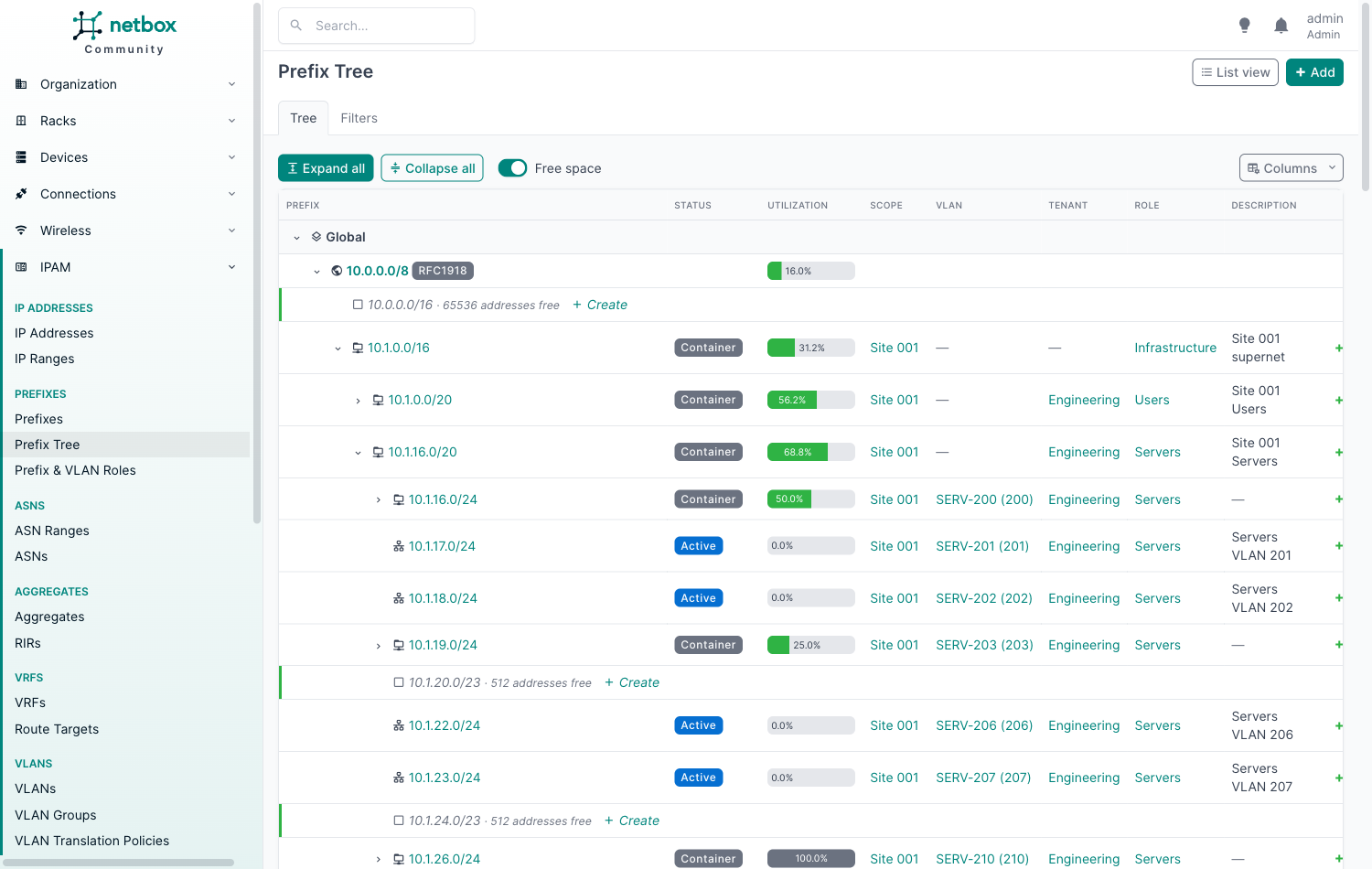
A DDI-style, collapsible tree view of NetBox IPAM. Instead of a flat, paginated list of prefixes, you start from the top-level supernets and drill down: VRF → Aggregate → Prefix → child prefix, with free space shown in place, one-click Expand all / Collapse all, and the tree remembering what you had open.
Features
- Collapsible tree: roots are VRFs (Global first) and the aggregates holding their prefixes; children load lazily as you expand, so it stays fast on large IPAMs.
- Expand all / Collapse all for the whole tree or any subtree (Alt+click a caret, or
*on a focused row), capped byexpand_all_limitso a click can never render an unbounded page. - Free space between children, shown as greyed rows with a one-click Create that pre-fills the prefix and VRF.
- Utilization bars with the same numbers as NetBox's own prefix views, computed in bulk.
- Row actions (add child, edit, delete), shown only when you have the permission.
- NetBox filters: the native prefix filter form; matches are shown with their ancestors as greyed context.
- Column picker, saved per user.
- Remembers state: expanded nodes are restored when you come back.
- Keyboard navigation (treegrid pattern): ↑ ↓ move, → expand / first child, ← collapse / parent,
*expand subtree, Enter opens the prefix. - Everywhere it is useful: a Prefix Tree page, a Tree view button on the native prefix list (carrying your filters), and Tree tabs on Prefix, Aggregate and VRF pages. Each can be switched off.
- Light and dark themes.
Compatibility
| Plugin | NetBox | Python |
|---|---|---|
| 0.1.x | 4.7 | 3.12 – 3.14 |
Installation
source /opt/netbox/venv/bin/activate
pip install netbox-ipam-treeview-plugin
Add it to configuration.py (or local_requirements.txt + plugins.py with netbox-docker):
PLUGINS = ["netbox_ipam_treeview"]
Then collect the static files and restart NetBox:
python /opt/netbox/netbox/manage.py collectstatic --no-input
sudo systemctl restart netbox
The tree lives at /plugins/ipam-tree/ (menu: IPAM → Prefixes → Prefix Tree, right below Prefixes).
Configuration
All settings are optional:
PLUGINS_CONFIG = {
    "netbox_ipam_treeview": {
        "expand_all_limit": 5000,
    },
}
| Setting | Default | Meaning |
|---|---|---|
show_menu_item |
True |
Show the Prefix Tree menu entry |
menu_location |
"ipam" |
"ipam": IPAM menu, right below Prefixes; "plugins": the Plugins menu |
show_list_toggle |
True |
Tree view button on the native prefix list |
show_prefix_tab |
True |
Tree tab on prefix pages |
show_aggregate_tab |
True |
Tree tab on aggregate pages |
show_vrf_tab |
True |
Tree tab on VRF pages |
group_by_vrf |
True |
Top level is one node per VRF; False mixes all VRFs under the aggregates (add the VRF column) |
show_aggregates |
True |
Aggregates as a tree level |
show_free_space |
True |
Default for free-space rows (each user can toggle it) |
gaps_respect_mark_utilized |
True |
No free-space rows under pools and mark utilized prefixes |
max_gap_rows |
64 |
Free-space rows per node; the rest are summarised in one row |
expand_all_limit |
5000 |
Row cap for Expand all and filtered trees |
default_columns |
status, utilization, scope, VLAN, tenant, role, description, actions | Columns before a user picks their own |
Permissions
- The page requires
ipam.view_prefix; every row is restricted to what the user may view. - Aggregates appear only for users with
ipam.view_aggregate; VRF groups only for VRFs the user may view. - With constrained (object-level) permissions, prefixes hang under their nearest visible ancestor, and free-space rows are not shown, because space taken by prefixes the user cannot see would look free.
- Delete links go to NetBox's own confirmation page.
Development
The dev stack is netbox-docker with the plugin mounted live, seeded with ~8,000 RFC 1918 / ULA prefixes across VRFs, aggregates, sites and VLANs.
make dev          # build and start NetBox on http://localhost:8000 (admin / admin)
make seed         # load the demo dataset (make reseed to wipe and reload, make seed-big for ~5x)
make test         # pure unit tests (no NetBox needed)
make test-netbox  # integration tests inside the NetBox container
make lint         # ruff
make dist         # build and check the wheel and sdist
License
Apache-2.0
1 maintainer

Metadata
1 maintainer
Release files for netbox-ipam-treeview-plugin 0.1.1
For a detailed explanation of source distributions (sdists) and built distributions (wheels), please see the package formats documentation.
Source distribution (sdist)
| File | Size | Uploaded | |
|---|---|---|---|
| netbox_ipam_treeview_plugin-0.1.1.tar.gz | 29.3 kB | Details |
Built distribution (wheel)
| File | Interpreter | ABI | Platform | Reset |
|---|---|---|---|---|
| netbox_ipam_treeview_plugin-0.1.1-py3-none-any.whl | Python 3 | none | any | Details |
Total release size: 66.4 kB
Release files / netbox_ipam_treeview_plugin-0.1.1.tar.gz
| Download URL | netbox_ipam_treeview_plugin-0.1.1.tar.gz |
|---|---|
| Size | 29.3 kB |
| Tags | Source |
|
SHA-256 checksum How to use checksums |
5aa3f146de83f539d5ae9390110f562ce2401dde73af08a02396c8da4766918b
|
|
BLAKE2b-256 checksum How to use checksums |
5f46c7228e533148c5ed1c6a898eb372186b746160fcd22ad7122f05ba224df9
|
| Upload date | |
|
Uploaded using Trusted Publishing? What is trusted publishing? |
Yes |
| Uploaded via |
twine/7.0.0 CPython/3.13.14
|
Provenance
Provenance describes where a file came from. On PyPI, provenance is shared via attestations, which provide a verifiable record of the build or publishing details. View details, limitations and caveats.


PyPI Publish Attestation
PyPI verified that this artifact, at this checksum, originated from the publisher listed below.
Signed by GitHub Actions, verified by PyPI on Oct 9, 2026.
Transparency logRelease files / netbox_ipam_treeview_plugin-0.1.1-py3-none-any.whl
| Download URL | netbox_ipam_treeview_plugin-0.1.1-py3-none-any.whl |
|---|---|
| Size | 37.2 kB |
| Tags | Python 3 |
|
SHA-256 checksum How to use checksums |
f10e4626e0ee2d369d9150d693b89018f92c8be2e3737105770a9d931ccc9873
|
|
BLAKE2b-256 checksum How to use checksums |
dc3aaef08be811feb286e58b073c2072537c3b8920d6166b6c84211f9851a894
|
| Upload date | |
|
Uploaded using Trusted Publishing? What is trusted publishing? |
Yes |
| Uploaded via |
twine/7.0.0 CPython/3.13.14
|
Provenance
Provenance describes where a file came from. On PyPI, provenance is shared via attestations, which provide a verifiable record of the build or publishing details. View details, limitations and caveats.
PyPI Publish Attestation
PyPI verified that this artifact, at this checksum, originated from the publisher listed below.
Signed by GitHub Actions, verified by PyPI on Oct 9, 2026.
Transparency log













