
NetBox plugin for device maintenance management with comprehensive REST API and Portuguese-BR support

Project description
NetBox Maintenance Device Plugin



A comprehensive NetBox plugin for managing device preventive and corrective maintenance with enhanced visual indicators, scheduling capabilities, and multi-language support.
Features
- Maintenance Plans: Create and manage maintenance plans for devices with configurable frequency
- Maintenance Executions: Record and track maintenance executions with status monitoring
- Device Integration: View maintenance history directly on device pages with dedicated tabs
- Quick Actions: Schedule and complete maintenance directly from the interface
- 🆕 REST API: Complete REST API for external integrations and automation
- Advanced Filtering: Powerful filtering and search capabilities
- Custom Actions: Schedule, complete, and cancel maintenance via API
- Statistics: Get maintenance statistics and overdue/upcoming reports
Compatibility
| NetBox Version | Plugin Support | Notes |
|---|---|---|
| 4.4.x | ✅ Tested & Supported | Current target version |
| 4.3.x | ⚠️ Likely Compatible | Not officially tested |
| 4.2.x | ⚠️ Likely Compatible | Not officially tested |
| 4.1.x | ⚠️ Likely Compatible | Not officially tested |
| 4.0.x | ⚠️ Likely Compatible | Not officially tested |
| 3.x | ❌ Not Supported | Breaking changes |
Note: This version (v1.2.1) is specifically tested and certified for NetBox 4.4.x. While it may work with other 4.x versions, we recommend testing in a development environment first.
Installation
Method 1: PyPI Installation
This plugin is not published on PyPI yet.
To install directly from GitHub, use:
Method 2: GitHub Installation
pip install git+https://github.com/diegogodoy06/netbox-maintenance-device.git
Note: You may see a warning about setup.py being deprecated. The installation still works fine, and a pyproject.toml will be added soon to remove this warning.
Method 3: Docker Installation
For Docker-based NetBox installations using netbox-docker:
📋 For detailed Docker installation instructions in English and Portuguese, see DOCKER_INSTALL.md
Quick Docker Setup
Installation
Method 1: PyPI (Recommended)
# Install via pip
pip install netbox-maintenance-device
For Docker deployments, add to your plugin_requirements.txt:
echo "netbox-maintenance-device>=1.2.1" >> plugin_requirements.txt
Method 2: From Source
- Add to
plugin_requirements.txt:
echo "https://github.com/diegogodoy06/netbox-maintenance-device/archive/main.tar.gz" >> plugin_requirements.txt
- Configure in
configuration/plugins.py:
PLUGINS = ['netbox_maintenance_device']
- Rebuild and restart:
docker compose down
docker compose build --no-cache
docker compose up -d
docker compose exec netbox python manage.py migrate
Configuration
Basic Configuration
Add the plugin to your NetBox configuration.py:
# configuration.py

PLUGINS = [
    'netbox_maintenance_device',
    # ... other plugins
]

# Optional: Plugin-specific settings
PLUGINS_CONFIG = {
    'netbox_maintenance_device': {
        # Future configuration options will be added here
        # Currently, the plugin uses default settings
    }
}
Language Configuration (Optional)
To enable Portuguese-BR by default:
# configuration.py

# Enable internationalization
USE_I18N = True
USE_L10N = True

# Set default language
LANGUAGE_CODE = 'pt-br'
TIME_ZONE = 'America/Sao_Paulo'

# Available languages
LANGUAGES = [
    ('en', 'English'),
    ('pt-br', 'Português (Brasil)'),
]
Database Migration
After configuration, run migrations:
python manage.py migrate
Restart Services
Restart your NetBox services:
# For systemd
sudo systemctl restart netbox netbox-rq

# For Docker
docker compose restart netbox netbox-worker
Screenshots
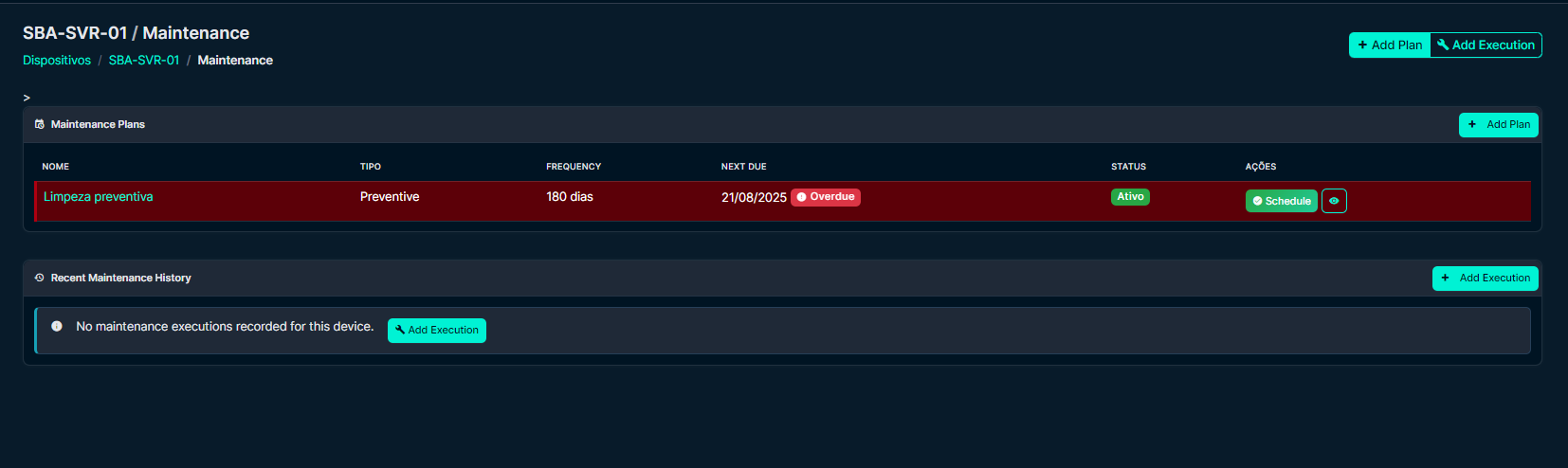
Device Maintenance Section
View maintenance plans and status directly on device pages
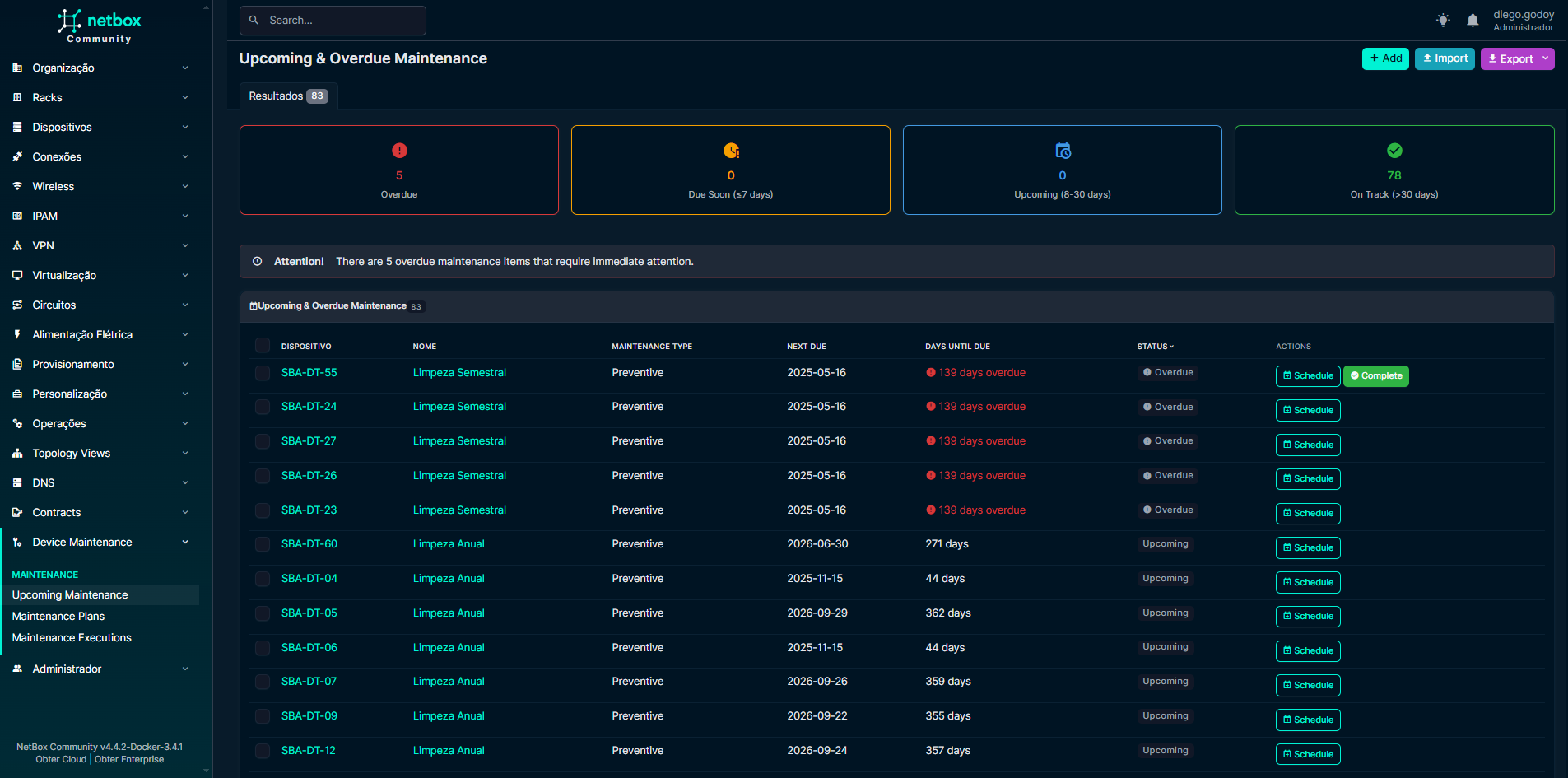
Upcoming Maintenance Dashboard
Monitor all upcoming and overdue maintenance across your infrastructure
Maintenance Plan Management
Create and manage maintenance plans with flexible scheduling

Usage
Creating Maintenance Plans
- Navigate to Plugins > Manutenção de Dispositivos > Planos de Manutenção
- Click Add to create a new maintenance plan
- Select a device, provide a name, and set the frequency in days
- Choose between preventive or corrective maintenance type
- Save and activate the plan
Scheduling Maintenance
From Device Page:
- Go to any device detail page
- View the Maintenance section
- Click the 📅 Schedule button next to any plan
- Set date, technician, and notes
- Confirm to create a scheduled execution
From Upcoming Maintenance:
- Navigate to Plugins > Upcoming Maintenance
- Find the maintenance plan in the table
- Click 📅 Schedule in the Actions column
- Complete the scheduling form
Completing Maintenance
Quick Complete:
- From the Upcoming Maintenance page or device section
- Click the ✅ Complete button for overdue/due maintenance
- Add technician notes and confirm
- The system creates and marks the execution as completed
Manual Recording:
- Navigate to Plugins > Maintenance Executions
- Click Add to record a new execution
- Select the plan, set dates, and update status
- Add detailed notes and technician information
Monitoring Maintenance
Device-Level Monitoring:
- Maintenance Section: Shows active plans with status badges
- Visual Indicators: Red (overdue), yellow (due soon), green (on track)
- Quick Actions: Schedule and complete buttons for urgent items
Dashboard Monitoring:
- Upcoming Maintenance: Centralized view of all maintenance
- Status Filters: Filter by overdue, due soon, or scheduled
- Bulk Actions: Manage multiple maintenance items efficiently
Models
MaintenancePlan
- Device: Links to a specific NetBox device
- Name: Descriptive name for the maintenance type
- Type: Preventive or corrective maintenance
- Frequency: Maintenance interval in days
- Status: Active/inactive flag
MaintenanceExecution
- Plan: Links to the maintenance plan
- Scheduled Date: When maintenance is scheduled
- Completed Date: When maintenance was completed
- Status: scheduled, in_progress, completed, cancelled
- Technician: Person responsible for maintenance
- Notes: Detailed maintenance notes
Available Endpoints
| Endpoint | Operations | Description |
|---|---|---|
/maintenance-plans/ |
CRUD + Custom Actions | Manage maintenance plans |
/maintenance-executions/ |
CRUD + Custom Actions | Manage maintenance executions |
/maintenance-plans/overdue/ |
GET | Get overdue plans |
/maintenance-plans/upcoming/ |
GET | Get upcoming plans |
/maintenance-plans/statistics/ |
GET | Get plan statistics |
/maintenance-executions/pending/ |
GET | Get pending executions |
🤝 Contributing
Contributions are welcome! Please feel free to submit a Pull Request.
📄 License
This project is licensed under the Apache 2.0 License - see the LICENSE file for details.
🙏 Acknowledgments
- NetBox community for the excellent platform
- Contributors and users providing feedback
Release history Release notifications | RSS feed


Download files
Download the file for your platform. If you're not sure which to choose, learn more about installing packages.
Source Distribution
Built Distribution
Filter files by name, interpreter, ABI, and platform.
If you're not sure about the file name format, learn more about wheel file names.
Copy a direct link to the current filters
File details
Details for the file netbox_maintenance_device-1.2.1.tar.gz.
File metadata
- Download URL: netbox_maintenance_device-1.2.1.tar.gz
- Upload date:
- Size: 41.0 kB
- Tags: Source
- Uploaded using Trusted Publishing? No
- Uploaded via: twine/6.2.0 CPython/3.12.4
File hashes
| Algorithm | Hash digest | |
|---|---|---|
| SHA256 |
b5b31d287c9cf2cc9ab383a7e132a7490ba640456a99b23fa7d46eb940207f09
|
|
| MD5 |
0d4e726d96952057246779dd7389a0cf
|
|
| BLAKE2b-256 |
adaa0e11cce451ff4a8e731fec7f447223b56b9c4c3ca091d45a560eae4e9dbc
|
File details
Details for the file netbox_maintenance_device-1.2.1-py3-none-any.whl.
File metadata
- Download URL: netbox_maintenance_device-1.2.1-py3-none-any.whl
- Upload date:
- Size: 54.9 kB
- Tags: Python 3
- Uploaded using Trusted Publishing? No
- Uploaded via: twine/6.2.0 CPython/3.12.4
File hashes
| Algorithm | Hash digest | |
|---|---|---|
| SHA256 |
7df6ac6f3858d2f9fe11708ccc0e5bd6585ac42fd3840287a56172727c08f24a
|
|
| MD5 |
24e1fcc58e1c3b773aea6b8618214d5c
|
|
| BLAKE2b-256 |
226b5406f030110913356973c210b04ca86b35827949ae0dca421eb13fc5562a
|






