
NetBox Notices







Repository: github.com/jsenecal/netbox-notices Documentation: jsenecal.github.io/netbox-notices PyPI: pypi.org/project/netbox-notices
Original Project: Forked and inspired from jasonyates/netbox-circuitmaintenance, differs in the ability to track more than just maintenances, and circuits.
A NetBox plugin built to track maintenance and outage events across various NetBox models. This plugin is agnostic in that it is only built to store data surrounding maintenance/outage events and provide an overview of historical, active and upcoming events. The plugin tracks events at the provider level and associates impact across multiple NetBox object types (circuits, devices, virtual machines, power feeds, sites, etc.).
The plugin does not directly provide an automated approach to ingesting provider notifications, instead it extends NetBox's extensive REST API and provides GET/POST/PUT/PATCH methods to manage events. The plugin is intended to be coupled with an automated parser to handle the parsing of provider notifications and the delivery of the events to the plugin's REST API. Several example parsers are documented here.
Important Note: This is a significant refactoring from the original netbox-circuitmaintenance plugin. There is no upgrade path from the original plugin. If you are using the original plugin, you will need to migrate your data manually.
Features
- Track provider maintenance events
- Track impact from provider maintenance across multiple NetBox object types
- Configurable allowed object types (circuits, devices, virtual machines, power feeds, sites, etc.)
- Provides a consolidated view of active, upcoming and historical maintenance events at the provider and object level
- Track unplanned outage events with optional end times and ETR tracking
- Unified event notification tracking
- Quick action buttons for common maintenance operations:
- Acknowledge maintenance events
- Reschedule maintenance (only before start time)
- Mark maintenance as in-progress or completed
- Cancel maintenance with confirmation
- Bulk actions on list views:
- Bulk edit for maintenances, outages and notification templates (status and scheduling fields excluded -- use the quick actions and the reschedule view)
- Bulk delete for maintenances, outages, notification templates and prepared notifications
- Bulk import (CSV/JSON/YAML) for maintenances and outages; impacts are added afterwards
- Received and sent notifications have none: received ones are deletable one row at a time, sent ones are a read-only log deleted from the prepared notifications list. Prepared notification
statusis changed through the REST API -- see permissions.
- Event timeline with status-specific icons and colors
- Maintenance rescheduling with automatic status updates
- Interactive calendar view with FullCalendar
- iCalendar feed for external calendar integration (Google Calendar, Outlook, Apple Calendar)
- Maintenance overlap detection (coming soon)
Compatibility
This plugin requires NetBox 4.5.0 or higher.
| NetBox Version | Plugin Version |
|---|---|
| 4.5.x | 1.x |
| 4.6.x | 1.x |
| 4.7.x | 1.x |
Installing
A working installation of NetBox 4.5.0+ is required - see official documentation.
Package Installation
Activate your virtual env and install via pip:
$ source /opt/netbox/venv/bin/activate
(venv) $ pip install netbox-notices
To ensure the plugin is automatically re-installed during future upgrades, add the package to your local_requirements.txt:
# echo netbox-notices >> local_requirements.txt
Enable the Plugin
In the Netbox configuration.py configuration file add or update the PLUGINS parameter, adding vendor_notification:
PLUGINS = [
    'notices'
]

PLUGINS_CONFIG = {
    "notices": {},
}
Configuration
The plugin supports configuration of which NetBox object types can be linked to maintenance and outage events. By default, the plugin allows linking to circuits, power feeds, and sites.
Default Configuration
If you don't specify any configuration, the plugin uses these defaults:
PLUGINS_CONFIG = {
    "notices": {
        "allowed_content_types": [
            "circuits.Circuit",
            "dcim.PowerFeed",
            "dcim.Site",
        ]
    }
}
Custom Configuration
You can customize which object types are allowed by specifying the allowed_content_types setting. Content types are specified in the format app_label.model_name.
Example: Add Devices and Virtual Machines
PLUGINS_CONFIG = {
    "notices": {
        "allowed_content_types": [
            "circuits.Circuit",
            "dcim.Device",
            "dcim.PowerFeed",
            "dcim.Site",
            "virtualization.VirtualMachine",
        ]
    }
}
Example: Minimal Configuration (Circuits Only)
PLUGINS_CONFIG = {
    "notices": {
        "allowed_content_types": [
            "circuits.Circuit",
        ]
    }
}
Example: Extended Configuration
PLUGINS_CONFIG = {
    "notices": {
        "allowed_content_types": [
            "circuits.Circuit",
            "dcim.Device",
            "dcim.Interface",
            "dcim.PowerFeed",
            "dcim.Rack",
            "dcim.Site",
            "ipam.IPAddress",
            "ipam.Prefix",
            "virtualization.VirtualMachine",
            "virtualization.VMInterface",
        ]
    }
}
How Configuration Affects Behavior
- Only object types listed in
allowed_content_typeswill appear in the Impact creation forms - The API will reject attempts to create impacts for non-allowed object types
- Changing the configuration requires a NetBox restart
- This setting controls which objects can be linked via the
Impactmodel to maintenance and outage events
Common NetBox Object Types
| Content Type | Description |
|---|---|
circuits.Circuit |
Network circuits |
circuits.Provider |
Service providers |
dcim.Device |
Physical network devices |
dcim.Interface |
Device network interfaces |
dcim.PowerFeed |
Power supply connections |
dcim.PowerPanel |
Power distribution panels |
dcim.Rack |
Equipment racks |
dcim.Site |
Physical locations |
ipam.IPAddress |
IP addresses |
ipam.Prefix |
IP prefixes/subnets |
virtualization.VirtualMachine |
Virtual machines |
virtualization.VMInterface |
VM network interfaces |
Apply Database Migrations
Apply database migrations with Netbox manage.py:
(venv) $ python manage.py migrate
Restart Netbox
Restart the Netbox service to apply changes:
sudo systemctl restart netbox
Outage Tracking
In addition to planned maintenance, this plugin supports tracking unplanned outage events:
Key Features
- Optional End Time: Outages can be created without an end time, which becomes required when marking as resolved
- ETR Tracking: Track Estimated Time to Repair with full revision history via NetBox's changelog
- Outage Status Workflow:
- REPORTED: Initial state when outage is reported
- INVESTIGATING: Team is investigating root cause
- IDENTIFIED: Root cause identified, working on fix
- MONITORING: Fix applied, monitoring for stability
- RESOLVED: Outage fully resolved (requires end time)
- Shared Impact Model: Uses the same impact tracking as maintenance events (Impact model)
- Unified View: View both maintenance and outages together in a single interface
- Flexible Object Support: Link outages to any configured NetBox object type
Calendar & iCal Integration
The plugin provides an interactive calendar view and iCal feed for integrating maintenance events with external calendar applications.
Calendar View
Access the calendar at Plugins -> Notices -> Calendar. Features include:
- Interactive FullCalendar: Month, week, and day views
- Color-coded events: Different colors for maintenance vs outage, and by status
- Click-to-view: Click any event to see details and navigate to full view
- Drag navigation: Navigate between time periods
iCal Feed
Subscribe to maintenance events in your preferred calendar application:
Subscription URL:
https://your-netbox/api/plugins/notices/ical/?token=YOUR_API_TOKEN
Supported Calendar Apps:
- Google Calendar: Settings -> Add calendar -> From URL
- Outlook: Calendar -> Add calendar -> Subscribe from web
- Apple Calendar: File -> New Calendar Subscription
Query Parameters:
token: Your NetBox API token (required)provider: Filter by provider IDstatus: Filter by status (e.g.,CONFIRMED,IN-PROCESS)days_past: Include events from N days ago (default: 30)days_future: Include events up to N days ahead (default: 90)
Example filtered subscription:
/api/plugins/notices/ical/?token=YOUR_TOKEN&provider=1&status=CONFIRMED
API Endpoints
Maintenance Events:
GET    /api/plugins/notices/maintenance/
POST   /api/plugins/notices/maintenance/
GET    /api/plugins/notices/maintenance/{id}/
PATCH  /api/plugins/notices/maintenance/{id}/
DELETE /api/plugins/notices/maintenance/{id}/
Outage Events:
GET    /api/plugins/notices/outage/
POST   /api/plugins/notices/outage/
GET    /api/plugins/notices/outage/{id}/
PATCH  /api/plugins/notices/outage/{id}/
DELETE /api/plugins/notices/outage/{id}/
Impact Tracking:
GET    /api/plugins/notices/impact/
POST   /api/plugins/notices/impact/
GET    /api/plugins/notices/impact/{id}/
PATCH  /api/plugins/notices/impact/{id}/
DELETE /api/plugins/notices/impact/{id}/
Event Notifications (Received):
GET    /api/plugins/notices/eventnotification/
POST   /api/plugins/notices/eventnotification/
GET    /api/plugins/notices/eventnotification/{id}/
DELETE /api/plugins/notices/eventnotification/{id}/
Notification Templates:
GET    /api/plugins/notices/notification-templates/
POST   /api/plugins/notices/notification-templates/
GET    /api/plugins/notices/notification-templates/{id}/
PATCH  /api/plugins/notices/notification-templates/{id}/
DELETE /api/plugins/notices/notification-templates/{id}/
Prepared Notifications:
GET    /api/plugins/notices/prepared-notifications/
POST   /api/plugins/notices/prepared-notifications/
GET    /api/plugins/notices/prepared-notifications/{id}/
PATCH  /api/plugins/notices/prepared-notifications/{id}/
DELETE /api/plugins/notices/prepared-notifications/{id}/
Sent Notifications (read-only):
GET    /api/plugins/notices/sent-notifications/
GET    /api/plugins/notices/sent-notifications/{id}/
Example: Creating an Outage
POST /api/plugins/notices/outage/
{
    "name": "OUT-2024-001",
    "summary": "Fiber cut on Main Street",
    "provider": 1,
    "start": "2024-10-29T14:30:00Z",
    "estimated_time_to_repair": "2024-10-29T18:00:00Z",
    "status": "INVESTIGATING"
}
Example: Creating Impact for a Circuit
POST /api/plugins/notices/impact/
{
    "maintenance": 1,
    "content_type": "circuits.circuit",
    "object_id": 42,
    "impact": "OUTAGE"
}
Example: Creating Impact for a Device
POST /api/plugins/notices/impact/
{
    "outage": 1,
    "content_type": "dcim.device",
    "object_id": 123,
    "impact": "DEGRADED"
}
Outgoing Notifications
The plugin supports generating and tracking outgoing notifications to customers and stakeholders about maintenance and outage events.
Key Features
- Notification Templates: Define Jinja templates for different event types and scenarios
- Template Scoping: Scope templates to specific tenants, providers, sites, etc. (similar to Config Contexts)
- Template Inheritance: Base templates can be extended for customization
- Recipient Discovery: Automatically discover contacts based on roles and priorities
- Approval Workflow: Notifications go through draft -> ready -> approved -> sent states
- Delivery Tracking: Track when notifications are sent, delivered, and viewed
- iCal Support: Generate iCal attachments for maintenance notifications
Notification Status Workflow
- Draft: Initial state, notification content can be edited
- Ready: Content finalized, awaiting approval
- Approved: Approved by user, ready to send
- Sent: Dispatched to recipients
- Delivered: Confirmed delivery
- Failed: Delivery failed (can be retried)
Navigation Structure
| Group | Menu Items |
|---|---|
| Notifications | Received, Sent |
| Events | Planned Maintenances, Outages, Calendar |
| Messaging | Notification Templates, Prepared Notifications |
Data Models
The plugin uses several models to track maintenance, outage, and notification events:
Maintenance
Represents a planned maintenance event from a provider. Key fields:
name: Event identifiersummary: Description of the maintenanceprovider: Foreign key to NetBox Providerstart,end: Maintenance window timesstatus: TENTATIVE, CONFIRMED, CANCELLED, IN-PROCESS, COMPLETED, RE-SCHEDULED, UNKNOWNinternal_ticket: Your organization's tracking ticket referenceacknowledged: Whether the event has been acknowledged
Outage
Represents an unplanned outage event from a provider. Key fields:
name: Event identifiersummary: Description of the outageprovider: Foreign key to NetBox Providerstart,end: Outage window times (end is optional until resolved)status: REPORTED, INVESTIGATING, IDENTIFIED, MONITORING, RESOLVEDestimated_time_to_repair: ETR timestamp (tracked with changelog history)internal_ticket: Your organization's tracking ticket referenceacknowledged: Whether the event has been acknowledged
Impact
Links maintenance or outage events to affected NetBox objects using Django's Generic Foreign Key pattern:
maintenanceoroutage: Foreign key to the event (mutually exclusive)content_type: The type of affected object (e.g., "circuits.circuit", "dcim.device")object_id: The ID of the affected objectimpact: Impact level - NO-IMPACT, REDUCED-REDUNDANCY, DEGRADED, OUTAGE
The Impact model allows linking events to any NetBox object type configured in allowed_content_types.
EventNotification
Stores raw email notifications received from providers:
maintenanceoroutage: Foreign key to the associated eventemail: Binary email dataemail_body: Extracted body textsubject: Email subject lineemail_from: Sender addressemail_received: Receipt timestamp
NotificationTemplate
Jinja templates for generating outgoing notifications to customers/stakeholders:
name,slug: Template identifierevent_type: Which event types this template applies to (maintenance, outage, or none)granularity: How notifications are grouped (per-event, per-tenant, per-contact)subject_template,body_template: Jinja templates for email contentbody_format: Output format (markdown, html, plain text)contact_roles,contact_priorities: Recipient discovery configurationis_base_template,extends: Template inheritance supportweight: Priority for template matching
PreparedNotification
A rendered notification ready for delivery:
template: Source NotificationTemplatestatus: Draft, Ready, Approved, Sent, Delivered, Failedsubject,body_text,body_html: Rendered content snapshotcontacts,recipients: Recipient listapproved_by,approved_at: Approval trackingsent_at,delivered_at,viewed_at: Delivery tracking
SentNotification
A read-only view of PreparedNotifications that have been sent or delivered. This is a proxy model that filters to only show notifications with status "sent" or "delivered".
Screenshots
Maintenance Event Detail
The maintenance detail view shows comprehensive information about a maintenance event including the event timeline, impacted objects, and received notifications.
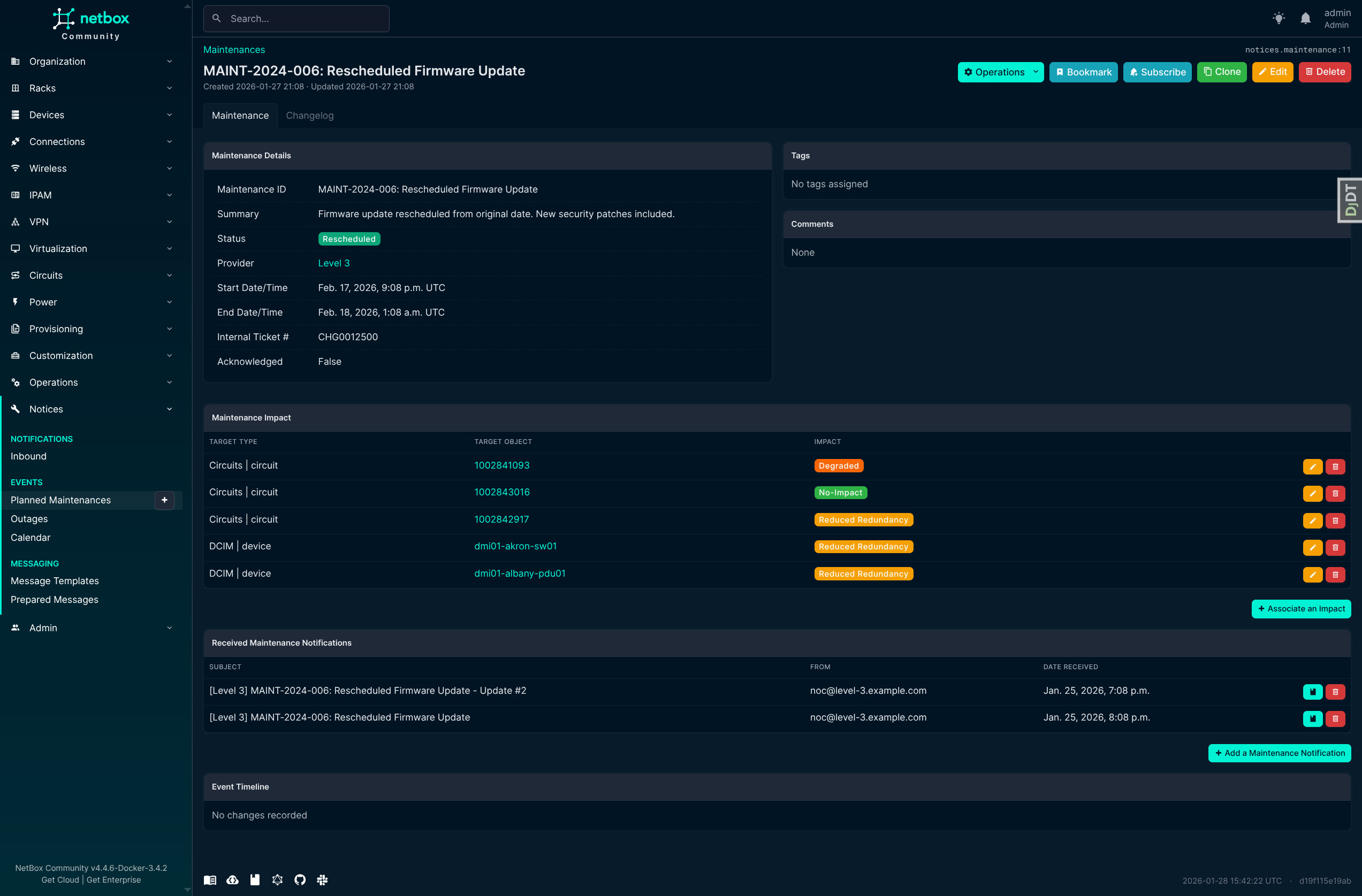
Key Features Shown:
- Operations dropdown with quick actions (Acknowledge, Reschedule, Mark In-Progress, Mark Completed, Cancel)
- Maintenance details with timezone conversion display
- Generic impact tracking showing any configured NetBox object type
- Received notifications from providers
- Event timeline with color-coded status changes
Outage Event Detail
The outage detail view tracks unplanned incidents with ETR (Estimated Time to Repair) and flexible status workflow.
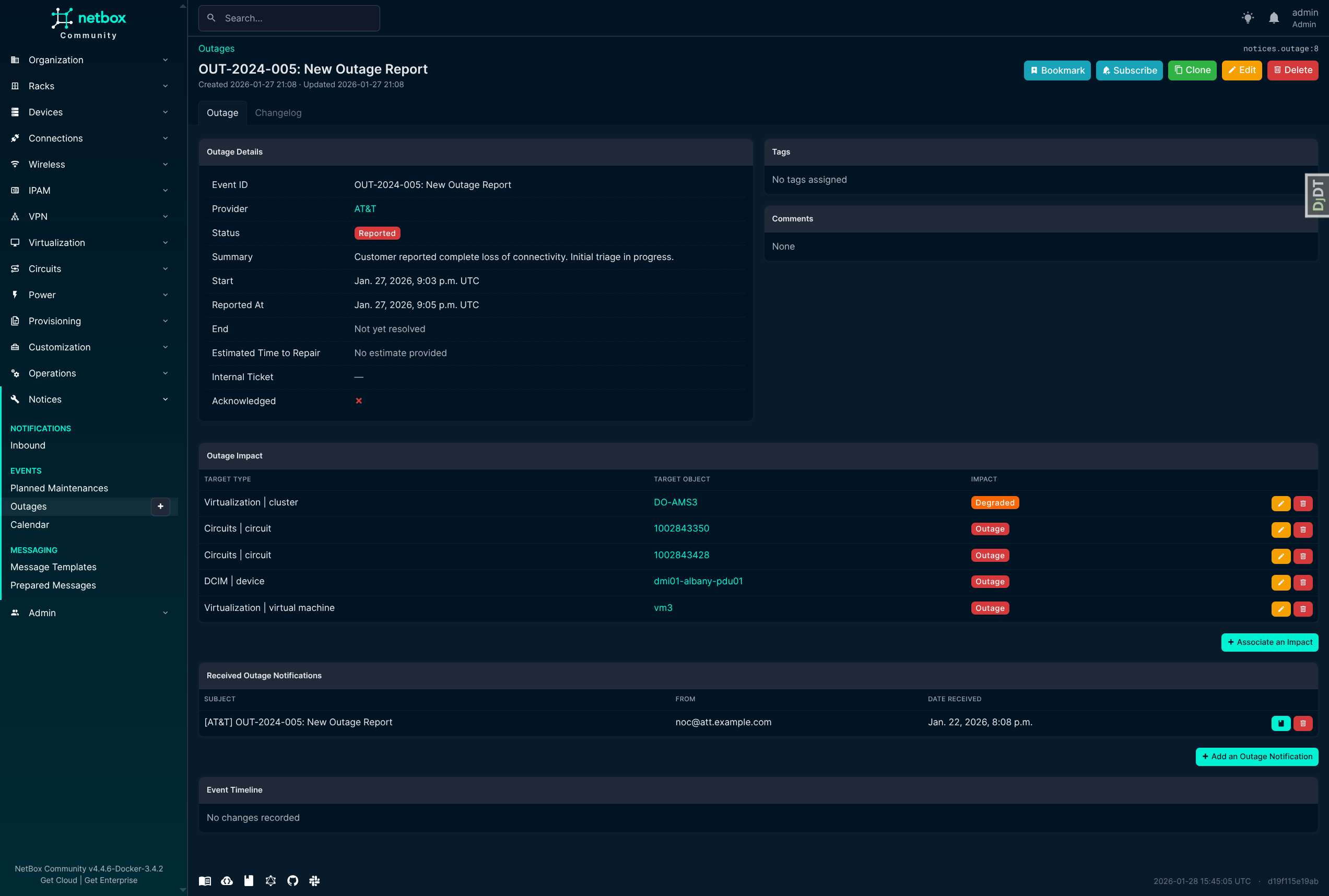
Key Features Shown:
- Outage-specific status workflow (Reported -> Investigating -> Identified -> Monitoring -> Resolved)
- ETR tracking with changelog history
- Optional end time (required only when resolving)
- Impact and notification tracking
Calendar View
Interactive calendar view for visualizing maintenance and outage events with iCal subscription support.
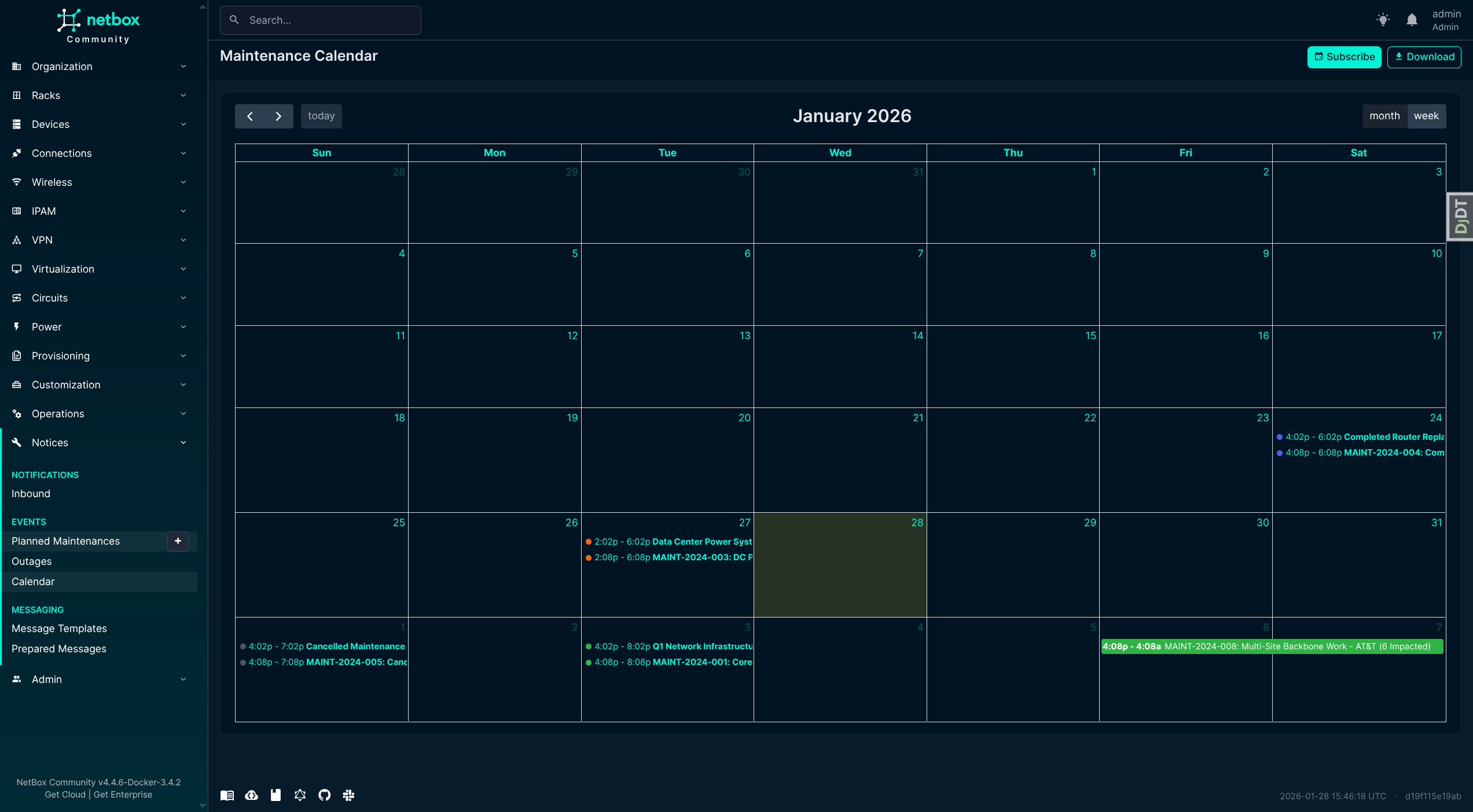
Click any event to see a quick summary modal with key details:
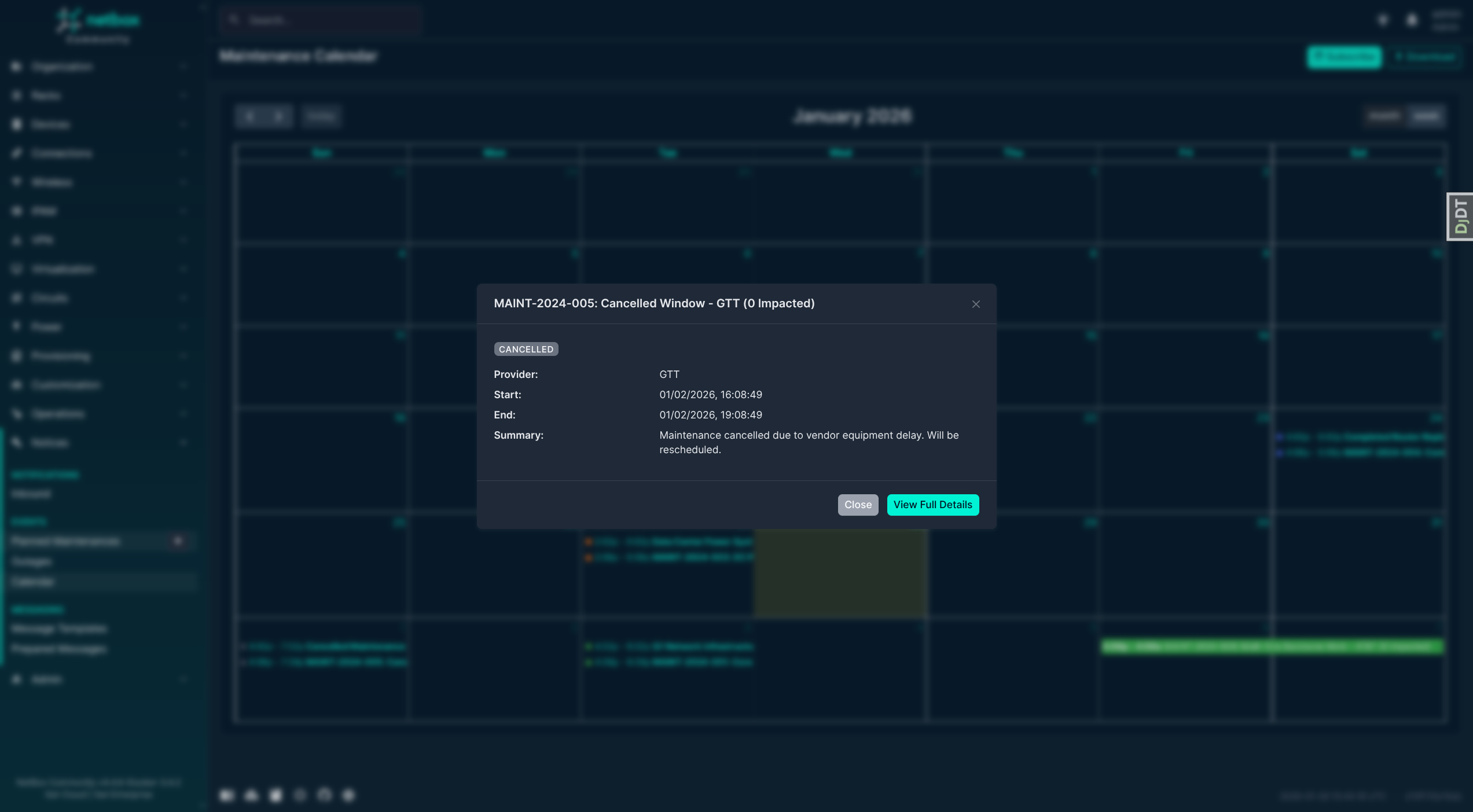
Key Features Shown:
- FullCalendar integration with month/week/day views
- Color-coded events by type (maintenance vs outage) and status
- Click-to-view event details modal with status, provider, timing, and summary
- iCal Subscribe and Download buttons for calendar integration
Provider Events Widget
A "Maintenance & Outage Events" widget appears on Provider detail pages, showing all events from that provider.
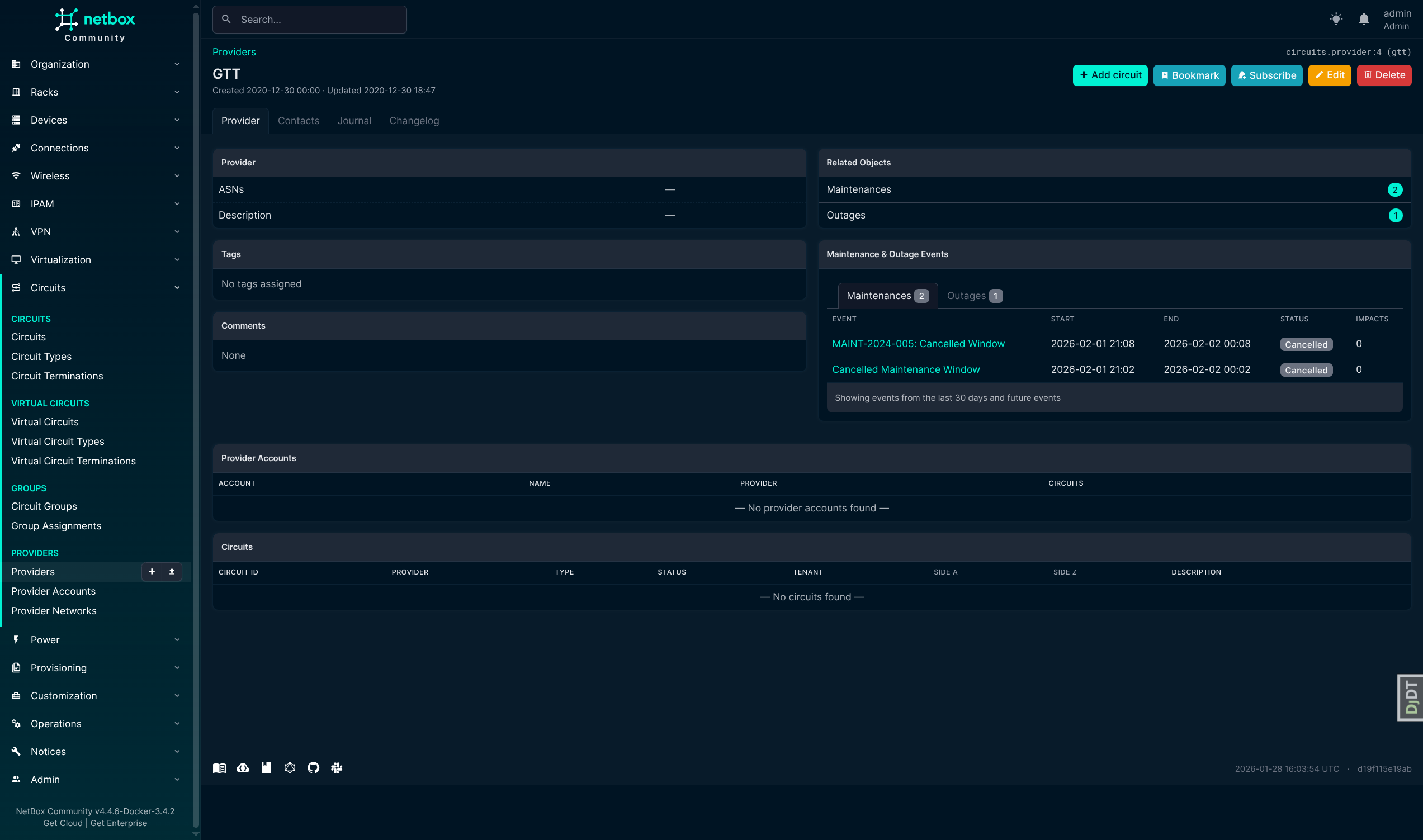
Key Features Shown:
- All maintenance and outage events for the provider
- Tabbed view with event counts
- Event status, timing, and impact count
- ETR tracking for outages
Object Event History Widget
A "Maintenance & Outage History" widget automatically appears on the detail pages of any impacted NetBox objects (circuits, devices, sites, etc.). This provides quick visibility into events affecting specific infrastructure.
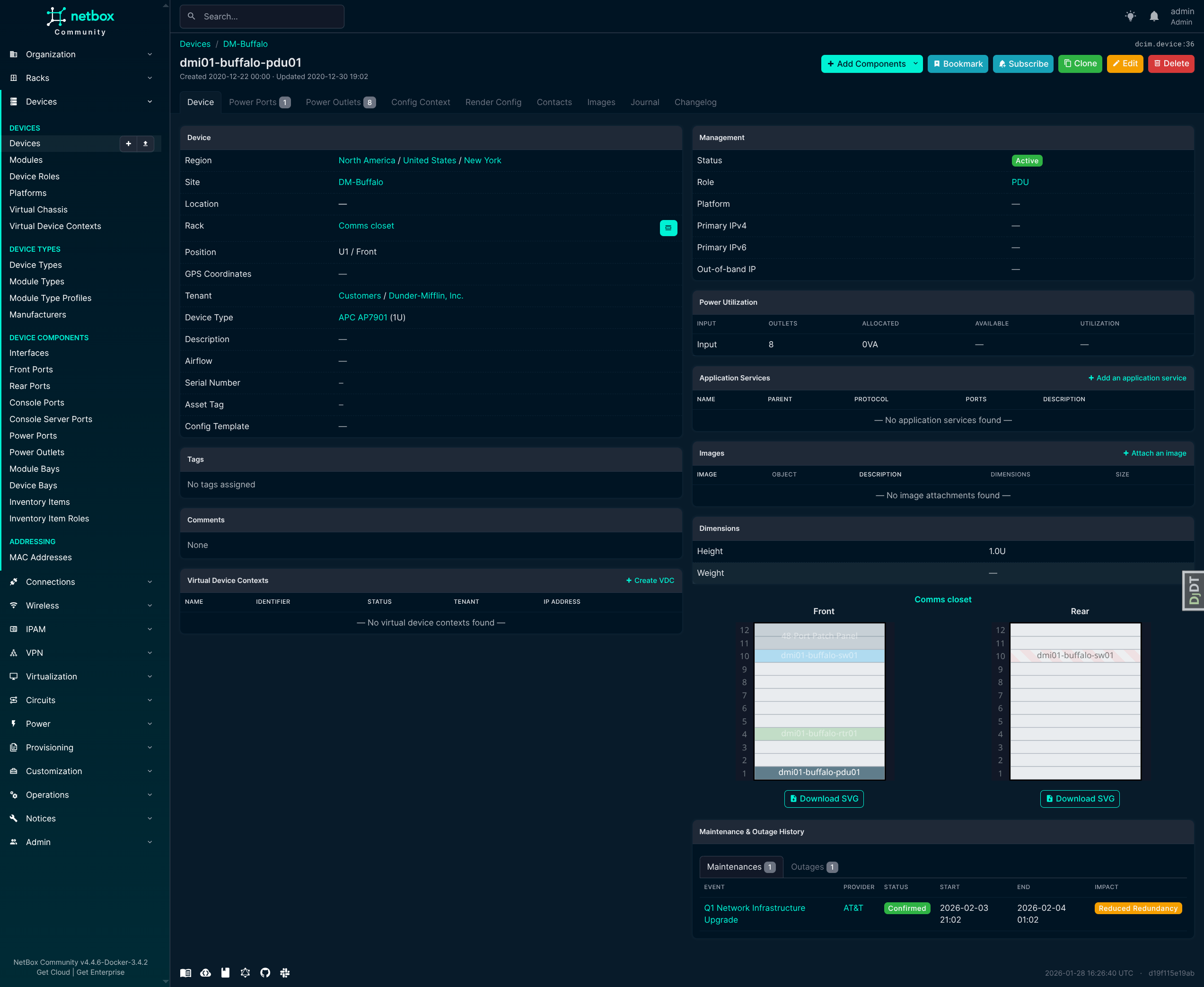
Key Features Shown:
- Tabbed view separating maintenances and outages
- Event counts in tab badges
- Links to event details
- Status and impact level badges
Credits
Forked from jasonyates/netbox-circuitmaintenance with significant enhancements including multi-object type support and outage tracking.
Based on the NetBox plugin tutorial:
This package was created with Cookiecutter and the netbox-community/cookiecutter-netbox-plugin project template.
1 maintainer

Metadata
1 maintainer
Release files for netbox-notices 1.3.0
For a detailed explanation of source distributions (sdists) and built distributions (wheels), please see the package formats documentation.
Source distribution (sdist)
| File | Size | Uploaded | |
|---|---|---|---|
| netbox_notices-1.3.0.tar.gz | 3.6 MB | Details |
Built distribution (wheel)
| File | Interpreter | ABI | Platform | Reset |
|---|---|---|---|---|
| netbox_notices-1.3.0-py3-none-any.whl | Python 3 | none | any | Details |
Total release size: 3.8 MB
Release files / netbox_notices-1.3.0.tar.gz
| Download URL | netbox_notices-1.3.0.tar.gz |
|---|---|
| Size | 3.6 MB |
| Tags | Source |
|
SHA-256 checksum How to use checksums |
de8929472a72a6e527162e76e4a630c7c8f4a684cc4b1cdb0d8701ec86ff040d
|
|
BLAKE2b-256 checksum How to use checksums |
e6fa717ff15378b9f986a8540c61a70a6fe6b3681d89f86b52cd1edc82a8077a
|
| Upload date | |
|
Uploaded using Trusted Publishing? What is trusted publishing? |
Yes |
| Uploaded via |
twine/7.0.0 CPython/3.13.14
|
Provenance
Provenance describes where a file came from. On PyPI, provenance is shared via attestations, which provide a verifiable record of the build or publishing details. View details, limitations and caveats.


PyPI Publish Attestation
PyPI verified that this artifact, at this checksum, originated from the publisher listed below.
Signed by GitHub Actions, verified by PyPI on Sep 12, 2026.
Transparency logRelease files / netbox_notices-1.3.0-py3-none-any.whl
| Download URL | netbox_notices-1.3.0-py3-none-any.whl |
|---|---|
| Size | 194.7 kB |
| Tags | Python 3 |
|
SHA-256 checksum How to use checksums |
7bcd172d0e8d57ae134e75b3eb5cc0b7314e34da3b57cc446ecdf201876fb37b
|
|
BLAKE2b-256 checksum How to use checksums |
f622ca9c0a7038e80098c75b696b6469070bafb9476ecdc10b835f70dba5a651
|
| Upload date | |
|
Uploaded using Trusted Publishing? What is trusted publishing? |
Yes |
| Uploaded via |
twine/7.0.0 CPython/3.13.14
|
Provenance
Provenance describes where a file came from. On PyPI, provenance is shared via attestations, which provide a verifiable record of the build or publishing details. View details, limitations and caveats.
PyPI Publish Attestation
PyPI verified that this artifact, at this checksum, originated from the publisher listed below.
Signed by GitHub Actions, verified by PyPI on Sep 12, 2026.
Transparency log













