
netbox-osp

Outside-plant fibre management for NetBox — cables, splice closures, loss budgets, and an offline-capable plant map.







Outside-plant (OSP) fibre management for NetBox. netbox-osp extends NetBox's dcim models
with a full OSP data model — cables, buffer tubes, strands, splice closures, trays, and end-to-end
fibre links — and pairs it with a full-screen interactive plant map. The plugin is offline-first
(no PostGIS, no upstream tile servers required), applies TIA-598-C colour ordering automatically,
and computes a per-link loss budget so operators can see at a glance whether a span meets its
attenuation target.
Screenshots
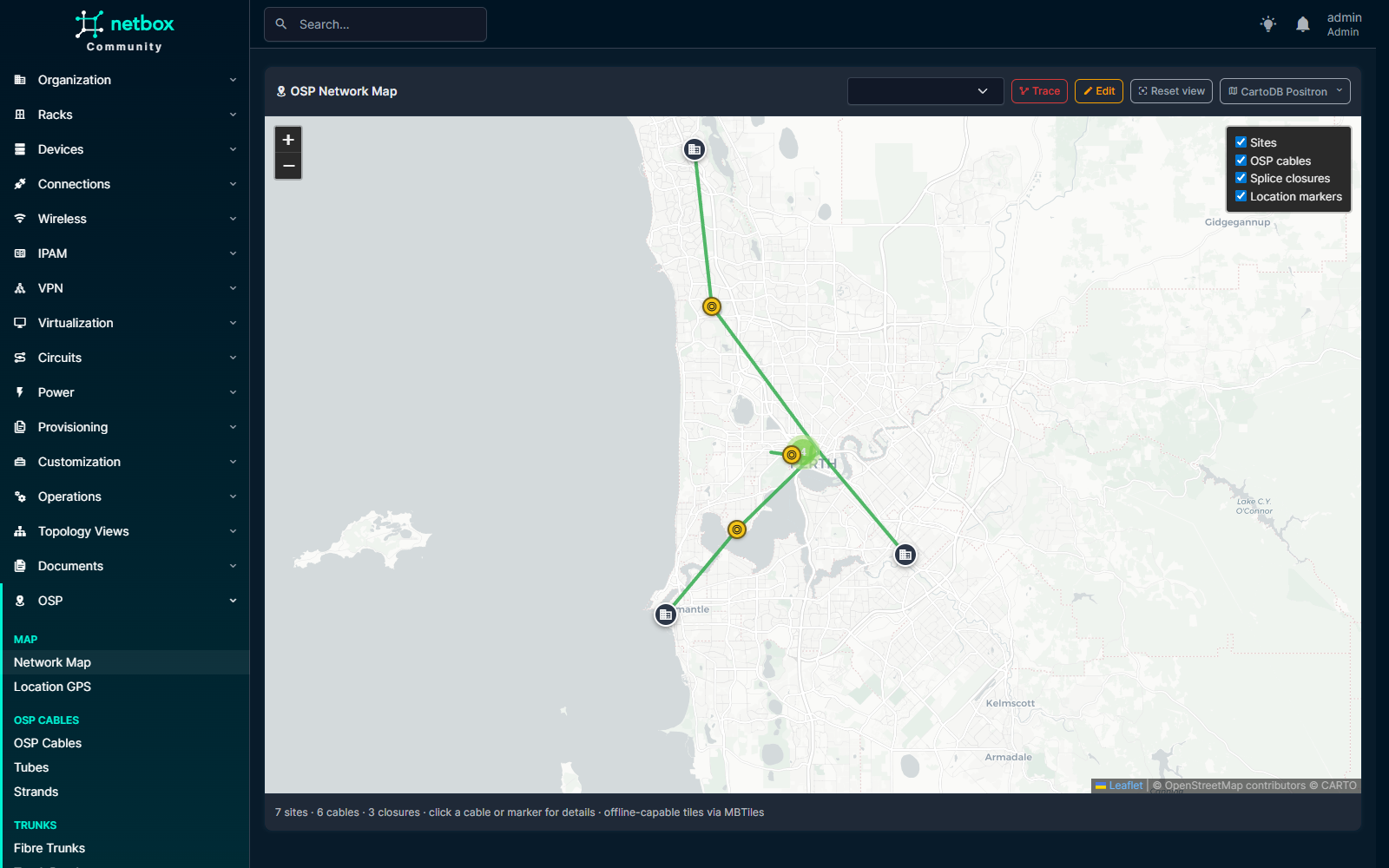
Full-screen Leaflet plant map at /plugins/osp/map/ — OSP cables, splice closures, Sites, and per-Location markers all filterable.
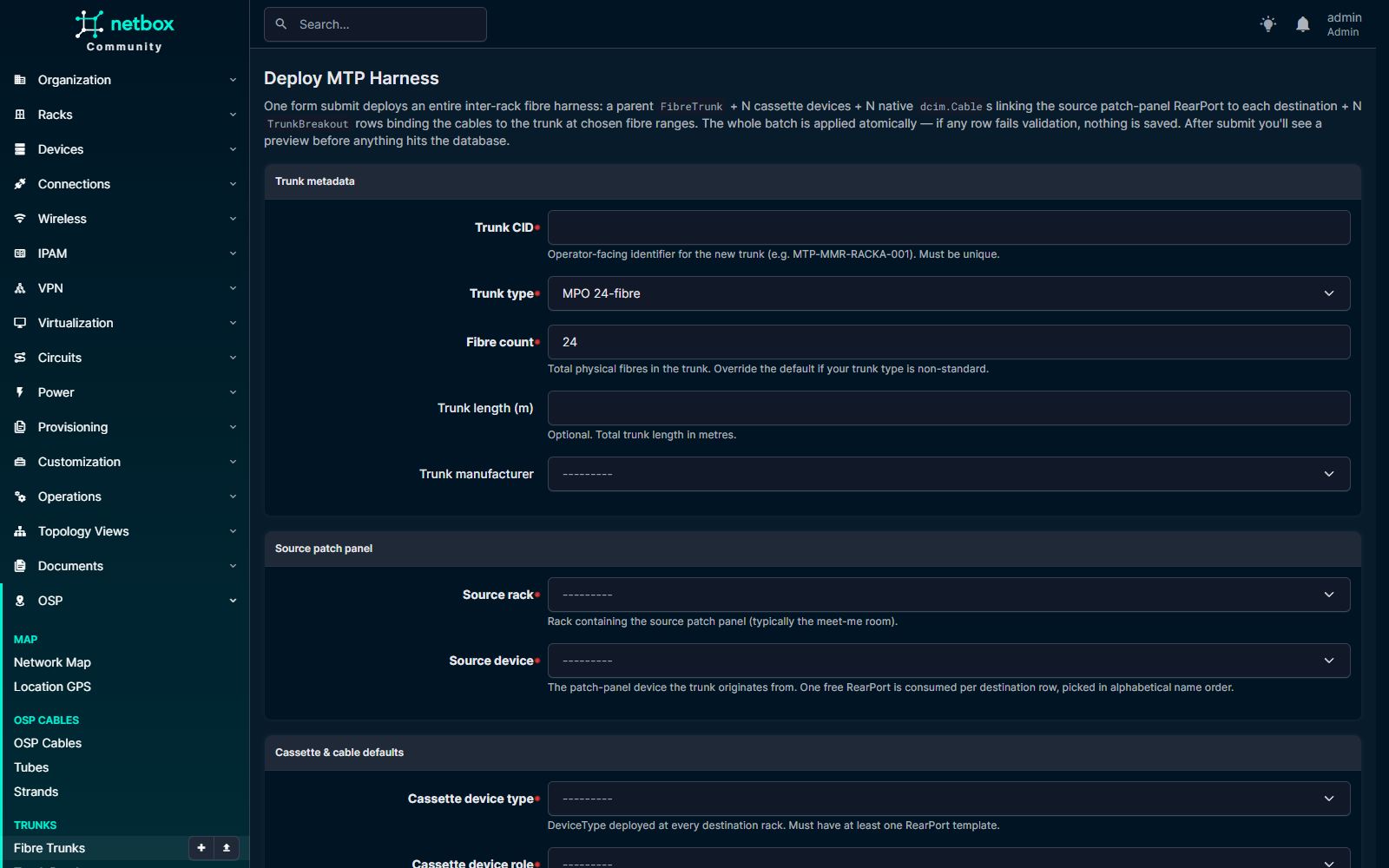
One form submit atomically deploys a parent FibreTrunk + N cassette devices + N cables + N TrunkBreakout rows.
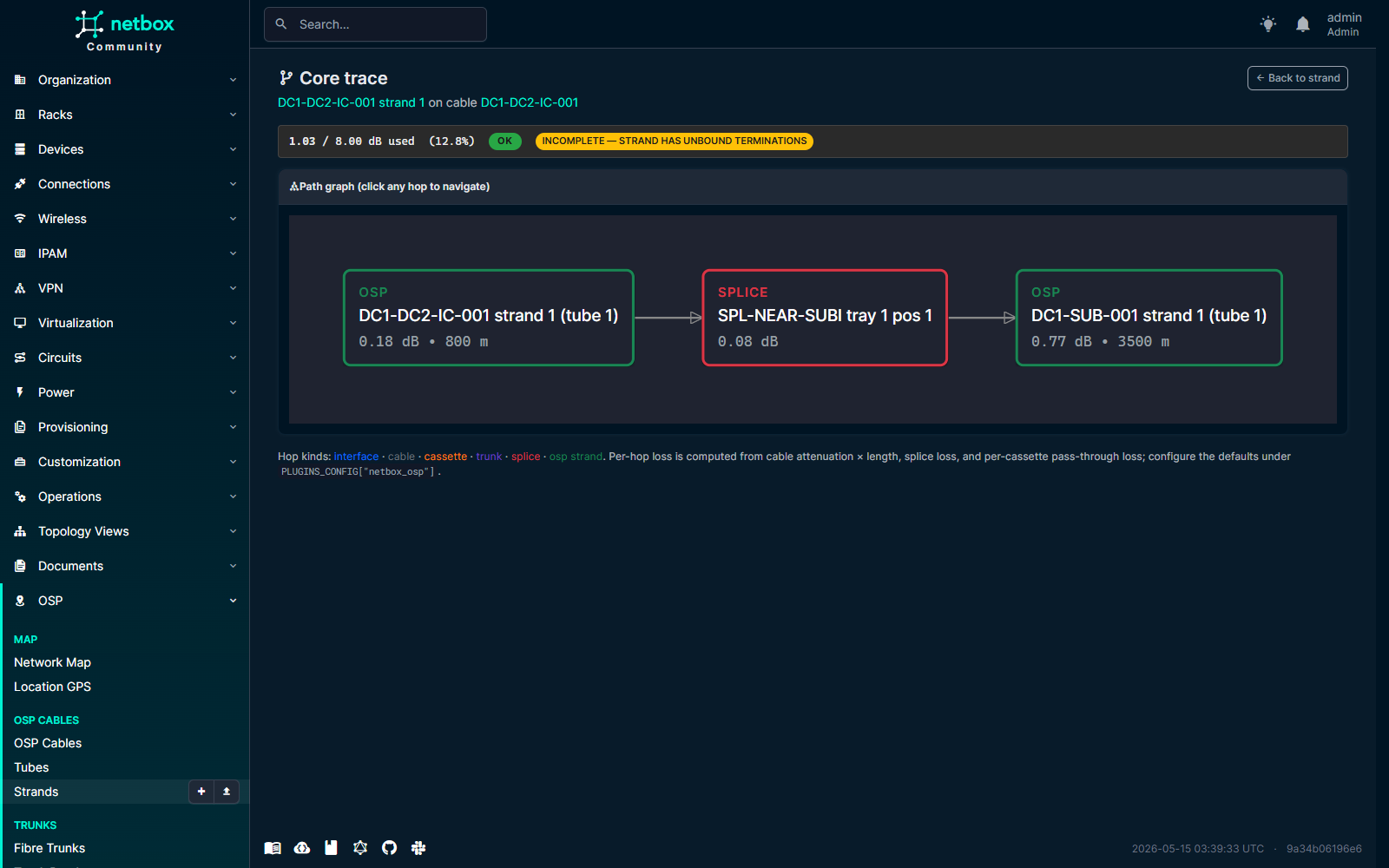
Click "Trace this core" on any Strand / FrontPort / Interface. Each hop is clickable; loss budget banded ok/warn/fail above the graph.
Features
- OSP cable / tube / strand data model — multi-tube armoured cables with TIA-598-C
colour-coded tubes and strands. The
fibre_count == tube_count * fibres_per_tubeinvariant is enforced inclean(). - Splice closures, trays, and splices — model dome / inline / pedestal / handhole / wall-mount / aerial closures, with measured per-splice loss and OTDR trace links.
- Fibre-link loss budget — chain strands through splices into an end-to-end logical link. The plugin computes strand attenuation × length + per-splice + per-connector loss, renders an SVG gauge, and bands the result as ok / warn / fail against a configurable target budget.
- Full-screen Leaflet map with seven online base layers (OSM, HOT OSM, CartoDB Positron and Dark Matter, OpenTopoMap, CyclOSM, Esri World Imagery) plus a bundled offline MBTiles layer. The map auto-falls-back to offline after three tile errors in five seconds and remembers the operator's explicit choice across reloads.
- GeoJSON cable-route editor — leaflet-geoman drag-to-edit on cables and closures, sharing the same base-layer machinery as the main map.
- Plant-boundary validation — set a closed polygon in
PLUGINS_CONFIGandOspCable.clean()rejects any cable whose route falls outside it. Pure-Python ray-casting, no PostGIS dependency. - Per-Location GPS markers —
LocationGeois a 1:1 side-table ondcim.Locationthat adds latitude / longitude / elevation / marker colour, rendered as overlays on the network map and as a panel on the Location detail page. - REST + GraphQL APIs — full CRUD on every model under
/api/plugins/osp/...plus read-only GraphQL types viastrawberry-djangoat NetBox's shared/graphql/endpoint. - Bulk import / bulk edit for tubes, strands, splices, trays, closures, and LocationGeo — closes the ~300-click data-entry gap on a 288-strand cable.
- NetBox 4.6+ with a CI matrix covering Python 3.12 and 3.13 on Postgres 17 + Redis 7.
Compatibility
| netbox-osp | NetBox | Python | Postgres | Redis | Notes |
|---|---|---|---|---|---|
| 0.1.x | 4.6.x | 3.12 · 3.13 | 17 | 7 | First functional release. |
PostGIS is not required — geometry is stored as GeoJSON in JSONField columns and
plant-boundary validation uses pure-Python ray-casting. See COMPATIBILITY.md
for the full support policy, NetBox / Python / Postgres version policies, and upgrade-path
guidance.
Install
From PyPI
The recommended path for production installs:
pip install netbox-osp
Enable the plugin in NetBox's configuration/plugins.py:
PLUGINS = [
    "netbox_osp",
]
Apply migrations and collect static assets:
python manage.py migrate
python manage.py collectstatic --no-input
Restart NetBox and the RQ workers.
From source (development)
git clone https://github.com/iamjohnnymac/netbox-osp.git
cd netbox-osp
pip install -e .
Then follow the same PLUGINS / migrate / collectstatic steps above.
With netbox-docker
Add the plugin to plugin_requirements.txt:
netbox-osp
Enable it in configuration/plugins.py:
PLUGINS = [
    "netbox_osp",
]

PLUGINS_CONFIG = {
    "netbox_osp": {
        "default_attenuation_db_per_km": 0.22,
        "default_splice_loss_db": 0.10,
        "default_connector_loss_db": 0.30,
        "map_default_center": [0.0, 0.0],
        "map_default_zoom": 2,
    },
}
Rebuild and restart the netbox and netbox-worker containers.
See docs/install.md for the complete walk-through.
Configuration
All settings live under PLUGINS_CONFIG["netbox_osp"]:
PLUGINS_CONFIG = {
    "netbox_osp": {
        # Fallback attenuation when an OspCable has no explicit value.
        "default_attenuation_db_per_km": 0.22,

        # Fallback per-splice loss when a Splice has no explicit loss_db.
        "default_splice_loss_db": 0.10,

        # Per-connector loss applied at both ends of every FibreLink.
        "default_connector_loss_db": 0.30,

        # Default Leaflet view as [lat, lon]. Set to your area of interest.
        "map_default_center": [0.0, 0.0],

        # Default Leaflet zoom level. 13-16 is appropriate for site scale.
        "map_default_zoom": 2,

        # Optional closed polygon of [lon, lat] vertices (GeoJSON order).
        # If set, OspCable.clean() rejects any cable whose route falls
        # outside the polygon. Pure-Python ray-casting; no PostGIS needed.
        # "plant_boundary": [
        #     [10.000, 50.000],
        #     [10.010, 50.000],
        #     [10.010, 50.010],
        #     [10.000, 50.010],
        # ],
    },
}
| Key | Default | Purpose |
|---|---|---|
default_attenuation_db_per_km |
0.22 |
Fallback attenuation when an OspCable has no explicit value. |
default_splice_loss_db |
0.10 |
Fallback per-splice loss when a Splice has no explicit loss_db. |
default_connector_loss_db |
0.30 |
Per-connector loss applied at both ends of every FibreLink. |
map_default_center |
[0.0, 0.0] |
[lat, lon] for the default map view. |
map_default_zoom |
2 |
Default Leaflet zoom level (13–16 is appropriate for site scale). |
plant_boundary |
None |
Optional closed [lon, lat] polygon. Validates OspCable.route. |
See docs/configure.md for deeper docs on plant-boundary validation, per-Location GPS markers, and GraphQL.
Ecosystem integrations
netbox-osp composes with the wider NetBox plugin ecosystem rather than reinventing it.
Each integration below is optional — the plugin runs fine without any of them.
- netbox-attachments — attach OTDR
.sortraces, splice photos, as-built drawings, and acceptance certificates to any OSP model. Install withpip install netbox-osp[attachments]and add ascope_filterblock toPLUGINS_CONFIG. - Field QR codes — built-in QR panel on
SpliceClosureandSpliceTraydetail pages encoding the absolute URL. Field crews scan from a printed closure label and land on the splice plan with attached photos. Install withpip install netbox-osp[qrcode]; noPLUGINS_CONFIGchanges needed.
See docs/integrations.md for the full configuration snippets, use-case matrix, and verification steps.
Data model
All geometry is stored as GeoJSON in WGS84 with [lon, lat] order (RFC 7946). Conversion
to Leaflet's [lat, lon] happens at the JS boundary only.
dcim.Site                                       dcim.Manufacturer
  |  |                                                |
  |  +--< OspCable >-----------< Tube >-----< Strand --+
  |          (route GeoJSON)         |          |
  |                                  +--------- |
  |                                             +--> dcim.Cable
  |                                             |    (Strand.cable_link, optional)
  |                                             |
  +--< SpliceClosure >--< SpliceTray >--< Splice >--+
            (Point)                       (strand_a, strand_b)

  FibreLink >--< FibreLinkStrand >--< Strand
        (loss budget, status)         (ordered hops)
| Model | Purpose |
|---|---|
OspCable |
A physical fibre cable run between two sites. Stores type, attenuation, GeoJSON route, and length. |
Tube |
A buffer tube inside an OspCable. Unique on (cable, number). |
Strand |
A single fibre strand. Optional bridge to dcim.Cable via Strand.cable_link for legacy strand-as-cable flows. |
SpliceClosure |
A physical splice enclosure (dome, pedestal, etc.) sited at a location with optional GeoJSON point. |
SpliceTray |
A tray inside a closure. Holds individual splices. |
Splice |
A fusion or mechanical splice joining two strands. Stores measured loss_db and an optional OTDR trace URL. |
FibreLink |
A logical end-to-end link composed of one or more strands joined by splices, with a configurable loss budget. |
FibreLinkStrand |
Through-table assigning strands to a FibreLink in ordered hops. |
LocationGeo |
1:1 side-table on dcim.Location adding latitude / longitude / elevation / marker colour for per-Location pins. |
See docs/data-model.md for the field-by-field reference.
API
REST
All endpoints sit under /api/plugins/osp/. Standard NetBox auth (Authorization: Token <key>)
and filtering / pagination apply.
| Path | Methods | Notes |
|---|---|---|
/api/plugins/osp/cables/ |
GET / POST / PATCH / DELETE | List + CRUD OspCable |
/api/plugins/osp/tubes/ |
GET / POST / PATCH / DELETE | List + CRUD Tube |
/api/plugins/osp/strands/ |
GET / POST / PATCH / DELETE | List + CRUD Strand |
/api/plugins/osp/closures/ |
GET / POST / PATCH / DELETE | List + CRUD SpliceClosure |
/api/plugins/osp/trays/ |
GET / POST / PATCH / DELETE | List + CRUD SpliceTray |
/api/plugins/osp/splices/ |
GET / POST / PATCH / DELETE | List + CRUD Splice |
/api/plugins/osp/links/ |
GET / POST / PATCH / DELETE | List + CRUD FibreLink |
/api/plugins/osp/location-geos/ |
GET / POST / PATCH / DELETE | List + CRUD LocationGeo |
GraphQL
Types are registered with NetBox's shared /graphql/ endpoint and authenticate with the same
API token as REST.
{
  osp_cable_list {
    id
    cid
    status
    fibre_count
    length_m
  }
}
The schema is read-only — use REST for writes.
UI endpoints
| Path | Purpose |
|---|---|
/plugins/osp/map/ |
Full-screen network map (HTML) |
/plugins/osp/map/data/ |
Map GeoJSON FeatureCollection (filterable) |
/plugins/osp/tiles/<z>/<x>/<y>.<ext> |
Tile proxy backed by MBTiles |
Map tiles
The plant map uses Leaflet with seven public online base layers plus a bundled offline MBTiles
layer, and auto-falls-back to offline after three tile-load failures in five seconds. To replace
the bundled stub with your own area's imagery, drop one or more .mbtiles files under
<MEDIA_ROOT>/osp_tiles/ — they take precedence over the bundled basemap. See
docs/tile-bundling.md for the tilemaker-based build workflow.
Development
git clone https://github.com/iamjohnnymac/netbox-osp.git
cd netbox-osp
pip install -e ".[test,docs]"
pre-commit install
Run the lint + format check and the test suite:
pre-commit run --all-files
python -m coverage run -m pytest
Ruff (lint + format) is configured in pyproject.toml to match the wider NetBox plugin
ecosystem; the pre-commit hook runs it on every commit.
Roadmap
- Short-term — extend the permission-matrix tests to the remaining seven primary-object view
sets, finish debugging the GraphQL
osp_<model>_listfield surfacing against a live/graphql/endpoint. - Medium-term — OTDR trace upload, DWDM channel allocation on
FibreLink, QGIS-friendly export of cable routes. - Long-term — optional PostGIS backend for users who want native spatial indexes, and submission to the NetBox Labs Plugin Certification Program.
Issue tracker for the live picture: https://github.com/iamjohnnymac/netbox-osp/issues.
Contributing
PRs welcome. Please run pre-commit run --all-files and ensure the test suite passes before
pushing, and keep new code aligned with the ruff config in pyproject.toml. Substantive
changes should add or update tests under netbox_osp/tests/. A formal CONTRIBUTING.md will
land alongside the first cert-program submission.
Support
- Bug reports — https://github.com/iamjohnnymac/netbox-osp/issues
- Questions and discussion — https://github.com/iamjohnnymac/netbox-osp/discussions
- Chat —
#netbox-pluginson NetDev Slack
License
Apache-2.0. See LICENSE for the full text. Icon CC BY 4.0.
1 maintainer

Metadata
1 maintainer
Release files for netbox-osp 0.3.8
For a detailed explanation of source distributions (sdists) and built distributions (wheels), please see the package formats documentation.
Source distribution (sdist)
| File | Size | Uploaded | Provenance | |
|---|---|---|---|---|
| netbox_osp-0.3.8.tar.gz | 548.8 kB | With provenance | Details |
Built distribution (wheel)
| File | Interpreter | ABI | Platform | Reset |
|---|---|---|---|---|
| netbox_osp-0.3.8-py3-none-any.whl | Python 3 | none | any | Details |
Total release size: 1.1 MB
Release files / netbox_osp-0.3.8.tar.gz
| Download URL | netbox_osp-0.3.8.tar.gz |
|---|---|
| Size | 548.8 kB |
| Tags | Source |
|
SHA-256 checksum How to use checksums |
09915875fa9d8bd7068f9611c44609e9594f0bb8711f053b33054565b13a85a3
|
|
BLAKE2b-256 checksum How to use checksums |
024477d5886ca9058db7ca3c79ee15e90ff69b0a565ac3069c6bf89002ad5257
|
| Upload date | |
|
Uploaded using Trusted Publishing? What is trusted publishing? |
Yes |
| Uploaded via |
twine/6.1.0 CPython/3.13.12
|
Provenance
Provenance describes where a file came from. On PyPI, provenance is shared via attestations, which provide a verifiable record of the build or publishing details. View details, limitations and caveats.


PyPI Publish Attestation
PyPI verified that this artifact, at this checksum, originated from the publisher listed below.
Signed by GitHub Actions, verified by PyPI on May 19, 2026.
Transparency logRelease files / netbox_osp-0.3.8-py3-none-any.whl
| Download URL | netbox_osp-0.3.8-py3-none-any.whl |
|---|---|
| Size | 581.3 kB |
| Tags | Python 3 |
|
SHA-256 checksum How to use checksums |
c5cdf328a820a85c7a81f4504d9d3c0308d2ec1517ed4d2779dae6de288e45d2
|
|
BLAKE2b-256 checksum How to use checksums |
1e59c3a3bd0adb2b57a409a20d0e958a41eb1803b7d6b57c25a8e545aa00cdf6
|
| Upload date | |
|
Uploaded using Trusted Publishing? What is trusted publishing? |
Yes |
| Uploaded via |
twine/6.1.0 CPython/3.13.12
|
Provenance
Provenance describes where a file came from. On PyPI, provenance is shared via attestations, which provide a verifiable record of the build or publishing details. View details, limitations and caveats.
PyPI Publish Attestation
PyPI verified that this artifact, at this checksum, originated from the publisher listed below.
Signed by GitHub Actions, verified by PyPI on May 19, 2026.
Transparency logSecurity for netbox-osp 0.3.8
Provenance
Provenance describes where a file came from. On PyPI, provenance is shared via attestations, which provide a verifiable record of the build or publishing details. View details, limitations and caveats.
Full provenance
All 2 files in this release have been uploaded with provenance metadata.
Attestation for netbox_osp-0.3.8.tar.gz
PyPI Publish Attestation
PyPI verified that this artifact, at this checksum, originated from the publisher listed below.
Signed by GitHub Actions, verified by PyPI on May 19, 2026.
Transparency logA note on package security
PyPI is a repository for distributing packages, not a service for auditing them. While third-party security researchers and our staff do their best to detect and remove malicious packages, PyPI cannot guarantee the quality, security or suitability of any given package.














