
NetBox plugin to display PRTG monitoring status on device pages
Verified details
These details have been verified by PyPIProject links
GitHub Statistics
Maintainers

Project description
NetBox PRTG Plugin

A NetBox plugin that displays PRTG Network Monitor status on Device and Virtual Machine detail pages.





Features
- Device Tab: Shows PRTG monitoring summary on device detail pages
- Virtual Machine Tab: Shows PRTG monitoring summary on VM detail pages
- Sensor Summary: Displays sensor counts by status (Up, Warning, Down, Paused)
- Export to PRTG: Create devices in PRTG directly from NetBox with auto-discovery
- Virtual Chassis Support: Monitors entire stack using VC name and master IP
- Direct Links: Quick link to view the device in PRTG
- Caching: Configurable caching to minimize API calls
- Custom Field: Optional
prtg_device_idfield for explicit device mapping
Screenshots
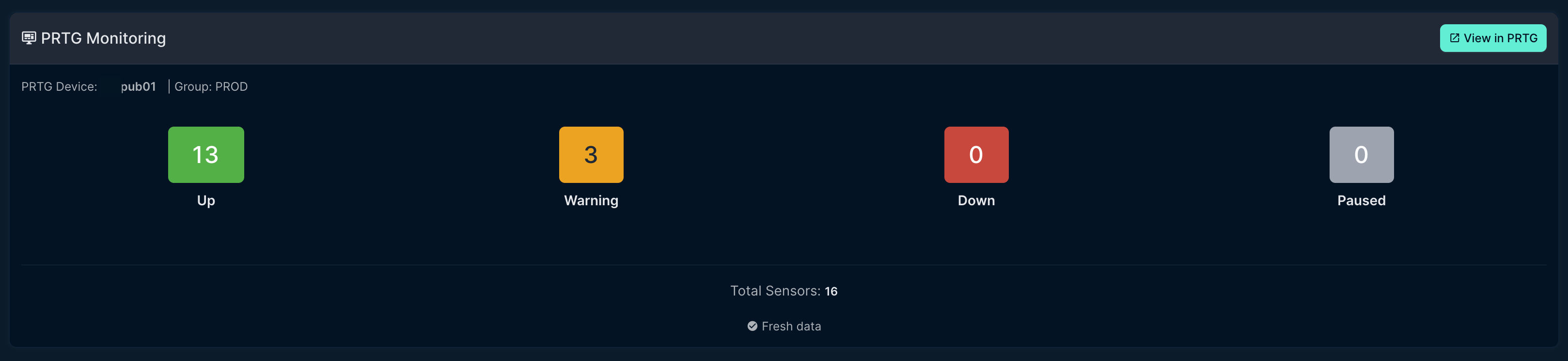
Device Tab
Shows sensor status summary with color-coded badges for quick status overview.
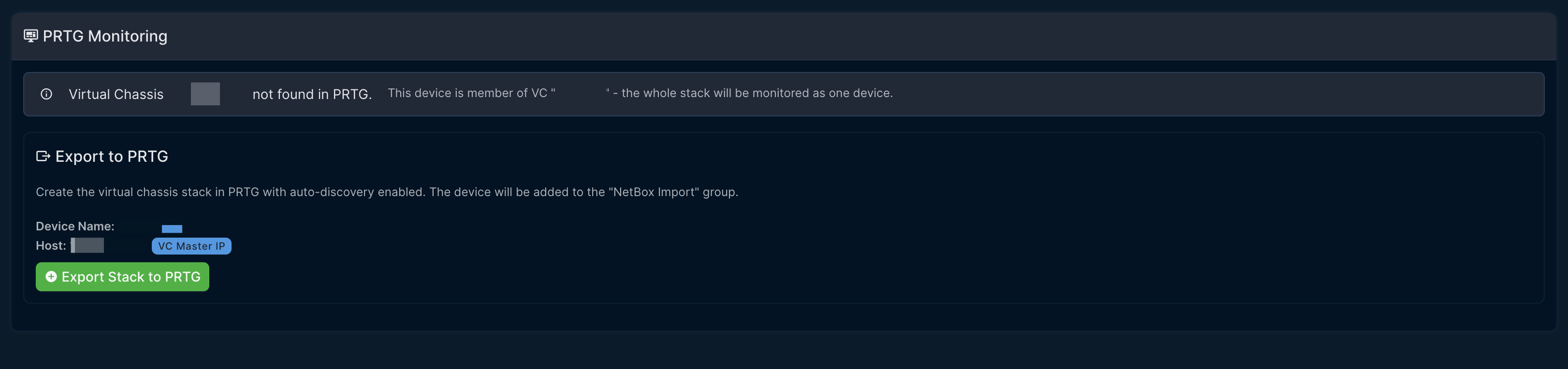
Export to PRTG
Export devices from NetBox to PRTG with one click.
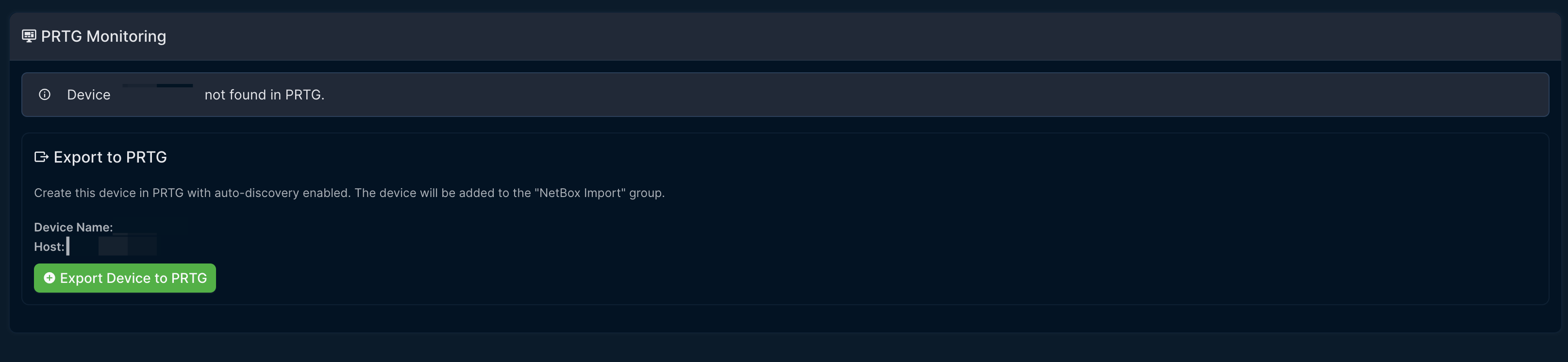
Export Confirmation
Confirmation dialog showing device details before export.
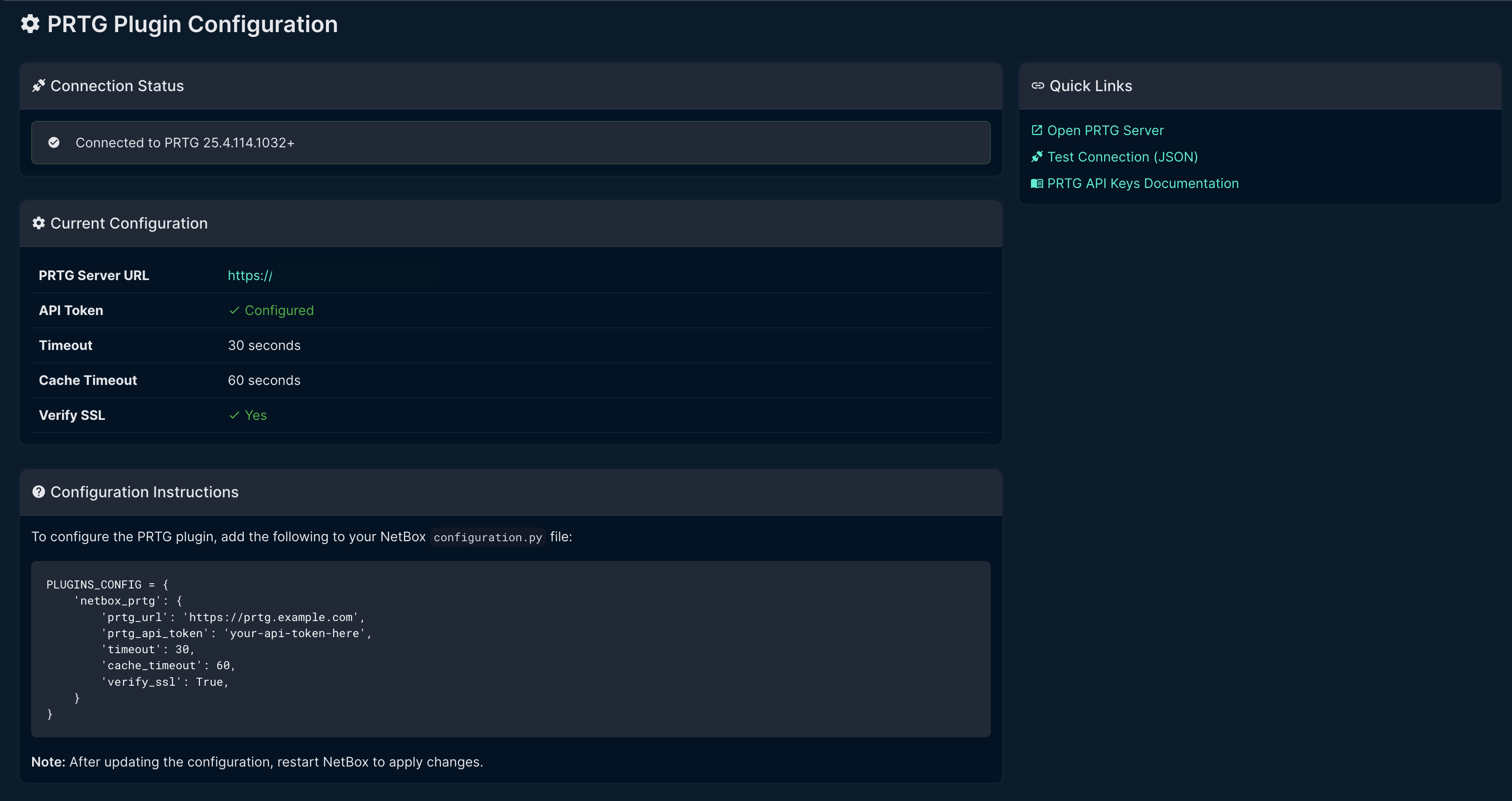
Settings Page
Displays current configuration and connection status.
Requirements
- NetBox 4.0.0 or higher
- PRTG Network Monitor with API access
- PRTG API Token
Note: This plugin is developed and tested exclusively on NetBox 4.x. It is not compatible with NetBox 3.x due to API and model changes.
Installation
Via pip (recommended)
pip install netbox-prtg
From source
git clone https://github.com/sieteunoseis/netbox-prtg.git
cd netbox-prtg
pip install .
Configuration
- Add the plugin to your NetBox
configuration.py:
PLUGINS = [
    'netbox_prtg',
]

PLUGINS_CONFIG = {
    'netbox_prtg': {
        'prtg_url': 'https://prtg.example.com',
        'prtg_api_token': 'your-api-token-here',
        'timeout': 30,
        'cache_timeout': 60,
        'verify_ssl': True,
    }
}
- Restart NetBox to load the plugin.
Configuration Options
| Option | Type | Default | Description |
|---|---|---|---|
prtg_url |
string | "" |
PRTG server URL (e.g., https://prtg.example.com) |
prtg_api_token |
string | "" |
API token from PRTG account settings |
timeout |
int | 30 |
API request timeout in seconds |
cache_timeout |
int | 60 |
How long to cache API responses in seconds |
verify_ssl |
bool | True |
Verify SSL certificates |
Getting a PRTG API Token
- Log into your PRTG web interface
- Go to Setup > Account Settings > My Account
- Under API Keys, click Create API Key
- Copy the token and add it to your NetBox configuration
Usage
Device Matching
The plugin matches NetBox devices to PRTG devices by hostname. The device name in NetBox must match the device name in PRTG.
For explicit mapping, you can set the prtg_device_id custom field on a device with the PRTG object ID.
Virtual Chassis Support
For devices that are members of a Virtual Chassis (VC), the plugin:
- Uses the VC name for PRTG device lookup/export (not individual member names)
- Uses the VC master's IP address as the host for monitoring
- Displays VC information in the PRTG tab
This allows you to monitor an entire switch stack as a single PRTG device.
Viewing Monitoring Status
- Navigate to any device or virtual machine detail page
- Click the PRTG tab
- View the sensor status summary
Exporting Devices to PRTG
When a device is not found in PRTG, you can export it directly:
- Click the Export to PRTG button
- The device is created in the "NetBox Import" group
- Auto-discovery runs to detect available sensors
- Move the device to the appropriate group in PRTG as needed
Status Indicators
| Status | Color | Description |
|---|---|---|
| Up | Green | Sensor is healthy |
| Warning | Orange | Sensor has warnings |
| Down | Red | Sensor is down/critical |
| Paused | Gray | Sensor is paused |
| Unusual | Amber | Sensor has unusual readings |
Development
Setup
cd ~/development
git clone https://github.com/sieteunoseis/netbox-prtg.git
cd netbox-prtg
python -m venv .venv
source .venv/bin/activate
pip install -e ".[dev]"
Running Lint Checks
black netbox_prtg/
isort netbox_prtg/
flake8 netbox_prtg/
Testing with NetBox Dev Instance
- Add to
netbox-dev/configuration/plugins.py - Mount in
netbox-dev/docker-compose.yml - Restart:
docker-compose restart netbox
API Endpoints Used
The plugin uses the following PRTG API endpoints:
GET /api/status.json- Test connectionGET /api/table.json?content=devices- Find devices by hostnameGET /api/table.json?content=sensors- Get device sensorsGET /api/table.json?content=groups- Find groupsGET /api/addgroup.htm- Create groupsGET /api/adddevice2.htm- Create devices with auto-discovery
Future Enhancements
- Detailed sensor list view
- Sensor alerts history
- Bulk device status view
- Conditional tab visibility
License
Apache License 2.0
Author
- sieteunoseis - GitHub
Links
Project details
Verified details
These details have been verified by PyPIProject links
GitHub Statistics
Maintainers
Release history Release notifications | RSS feed


Download files
Download the file for your platform. If you're not sure which to choose, learn more about installing packages.
Source Distribution
Built Distribution
Filter files by name, interpreter, ABI, and platform.
If you're not sure about the file name format, learn more about wheel file names.
Copy a direct link to the current filters
File details
Details for the file netbox_prtg-0.3.1.tar.gz.
File metadata
- Download URL: netbox_prtg-0.3.1.tar.gz
- Upload date:
- Size: 22.8 kB
- Tags: Source
- Uploaded using Trusted Publishing? Yes
- Uploaded via: twine/6.1.0 CPython/3.13.7
File hashes
| Algorithm | Hash digest | |
|---|---|---|
| SHA256 |
34ad65012025d6be98befd3ac868d029125060f8567453982744727400b903fb
|
|
| MD5 |
5b74ad4f2220aa10c7c175e82f79ef1b
|
|
| BLAKE2b-256 |
2b17e6703cc9abee77993bcaf3532046120223bb2ac87962911e5e7d2b1821e7
|
Provenance
The following attestation bundles were made for netbox_prtg-0.3.1.tar.gz:
Publisher:
release.yml on sieteunoseis/netbox-prtg
-
Statement:
-
Statement type:
https://in-toto.io/Statement/v1 -
Predicate type:
https://docs.pypi.org/attestations/publish/v1 -
Subject name:
netbox_prtg-0.3.1.tar.gz -
Subject digest:
34ad65012025d6be98befd3ac868d029125060f8567453982744727400b903fb - Sigstore transparency entry: 1010150709
- Sigstore integration time:
-
Permalink:
sieteunoseis/netbox-prtg@152cdfbf64cb3aaa1df1af15d18eb68caa3d2bcf -
Branch / Tag:
refs/tags/v0.3.1 - Owner: https://github.com/sieteunoseis
-
Access:
public
-
Token Issuer:
https://token.actions.githubusercontent.com -
Runner Environment:
github-hosted -
Publication workflow:
release.yml@152cdfbf64cb3aaa1df1af15d18eb68caa3d2bcf -
Trigger Event:
push
-
Statement type:
File details
Details for the file netbox_prtg-0.3.1-py3-none-any.whl.
File metadata
- Download URL: netbox_prtg-0.3.1-py3-none-any.whl
- Upload date:
- Size: 23.5 kB
- Tags: Python 3
- Uploaded using Trusted Publishing? Yes
- Uploaded via: twine/6.1.0 CPython/3.13.7
File hashes
| Algorithm | Hash digest | |
|---|---|---|
| SHA256 |
7933e6e5989fdb71dc8ddf1ca4ed4d073729205d99758ec8b51bc804502b441e
|
|
| MD5 |
641d0da21ce7113698460effce0082bd
|
|
| BLAKE2b-256 |
98b24ec20c8ffb746b18effecc172984a1ca676b506caad531646028b382fccd
|
Provenance
The following attestation bundles were made for netbox_prtg-0.3.1-py3-none-any.whl:
Publisher:
release.yml on sieteunoseis/netbox-prtg
-
Statement:
-
Statement type:
https://in-toto.io/Statement/v1 -
Predicate type:
https://docs.pypi.org/attestations/publish/v1 -
Subject name:
netbox_prtg-0.3.1-py3-none-any.whl -
Subject digest:
7933e6e5989fdb71dc8ddf1ca4ed4d073729205d99758ec8b51bc804502b441e - Sigstore transparency entry: 1010150760
- Sigstore integration time:
-
Permalink:
sieteunoseis/netbox-prtg@152cdfbf64cb3aaa1df1af15d18eb68caa3d2bcf -
Branch / Tag:
refs/tags/v0.3.1 - Owner: https://github.com/sieteunoseis
-
Access:
public
-
Token Issuer:
https://token.actions.githubusercontent.com -
Runner Environment:
github-hosted -
Publication workflow:
release.yml@152cdfbf64cb3aaa1df1af15d18eb68caa3d2bcf -
Trigger Event:
push
-
Statement type:






