
🗺️ NetBox Service Canvas
See which services run where and how they talk to each other, right inside NetBox.
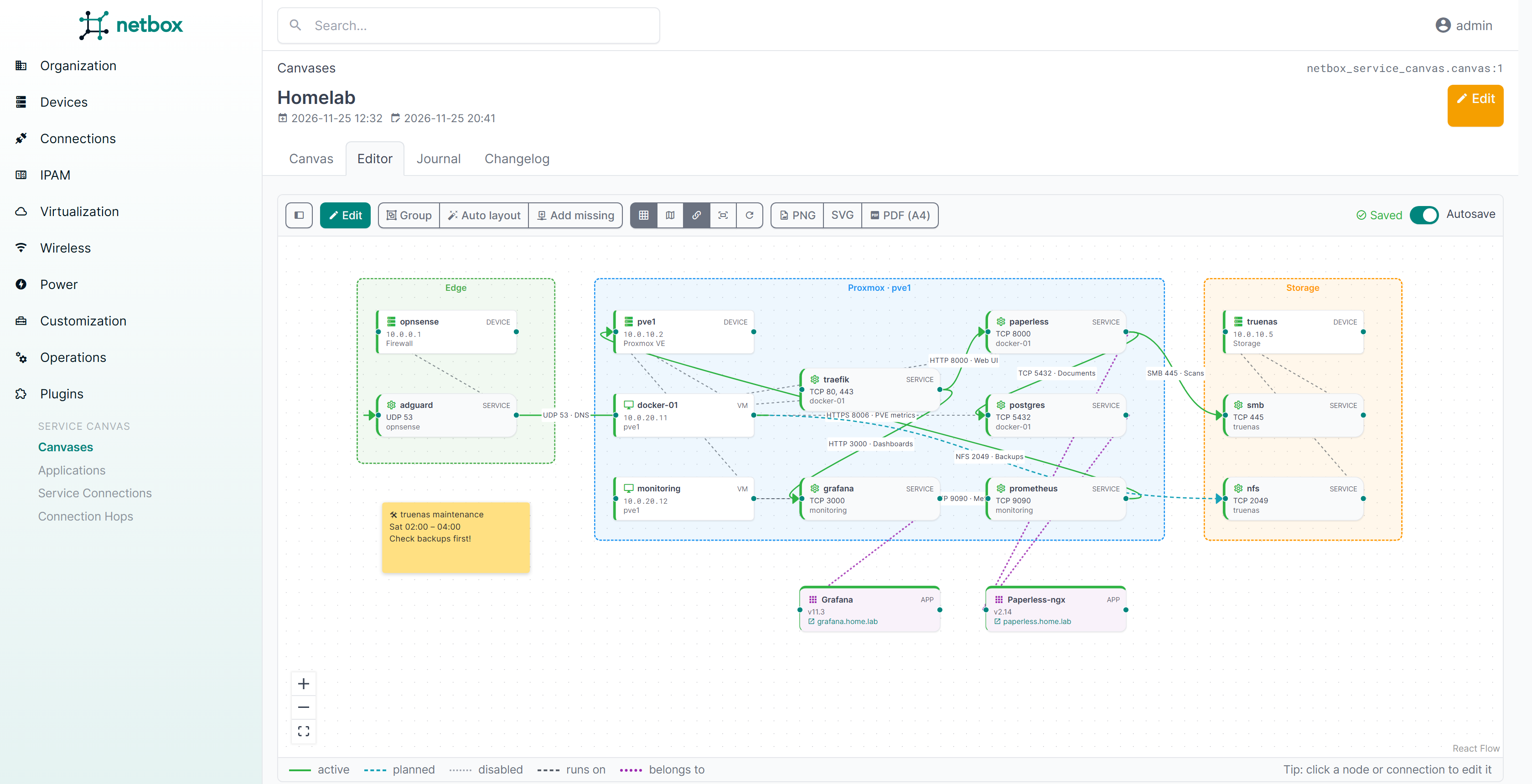
An interactive, drag-and-drop canvas for NetBox that turns your devices, VMs, services and applications into a living architecture diagram. The diagram is built from real NetBox data, not just drawn.







Features · Install · How it works · Permissions · API · 📖 Wiki · 🇩🇪 Deutsch
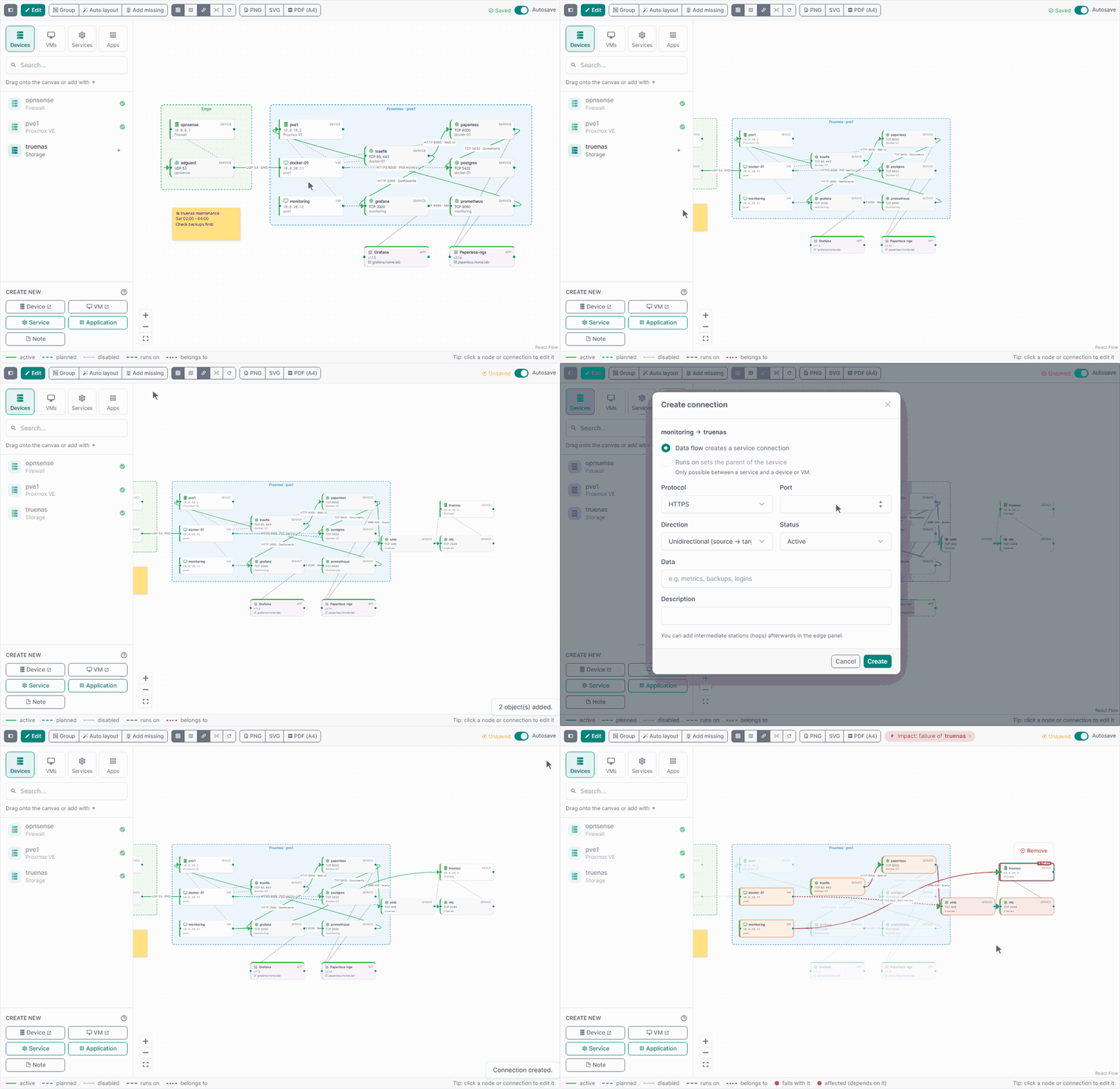
Drag a host in, let Add missing pull in its services, draw a connection, then ask what breaks if it fails.
💙 Why this exists
I love NetBox. It's the source of truth for everything in my homelab: racks, devices, VMs, IPs, VLANs. But one question it never answered at a glance was:
"Which service runs on which box, and who talks to whom over which port?"
The topology plugins show cables and links. I wanted the service layer: Grafana pulling metrics from Prometheus, Paperless writing to Postgres on the NAS, the reverse proxy in front of everything. So I built this plugin, and I hope it's useful to you too. ✨
🤖 Built 100% with AI
Full transparency: every line of this plugin was written by AI. That includes the Django models, the REST and GraphQL API, the React editor, the tests and this README. It was created with Claude (Anthropic) through Claude Code, with me as the product owner. I described what I wanted, tested it in my homelab and gave feedback.
It was an experiment in how far you can get when a NetBox fan with ideas teams up with an AI pair programmer. The answer: pretty far. Issues, ideas and PRs from humans (or their AIs 😄) are very welcome.
✨ Features
🧩 Data model (usable everywhere in NetBox, even without a canvas)
| Object | What it is |
|---|---|
| Service (NetBox core) | A port/protocol on exactly one device or VM, e.g. grafana, TCP 3000 on nas. |
| Application (new) | The software as a whole, made of one or more services, e.g. Grafana = web UI service + database service. Has status, version and URL. |
| Service Connection (new) | "A talks to B": source/target can be a service, device, VM or application. Includes direction, protocol, port, data description and status. |
| Connection Hop (new) | Ordered waypoints of a connection: reverse proxy, VRF, VLAN, tunnel, prefix, IP… |
- Full NetBox integration: list views, filters, CSV import, bulk edit, global search, REST API, GraphQL, change log and journal.
- Connections tab (dependency table) on device, VM, service and application pages.
- Applications panel on service, device and VM pages.
- Show on canvas button that jumps straight into the editor and highlights the object.
🎨 Canvas editor
- 🖱️ Drag & drop devices, VMs, services and applications from a searchable sidebar.
- 🔗 Draw an edge to create real data. A data flow creates a
ServiceConnection, and runs on sets the service's host. - 🪟 Node panel (click any node): details, its connections, quick edit for services and applications, a link to the full NetBox form (with a jump back to the editor) and remove from canvas.
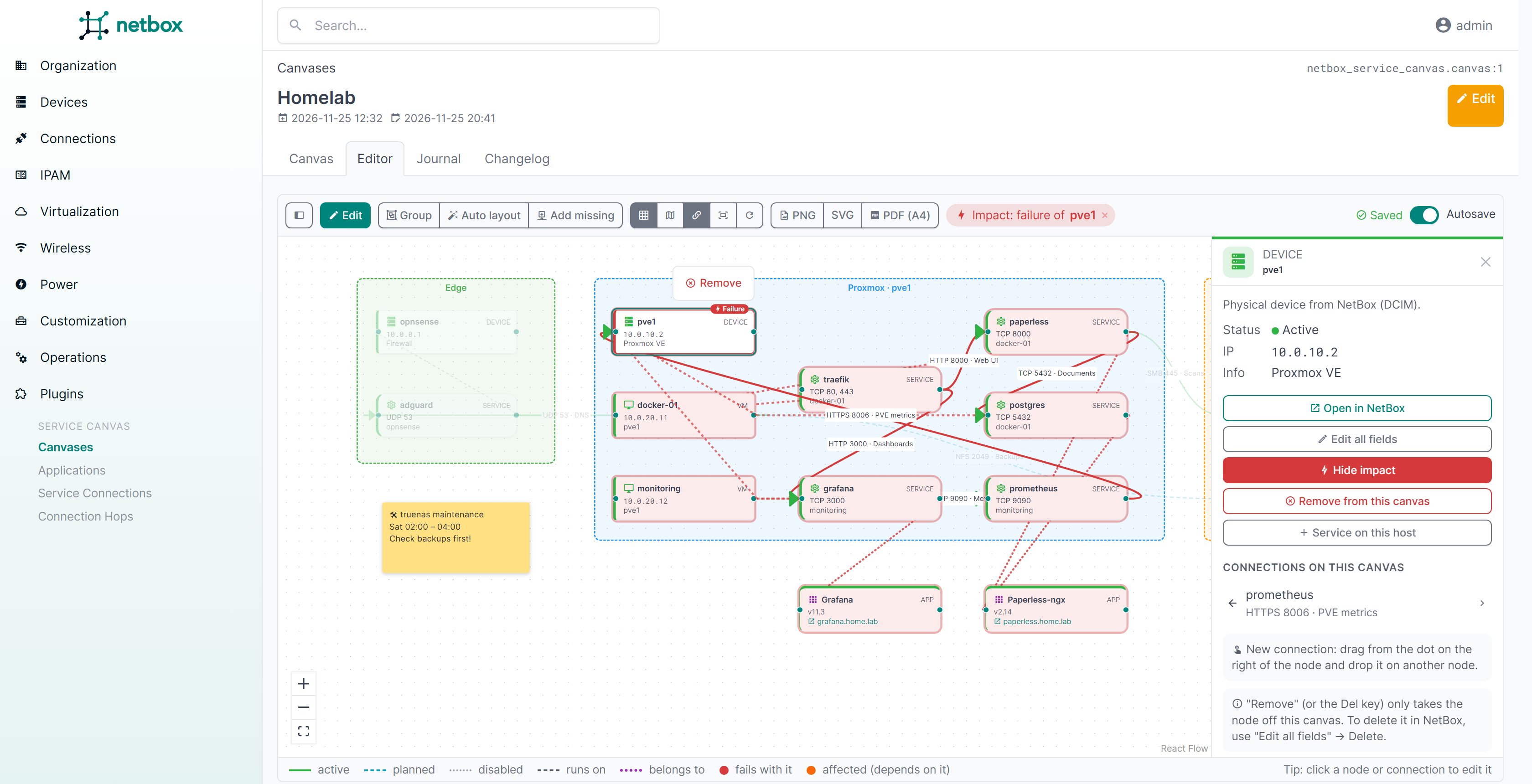
- ⚡ Impact analysis: "What breaks if this box goes down?" Red marks what fails with it (a hypervisor takes its VMs, their services and applications down with it), orange marks everything that depends on it (transitively).
- 📝 Sticky notes for maintenance windows, TODOs and explanations.
- 🗂️ Groups (racks, clusters, VLANs…) with name, colour and resizing.
- 🪄 Auto layout (ELK), add missing (pulls in related hosts, services and peers), minimap, snap to grid.
- 💾 Autosave: only what actually changed is written, so your change log isn't flooded.
- 🖨️ Export as PNG, SVG or a print-ready DIN A4 PDF with header and legend.
- 🌗 Follows the NetBox light/dark theme. Read-only mode respects NetBox permissions, including object constraints.
- 🔒 No CDNs, no external calls. The frontend is bundled with the plugin.
🧭 Service vs. Application (in one sentence each)
- Service = where something listens: one port on one host (
grafana · TCP 3000 · nas). - Application = what it is: the software, optionally spanning several services and hosts (
Grafana).
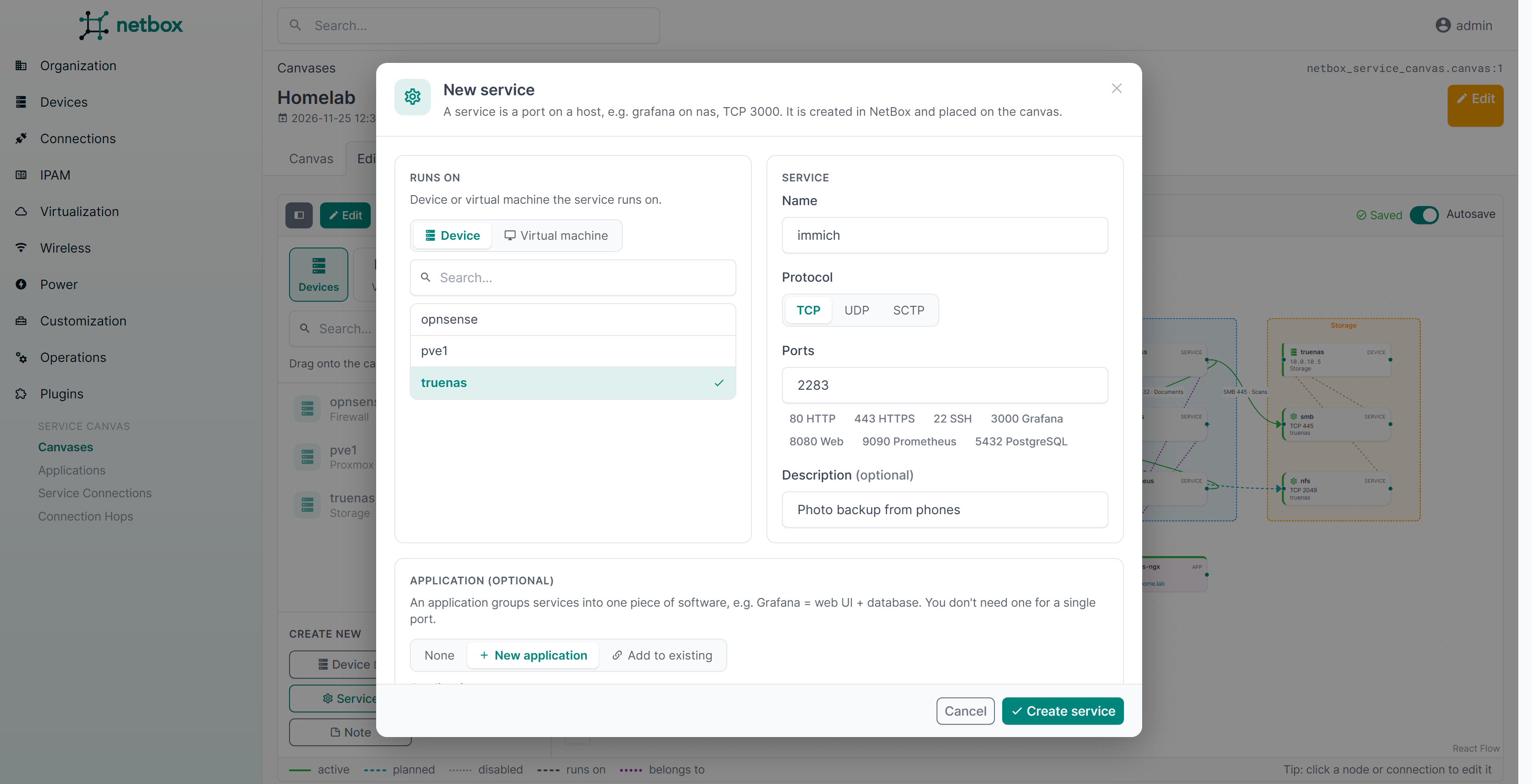
For a simple one-port app you only need a service. When you create a service in the editor, you can create or link the application in the same dialog.
📸 Screenshots
 |
 |
⚡ Impact analysis: what breaks if truenas goes down? |
➕ New service with an optional application, in one dialog |
The editor follows your NetBox language: English by default, German if NetBox is set to German. Screenshots show a demo homelab, not real infrastructure.
📦 Installation
Requirements: NetBox 4.5.x (tested with 4.5.7) and Python 3.12+. Works with netbox-docker and plain installs.
Plain install: install the package into the NetBox virtual environment:
source /opt/netbox/venv/bin/activate
pip install netbox-service-canvas
To keep it across NetBox upgrades, add netbox-service-canvas to local_requirements.txt in the NetBox root.
netbox-docker: add the plugin to plugin_requirements.txt:
netbox-service-canvas
(Pin a version with netbox-service-canvas==0.3.0 if you like.)
Enable it in configuration/plugins.py:
PLUGINS = [
    # ...
    "netbox_service_canvas",
    # "netbox_branching",  # if you use branching, keep it last
]
PLUGINS_CONFIG = {
    "netbox_service_canvas": {"grid_size": 10},
}
Then migrate and collect static files (plain install: python manage.py migrate and
python manage.py collectstatic --no-input, then restart NetBox). With netbox-docker, rebuild first:
docker compose build --no-cache netbox && docker compose up -d
docker compose exec netbox /opt/netbox/netbox/manage.py migrate
docker compose exec netbox /opt/netbox/netbox/manage.py collectstatic --no-input
📖 Step-by-step guide with backup, update and uninstall (German): docs/install-netbox-docker.md · 🧪 Dev/test environment on a VM or LXC: dev/README.md
🚀 How it works
- Plugins → Service Canvas → Canvases → Add, give it a name (e.g. Homelab).
- Open the Editor tab.
- Drag your devices and VMs onto the canvas, then click Add missing to pull in their services.
- Drag from the dot on the right of a node to another node to create a data flow.
- Click a node or an edge to edit it. Use ⚡ Impact analysis to see what depends on it.
- Export the result as a PDF (A4) for your documentation folder. 🖨️
Design principle: relationships are real NetBox data; the canvas only stores the layout. The same object can appear on many canvases, and if it is deleted in NetBox it disappears from every canvas. The plugin is compatible with netbox-branching: all models are change-logged and there is no raw SQL.
🔐 Permissions
| Action | Required permission |
|---|---|
| View a canvas | view on canvas (objects and connections only as far as you may view them) |
| Move, add, remove nodes | change on the canvas + add/change/delete on canvas node |
| Groups / notes | additionally add/change/delete on canvas group / canvas note |
| Create / edit / delete data flows | add/change/delete on service connection |
| Hops | add/change/delete on connection hop |
| New service, "runs on", quick edit | add / change on ipam › service |
| Applications | add / change on application |
🔌 REST API & GraphQL
Base URL: /api/plugins/service-canvas/
| Endpoint | |
|---|---|
applications/, connections/, connection-hops/, canvases/, canvas-groups/, canvas-nodes/, canvas-notes/ |
Standard NetBox CRUD, bulk, filters, brief mode |
GET canvases/<id>/graph/ |
Everything the editor needs in one request |
GET canvases/<id>/missing/ |
Related objects not yet on the canvas |
GET/PUT canvases/<id>/layout/ |
Read / atomically save the layout (diff only) |
POST connections/<id>/reorder-hops/ |
Reorder hops in one transaction |
GraphQL: service_canvas_application(_list), service_canvas_connection(_list), service_canvas_canvas(_list)
and more.
🛠️ Development
# Frontend (React 18 + React Flow 12 + Vite), output goes to netbox_service_canvas/static/…/dist
cd frontend && npm ci && npm test && npm run build

# Backend tests run inside a NetBox dev environment, see dev/README.md
python manage.py test netbox_service_canvas
See CONTRIBUTING.md for details.
🗺️ Roadmap ideas
- Auto-fill groups from cluster / site / tag
- Services drawn inside their host's container
- Live status (e.g. from monitoring) on nodes
- Filters and search on the canvas, undo/redo
- More UI languages (one dictionary file each, PRs welcome)
Got an idea? Open an issue. ⭐ Stars are appreciated if you find this useful!
📄 License
Apache-2.0. Not affiliated with NetBox Labs. NetBox is a trademark of NetBox Labs, Inc.
Made with 💙 for the NetBox community: an idea from a homelabber, code by AI.
#NetBox #NetBoxPlugin #Homelab #SelfHosted #SourceOfTruth #IPAM #DCIM #NetDevOps
#NetworkAutomation #InfrastructureDocumentation #ServiceMap #DependencyMapping #ImpactAnalysis
#SysAdmin #DevOps #Django #React #ReactFlow #OpenSource #BuiltWithAI #ClaudeCode #AIAssisted
1 maintainer

Metadata
1 maintainer
Release files for netbox-service-canvas 0.3.0
For a detailed explanation of source distributions (sdists) and built distributions (wheels), please see the package formats documentation.
Source distribution (sdist)
| File | Size | Uploaded | Provenance | Actions |
|---|---|---|---|---|
| netbox_service_canvas-0.3.0.tar.gz | 892.1 kB | With provenance | Details for netbox_service_canvas-0.3.0.tar.gz |
Built distribution (wheel)
| File | Interpreter | ABI | Platform | Actions Reset |
|---|---|---|---|---|
| netbox_service_canvas-0.3.0-py3-none-any.whl | Python 3 | none | any | Details for netbox_service_canvas-0.3.0-py3-none-any.whl |
Total release size: 1.8 MB
Release files / netbox_service_canvas-0.3.0.tar.gz
| Download URL | netbox_service_canvas-0.3.0.tar.gz |
|---|---|
| Size | 892.1 kB |
| Tags | Source |
|
SHA-256 checksum How to use checksums |
8985b58af8edd7a549703c80a5385478831fc2466e64e3486c8202966e736088
|
|
BLAKE2b-256 checksum How to use checksums |
17f71bcd0c47458de155d82ea8c0165e2e071cf3de2422b77513aa51dfa924f3
|
| Upload date | |
|
Uploaded using Trusted Publishing? What is trusted publishing? |
Yes |
| Uploaded via |
twine/7.0.0 CPython/3.13.16
|
Provenance
Provenance describes where a file came from. On PyPI, provenance is shared via attestations, which provide a verifiable record of the build or publishing details. View details, limitations and caveats.


PyPI Publish Attestation
PyPI verified that this artifact, at this checksum, originated from the publisher listed below.
Signed by GitHub Actions, verified by PyPI on Nov 25, 2026.
Transparency logRelease files / netbox_service_canvas-0.3.0-py3-none-any.whl
| Download URL | netbox_service_canvas-0.3.0-py3-none-any.whl |
|---|---|
| Size | 908.2 kB |
| Tags | Python 3 |
|
SHA-256 checksum How to use checksums |
4ca716f5badaba52c6835d150900e9a57351c3eb18ae8e63847225c62c841a81
|
|
BLAKE2b-256 checksum How to use checksums |
0e31be8d3950105aabc2f85c8c35b50c165410951e3bbc2d68a8601b65cf2e54
|
| Upload date | |
|
Uploaded using Trusted Publishing? What is trusted publishing? |
Yes |
| Uploaded via |
twine/7.0.0 CPython/3.13.16
|
Provenance
Provenance describes where a file came from. On PyPI, provenance is shared via attestations, which provide a verifiable record of the build or publishing details. View details, limitations and caveats.
PyPI Publish Attestation
PyPI verified that this artifact, at this checksum, originated from the publisher listed below.
Signed by GitHub Actions, verified by PyPI on Nov 25, 2026.
Transparency logSecurity for netbox-service-canvas 0.3.0
Provenance
Provenance describes where a file came from. On PyPI, provenance is shared via attestations, which provide a verifiable record of the build or publishing details. View details, limitations and caveats.
Full provenance
Both files in this release have been uploaded with provenance metadata.
Attestation for netbox_service_canvas-0.3.0.tar.gz
PyPI Publish Attestation
PyPI verified that this artifact, at this checksum, originated from the publisher listed below.
Signed by GitHub Actions, verified by PyPI on Nov 25, 2026.
Transparency logA note on package security
PyPI is a repository for distributing packages, not a service for auditing them. While third-party security researchers and our staff do their best to detect and remove malicious packages, PyPI cannot guarantee the quality, security or suitability of any given package.
To learn more about protecting yourself from malicious actors, visit our package security documentation.













