
NetBox Services Plugin
This plugin extends NetBox to manage and relate business services to network resources. It introduces a Service model that allows you to track various service types (such as L2VPN, L3VPN, DIA, Transit, CDN, Voice) and associate them with devices, interfaces, cables, VLANs, prefixes, VRFs, ASNs, route targets, L2VPNs, tunnels, and virtual machines.
Features
- Add, edit, and delete business services.
- Relate services to network objects (devices, interfaces, cables, VLANs, prefixes, VRFs, ASNs, route targets, L2VPNs, tunnels, virtual machines).
- Filter and view services in a table with all relevant fields.
- Custom forms and views for relating specific network objects to a service.
- Integrated navigation and changelog support.
Usage
- Access the plugin from the NetBox navigation menu under "Business Services".
- Create new services and relate them to network resources.
- Use the detail view to see all associations for a service.
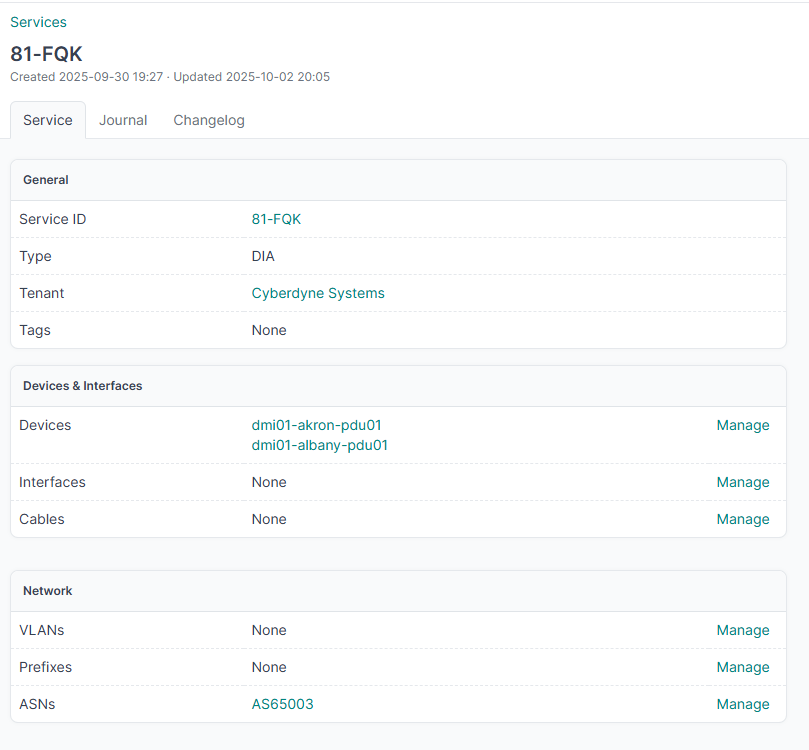
Why
Because you might be looking for such a thing.
Tagging is great for simple categorization, but the NetBox Services plugin goes far beyond that by letting you model real business services and their relationships to network resources.
Instead of just tagging a device or prefix as "DIA," you can create a full DIA service—like "NW-123456" from Cogent—and link it to all relevant devices, interfaces, prefixes, VRFs, ASNs, and more.
For example, with a DIA service from Cogent (Service ID: NW-123456), you can:
- See all devices and interfaces delivering that service.
- Track the exact IP prefixes, VRFs, and ASNs involved.
- Relate cables, tunnels, and even virtual machines to the service.
- View and manage all these relationships in one place, with history and forms tailored to each resource.
This gives you a true service-centric view of your network, making troubleshooting, reporting, and change management much more powerful and organized than simple tagging ever could.
Requirements
- NetBox 4.x or later
- Django 4.x or later
Installation
- Clone this repository into your NetBox
pluginsdirectory. You can also install it on your system / venv / coffee maker with
pip install netbox_services
- Add
'netbox_services'to thePLUGINSlist in your NetBox configuration.
    PLUGINS = [
        'netbox_services'
    ],
- Run migrations:
python manage.py migrate netbox_services - Restart NetBox.
License
MIT
1 maintainer

Metadata
1 maintainer
Release files for netbox-services 0.0.11
For a detailed explanation of source distributions (sdists) and built distributions (wheels), please see the package formats documentation.
Source distribution (sdist)
| File | Size | Uploaded | |
|---|---|---|---|
| netbox_services-0.0.11.tar.gz | 10.2 kB | Details |
Built distribution (wheel)
| File | Interpreter | ABI | Platform | Reset |
|---|---|---|---|---|
| netbox_services-0.0.11-py3-none-any.whl | Python 3 | none | any | Details |
Total release size: 22.5 kB
Release files / netbox_services-0.0.11.tar.gz
| Download URL | netbox_services-0.0.11.tar.gz |
|---|---|
| Size | 10.2 kB |
| Tags | Source |
|
SHA-256 checksum How to use checksums |
297c7474ccc656a2d2abcea85d9b84db1de249f68ab33900227f61b2cde6ee5c
|
|
BLAKE2b-256 checksum How to use checksums |
5f0a95e785cf6549b5806e470b4e3c020c9d5d1eeb9dc6e42e53068ac3c6e05e
|
| Upload date | |
|
Uploaded using Trusted Publishing? What is trusted publishing? |
No |
| Uploaded via |
twine/6.2.0 CPython/3.9.25
|
Release files / netbox_services-0.0.11-py3-none-any.whl
| Download URL | netbox_services-0.0.11-py3-none-any.whl |
|---|---|
| Size | 12.3 kB |
| Tags | Python 3 |
|
SHA-256 checksum How to use checksums |
33e2a8d849b26597217d15ccf9412149d25932e7768faa849af4207860bf6211
|
|
BLAKE2b-256 checksum How to use checksums |
6e38dad7386051a551c9a97b1b1b55a1869a9cb17354bd833366cb8854e83af3
|
| Upload date | |
|
Uploaded using Trusted Publishing? What is trusted publishing? |
No |
| Uploaded via |
twine/6.2.0 CPython/3.9.25
|














