
Network state time-lapse — periodic structured snapshots of device operational state with versioned diffs (an Oxidized replacement).

Project description
Netlapse
An Oxidized replacment, network state time-lapse. Periodic structured snapshots of network device operational state with versioned diffs.
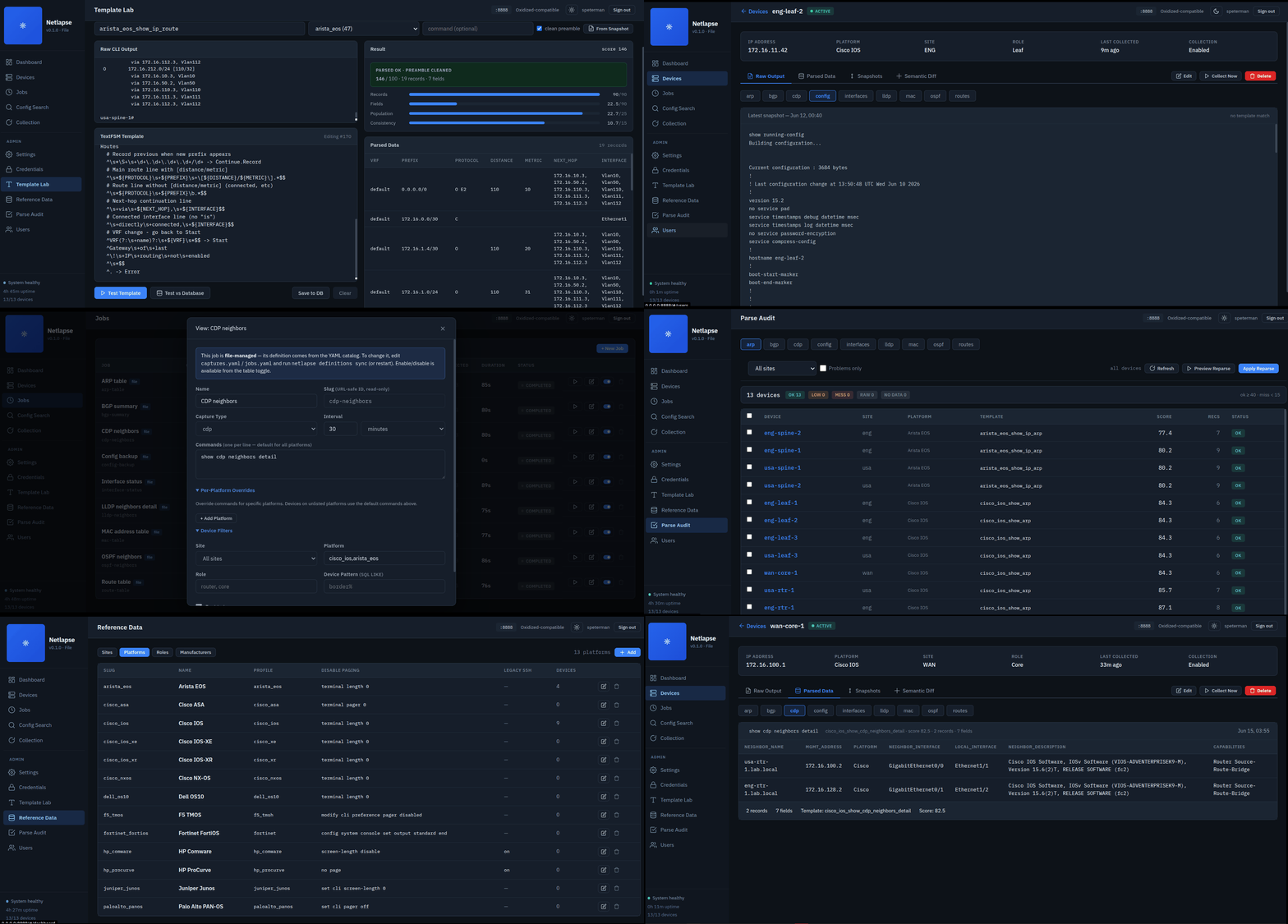
New Capabilities in Development
LibreNMS integration (beta). Netlapse now serves an Oxidized-compatible REST API, so LibreNMS renders Netlapse's configs, version history, and diffs under each device's Config tab — and the Refresh button triggers an on-demand re-collection. Validated end to end against a live LibreNMS instance.
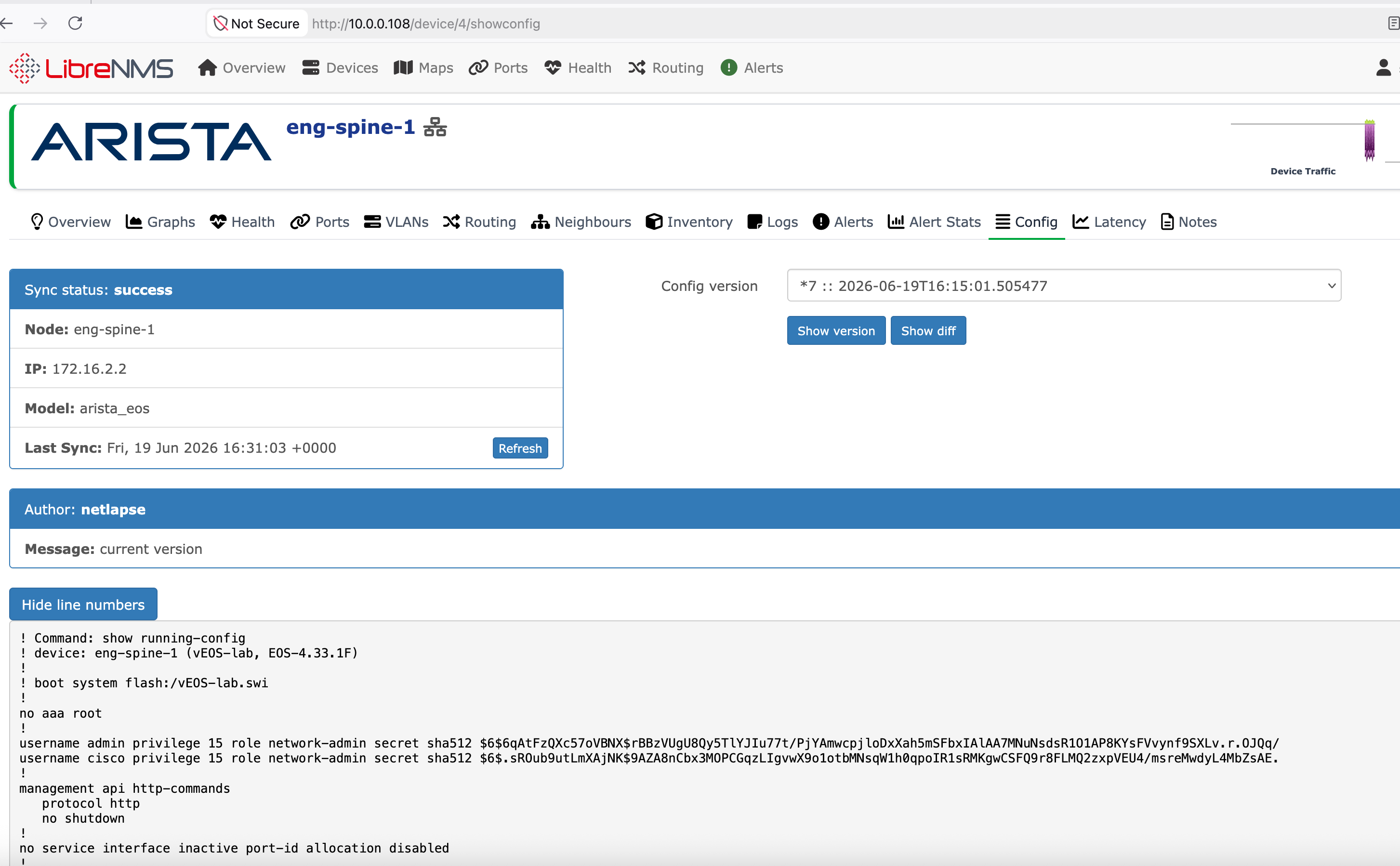
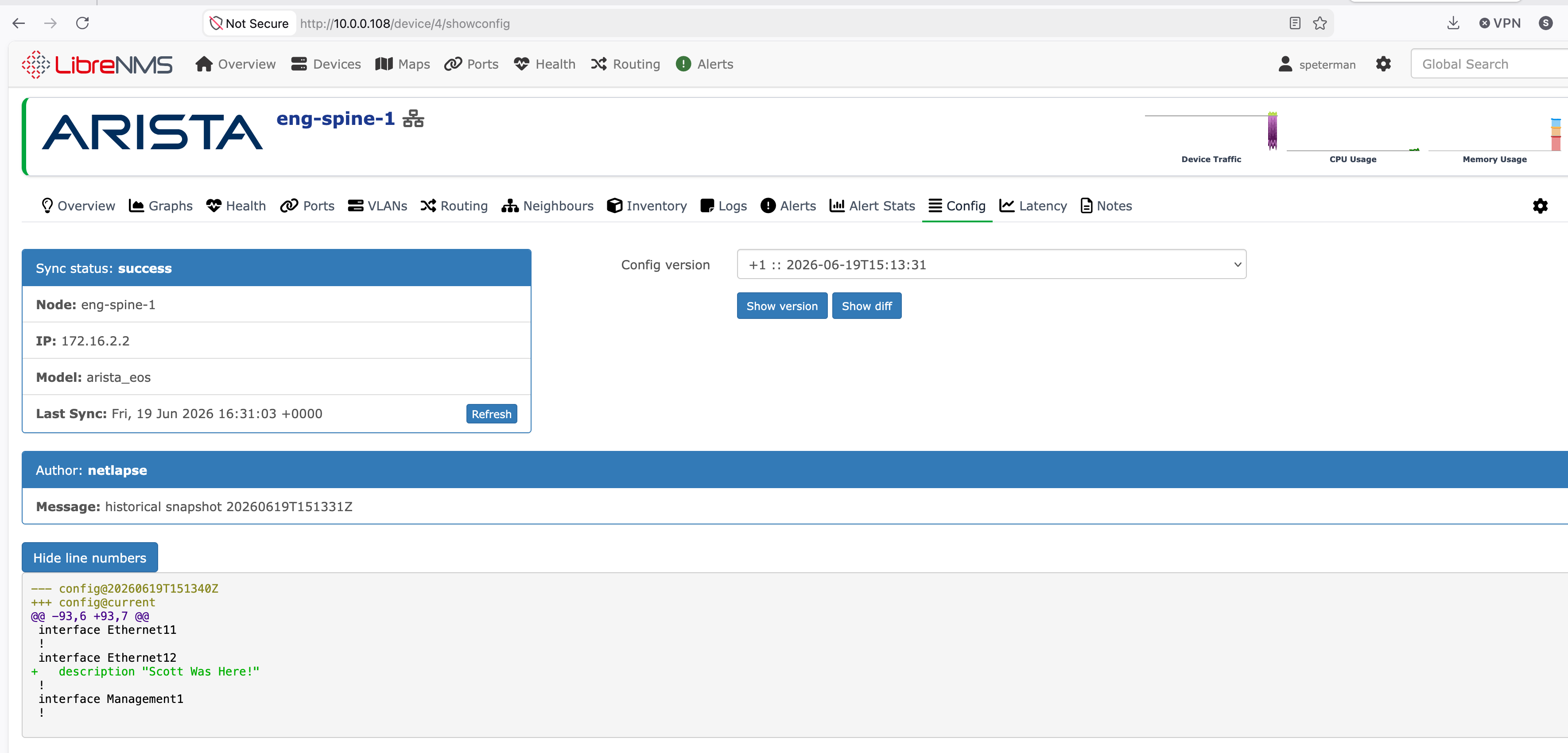
See Netlapse + LibreNMS Integration for wiring, authentication modes, and the naming requirements that determine whether configs render.
LDAP / Active Directory authentication. Beyond the built-in local accounts,
Netlapse authenticates against a directory with auth.provider: ldap (or
ldap+local to keep a local break-glass admin). Roles are directory-authoritative
— group membership maps to admin/viewer and is re-evaluated on every login — and
each directory user is provisioned as a local shadow row so the rest of the app
works unchanged. A mock mode boots the full login flow with no domain controller
for testing. See Authentication.
Why Netlapse?
Oxidized backs up configs as text blobs. It answers "what changed?" with git diff.
Netlapse captures any CLI output (configs, ARP tables, BGP state, routing tables, interface status), parses it into structured JSON, versions both artifacts, and answers "what changed?" with semantic diffs:
- ARP diff: "12 MACs learned, 3 aged out, 2 moved interfaces"
- BGP diff: "peer 10.0.0.1 went Established → Idle, prefix count dropped 4200 → 0"
- Interface diff: "Gi0/3 MTU changed 9000 → 1500"
- Config diff: same as Oxidized — git text diff. Table stakes.
One Search
Type one token — an IP, a MAC, an ASN, a hostname, a serial — and get everything that references it across the whole fleet, grouped by what it means. It's the structured version of the 2 AM grep: instead of greping one device at a time, you ask the question once and the answer comes back organized.
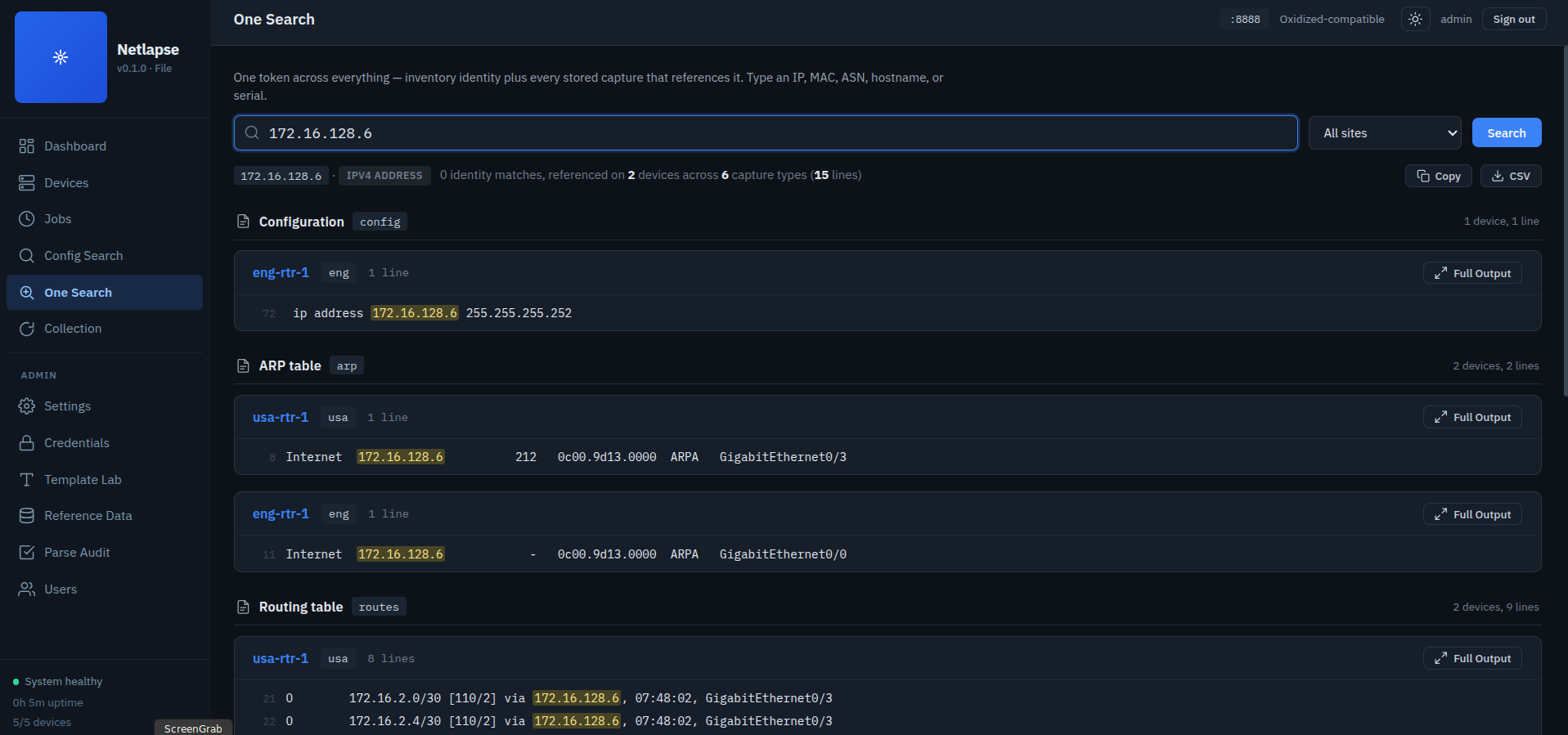
A single search returns two answers:
- Identity — which managed device this token is. A management or OOB address, a hostname, a serial, an asset tag resolves to the device that owns it, with a link straight to its detail page.
- References — everywhere it's seen, grouped by capture type (config, ARP, MAC table, BGP, routes, version, …) then by device, with the matching lines highlighted. Open any hit to the full capture and copy it whole.
The matching is format-aware, because the value never appears the same way twice across a mixed fleet:
- IP is octet-anchored — searching
10.7.255.35will not drag in10.7.255.350or210.7.255.35. The lines it returns are actually that address. - MAC matches every vendor representation from one keystroke — type
d4af.f76c.45adand it also findsd4:af:f7:6c:45:ad,d4-af-f7-6c-45-ad, and the bared4aff76c45ad, wherever they're stored. - ASN matches with or without the
ASprefix, soAS6169andremote-as 6169both surface.
Because it reads the captures Netlapse already stores, it has zero runtime coupling to collection — it's a query over the dual-artifact tree, not a second index to keep in sync. Trace a /31 link subnet to the device that advertises it, pivot from its ARP entry to the chassis MAC in show version, and confirm they're the same box — in two searches, with no topology tool and no correlation database underneath.
Semantic Diff
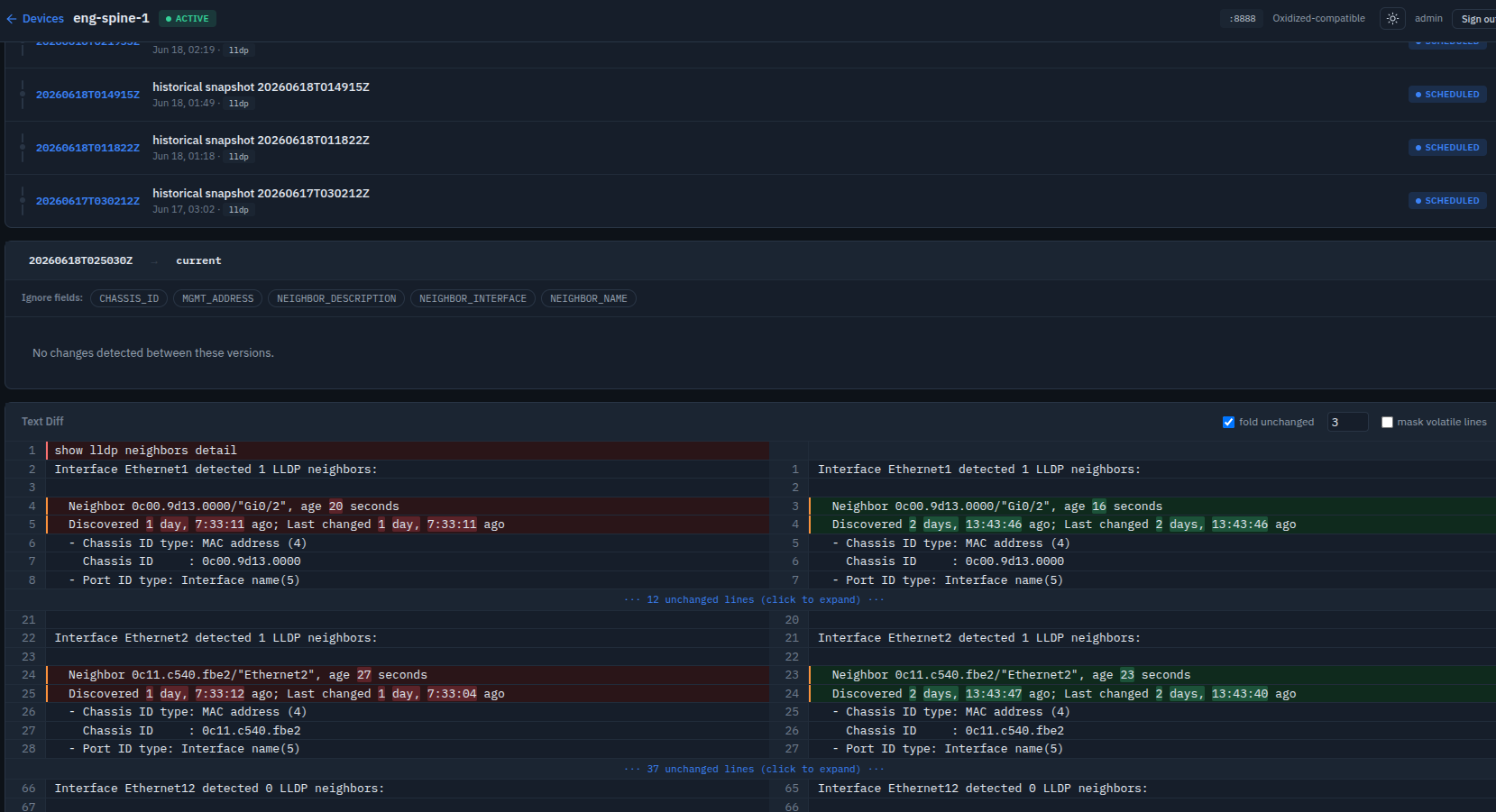
Two snapshots, one question that actually matters at 2 AM: did the network change, or did a timer just tick? Semantic diff answers it by comparing parsed records instead of raw text. It matches each record by its identity — an ARP entry by IP, a BGP session by neighbor, an OSPF adjacency by neighbor ID — and reports only meaningful state changes: a MAC relearned on a different interface, a peer dropped to Idle, a route's next-hop moved. Volatile fields that tick every poll — age timers, uptimes, counters — are excluded by default, so the diff stays quiet when nothing operationally significant happened and surfaces the one line that matters when something did
⚠️ Beta Version Notice
Netlapse is beta (v0.1.0). It can run in production, but expect rough edges and breaking changes before 1.0.
Authentication. Sessions are cookie-based; the local backend stores usernames with
scrypt-hashed passwords, bootstrapped from a singleadminaccount (setNETLAPSE_ADMIN_PASSWORDon first run). LDAP/Active Directory authentication is also supported (auth.provider: ldaporldap+local), with directory-authoritative roles and a local break-glass fallback — see Authentication. The local-only default is adequate for a trusted operator or small team on a trusted network; it is not hardened for untrusted or multi-tenant exposure.LDAP/AD is implemented. The provider binds against a directory (service-bind → locate → proxy-bind), gates access on group membership, maps
admin_groupsto the admin role, and provisions a local shadow row per directory user. Group membership is re-evaluated on every login (directory-authoritative). A built-in mock mode lets you exercise the full login path with no DC; nested-group expansion is the one documented limitation. See Authentication for sample configs and the break-glass procedure.
Data-Driven Collection
What Netlapse collects — and how each vendor's CLI says it — is defined in two YAML files, not in code. They live as siblings of config.yaml (default ~/.netlapse/):
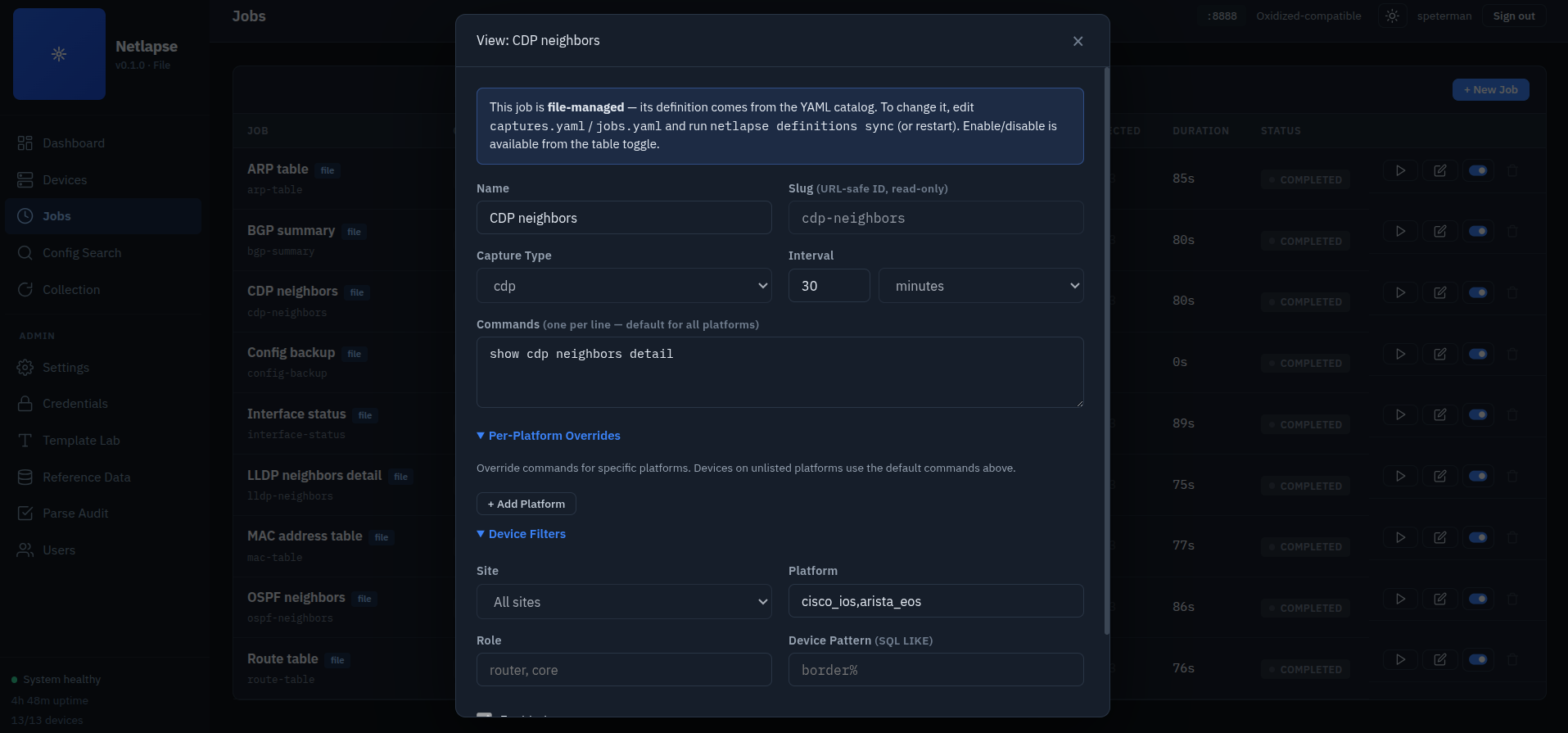
captures.yaml — the catalog of collectable artifacts. Each capture is a vendor-neutral intent (an ARP table, a BGP summary) plus the syntax to get it. command is either one string for everyone, or a map keyed by platform slug with a reserved default fallback:
captures:
  bgp-summary:
    capture_type: bgp
    description: BGP session state
    command:
      default: show ip bgp summary
      juniper_junos: show bgp summary
    interval: 900
jobs.yaml — bindings: which capture runs against which devices. A binding carries no command syntax and no interval (those come from the capture it references) — only the device selection:
jobs:
  bgp-summary:
    capture: bgp-summary
    name: BGP summary
    enabled: true
    filters:
      platform: cisco_ios,arista_eos,juniper_junos
Adding a vendor, a capture, or a whole new artifact type is a file edit and a restart — no coder in the loop:
# edit ~/.netlapse/captures.yaml + jobs.yaml, then:
python -m netlapse definitions validate    # offline, all-or-nothing check
python -m netlapse definitions sync         # project into the jobs table (or just restart)
The new capture type then propagates to the UI through the DB — it appears in the Capture Type selector on every job, with no template or schema work.
Files are authoritative for definitions; the DB owns runtime state. A sync reconciles the jobs table to the files — insert new, update changed, tombstone removed — but never touches the live enable/disable toggle, the schedule, or job history. Validation runs over the whole catalog at once and is fail-soft: a typo is reported alongside every other problem in one pass, and the sync is skipped entirely rather than half-applied — the daemon keeps running on the last-good definitions already in the DB.
The definitions CLI rounds it out: validate, sync, list, and adopt (which takes over jobs that predate the registry). See Design Decisions for why definitions are file-authoritative while platforms stayed in the DB.
Project Status
| Layer | Module | Lines | Status |
|---|---|---|---|
| API | Oxidized compat (9 routes) | 220 | ✅ Wired to DCIM + storage + scheduler |
| API | Native REST (27 routes) | 687 | ✅ Full CRUD + device edit + auth test + scheduler triggers + search |
| DCIM | NetBox-aligned SQLite schema (v6) | 1,439 | ✅ Jobs, devices, history, CRUD, per-platform commands, auto-migration |
| DCIM | SC2 map importer | 817 | ✅ Topology → DCIM sync, idempotent, full hostname preservation |
| Storage | File backend (directory tree) | 417 | ✅ Dual artifacts (raw + parsed JSON), last-N rotation |
| Storage | Git backend (versioned + trailers) | 738 | ✅ Tested |
| SSH | Client (Paramiko wrapper) | 817 | ✅ Ported from SC2, key auth, legacy algorithm + pubkey signature handling |
| SSH | Emulation shim (NetEmulate) | 302 | ✅ 82/82 devices verified |
| SSH | Executor (DCIM → SSH → Snapshot) | 602 | ✅ Built, auth test, device-level legacy override |
| Vault | Credential vault (Fernet/PBKDF2) | 2,142 | ✅ Ported from SC2, headless unlock, key + password auth |
| Vault | DCIM bridge + credential resolution | 350 | ✅ Vault ↔ executor integration |
| Core | Collection pipeline (DCIM→vault→SSH→disk) | 502 | ✅ End-to-end proven, \r\n normalization |
| Core | CLI (sync-map, vault, collect) | 232 | ✅ Subcommand dispatch |
| Parser | tfsm-fire engine (TextFSM auto-template) | 232 | ✅ Ported from SC2.5, thread-safe |
| Parser | Parse engine (clean + score + enrich) | 392 | ✅ Output cleaning, filter cascade, vendor fallback |
| Parser | Template database | 296 templates | ✅ Arista (48), Cisco IOS (143), Juniper (22), NX-OS, ASA |
| Scheduler | Async job loop + WS broadcast + parsing | 571 | ✅ Running in production, inline tfsm-fire, per-platform command resolution |
| Web | Dashboard (FastAPI + vanilla JS) | 3,880 | ✅ Live — 6 views, job CRUD, device edit + auth test, parsed data tables, capture type selector |
netlapse/
├── __init__.py              (3)     Package version (0.1.1)
├── __main__.py              (287)   CLI: serve, sync-map, vault (init/add-ssh/delete/list/assign), collect
├── app.py                   (255)   FastAPI app, lifespan, vault unlock, parser init, scheduler start
├── parse_test.py            (305)   Single-device collect + parse diagnostic tool
├── api/
│   ├── native.py            (687)   27 native REST routes at /api/v1/
│   └── oxidized_compat.py   (220)   9 Oxidized-compatible routes at /
├── core/
│   └── collector.py         (502)   End-to-end collection pipeline, \r\n normalization
├── dcim/
│   ├── db_schema.py         (1439)  SQLite schema v6, views, queries, CRUD, device edit, auto-migration
│   └── map_importer.py      (817)   SC2 topology map → DCIM sync, hostname.site preservation
├── parser/
│   ├── __init__.py          (17)    Package exports: ParseEngine, ParseResult
│   ├── tfsm_fire.py         (232)   TextFSMAutoEngine — template matching + scoring (from SC2.5)
│   └── engine.py            (392)   ParseEngine — output cleaning, filter cascade, vendor fallback
├── scheduler/
│   └── __init__.py          (571)   ConnectionManager + Scheduler (poll loop, queue, WS broadcast, inline parsing, per-platform commands)
├── storage/
│   ├── backend.py           (280)   Abstract interface + Snapshot/DiffResult
│   ├── file_backend.py      (417)   Directory tree, last-N rotation, multi-type search, parsed JSON write-through
│   └── git_backend.py       (738)   Git versioning, commit trailers, structured diffs
├── ssh/
│   ├── emulation.py         (302)   NetEmulate shim (standalone, reusable)
│   ├── client.py            (817)   SSHClient with DCIM platform field mapping, legacy pubkey handling
│   └── executor.py          (602)   v_device_detail → SSHClient → Snapshot[], auth test with debug capture
├── vault/
│   ├── encryption.py        (339)   PBKDF2 key derivation + Fernet encryption
│   ├── models.py            (391)   SSH/SNMP credential dataclasses
│   ├── schema.py            (353)   Vault SQLite schema + DatabaseManager
│   ├── vault.py             (1059)  CredentialVault — CRUD, encrypt/decrypt
│   └── bridge.py            (350)   Headless unlock, DCIM↔vault integration
└── web/
    ├── __init__.py          (26)    Web router — serves / and mounts /static
    └── static/
        ├── index.html       (79)    SPA shell: sidebar, content area, module loader
        ├── css/
        │   └── netlapse.css (1032)  CSS custom properties, full component library + forms + modal
        └── js/
            ├── app.js       (154)   Hash router, view lifecycle, health polling
            ├── api.js       (86)    All /api/v1 + Oxidized + native search + job CRUD + device edit + auth test
            ├── components.js(125)   Shared: badges, stat cards, formatters, icons (edit, toggle, trash)
            ├── ws.js        (136)   WebSocket manager with auto-reconnect
            └── views/
                ├── dashboard.js  (114)  Health stats, site grid, recent jobs
                ├── devices.js    (126)  Filterable inventory, URL param pre-filtering
                ├── device.js     (834)  4 tabs, capture type pills, parsed data, device edit modal, auth test
                ├── jobs.js       (592)  Job CRUD with per-platform command map editor
                ├── search.js     (331)  Multi-type regex search, detail modal, match nav
                └── collection.js (185)  Job selector, WebSocket progress, live log
Quick Start
pip install netlapse
netlapse                      # first run scaffolds ~/.netlapse, then serves
Requires Python 3.10+.
On first run Netlapse seeds ~/.netlapse/ with an annotated config.yaml, the
default definition catalog (captures, jobs, roles, volatility), and downloads
the TextFSM template database (~53 MB) that powers structured parsing — then
serves the Web UI and API on http://localhost:8888. Nothing else is required
to get a running instance; everything below is for connecting it to real
devices. (netlapse and python -m netlapse are equivalent.)
Two environment variables matter for unattended operation:
NETLAPSE_ADMIN_PASSWORD— sets the initial Web UIadminpassword on first start (otherwise a one-time password is generated and logged once).NETLAPSE_VAULT_PASSWORD— unlocks the credential vault headlessly so the scheduler can collect. Without it the API and UI still come up, but collection stays paused.
Air-gapped or offline? The template download is best-effort and non-fatal: set
NETLAPSE_SKIP_TEMPLATE_DOWNLOAD=1 to skip it, copy tfsm_templates.db into
~/.netlapse/ yourself, or run netlapse fetch-templates once you have
connectivity. Without it, raw captures still collect — only structured parsing
is disabled.
Import devices from Secure Cartography topology map
# Dry run — parse and report, no writes
python -m netlapse sync-map /path/to/map.json --dry-run

# Import — creates sites, assigns roles, detects platforms
python -m netlapse sync-map /path/to/map.json

# Exclude OOB management switches
python -m netlapse sync-map /path/to/map.json --exclude-prefix oob
The map importer supports two hostname conventions:
| Convention | Example | Device Name | Site |
|---|---|---|---|
| Dot-separated (datacenter/SP) | border01.site1.company.com |
border01.site1 |
site1 |
| Dot-separated (datacenter/SP) | peer1-01.site1 |
peer1-01.site |
site1 |
| Dash-prefixed (campus/enterprise) | den-core-01 |
den-core-01 |
den |
Device names preserve the operational hostname — domain suffixes are stripped but the site segment stays because it's part of the device identity (border01.site1 and border01.den2 are different devices).
Roles are inferred from hostname patterns (border* → router, tor* → leaf, -core- → core, -sw- → access). Platforms are parsed from SC2's discovery strings (Arista DCS-7280SRA-48C6-F EOS 4.33.1.1F → arista_eos, Cisco IOS-XE 17.03.06 → cisco_ios_xe, Juniper JUNOS 23.2R1-S2.5 → juniper_junos). Handles both short (Arista EOS 4.33.1.1F) and full chassis (Arista DCS-7280SRA-48C6-F EOS 4.33.1.1F) platform strings. Idempotent — safe to re-run after every SC2 discovery cycle.
Initialize credential vault and collect
# Initialize vault with master password
python -m netlapse vault init

# Add SSH credentials (password auth)
python -m netlapse vault add-ssh lab -u admin -p admin --default

# Add SSH credentials (key auth)
python -m netlapse vault add-ssh prod -u scott -k ~/.ssh/id_ed25519 --default

# Add SSH credentials (key + password for enable)
python -m netlapse vault add-ssh prod -u scott -k ~/.ssh/id_rsa -p 'enable_pass' --default

# Assign credential to all devices
python -m netlapse vault assign prod

# Verify
python -m netlapse vault list

# Delete a credential
python -m netlapse vault delete lab

# Collect configs (one-shot CLI)
export NETLAPSE_VAULT_PASSWORD="your_master_password"
python -m netlapse collect --site den

# Collect against NetEmulate (emulated devices)
python -m netlapse collect --site den --emulate

# Run a named job
python -m netlapse collect --job config-backup

# Start the daemon (scheduler + API + Web UI)
python -m netlapse
The vault stores key file contents encrypted — the original file isn't referenced at runtime, so the daemon doesn't need filesystem access to the key.
Browse the Web UI at http://localhost:8888 or the Swagger API docs at http://localhost:8888/docs.
First scheduled collection (65/65 against NetEmulate)
$ python -m netlapse
Netlapse v0.1.1 starting
Storage backend: FileBackend at /home/user/.netlapse/data
Emulation enabled: 1738 device IPs loaded
Vault unlocked from NETLAPSE_VAULT_PASSWORD env var
Scheduler started (poll=15s, workers=2)
Netlapse ready — http://0.0.0.0:8888

Job 'config-backup': collecting from 65 devices (trigger=scheduled, history=1)
  den-core-01: show running-config — 35361 bytes in 0.1s
  den-core-02: show running-config — 33057 bytes in 0.1s
  den-2-sw-01: show running-config — 47442 bytes in 0.1s
  ...
Job 'config-backup' complete: 65/65 in 42.3s (history=1)
Architecture
┌─────────────────────────────────────────────────────┐
│  FastAPI Application (port 8888)                    │
│  ├── /nodes, /node/* → Oxidized compat API          │
│  ├── /api/v1/*       → Native Netlapse API          │
│  ├── /ws             → WebSocket (live progress)    │
│  └── /               → Web UI (vanilla JS)          │
└────────────────────┬────────────────────────────────┘
                     │
┌────────────────────▼────────────────────────────────┐
│  Scheduler (asyncio + ThreadPoolExecutor)            │
│  ├── Poll loop: get_due_jobs() every 15s             │
│  ├── Job queue: scheduled + API triggers             │
│  ├── Worker threads: collect_device() per device     │
│  ├── WS broadcast: per-device progress to all clients│
│  └── History: job_history + job_device_results       │
└────────────────────┬────────────────────────────────┘
                     │
┌────────────────────▼────────────────────────────────┐
│  Collection Engine                                   │
│  ├── Collector (DCIM → vault → executor → storage)   │
│  ├── SSH Client (Paramiko, legacy device support)    │
│  ├── Emulation shim (NetEmulate mock devices)        │
│  ├── Parse engine (tfsm-fire, 296 templates)         │
│  └── Credential vault (Fernet/PBKDF2 encrypted)     │
└────────────────────┬────────────────────────────────┘
                     │
┌────────────────────▼────────────────────────────────┐
│  Storage Layer                                       │
│  ├── Git backend (raw text + parsed JSON per commit) │
│  ├── File backend (directory tree, last-N rotation)  │
│  ├── DCIM SQLite (devices, jobs, history)             │
│  └── Vault SQLite (encrypted credentials, separate)  │
└─────────────────────────────────────────────────────┘
Scheduler Data Flow
app.py lifespan → DB → Storage → Vault unlock → Parser init → Emulation → Scheduler.start()
                                                                │
    ┌───────────────────────────────────────────────────────────┘
    │
    ├── Poll loop (asyncio, main thread)
    │   └── get_due_jobs(now) → queue.put(("scheduled", slug))
    │
    ├── API triggers (async, main thread)
    │   ├── POST /api/v1/jobs/{slug}/run   → scheduler.enqueue_job()
    │   ├── POST /api/v1/collect/{id}      → scheduler.enqueue_device()
    │   └── GET/PUT /node/next/{node}      → scheduler.enqueue_device()
    │
    └── Queue consumer → ThreadPoolExecutor (worker thread)
        ├── NetlapseDB(db_path)             # thread-local DB connection
        ├── db.start_job_run()              # job_history row (status=running)
        ├── for device in targets:
        │   ├── collect_device()            # SSH → Paramiko → raw output
        │   ├── parser.enrich_snapshot()    # tfsm-fire → parsed records + score
        │   ├── _record_result()            # store snapshot + update device status
        │   ├── db.insert_device_result()   # per-device history row
        │   └── _broadcast()                # WS events → collection view
        ├── db.complete_job_run()           # finalize counts + status
        └── db.update_job_schedule()        # next_run = now + interval
End-to-End Data Flow
CLI: netlapse collect --site den --emulate
    │
    ▼
Map importer: SC2 map.json → DCIM (sites, platforms, roles, devices)
    │   Hostname parsing: border01.site1 → site=site1, den-core-01 → site=cal
    │   Platform parsing: "Cisco IOS-XE 17.03.06" → cisco_ios_xe
    │   Role inference: border* → router, tor* → leaf, -core- → core
    │
    ▼
Vault: unlock from NETLAPSE_VAULT_PASSWORD env var
    │   PBKDF2-HMAC-SHA256 (480,000 iterations) → Fernet key derivation
    │   resolve_shared_credentials() → (username, password) tuple
    │
    ▼
Collector: list_collection_targets(site_filter="cal") → 13 devices
    │
    ▼
Executor: build_ssh_config(v_device_detail row + credentials)
    │   Maps dcim_platform fields → SSHClientConfig:
    │     primary_ip4           → host
    │     ssh_port              → port
    │     platform_profile      → (used by tfsm-fire for template matching)
    │     paging_disable_command → single platform-specific command
    │     prompt_regex          → prompt detection override
    │     enable_command        → enter privileged mode
    │     legacy_ssh            → device override > platform default > off
    │                             (DH group1, 3DES, forced ssh-rsa signatures)
    │
    ▼
Emulation shim: 172.16.48.60:22 → 127.0.0.1:10224 (den-core-01)
    │   1738 IPs loaded from ip_lookup.json
    │   DNS intercept patches socket.getaddrinfo
    │
    ▼
SSHClient: connect → find_prompt → disable_pagination → show running-config
    │   Prompt detected: "den-core-01#"
    │   Output captured: 35,361 bytes in 0.1s
    │
    ▼
Parser: ParseEngine.enrich_snapshot(snapshot, platform_profile="arista_eos")
    │   _clean_output: strip preamble, find last hostname echo, take output after
    │   _build_filter: "arista_eos_show_ip_arp" → 1 matching template
    │   find_best_template: score 80.2 → arista_eos_show_ip_arp
    │   Snapshot.parsed_data = { records: [...] }
    │   Snapshot.template_name = "arista_eos_show_ip_arp"
    │   (vendor fallback if specific filter misses)
    │
    ▼
Storage: store_batch(snapshots)
    │   → ~/.netlapse/data/site1/peer1-01.site1/arp.txt  (raw CLI output)
    │   → ~/.netlapse/data/site1/peer1-01.site1/arp.json (parsed records + template metadata)
    │
    ▼
DCIM: update_device_collection_status(device_id, "success", timestamp)
What's Built — Module Details
Scheduler (scheduler/__init__.py)
Two components in one module:
ConnectionManager — WebSocket broadcast hub. Tracks connected clients, broadcasts JSON events to all. The /ws endpoint in app.py adds/removes connections; the scheduler broadcasts.
Scheduler — asyncio-based job loop backed by a ThreadPoolExecutor for blocking SSH work. Poll loop checks get_due_jobs() every 15 seconds (configurable). API routes push ad-hoc triggers onto an asyncio.Queue. Worker threads create their own SQLite connections (thread-local — SQLite connections can't cross thread boundaries). Each device collection produces a WebSocket event, giving the frontend real-time progress.
WebSocket events emitted during collection:
| Event | Payload | When |
|---|---|---|
collection_start |
{ job, device_count, history_id } |
Job begins |
device_collected |
{ device, status, command, commands, platform, bytes, duration, parsed, template } |
Each device completes |
collection_progress |
{ collected, total } |
After each device |
collection_complete |
{ job, collected, failed, device_count, duration, history_id } |
Job finishes |
The Jobs view auto-refreshes every 10 seconds and instantly on collection_start/collection_complete events. The Collection view shows per-device live progress with a progress bar and scrolling log.
DCIM Schema (dcim/db_schema.py)
Single SQLite database at ~/.netlapse/netlapse.db. Schema version 10 (auto-migrates from v3 through v10). WAL mode for concurrent reads from the API while the scheduler writes.
Tables:
| Table | Purpose |
|---|---|
dcim_site |
Physical locations. slug = Oxidized group = git directory = one namespace everywhere |
dcim_manufacturer |
Hardware vendors (8 seeded: Cisco, Arista, Juniper, Palo Alto, Fortinet, F5, HP, Dell) |
dcim_platform |
OS/software. Each platform carries SSH behavior fields: platform_profile, paging_disable_command, enable_command, prompt_regex, legacy_ssh |
dcim_device_role |
Functional roles (12 seeded: router through border) |
dcim_device |
Devices. credential_id, collection_enabled, legacy_ssh (device override), last_collection_status, credential_tested_at, credential_test_result |
jobs |
Persistent job definitions: capture type, commands (JSON default), command_map (per-platform JSON, projected from captures.yaml for file-managed jobs), device filters, schedule, and source (file = catalog-owned/managed by sync; seed = shipped default, editable until a matching binding adopts it; NULL/api = created via API/UI) |
job_history |
Per-run execution records: trigger, status, counts, timing |
job_device_results |
Per-device outcome within a job run: status, error category, duration |
Views: v_device_detail (full join of device + site + platform + manufacturer + role + credential, includes both device_legacy_ssh and platform legacy_ssh), v_site_summary, v_platform_summary, v_job_summary (27 columns — all job fields including command_map + latest history with computed duration).
Job CRUD methods: create_job(), update_job() (field whitelist protects schedule fields), delete_job() (history preserved via FK SET NULL), set_job_enabled().
Device CRUD methods: update_device() (14-field whitelist, diff-only updates, FK null normalization, legacy_ssh tri-state), list_credentials() (safe — no decrypted material), list_roles(), list_platforms().
Job history methods: start_job_run() → history_id, complete_job_run(), insert_device_result(), list_job_history(), get_job_run() (includes nested device results).
13 platforms with SSH behavior seeded. The slug is what devices reference and what captures.yaml per-platform override keys are matched against; profile is the tfsm-fire template-matching key (the two differ on a few platforms, so use the slug when authoring overrides):
| Platform | Slug | Profile | Paging Command | Enable | Legacy |
|---|---|---|---|---|---|
| Cisco IOS | cisco_ios |
cisco_ios |
terminal length 0 |
enable |
|
| Cisco IOS-XE | cisco_ios_xe |
cisco_xe |
terminal length 0 |
enable |
|
| Cisco IOS-XR | cisco_ios_xr |
cisco_xr |
terminal length 0 |
||
| Cisco NX-OS | cisco_nxos |
cisco_nxos |
terminal length 0 |
||
| Cisco ASA | cisco_asa |
cisco_asa |
terminal pager 0 |
enable |
|
| Arista EOS | arista_eos |
arista_eos |
terminal length 0 |
||
| Juniper Junos | juniper_junos |
juniper_junos |
set cli screen-length 0 |
||
| Palo Alto PAN-OS | paloalto_panos |
paloalto_panos |
set cli pager off |
||
| Fortinet FortiOS | fortinet_fortios |
fortinet |
config system console\nset output standard\nend |
||
| F5 TMOS | f5_tmos |
f5_tmsh |
modify cli preference pager disabled |
||
| HP ProCurve | hp_procurve |
hp_procurve |
no page |
✓ | |
| HP Comware | hp_comware |
hp_comware |
screen-length disable |
✓ | |
| Dell OS10 | dell_os10 |
dell_os10 |
terminal length 0 |
8 default jobs seeded (as source='seed' — editable and collecting out of the box; sync promotes them to file if/when a jobs.yaml binding with the same slug is synced):
| Job | Capture Type | Commands | Interval |
|---|---|---|---|
| Config Backup | config |
show running-config |
1 hour |
| ARP Table | arp |
show ip arp |
30 min |
| BGP Summary | bgp |
show ip bgp summary |
15 min |
| Interface Status | interfaces |
show interfaces |
30 min |
| Route Table | routes |
show ip route |
30 min |
| OSPF Neighbors | ospf |
show ip ospf neighbor |
30 min |
| MAC Address Table | mac |
show mac address-table |
30 min |
| LLDP Neighbors | lldp |
show lldp neighbors detail |
30 min |
Per-platform command overrides (Junos show configuration | display set, Arista show arp, etc.) live in captures.yaml and are projected into each job's command_map at sync time.
Map Importer (dcim/map_importer.py)
Imports device inventory from Secure Cartography topology maps — the output of SC2's BFS discovery. The network is the source of truth. NetBox coexistence is optional.
The importer follows the NetAudit pattern: the patrol/topology map is the seed source. It creates sites and roles as needed, upserts devices (updates IP/platform if changed, inserts if new), and flags devices that may need legacy SSH algorithms.
# CLI
python -m netlapse sync-map /path/to/map.json
python -m netlapse sync-map /path/to/map.json --exclude-prefix oob
python -m netlapse sync-map /path/to/map.json --site override-slug --dry-run
# Programmatic
from netlapse.dcim.map_importer import sync_from_map
result = sync_from_map(db, "/path/to/map.json")
print(f"Created {result.created}, updated {result.updated}, skipped {result.skipped}")
Credential Vault (vault/)
Ported from Secure Cartography's credential vault. Separate encrypted SQLite database at ~/.netlapse/vault.db — not in the DCIM DB (correct security boundary).
Encryption: PBKDF2-HMAC-SHA256 (480,000 iterations) for key derivation, Fernet (AES-128-CBC + HMAC-SHA256) for symmetric encryption. Salt randomly generated per vault initialization.
Credential types: SSH (username + password and/or private key), SNMPv2c (community string), SNMPv3 (USM with auth/priv protocols). SSH is the primary path for collection; SNMP support is carried forward for future use.
Headless unlock: Set NETLAPSE_VAULT_PASSWORD env var for daemon/unattended operation. The bridge module (vault/bridge.py) auto-unlocks on first access. The app lifespan unlocks the vault before starting the scheduler.
DCIM integration: The bridge resolves credential_id from dcim_device → vault lookup → (username, password) tuple for the executor. assign_credential_to_all() bulk-assigns a named credential to matching devices.
python -m netlapse vault init                          # Initialize with master password
python -m netlapse vault add-ssh lab -u admin -p admin --default  # Add SSH credential
python -m netlapse vault list                          # List credentials (no secrets shown)
python -m netlapse vault assign lab                    # Assign to all devices
python -m netlapse vault assign lab --site den         # Assign to one site
Collection Pipeline (core/collector.py)
The bridge between "we have devices and credentials" and "config backups land on disk." Two entry points converge on the same pipeline:
collect_now()— ad-hoc collection from CLI or API trigger. Specify filters, commands, and credential name.run_job()— job-based collection from the jobs table. Resolves job definition, target devices, and schedule.
Both resolve credentials from the vault, denl the executor, store results via the storage backend, and update DCIM collection history. Line endings are normalized (\r\n → \n) before storage — devices send Windows-style line endings, Netlapse stores Unix-only. The scheduler denls collect_device() directly for per-device granularity in history and WebSocket broadcast.
# Ad-hoc collection
python -m netlapse collect --site den --emulate
python -m netlapse collect --role router --credential prod-ssh

# Job-based collection
python -m netlapse collect --job config-backup
python -m netlapse collect --job arp-table --site site1
Storage Layer (storage/)
Abstract interface defines Snapshot, StoredVersion, DiffResult data classes and the method contract. Factory function create_backend(config) reads storage.backend: file|git.
File backend stores snapshots as {site}/{device}/{capture_type}.txt with last-N rotation into a history/ subdirectory. Supports regex search across any capture type with line-number tracking and dynamic capture-type discovery. Configs are landing here in the current working state.
Git backend commits per-device with machine-parseable trailers:
X-Netlapse-Device: border-rtr-01
X-Netlapse-Site: site1
X-Netlapse-Trigger: scheduled
X-Netlapse-Types: config,arp,bgp
Trailers survive git clone, git bundle, and repo migrations — no side-car database required.
Structured diff engine matches parsed JSON records by capture-type-specific key fields:
| Capture Type | Key Field(s) |
|---|---|
| arp | ADDRESS |
| mac | DESTINATION_ADDRESS, VLAN |
| bgp | NEIGHBOR or BGP_NEIGH |
| ospf | NEIGHBOR_ID |
| interfaces | INTERFACE or INTF |
| routes | NETWORK or PREFIX |
| vlans | VLAN_ID |
| spanning, cdp, lldp | INTERFACE + NEIGHBOR |
| inventory | NAME, PID |
Falls back to full-record hash comparison when no key field is recognized.
Parser (parser/)
Structured CLI output parsing via tfsm-fire — the "output selects template" paradigm. Ported from Secure Cartography v2.5. The parse engine finds the best TextFSM template for raw CLI output automatically based on the output's structure, not manual template selection.
Architecture: Three layers —
-
tfsm_fire.py(from SC2.5) —TextFSMAutoEngine. Thread-safe (thread-local SQLite connections). Scores each candidate template on four factors — record count (0–90), field richness (0–90), population rate (0–25), and consistency (0–15) — and selects the highest. The Template Lab normalizes the total to a 0–100 match score for display. -
engine.py—ParseEngine. Wraps the engine with output cleaning, filter string construction, and a two-stage parse strategy:- Specific filter:
{platform_profile}_{command}(e.g.arista_eos_show_ip_arp) — tries 1-3 templates, fast. - Vendor fallback:
{vendor}only (e.g.arista) — tries all vendor templates when the command name doesn't align with the template naming convention.
- Specific filter:
-
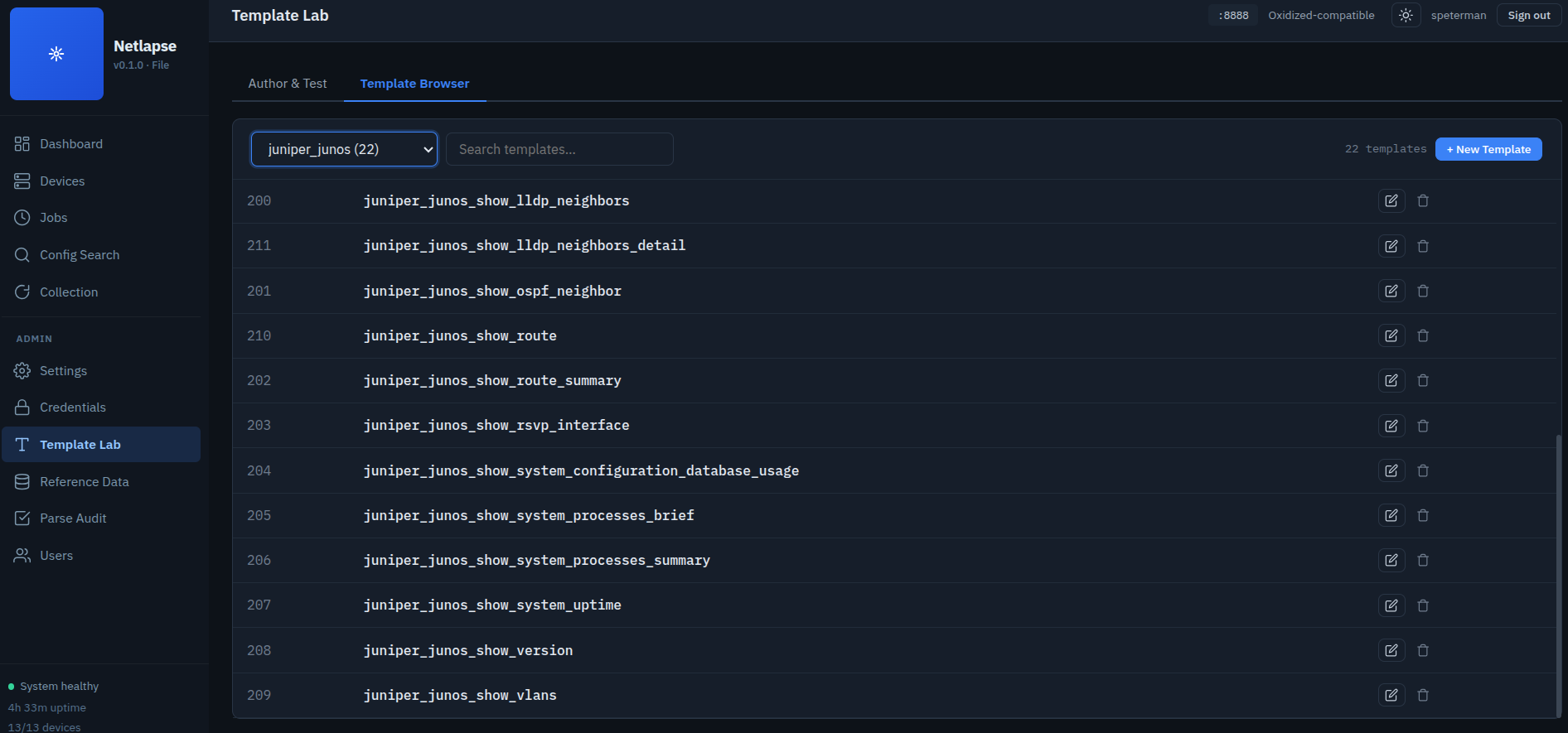
tfsm_templates.db— 1275 TextFSM templates in a SQLite database. 48 Arista, 143 Cisco IOS, 22 Juniper, plus NX-OS, ASA, and others.
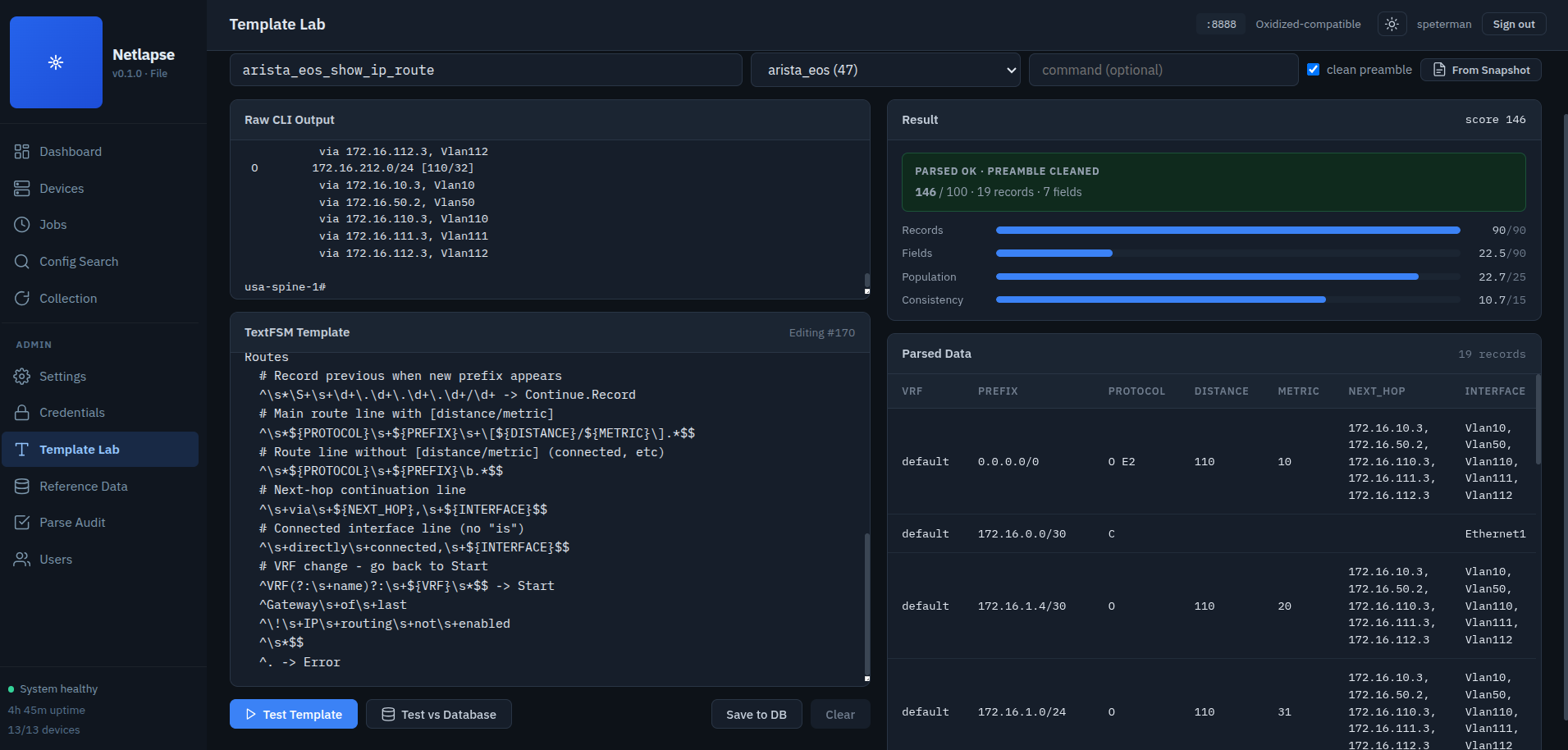
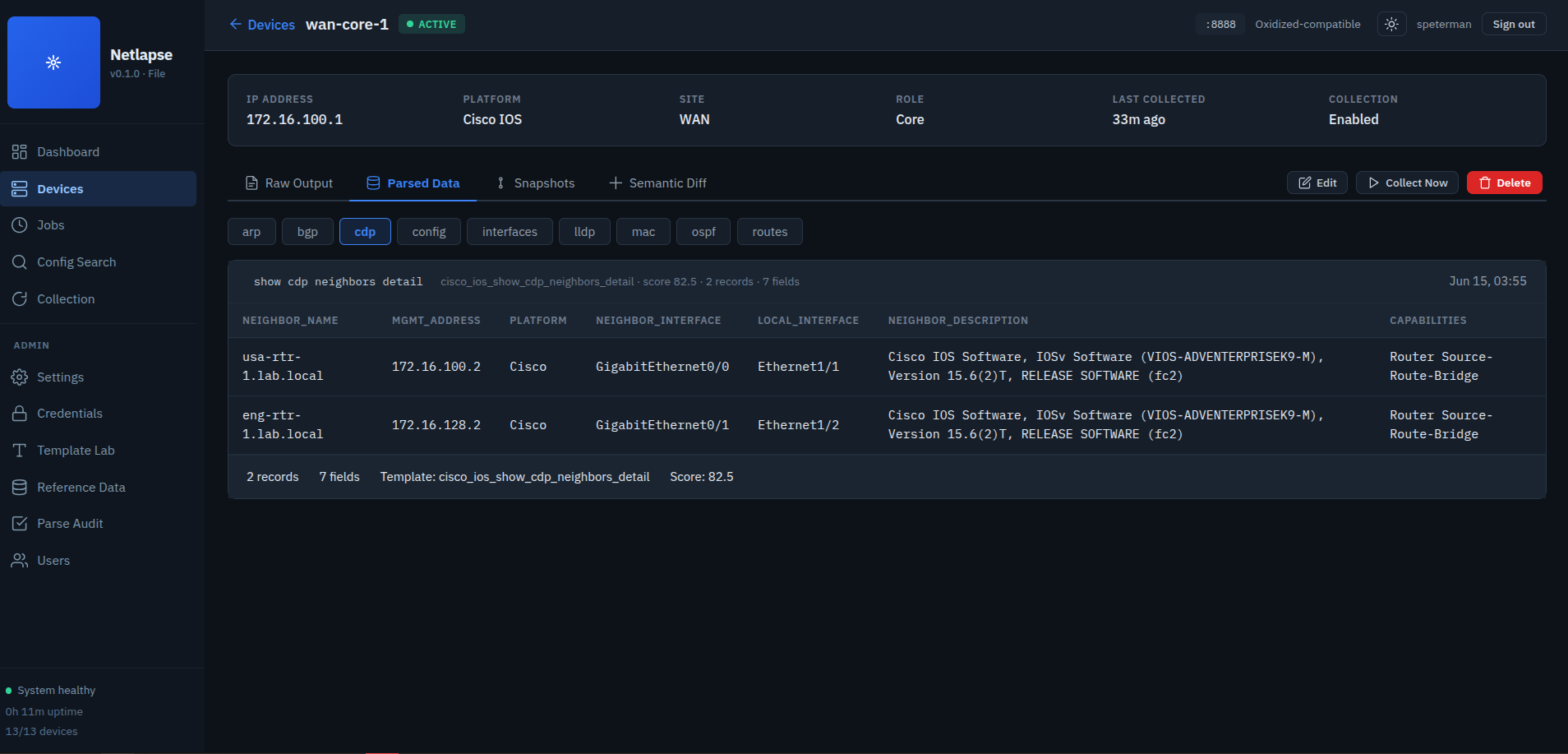
Output cleaning is critical — SSH session captures include command echo, banners, pagination responses, and trailing prompts that TextFSM can't handle. The cleaner uses a two-strategy approach:
- Primary: Find the LAST hostname-prefixed command echo (e.g.
router#show ip arp,user@switch> show arp) and take everything after it. - Fallback: Strip known preamble patterns (bare command lines, JUNOS version banners,
terminal length,set cli screen-length, empty lines).
Integration point: The scheduler calls parser.enrich_snapshot(snapshot, platform_profile) after SSH collection and before storage. Both raw text and parsed JSON are written to disk as dual artifacts (arp.txt + arp.json).
Diagnostic tool: parse_test.py runs the full pipeline for a single device with verbose step-by-step output:
# Full pipeline: SSH → clean → parse → store
python -m netlapse.parse_test peer1-01 --capture arp --emulate

# Skip SSH, test against a saved raw file
python -m netlapse.parse_test border01 --raw-file /tmp/border01-arp.txt --capture arp

# Lower threshold to see low-confidence matches
python -m netlapse.parse_test border01 --capture bgp --min-score 1
SSH Module (ssh/)
Ported from Secure Cartography v2, split into three modules.
ssh/emulation.py — NetEmulate integration as a standalone module. Four resolution strategies for IP→mock device mapping: exact IP match → DNS resolution → FQDN-strip → hostname reverse-scan. Includes DNS intercept (monkey-patches socket.getaddrinfo). Enable once at startup (via CLI --emulate or config.yaml emulation.enabled), every SSHClient connection transparently redirects.
ssh/client.py — Paramiko wrapper. Invoke-shell only (required for most network devices). ANSI sequence filtering, prompt detection, RSA/Ed25519/ECDSA key loading from vault (PEM strings, not file paths at runtime), platform-specific pagination disable, enable mode entry. SSHClientConfig dataclass maps 1:1 to dcim_platform fields.
LegacySSHSupport auto-registers all available kex and host key handlers into Paramiko's Transport._kex_info and Transport._key_info dicts at first connection. Paramiko 3.x+ (especially on Python 3.14) ships with incomplete handler dictionaries — algorithm names are offered during negotiation but their handler classes aren't registered, causing KeyError on connect(). The registration discovers every kex/key class Paramiko ships via importlib, registers what's missing, and builds preference lists from only what's actually registered. Runs once per process, idempotent. Handles mixed fleets: modern devices negotiate curve25519/ecdh, legacy Cisco-1.25 devices fall back to DH group1/3DES, OpenSSH 6.x servers with only ssh-rsa host keys all connect without retry or fallback logic. When legacy_mode is active, also disables rsa-sha2-512 and rsa-sha2-256 pubkey signature algorithms to force ssh-rsa (SHA-1) — required for pre-2014 SSH servers that don't support RFC 8332 or advertise server-sig-algs.
ssh/executor.py — The bridge. build_ssh_config() takes a v_device_detail row and credentials, produces an SSHClientConfig. Device-level legacy_ssh overrides platform default via _resolve_legacy_ssh(). collect_device() connects, detects prompt, disables pagination, optionally enters enable mode, runs commands, and returns DeviceResult with Snapshot objects. test_device_auth() connects and disconnects without commands, capturing the full Paramiko negotiation trace via a temporary log handler — returns AuthTestResult with transport metadata (SSH banner, KEX algorithm, cipher, auth method) and debug log. 12 error categories: connection_refused, connection_timeout, auth_failure, host_unreachable, dns_failure, ssh_protocol, shell_timeout, prompt_detection, command_timeout, command_error, emulation_miss, unknown. Consecutive-failure circuit breaker for batch runs.
Web UI (web/)
Single-page application served by FastAPI at /. Vanilla JS with ES modules — no build step, no bundler, no framework. ~3,300 lines across 13 files. Tested live against 82 devices across 3 data centers.
Architecture: One HTML shell loads app.js, which manages a hash router and dynamically imports each view module on demand. Every view implements the same lifecycle contract: render() returns an HTML string, init() fetches data and wires events after the HTML is in the DOM, destroy() cleans up timers and WebSocket subscriptions when navigating away.
Views:
| View | Route | API Endpoints | Purpose |
|---|---|---|---|
| Dashboard | #/dashboard |
/health, /sites, /jobs |
Stat cards, site grid with device counts, recent collections table |
| Devices | #/devices |
/devices, /sites |
Filterable inventory table — search, site, status filters. URL param pre-filtering (#/devices?site=site1) |
| Device Detail | #/device/{id} |
/devices/{id}, PATCH /devices/{id}, /devices/{id}/test-auth, /snapshots, /snapshots/latest, /diff, /search/capture_types, /platforms, /roles, /credentials, /sites |
Four tabs with capture type pill selector. Raw output per type, parsed data table with click-to-sort columns and status color-coding, snapshot timeline, semantic diff per capture type. Device edit modal (identity, collection, metadata) with credential override, legacy SSH tri-state, SSH auth test with debug log |
| Jobs | #/jobs |
/jobs, /jobs/{slug}/run, POST /jobs, PUT /jobs/{slug}, DELETE /jobs/{slug}, PUT /jobs/{slug}/enabled, /platforms |
Full CRUD: create/edit via modal form with per-platform command map editor, enable/disable toggle, delete with confirmation. Auto-refresh (10s), WS-driven instant updates |
| Config Search | #/search |
POST /api/v1/search, GET /api/v1/search/capture_types, /devices/{id}/snapshots/latest |
Capture-type selector (config, arp, bgp, routes, interfaces), regex search with line numbers, match highlighting, full-output detail modal with ▲▼ match navigation |
| Live Collection | #/collection |
/jobs, /jobs/{slug}/run, WS /ws |
Job selector, trigger button, real-time progress via WebSocket — per-device log, progress bar, summary |
Key modules:
api.js (86 lines) — Every /api/v1 and Oxidized-compat endpoint in one file. Includes job CRUD methods (createJob, updateJob, deleteJob, setJobEnabled, jobHistory), device edit (updateDevice), auth test (testAuth), and reference data (platforms, roles, credentials). Views import typed convenience methods and never construct URLs.
components.js (125 lines) — Pure functions returning HTML strings. badge(status) maps status strings to colored indicators, statCard() renders dashboard metrics, code() wraps text in monospace tags, and formatters handle uptime, intervals, relative timestamps, and byte counts. Icon set includes play, edit, trash, toggle on/off for the jobs CRUD UI.
ws.js (136 lines) — WebSocket manager wrapping /ws with auto-reconnect (exponential backoff, 2s → 30s cap) and event dispatch. Views subscribe during init() and receive an unsubscribe function to denl during destroy(). The collection view receives four event types from the scheduler: collection_start, device_collected (now includes parsed flag and template name), collection_progress, collection_complete. The jobs view subscribes to collection_start and collection_complete for instant status updates.
netlapse.css (1,032 lines) — Enterprise light theme. IBM Plex Sans/Mono typography. CSS custom properties for theming — change --blue and every button, badge, and link updates. Dark sidebar, light content area. Component classes for cards, tables, badges, stat cards, diff blocks, snapshot timelines, progress bars, form grids, modal dialogs, filter pills, and the search detail modal with match navigation.
Design decisions:
- Vanilla JS + ES modules — no webpack, no node, no build tooling. A network engineer opens
views/devices.jsand sees HTML strings and fetch denls. - Dynamic
import()— the browser only loads the JS for the view being displayed. Dashboard never loads the collection view's WebSocket code. render → init → destroylifecycle — same pattern as a PyQt6 widget (setupUi → populate → cleanup). Familiar to anyone who's written desktop apps.- IBM Plex Sans/Mono — enterprise typography that renders IPs, hostnames, and config blocks alongside prose without visual conflict.
- URL param pre-filtering — clicking a site card on the dashboard navigates to
#/devices?site=caland the devices view reads the param on init. Deep-linkable.
API Detail
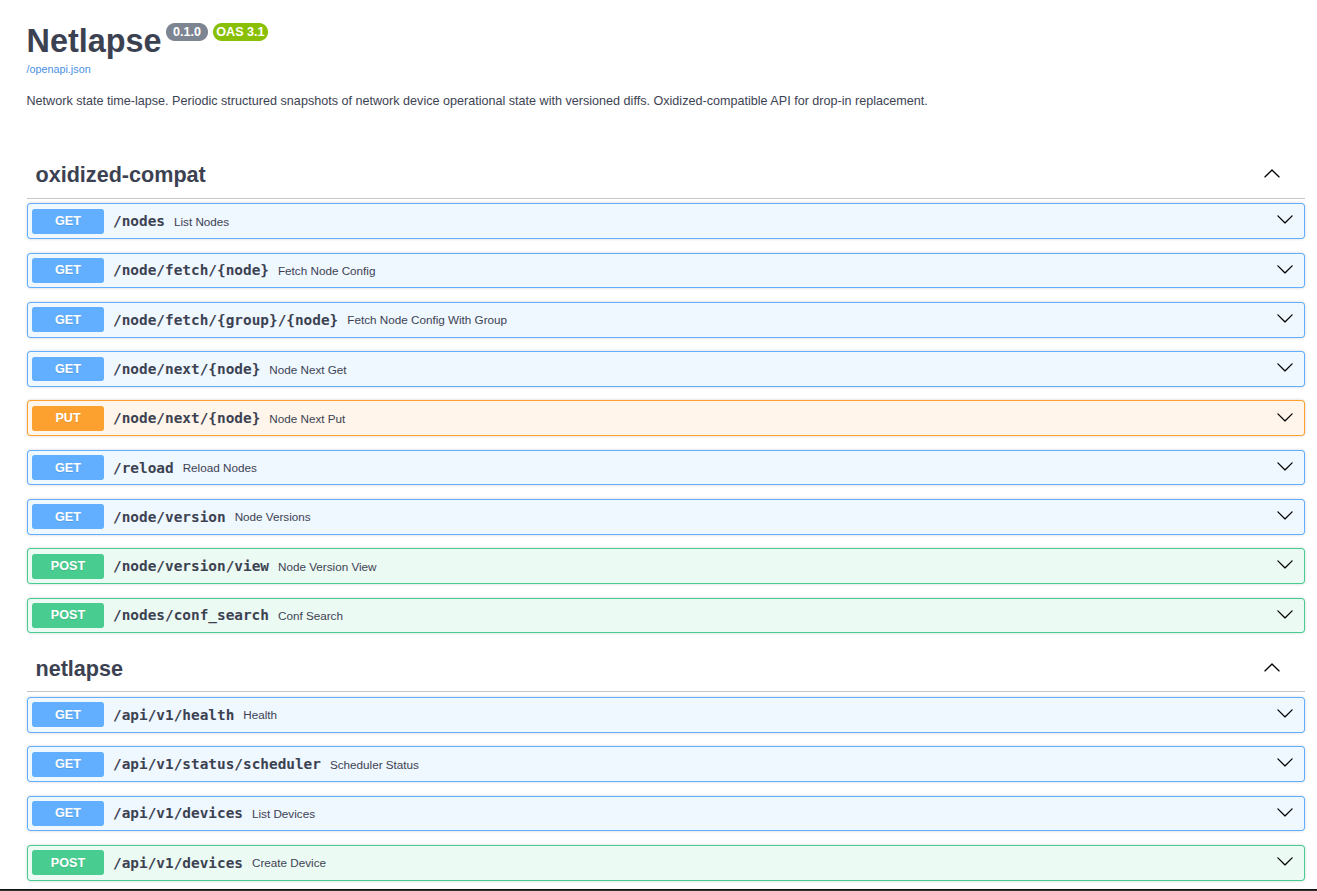
Oxidized Compatibility
Netlapse implements the Oxidized REST surface LibreNMS uses, served at the root
path. LibreNMS needs no special configuration beyond pointing oxidized.url at
Netlapse — but Netlapse needs auth.oxidized_public: true, because LibreNMS
stores only a bare URL and can't send credentials. The full Config-tab path
(metadata, fetch, version list, version view, diffs) is validated end to end
against a live LibreNMS; the Refresh button works as an opt-in trigger. See
README_LibreNMS_Integration.md for the wiring,
auth modes, and naming requirements.
| Oxidized Endpoint | Method | Status |
|---|---|---|
/nodes |
GET | ✅ Optional ?group= filter by site slug |
/node/show/{node} |
GET | ✅ Node metadata (name, ip, model, group, last) |
/node/fetch/{node} |
GET | ✅ Resolves by name or IP |
/node/fetch/{group}/{node} |
GET | ✅ Scoped to site slug |
/node/version |
GET | ✅ Git commits or file timestamps |
/node/version/view |
GET/POST | ✅ View a specific version (plain text) |
/node/version/diffs |
GET | ✅ Unified diff between two versions |
/reload |
GET | ✅ Returns device count |
/node/next/{node} |
GET/PUT | ✅ Enqueues collection — opt-in, IP-scoped (Refresh button); LibreNMS sends PUT |
/nodes/conf_search |
POST | ✅ Regex search across all configs (gated; native search is multi-type) |
The read routes are exposed unauthenticated under oxidized_public (the upstream
Oxidized trust model — no app-layer auth, trusted network boundary). The trigger
route (/node/next) is a side effect and stays off until you list source IPs in
oxidized_public_trigger_ips; that grant is a strict subset of read access.
/nodes/conf_search and every admin/vault route remain behind the normal gate.
Native API
Swagger UI at /docs.
| Endpoint | Method | Status |
|---|---|---|
/api/v1/health |
GET | ✅ Version, uptime, device/job counts |
/api/v1/status/scheduler |
GET | ✅ Running state, active jobs, queue depth, WS clients |
/api/v1/devices |
GET | ✅ Filterable by site, platform, role, status |
/api/v1/devices/{id} |
GET | ✅ Full detail from v_device_detail |
/api/v1/devices/{id} |
PATCH | ✅ Update device (14-field whitelist, diff-only) |
/api/v1/devices/{id}/test-auth |
POST | ✅ SSH auth test with debug log capture |
/api/v1/sites |
GET | ✅ Site list with device counts |
/api/v1/platforms |
GET | ✅ Platform list with device counts |
/api/v1/roles |
GET | ✅ Role list with device counts |
/api/v1/credentials |
GET | ✅ Credential list (safe — id, name, username only) |
/api/v1/devices/{id}/snapshots |
GET | ✅ List collection snapshots |
/api/v1/devices/{id}/snapshots/latest |
GET | ✅ Latest raw text + parsed JSON |
/api/v1/devices/{id}/snapshots/{sha} |
GET | ✅ Specific version |
/api/v1/devices/{id}/diff |
GET | ✅ Structured diff |
/api/v1/jobs |
GET | ✅ Job list with last-run summary (v_job_summary) |
/api/v1/jobs |
POST | ✅ Create new job |
/api/v1/jobs/{slug} |
GET | ✅ Single job definition |
/api/v1/jobs/{slug} |
PUT | ✅ Update job (field whitelist) |
/api/v1/jobs/{slug} |
DELETE | ✅ Delete job (history preserved) |
/api/v1/jobs/{slug}/run |
POST | ✅ Trigger immediate run via scheduler |
/api/v1/jobs/{slug}/enabled |
PUT | ✅ Enable/disable job |
/api/v1/jobs/{slug}/history |
GET | ✅ Run history for a job |
/api/v1/history/{id} |
GET | ✅ Single run with per-device results |
/api/v1/collect/{device_id} |
POST | ✅ Trigger single-device collection |
/api/v1/search |
POST | ✅ Multi-capture-type regex search with line numbers |
/api/v1/search/capture_types |
GET | ✅ List all stored capture types dynamically |
Configuration
# ~/.netlapse/config.yaml
listen:
  host: 0.0.0.0
  port: 8888

storage:
  backend: file           # file or git
  path: ~/.netlapse/data
  max_versions: 50        # file backend only

dcim_db: ~/.netlapse/netlapse.db

scheduler:
  poll_interval: 15       # seconds between due-job checks (default: 15)
  max_workers: 2          # concurrent collection threads (default: 2)

emulation:
  enabled: true           # redirect SSH to NetEmulate mock devices
  # lookup_path: ~/netemulate/ip_lookup.json  # auto-searches defaults if omitted
  # bind_host: 127.0.0.1                     # default

parser:
  # db_path: ~/.netlapse/tfsm_templates.db  # auto-detected if omitted
  # min_score: 15.0                          # minimum template match score (0-100)
Config path overridable with NETLAPSE_CONFIG env var. Falls back to sensible defaults if no config file exists.
Two more files live alongside config.yaml in the same directory (default ~/.netlapse/) and drive collection rather than the daemon itself:
captures.yaml— what to collect and the per-platform command syntaxjobs.yaml— bindings: which capture runs against which devices
Both are optional — absent, the daemon runs on whatever job definitions are already in the DB. See Data-Driven Collection. Their directory can be overridden with definitions_dir in config.yaml; otherwise it follows NETLAPSE_CONFIG.
Environment variables:
NETLAPSE_VAULT_PASSWORD— master password for headless vault unlock (required for scheduler)NETLAPSE_CONFIG— config file path overrideNETLAPSE_ADMIN_PASSWORD- force set admin pw
Remaining Work
Phase 1 — Scheduler ✅
Complete. 551 lines. Asyncio poll loop + ThreadPoolExecutor + WebSocket broadcast. Job CRUD API (create, update, delete, enable/disable). Job history with per-device results. Auto-migrating schema (v3 → v4). All API stubs wired. Running in production against 82 devices.
Phase 2 — Structured Parsing ✅
Complete. Parser engine ported from SC2.5 (tfsm_fire.py + engine.py). 296 TextFSM templates (48 Arista, 143 Cisco IOS, 22 Juniper). Integrated into scheduler — parsing runs inline after SSH collection, before storage. Dual artifacts written to disk: raw .txt + parsed .json. Output cleaning handles multi-vendor SSH session transcripts (Cisco #, Junos >, Arista #, with banners, pagination responses, and command echo). Device detail view renders parsed data as sortable tables with capture type selection. File backend handles write-through of parsed JSON even when raw text is unchanged (covers parser-added-after-first-collection scenario).
Phase 3 — Web UI ✅
Complete. ~3,300 lines, 13 files, zero new dependencies. Six views with hash routing, dynamic module loading, and WebSocket integration. Jobs view has full CRUD (create, edit, enable/disable, delete via modal forms with two-column grid layout, capture type datalist, interval picker, collapsible device filters, auto-slug generation). Device detail view has capture type pill selector across Raw Output, Parsed Data, and Semantic Diff tabs — parsed data renders as sortable tables with status color-coding. Config search supports all capture types with regex, line numbers, and full-output detail modal.
Phase 4 — Multi-Vendor & Device Management (partial) ✅
Per-platform command resolution: a job's commands column holds the default command list and command_map holds per-platform overrides (platform_slug → command array). These columns are no longer authored by hand — for file-managed jobs they're projected from captures.yaml at sync time (the capture's default becomes commands, every other platform key becomes a command_map entry), so the override surface is edited in one vendor-neutral place rather than per job. API-created jobs still write the same two columns directly, so both kinds resolve identically.
Resolution itself is a single shared function — registry.resolver.resolve_commands(default_commands, command_map, platform_slug) — that both the scheduler and the CLI collector call. That sharing is the point: before it existed, the scheduler honored command_map inline while the CLI collector sent the default commands to every platform, so netlapse collect --job and the daemon disagreed on Junos boxes. With one resolver, the two paths cannot diverge. Schema is now v10. jobs.source has three states — file (catalog-owned, read-only, tombstoned when removed), seed (a shipped default no file owns yet: editable, never tombstoned, auto-adopted to file when a matching binding is synced), and NULL/api (hand-made, never touched by sync). The defaults are seeded seed so they collect and stay editable with no catalog on disk, yet a catalog edit takes effect the moment its slug is synced. Auto-migrates from v3 through v10 (v10 repairs DBs left at an interim file seed value).
Device edit: full CRUD modal on the device detail view. Three sections — Identity (name, status, IPs, platform, site, role), Collection (credential override, SSH port, legacy SSH tri-state, collection enabled), Metadata (serial, asset tag, description, comments). Diff-only saves — only changed fields are sent in the PATCH payload. Reference data (sites, platforms, roles, credentials) lazy-loaded once on first edit.
Per-device SSH controls: credential_id overrides the shared vault default per device. legacy_ssh column on dcim_device (nullable — NULL inherits platform default, 0 forces off, 1 forces on). The SSH client now passes disabled_algorithms={'pubkeys': ['rsa-sha2-512', 'rsa-sha2-256']} when legacy mode is active, forcing ssh-rsa signatures for pre-2014 OpenSSH servers that don't support RFC 8332. (Introduced in schema v6; current schema is v8.)
SSH auth test with debug: POST /devices/{id}/test-auth connects, detects prompt, captures transport negotiation details (SSH banner, KEX algorithm, cipher, auth method), and disconnects. A temporary log handler captures DEBUG-level output from Paramiko and the SSH client during the test, returning the full negotiation trace. Updates credential_tested_at and credential_test_result on the device. UI shows inline results with a collapsible debug log panel — the exact output that diagnosed the rsa-sha2-512 signature mismatch on OpenSSH 6.2 Juniper border routers.
Phase 5 — Remaining
NetBox sync (optional, bidirectional), syslog-triggered collection, external device sources (LibreNMS/NetBox API), backfill CLI (re-parse existing raw text through the parser), per-template timeout guard in tfsm-fire for pathological regex cases, admin UI for template management, tfsm-fire template database auto-download on first run.
Shipped since this list was first written: application authentication (session-cookie login, scrypt hashing, LDAP/AD with directory-authoritative roles), the data-driven definition registry, and interval-change rescheduling (a definition sync re-derives next_run when a capture's interval changes, so it takes effect that cycle rather than the next).
Design Decisions
Why the network is the source of truth: The resistance of NetBox adoption at the operator level drove an architectural pivot. VelocityCMDB required a populated NetBox; Netlapse doesn't. Each tool in the suite carries enough DCIM to operate autonomously. If NetBox exists, sync to it. If it doesn't, the tool still works. The SC2 topology map is the seed source — pip install, point at the network, start collecting.
Why definitions are files-authoritative but DB-synced: A YAML catalog is what an operator should edit — diffable, reviewable, version-controllable, no code change to add a vendor. But the running daemon needs state that doesn't belong in a file: the live enable/disable toggle flipped in the UI, the schedule (last_run/next_run), and job history. So definitions are authoritative in the files and projected into the jobs table on startup, while that runtime state stays authoritative in the DB and is never clobbered by a sync. The DB therefore doubles as the last-good cache: if the catalog fails validation on a restart, the sync is skipped and the daemon runs on the definitions already in the DB. A typo degrades to "ran with last good definitions," never to "stopped collecting."
Why platforms stayed in the DB while captures and jobs moved to files: Devices reference their platform by platform_slug, and dcim_platform already carries the live SSH behavior each platform needs — prompt regex, paging-disable command, enable command, legacy-SSH flag. Putting platforms in a file too would create a second source of platform truth that could drift from the one devices actually resolve against. Instead, a capture's per-platform command keys are validated against the real dcim_platform list at load time, so an override key that no device could ever match is caught against the source that decides matching. One platform table, no drift. (Making the file authoritative for SSH behavior too is a deliberate later step — it means deciding what wins when file and DCIM disagree.)
Why no netmiko: The SC2 SSH client is 700 lines of battle-tested Paramiko logic — ANSI filtering, prompt detection, legacy algorithm support, invoke-shell for devices that reject exec channels. It auto-registers kex and host key handlers that Paramiko 3.x strips from its lookup dicts, handling mixed-fleet algorithm negotiation (modern curve25519 through legacy DH group1) without retry chains. Netmiko would be a dependency that does less than what's already built.
Why SQLite, not PostgreSQL: Single-file deployment. No database server. The DCIM handles 500+ devices trivially. WAL mode handles concurrent API reads while the scheduler writes. Worker threads create their own connections — SQLite connections can't cross thread boundaries, but concurrent connections with WAL mode are safe.
Why two storage backends: Not everyone has or wants git. The file backend lets someone start collecting in 60 seconds. When they want versioning, they switch one config line.
Why dual artifacts (raw + parsed): The raw text is what you grep at 2 AM. The parsed JSON is what makes Netlapse different — structured diffs, semantic change detection, operational state awareness.
Why a separate vault database: The credential vault lives at ~/.netlapse/vault.db, separate from the DCIM at ~/.netlapse/netlapse.db. Different security boundary — the vault is encrypted, the DCIM is not. The credential_id on dcim_device is a logical reference resolved at runtime through the vault bridge.
Why commit trailers instead of a metadata database: Git trailers survive git clone, git bundle, repo migrations, and backup/restore. A side-car database can get out of sync.
Why site_slug = Oxidized group = git directory: Three systems that need to agree on a namespace. Making them the same string eliminates mapping tables.
Why thread-local DB connections in the scheduler: SQLite connections can't cross thread boundaries (check_same_thread=True by default). The scheduler's worker threads create their own NetlapseDB(db_path) instances and close them after each job. The poll loop runs in the main asyncio thread and uses the shared connection. WAL mode ensures concurrent reads don't block.
Design Philosophy
The stack is deliberately inheritable: FastAPI, SQLite, vanilla JS, Paramiko — mainstream frameworks, no exotic dependencies. Vanilla JS is intentional (the next person maintaining this is a network engineer, not a frontend developer). All projects have architecture docs. pip-installable. GPL licensed so it stays open.
Portable Components
Netlapse reuses battle-tested modules from the author's network automation stack:
| Component | Origin | Status | Purpose |
|---|---|---|---|
| SSH Client | Secure Cartography v2 | ✅ Ported | Paramiko wrapper with auto-registered algorithm handlers, key+password auth, ANSI filtering, prompt detection |
| Emulation Shim | Secure Cartography v2 | ✅ Ported | NetEmulate mock device redirection for testing |
| SSH Executor | VelocityCollector | ✅ Adapted | DCIM → SSH → Snapshot pipeline with 12-category error handling |
| DCIM Schema | VelocityCollector | ✅ Ported | NetBox-aligned SQLite (sites, platforms, roles, devices, jobs, history) |
| Credential Vault | Secure Cartography v2 | ✅ Ported | Fernet-encrypted SQLite, headless unlock, DCIM bridge |
| tfsm-fire | Secure Cartography v2.5 | ✅ Ported | TextFSM auto-template selection — output selects template |
| Parse Engine | New for Netlapse | ✅ Built | Output cleaning, filter cascade, vendor fallback, Snapshot enrichment |
| Map Importer | New for Netlapse | ✅ Built | SC2 topology maps → DCIM device inventory, hostname.site preservation |
| Collection Pipeline | New for Netlapse | ✅ Built | End-to-end: DCIM → vault → executor → parser → storage |
| Scheduler | New for Netlapse | ✅ Built | asyncio + ThreadPoolExecutor, WS broadcast, inline parsing, job history |
| Web UI | New for Netlapse | ✅ Built | SPA: dashboard, inventory, parsed data tables, job CRUD, live collection |
Dependencies
fastapi>=0.110          # Web framework
uvicorn[standard]>=0.27 # ASGI server
python-multipart>=0.0.9 # Form parsing (Oxidized compat endpoints)
paramiko>=3.4           # SSH (SC2 client)
gitpython>=3.1          # Git storage backend
deepdiff>=7.0           # Structured diff engine
pyyaml>=6.0             # Configuration
cryptography>=42.0      # Vault encryption
textfsm>=1.1            # Template parsing (tfsm-fire structured output)
Python Compatibility
Tested on Python 3.12 and 3.14. The SSH client's LegacySSHSupport handles Paramiko algorithm registration differences across Python versions automatically — no version-specific configuration needed.
License
GPLv3
Author
Scott Peterman — [Full Stack Net Ops Developer](https://scottpeterman.github.io)
Release history Release notifications | RSS feed


Download files
Download the file for your platform. If you're not sure which to choose, learn more about installing packages.
Source Distribution
Built Distribution
Filter files by name, interpreter, ABI, and platform.
If you're not sure about the file name format, learn more about wheel file names.
Copy a direct link to the current filters
File details
Details for the file netlapse-0.1.1.tar.gz.
File metadata
- Download URL: netlapse-0.1.1.tar.gz
- Upload date:
- Size: 365.8 kB
- Tags: Source
- Uploaded using Trusted Publishing? No
- Uploaded via: twine/6.2.0 CPython/3.10.12
File hashes
| Algorithm | Hash digest | |
|---|---|---|
| SHA256 |
ac2cf4a6328b8be6b0717e735b1176169489084b026078a8765e4704b16fbeb0
|
|
| MD5 |
fa4c40136f70344d573593ceaf36fac5
|
|
| BLAKE2b-256 |
5b84ca4319591a3ed0bdf195babf3d7cd89befc3f47ff5bb94b3b079727b1628
|
File details
Details for the file netlapse-0.1.1-py3-none-any.whl.
File metadata
- Download URL: netlapse-0.1.1-py3-none-any.whl
- Upload date:
- Size: 376.3 kB
- Tags: Python 3
- Uploaded using Trusted Publishing? No
- Uploaded via: twine/6.2.0 CPython/3.10.12
File hashes
| Algorithm | Hash digest | |
|---|---|---|
| SHA256 |
3fde4a9bb790a54364cfcfe5c42a5cf860b49bd8ec6d97ce33beea4d5652a48b
|
|
| MD5 |
8f3dfddecba36ce47310e6c0a83698c0
|
|
| BLAKE2b-256 |
c014021c4eea49508c870a2f9100391a7595680bffcf1caf3857a76e762feb1b
|






