
netlogopy
netlogopy is a Python library that bridges NetLogo and Python, enabling advanced agent-based simulations by combining NetLogo's simulation environment with Python's powerful libraries for computation, optimization, and AI. netlogopy allows direct manipulation of NetLogo agents from Python.
License
This project is licensed under the terms of the MIT License.
Developed by
- Nourddine Bouaziz - @Bouaziz19
Requirements
- netlogopy works with Python >= 3.6
- netlogopy works with NetLogo 6.0, 6.1, and 6.2
- netlogopy requires JDK 8 or 11 (e.g.,
openjdk=11) - netlogopy requires nl4py
Installation
Step 1: Install NetLogo
Download and install NetLogo from the official site.

Step 2: Install Conda
If you do not already have Conda installed, download and install Anaconda or Miniconda.
Step 3: Create the Conda Environment
Use the provided environment.yml file:
conda env create -f environment.yml
conda activate netlogopy-env
Or install manually:
conda install openjdk=11 -y
pip install netlogopy
To upgrade:
pip install netlogopy --upgrade
Configure IDE (Optional)
To set up VS Code for CLI compatibility:
Colors Reference
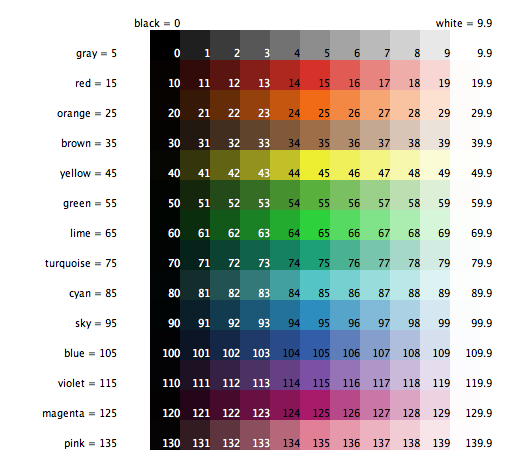
API Reference
World functions
| Function | Description |
|---|---|
run_netlogo(netlogo_home, path_model="") |
Start NetLogo and open the model |
resize_world(n, x0, xf, y0, yf) |
Resize the NetLogo world |
set_background(n, image_path) |
Set a background image |
run_command(n, command) |
Execute any NetLogo command |
netlogoshow(n, word) |
Print a message in the NetLogo console |
nl_output_print(n, word) |
Print a message in the NetLogo output window |
clear_drawing(n) |
Erase all pen traces |
clear_all_turtles(n) |
Remove all pyturtles from the world |
get_ticks(n) |
Return the current tick count |
do_tick(n) |
Advance the simulation clock by one tick |
Agent functions
| Function | Description |
|---|---|
count_pyturtles(n) |
Return the number of pyturtles in the world |
get_all_pyturtles() |
Return the Python list of all pyturtles |
getxyturtle(n, turtle) |
Return [x, y] of a turtle |
distancebetween(n, t1, t2) |
Return the distance between two turtles |
pyturtle class — movement
| Method | Description |
|---|---|
fd(steps) |
Move forward |
bk(steps) |
Move backward |
rt(angle) |
Turn right (degrees) |
lt(angle) |
Turn left (degrees) |
setxy(x, y) |
Teleport to coordinates |
move_to(target) |
Move to another turtle's position |
face_to(target) |
Face towards another turtle |
get_xcor() |
Return current X coordinate |
get_ycor() |
Return current Y coordinate |
distanceto(target) |
Return distance to another turtle |
pyturtle class — heading
| Method | Description |
|---|---|
set_heading(angle) |
Set heading (0=N, 90=E, 180=S, 270=W) |
get_heading() |
Return current heading |
pyturtle class — appearance
| Method | Description |
|---|---|
set_shape(shape) |
Change shape (e.g. "car", "default") |
set_color(color) |
Change color (NetLogo color code) |
get_color() |
Return current color |
set_size(size) |
Change size |
get_size() |
Return current size |
set_label(text) |
Set text label displayed on the turtle |
hideturtle() |
Hide the turtle |
showturtle() |
Make the turtle visible |
dieturtle() |
Remove the turtle from the world |
pyturtle class — pen
| Method | Description |
|---|---|
pen_down() |
Activate pen (traces path) |
pen_up() |
Deactivate pen |
stamp() |
Stamp shape on patches |
street class (directed link)
street(n, fromm=car01, too=car02, label="street",
       labelcolor=35, color=35, shape="default", thickness=0.5)
Usage Examples
Example 1: pyturtle
Create an agent and move it.
import time
from netlogopy.netlogopy import *

if __name__ == "__main__":
    netlogo_home = "C:/Program Files/NetLogo 6.2.2"
    n = run_netlogo(netlogo_home)
    resize_world(n, 0, 60, 0, 60)
    car01 = pyturtle(n, x=20, y=20, shape="car", size_shape=4, color=15, name="car01", labelcolor=15)

    for i in range(10):
        time.sleep(1)
        car01.fd(1)
    n.close_model()
Example 2: set_background
Set a custom background image.
import time
from netlogopy.netlogopy import *

if __name__ == "__main__":
    netlogo_home = "C:/Program Files/NetLogo 6.2.2"
    n = run_netlogo(netlogo_home)
    resize_world(n, 0, 60, 0, 60)
    set_background(n, "path/to/image.png")
    car01 = pyturtle(n, x=20, y=20, shape="car", size_shape=4, color=15, name="car01", labelcolor=15)

    for i in range(10):
        time.sleep(1)
        car01.fd(1)
    n.close_model()
Example 3: street
Create a link between two agents.
import time
from netlogopy.netlogopy import *

if __name__ == "__main__":
    netlogo_home = "C:/Program Files/NetLogo 6.2.2"
    n = run_netlogo(netlogo_home)
    resize_world(n, 0, 60, 0, 60)
    car01 = pyturtle(n, x=20, y=20, shape="car", size_shape=4, color=15, name="car01", labelcolor=15)
    car02 = pyturtle(n, x=5,  y=5,  shape="car", size_shape=4, color=55, name="car02", labelcolor=55)
    street(n, fromm=car01, too=car02, label="street", labelcolor=35, color=35, shape="default", thickness=0.5)

    for i in range(10):
        time.sleep(1)
        car01.fd(1)
    n.close_model()
Example 4: fd / bk
Move forward and backward.
import time
from netlogopy.netlogopy import *

if __name__ == "__main__":
    netlogo_home = "C:/Program Files/NetLogo 6.2.2"
    n = run_netlogo(netlogo_home)
    resize_world(n, 0, 60, 0, 60)
    car01 = pyturtle(n, x=30, y=30, shape="car", size_shape=4, color=15, name="car01", labelcolor=15)

    for i in range(10):
        time.sleep(0.5)
        car01.fd(2)

    for i in range(10):
        time.sleep(0.5)
        car01.bk(2)
    n.close_model()
Example 5: rt / lt
Turn right and left — full circle.
import time
from netlogopy.netlogopy import *

if __name__ == "__main__":
    netlogo_home = "C:/Program Files/NetLogo 6.2.2"
    n = run_netlogo(netlogo_home)
    resize_world(n, 0, 60, 0, 60)
    car01 = pyturtle(n, x=30, y=30, shape="car", size_shape=4, color=15, name="car01", labelcolor=15)

    for i in range(36):       # full circle turning right
        time.sleep(0.2)
        car01.rt(10)
        car01.fd(1)

    for i in range(36):       # full circle turning left
        time.sleep(0.2)
        car01.lt(10)
        car01.fd(1)
    n.close_model()
Example 6: set_heading / get_heading
Set and read the direction of a turtle.
import time
from netlogopy.netlogopy import *

if __name__ == "__main__":
    netlogo_home = "C:/Program Files/NetLogo 6.2.2"
    n = run_netlogo(netlogo_home)
    resize_world(n, 0, 60, 0, 60)
    car01 = pyturtle(n, x=30, y=30, shape="car", size_shape=4, color=15, name="car01", labelcolor=15)

    for heading in [0, 90, 180, 270]:   # North, East, South, West
        time.sleep(1)
        car01.set_heading(heading)
        print(f"Heading → {car01.get_heading()}")
        car01.fd(5)
    n.close_model()
Example 7: set_color / get_color
Change the turtle color dynamically.
import time
from netlogopy.netlogopy import *

if __name__ == "__main__":
    netlogo_home = "C:/Program Files/NetLogo 6.2.2"
    n = run_netlogo(netlogo_home)
    resize_world(n, 0, 60, 0, 60)
    car01 = pyturtle(n, x=20, y=20, shape="car", size_shape=4, color=15, name="car01", labelcolor=15)

    # NetLogo colors: 15=red, 55=green, 95=blue, 35=orange, 125=violet
    for c in [15, 55, 95, 35, 125]:
        time.sleep(1)
        car01.set_color(c)
        print(f"Color → {car01.get_color()}")
        car01.fd(3)
    n.close_model()
Example 8: set_size / get_size
Grow a turtle progressively.
import time
from netlogopy.netlogopy import *

if __name__ == "__main__":
    netlogo_home = "C:/Program Files/NetLogo 6.2.2"
    n = run_netlogo(netlogo_home)
    resize_world(n, 0, 60, 0, 60)
    car01 = pyturtle(n, x=30, y=10, shape="car", size_shape=2, color=15, name="car01", labelcolor=15)

    for i in range(8):
        time.sleep(0.8)
        car01.set_size(2 + i)
        print(f"Size → {car01.get_size()}")
        car01.fd(2)
    n.close_model()
Example 9: hideturtle / showturtle
Hide then show a turtle.
import time
from netlogopy.netlogopy import *

if __name__ == "__main__":
    netlogo_home = "C:/Program Files/NetLogo 6.2.2"
    n = run_netlogo(netlogo_home)
    resize_world(n, 0, 60, 0, 60)
    car01 = pyturtle(n, x=30, y=30, shape="car", size_shape=4, color=15, name="car01", labelcolor=15)

    for i in range(10):
        time.sleep(1)
        if i == 3:
            car01.hideturtle()
        if i == 7:
            car01.showturtle()
        car01.fd(2)
    n.close_model()
Example 10: pen_down / pen_up / stamp
Draw a path and stamp shapes.
import time
from netlogopy.netlogopy import *

if __name__ == "__main__":
    netlogo_home = "C:/Program Files/NetLogo 6.2.2"
    n = run_netlogo(netlogo_home)
    resize_world(n, 0, 60, 0, 60)
    car01 = pyturtle(n, x=10, y=10, shape="car", size_shape=4, color=15, name="car01", labelcolor=15)

    car01.pen_down()
    for side in range(4):          # draw a square
        for _ in range(10):
            time.sleep(0.1)
            car01.fd(1)
        car01.rt(90)
    car01.pen_up()

    for pos in [(20, 20), (40, 20), (30, 40)]:
        time.sleep(0.5)
        car01.setxy(pos[0], pos[1])
        car01.stamp()
    n.close_model()
Example 11: distanceto / face_to
Calculate distance and orient a turtle towards another.
import time
from netlogopy.netlogopy import *

if __name__ == "__main__":
    netlogo_home = "C:/Program Files/NetLogo 6.2.2"
    n = run_netlogo(netlogo_home)
    resize_world(n, 0, 60, 0, 60)
    car01 = pyturtle(n, x=20, y=20, shape="car", size_shape=4, color=15)
    car02 = pyturtle(n, x=5,  y=5,  shape="car", size_shape=4, color=55)

    for i in range(10):
        time.sleep(1)
        car01.face_to(car02)
        dist = car01.distanceto(car02)
        print(f"Distance to car02: {dist}")
        car01.fd(1)
    n.close_model()
Example 12: count_pyturtles / clear_all_turtles
Count and remove all agents.
import time
from netlogopy.netlogopy import *

if __name__ == "__main__":
    netlogo_home = "C:/Program Files/NetLogo 6.2.2"
    n = run_netlogo(netlogo_home)
    resize_world(n, 0, 60, 0, 60)

    turtles = [pyturtle(n, x=i*10, y=20, shape="car", size_shape=3, color=15+i*10, name=f"car{i:02d}") for i in range(5)]
    time.sleep(1)
    print(f"Turtles: {count_pyturtles(n)}")

    time.sleep(2)
    clear_all_turtles(n)
    print(f"After clear: {count_pyturtles(n)}")
    n.close_model()
Example 13: get_ticks / do_tick
Use NetLogo ticks as a simulation clock.
import time
from netlogopy.netlogopy import *

if __name__ == "__main__":
    netlogo_home = "C:/Program Files/NetLogo 6.2.2"
    n = run_netlogo(netlogo_home)
    resize_world(n, 0, 60, 0, 60)
    car01 = pyturtle(n, x=10, y=30, shape="car", size_shape=4, color=15, name="car01", labelcolor=15)

    for _ in range(20):
        time.sleep(0.3)
        do_tick(n)
        tick = get_ticks(n)
        car01.fd(1)
        car01.set_label(f"t={tick}")
        print(f"Tick: {tick}  pos: ({car01.get_xcor():.1f}, {car01.get_ycor():.1f})")
    n.close_model()
Example 14: Integrating an Existing NetLogo Model
Add Python-controlled agents on top of an existing NetLogo model.
import time, os
from netlogopy.netlogopy import *

if __name__ == "__main__":
    netlogo_home = "C:/Program Files/NetLogo 6.2.2"
    path_model = os.path.join(os.path.dirname(__file__), "Wolf Sheep Predation.nlogo")
    n = run_netlogo(netlogo_home, path_model)
    resize_world(n, 0, 70, 0, 55)
    run_command(n, "setup")

    car01 = pyturtle(n, x=20, y=20, shape="car", size_shape=4, color=15, name="car01", labelcolor=15)
    car02 = pyturtle(n, x=5,  y=5,  shape="car", size_shape=4, color=55, name="car02", labelcolor=55)
    street(n, fromm=car01, too=car02, label="street", labelcolor=35, color=35, shape="default", thickness=0.5)

    for i in range(100):
        run_command(n, "go")
        time.sleep(0.1)
        car01.fd(1)
        if i % 20 == 0:
            car01.setxy(10, 10)
Download Examples
You can download all example files from GitHub Examples.
Happy simulating! If you have any questions, issues, or ideas for new features, please open an issue or submit a pull request.
1 maintainer

Metadata
1 maintainer
Release files for netlogopy 0.1.6
For a detailed explanation of source distributions (sdists) and built distributions (wheels), please see the package formats documentation.
Source distribution (sdist)
| File | Size | Uploaded | |
|---|---|---|---|
| netlogopy-0.1.6.tar.gz | 55.7 kB | Details |
Built distribution (wheel)
| File | Interpreter | ABI | Platform | Reset |
|---|---|---|---|---|
| netlogopy-0.1.6-py3-none-any.whl | Python 3 | none | any | Details |
Total release size: 122.3 kB
Release files / netlogopy-0.1.6.tar.gz
| Download URL | netlogopy-0.1.6.tar.gz |
|---|---|
| Size | 55.7 kB |
| Tags | Source |
|
SHA-256 checksum How to use checksums |
62494e8b3dd1e81baeb1d7f82332bb12b45269ba4eee2f225b04315a85e484da
|
|
BLAKE2b-256 checksum How to use checksums |
565062607fa6194a0fdb85e3389686bd9902b809281314c8a91a0ede5fb69f1a
|
| Upload date | |
|
Uploaded using Trusted Publishing? What is trusted publishing? |
No |
| Uploaded via |
twine/6.2.0 CPython/3.9.25
|
Release files / netlogopy-0.1.6-py3-none-any.whl
| Download URL | netlogopy-0.1.6-py3-none-any.whl |
|---|---|
| Size | 66.6 kB |
| Tags | Python 3 |
|
SHA-256 checksum How to use checksums |
f5672bc7567cd6f85f9affa8dda98b0ee9048d6fa3201b1f73564fb2a346257f
|
|
BLAKE2b-256 checksum How to use checksums |
2d7eb29b73dd27d7aeb180f69ec87dd54fe3a13ce978868cb780ca3929c5a611
|
| Upload date | |
|
Uploaded using Trusted Publishing? What is trusted publishing? |
No |
| Uploaded via |
twine/6.2.0 CPython/3.9.25
|














