
轻量级 Linux 终端网络流量监控工具
Verified details
These details have been verified by PyPIProject links
GitHub Statistics
Maintainers

Project description

netop
netop is a focused rewrite of the original tmd-top idea for day-to-day
Linux network troubleshooting. The upstream project has not seen active feature
work for a while, and its original design bundled GeoIP lookup, SQLite snapshot
tables, firewall mutation, and TUI rendering into one application. This fork
intentionally narrows the scope to one job: fast, read-only terminal network
monitoring.
Design Goals
- Pure monitoring: no IP ban button, no iptables, nftables, or firewalld writes.
- Stateless runtime: no SQLite database and no persistent traffic history.
- No GeoIP: no bundled MMDB file, no location column, no per-IP lookup cost.
- Low overhead: collect from
ss,ps, and/proc/net/dev, then calculate rates from in-memory deltas. - Modern Textual path: use public Textual APIs and track
textual>=8.2,<9instead of pinning totextual==1.0.0.
Current Status
This is an early refactor branch. The package and CLI entry point have been
renamed to netop. Compatibility with the old tmd and tmd-top command
names is intentionally not preserved.
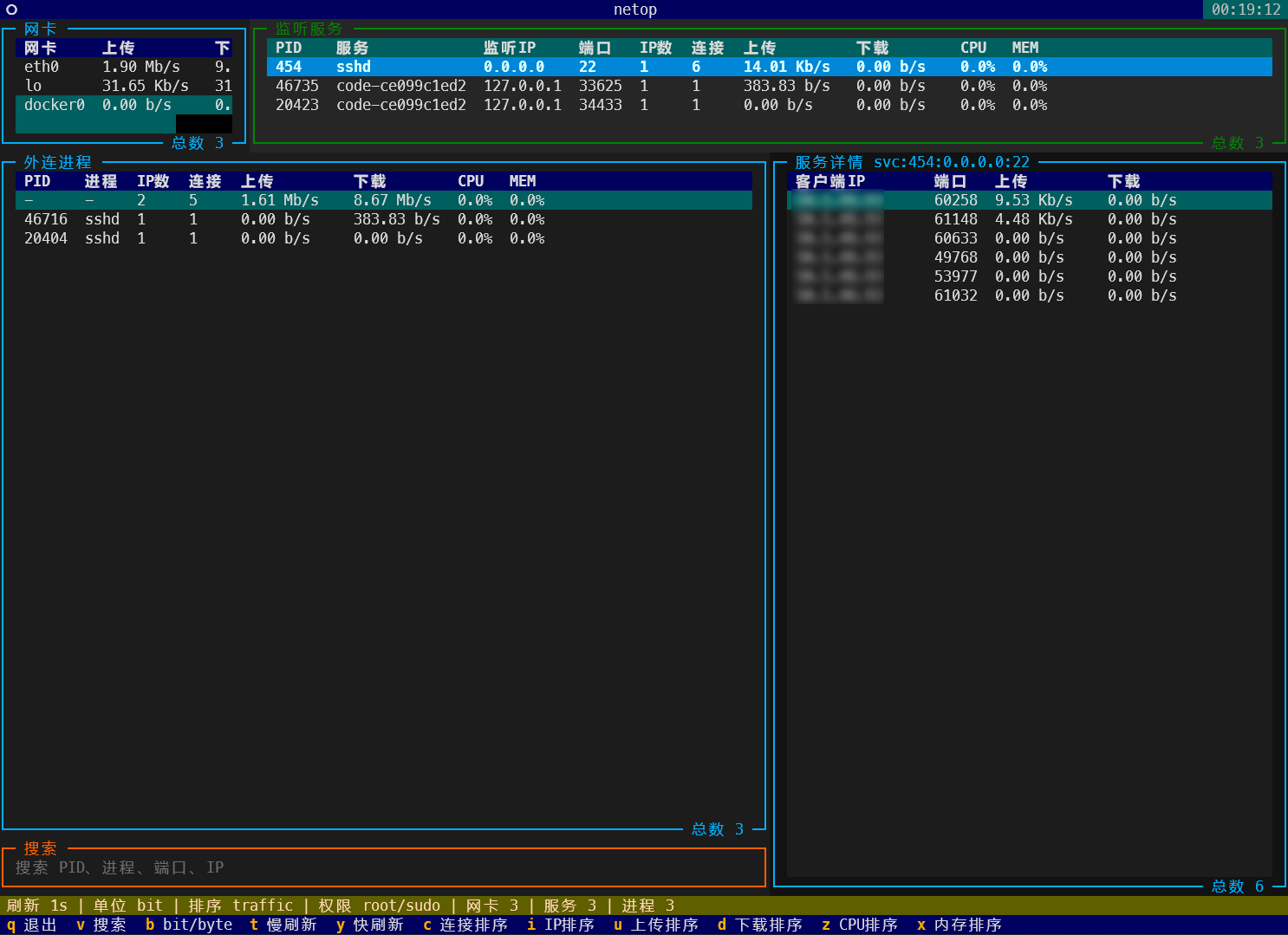
The UI currently shows:
- interface traffic
- listening services
- outbound processes
- per-service or per-process TCP connection details
- search, refresh mode, sort mode, permission state, and rate unit state
Requirements
- Python >= 3.10
- Linux
iproute2forssprocpsforps
Install
The recommended installation path is PyPI:
python -m pip install netop
If your default pip index is an internal mirror that has not synced netop
yet, install from the official PyPI index:
python -m pip install --index-url https://pypi.org/simple netop
For local development, install from source:
python -m pip install -e .
Usage
If netop was installed in a user environment, run it directly:
netop
In normal-user mode, netop will still try sudo -n ss when passwordless sudo
is available, so it can display more PID/process ownership data without
prompting for a password inside the TUI.
If netop is installed in a root-visible environment, or you need the most
complete socket ownership data, run:
sudo netop
Shortcuts
| Key | Action |
|---|---|
q |
Quit |
v |
Focus search |
b |
Toggle bit/byte rate mode |
t |
Slow refresh to 5 seconds |
y |
Restore refresh to 1 second |
r |
Sort by total traffic |
c |
Sort by connections |
i |
Sort by unique IP count |
u |
Sort by upload |
d |
Sort by download |
z |
Sort by CPU |
x |
Sort by memory |
Click or highlight a listening service or outbound process row to display its connection details on the right.
Display Units
By default, netop displays network rates as bit rates such as Kb/s and
Mb/s. Press b to switch to byte-rate mode such as KB/s and MB/s.
Data Flow
ss -tniH state establishedreads TCP socket counters.ss -tpanHreads listening sockets, established sockets, PIDs, and process names when available.psprovides lightweight CPU and memory metadata by PID./proc/net/devprovides interface-level counters.- The collector computes deltas in memory and sends immutable snapshots to the Textual UI.
What Changed From tmd-top
| Area | netop direction |
|---|---|
| GeoIP | Removed |
| SQLite | Removed |
| Firewall ban actions | Removed |
| Package name | netop |
| CLI command | netop only |
| Textual dependency | textual>=8.2,<9 |
| Runtime model | Read-only, in-memory snapshots |
Original Project
Original repository README: https://github.com/CDWEN0526/tmd-top
Project details
Verified details
These details have been verified by PyPIProject links
GitHub Statistics
Maintainers
Release history Release notifications | RSS feed


Download files
Download the file for your platform. If you're not sure which to choose, learn more about installing packages.
Source Distribution
Built Distribution
Filter files by name, interpreter, ABI, and platform.
If you're not sure about the file name format, learn more about wheel file names.
Copy a direct link to the current filters
File details
Details for the file netop-0.1.1.tar.gz.
File metadata
- Download URL: netop-0.1.1.tar.gz
- Upload date:
- Size: 19.7 kB
- Tags: Source
- Uploaded using Trusted Publishing? Yes
- Uploaded via: twine/6.1.0 CPython/3.13.12
File hashes
| Algorithm | Hash digest | |
|---|---|---|
| SHA256 |
b5ff564be3d2d278d24a2294cfd960790e620db87973f60ebbaf051b25c1ef77
|
|
| MD5 |
1ff8e5b2e584b67aa9254d6c6ebe7a78
|
|
| BLAKE2b-256 |
afe46baa7c165f970cf9935a6bb9848184c71ee2bab549d368bbcc0540a51c33
|
Provenance
The following attestation bundles were made for netop-0.1.1.tar.gz:
Publisher:
pypi.yml on i-square/netop
-
Statement:
-
Statement type:
https://in-toto.io/Statement/v1 -
Predicate type:
https://docs.pypi.org/attestations/publish/v1 -
Subject name:
netop-0.1.1.tar.gz -
Subject digest:
b5ff564be3d2d278d24a2294cfd960790e620db87973f60ebbaf051b25c1ef77 - Sigstore transparency entry: 2063242403
- Sigstore integration time:
-
Permalink:
i-square/netop@eb68d05b3811cdf4d1e495177ad5f35a940bb109 -
Branch / Tag:
refs/tags/v0.1.1 - Owner: https://github.com/i-square
-
Access:
public
-
Token Issuer:
https://token.actions.githubusercontent.com -
Runner Environment:
github-hosted -
Publication workflow:
pypi.yml@eb68d05b3811cdf4d1e495177ad5f35a940bb109 -
Trigger Event:
push
-
Statement type:
File details
Details for the file netop-0.1.1-py3-none-any.whl.
File metadata
- Download URL: netop-0.1.1-py3-none-any.whl
- Upload date:
- Size: 16.0 kB
- Tags: Python 3
- Uploaded using Trusted Publishing? Yes
- Uploaded via: twine/6.1.0 CPython/3.13.12
File hashes
| Algorithm | Hash digest | |
|---|---|---|
| SHA256 |
0af1973269dd0bcab7c1ab0dcab0cef575ddb4be1b73b29fb02a850500d7e047
|
|
| MD5 |
b1ec2040d67adb0cf85a62c3f0d14d4f
|
|
| BLAKE2b-256 |
4f6b7c5e2ec4aca7facbe0bd67f654bf7cc9e9aa4cb4e3a3e5e18de470ef93a4
|
Provenance
The following attestation bundles were made for netop-0.1.1-py3-none-any.whl:
Publisher:
pypi.yml on i-square/netop
-
Statement:
-
Statement type:
https://in-toto.io/Statement/v1 -
Predicate type:
https://docs.pypi.org/attestations/publish/v1 -
Subject name:
netop-0.1.1-py3-none-any.whl -
Subject digest:
0af1973269dd0bcab7c1ab0dcab0cef575ddb4be1b73b29fb02a850500d7e047 - Sigstore transparency entry: 2063242411
- Sigstore integration time:
-
Permalink:
i-square/netop@eb68d05b3811cdf4d1e495177ad5f35a940bb109 -
Branch / Tag:
refs/tags/v0.1.1 - Owner: https://github.com/i-square
-
Access:
public
-
Token Issuer:
https://token.actions.githubusercontent.com -
Runner Environment:
github-hosted -
Publication workflow:
pypi.yml@eb68d05b3811cdf4d1e495177ad5f35a940bb109 -
Trigger Event:
push
-
Statement type:






