

GitHub | Model Download | Dataset Download | Inference Space |
A Squeeze-and-Excitation Transformer Network for Khmer Optical Character Recognition

Character Error Rate (CER %) on KHOB, Legal Documents, and Printed Word Benchmark. Lower is better.
Quick start: Netra OCR app (Docker)
One command gives you a web app and a REST API, with every model baked in. It runs offline and nothing leaves your machine.
docker run -p 8000:8000 -v netra-data:/data ghcr.io/netra-ai-lab/netra-ocr
# open http://localhost:8000
The image is CPU-only: a ~660 MB download, ~1.7 GB on disk. The recognizer has 17M parameters and the detectors are small YOLO models, so a CPU reads a page in seconds (1.4–3.2 s per page on an i7-13700K, longer on a laptop), and leaving out CUDA saves several gigabytes. It runs on Intel/AMD (x86-64) and ARM64 machines, including Apple Silicon Macs, with no GPU driver needed. Give Docker at least 4 GB of memory (a 10-page PDF peaks at about 1.7 GB).
The -p 8000:8000 part publishes the port. Docker Desktop: when you start the image from the Images tab, open Optional settings and set Host port to 8000, or the page won't open.
To build it yourself, run docker compose up --build. The build ends with a smoke test: it runs every detector, both decoders, PDF input and every export format against the slimmed environment, so a broken image fails to build rather than failing on your first upload.
What it does:
- Input: a scan, a phone photo, or a multi-page PDF (JPG/PNG/TIFF/BMP/WebP/PDF, up to 50 MB / 100 pages by default).
- Layout analysis: DocLayout-YOLO finds headings, paragraphs, tables, figures, captions and page headers/footers, and the reading order. Netra's YOLO line detector and recognizer then read the Khmer and English text.
- Editable result: the output is a structured document, not a text dump. You fix misreads in the browser, with each block linked to its region on the page image. You can change a block's type (heading/paragraph/caption…), alignment and order, split or merge blocks, and edit table cells. Edits autosave, and undo is supported.
- Export: a structured Word document (real Heading styles, native tables, figures, captions, per-page headers/footers, Khmer set as a complex script in Kantumruy Pro), plus HTML, Markdown, JSON (blocks + bounding boxes) and plain text.
REST API (interactive docs at http://localhost:8000/docs):
curl -F file=@scan.jpg http://localhost:8000/v1/ocr                 # image: returns the finished document
curl -F file=@letter.pdf http://localhost:8000/v1/ocr               # PDF: returns a job to poll
curl http://localhost:8000/v1/jobs/<id>                             # status + page progress
curl -OJ "http://localhost:8000/v1/jobs/<id>/export?format=docx"    # docx | html | md | json | txt
| Setting | Default | Meaning |
|---|---|---|
NETRA_API_KEY |
(unset) | Require X-API-Key / Authorization: Bearer on /v1/*. Set it before exposing the port beyond your machine. |
NETRA_MAX_UPLOAD_MB / NETRA_MAX_PDF_PAGES |
50 / 100 |
Upload limits. |
NETRA_JOB_TTL_HOURS |
24 |
Documents (and edits) are deleted this long after their last change. |
NETRA_DETECTOR / NETRA_DECODER |
yolo / ar |
Defaults for new uploads (ar = autoregressive; blockwise gives the same text, usually faster). |
Without Docker: pip install "netra-ocr[server]", then netra_ocr serve.
Licensing: the app bundles
ultralyticsanddoclayout-yolo, both AGPL-3.0. See THIRD_PARTY_LICENSES.md before redistributing the images or running a modified version as a public service.
1. Abstract
This work presents Netra-OCR, a 17M-parameter model designed to process variable-length text-line images with high accuracy and low latency. Trained from scratch on a dataset of 1.3M bilingual (Khmer and English) text-line images, the model employs an encoder-decoder architecture. Specifically, the vision encoder integrates a Squeeze-and-Excitation (SE) network with a Transformer encoder to extract robust spatial features, while the decoder utilizes a standard Transformer architecture for autoregressive text generation. To accommodate the distinct orthographic structures of the two languages, we implement a hybrid tokenization strategy: English text is processed strictly at the character level, whereas Khmer text utilizes a mixture of character-level and character-cluster representations.
2. Datasets
The model was trained entirely on synthetic data and evaluated on real-world and synthetic datasets.
2.1 Training Data (Synthetic)
To train the model, we utilized a combination of custom-generated synthetic data and publicly available external datasets. Specifically, we generated 200,000 synthetic text-line images encompassing 11 distinct typographical fonts. To further enhance the diversity, scale, and robustness of the training corpus, we integrated two external open-source datasets: SoyVitou/KhmerSynthetic1M and seanghay/khmer-hanuman-100k.
| Dataset | Count | Source / Generator | Augmentations |
|---|---|---|---|
| Custom Document Text | 100,000 | Pillow + Khmer Corpus | Erosion, noise, thinning/thickening, perspective distortion. |
| Custom Scene Text | 100,000 | SynthTIGER + Stanford BG | Rotation, blur, noise, realistic backgrounds. |
| KhmerSynthetic1M | 1,000,000 | SoyVitou (External) | Pre-applied by source authors. |
| khmer-hanuman-100k | 100,000 | seanghay (External) | Pre-applied by source authors. |
2.2 Evaluation Data (Real-World + Synthetic)
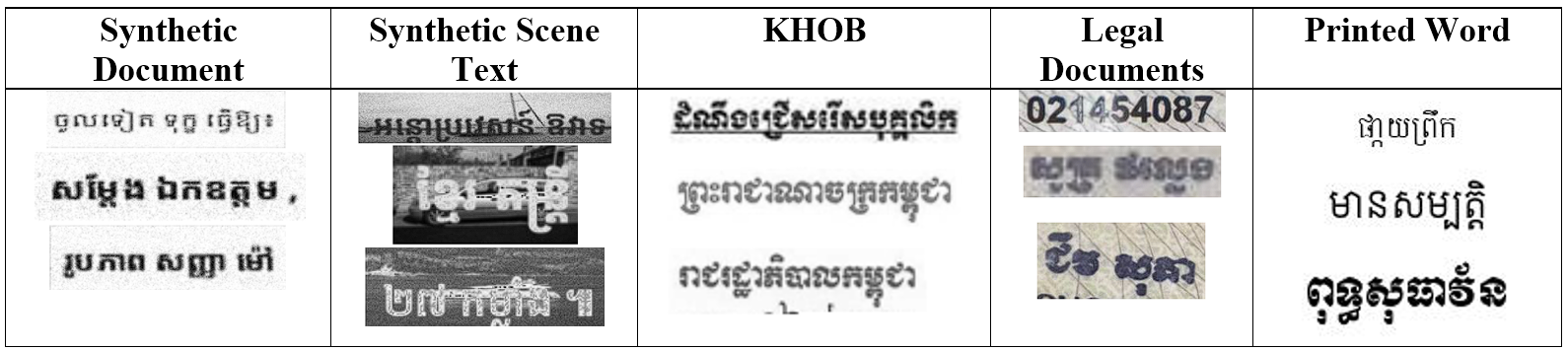
To evaluate the model, we utilized the publicly available Khmer OCR Benchmark (KHOB) dataset alongside a proprietary, custom-annotated dataset. This internal dataset consists of smartphone-captured images of official legal documents, including birth certificates, academic diplomas, and national identification cards, to test real-world applicability. Furthermore, because the primary training corpus predominantly featured mid-to-long text lines, we conducted an additional evaluation using synthetic printed words to explicitly assess the model's robustness in recognizing shorter text sequences.
| Dataset | Type | Size | Description |
|---|---|---|---|
| KHOB | Real | 325 | Standard benchmark, clean backgrounds but compression artifacts. |
| Legal Documents | Real | 227 | High variation in degradation, illumination, and distortion. |
| Printed Words | Synthetic | 1,000 | Short, isolated words in 10 different fonts. |
3. Methodology & Architecture
3.1 Preprocessing: Chunking & Merging
To handle variable-length text lines without aggressive resizing, we employ a "Chunk-and-Merge" strategy:
- Resize: Input images are resized to a fixed height of 48 pixels while maintaining aspect ratio.
- Chunking: The image is split into overlapping chunks (Size: 48x100 px, Overlap: 16 px).
3.2 Model Architecture: Squeeze-and-Excitation Transformer Network
Our proposed architecture (see figure 2) integrates sequence-aware attention and recurrent smoothing to overcome the limitations of standard chunk-based OCR. The model consists of six key modules:
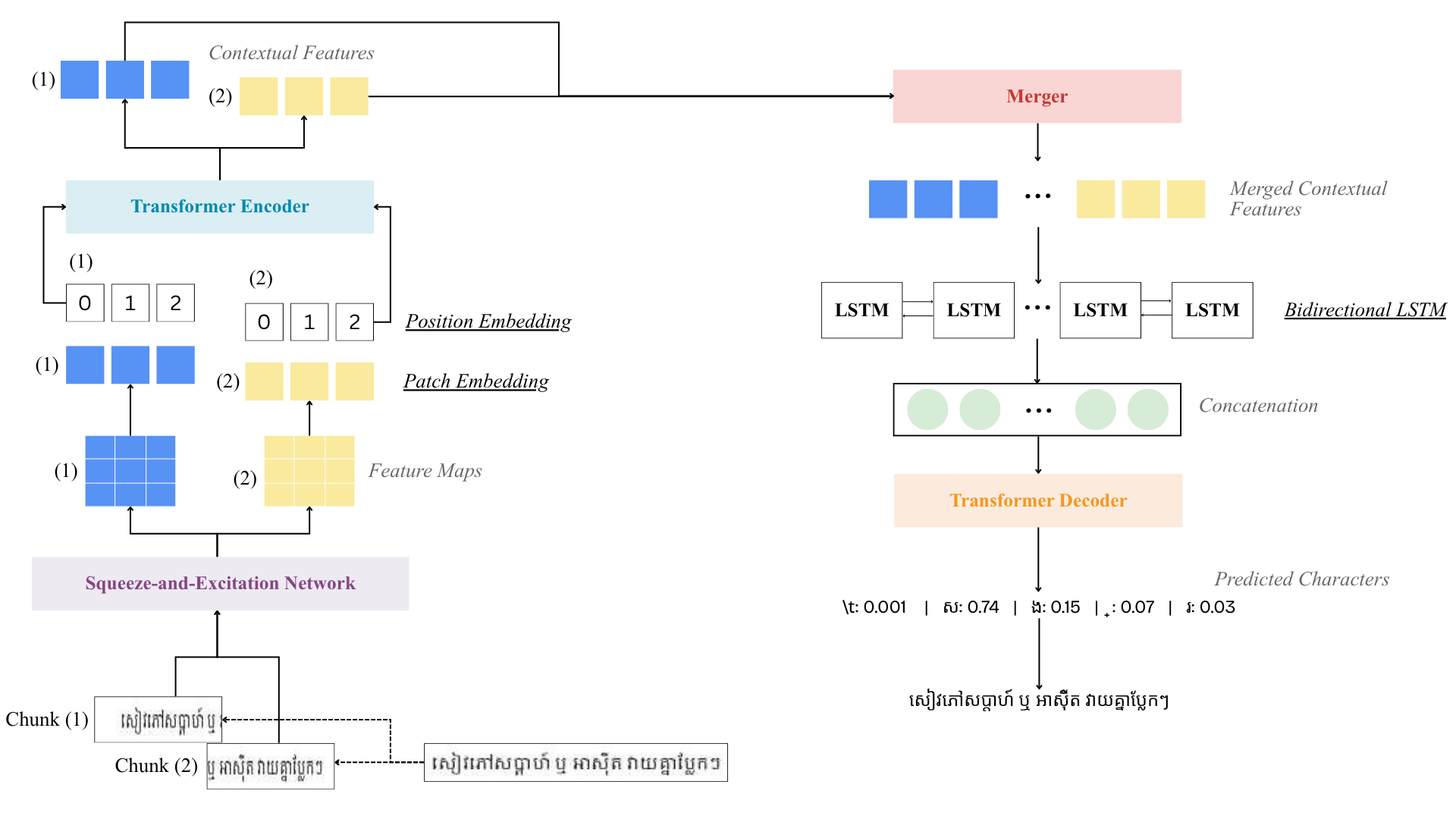
Figure 2: Overview of Netra-OCR architecture. The input image is first resized and chunked into fixed chunk of 48x100px with 16px overlaps between each chunk. Each chunk is processed by the Squeeze-and-Excitation network in parallel resulting in 512 feature maps of size 2x32px. Each feature maps are transformed into patch embedding with positional embedding. The Transformer encoder takes these embedding and output Vision Token. These token are merged, and processed by a Bidirectional LSTM layer before being concatenating and ultimately pass through the Transformer decoder which outputs each character cluster sequentially.
Squeeze-and-Excitation Network
The backbone is composed of 5 blocks of convolution in the style of VGG that progressively extracts 64, 128, 256, and 512 channel feature maps, using height-only pooling in the later stages so horizontal (width) resolution, where character order lives, is preserved. After the deeper convolutional blocks, a 1D Squeeze-and-Excitation (SE) module recalibrates the feature maps. Unlike the original SE block, which squeezes both spatial axes into a single per-channel descriptor, this variant averages only over height, leaving the width axis intact. This yields one channel-attention vector per horizontal column, so each part of the text line gets its own excitation weights, letting the network suppress noisy/background channels independently at each horizontal position instead of applying one global correction to the whole chunk. The gating vector is computed by a small bottleneck (reducing then restoring the channel dimension) with a ReLU and a Sigmoid, then used to rescale the feature map via element-wise multiplication. The backbone finishes with an adaptive average pooling step, producing a fixed-size feature map per chunk regardless of minor size variation.
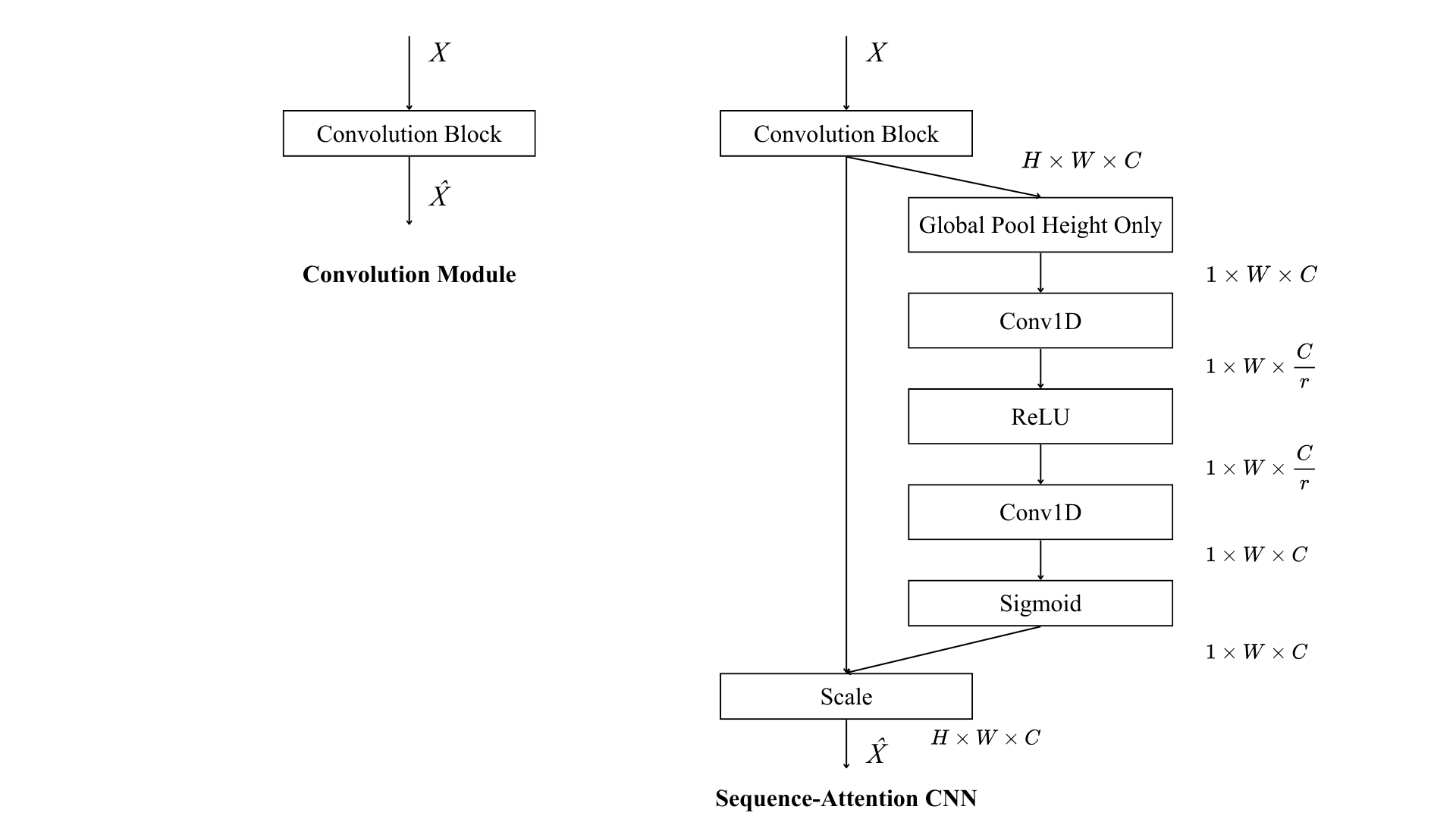
Figure 3: The Squeeze-and-Excitation Network is composed of 5 blocks of convolution where block 3, 4, and 5 gets Squeeze-and-Excitation (SE) module implemented. Within each SE module, the feature map is first squeezed by averaging across the height axis only, collapsing each channel down to a single value per horizontal column while leaving the width axis untouched — producing a per-column channel descriptor rather than the single global descriptor a standard SE block would produce. This descriptor is then passed through the excitation gate: a small bottleneck that reduces the channel dimension, applies a ReLU, then restores it, followed by a sigmoid, applied independently at every column to produce a set of gate values between 0 and 1 for each channel at each horizontal position. Finally, in the scale step, the original feature map is rescaled column-by-column by multiplying it elementwise with these gate values, so every horizontal position in the text line gets its own learned channel weighting.
Patch Module
The CNN's 2D feature map is converted into a sequence of patch embeddings, ViT-style. A small convolutional projection slides across the feature map, collapsing its height down to one while keeping the width axis intact, and maps each resulting column to the model's embedding dimension. The result is a flattened sequence of patch tokens, and a learnable positional embedding is added to each token so the encoder knows each patch's position within the chunk.
Transformer Encoder
Each chunk's patch sequence is passed through a standard Transformer encoder. Self-attention lets patches within the same chunk attend to one another, resolving local ambiguities (e.g. distinguishing visually similar sub-consonant stacks) using context from neighboring columns before the chunk's representation is finalized as a sequence of "vision tokens".
Merging Module
Because a text line is split into overlapping chunks, each chunk is encoded independently. The merging step concatenates the vision-token sequences of all chunks belonging to the same line back into one continuous sequence, pads sequences of different lengths within a batch, and builds a padding mask so the decoder can later ignore the padded positions. A second, global positional embedding is then added across the full merged sequence, separate from the per-chunk positional embedding used earlier, so the model can distinguish a token's position within the whole line, not just within its originating chunk.
BiLSTM Context Smoother
Encoding chunks independently means the seams where adjacent chunks overlap can be inconsistent, a character split across a chunk boundary may be represented differently depending on which chunk "sees" more of it. After merging, the full sequence is passed through a single-layer bidirectional LSTM. Its recurrent connections let information flow across chunk boundaries in both directions, smoothing the representation at the seams before decoding — effectively blending each chunk's context with its neighbors.
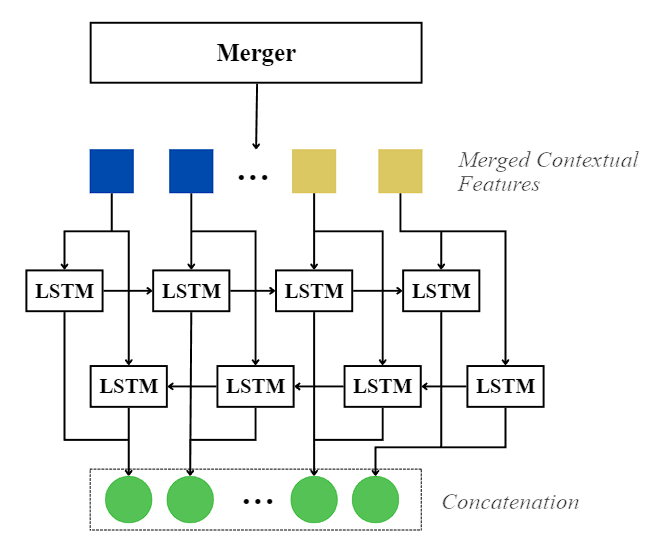
Figure 4: After the per-chunk vision tokens are concatenated into one continuous sequence, a single bidirectional LSTM layer sweeps across the full sequence in both directions. A forward pass reads the sequence left-to-right, carrying context from earlier chunks forward into later ones, while a backward pass reads it right-to-left, carrying context from later chunks back into earlier ones. The two directions' hidden states are concatenated at every position, so each token's final representation is informed by tokens on both sides of any chunk seam — resolving the discontinuity that arises when a character is split across two independently-encoded chunks.
Transformer Decoder
A standard autoregressive Transformer decoder generates the output character-cluster sequence one token at a time. Target tokens are embedded and combined with a learned positional embedding, a causal mask prevents attending to future tokens, and cross-attention lets each decoding step attend over the smoothed encoder memory (respecting the padding mask from the merging step). A final linear projection maps the decoder's output to logits over the vocabulary.
4. Evaluation Result
Figure 5: Character Error Rates (%) across all evaluation datasets, benchmarked against five models including Vision-Language Models (VLMs) such as Qwen2.5-VL (3B) and DeepSeek-OCR (3B). Qwen and Deepseek-OCR was finetuned on the same training set as Netra-OCR before evaluation using unsloth.


Figure 6: Recognized sample
5. Setup
Create virtual environment
# Windows
python -m venv myenv
.\myenv\Scripts\activate

# Mac/Linux
python3 -m venv myenv
source myenv/bin/activate
Installation
# From PyPI
pip install netra-ocr

# Or install the latest from GitHub
pip install -v git+https://github.com/netra-ai-lab/Khmer-OCR-CNN-Transformer.git@master
pip install netra-ocr on its own gives you the recognizer (works standalone on
any text-line image/crop, from any source) plus the legacy detector (classic CV,
pure OpenCV/NumPy, no extra deps). The recognition weights (using a Khmer Character
Cluster tokenizer) are downloaded automatically from the
model page on first use and
cached locally, so the base install itself stays small. Two decoders are available,
selected via --decoder / decoder= (see Recognition Decoder
below); other trained checkpoints listed on the model page are not auto-downloaded, pass
them explicitly via --model / model_path if you want to use them.
Everything else — the bundled YOLO detector, the Tesseract detector, .docx
output, and the browser UI — is an opt-in extra, so you only install what you actually
use. Whether you want the recognizer alone or the full detector+recognizer pipeline is
your call; see Recognizer-Only Usage vs
Full Pipeline Usage below.
Optional extras
# YOLO detector backend (netra_ocr's own trained detector; weights are bundled either way)
pip install "netra-ocr[yolo]"

# Tesseract detector backend (also requires the system Tesseract binary)
pip install "netra-ocr[tesseract]"

# .docx output support, for KhmerOCRPipeline's output_path=*.docx
pip install "netra-ocr[docx]"

# Page layout analysis (DocLayout-YOLO) and PDF input, for structured documents
pip install "netra-ocr[layout,pdf]"

# Web app + REST API (netra_ocr serve); includes yolo, layout, pdf and docx
pip install "netra-ocr[server]"

# Everything above, for the full detector+recognizer pipeline with all detectors/formats
pip install "netra-ocr[full]"
Recognizer-Only Usage
If you already have line crops from your own detector, layout engine, or manual
cropping, you don't need netra_ocr's detectors (or their extras) at all — the
recognizer is a standalone component that takes an image (a file path or a PIL
Image, already cropped to a single text line) and returns the recognized string.
from netra_ocr.recognition import recognize, recognize_batch

# A single crop -- path or PIL.Image both work
text = recognize("line_crop.png", beam_width=3)

# Many crops at once -- model stays loaded between calls
texts = recognize_batch(my_line_crops, beam_width=1, batch_size=8)

# Pick the decoder / a specific checkpoint if you don't want the defaults
text = recognize("line_crop.png", decoder="blockwise")
text = recognize("line_crop.png", model_path="weight/my_checkpoint.pth",
                  vocab_path="my_vocab.json")
This works with crops from anything — your own YOLO/Tesseract/layout model, manual
annotation, another OCR pipeline's line-segmentation step, etc. No detector= choice,
no ultralytics/pytesseract install, and no KhmerOCRPipeline involved.
CLI equivalent (single image, no detection step):
python -m netra_ocr.recognition.recognize_text --image line_crop.png --beam 3
If you do want detection but would rather bring your own model than use one of the
bundled detectors, implement netra_ocr.detectors.base.BaseTextDetector (one method,
detect(image_path) -> list[DetectedLine]) and feed its DetectedLine.crop values
into recognize_batch directly — you don't need to register it in DETECTOR_REGISTRY
or use KhmerOCRPipeline unless you want its output-formatting/CLI convenience too.
Full Pipeline Usage
This is the full KhmerOCRPipeline — it detects text lines (and optionally logos) in a
document image using one of the bundled detectors below, then feeds each crop to the
recognizer, and extracts the recognized text into your chosen output format. If you
already have your own line crops or detector, skip this and see
Recognizer-Only Usage instead.
Supported Output Formats
The output format is selected automatically from the file extension:
.txt/.md— plain UTF-8 text, one line per detected text line..docx— Word document: text lines as paragraphs, detected logos embedded as inline images. Requires thedocxextra..json— structured metadata including image size and per-line text + bounding boxes, suitable for reconstructing the document layout later.
Detectors
| Detector | Requires | Description |
|---|---|---|
yolo (default) |
pip install netra-ocr[yolo] |
YOLOv26s trained on Khmer documents. Detects class 0 (text lines) and class 1 (logos). Logos are cropped and embedded in .docx output; other formats receive text only. Text boxes are refined after detection to horizontally cover the full text line (content-aware, on by default). Weights are bundled in the package either way (~20 MB); only the ultralytics runtime is a separate install. |
tesseract |
pip install netra-ocr[tesseract] + system Tesseract binary |
Tesseract + graph clustering. No external model required. |
legacy |
(none — included in the base install) | Classic CV detector using MSER, gradient analysis, and multi-channel binarization. No GPU or Tesseract installation required. Accepts optional pad parameter. |
Recognition Post-Processing
Raw decoder output is cleaned of common gibberish (control/replacement characters and runaway repeated characters, clusters, or tokens from decoder loops). Machine-readable zone (MRZ) lines on passports/ID cards are auto-detected and exempted, so legitimate repeated < filler (e.g. IDKHM1011052875<<<<<<<<) is preserved intact.
Local-Inference (Full Pipeline)
1. Command Line Interface (CLI)
netra_ocr --image path/to/your/image.jpg --output result.txt
More examples
# Classic CV detector — no GPU or Tesseract required
netra_ocr --image scan.jpg --output result.txt --detector legacy

# Legacy with custom padding
netra_ocr --image scan.jpg --output result.txt --detector legacy --pad 4

# Save as Word document (YOLO: logos are embedded as images)
netra_ocr --image scan.jpg --output result.docx --detector yolo

# Save structured JSON (includes bbox per line, text only)
netra_ocr --image scan.jpg --output result.json --detector yolo

# Tune YOLO confidence threshold (default 0.25)
netra_ocr --image scan.jpg --output result.txt --detector yolo --conf 0.4

# High-accuracy mode with Tesseract detector
netra_ocr --image scan.jpg --output result.txt --detector tesseract --beam 5 --batch_size 16

# Blockwise-parallel decoder — same output as the default, usually faster
netra_ocr --image scan.jpg --output result.txt --decoder blockwise

# Debug mode — saves per-line .txt and logo .png files to a debug_ folder
netra_ocr --image scan.jpg --output result.txt --detector yolo --debug
2. Python API
Instantiate KhmerOCRPipeline once to keep models in memory for repeated calls.
from netra_ocr.ocr_engine import KhmerOCRPipeline

# YOLO detector with custom confidence threshold, blockwise-parallel decoder
pipeline = KhmerOCRPipeline(detector="yolo", conf=0.4, decoder="blockwise")

# Process an image — returns recognized text; also writes the output file
result_text = pipeline.process_image(
    image_path="document.png",
    output_path="document.docx",   # Extension determines format
    beam_width=1,
    batch_size=8,
    save_debug=False,
)

print(result_text)
Recognition Decoder
Two interchangeable recognition decoders are available, selected via --decoder (CLI) or
decoder= (KhmerOCRPipeline). Both are auto-downloaded from the
model page and share the same
vocabulary, so switching between them never changes the recognized text:
| Decoder | Checkpoint | Notes |
|---|---|---|
ar (default) |
khmerocr_cluster_ar.pth |
Plain autoregressive decoding, one token per step. |
blockwise |
khmerocr_cluster_blockwise.pth |
Stern et al. 2018 blockwise-parallel decoding — proposes several tokens ahead each step and verifies them against the same frozen base decoder used by ar, so output is provably identical to greedy ar decoding, just usually faster. Only supports greedy decoding (beam_width is ignored). |
3. Web App (Browser UI) and REST API
See Quick start. Without Docker:
pip install "netra-ocr[server]"
netra_ocr serve            # http://localhost:8000 (add --host 0.0.0.0 to allow other machines)
4. Structured documents (layout analysis) from Python
from netra_ocr.ocr_engine import KhmerOCRPipeline
from netra_ocr.exporters import save_document

pipeline = KhmerOCRPipeline(detector="yolo", layout=True)   # needs the "layout" extra
doc = pipeline.process_document("letter.pdf")               # images, multi-page TIFF or PDF ("pdf" extra)
for block in doc.blocks:                                    # heading / paragraph / table / figure / caption / ...
    print(block["type"], block.get("text") or block.get("rows"))
save_document(doc, "letter.docx")                           # .docx .html .md .json .txt
CLI: netra_ocr --image letter.pdf --output letter.docx --layout
CLI & API Arguments
| Argument | Type | Default | Description |
|---|---|---|---|
image_path |
str |
Required | Path to the input image file. |
detector |
str |
yolo |
Text detector: yolo, tesseract, or legacy. |
conf |
float |
0.25 |
YOLO confidence threshold. Only applies when detector="yolo". |
pad |
int |
None (auto) |
Pixels added around each detected box. Applies to yolo and legacy detectors. |
output_path |
str |
None |
Destination file. Extension selects format: .txt, .md, .json, .docx. |
decoder |
str |
ar |
Recognition decoder: ar (plain autoregressive) or blockwise (same output, usually faster — see Recognition Decoder). |
beam_width |
int |
1 |
1 = greedy search (fast). Higher values improve accuracy at the cost of speed. Ignored when decoder="blockwise". |
batch_size |
int |
8 |
Number of text lines processed per recognition batch. |
save_debug |
bool |
False |
Saves per-segment debug files (.txt for text, .png for logos) into a debug_<name>/ folder. |
Huggingface-Inference
- Setup
pip install torch torchvision transformers pillow huggingface_hub

# Setup the inference script
wget https://huggingface.co/Darayut/khmer-text-recognition/resolve/main/configuration_khmerocr.py

wget https://huggingface.co/Darayut/khmer-text-recognition/resolve/main/inference.py
- Run via CLI
python inference.py --image "path/to/image.png" --method beam --beam_width 3
- Run via Python
from inference import KhmerOCR

# Load Model (Downloads automatically)
ocr = KhmerOCR()

# Predict
text = ocr.predict("test_image.jpg", method="beam", beam_width=3)
print(text)
References
-
An Image is Worth 16x16 Words: Transformers for Image Recognition at Scale
Alexey Dosovitskiy, Lucas Beyer, Alexander Kolesnikov, et al.
ICLR 2021.
arXiv:2010.11929 -
TrOCR: Transformer-based Optical Character Recognition with Pre-trained Models
Minghao Li, Tengchao Lv, Lei Cui, Yijuan Lu, Dinei Florencio, Cha Zhang, Zhoujun Li, Furu Wei.
AAAI 2023.
arXiv:2109.10282 -
Toward a Low-Resource Non-Latin-Complete Baseline: An Exploration of Khmer Optical Character Recognition
R. Buoy, M. Iwamura, S. Srun and K. Kise.
IEEE Access, vol. 11, pp. 128044-128060, 2023.
DOI: 10.1109/ACCESS.2023.3332361 -
Balraj98. (2018). Stanford background dataset [Data set]. Kaggle. https://www.kaggle.com/datasets/balraj98/stanford-background-dataset
-
EKYC Solutions. (n.d.). Khmer OCR benchmark dataset (KHOB) [Data set]. GitHub. https://github.com/EKYCSolutions/khmer-ocr-benchmark-dataset
-
Em, H., Valy, D., Gosselin, B., & Kong, P. (2024). Khmer text recognition dataset [Data set]. Kaggle. https://www.kaggle.com/datasets/emhengly/khmer-text-recognition-dataset
-
Squeeze-and-Excitation Networks
Jie Hu, Li Shen, and Gang Sun.
CVPR 2018.
arXiv:1709.01507 -
Bidirectional Recurrent Neural Networks
Mike Schuster and Kuldip K. Paliwal.
IEEE Transactions on Signal Processing, 1997.
DOI: 10.1109/78.650093
1 maintainer

Release files for netra-ocr 1.1.0
For a detailed explanation of source distributions (sdists) and built distributions (wheels), please see the package formats documentation.
Source distribution (sdist)
| File | Size | Uploaded | |
|---|---|---|---|
| netra_ocr-1.1.0.tar.gz | 18.9 MB | Details |
Built distribution (wheel)
| File | Interpreter | ABI | Platform | Reset |
|---|---|---|---|---|
| netra_ocr-1.1.0-py3-none-any.whl | Python 3 | none | any | Details |
Total release size: 37.8 MB
Release files / netra_ocr-1.1.0.tar.gz
| Download URL | netra_ocr-1.1.0.tar.gz |
|---|---|
| Size | 18.9 MB |
| Tags | Source |
|
SHA-256 checksum How to use checksums |
0b7616c0d4ea14f1f5007ccc8b9a71a6132a8d5f31ddafaccb6da52fc9959a4f
|
|
BLAKE2b-256 checksum How to use checksums |
2034bdcd1bf8a0d2941acd8c9a7b8463f5cb839d97b67b121f74f68a86b63d38
|
| Upload date | |
|
Uploaded using Trusted Publishing? What is trusted publishing? |
No |
| Uploaded via |
twine/7.0.0 CPython/3.12.13
|
Release files / netra_ocr-1.1.0-py3-none-any.whl
| Download URL | netra_ocr-1.1.0-py3-none-any.whl |
|---|---|
| Size | 18.9 MB |
| Tags | Python 3 |
|
SHA-256 checksum How to use checksums |
c6fadfc673f8457553482cd5823ff314264f15f24e679845212626c0dcfbe631
|
|
BLAKE2b-256 checksum How to use checksums |
2dde1fefb3c89b2eeff8cea43fe6fc3aec8b2bf2ec6541a8049eb0ca97c462c1
|
| Upload date | |
|
Uploaded using Trusted Publishing? What is trusted publishing? |
No |
| Uploaded via |
twine/7.0.0 CPython/3.12.13
|














