
Multi-instance Claude orchestrator for parallel task execution


Project description
Free more claude usage through optimization.
Extend your claude usage (all plans) for free with minimal effort and no risk.
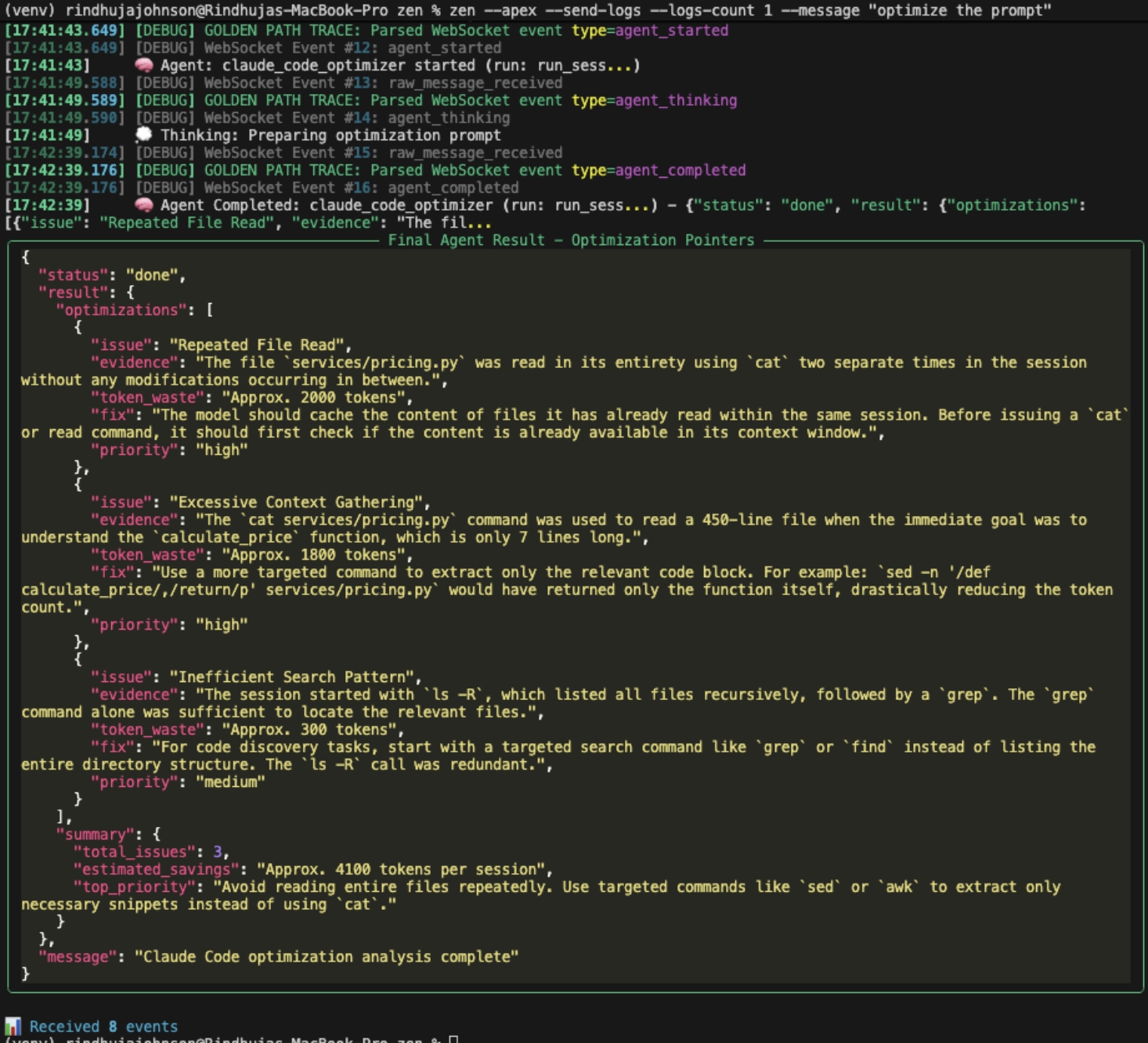
It works by analyzing your usage logs for metadata optimizations. It is focused on the metadata not the semantics of the prompt, so no risk in drop of quality.
This is a micro startup effort, aiming to provide real value for individual devs in exchange for feedback. Our intent is to charge businesses for larger scale optimizations.
The process is simple. One time install, then one command. It auto grabs the last 5 logs and provides actionable items to update going forward to get the value of the optimizations.
Quick start
pip install netra-zenzen --apex --send-logs --message "claude code"- Read the results and update claude settings, prompts, commands, etc. as needed to benefit
By default it will optimize based on logs no thought on the message is needed. Just copy and paste #2! See detailed install below if needed.
Example output
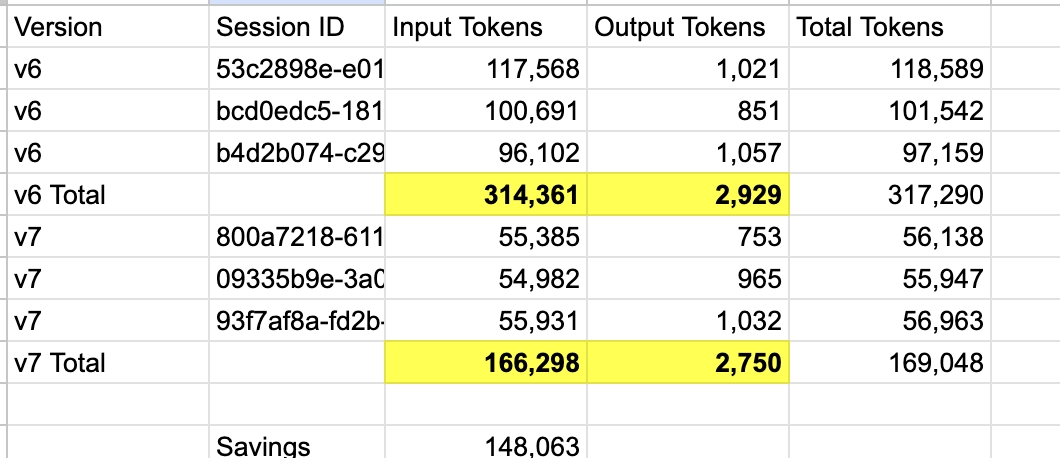
Proof it works
Example savings on real world production git issue progressor task (complex claude code command)
This was just changing a few small lines on a 400 line command.
Other features & detailed install guide
Orchestrator
Zen allows you to:
- Zen Orchestrator runs multiple Code CLI instances for peaceful parallel task execution.
- Run multiple headless Claude Code CLI instances simultaneously.
- Calm unified results (status, time, token usage)
- Relax "5-hour limit reached" lockout fears with easy token budget limits
- Get more value out of your Claude MAX subscription
with scheduling features. (
--run-at "2am") - Learn more about how Claude Code uses tools and other inner workings
- Control usage and budget for groups of work or per command
Example portion of status report:
╔═══ STATUS REPORT [14:25:10] ═══╗
║ Total: 5 instances
║ Running: 3, Completed: 2, Failed: 0
║ Tokens: 32.1K total | Tools: 15
║ 💰 Cost: $0.0642 total
║
║ TOKEN BUDGET STATUS
║ Overall: [████████████----] 75% 32.1K/43.0K
║
║  Status   Name                    Duration  Tokens
║  ──────── ─────────────────        ───────  ──────
║  ✅        security-reviewer      2m15s     8.5K
║  ✅        performance-analyzer   1m42s     7.2K
║  🏃        architecture-reviewer  1m18s     6.5K
║  🏃        test-coverage-analyst  0m45s     4.8K
║  ⏳        quality-synthesizer    queued    0K
╚════════════════════════════════════════════╝
Example Start
zen
+=== STATUS REPORT [14:47:39] ===+
| Total: 2 instances
| Running: 2, Completed: 0, Failed: 0, Pending: 0
| Tokens: 0 total, 0 cached | Median: 0 | Tools: 0
| 💰 Cost: $0.0000 total, $0.0000 avg/instance | Pricing: Claude compliant
|
| TOKEN BUDGET STATUS |
| Overall: [--------------------] 0% 0/10.0K
| Command Budgets:
|                        /analyze-repository  [--------------------] 0% 0/5.0K
|                        /README              [--------------------] 0% 0/1.0K
|
|  📝 Model shows actual Claude model used (critical for accurate cost tracking)
|  💡 Tip: Model may differ from your config - Claude routes requests intelligently
|  Status   Name                           Model      Duration   Overall  Tokens   Cache Cr Cache Rd Tools  Budget
|  -------- ------------------------------ ---------- ---------- -------- -------- -------- -------- ------ ----------
|  🏃        analyze-repo                   opus4      5.1s       0        0        0        0        0      0/5.0K
|  🏃        help-overview                  sonnet4    0.0s       0        0        0        0        0      0/1.0K
+================================+
Budget Warning Only
zen --overall-token-budget 10000
+=== STATUS REPORT [14:47:44] ===+
| Total: 2 instances
| Running: 2, Completed: 0, Failed: 0, Pending: 0
| Tokens: 32.2K total, 32.2K cached | Median: 32.2K | Tools: 1
| 💰 Cost: $0.0818 total, $0.0409 avg/instance | Pricing: Claude compliant
|
| TOKEN BUDGET STATUS |
| Overall: [####################] 100% 32.2K/10.0K
| Command Budgets:
|                        /analyze-repository  [####################] 100% 32.2K/5.0K
|                        /README              [--------------------] 0% 0/1.0K
|
|  📝 Model shows actual Claude model used (critical for accurate cost tracking)
|  💡 Tip: Model may differ from your config - Claude routes requests intelligently
|  Status   Name                           Model      Duration   Overall  Tokens   Cache Cr Cache Rd Tools  Budget
|  -------- ------------------------------ ---------- ---------- -------- -------- -------- -------- ------ ----------
|  🏃        analyze-repo                   35sonnet   10.1s      32.2K    5        20.9K    11.4K    1      32.2K/5.0K
|  🏃        help-overview                  opus4      5.0s       0        0        0        0        0      0/1.0K
+================================+

+=== TOOL USAGE DETAILS ===+
| Tool Name            Uses     Tokens     Cost ($)   Used By
| -------------------- -------- ---------- ---------- -----------------------------------
| Bash                 1        33         0.0001     analyze-repo(1 uses, 33 tok)
| -------------------- -------- ---------- ---------- -----------------------------------
| TOTAL                1        33         0.0001
+===============================================================================================+
Budget Block
zen --overall-token-budget 10000 --budget-enforcement-mode block
2025-09-18 14:50:42,050 - zen_orchestrator - INFO - 💰 BUDGET UPDATE [analyze-repo]: Recording 32240 tokens for command '/analyze-repository'
2025-09-18 14:50:42,050 - zen_orchestrator - INFO - 📊 BUDGET STATE [analyze-repo]: /analyze-repository now at 32240/5000 tokens (644.8%)
2025-09-18 14:50:42,050 - zen_orchestrator - ERROR - 🚫 🔴 RUNTIME TERMINATION: Runtime budget violation for analyze-repo: Overall budget exceeded: 32240/10000 tokens
2025-09-18 14:50:42,050 - zen_orchestrator - INFO - Terminating instance analyze-repo (PID: 88916): Terminated due to budget violation - Overall budget exceeded: 32240/10000 tokens
2025-09-18 14:50:42,050 - zen_orchestrator - INFO - Sent SIGTERM to analyze-repo (PID: 88916)
+=== FINAL STATUS [14:50:57] ===+
| Total: 2 instances
| Running: 0, Completed: 0, Failed: 2, Pending: 0
| Tokens: 85.6K total, 85.2K cached | Median: 42.8K | Tools: 1
| 💰 Cost: $0.0889 total, $0.0444 avg/instance | Pricing: Claude compliant
|
| TOKEN BUDGET STATUS |
| Overall: [####################] 100% 85.6K/10.0K
| Command Budgets:
|                        /analyze-repository  [####################] 100% 48.4K/5.0K
|                        /README              [####################] 100% 37.2K/1.0K
|
|  📝 Model shows actual Claude model used (critical for accurate cost tracking)
|  💡 Tip: Model may differ from your config - Claude routes requests intelligently
|  Status   Name                           Model      Duration   Overall  Tokens   Cache Cr Cache Rd Tools  Budget
|  -------- ------------------------------ ---------- ---------- -------- -------- -------- -------- ------ ----------
|  ❌        analyze-repo                   sonnet4    22.5s      48.4K    31       16.1K    32.2K    1      48.4K/5.0K
|  ❌        help-overview                  35sonnet   16.2s      37.2K    422      0        36.8K    0      37.2K/1.0K
+===============================+

+=== TOOL USAGE DETAILS ===+
| Tool Name            Uses     Tokens     Cost ($)   Used By
| -------------------- -------- ---------- ---------- -----------------------------------
| Task                 1        348        0.0010     analyze-repo(1 uses, 348 tok)
| -------------------- -------- ---------- ---------- -----------------------------------
| TOTAL                1        348        0.0010
+===============================================================================================+
Example Start At
zen --start-at "2am"
...
2025-09-18 14:54:29,863 - zen_orchestrator - INFO - Added instance: analyze-repo - Analyze the repository structure and codebase
2025-09-18 14:54:29,863 - zen_orchestrator - INFO - Added instance: help-overview - Show project README and overview information

2025-09-18 14:54:29,863 - zen_orchestrator - INFO - Orchestration scheduled to start at: 2025-09-19 02:00:00
2025-09-18 14:54:29,863 - zen_orchestrator - INFO - Waiting 39930.1 seconds (11.1 hours) until start time...
Example Command
Assumes you have a claude command /runtests
zen "/runtests"
...
2025-09-18 14:56:18,478 - zen_orchestrator - INFO - Added instance: direct-runtests-3337c2c5 - Direct execution of /runtests
2025-09-18 14:56:18,478 - zen_orchestrator - INFO - Starting Claude Code instance orchestration
2025-09-18 14:56:18,478 - zen_orchestrator - INFO - Starting 1 instances with 5.0s delay between launches (timeout: 10000s each)
2025-09-18 14:56:18,478 - zen_orchestrator - INFO - Now starting instance 'direct-runtests-3337c2c5' (after 0.0s delay)
Example Config (Recommended Usage)
Your JSON file as path\my_config.json
{
  "instances": [
    {
      "name": "analyze-repository",
      "command": "/analyze-repository; Spawn three subagents to understand how the information at this website is used in the zen directory. https://docs.claude.com/en/docs/about-claude/pricing#tool-use-pricing.",
      "description": "Reads and understands the required portion of the repository",
      "permission_mode": "bypassPermissions",
      "output_format": "stream-json",
      "max_tokens_per_command": 5000
    }
  ]
}
zen --config path\my_config.json
...

2025-09-18 15:00:09,645 - zen_orchestrator - INFO - Loading config from config_example.json

2025-09-18 15:00:09,657 - zen_orchestrator - INFO - 🎯 Token transparency pricing engine enabled - Claude pricing compliance active

2025-09-18 15:00:09,657 - zen_orchestrator - WARNING - Command '/analyze-repository; Spawn three subagents to understand how the information at this website is used in the zen directory. https://docs.claude.com/en/docs/about-claude/pricing#tool-use-pricing.' not found in available commands

2025-09-18 15:00:09,657 - zen_orchestrator - INFO - Available commands: /clear, /compact, /help

2025-09-18 15:00:09,657 - zen_orchestrator - INFO - Added instance: analyze-repository - Reads and understands the required portion of the repository

2025-09-18 15:00:09,657 - zen_orchestrator - INFO - Starting Claude Code instance orchestration

2025-09-18 15:00:09,659 - zen_orchestrator - INFO - Starting 1 instances with 5.0s delay between launches (timeout: 10000s each)

2025-09-18 15:00:09,659 - zen_orchestrator - INFO - Now starting instance 'analyze-repository' (after 0.0s delay)

2025-09-18 15:00:09,659 - zen_orchestrator - INFO - Starting instance: analyze-repository

2025-09-18 15:00:09,665 - zen_orchestrator - INFO - Command: claude.CMD -p /analyze-repository; Spawn three subagents to understand how the information at this website is used in the zen directory. https://docs.claude.com/en/docs/about-claude/pricing#tool-use-pricing. --output-format=stream-json --permission-mode=bypassPermissions --verbose

2025-09-18 15:00:09,738 - zen_orchestrator - INFO - Permission mode: bypassPermissions (Platform: Windows)
2025-09-18 15:00:09,746 - zen_orchestrator - INFO - Instance analyze-repository started with PID 672

+=== STATUS REPORT [15:00:14] ===+
| Total: 1 instances
| Running: 1, Completed: 0, Failed: 0, Pending: 0
| Tokens: 0 total, 0 cached | Median: 0 | Tools: 0
| 💰 Cost: $0.0000 total, $0.0000 avg/instance | Pricing: Claude compliant
|
|  📝 Model shows actual Claude model used (critical for accurate cost tracking)
|  💡 Tip: Model may differ from your config - Claude routes requests intelligently
|  Status   Name                           Model      Duration   Overall  Tokens   Cache Cr Cache Rd Tools  Budget
|  -------- ------------------------------ ---------- ---------- -------- -------- -------- -------- ------ ----------
|  🏃        analyze-repository             opus4      5.1s       0        0        0        0        0      -
+================================+


+=== STATUS REPORT [15:00:19] ===+
| Total: 1 instances
| Running: 1, Completed: 0, Failed: 0, Pending: 0
| Tokens: 14.7K total, 14.7K cached | Median: 14.7K | Tools: 0
| 💰 Cost: $0.0798 total, $0.0798 avg/instance | Pricing: Claude compliant
|  Status   Name                           Model      Duration   Overall  Tokens   Cache Cr Cache Rd Tools  Budget
|  -------- ------------------------------ ---------- ---------- -------- -------- -------- -------- ------ ----------
|  🏃        analyze-repository             opus4      10.1s      14.7K    6        3.3K     11.4K    0      -
+================================+
Inspiration and background
While developing Netra Apex (commercial product)
our team has been running 100s of parallel claude code instances.
During that process we got annoyed at the "cognitive overhead"
of each having 10s of terminals open per machine and scrolling mountains of text.
Did the /command work or not?
What started as a simple way to make that process more peaceful turned into something we believe will be useful to the community.
Further, as usage limits become more restrictive, getting up at odd hours just to feed the beast got old fast. So we added scheduling to run it at pre-defined times.
Surprisingly, the duration that a command ran and it's presumed difficulty, often had little correlation with actual token usage. "Simple" git operations would sometimes eat 10x as many as complex issue resolution commands.
The market is moving quickly, codex is getting better and other Code CLIs are coming. How effective a code factory is matters. This V1 alpha is just the start of codifying code CLI dev practices and progressing from alchemy to engineering.
For more power, try Zen with Netra Apex for the most effective usage and control of business AI spend.
Limitations
Budget Enforcement Behavior
Important:
- Local Monitoring Only: Budgets defined in
jsonconfigs or command-line flags are tracked locally by Zen. Zen cannot prevent the underlying CLI from consuming tokens beyond the limit in some cases. For example if a request is made when it is under budget, that single request may exceed the budget. Inblockmode the next request will be stopped. - Budget Exceeded Behavior:
warnmode: Zen logs warnings but continues executionblockmode: Zen prevents running new instances or halts in progress commands, depending on the nature of the budget config.
- Token Counting: Budget calculations are based on estimates and may not match exact billing from Claude/Codex
Target Audience and Use Cases
Zen is designed for internal developer productivity and automation workflows and is not suitable for all use cases.
It is generally expected that you already familiar with claude code in order to get the most value out of Zen.
✅ Supported Use Cases:
- Internal development workflows and automation
- Parallel execution of development tasks
- CI/CD integration for development teams
- Budget and cost control for Claude
Installation
Default Method: pipx (Recommended for ALL Users)
Pipx automatically handles PATH configuration and creates an isolated environment, preventing dependency conflicts.
Step 1: Install pipx
# Windows
pip install --user pipx
python -m pipx ensurepath

# macOS
brew install pipx
pipx ensurepath

# Linux (Ubuntu/Debian)
sudo apt update
sudo apt install pipx
pipx ensurepath

# Linux (Other)
pip install --user pipx
pipx ensurepath
Note: Restart your terminal after running pipx ensurepath
Step 2: Install zen
# From PyPI
pipx install netra-zen

# For local development (editable mode)
cd zen/
pipx install --editable .

# Verify installation
zen --help
Alternative: pip (Manual PATH Configuration Required)
⚠️ Warning: Using pip directly often results in PATH issues. We strongly recommend pipx instead.
pip install netra-zen

# If 'zen' command not found, you'll need to:
# Option 1: Use Python module directly
python -m zen_orchestrator --help

# Option 2: Manually add to PATH (see Troubleshooting)
Understanding the Model Column in Status Reports
Model Column Behavior
The Model column in Zen's status display shows the actual model used by Claude Code for each API response, not necessarily the model you configured in your settings.
Key Points:
- Cost Tracking Value: Knowing the actual model is critical for accurate cost calculation since different models have vastly different pricing (e.g., Opus costs 5x more than Sonnet)
- Dynamic Detection: Zen automatically detects the model from Claude's API responses in real-time
Example Status Display:
║  Status   Name                Model      Duration  Overall  Tokens   Budget
║  ✅        analyze-code        35sonnet   2m15s     45.2K    2.1K     85% used
║  🏃        optimize-perf       opus4      1m30s     12.8K    800      45% used
This transparency helps you understand your actual AI spend and make informed decisions about model usage.
Step 3: Generate with AI
- Copy your customized prompt
- Paste it into ChatGPT, Claude, or your preferred LLM
- Save the generated JSON as
customer_feedback.json - Run:
zen --config customer_feedback.json
Understanding Configuration Structure
Every Zen configuration has the same basic structure:
{
  "// Description": "What this workflow accomplishes",
  "// Use Case": "When to use this configuration",

  "instances": [
    {
      "command": "/command || prompt",
      "permission_mode": "bypassPermissions", // Default
      "output_format": "stream-json", // Default
      "max_tokens_per_command": 12000, // Optional
      "allowed_tools": ["Read", "Write", "Edit", "Task"],  // Optional
      // Other optional features
    }//,
    //{
    //  next instance
    //}
    //... series of instances
  ]
}
Key Configuration Elements
| Element | Purpose | Best Practice |
|---|---|---|
command |
Task specification | Can use existing /commands or any string literal input |
max_tokens_per_command |
Token budget | Allocate based on complexity |
allowed_tools |
Tool permissions | Grant minimal necessary tools |
For Output Truncation control: --max-console-lines and --max-line-length parameters, or redirect output to files
Scheduling
Schedule to run later. This helps you get the most value out of your claude max subscription.
# Start in 2 hours
zen --config my_config.json --start-at "2h"

# Start at specific time
zen --config my_config.json --start-at "14:30"

# Start in 30 minutes
zen --config my_config.json --start-at "30m"
Expected questions
1. Do I have to use /commands?
- No. You can just put your string query (prompt) and it works the same.
- It does seem to be a best practice though to version controlled
/commands.
2. Does this replace using Claude command directly?
- No. At least not yet fully.
- As we primarily using structured commands, internally we see 80%+ of our usage through Zen.
- Ad hoc questions or validating if a command is working as expected for now is better through Claude directly.
3. What does this assume?
- You have claude code installed, authenticated, and configured already.
4. How do I know if it's working?
- Each command returns fairly clear overall statuses.
- Budget states etc. are logged.
- You can also see the duration and token usage.
- By default, each command outputs a truncated version of the output to the console.
- You can optionally choose to save a report of all output to .json
- Our usage is heavily integrated with github, we use git issues as the visual output
and notification system for most work. This means regardless of where Zen is running
you can see the results wherever you access git. This is as easy as adding
ghinstructions (the cli + token assumed to be present) to your commands.
5. Data privacy?
At this moment no data is collected. Our intent is to add an optional system where non-PII usage data is sent to Netra for exclusively aggregated metadata level use to help make our spend management system better. (So you can get more from your AI spend!)
6. What about the UI/UX?
There is a time and a place for wanting to have multiple windows and git trees open.
Zen's intent is the opposite: make running n code clis more peaceful.
Why activate your "giga-brain" when you can run one command instead?
Zen --help
zen --help
yields:
usage: zen [-h] [--workspace WORKSPACE] [--config CONFIG] [--dry-run] [--list-commands] [--inspect-command INSPECT_COMMAND]
           [--output-format {json,stream-json}] [--timeout TIMEOUT] [--max-console-lines MAX_CONSOLE_LINES] [--quiet]
           [--startup-delay STARTUP_DELAY] [--max-line-length MAX_LINE_LENGTH] [--status-report-interval STATUS_REPORT_INTERVAL]
           [--start-at START_AT] [--overall-token-budget OVERALL_TOKEN_BUDGET] [--command-budget COMMAND_BUDGET]
           [--budget-enforcement-mode {warn,block}] [--disable-budget-visuals]

Claude Code Instance Orchestrator

options:
  -h, --help            show this help message and exit
  --workspace WORKSPACE
                        Workspace directory (default: current directory)
  --config CONFIG       Custom instance configuration file
  --dry-run             Show commands without running
  --list-commands       List all available slash commands and exit
  --inspect-command INSPECT_COMMAND
                        Inspect a specific slash command and exit
  --output-format {json,stream-json}
                        Output format for Claude instances (default: stream-json)
  --timeout TIMEOUT     Timeout in seconds for each instance (default: 10000)
  --max-console-lines MAX_CONSOLE_LINES
                        Maximum recent lines to show per instance on console (default: 5)
  --quiet               Minimize console output, show only errors and final summaries
  --startup-delay STARTUP_DELAY
                        Delay in seconds between launching each instance (default: 5.0)
  --max-line-length MAX_LINE_LENGTH
                        Maximum characters per line in console output (default: 500)
  --status-report-interval STATUS_REPORT_INTERVAL
                        Seconds between rolling status reports (default: 5)
  --start-at START_AT   Schedule orchestration to start at specific time. Examples: '2h' (2 hours from now), '30m' (30 minutes),
                        '14:30' (2:30 PM today), '1am' (1 AM today/tomorrow)
  --overall-token-budget OVERALL_TOKEN_BUDGET
                        Global token budget for the entire session.
  --command-budget COMMAND_BUDGET
                        Per-command budget in format: '/command_name=limit'. Can be used multiple times.
  --budget-enforcement-mode {warn,block}
                        Action to take when a budget is exceeded: 'warn' (log and continue) or 'block' (prevent new instances).
  --disable-budget-visuals
                        Disable budget visualization in status reports
Requirements
- Python 3.8+
- Claude Code CLI
- Dependencies in requirements.txt
Logging and Output
- Console Output: All logs and execution results are displayed in the console
- No File Logging: ZEN does not write logs to files by default
- Capturing Output: To save execution logs, use output redirection:
zen --config tasks.json > execution.log 2>&1
Testing
cd tests/
python test_runner.py
Basic Usage
Command Execution
Execute commands directly without config files:
# Execute a single command directly
zen "/my-existing-claude-command"

# Execute with config (recommended usage pattern)
zen --config /my-config.json

# Execute with custom workspace
zen "/analyze-code" --workspace ~/my-project

# Execute with token budget
zen "/complex-analysis" --overall-token-budget 5000

# Execute with custom instance name
zen "/debug-issue" --instance-name "debug-session"

# Execute with session continuity
zen "/optimize-performance" --session-id "perf-session-1"

# Start in 2 hours
zen --config my_config.json --start-at "2h"

# Start at specific time
zen --config my_config.json --start-at "14:30"
Quick Test
# List available commands (auto-detects workspace)
zen --list-commands

# Dry run to see what would be executed (auto-detects workspace)
zen --dry-run

# Run with default configuration (uses actual slash commands from workspace)
zen
Workspace Management
# Auto-detect workspace (looks for project root with .git, .claude, etc.)
zen --dry-run

# Use specific workspace (override auto-detection)
zen --workspace ~/projects/myapp

# With custom timeout
zen --timeout 300 --workspace ~/projects/myapp
Token Budget Control
# Set overall budget
zen --overall-token-budget 100000

# Set per-command budgets
zen --command-budget "/analyze=50000" --command-budget "/optimize=30000"

# Budget enforcement modes
zen --budget-enforcement-mode block  # Stop when exceeded
zen --budget-enforcement-mode warn   # Warn but continue
Scheduled Execution
# Start in 2 hours
zen --start-at "2h"

# Start at specific time
zen --start-at "14:30"  # 2:30 PM today
zen --start-at "1am"    # 1 AM tomorrow
Execution Mode Precedence
Zen supports three execution modes with clear precedence rules:
-
Direct Command (Highest Priority)
zen "/analyze-code" # Executes direct command
-
Config File (Medium Priority)
zen --config my-config.json # Uses config file
-
Default Instances (Lowest Priority)
zen # Uses built-in default commands
Other Features
Parallel Execution Control
# Control startup delay between instances
zen --startup-delay 30.0  # seconds between launches

# Limit console output
zen --max-console-lines 10
zen --max-line-length 200
Output Formats
# JSON output
zen --output-format json

# Stream JSON (default)
zen --output-format stream-json
Quiet Mode
# Minimal output - only errors and summary
zen --quiet
Status Reporting
# Change status report interval
zen --status-report-interval 30  # Every 30 seconds
Environment Variables
# Set default workspace
export ZEN_WORKSPACE="~/projects"

# Set default config
export ZEN_CONFIG="~/configs/zen-default.json"

# Enable debug logging
export ZEN_DEBUG="true"
Troubleshooting
Command not found
If using pipx (recommended):
# Ensure PATH is configured
pipx ensurepath

# Restart terminal, then verify
zen --version
Permission denied
# Make sure scripts are executable
chmod +x $(which zen)
Module not found
# Reinstall with dependencies
pip install --force-reinstall netra-zen
Getting Help
# Show help
zen --help

# Inspect specific command
zen --inspect-command /analyze

# Visit documentation
# https://github.com/netra-systems/zen
Known Issues
Token Budget Accuracy:
- Problem: Budget calculations may not exactly match actual API billing
- Cause: Estimates based on local token counting vs. server-side billing
- Workaround: Use conservative budget limits and monitor actual usage through provider dashboards
Configuration File Validation:
- Problem: Limited validation of JSON configuration files
- Impact: Invalid configurations may cause runtime errors
- Workaround: Use
--dry-runto validate configurations before execution
Resource Cleanup:
- Problem: Interrupted executions may leave background processes running
- Workaround: Monitor system processes and manually terminate if necessary
- Planned Fix: Improved signal handling and cleanup in future versions
Example Configurations
See the included example files:
minimal_config.json- Basic setupconfig_example.json- Standard configurationnetra_apex_tool_example.json- Advanced integration
Support
- GitHub Issues: https://github.com/netra-systems/zen/issues
- Documentation: https://github.com/netra-systems/zen/wiki
Release history Release notifications | RSS feed


Download files
Download the file for your platform. If you're not sure which to choose, learn more about installing packages.
Source Distribution
Built Distribution
Filter files by name, interpreter, ABI, and platform.
If you're not sure about the file name format, learn more about wheel file names.
Copy a direct link to the current filters
File details
Details for the file netra_zen-1.0.7.tar.gz.
File metadata
- Download URL: netra_zen-1.0.7.tar.gz
- Upload date:
- Size: 194.7 kB
- Tags: Source
- Uploaded using Trusted Publishing? No
- Uploaded via: twine/6.2.0 CPython/3.13.7
File hashes
| Algorithm | Hash digest | |
|---|---|---|
| SHA256 |
fa4eb6b590cc7d9596e49f0b26d3d539945f94afa8c8e8e86fe2d7d9486533b8
|
|
| MD5 |
f5576fb26055e8622ea9718af73bd5c2
|
|
| BLAKE2b-256 |
b579841b5943557b0f6542b176f89a17d3ac9a1b32e69666e318a11e11ce8f51
|
File details
Details for the file netra_zen-1.0.7-py3-none-any.whl.
File metadata
- Download URL: netra_zen-1.0.7-py3-none-any.whl
- Upload date:
- Size: 129.9 kB
- Tags: Python 3
- Uploaded using Trusted Publishing? No
- Uploaded via: twine/6.2.0 CPython/3.13.7
File hashes
| Algorithm | Hash digest | |
|---|---|---|
| SHA256 |
a9e210e2fe95cde3752b99d3f4591da301a767d49d2c818d4a3016548697a682
|
|
| MD5 |
615537d55768a6ec8f8be1cfe6edf764
|
|
| BLAKE2b-256 |
4ffa9caea0458e4f65254b53f8763bc27cd34c3e2420515097d9eb31d62df9ec
|






