
PyNetsPresso


Project description


YOLO Fastest | YOLOX | YOLOv8 | YOLOv7 | YOLOv5 | PIDNet | PyTorch-CIFAR-Models
STM32 model zoo





Use NetsPresso for a seamless model optimization process. NetsPresso resolves AI-related constraints in business use cases and enables cost-efficiency and enhanced performance by removing the requirement for high-spec servers and network connectivity and preventing high latency and personal data breaches.
Easily compress various models with our resources. Please browse the Docs for details, and join our Discussion Forum for providing feedback or sharing your use cases.
To get started with NetsPresso, you'll need to sign up here.
We offer a comprehensive guide to walk you through the process of optimizing an AI model using NetsPresso. A full tutorial can be found Google Colab.






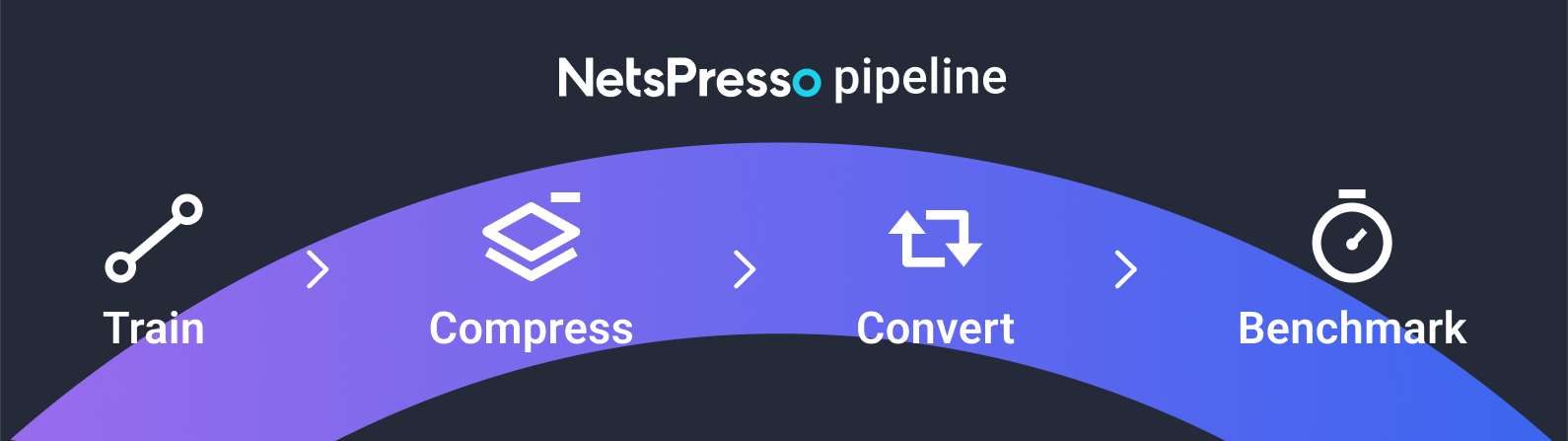
| Step | Type | Description |
|---|---|---|
| Train | np.trainer | Build and train a model. |
Model ZooImage ClassificationPyTorch-CIFAR-ModelsSemantic SegmentationPIDNetPose EstimationYOLOv8 |
||
| Compress | np.compressor | Compress and optimize the user’s model. |
| Convert | np.converter | Convert and quantize the user’s model to run efficiently on device. |
| Benchmark | np.benchmarker | Benchmark the user's model to measure model inference speed on diverse device. |
Installation
Prerequisites
- Python
3.8|3.9|3.10 - PyTorch
1.13.0(recommended) (compatible with:1.11.x-1.13.x) - TensorFlow
2.8.0(recommended) (compatible with:2.3.x-2.8.x)
Install with PyPI (stable)
pip install netspresso
To use editable mode or docker, see INSTALLATION.md.
Getting started
Login
Log-in to your netspresso account. Please sign-up here if you need one.
from netspresso import NetsPresso

netspresso = NetsPresso(email="YOUR_EMAIL", password="YOUR_PASSWORD")
Trainer
Train
To start training a model, first select a task.
Then configure the dataset, model, augmentation, and hyperparameters.
Once setup is finished, enter the GPU number and project name for training.
from netspresso.enums import Task
from netspresso.trainer.optimizers import AdamW
from netspresso.trainer.schedulers import CosineAnnealingWarmRestartsWithCustomWarmUp
from netspresso.trainer.augmentations import Resize


# 1. Declare trainer
trainer = netspresso.trainer(task=Task.OBJECT_DETECTION)  # IMAGE_CLASSIFICATION, OBJECT_DETECTION, SEMANTIC_SEGMENTATION

# 2. Set config for training
# 2-1. Data
trainer.set_dataset_config(
    name="traffic_sign_config_example",
    root_path="/root/traffic-sign",
    train_image="images/train",
    train_label="labels/train",
    valid_image="images/valid",
    valid_label="labels/valid",
    id_mapping=["prohibitory", "danger", "mandatory", "other"],
)

# 2-2. Model
print(trainer.available_models)  # ['YOLOX-S', 'YOLOX-M', 'YOLOX-L', 'YOLOX-X']
trainer.set_model_config(model_name="YOLOX-S", img_size=512)

# 2-3. Augmentation
trainer.set_augmentation_config(
    train_transforms=[Resize()],
    inference_transforms=[Resize()],
)

# 2-4. Training
optimizer = AdamW(lr=6e-3)
scheduler = CosineAnnealingWarmRestartsWithCustomWarmUp(warmup_epochs=10)
trainer.set_training_config(
    epochs=40,
    batch_size=16,
    optimizer=optimizer,
    scheduler=scheduler,
)

# 3. Train
training_result = trainer.train(gpus="0, 1", project_name="PROJECT_TRAIN_SAMPLE")
Retrain
To start retraining a model, use hparams.yaml file which is one of the artifacts generated during the training of the original model.
Then, enter the compressed model path, which is an artifact of the compressor in fx_model_path.
Adjust the training hyperparameters as needed. (See 2-2. for detailed code.)
from netspresso.trainer.optimizers import AdamW

# 1. Declare trainer
trainer = netspresso.trainer(yaml_path="./temp/hparams.yaml")

# 2. Set config for retraining
# 2-1. FX Model
trainer.set_fx_model(fx_model_path="./temp/FX_MODEL_PATH.pt")

# 2-2. Training
optimizer = AdamW(lr=6e-3)
trainer.set_training_config(
    epochs=30,
    batch_size=16,
    optimizer=optimizer,
)

# 3. Train
retraining_result = trainer.train(gpus="0, 1", project_name="PROJECT_RETRAIN_SAMPLE")
Compressor
Compress (Automatic compression)
To start compressing a model, enter the model path to compress and the appropriate compression ratio.
The compressed model will be saved in the specified output directory (output_dir).
# 1. Declare compressor
compressor = netspresso.compressor_v2()

# 2. Run automatic compression
compression_result = compressor.automatic_compression(
    input_shapes=[{"batch": 1, "channel": 3, "dimension": [224, 224]}],
    input_model_path="./examples/sample_models/graphmodule.pt",
    output_dir="./outputs/compressed/pytorch_automatic_compression",
    compression_ratio=0.5,
)
Converter
Convert
To start converting a model, enter the model path to convert and the target framework and device name.
For NVIDIA GPUs and Jetson devices, enter the software version additionally due to the jetpack version.
The converted model will be saved in the specified output directory (output_dir).
from netspresso.enums import DeviceName, Framework, SoftwareVersion

# 1. Declare converter
converter = netspresso.converter_v2()

# 2. Run convert
conversion_result = converter.convert_model(
    input_model_path="./examples/sample_models/test.onnx",
    output_dir="./outputs/converted/TENSORRT_JETSON_AGX_ORIN_JETPACK_5_0_1",
    target_framework=Framework.TENSORRT,
    target_device_name=DeviceName.JETSON_AGX_ORIN,
    target_software_version=SoftwareVersion.JETPACK_5_0_1,
)
Benchmarker
Benchmark
To start benchmarking a model, enter the model path to benchmark and the target device name.
For NVIDIA GPUs and Jetson devices, device name and software version have to be matched with the target device of the conversion.
TensorRT Model has strong dependency with the device type and its jetpack version.
from netspresso.enums import DeviceName, SoftwareVersion

# 1. Declare benchmarker
benchmarker = netspresso.benchmarker_v2()

# 2. Run benchmark
benchmark_result = benchmarker.benchmark_model(
    input_model_path="./outputs/converted/TENSORRT_JETSON_AGX_ORIN_JETPACK_5_0_1/TENSORRT_JETSON_AGX_ORIN_JETPACK_5_0_1.trt",
    target_device_name=DeviceName.JETSON_AGX_ORIN,
    target_software_version=SoftwareVersion.JETPACK_5_0_1,
)
print(f"model inference latency: {benchmark_result.benchmark_result.latency} ms")
print(f"model gpu memory footprint: {benchmark_result.benchmark_result.memory_footprint_gpu} MB")
print(f"model cpu memory footprint: {benchmark_result.benchmark_result.memory_footprint_cpu} MB")
Supported options for Converter & Benchmarker
Frameworks that support conversion for model's framework
| Target / Source Framework | ONNX | TENSORFLOW_KERAS | TENSORFLOW |
|---|---|---|---|
| DLC | ✔️ | ||
| TENSORRT | ✔️ | ||
| DRPAI | ✔️ | ||
| OPENVINO | ✔️ | ||
| TENSORFLOW_LITE | ✔️ | ✔️ | ✔️ |
Devices that support benchmarks for model's framework
| Device / Framework | ONNX | TENSORRT | TENSORFLOW_LITE | DRPAI | OPENVINO | DLC |
|---|---|---|---|---|---|---|
| GALAXY_S24_ULTRA | ✔️ | |||||
| RASPBERRY_PI_5 | ✔️ | ✔️ | ||||
| RASPBERRY_PI_4B | ✔️ | ✔️ | ||||
| RASPBERRY_PI_3B_PLUS | ✔️ | ✔️ | ||||
| RASPBERRY_PI_ZERO_W | ✔️ | ✔️ | ||||
| RASPBERRY_PI_ZERO_2W | ✔️ | ✔️ | ||||
| ARM_ETHOS_U_SERIES | ✔️(only INT8) | |||||
| ALIF_ENSEMBLE_E7_DEVKIT_GEN2 | ✔️(only INT8) | |||||
| RENESAS_RA8D1 | ✔️(only INT8) | |||||
| NXP_iMX93 | ✔️(only INT8) | |||||
| ARDUINO_NICLA_VISION | ✔️(only INT8) | |||||
| RENESAS_RZ_V2L | ✔️ | ✔️ | ||||
| RENESAS_RZ_V2M | ✔️ | ✔️ | ||||
| JETSON_NANO | ✔️ | ✔️ | ||||
| JETSON_TX2 | ✔️ | ✔️ | ||||
| JETSON_XAVIER | ✔️ | ✔️ | ||||
| JETSON_NX | ✔️ | ✔️ | ||||
| JETSON_AGX_ORIN | ✔️ | ✔️ | ||||
| JETSON_ORIN_NANO | ✔️ | ✔️ | ||||
| AWS_T4 | ✔️ | ✔️ | ||||
| INTEL_XEON_W_2233 | ✔️ |
Software versions that support conversions and benchmarks for specific devices
Software Versions requires for Jetson Device. If you are using a different device, you do not need to enter it.
| Software Version / Device | JETSON_NANO | JETSON_TX2 | JETSON_XAVIER | JETSON_NX | JETSON_AGX_ORIN | JETSON_ORIN_NANO |
|---|---|---|---|---|---|---|
| JETPACK_4_4_1 | ✔️ | |||||
| JETPACK_4_6 | ✔️ | ✔️ | ✔️ | ✔️ | ||
| JETPACK_5_0_1 | ✔️ | |||||
| JETPACK_5_0_2 | ✔️ | |||||
| JETPACK_6_0 | ✔️ |
Software Versions requires for Galaxy S24 Ultra. If you are using a different device, you do not need to enter it.
| Software Version / Device | GALAXY_S24_ULTRA |
|---|---|
| SNPE_2_20 | ✔️ |
The code below is an example of using software version.
conversion_result = converter.convert_model(
    input_model_path=INPUT_MODEL_PATH,
    output_dir=OUTPUT_DIR,
    target_framework=Framework.TENSORRT,
    target_device_name=DeviceName.JETSON_AGX_ORIN,
    target_software_version=SoftwareVersion.JETPACK_5_0_1,
)
benchmark_result = benchmarker.benchmark_model(
    input_model_path=CONVERTED_MODEL_PATH,
    target_device_name=DeviceName.JETSON_AGX_ORIN,
    target_software_version=SoftwareVersion.JETPACK_5_0_1,
)
Hardware type that support benchmarks for specific devices
Benchmark and compare models with and without Arm Helium.
RENESAS_RA8D1 and ALIF_ENSEMBLE_E7_DEVKIT_GEN2 are available for use.
The benchmark results with Helium can be up to twice as fast as without Helium.
The code below is an example of using hardware type.
benchmark_result = benchmarker.benchmark_model(
    input_model_path=CONVERTED_MODEL_PATH,
    target_device_name=DeviceName.RENESAS_RA8D1,
    target_data_type=DataType.INT8,
    target_hardware_type=HardwareType.HELIUM
)
Guide to Credit Consumption by Module
| Module | Feature | Credit |
|---|---|---|
| Compressor | Automatic compression | 25 |
| Advanced compression | 50 | |
| Converter | Convert | 50 |
| Benchmarker | Benchmark | 25 |
Contact
Join our Discussion Forum for providing feedback or sharing your use cases, and if you want to talk more with Nota, please contact us here.
Or you can also do it via email(netspresso@nota.ai) or phone(+82 2-555-8659)!
Release history Release notifications | RSS feed


Download files
Download the file for your platform. If you're not sure which to choose, learn more about installing packages.
Source Distribution
Built Distribution
Filter files by name, interpreter, ABI, and platform.
If you're not sure about the file name format, learn more about wheel file names.
Copy a direct link to the current filters
File details
Details for the file netspresso-1.10.0b11.tar.gz.
File metadata
- Download URL: netspresso-1.10.0b11.tar.gz
- Upload date:
- Size: 96.8 kB
- Tags: Source
- Uploaded using Trusted Publishing? No
- Uploaded via: twine/6.0.1 CPython/3.12.8
File hashes
| Algorithm | Hash digest | |
|---|---|---|
| SHA256 |
6e2ff47ae134c4eadc8062de7964ff4ae7093d2a24cb741accd03aaa9aaa26e0
|
|
| MD5 |
7883739c8fdf6975fda38b122f58e4fa
|
|
| BLAKE2b-256 |
de5f311a8029e25f6c916f0523b43eb9c8d1bcf46ff2052db36c799084052055
|
File details
Details for the file netspresso-1.10.0b11-py3-none-any.whl.
File metadata
- Download URL: netspresso-1.10.0b11-py3-none-any.whl
- Upload date:
- Size: 141.6 kB
- Tags: Python 3
- Uploaded using Trusted Publishing? No
- Uploaded via: twine/6.0.1 CPython/3.12.8
File hashes
| Algorithm | Hash digest | |
|---|---|---|
| SHA256 |
1313241b3e8f9b15d4758e3acd77363b66e4091fa0ddeeddf468ef25d6c7d76f
|
|
| MD5 |
ed4964cae28d802be733d1058134797b
|
|
| BLAKE2b-256 |
dce8a00ad69342f041e4eb4b23f5b6e4a8d3cc816a58eabc82f035719b9bd734
|






