
OWASP Nettacker










DISCLAIMER
- THIS SOFTWARE WAS CREATED FOR AUTOMATED PENETRATION TESTING AND INFORMATION GATHERING. YOU MUST USE THIS SOFTWARE IN A RESPONSIBLE AND ETHICAL MANNER. DO NOT TARGET SYSTEMS OR APPLICATIONS WITHOUT OBTAINING PERMISSIONS OR CONSENT FROM THE SYSTEM OWNERS OR ADMINISTRATORS. CONTRIBUTORS WILL NOT BE RESPONSIBLE FOR ANY ILLEGAL USAGE.
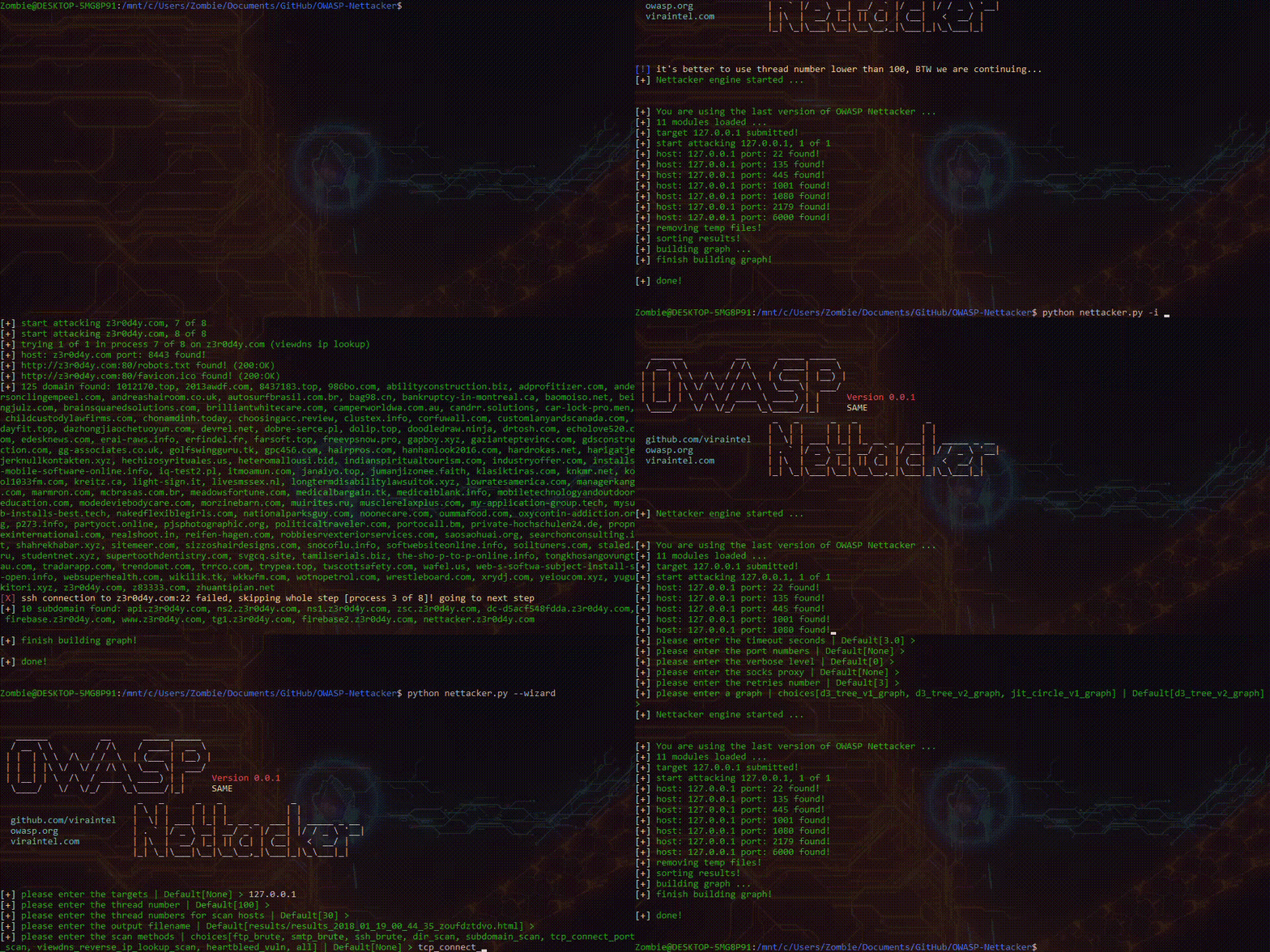
OWASP Nettacker is an open-source, Python-based automated penetration testing and information-gathering framework designed to help cyber security professionals and ethical hackers perform reconnaissance, vulnerability assessments, and network security audits efficiently. Nettacker automates tasks like port scanning, service detection, subdomain enumeration, network mapping, vulnerability scanning, credential brute-force testing making it a powerful tool for identifying weaknesses in networks, web applications, IoT devices and APIs.
Key Features
- Modular architecture - Each task — like port scanning, directory discovery, subdomain enumeration, vulnerability checks, or credential brute-forcing - is implemented as its own module, giving you control over what runs.
- Multi-protocol & multithreaded scanning - Supports HTTP/HTTPS, FTP, SSH, SMB, SMTP, ICMP, TELNET, XML-RPC, and can run scans in parallel for speed.
- Comprehensive output - Export reports in HTML, JSON, CSV, and plain text.
- Built-in database & drift detection - Stores past scans in the database for easy search and comparison with current results: useful to detect new hosts, open ports, or vulnerabilities in CI/CD pipelines.
- CLI, REST API & Web UI - Offers both programmatic integration and a user-friendly web interface for defining scans and viewing results.
- Evasion techniques - Enables configurable delays, proxy support, and randomized user-agents to reduce detection by firewalls or IDS systems.
- Flexible targets - Accepts single IPv4s, IP ranges, CIDR blocks, domain names, and full HTTP/HTTPS URLs. Targets can be mixed in a single command or loaded from a file using the
-l/--targets-listflag.
Use Cases
-
Penetration Testing
Automate reconnaissance, misconfiguration checks, service discovery, and vulnerability scanning to support efficient and repeatable penetration testing workflows. -
Recon & Vulnerability Assessment
Map live hosts, open ports, services, default credentials, and directories, then perform credential brute-forcing or fuzzing using built-in or custom wordlists. -
Attack Surface Mapping
Discover exposed hosts, ports, subdomains, and services quickly using built-in enumeration modules—ideal for both internal and external assets. -
Bug Bounty Recon
Automate and scale common reconnaissance tasks like subdomain enumeration, directory brute-forcing, and default credential checks to speed up finding targets. -
Network Vulnerability Scanning
Efficiently scan IPs, IP ranges, or entire CIDR blocks or all subdomains of the organisation in parallel using a modular, multithreaded approach for large-scale network assessments. -
Shadow IT & Asset Discovery
Use historical scan data and drift detection to uncover unmanaged or forgotten hosts, open ports/services, and subdomains appearing over time. -
CI/CD & Compliance Monitoring
Integrate Nettacker into pipelines to track infrastructure changes and detect new vulnerabilities via stored scan history and comparison features.
Links
- OWASP Nettacker Project Home Page: https://owasp.org/nettacker
- Documentation: https://nettacker.readthedocs.io
- Slack: #project-nettacker on https://owasp.slack.com
- Installation: https://nettacker.readthedocs.io/en/latest/Installation
- Usage: https://nettacker.readthedocs.io/en/latest/Usage
- GitHub repo: https://github.com/OWASP/Nettacker
- Docker Image: https://hub.docker.com/r/owasp/nettacker
- How to use the Dockerfile: https://nettacker.readthedocs.io/en/latest/Installation/#install-nettacker-using-docker
- OpenHub: https://www.openhub.net/p/OWASP-Nettacker
- Donate: https://owasp.org/donate/?reponame=www-project-nettacker&title=OWASP+Nettacker
- Read More: https://www.secologist.com/open-source-projects
Quick Setup & Run
CLI (Docker)
# Basic port scan on a single IP address:
$ docker run owasp/nettacker -i 192.168.0.1 -m port_scan
# Scan the entire Class C network for any devices with port 22 open:
$ docker run owasp/nettacker -i 192.168.0.0/24 -m port_scan -g 22
# Scan all subdomains of 'owasp.org' for http/https services and return HTTP status code
$ docker run owasp/nettacker -i owasp.org -d -s -m http_status_scan
# Display Help
$ docker run owasp/nettacker --help
Web UI (Docker)
$ docker-compose up
- Use the API Key displayed in the CLI to login to the Web GUI
- Web GUI is accessible from your (https://localhost:5000) or https://nettacker-api.z3r0d4y.com:5000/ (pointed to your localhost)
- The local database is
.nettacker/data/nettacker.db(sqlite). - Default results path is
.nettacker/data/results docker-composewill share your nettacker folder, so you will not lose any data afterdocker-compose down- To see the API key in you can also run
docker logs nettacker_nettacker. - More details and install without docker https://nettacker.readthedocs.io/en/latest/Installation
Thanks to our awesome contributors!
OWASP Nettacker is an open-source project, built on the principles of collaboration and shared knowledge. The vibrant OWASP community contributes to its development, ensuring that the tool remains up-to-date, adaptable, and aligned with the latest security practices. Thanks to all our awesome contributors! 🚀
Adopters
We’re grateful to the organizations, community projects, and individuals who adopt and rely on OWASP Nettacker for their security workflows.
If you’re using OWASP Nettacker in your organization or project, we’d love to hear from you! Feel free to add your details to the ADOPTERS.md file by submitting a pull request or reach out to us via GitHub issues. Let’s showcase how Nettacker is making a difference in the security community!
See ADOPTERS.md for details.
Google Summer of Code (GSoC) Project
- ☀️ OWASP Nettacker Project is participating in the Google Summer of Code Initiative
- 🙏 Thanks to Google Summer of Code Initiative and all the students who contributed to this project during their summer breaks:

Supporters
OWASP Nettacker is supported by Sorena AI, a compliance and GRC platform that helps security teams streamline assessments, evidence collection, risk management, and regulatory workflows.
2 maintainers


Download files
Download the file for your platform. If you're not sure which to choose, learn more about installing packages.
Source Distribution
Built Distribution
Filter files by name, interpreter, ABI, and platform.
If you're not sure about the file name format, learn more about wheel file names.
Copy a direct link to the current filters
File details
Details for the file nettacker-0.4.1.tar.gz.
File metadata
- Download URL: nettacker-0.4.1.tar.gz
- Upload date:
- Size: 3.3 MB
- Tags: Source
- Uploaded using Trusted Publishing? Yes
- Uploaded via:
twine/7.0.0 CPython/3.13.14
File hashes
| Algorithm | Hash digest | |
|---|---|---|
| SHA256 |
197d34740e2601de83d5973b857253c3a91517b0acb77bc5fb7a7352538bfb6d
|
|
| MD5 |
b0b8ce5ba46a4bedf801434c1e2908c8
|
|
| BLAKE2b-256 |
58f7b0655a4cfee63df142e775cf7cee14fd402fa03c0b675890e45791b6d79a
|
Provenance
The following attestation bundles were made for nettacker-0.4.1.tar.gz:
Publisher:
ci_cd.yml on OWASP/Nettacker
-
Statement:
-
Statement type:
https://in-toto.io/Statement/v1 -
Predicate type:
https://docs.pypi.org/attestations/publish/v1 -
Subject name:
nettacker-0.4.1.tar.gz -
Subject digest:
197d34740e2601de83d5973b857253c3a91517b0acb77bc5fb7a7352538bfb6d - Sigstore transparency entry: 2582028138
- Sigstore integration time:
-
Permalink:
OWASP/Nettacker@c457dfea61cd8bfb2d595cea3f40442fb21d968e -
Branch / Tag:
refs/tags/0.4.1 - Owner: https://github.com/OWASP
-
Access:
public
-
Token Issuer:
https://token.actions.githubusercontent.com -
Runner Environment:
github-hosted -
Publication workflow:
ci_cd.yml@c457dfea61cd8bfb2d595cea3f40442fb21d968e -
Trigger Event:
push
-
Statement type:
File details
Details for the file nettacker-0.4.1-py3-none-any.whl.
File metadata
- Download URL: nettacker-0.4.1-py3-none-any.whl
- Upload date:
- Size: 3.6 MB
- Tags: Python 3
- Uploaded using Trusted Publishing? Yes
- Uploaded via:
twine/7.0.0 CPython/3.13.14
File hashes
| Algorithm | Hash digest | |
|---|---|---|
| SHA256 |
6d0f405200b7040c93062e1b6df25d55dba1a404458390fea5bdb84738521411
|
|
| MD5 |
279ab38d3be814a140be4605cc782976
|
|
| BLAKE2b-256 |
80f9d68e9e81589009d36488a43b3b308c3a29e754da93b0e508570c4e967c5e
|
Provenance
The following attestation bundles were made for nettacker-0.4.1-py3-none-any.whl:
Publisher:
ci_cd.yml on OWASP/Nettacker
-
Statement:
-
Statement type:
https://in-toto.io/Statement/v1 -
Predicate type:
https://docs.pypi.org/attestations/publish/v1 -
Subject name:
nettacker-0.4.1-py3-none-any.whl -
Subject digest:
6d0f405200b7040c93062e1b6df25d55dba1a404458390fea5bdb84738521411 - Sigstore transparency entry: 2582028141
- Sigstore integration time:
-
Permalink:
OWASP/Nettacker@c457dfea61cd8bfb2d595cea3f40442fb21d968e -
Branch / Tag:
refs/tags/0.4.1 - Owner: https://github.com/OWASP
-
Access:
public
-
Token Issuer:
https://token.actions.githubusercontent.com -
Runner Environment:
github-hosted -
Publication workflow:
ci_cd.yml@c457dfea61cd8bfb2d595cea3f40442fb21d968e -
Trigger Event:
push
-
Statement type:














