
Neural Network from Scratch
Verified details
These details have been verified by PyPIProject links
GitHub Statistics
Maintainers

Project description

Introduction
Netweaver is a lightweight, from-scratch implementation of neural networks, built primarily with Numpy for efficient and fast matrix operations. It avoids heavy dependencies and complex abstractions, making it ideal for learning, experimentation, and educational use.
This project was born out of my own curiosity while exploring deep learning concepts. While popular frameworks offer powerful tools, they often come with layers of abstraction that can be difficult to modify or understand deeply. Netweaver aims to be different—modular, transparent, and flexible—providing a sandbox for implementing and testing your own ideas without the usual overhead. Whether you're a student, a curious developer, or a researcher testing new ideas, Netweaver offers a flexible playground for experimentation and understanding the internals of neural networks.
The ultimate goal is to foster a collaborative space where learners and tinkerers can exchange ideas and build together. Contributions of all kinds—bug fixes, enhancements, or new features—are not only welcome but encouraged.
Source code: https://github.com/vabsalack/Netweaver
discussions: https://github.com/vabsalack/Netweaver/discussions
issues: https://github.com/vabsalack/Netweaver/issues
community: https://discord.gg/5GS8EGdr
To get started, simply install the library. For a hands-on introduction, I recommend downloading and running these two notebooks: demo_libusage.ipynb and demo_metricmonitor.ipynb. They'll walk you through the basics and show you how to make the most of Netweaver.
Features
- No deep learning frameworks—just Numpy
- Modular architecture (Layers, Activations, Losses, etc..)
- Easy to extend and customize
- Designed for learning and experimentation
Table of Contents
| S.No. | Contents |
|---|---|
| 1. | Introduction |
| 2. | Features |
| 3. | Table of Contents |
| 4. | Installation |
| 5. | Usage |
| 6. | Project Structure |
| 7. | Contributing |
| 8. | Authors |
| 9. | Community |
| 10. | License |
Installation
You can install Netweaver using:
Option 1: pip
pip install netweaver
Option 2: uv (Recommended)
uv add netweaver
Option 3: clone it locally for development and exploration.
git clone https://github.com/vabsalack/Netweaver.git
cd Netweaver
pip install -e .
Usage
Here’s a minimal example of building and training a neural network with Netweaver:
For detailed instructions and examples, refer to the demo_libusage.ipynb and demo_metricmonitor.ipynb files.
Usage Overview & Highlights
Here are some key features that make working with Netweaver both intuitive and powerful:
-
Effortless Dataset Handling:
Netweaver offers built-in utilities to download and extract the Fashion MNIST dataset, allowing you to jump straight into building and training neural networks without manual data preparation. -
Integrated Progress Monitoring:
Training loops come with an embedded progress bar that displays real-time updates, including estimated time remaining for both epochs and batches. This provides clear visibility into training progress and helps manage expectations during long runs. -
Real-Time Metric Visualization:
Thenetweaver.utils.PlotTrainingclass provides real-time visualization of training and validation metrics. This feature is especially useful for tracking trends such as overfitting or underfitting, and for making timely decisions about early stopping. The plot automatically scrolls the x-axis to highlight the most recent metrics, ensuring clarity even as the graph crowds up. After training, you can display and save the complete graph of the training metrics to a .png file. -
Organized Logging and Model Management:
Each training session generates its own dedicated log folder. All logs and model files are automatically suffixed with a timestamp ({now:%Y%m%d-%H%M%S}), ensuring that results from different runs are kept separate and easy to compare. This organization simplifies experiment tracking and reproducibility.



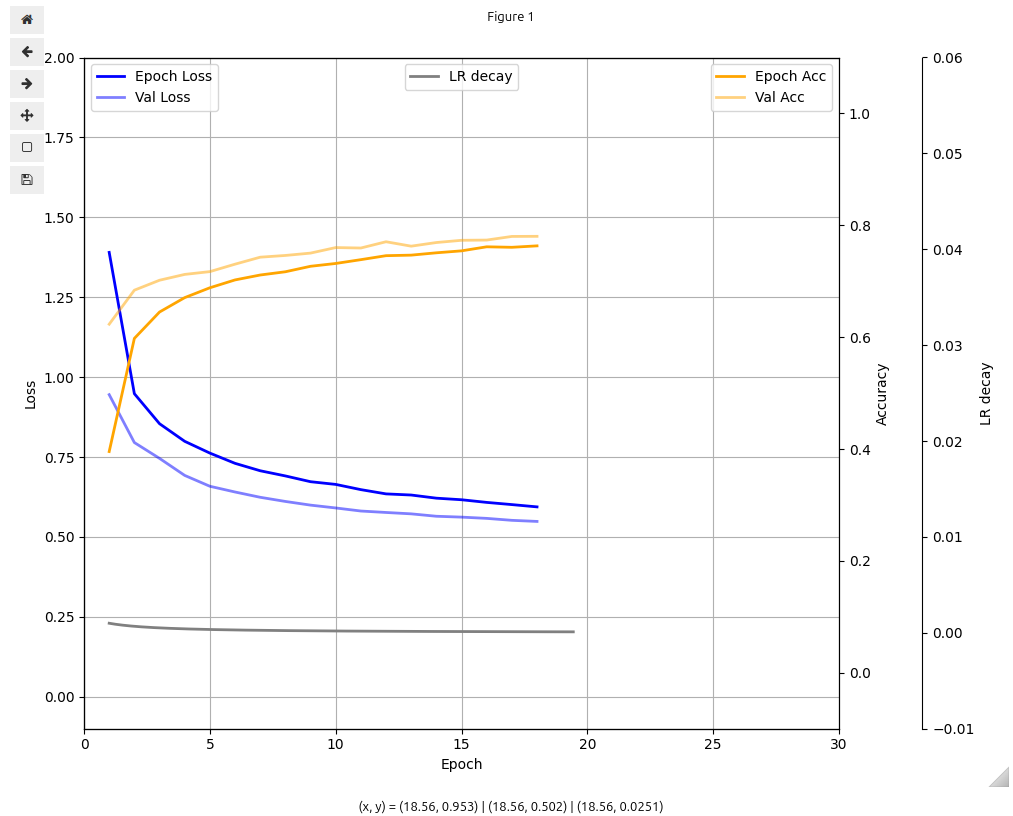
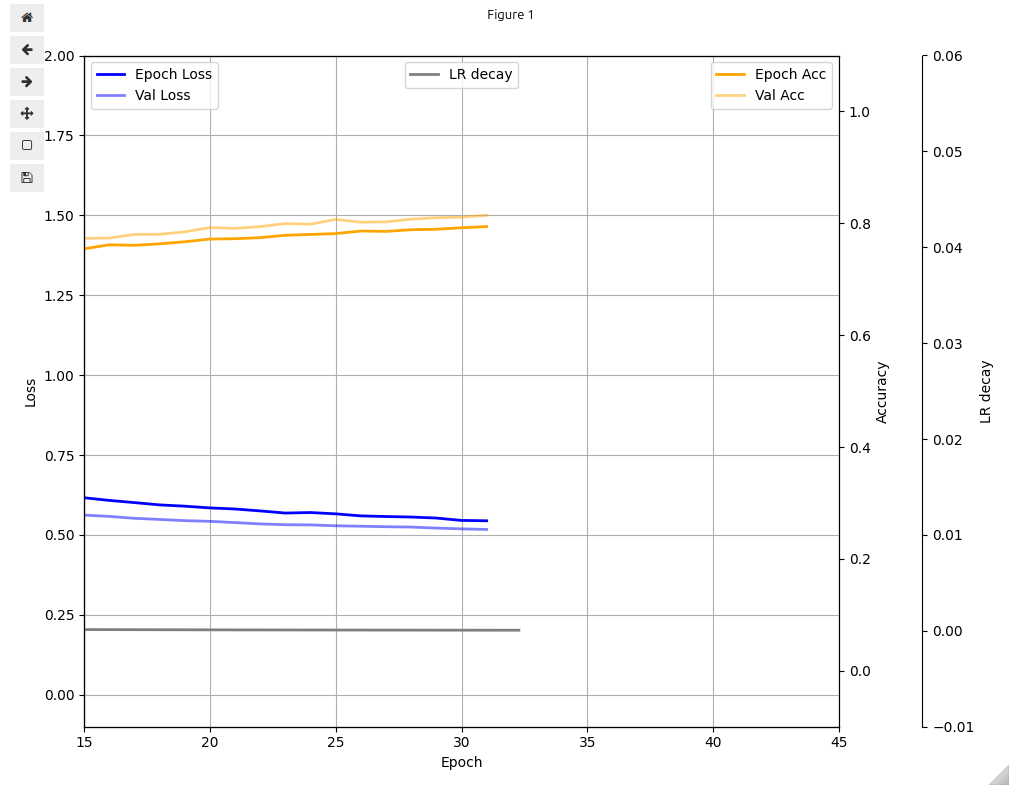
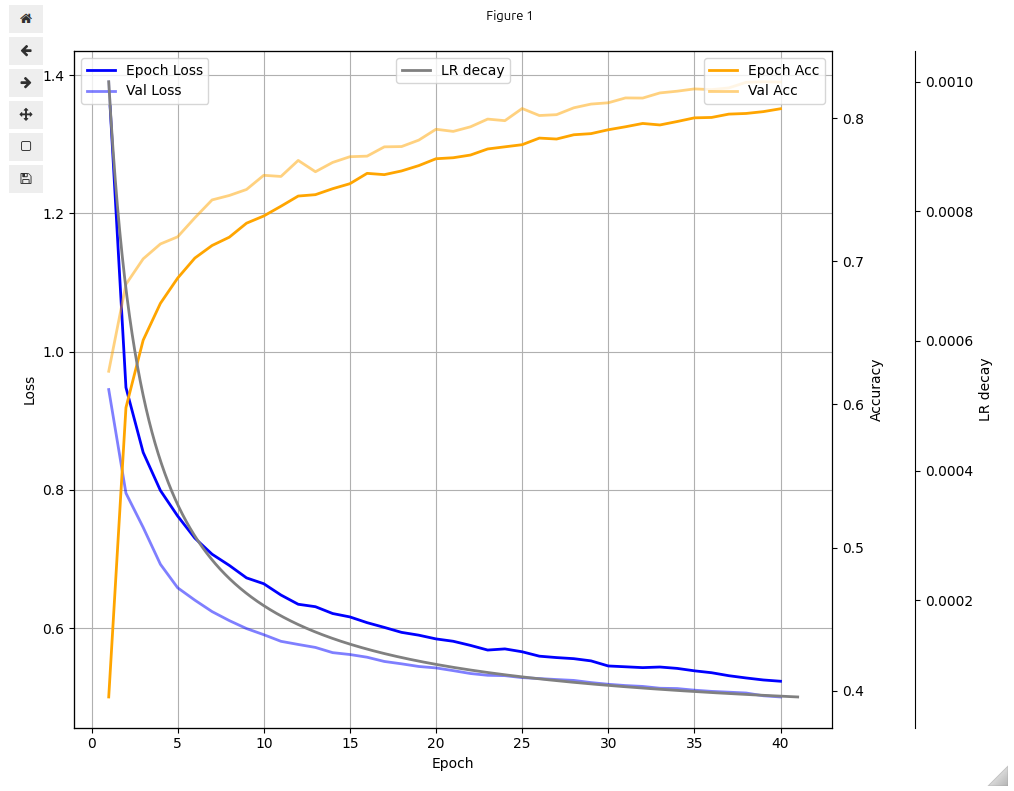
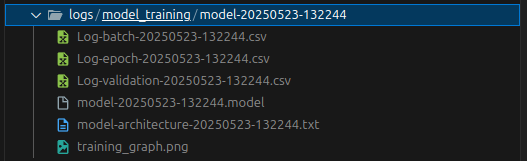
These features collectively make Netweaver a practical and educational tool for anyone interested in understanding and experimenting with neural networks.
Project Structure
.
|-- README.md
|-- pyproject.toml
|-- .gitignore
|-- .dockerignore
|-- branding
|-- notebooks
|   `-- demonstration
|       |-- demo_metricmonitor.ipynb
|       `-- demo_libusage.ipynb
|-- uv.lock
|-- src
|   `-- netweaver
|       |-- __init__.py
|       |-- accuracy.py
|       |-- datasets.py
|       |-- optimizers.py
|       |-- activation_layers.py
|       |-- model.py
|       |-- _internal_utils.py
|       |-- softmax_cce_loss.py
|       |-- utils.py
|       |-- layers.py
|       `-- lossfunctions.py
|-- .devcontainer
|   |-- devcontainer.json
|   |-- update_zshrc.sh
|   `-- Dockerfile
|-- LICENSE.txt
|-- .vscode
|   |-- extensions.json
|   `-- settings.json
|-- drawio
|-- store_room
|   |-- images
|-- tests
|   |-- e2e
|   |-- integration
|   |-- unit
|   |   |-- test_optimizers.py
|   |   |-- test_layers.py
|   |   |-- test_activation_layers.py
|   |   `-- test_loss_functions.py
|   `-- functional
|       |-- test_datasets.py
|       `-- test_model_training.py
`-- ruff.toml
Contributing
We welcome all contributions! Whether you have ideas for improvements, bug fixes, or new features, your input is valued.
This project uses the Fork and Pull Request workflow:
- Fork the repository to your own GitHub account.
- Create a new branch for your changes (
git checkout -b feature/your-feature-name). - Make your changes and commit them with clear, descriptive messages.
- Push your branch to your forked repository.
- Open a Pull Request to the main repository.
🐳 Development Environment: VS Code Dev Container
To streamline development and contributions, Netweaver provides a fully configured VS Code Dev Container setup. This environment ensures consistency and reduces setup friction for all contributors.
Key Features
-
Custom Dockerfile (Dockerfile)
- Uses the fast and modern
uvpackage manager for Python dependency management. - Installs a
uv-managed Python interpreter (see Dockerfile for version details). - Configures the
zshshell with the powerlevel10k theme for an enhanced terminal experience.
- Uses the fast and modern
-
Dev Container Configuration (devcontainer.json)
- Pre-installs essential VS Code extensions:
- Pylance (Python language support)
- Jupyter (notebook support)
- Ruff (linting and formatting)
- Sourcery (code quality suggestions)
- Draw.io Integration (diagramming)
- Material Icon Theme (file icons)
- Rainbow CSV (CSV highlighting)
- Pre-installs essential VS Code extensions:
How It Works
The dev container uses a bind mount volume, meaning your project files and environment/cache data are stored on your local filesystem, outside the container. This ensures that dependencies, caches, and settings persist across container rebuilds and are not lost when the container is removed.
Troubleshooting
If you encounter any issues while setting up or using the dev container, please open a request or discussion in the community channels or Github discussions.
Feel free to open issues for bugs, feature requests, or questions. Let's grow a collaborative community focused on learning and innovation!
Contribution Guidelines
- As this is a new and evolving project, there are no strict contribution rules—just follow good Python practices.
- Please ensure your code is clean and readable before submitting a pull request.
- We use Sourcery for code quality suggestions and Ruff for linting and formatting. Check the
ruff.tomlfile for current rules or to suggest new ones. - Be respectful and constructive in all discussions.
Thank you for helping make Netweaver better!
Author
Netweaver was created as a side project to explore the deeper math behind neural networks and as a way to overcome boredom. If you're curious about the inspiration behind Netweaver, check out the awesome Neural Networks from Scratch book. That's where the spark for this project came from

|
keerthivasan
Mail: Keerthi@gmail GitHub: Vabsalack LinkedIn: Keerthivasan |
Contributors
| Vabsalack |
Community Channels
| Discord, click me | use text channels wisely |
License
This project is licensed under the MIT License. See the LICENSE file for details.

Project details
Verified details
These details have been verified by PyPIProject links
GitHub Statistics
Maintainers
Release history Release notifications | RSS feed


Download files
Download the file for your platform. If you're not sure which to choose, learn more about installing packages.
Source Distribution
Built Distribution
Filter files by name, interpreter, ABI, and platform.
If you're not sure about the file name format, learn more about wheel file names.
Copy a direct link to the current filters
File details
Details for the file netweaver-1.0.0.tar.gz.
File metadata
- Download URL: netweaver-1.0.0.tar.gz
- Upload date:
- Size: 987.4 kB
- Tags: Source
- Uploaded using Trusted Publishing? Yes
- Uploaded via: uv/0.7.10
File hashes
| Algorithm | Hash digest | |
|---|---|---|
| SHA256 |
d647c0488be5458c0eb94fd706fa7ec70ba9c8ac6d49fe38c3e8ed292e873a02
|
|
| MD5 |
b9b30d2e5e30187ee1c25f1d0d1565bd
|
|
| BLAKE2b-256 |
e564a0e01567f6418e6d7e53dfdb93e830967d48abd0249c2b223e3dfeafd31c
|
File details
Details for the file netweaver-1.0.0-py3-none-any.whl.
File metadata
- Download URL: netweaver-1.0.0-py3-none-any.whl
- Upload date:
- Size: 31.5 kB
- Tags: Python 3
- Uploaded using Trusted Publishing? Yes
- Uploaded via: uv/0.7.10
File hashes
| Algorithm | Hash digest | |
|---|---|---|
| SHA256 |
d3a2dc5b2e043c87a116b1e38a53978a27fead8e4ddc494f78a1de655d0023aa
|
|
| MD5 |
64ee2f93da476a7d86f578fbbcb8b709
|
|
| BLAKE2b-256 |
51f96fc315a279a0cfbb2bf0153d65157e1731e226029cc5385ced19ff0962a9
|






