
Network MCP Server for AI Agents - Connectivity testing and pcap analysis

Project description
Network MCP Server
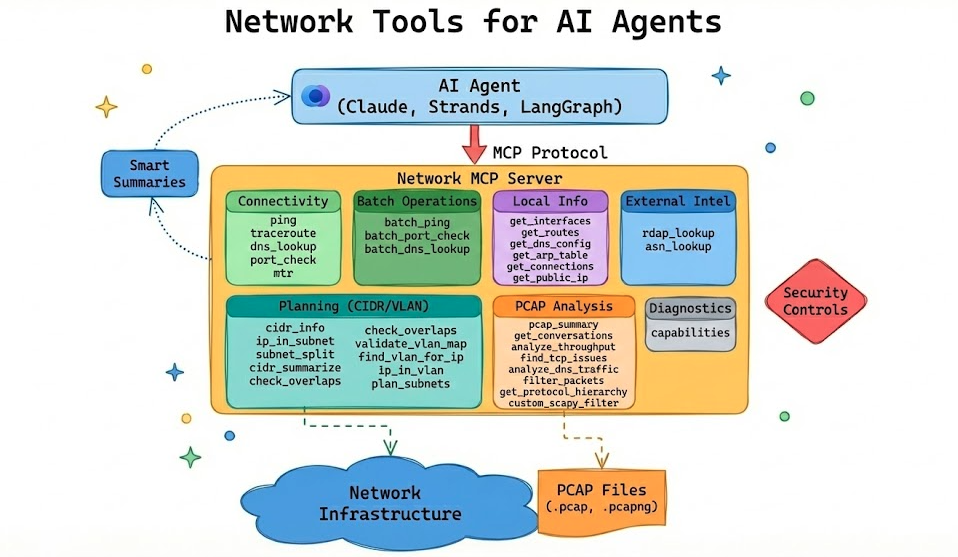
A Model Context Protocol (MCP) server providing network diagnostic tools for AI agents. Designed to offload heavy network analysis to the server and return structured, actionable data optimized for LLM consumption.



Features
- Connectivity Testing: ping, traceroute, DNS lookups, port checks, MTR
- Batch Operations: Test multiple hosts/ports concurrently
- Local Network Info: Get interfaces, routes, DNS config, ARP table, connections (cross-platform)
- Pcap Analysis: Analyze packet captures with scapy (no tshark required)
- Custom Filters: Execute scapy filter expressions for advanced queries (AST-validated)
- Security Controls: Configurable allowlist/blocklist for target validation (enforced on connectivity tools)
- PCAP Path Guardrails: Restrict which directories the server is allowed to read captures from
- Smart Summaries: Returns human-readable summaries plus structured data
Installation
pip install network-mcp
Or install from source:
git clone https://github.com/labeveryday/network-mcp.git
cd network-mcp
pip install -e .
Quick Start
Run the MCP server:
network-mcp
Or with Python:
python -m network_mcp.server
Recommended first run (helps agents decide what’s safe/available on this host):
- Check capabilities: call
capabilitiesto see installed binaries (likemtr), active security policy, and PCAP path guardrails. - Decide on policy: if you need to loosen/tighten target validation or PCAP access, set env vars before launching.
- Run unit tests by default:
pytestskips integration tests unless you opt in (see Development).
Available Tools
Diagnostics
| Tool | Description |
|---|---|
capabilities |
Report runtime capabilities (installed binaries like mtr, active security policy, pcap path guardrails) so agents can plan tool usage |
External Intel
| Tool | Description |
|---|---|
rdap_lookup |
WHOIS-style lookup using RDAP for domains and IPs |
asn_lookup |
Origin ASN lookup for an IP (BGP origin intel) |
Connectivity Tools
| Tool | Description |
|---|---|
ping |
ICMP ping with latency statistics and packet loss |
traceroute |
Path analysis showing each hop with latency |
dns_lookup |
DNS resolution (A, AAAA, MX, TXT, etc.) and reverse lookups |
port_check |
TCP port connectivity test with banner grabbing |
mtr |
Combined traceroute + ping with per-hop statistics |
Batch Operations
| Tool | Description |
|---|---|
batch_ping |
Ping multiple hosts concurrently |
batch_port_check |
Check multiple ports on a single host |
batch_dns_lookup |
Resolve multiple hostnames in parallel |
Local Network Info Tools
Cross-platform tools that work on Linux, macOS, and Windows.
| Tool | Description |
|---|---|
get_interfaces |
List network interfaces with IPs, MACs, and status |
get_routes |
Get routing table with default gateway |
get_dns_config |
Get configured DNS servers and search domains |
get_arp_table |
Get ARP cache (IP to MAC mappings) |
get_connections |
List active TCP/UDP connections |
get_public_ip |
Get public/external IP address as seen from the internet |
Pcap Analysis Tools
| Tool | Description |
|---|---|
pcap_summary |
High-level capture stats: packets, duration, protocols, top talkers |
get_conversations |
Network flows/conversations between endpoints |
analyze_throughput |
Observed throughput (Mbps) per conversation/flow, including dominant direction and duration |
find_tcp_issues |
Detect retransmissions, resets, zero windows, dup ACKs |
analyze_dns_traffic |
DNS queries, failures, slow responses |
filter_packets |
Extract packets by IP, port, or protocol |
get_protocol_hierarchy |
Protocol breakdown by packets and bytes |
custom_scapy_filter |
Execute custom scapy filter expressions |
IDE Integration
Claude Desktop
Add to ~/Library/Application Support/Claude/claude_desktop_config.json (macOS) or %APPDATA%\Claude\claude_desktop_config.json (Windows):
{
  "mcpServers": {
    "network-tools": {
      "command": "network-mcp"
    }
  }
}
Cursor
Add to your MCP settings:
{
  "mcpServers": {
    "network-tools": {
      "command": "network-mcp"
    }
  }
}
Using with uv
If you installed with uv:
{
  "mcpServers": {
    "network-tools": {
      "command": "uv",
      "args": ["run", "--directory", "/path/to/network-mcp", "network-mcp"]
    }
  }
}
Example Responses
Ping
{
  "success": true,
  "target": "google.com",
  "resolved_ip": "142.250.80.46",
  "packets_sent": 4,
  "packets_received": 4,
  "packet_loss_percent": 0.0,
  "min_latency_ms": 11.2,
  "avg_latency_ms": 12.8,
  "max_latency_ms": 15.1,
  "summary": "google.com is reachable. 4/4 packets received, avg latency 12.8ms"
}
Batch Ping
{
  "success": true,
  "total_targets": 3,
  "successful": 3,
  "failed": 0,
  "results": [
    {"target": "8.8.8.8", "success": true, "avg_latency_ms": 12.5},
    {"target": "1.1.1.1", "success": true, "avg_latency_ms": 8.2},
    {"target": "google.com", "success": true, "avg_latency_ms": 15.1}
  ],
  "summary": "Batch ping: 3/3 targets reachable"
}
TCP Issues Detection
{
  "success": true,
  "file_path": "/tmp/capture.pcap",
  "total_tcp_packets": 15234,
  "issues": [
    {
      "issue_type": "retransmission",
      "count": 47,
      "severity": "medium",
      "recommendation": "Retransmissions indicate packet loss. Check for network congestion."
    }
  ],
  "has_issues": true,
  "summary": "TCP issues detected in 15234 packets: 47 retransmissions"
}
Throughput (from PCAP)
{
  "success": true,
  "file_path": "/tmp/capture.pcap",
  "total_packets_scanned": 100000,
  "conversations_analyzed": 87,
  "top_n": 3,
  "sort_by": "mbps_total",
  "conversations": [
    {
      "src_ip": "10.0.0.10",
      "src_port": 51544,
      "dst_ip": "93.184.216.34",
      "dst_port": 443,
      "protocol": "TCP",
      "packets_total": 1240,
      "bytes_total": 18423333,
      "duration_seconds": 9.84,
      "start_time": 1734567890.01,
      "end_time": 1734567899.85,
      "packets_forward": 820,
      "bytes_forward": 17600000,
      "packets_reverse": 420,
      "bytes_reverse": 823333,
      "mbps_forward": 14.308,
      "mbps_reverse": 0.669,
      "mbps_total": 14.977,
      "direction": "10.0.0.10:51544 -> 93.184.216.34:443"
    }
  ],
  "summary": "Throughput analysis: 87 conversations from 100000 packets. Top flow 10.0.0.10:51544 -> 93.184.216.34:443 at ~14.977 Mbps over 9.84s"
}
Get Interfaces
{
  "success": true,
  "interfaces": [
    {
      "name": "en0",
      "status": "up",
      "mac_address": "00:11:22:33:44:55",
      "ipv4_addresses": ["192.168.1.100"],
      "ipv6_addresses": ["fe80::1"],
      "netmask": "255.255.255.0",
      "mtu": 1500
    }
  ],
  "default_interface": "en0",
  "summary": "Found 5 interfaces (3 up). Primary: en0"
}
Get Public IP
{
  "success": true,
  "public_ip": "203.0.113.42",
  "service_used": "ipify.org",
  "summary": "Public IP: 203.0.113.42 (via ipify.org)"
}
RDAP Lookup (WHOIS-style)
{
  "success": true,
  "query": "1.1.1.1",
  "query_type": "ip",
  "rdap_url": "https://rdap.org/ip/1.1.1.1",
  "handle": "NET-1-1-1-0-1",
  "country": "AU",
  "start_address": "1.1.1.0",
  "end_address": "1.1.1.255",
  "summary": "RDAP 1.1.1.1: 1.1.1.0–1.1.1.255 (AU), handle NET-1-1-1-0-1"
}
ASN Lookup
{
  "success": true,
  "ip": "1.1.1.1",
  "asn": "13335",
  "prefix": "1.1.1.0/24",
  "country": "AU",
  "registry": "apnic",
  "allocated": "2011-08-11",
  "as_name": "CLOUDFLARENET",
  "summary": "1.1.1.1 originates from AS13335 (CLOUDFLARENET), prefix 1.1.1.0/24"
}
Configuration
Create config.yaml in your working directory or ~/.network-mcp/config.yaml:
security:
  # Only allow these targets (glob patterns, CIDR ranges)
  allowed_targets:
    - "*.company.com"
    - "10.0.0.0/8"
    - "192.168.0.0/16"

  # Block these targets
  blocked_targets:
    - "*.gov"
    - "localhost"
    - "127.0.0.0/8"

  # Block private IPs
  block_private: false

  # Block cloud metadata endpoints (AWS, GCP, etc.)
  block_cloud_metadata: true

pcap:
  max_packets: 100000
  allow_custom_filters: true
  # Restrict which directories the server is allowed to read pcaps from.
  # (Paths are resolved before checking.)
  allowed_paths:
    - "."
    - "~/Documents"
    - "/tmp"
Environment variables:
NETWORK_MCP_ALLOWED_TARGETS="*.company.com,10.0.0.0/8"
NETWORK_MCP_BLOCKED_TARGETS="*.gov,localhost"
NETWORK_MCP_BLOCK_PRIVATE="true"
NETWORK_MCP_MAX_PACKETS="50000"
NETWORK_MCP_PCAP_ALLOWED_PATHS=".,~/Documents,/tmp"
Why MCP for Network Tools?
Token Efficiency: LLMs have context limits. The server does heavy processing (parsing 100k packets) and returns concise summaries instead of raw data.
Better Reasoning: LLMs excel at deciding what to investigate, not parsing raw output. Structured data leads to better decisions.
Consistency: Server-side processing is deterministic. You don't rely on the LLM to correctly interpret traceroute output every time.
Development
# Clone and install dev dependencies
git clone https://github.com/labeveryday/network-mcp.git
cd network-mcp
pip install -e ".[dev]"

# Run unit tests (integration tests are skipped by default)
pytest

# Run integration tests (requires system tools and/or network access)
pytest -m integration

# Run linting
ruff check .
Project Structure
network-mcp/
├── src/network_mcp/
│   ├── __init__.py
│   ├── server.py           # FastMCP server
│   ├── config.py           # Configuration and security
│   ├── tools/
│   │   ├── connectivity.py # ping, traceroute, dns, port_check, mtr, batch ops
│   │   ├── local.py        # local network info (interfaces, routes, etc.)
│   │   └── pcap.py         # pcap analysis tools
│   └── models/
│       └── responses.py    # Pydantic response models
├── tests/
├── pyproject.toml
└── README.md
Requirements
- Python 3.10+
- System tools:
ping,traceroute(standard on most systems) - Optional:
mtrfor the MTR tool
License
MIT License - see LICENSE file for details.
Release history Release notifications | RSS feed


Download files
Download the file for your platform. If you're not sure which to choose, learn more about installing packages.
Source Distribution
Built Distribution
Filter files by name, interpreter, ABI, and platform.
If you're not sure about the file name format, learn more about wheel file names.
Copy a direct link to the current filters
File details
Details for the file network_mcp-0.1.1.tar.gz.
File metadata
- Download URL: network_mcp-0.1.1.tar.gz
- Upload date:
- Size: 4.8 MB
- Tags: Source
- Uploaded using Trusted Publishing? No
- Uploaded via: twine/6.2.0 CPython/3.13.5
File hashes
| Algorithm | Hash digest | |
|---|---|---|
| SHA256 |
dbb543fa08e4f2c64c492c4d7e750346a3d5256f973bf31baba0af63a82bde25
|
|
| MD5 |
65c1b69dcc6c2f303bd7ff03eed935ac
|
|
| BLAKE2b-256 |
21077e5e1d83e6ba3e9fcbb7a351811405df7cbcc8022317895612214fbdb4c4
|
File details
Details for the file network_mcp-0.1.1-py3-none-any.whl.
File metadata
- Download URL: network_mcp-0.1.1-py3-none-any.whl
- Upload date:
- Size: 52.8 kB
- Tags: Python 3
- Uploaded using Trusted Publishing? No
- Uploaded via: twine/6.2.0 CPython/3.13.5
File hashes
| Algorithm | Hash digest | |
|---|---|---|
| SHA256 |
313dd79fe079f1cdb9023ea579e0e7a07bd71ca7a81306d22da685cd49010383
|
|
| MD5 |
46835d2e051f5586265e3353be965a33
|
|
| BLAKE2b-256 |
533da8eeb8015202cacefeb7d084e09eafb8049784c300a23f9e6b77f993839c
|






