
Modern Python cli toolkit for network device automation

Project description

Network automation CLI. Apache 2.0 licensed. Fully open-source. Originally developed at narrowin, now community maintained.
Networka: Eierlegende Wollmilchsau of network operations — optimized for your daily workflows.






Networka is a modern CLI tool for automating network devices across multiple vendors. Designed for network engineers who want fast, scalable automation with full cross-platform support.
Built with the help of agentic-AI with humans in the loop, this started as an experiment that turned into something genuinely useful.
The Networka Monologue
“People ask the question…
what’s a Networka?
And I tell 'em —
it's not about cables, configs, and pings.
Oh no.
There’s more to it than that, my friend.
We all like a bit of the good life —
some the uptime, some the security,
others the automation, the visibility, or the compliance.
But a Networka, oh, they're different.
Why?
Because a real Networka wants the f*ing lot.”
(inspired by: RockNRolla)
Getting Started
- Installation: see the docs → https://narrowin.github.io/networka/getting-started/
- Platform compatibility → https://narrowin.github.io/networka/platform-compatibility/
- Shell completion → https://narrowin.github.io/networka/shell-completion/
- CLI reference → https://narrowin.github.io/networka/reference/cli/
- API reference → https://narrowin.github.io/networka/reference/api/
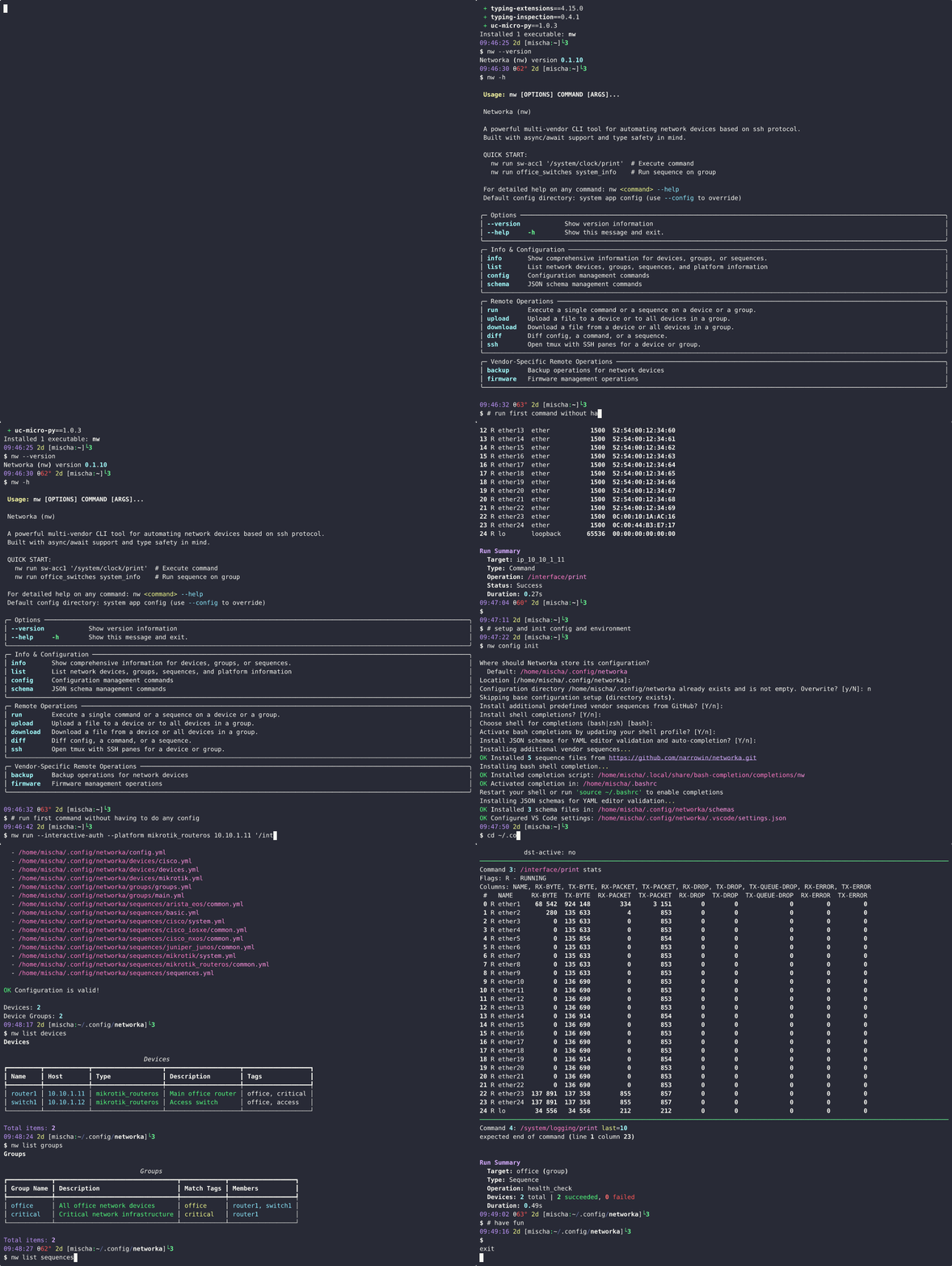
Networka setup and command execution demo
Features
Core Capabilities
- Multi-vendor network automation: Native support for MikroTik RouterOS, Cisco IOS/IOS-XE/NX-OS, Arista EOS, Juniper JunOS, and more
- Scalable device management: Execute commands across individual devices or groups
- Cross-platform compatibility: Full support for Linux, macOS, and Windows environments
- Flexible configuration: YAML and CSV configuration options with powerful device tagging and grouping
Operational Features
- Command execution: Run single commands or predefined sequences across devices and groups
- File management: Upload/download files to/from network devices with verification and error handling
- Device backup: Automated configuration and comprehensive backups with vendor-specific implementations
- Firmware management: Upgrade, downgrade, and BIOS operations with platform validation
- CLI session management: Direct CLI access with tmux integration for interactive sessions
Advanced Features
- Intelligent completions: Context-aware shell completions for devices, groups, and sequences
- Vendor-aware sequences: Predefined command sets optimized for different network platforms
- Results management: Organized storage with multiple output formats and automatic timestamping
- Configuration validation: Schema-based validation with detailed error reporting
- Credential management: Secure credential handling via environment variables with device-specific overrides
Developer & Integration Features
- Type safety: Full mypy type checking for reliability and maintainability
- Modern architecture: Built with scalable scrapli and nornir support
- Extensible design: Plugin-friendly architecture for adding new vendors and operations
- Rich output: Professional CLI interface with color coding and structured information display
Installation
System Requirements
- Operating System: Linux, macOS, or Windows
- Python: 3.11, 3.12, or 3.13
- Network Access: SSH connectivity to target devices
- Package Manager: uv (recommended) or pip
Quick Install (recommended)
Not on PyPI yet — install from GitHub.
# Recommended (isolated, user-wide)
uv tool install git+https://github.com/narrowin/networka.git

# Alternative
pipx install git+https://github.com/narrowin/networka.git

# Verify installation
nw --help
If nw is not found
- Check:
command -v nw(Linux/macOS) orwhere nw(Windows) - If using pipx: ensure PATH is set, then reload shell
pipx ensurepath
exec $SHELL
- Linux/macOS: add user bin to PATH if needed
echo 'export PATH="$HOME/.local/bin:$PATH"' >> ~/.bashrc  # or ~/.zshrc
exec $SHELL
- Windows (native, best-effort): prefer WSL2; if native, run
pipx ensurepathand restart the terminal
More → PATH troubleshooting: https://narrowin.github.io/networka/troubleshooting/#path-nw-not-found
Upgrade & Remove
# Upgrade to latest version (from GitHub)
uv tool install --force git+https://github.com/narrowin/networka.git
# or
pipx install --force git+https://github.com/narrowin/networka.git

# Remove installation
uv tool uninstall nw
# or
pipx uninstall networka
Platform-Specific Notes
Linux/macOS: No additional dependencies required
Windows: Scrapli (the default transport) does not officially support native Windows. While it may work with Paramiko or ssh2-python drivers, the recommended approach is to run Networka on WSL2 (Ubuntu) for a fully supported POSIX environment. Native Windows usage is best-effort.
WSL2 quickstart (recommended):
# In Ubuntu on WSL2
curl -LsSf https://astral.sh/uv/install.sh | sh
exec $SHELL
uv tool install git+https://github.com/narrowin/networka.git
nw --help
Details → https://narrowin.github.io/networka/platform-compatibility/#wsl2-quickstart-recommended
Quick Start
Get up and running with config init command:
# Initialize in default location with interactive prompts
nw config init
One-liners (no config)
Run directly against an IP without creating files. --platform selects the network OS driver; --interactive-auth prompts for credentials.
# MikroTik RouterOS
nw run --platform mikrotik_routeros 192.0.2.10 "/system/identity/print" --interactive-auth
# Cisco IOS-XE
nw run --platform cisco_iosxe 198.51.100.20 "show version" --interactive-auth
Terminology: device_type vs hardware platform vs transport
- device_type: Network OS driver used for connections and commands (Scrapli "platform"). Examples: mikrotik_routeros, cisco_iosxe, arista_eos, juniper_junos.
- platform (hardware/firmware): Hardware architecture used for firmware-related operations (x86, x86_64, arm, mipsbe, tile).
- transport: Connection backend. Default is scrapli.
Note: When targeting IPs directly, --platform refers to the network driver (device_type), not hardware architecture.
Quick links
- Getting started → https://narrowin.github.io/networka/getting-started/
- Running commands → https://narrowin.github.io/networka/running-commands/
- Configuration → https://narrowin.github.io/networka/configuration/
- Environment variables → https://narrowin.github.io/networka/environment-variables/
- Results → https://narrowin.github.io/networka/results/
- Output modes → https://narrowin.github.io/networka/output-modes/
- Backups → https://narrowin.github.io/networka/backups/
- CLI reference → https://narrowin.github.io/networka/reference/cli/
- API reference → https://narrowin.github.io/networka/reference/api/
CLI overview
- For current usage and commands, see the CLI reference:
- https://narrowin.github.io/networka/reference/cli/
- Quick checks:
nw --helpandnw --version
Community & support
- Visit our documentation for detailed guides and examples
- Create GitHub Issues for bug reports and feature requests
- See CONTRIBUTING.md for contribution guidelines
- Check SECURITY.md for security policy and reporting vulnerabilities
Contributing
Have a look through existing Issues and Pull Requests that you could help with. If you'd like to request a feature or report a bug, please create a GitHub Issue using one of the templates provided.
Documentation
- Docs Home → https://narrowin.github.io/networka/
- Platform Compatibility → https://narrowin.github.io/networka/platform-compatibility/
- Development Guide → https://narrowin.github.io/networka/development/
- Multi-Vendor Support → https://narrowin.github.io/networka/multi-vendor-support/
- IP Address Support → https://narrowin.github.io/networka/ip-address-support/
- Transport Selection → https://narrowin.github.io/networka/transport/
- Environment Variables → https://narrowin.github.io/networka/environment-variables/
- File Upload Guide → https://narrowin.github.io/networka/file_upload/
- Interactive Credentials → https://narrowin.github.io/networka/interactive-credentials/
License
Apache License 2.0 - Free for commercial and personal use. No paid tiers, no enterprise versions, no licensing restrictions.
Community-driven project with contributions from narrowin and network engineers worldwide. See GOVERNANCE.md for maintenance and decision-making model.
Acknowledgments
- Scrapli - Network device connections
- Nornir - Network automation framework
- Netmiko - Multi-vendor CLI connections to network devices
- Typer - CLI framework
- Pydantic - Data validation
- Rich - Terminal formatting
Built for network engineers who value clean, reliable automation


Download files
Download the file for your platform. If you're not sure which to choose, learn more about installing packages.
Source Distribution
Built Distribution
Filter files by name, interpreter, ABI, and platform.
If you're not sure about the file name format, learn more about wheel file names.
Copy a direct link to the current filters
File details
Details for the file networka-0.1.12.tar.gz.
File metadata
- Download URL: networka-0.1.12.tar.gz
- Upload date:
- Size: 7.3 MB
- Tags: Source
- Uploaded using Trusted Publishing? No
- Uploaded via: twine/6.2.0 CPython/3.12.3
File hashes
| Algorithm | Hash digest | |
|---|---|---|
| SHA256 |
ef3a9841e1437469a6d52d25e85e3b027a9dfcb2523f6ee9100ec38aa5cd670d
|
|
| MD5 |
fa327cb3caec191c317dadf8633351d5
|
|
| BLAKE2b-256 |
8fdd3ad2f376830c71fa2bc65b27e363a9ac649228cd3b9c34289936cea00f17
|
File details
Details for the file networka-0.1.12-py3-none-any.whl.
File metadata
- Download URL: networka-0.1.12-py3-none-any.whl
- Upload date:
- Size: 224.8 kB
- Tags: Python 3
- Uploaded using Trusted Publishing? No
- Uploaded via: twine/6.2.0 CPython/3.12.3
File hashes
| Algorithm | Hash digest | |
|---|---|---|
| SHA256 |
497f66b1b5440c2ab08b6090d2ad76717a7266832618a1edeb8c819b26e9aa9b
|
|
| MD5 |
5e837b61f6143c0184f6ce10aca3a346
|
|
| BLAKE2b-256 |
9e0567987be71548d157ccc11a272fc48e50feecfb9259a91246635d0e4eeed3
|






