
Neural-pleX


An object oriented educational/experimental neural network implementation.
Introduction
Neural-pleX is an intuitive object oriented neural network implementation. The Neural-pleX API consists of Network, Layer, and Neuron constructors. The networks can be easily visualized using a visualization library.
Table of contents
Installation
pip install neuralplex
Usage
This implementation demonstrates each component of the API. A 3 layer neural network is constructed that has a 4 neuron input Layer and a 1 neuron output layer. The hidden layer has 8 neurons.
Implement a 3 layer neural network
Import the Network, Layer, and Neuron classes.
from neuralplex import Network, Layer, Neuron
Set a step.
STEP = 1e-4
Construct a neural network by specifying the Neurons for each Layer and adding the Layers to a Network.
The resulting neural network will have 4 input neurons, 1 ouput neuron, and 8 neurons in the hidden layer.
l1 = Layer(neurons=[Neuron(m=random()) for i in range(0, 4)], step=STEP)
l2 = Layer(neurons=[Neuron(m=random()) for i in range(0, 8)], step=STEP)
l3 = Layer(neurons=[Neuron(m=random())], step=STEP)
n1 = Network([l1, l2, l3])
With the Network defined, you can train the network.
Here the network is trained to recognize the nibble 1111 as the decimal number 15.
n1.train([1,1,1,1], [15])
You can generate and print a prediction using the predict method. Because the network underwent just one iteration of training, the estimate will likely be inaccurate. The accuracy of the prediction can be improved by iteratively training the network. Please see the Train and Visualize a Neural-pleX Network implementation for an example of how to iteratively train the network.
prediction = n1.predict([1,1,1,1])
print(prediction)
Example
Train and visualize a Neural-pleX network
In this example you will use D3 and D3Blocks in order to visualize a neural network before and after training.
Import the necessary dependencies.
from random import random, randint
import pandas as pd
from neuralplex import Network, Layer, Neuron, get_edge_data
from d3blocks import D3Blocks
Implement a function that will visualize the network.
def visualize(n):

    d3 = D3Blocks()

    df = pd.DataFrame(get_edge_data(n))

    df['weight'] = df['weight'] * 42

    d3.d3graph(df, charge=1e4, filepath=None)

    for index, source, target, weight in df.to_records():
        if source.startswith('l1'):
            color = 'green'
        elif source.startswith('l2'):
            color = 'red'
        else:
            color='yellow'

        d3.D3graph.node_properties[source]['color'] = color
        d3.D3graph.node_properties[source]['size'] = weight

    d3.D3graph.show(save_button=True, filepath='./Neural-pleX.html')
Set a step.
STEP = 1e-5
Construct a network.
n = Network([Layer(neurons=[Neuron(m=random(), name=f'l{layer}-p{i}') for i in range(1, size+1)], step=STEP) for layer, size in zip([1,2,3], [4, 8, 1])])
Use D3 and D3Blocks in order to visualize the network before training.
visualize(n)
Train the network.
for i in range(0, int(1e5)):
    rn = randint(1, 15)
    b = [int(n) for n in bin(rn)[2:]]
    while len(b) < 4:
        b = [0] + b
    n.train(b, [rn])
Use D3 and D3Blocks in order to visualize the network after training.
visualize(n)
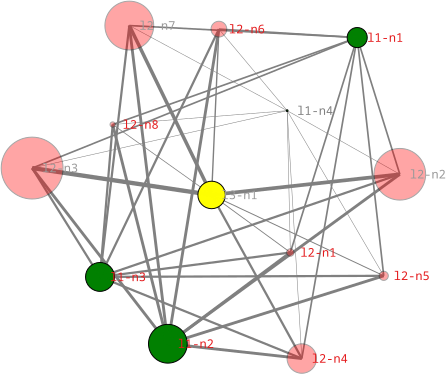
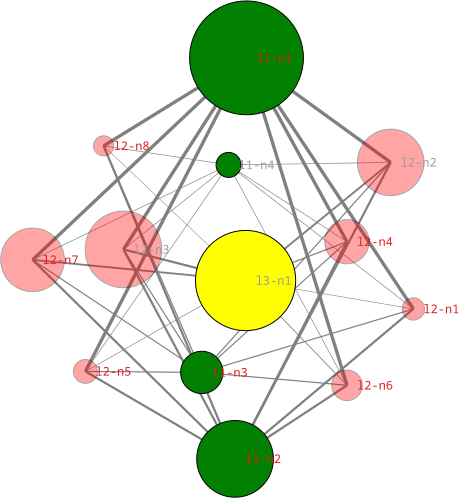
Visualizations of the network before and after training:
The green nodes comprise the inputs, the red nodes comprise the hidden layer, and the yellow node is the output. The size of the Neuron is proportional to its coefficient and dependent on its random initialization and subsequent training.
| Before Training | After Training |
|---|---|
 |
 |
Test
How to run the Nibble Challenge
A model is trained that estimates a decimal value given a binary nibble.
Clone the repository.
git clone https://github.com/adamjpatterson/neuralplex.git
Change directory into the repository.
cd neuralplex
Install the package in editable mode.
pip install -e .
Run the tests.
python -m unittest -v
Output
test_nibbles (tests.test.Test.test_nibbles) ... Training the model.
Training iteration: 0
Training iteration: 1000
Training iteration: 2000
Training iteration: 3000
Training iteration: 4000
Training iteration: 5000
Training iteration: 6000
Training iteration: 7000
Training iteration: 8000
Training iteration: 9000
1 input: [0, 0, 0, 1], truth: 1 prediction: [1.8160007977374275]
2 input: [0, 0, 1, 0], truth: 2 prediction: [2.768211299141504]
3 input: [0, 0, 1, 1], truth: 3 prediction: [4.584212096878932]
4 input: [0, 1, 0, 0], truth: 4 prediction: [3.772563194981495]
5 input: [0, 1, 0, 1], truth: 5 prediction: [5.588563992718923]
6 input: [0, 1, 1, 0], truth: 6 prediction: [6.540774494122998]
7 input: [0, 1, 1, 1], truth: 7 prediction: [8.356775291860426]
8 input: [1, 0, 0, 0], truth: 8 prediction: [6.784403350226391]
9 input: [1, 0, 0, 1], truth: 9 prediction: [8.600404147963818]
10 input: [1, 0, 1, 0], truth: 10 prediction: [9.552614649367897]
11 input: [1, 0, 1, 1], truth: 11 prediction: [11.368615447105324]
12 input: [1, 1, 0, 0], truth: 12 prediction: [10.556966545207885]
13 input: [1, 1, 0, 1], truth: 13 prediction: [12.372967342945314]
14 input: [1, 1, 1, 0], truth: 14 prediction: [13.32517784434939]
15 input: [1, 1, 1, 1], truth: 15 prediction: [15.141178642086818]
R2: 0.9599237139109126
ok

----------------------------------------------------------------------
Ran 1 test in 0.333s

OK
Support
If you have a feature request or run into any issues, feel free to submit an issue. You’re also welcome to reach out to one of the authors.
1 maintainer

Metadata
1 maintainer
Release files for neuralplex 0.1.6
For a detailed explanation of source distributions (sdists) and built distributions (wheels), please see the package formats documentation.
Source distribution (sdist)
| File | Size | Uploaded | |
|---|---|---|---|
| neuralplex-0.1.6.tar.gz | 179.8 kB | Details |
Built distribution (wheel)
| File | Interpreter | ABI | Platform | Reset |
|---|---|---|---|---|
| neuralplex-0.1.6-py3-none-any.whl | Python 3 | none | any | Details |
Total release size: 187.1 kB
Release files / neuralplex-0.1.6.tar.gz
| Download URL | neuralplex-0.1.6.tar.gz |
|---|---|
| Size | 179.8 kB |
| Tags | Source |
|
SHA-256 checksum How to use checksums |
fee828b53cad28fa241ad3c01e7d87296166357886eb183c18008c687bd420be
|
|
BLAKE2b-256 checksum How to use checksums |
42cb0d959364b915769783983de89679acc82caf0d4e831fbc3540830a0e8ce7
|
| Upload date | |
|
Uploaded using Trusted Publishing? What is trusted publishing? |
No |
| Uploaded via |
python-httpx/0.28.1
|
Release files / neuralplex-0.1.6-py3-none-any.whl
| Download URL | neuralplex-0.1.6-py3-none-any.whl |
|---|---|
| Size | 7.3 kB |
| Tags | Python 3 |
|
SHA-256 checksum How to use checksums |
8de2783b5f990c3c50215353be423ac811c9909dbdb6ebf2cedf0d00d7258280
|
|
BLAKE2b-256 checksum How to use checksums |
c2b0a03b9f4bedf9a83c232e2cf20a49124e81deafe1b844f061957031551b9a
|
| Upload date | |
|
Uploaded using Trusted Publishing? What is trusted publishing? |
No |
| Uploaded via |
python-httpx/0.28.1
|














