
NeuroCorgi SDK



The NeuroCorgi-SDK is a SDK to use the NeuroCorgi model in your object detection, instance segmentation and classification applications as a feature extractor.
This SDK is developed inside the Andante project. For more information about the Andante project, go to https://www.andante-ai.eu/.
The SDK provides some versions of the NeuroCorgi circuit which can simulate the behaviour of the models on chip. Two versions have been designed from a MobileNetV1 trained and quantized in 4-bit by using the SAT method in N2D2: one with the ImageNet dataset and the second with the Coco dataset.
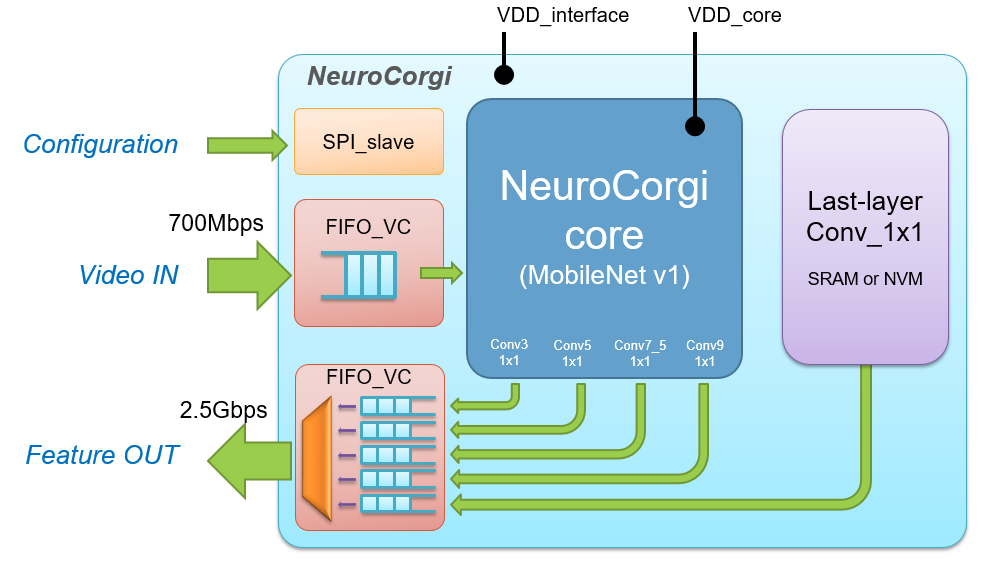
The NeuroCorgi ASIC is able to extract features from HD images (1280x720) at 30 FPS with less than 100 mW.
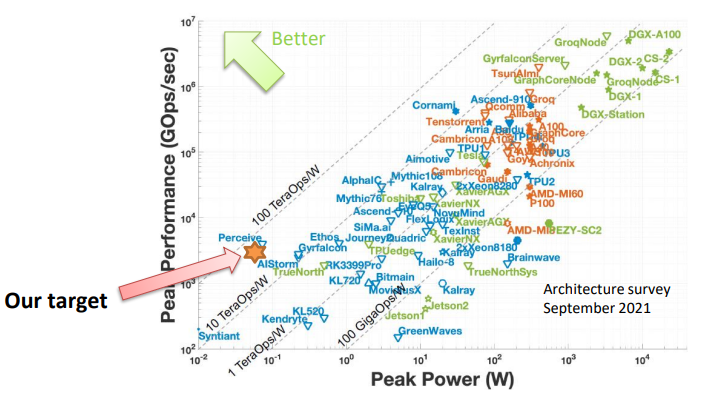
For more information about the NeuroCorgi ASIC, check the presentation of Ivan Miro-Panades at the International Workshop on Embedded Artificial Intelligence Devices, Systems, and Industrial Applications (EAI).
Installation
Before installing the sdk package, be sure to have the weight files of the NeuroCorgi models to use them with the sdk. Two versions exist for both Coco and ImageNet versions of the circuit.
Please choose what you want:
| For PyTorch integration | For N2D2 integration | |
|---|---|---|
| ImageNet chip | neurocorginet_imagenet.safetensors |
imagenet_weights.zip |
| Coco chip | neurocorginet_coco.safetensors |
coco_weights.zip |
Please send an email to Ivan Miro-Panades or Vincent Templier to get the files.
Via PyPI
Pip install the sdk package including all requirements in a Python>=3.7 environment with PyTorch>=1.8.
pip install neurocorgi_sdk
From Source
To install the SDK, run in your Python>=3.7 environment
git clone https://github.com/CEA-LIST/neurocorgi_sdk
cd neurocorgi_sdk
pip install .
With Docker
If you wish to work inside a Docker container, you will need to build the image first.
To do so, run the command
docker build --pull --rm -f "docker/Dockerfile" -t neurocorgi:neurocorgi_sdk "."
After building the image, start a container
docker run --name myContainer --gpus=all -it neurocorgi:neurocorgi_sdk
Getting Started
Use NeuroCorgiNet directly in a Python environment:
from neurocorgi_sdk import NeuroCorgiNet
from neurocorgi_sdk.transforms import ToNeuroCorgiChip

# Load a model
model = NeuroCorgiNet("neurocorginet_imagenet.safetensors")

# Load and transform an image (requires PIL and requests)
image = PIL.Image.open(requests.get("https://github.com/CEA-LIST/neurocorgi_sdk/blob/master/neurocorgi_sdk/assets/corgi.jpg", stream=True).raw)
img = ToNeuroCorgiChip()(image)

# Use the model
div4, div8, div16, div32 = model(img)
About NeuroCorgi model
The NeuroCorgi circuit embeds a version of MobileNetV1 which has been trained and quantized in 4-bit. It requires to provide unsigned 8-bit inputs. To respect this condition, inputs provided to NeuroCorgiNet must be between 0 and 255.
You can use the ToNeuroCorgiChip transformation to transform your images in the correct format. (No need to use it with the fakequant version NeuroCorgiNet_fakequant as the inputs have to be between 0 and 1).
Moreover, since the model is fixed on chip it is not possible to modify its parameters.
So it will be impossible to train the models but you can train additional models to plug with NeuroCorgiNet for your own applications.
Examples
You can find some examples of how to integrate the models in your applications.
For instance:
- ImageNet: use
NeuroCorgiNetto perform an ImageNet inference. You need a local installation of the ImageNet Database to make it work. Once installed somewhere, you need to modify the ILSVRC2012_root variable to locate the correct directory. - Cifar100: use
NeuroCorgiNetto perform a transfer learning on CIFAR100 classification challenge.
To evaluate NeuroCorgi's performances on other tasks, you should use those scripts as a base inspiration.
The Team
The NeuroCorgi-SDK is a project that brought together several skillful engineers and researchers who contributed to it.
This SDK is currently maintained by Lilian Billod and Vincent Templier. A huge thank you to the people who contributed to the creation of this SDK: Ivan Miro-Panades, Vincent Lorrain, Inna Kucher, David Briand, Johannes Thiele, Cyril Moineau, Nermine Ali and Olivier Bichler.
License
This SDK has a CeCill-style license, as found in the LICENSE file.


Release files for neurocorgi-sdk 2.0.2
For a detailed explanation of source distributions (sdists) and built distributions (wheels), please see the package formats documentation.
Source distribution (sdist)
| File | Size | Uploaded | |
|---|---|---|---|
| neurocorgi_sdk-2.0.2.tar.gz | 138.9 kB | Details |
Built distribution (wheel)
| File | Interpreter | ABI | Platform | Reset |
|---|---|---|---|---|
| neurocorgi_sdk-2.0.2-py3-none-any.whl | Python 3 | none | any | Details |
Total release size: 276.9 kB
Release files / neurocorgi_sdk-2.0.2.tar.gz
| Download URL | neurocorgi_sdk-2.0.2.tar.gz |
|---|---|
| Size | 138.9 kB |
| Tags | Source |
|
SHA-256 checksum How to use checksums |
63d05c97f005ab6f0ea3e22d4201c9e8b2aba60f896cebde298e7970030ccb64
|
|
BLAKE2b-256 checksum How to use checksums |
d1e3b3d97fdf2209f6bae29b9dd29287f15edd5cf364067956fedd223415c366
|
| Upload date | |
|
Uploaded using Trusted Publishing? What is trusted publishing? |
No |
| Uploaded via |
twine/4.0.2 CPython/3.10.13
|
Release files / neurocorgi_sdk-2.0.2-py3-none-any.whl
| Download URL | neurocorgi_sdk-2.0.2-py3-none-any.whl |
|---|---|
| Size | 138.0 kB |
| Tags | Python 3 |
|
SHA-256 checksum How to use checksums |
78170fe88e7170a4c38582865351e14b2a3a7337cfa9ea2e4fc4714914edaeee
|
|
BLAKE2b-256 checksum How to use checksums |
cdc9e9ff83814952476ab974cf9a840c068013f8d31806972a30b54867e4bfd7
|
| Upload date | |
|
Uploaded using Trusted Publishing? What is trusted publishing? |
No |
| Uploaded via |
twine/4.0.2 CPython/3.10.13
|














