
NeuroLens




Watch neural networks train, live. NeuroLens is a fast C++/OpenGL window that shows what your model is doing while it trains: loss curves, gradient flow through every layer, update sizes, and the neurons themselves. Built-in checks tell you when something goes wrong: NaN loss, exploding gradients, a learning rate that is too high, overfitting.
pip install neurolens
import neurolens

neurolens.launch()                        # opens the window
mon = neurolens.monitor(model, optimizer) # any PyTorch model

for step, (x, y) in enumerate(loader):
    loss = loss_fn(model(x), y)
    optimizer.zero_grad(); loss.backward(); optimizer.step()
    mon.step(step, loss=loss)
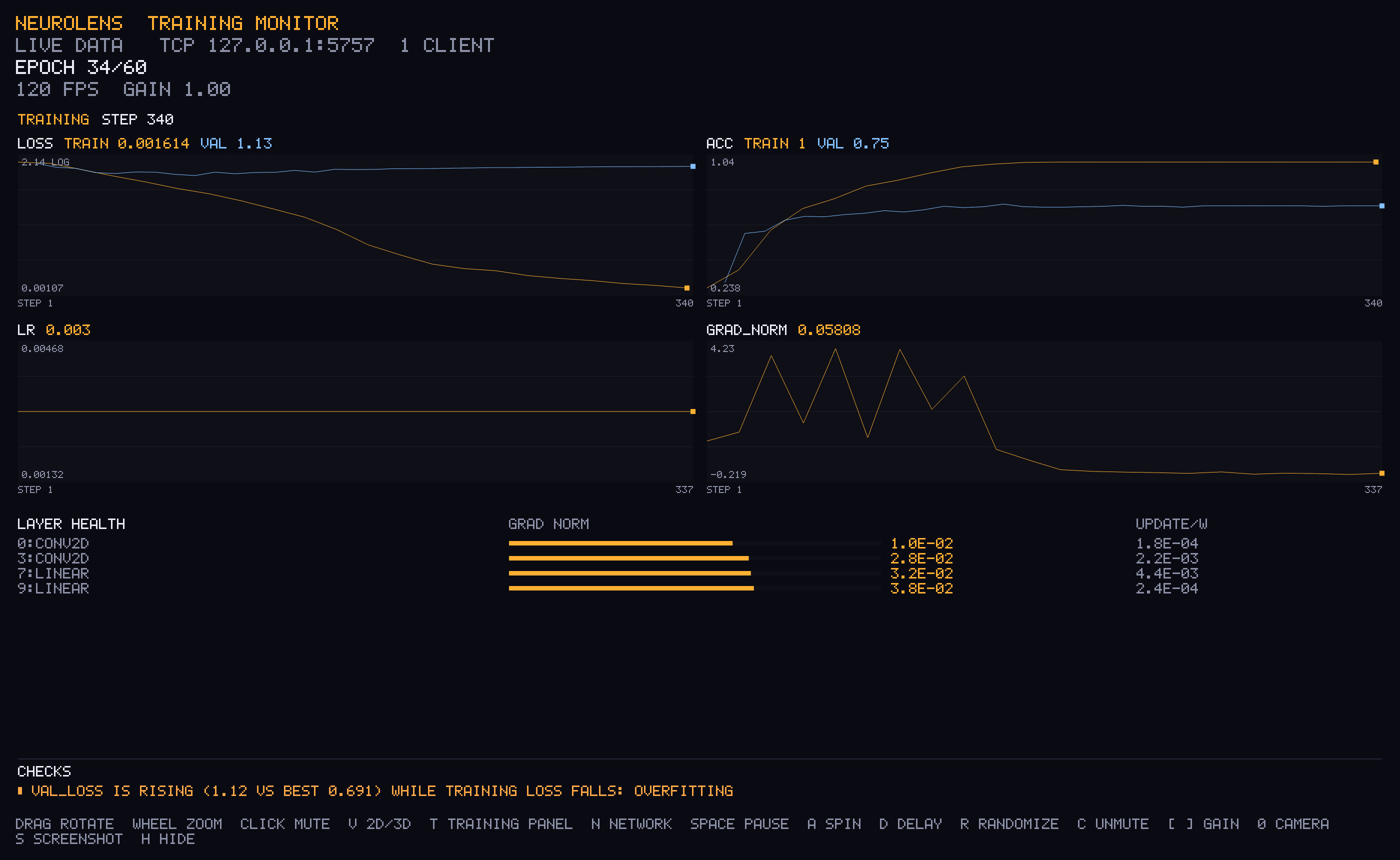
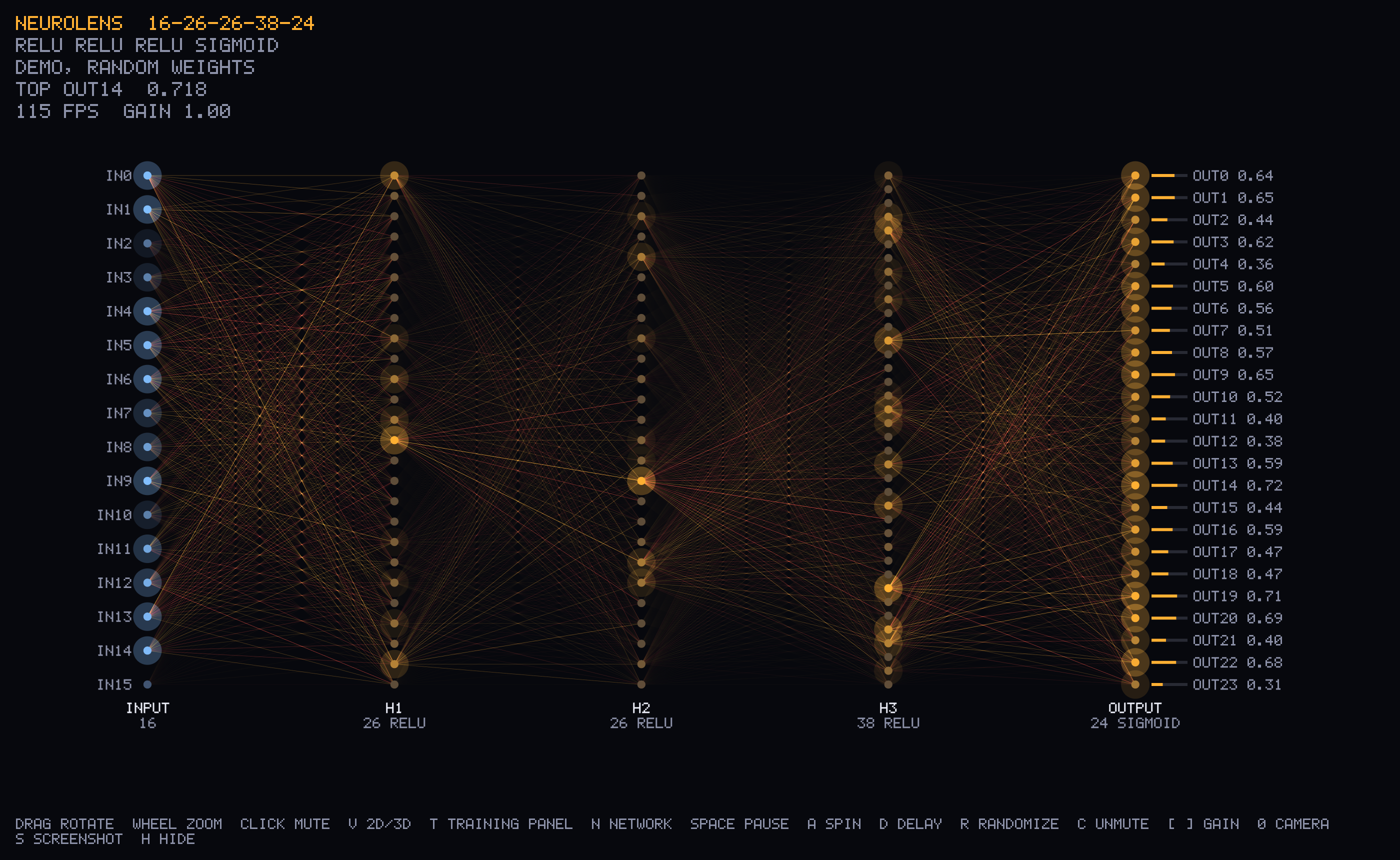
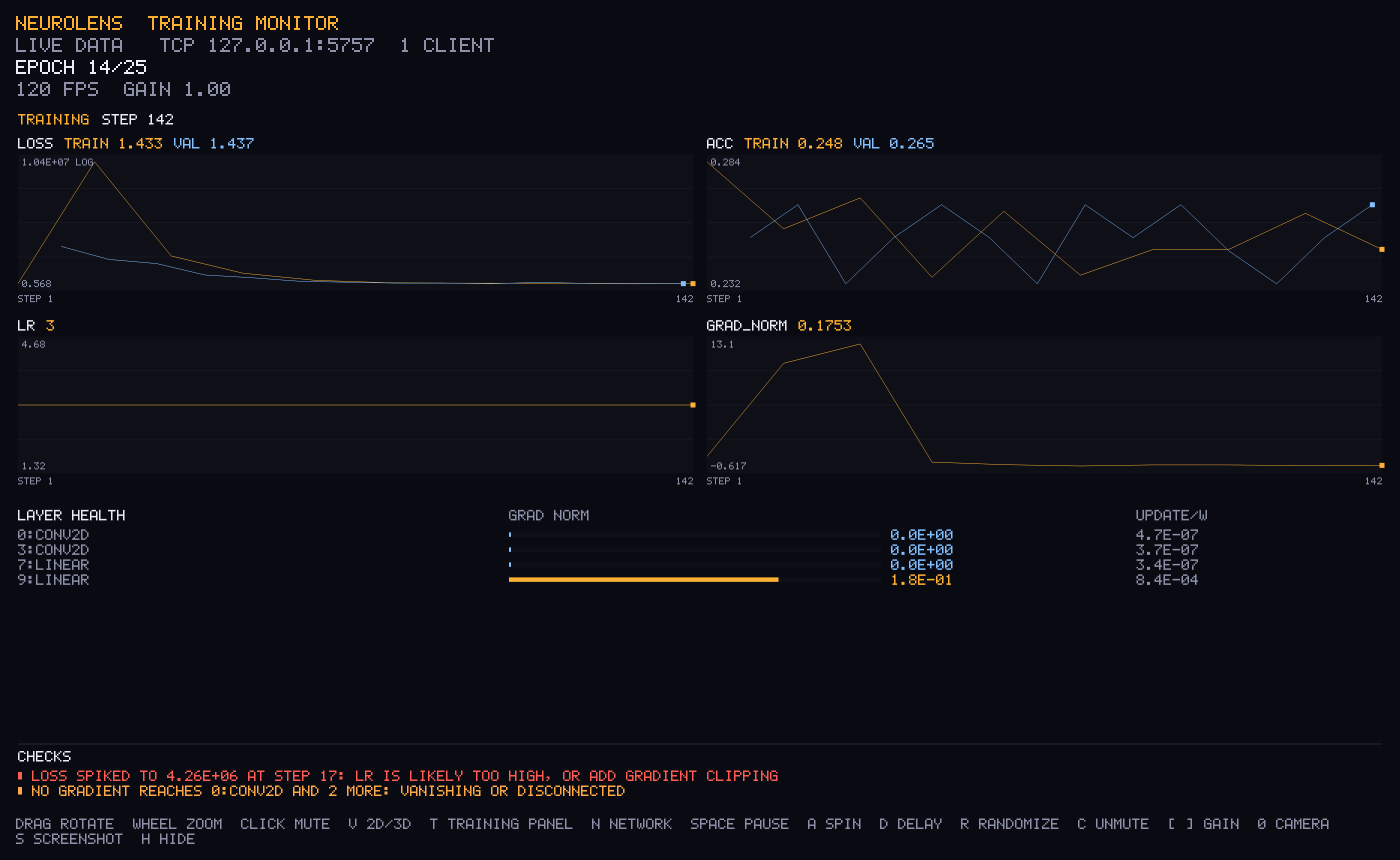
| Live network view | LR far too high: the checks catch it |
|---|---|
 |
 |
Contents: Quick start · Training monitor · Network view · Any framework · How it works · Protocol · Examples · Troubleshooting · Roadmap · Contributing
Why NeuroLens
- Works with any PyTorch model. CNNs, transformers and LoRA fine-tunes
all work:
monitor()only reads parameters and gradients. - Tells you what's wrong. It runs about ten rule-of-thumb checks continuously, and each warning says what to try.
- Never slows training down. Data goes out on a background thread. If the window is closed or busy, data is dropped instead of blocking your loop.
- Open the window any time. Curves are replayed from step 0, so you can start the viewer halfway through a run.
- No setup. The viewer is compiled into the wheel. There is nothing to build, no browser, and no server.
- Any language. It uses a tiny plain-text TCP protocol, so a few lines of code are enough to send data from JAX, TensorFlow, C++ or a shell script.
Quick start
- Install on macOS (Intel or Apple Silicon) or Linux, with Python 3.9+:
pip install neurolens # add [torch] to also install PyTorch
- Add three lines to your training script:
import neurolens
neurolens.launch()                          # once, before training
mon = neurolens.monitor(model, optimizer)   # once, before training
...
mon.step(step, loss=loss)                    # every step, after optimizer.step()
- Run your script as usual. The window opens, and curves appear within a second.
Windows is not supported yet (help wanted).
Platforms without a prebuilt wheel compile the viewer during pip install.
That needs a C++ compiler, plus OpenGL and X11 headers on Linux.
Start the viewer
From a terminal:
neurolens                  # opens the window and waits for your training script
neurolens model.nlens      # opens a saved network
neurolens --help           # all options
Or from Python, in a script or notebook: neurolens.launch(). If a viewer
is already open, launch() does nothing.
Training monitor
mon = neurolens.monitor(model, optimizer)

for step, (x, y) in enumerate(loader):
    out = model(x)
    loss = loss_fn(out, y)
    optimizer.zero_grad()
    loss.backward()
    optimizer.step()
    mon.step(step, loss=loss, acc=(out.argmax(1) == y).float().mean())  # before the next zero_grad

    if step % 500 == 0:
        mon.log(step, val_loss=evaluate(), val_acc=val_acc)  # sent as is, not averaged
| Panel | Shows | Read it like this |
|---|---|---|
| Curves | every metric you pass; val_x shares a chart with x; lr and total grad_norm are added for you |
Training loss falling while validation loss rises means overfitting. Loss charts switch to a log scale when the range is wide. |
| Layer health | per layer: gradient norm (log bar) and update size |ΔW|/|W| per optimizer step | Healthy updates are around 1e-3. Above 5e-2 the LR is too high; below 1e-6 the layer barely learns. A gradient of 0 means nothing reaches the layer. |
| Checks | warnings with a suggested fix | see below |
| Check | Fires when |
|---|---|
| NaN / Inf loss | the latest loss is not finite |
| Loss spike | a loss point is more than 10× the first value |
| Diverging | recent loss is more than 3× the best seen |
| Plateau | the last quarter of the run did not beat the earlier best by 1% |
| Overfitting | val_loss is 5% above its best while training loss keeps falling |
| Exploding gradient | a layer's gradient norm is over 100 |
| No gradient | a trainable layer's gradient norm is about 0 (vanishing, or detached from the loss) |
| LR too high / too low | updates are over 5% / under 1e-6 of the weights per step |
| Dead ReLUs | over half of a hidden ReLU layer outputs 0 for every input (network view) |
Options: monitor(model, optimizer, every=0.5, max_layers=40, track_updates=True, port=5757).
Metrics are averaged over every seconds. Large models are grouped into
max_layers rows. Update sizes need the optimizer and one temporary copy of
the trainable weights per send, and turn off automatically above 200M
trainable values. With LoRA, only the adapters count toward that limit.
Network view
For MLPs, you can watch the neurons themselves, during training or inference:
handle = neurolens.watch(model, labels=["cat", "dog", "bird"])
model(x)            # each forward pass lights up the network (max 20 per second)
handle.remove()
Connections glow by |activation × weight|. Gold means positive and red means negative, and the signal travels from left to right. Hover a neuron to see its value, and click it to mute it and watch how the output changes. Layers wider than 64 neurons are drawn as an evenly spaced sample.
| Key / mouse | Action |
|---|---|
| drag / wheel | rotate / zoom |
| hover / click | show a neuron's value / mute it (C unmutes all) |
V |
flat or 3D view |
T / N |
show or hide the training panel / the network |
Space |
pause |
S |
save a PNG screenshot |
R |
randomize the weights |
[ ] |
connection brightness |
A / D / 0 |
auto-rotate / layer delay / reset camera |
H / Esc |
hide the key help / quit |
Any framework
v = neurolens.Viewer()
v.metric("loss", 0.42, step)                                  # curves
v.layer_stats([("encoder", grad_norm, weight_norm, update_ratio), ...])
v.topology([784, 128, 10], ["relu", "softmax"])               # network view
v.weights(0, W0, b0)                                          # shape (out, in)
v.input(x)                # the viewer runs the forward pass, or:
v.frame([x, h, y])        # send real activations
v.status(epoch=3)
Save a network to a file with neurolens.save_torch(model, "net.nlens") or
neurolens.save_nlens(...). Open it later with neurolens net.nlens.
How it works
 your training script                                 NeuroLens window
┌─────────────────────────────┐                     ┌───────────────────────────┐
│ monitor() / watch() hooks   │  TCP 127.0.0.1:5757  │ C++ / OpenGL, 60+ fps     │
│ read params, grads, acts    │ ── plain text ──────▶│ curves · layer health     │
│ background thread, drops    │   one command/line   │ checks · network view     │
│ data rather than block      │                      │                           │
└─────────────────────────────┘                     └───────────────────────────┘
- Separate process. The viewer runs in its own process, so a slow frame never stalls a training step, and a crashed training run never takes the window down.
- Lightweight hooks. The Python side is a few hooks and a socket. It
measures about every half second (
every=0.5), so the cost per training step is close to zero. - Analysis lives in the viewer. The checks run in the viewer, on the data it receives, so a client in any language gets them too.
Protocol
.nlens files and the TCP stream (127.0.0.1:5757) use the same plain-text
commands, one per line. You can try them by hand with nc localhost 5757.
| Command | Meaning |
|---|---|
metric NAME VALUE [STEP] |
add a point to a curve (nan and inf are kept, so they can be flagged) |
pstats N then pstat I NAME GRAD WEIGHT UPDATE |
layer health table; -1 means unknown or no gradient |
clearmetrics |
drop all curves and layer stats |
layers 16 26 24 |
layer sizes, input first |
act relu sigmoid |
activation per non-input layer: relu tanh sigmoid softmax linear |
w L v... / b L v... |
weights (row-major, out x in) / biases from layer L to L+1 |
input v... |
input; the viewer computes the other layers |
acts L v... |
real activations of layer L (0 = input) |
labels a b c |
output neuron names |
status text |
one line of text in the header |
reset |
forget sent activations and input |
# ... |
comment |
Examples
git clone https://github.com/Yaiphaba189/TrainLens && cd TrainLens
# each example opens the viewer window itself with neurolens.launch()
python examples/torch_monitor_cnn.py          # CNN: the monitor flags overfitting
python examples/torch_monitor_cnn.py --lr 3   # learning rate far too high
python examples/torch_spiral_train.py         # MLP: network view plus monitor, then inference
python examples/numpy_xor_train.py            # no PyTorch: plain numpy
Troubleshooting
| Problem | Fix |
|---|---|
| Training on a remote GPU server over SSH | The window needs a screen, so run it on your laptop and tunnel the port backwards: run neurolens locally, connect with ssh -R 5757:localhost:5757 gpu-box, and start training on the server as usual. |
| Google Colab, Kaggle, or a headless server with no SSH from your machine | Not supported yet: the viewer needs a display it can reach. |
cannot find the neurolens-viewer program |
The compiled viewer is missing. Reinstall with pip install --force-reinstall neurolens. |
not listening for clients (port 5757 ...) |
Another viewer is already open. Use that one, or pick another port: neurolens --port 6000 and monitor(..., port=6000). |
Curves appear but the layer table is empty, or every layer shows NO GRAD |
Call mon.step() after loss.backward() and before the next optimizer.zero_grad(). The monitor prints this hint once. |
| No update sizes in the layer table | Pass the optimizer: monitor(model, optimizer). They also turn off above 200M trainable values. |
pip install compiles for a long time |
No prebuilt wheel exists for your platform, so it builds the viewer, and SDL2 if needed. This happens only once. |
Limits
- The network view draws dense layers only: MLPs, or the MLP head of a bigger model. The training monitor has no such limit.
watch()finds layers in the order they are registered, which matchesnn.Sequential.- The viewer accepts connections from this machine only (127.0.0.1). Use an SSH tunnel for remote training, as shown above.
Roadmap
- Windows support: the viewer needs Winsock networking.
- Remote and notebook training: Colab and Kaggle.
- Network view for convolution and attention layers.
monitor()helpers for JAX and TensorFlow.- Export a run (curves and checks) to a report you can share.
Ideas and pull requests are welcome. See CONTRIBUTING.md.
Contributing
See CONTRIBUTING.md. MIT licensed. Inspired by m607stars/Neural-Network-Visualization-using-OpenGL.
1 maintainer

Metadata
1 maintainer
Release files for neurolens 0.1.1
For a detailed explanation of source distributions (sdists) and built distributions (wheels), please see the package formats documentation.
Source distribution (sdist)
| File | Size | Uploaded | Provenance | |
|---|---|---|---|---|
| neurolens-0.1.1.tar.gz | 56.2 kB | With provenance | Details |
Built distributions (wheels)
| File | Reset | |||
|---|---|---|---|---|
| neurolens-0.1.1-py3-none-manylinux_2_27_x86_64.manylinux_2_28_x86_64.whl | Python 3 | none | Linux glibc 2.28+ x86-64, Linux glibc 2.27+ x86-64 | Details |
| neurolens-0.1.1-py3-none-manylinux_2_27_aarch64.manylinux_2_28_aarch64.whl | Python 3 | none | Linux glibc 2.27+ ARM64, Linux glibc 2.28+ ARM64 | Details |
| neurolens-0.1.1-py3-none-macosx_11_0_x86_64.whl | Python 3 | none | macOS 11.0+ x86-64 | Details |
| neurolens-0.1.1-py3-none-macosx_11_0_arm64.whl | Python 3 | none | macOS 11.0+ ARM64 | Details |
Total release size: 3.2 MB
Release files / neurolens-0.1.1.tar.gz
| Download URL | neurolens-0.1.1.tar.gz |
|---|---|
| Size | 56.2 kB |
| Tags | Source |
|
SHA-256 checksum How to use checksums |
3c989a83ae94d53fb6a6204c7cc4fc25927213b2aae97d97f7941c67664b4bfa
|
|
BLAKE2b-256 checksum How to use checksums |
3787782c3b2485a25340389657710e90d6b62a66f36a40e603d241dd2cef4540
|
| Upload date | |
|
Uploaded using Trusted Publishing? What is trusted publishing? |
Yes |
| Uploaded via |
twine/7.0.0 CPython/3.13.16
|
Provenance
Provenance describes where a file came from. On PyPI, provenance is shared via attestations, which provide a verifiable record of the build or publishing details. View details, limitations and caveats.


PyPI Publish Attestation
PyPI verified that this artifact, at this checksum, originated from the publisher listed below.
Signed by GitHub Actions, verified by PyPI on Oct 24, 2026.
Transparency logRelease files / neurolens-0.1.1-py3-none-manylinux_2_27_x86_64.manylinux_2_28_x86_64.whl
| Download URL | neurolens-0.1.1-py3-none-manylinux_2_27_x86_64.manylinux_2_28_x86_64.whl |
|---|---|
| Size | 963.8 kB |
| Tags | Linux glibc 2.27+ x86-64 Linux glibc 2.28+ x86-64 Python 3 |
|
SHA-256 checksum How to use checksums |
82a8ea818685aba72af87fe6ed0ebac19667090cd68bfe8b42ff03267e59431f
|
|
BLAKE2b-256 checksum How to use checksums |
3dac3a6cc8c614ed4f5f3e1c82ffb2b31c7d2a8fe69a3497f353d227caccdf1d
|
| Upload date | |
|
Uploaded using Trusted Publishing? What is trusted publishing? |
Yes |
| Uploaded via |
twine/7.0.0 CPython/3.13.16
|
Provenance
Provenance describes where a file came from. On PyPI, provenance is shared via attestations, which provide a verifiable record of the build or publishing details. View details, limitations and caveats.
PyPI Publish Attestation
PyPI verified that this artifact, at this checksum, originated from the publisher listed below.
Signed by GitHub Actions, verified by PyPI on Oct 24, 2026.
Transparency logRelease files / neurolens-0.1.1-py3-none-manylinux_2_27_aarch64.manylinux_2_28_aarch64.whl
| Download URL | neurolens-0.1.1-py3-none-manylinux_2_27_aarch64.manylinux_2_28_aarch64.whl |
|---|---|
| Size | 865.4 kB |
| Tags | Linux glibc 2.27+ ARM64 Linux glibc 2.28+ ARM64 Python 3 |
|
SHA-256 checksum How to use checksums |
2e975152e229991a91daec7b6bb88d3c43b98ff221e9802415932c0412932470
|
|
BLAKE2b-256 checksum How to use checksums |
1cba15eddd9b11d9137914a1c558d94a10ecc0acac66121d3837cdce69d21e09
|
| Upload date | |
|
Uploaded using Trusted Publishing? What is trusted publishing? |
Yes |
| Uploaded via |
twine/7.0.0 CPython/3.13.16
|
Provenance
Provenance describes where a file came from. On PyPI, provenance is shared via attestations, which provide a verifiable record of the build or publishing details. View details, limitations and caveats.
PyPI Publish Attestation
PyPI verified that this artifact, at this checksum, originated from the publisher listed below.
Signed by GitHub Actions, verified by PyPI on Oct 24, 2026.
Transparency logRelease files / neurolens-0.1.1-py3-none-macosx_11_0_x86_64.whl
| Download URL | neurolens-0.1.1-py3-none-macosx_11_0_x86_64.whl |
|---|---|
| Size | 728.6 kB |
| Tags | Python 3 macOS 11.0+ x86-64 |
|
SHA-256 checksum How to use checksums |
5737f111dc101f59dd616751d69aa954ab204a7ac0829b72f2fd75e0183ee063
|
|
BLAKE2b-256 checksum How to use checksums |
d45c1ed95654ddfc53eb736b1c49dbdd9991c4cca94db0a441621258e9f90ce8
|
| Upload date | |
|
Uploaded using Trusted Publishing? What is trusted publishing? |
Yes |
| Uploaded via |
twine/7.0.0 CPython/3.13.16
|
Provenance
Provenance describes where a file came from. On PyPI, provenance is shared via attestations, which provide a verifiable record of the build or publishing details. View details, limitations and caveats.
PyPI Publish Attestation
PyPI verified that this artifact, at this checksum, originated from the publisher listed below.
Signed by GitHub Actions, verified by PyPI on Oct 24, 2026.
Transparency logRelease files / neurolens-0.1.1-py3-none-macosx_11_0_arm64.whl
| Download URL | neurolens-0.1.1-py3-none-macosx_11_0_arm64.whl |
|---|---|
| Size | 635.2 kB |
| Tags | Python 3 macOS 11.0+ ARM64 |
|
SHA-256 checksum How to use checksums |
3c979b77c52cf536a3c697f79116b75724457ebbc69631188fc0f55c6a39c85a
|
|
BLAKE2b-256 checksum How to use checksums |
79b6467110ddf66f0d51f95a56b3e82834f3ddfdf23f7800030d6474ea5a67f6
|
| Upload date | |
|
Uploaded using Trusted Publishing? What is trusted publishing? |
Yes |
| Uploaded via |
twine/7.0.0 CPython/3.13.16
|
Provenance
Provenance describes where a file came from. On PyPI, provenance is shared via attestations, which provide a verifiable record of the build or publishing details. View details, limitations and caveats.
PyPI Publish Attestation
PyPI verified that this artifact, at this checksum, originated from the publisher listed below.
Signed by GitHub Actions, verified by PyPI on Oct 24, 2026.
Transparency logSecurity for neurolens 0.1.1
Provenance
Provenance describes where a file came from. On PyPI, provenance is shared via attestations, which provide a verifiable record of the build or publishing details. View details, limitations and caveats.
Full provenance
All 5 files in this release have been uploaded with provenance metadata.
Attestation for neurolens-0.1.1.tar.gz
PyPI Publish Attestation
PyPI verified that this artifact, at this checksum, originated from the publisher listed below.
Signed by GitHub Actions, verified by PyPI on Oct 24, 2026.
Transparency logA note on package security
PyPI is a repository for distributing packages, not a service for auditing them. While third-party security researchers and our staff do their best to detect and remove malicious packages, PyPI cannot guarantee the quality, security or suitability of any given package.
To learn more about protecting yourself from malicious actors, visit our package security documentation.













