
Neurolume



See your PyTorch and Keras models as interactive diagrams, and watch them train... (If it's working)
Neurolume runs your model once to learn its shape, then opens an interactive viewer in the browser: every layer as a panel, every dense connection as a line, feature maps painted with what the model actually sees. Several models wired together become one schematic you can open level by level. While you train, the same viewer shows the loss, whether the model is overfitting, its predictions against the truth, and how its parameters change, and lets you scrub back through the run.
- One call:
neurolume.show(model, sample). No account, no log files, nothing to set up. - PyTorch and Keras 3, CNNs (with real feature maps), residual and branching models.
- Systems: several networks plus plain blocks (sensors, losses, outputs) in one diagram, nested as deep as you like.
- Live training: a calmer, more readable alternative to TensorBoard, in the browser or embedded in a Qt app.
- Export to one standalone HTML file that opens anywhere, offline.
Install
pip install "neurolume[torch]"      # with PyTorch
pip install "neurolume[keras]"      # with Keras 3, plus a backend: TensorFlow, JAX or PyTorch
Neurolume needs Python 3.10 or later. The viewer runs in any modern browser;
nothing else needs installing. (Keras with PyTorch underneath: install torch
too and set KERAS_BACKEND=torch.)
To try it straight away:
neurolume-demo          # a small network in the viewer
neurolume-demo --live   # watch a model train (and overfit) live
Example 1: a model
import neurolume
import torch
from torch import nn


class MLP(nn.Module):
    def __init__(self) -> None:
        super().__init__()
        self.flatten = nn.Flatten()
        self.fc1 = nn.Linear(784, 512)
        self.relu1 = nn.ReLU()
        self.dropout = nn.Dropout(0.2)
        self.fc2 = nn.Linear(512, 256)
        self.relu2 = nn.ReLU()
        self.fc3 = nn.Linear(256, 10)

    def forward(self, x: torch.Tensor) -> torch.Tensor:
        x = self.flatten(x)
        x = self.dropout(self.relu1(self.fc1(x)))
        x = self.relu2(self.fc2(x))
        return self.fc3(x)


neurolume.show(MLP(), (1, 28, 28))  # the shape of one input: 1 channel, 28 x 28 pixels
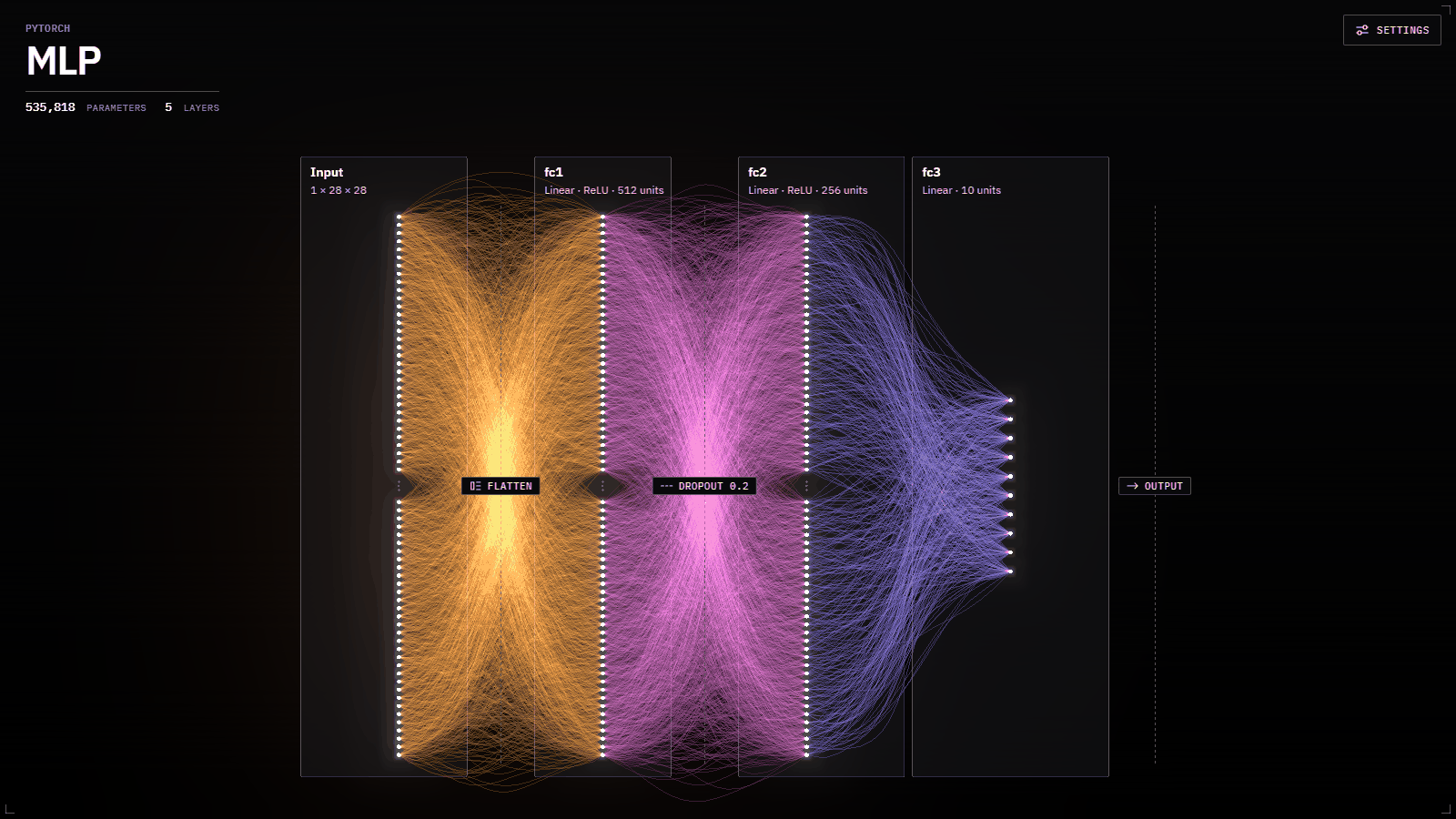
This opens the viewer shown at the top of this page. Each layer is a panel; the lines between them are the strongest weights, brighter where the weight is larger. Click a layer for its details, scroll to zoom, drag to pan.
The second argument, sample, tells Neurolume what goes into the model:
- the shape of one input, without the batch dimension, like
(1, 28, 28). Enough to draw the architecture. - real data, such as a batch of images. Convolution layers then show their actual feature maps for that input.
Neurolume follows the data through your model's forward method to find the
layers and how they connect, so a PyTorch model needs a forward (or must be
an nn.Sequential). Keras models that start with keras.Input don't need a
sample at all.
Run it: examples/mlp.py.
Example 2: a system of networks
Real projects are often several networks wired together. Add each one, plus any plain blocks such as data sources or losses, and connect them:
import neurolume
from torch import nn


def mlp(*sizes):
    layers = []
    for i, (inputs, outputs) in enumerate(zip(sizes, sizes[1:])):
        layers.append(nn.Linear(inputs, outputs))
        if i < len(sizes) - 2:
            layers.append(nn.ReLU())
    return nn.Sequential(*layers)


system = neurolume.System("Sensor autoencoder")
sensor = system.block("sensor", label="Sensor", description="32 readings per sample", output_shape=[32])
encoder = system.add("encoder", mlp(32, 64, 64, 16), (32,), label="Encoder")
decoder = system.add("decoder", mlp(16, 64, 64, 32), (16,), label="Decoder")
classifier = system.add("classifier", mlp(16, 12, 3), (16,), label="Classifier")
loss = system.block("loss", label="Reconstruction loss", description="Mean squared error", input_shape=[32])
prediction = system.block("prediction", label="Fault type", input_shape=[3])

system.connect(sensor, encoder, label="readings")
system.connect(encoder, decoder, label="latent")
system.connect(encoder, classifier, label="latent")
system.connect(decoder, loss)
system.connect(classifier, prediction, label="logits")

neurolume.show(system)
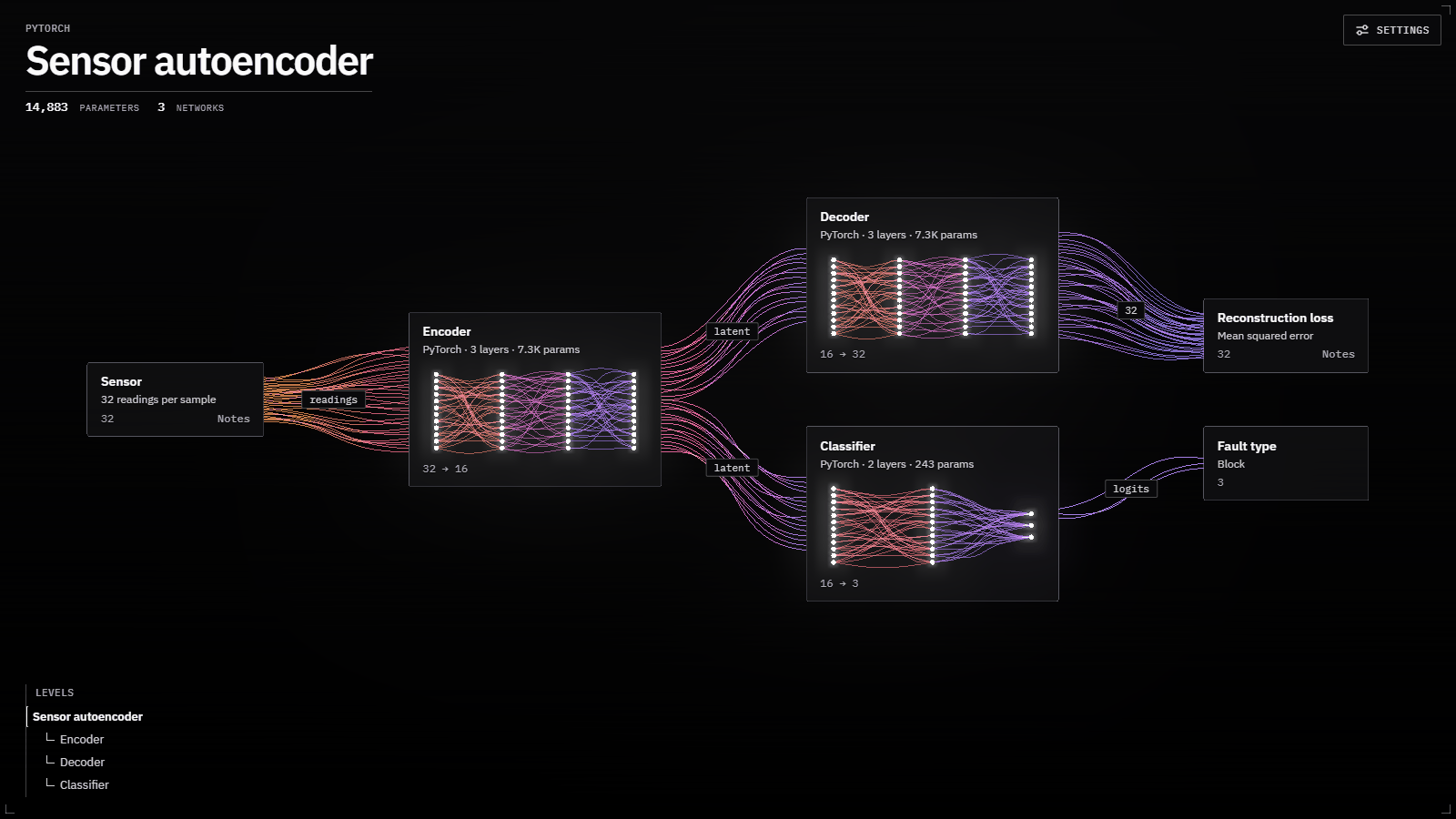
The viewer opens on an overview: one card per network or block, with labelled
links between them. Click a card (or zoom into it) to open its layers; press
Esc or zoom out to go back. Blocks can carry Markdown notes with LaTeX maths
(notes=...), shown when you click them.
Run it: examples/system.py.
Example 3: systems inside systems
A component can itself be a System, or a model with parts of its own. Each one opens to its own overview, as many levels deep as you need:
import neurolume
from autoencoder import Autoencoder  # a model with self.encoder and self.decoder
from system import build_system      # the System from example 2

plant = neurolume.System("Plant monitor")
camera = plant.block("camera", label="Camera", description="Noisy 28 x 28 frames", output_shape=[1, 28, 28])
denoiser = plant.add("denoiser", Autoencoder(), (1, 28, 28), label="Denoiser")
sensors = plant.block("sensors", label="Sensor bus", description="32 readings per tick", output_shape=[32])
detector = plant.add("detector", build_system(), label="Fault detector")  # a whole System as one component
alarm = plant.block("alarm", label="Alarm", description="Raise a ticket on a fault", input_shape=[3])
display = plant.block("display", label="Operator screen", input_shape=[784])

plant.connect(camera, denoiser, label="frames")
plant.connect(denoiser, display, label="clean frames")
plant.connect(sensors, detector, label="readings")
plant.connect(detector, alarm, label="fault type", from_="prediction")  # the detector has two outputs

neurolume.show(plant)
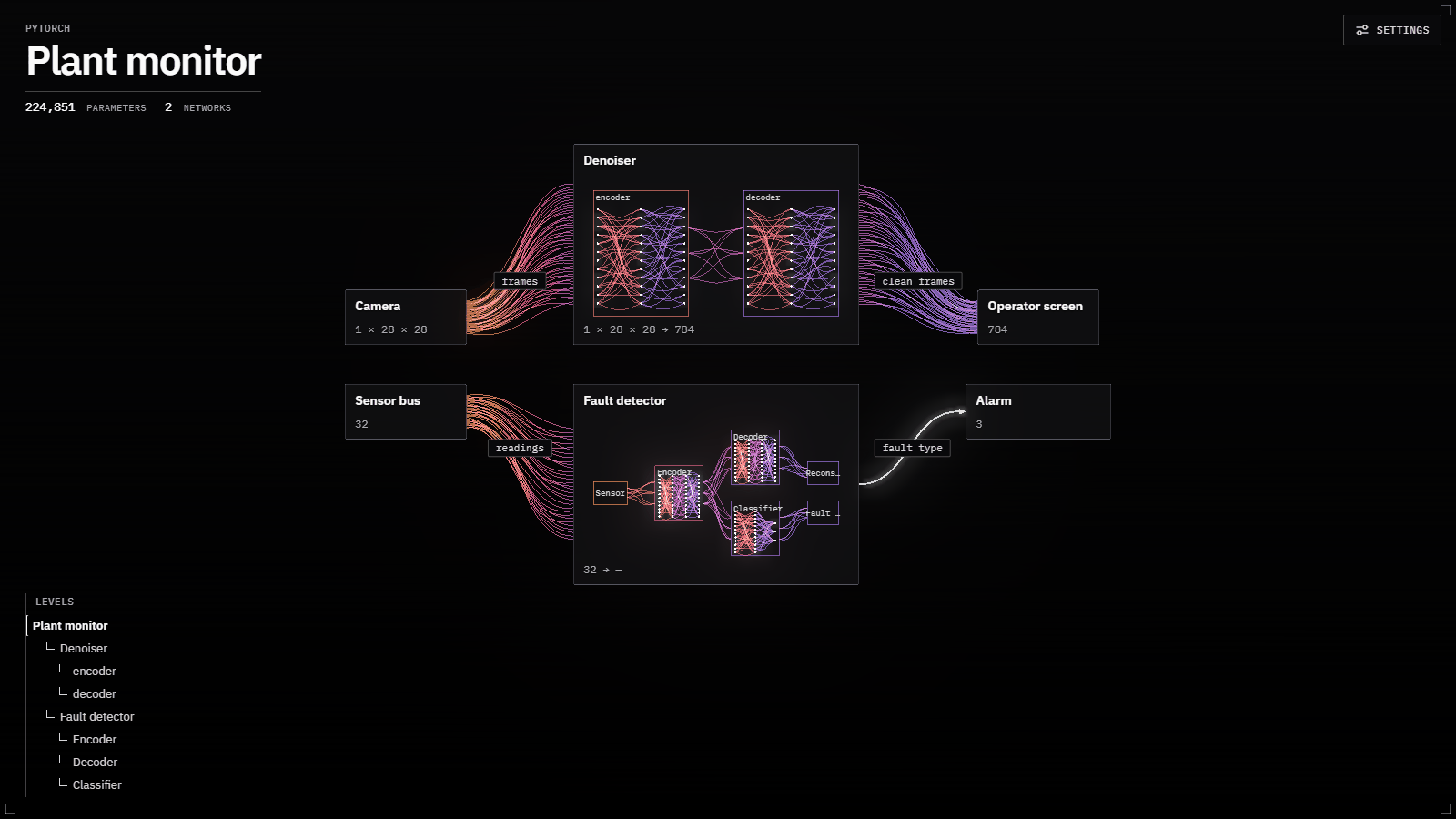
The "Denoiser" card opens to its encoder and decoder; the "Fault detector" card opens to the whole system from example 2. Links from outside attach to its ends: the readings reach its sensor block, and the fault type leaves from its prediction block. The tree at the bottom left shows every level.
A single PyTorch module that keeps its parts in attributes (self.encoder,
self.decoder) is split into networks like this automatically. Pass
group_submodules=False to show to keep it as one network.
The two imports at the top are files in examples/, so run this one from a
clone of the repository: examples/nested_system.py.
Watching a model train (beta)
Swap show for watch and log as you go:
import neurolume
import torch
from torch import nn

x, x_val = torch.randn(200, 8), torch.randn(500, 8)  # learn y = sin(x0) + x1 * x2
y, y_val = (torch.sin(v[:, :1]) + v[:, 1:2] * v[:, 2:3] for v in (x, x_val))
model = nn.Sequential(nn.Linear(8, 64), nn.ReLU(), nn.Linear(64, 1))
optimiser = torch.optim.Adam(model.parameters(), lr=1e-3)

with neurolume.watch(model, (8,)) as live:          # the viewer stays open at the end until Ctrl+C
    for step in range(3000):
        loss = nn.functional.mse_loss(model(x), y)
        optimiser.zero_grad()
        loss.backward()
        optimiser.step()
        live.log(step, loss=loss)                    # after backward(); tensors are fine
        if step % 50 == 0:
            with torch.no_grad():
                predicted = model(x_val)
            live.log(step, split="val", loss=nn.functional.mse_loss(predicted, y_val))
            live.predictions(step, predicted, y_val)  # predicted against true values
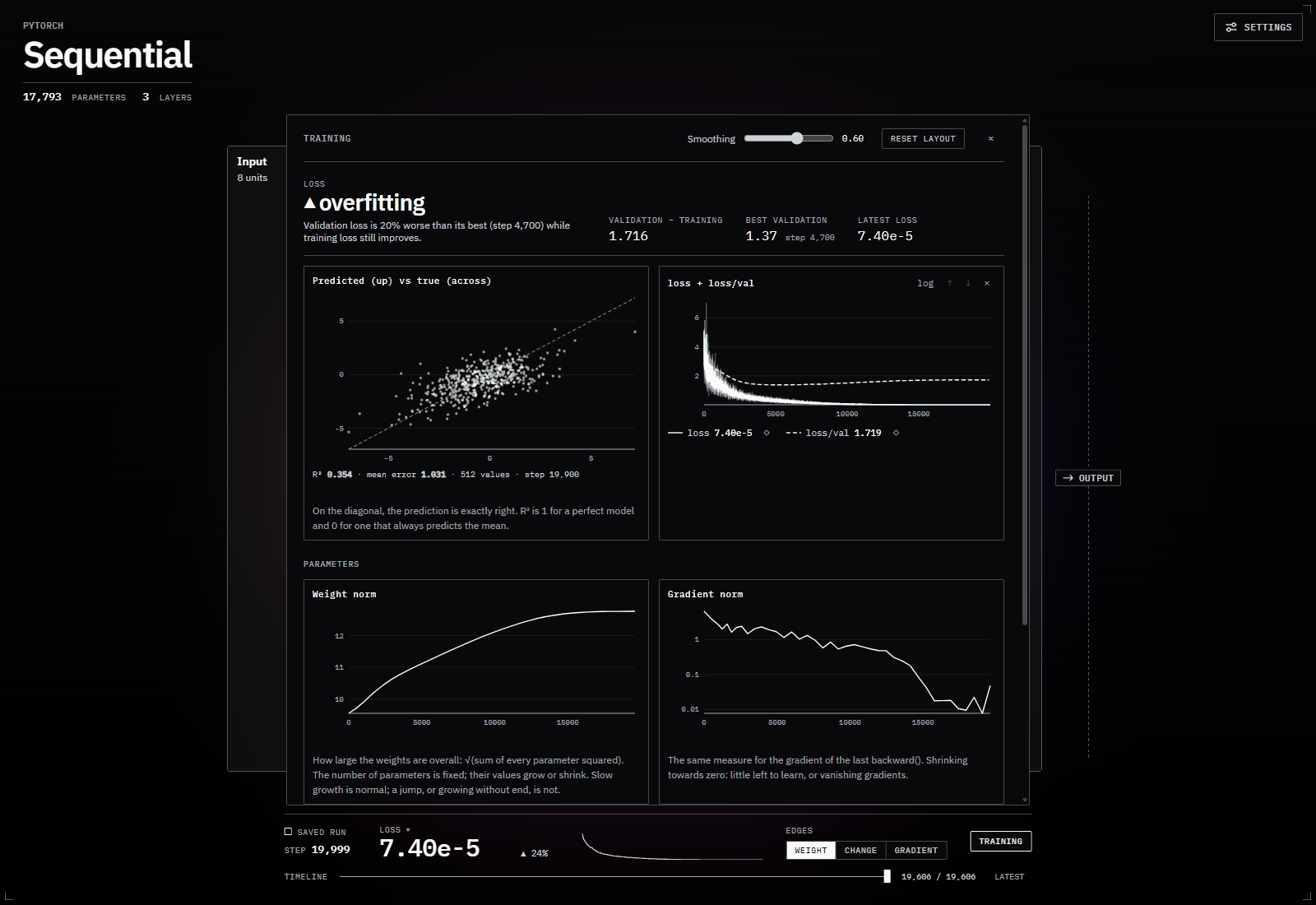
The viewer gains a run strip (step, the main metric, its trend) and a Training panel:
- Summary: whether the run is
improving,levelling off,converged,getting worseoroverfitting(validation getting worse while training still improves), the gap between validation and training, and the best validation point. - Predictions vs truth: a predicted-against-true scatter with R² and mean error, or a confusion matrix when the targets are class labels.
- Metrics: a chart for each metric you log, with training and validation together. Smooth, log-scale, reorder, hide, combine or pin them; the layout is remembered per model.
- Parameters: the weight norm (how large the weights are overall), the gradient norm, how fast the parameters move, and how their values are spread over time.
The network itself updates too: lines brighten and fade as the weights change
(or show the change since the start, or the gradient), and CNN feature maps
repaint as the filters learn. Drag the timeline to scrub back through the
run. live.save("run.nlrun") keeps it; neurolume.open_run("run.nlrun") opens
it again later.
log() costs microseconds; the model is read at most every half second
(every_seconds=0.5): about 1% of training time for an MLP, and live feature
maps are kept under 2%. Memory stays small whatever the model's size: each reading
keeps a sample of 20,000 parameter values (param_sample=), not a copy of the
model.
- Keras:
model.fit(x, y, callbacks=[neurolume.keras.Live(x[:64], validation=(x_val, y_val))]). - Systems:
neurolume.watch(system)follows every network, nested ones included;live.log(step, network="critic", loss=...)logs per network.
Run it: examples/live_training.py (a small
model that overfits on purpose), examples/live_resnet.py
(ResNet-18 with live feature maps), examples/live_nested_system.py
(example 3's plant monitor, every network training at once),
examples/keras_live.py.
Sharing: a standalone HTML file
neurolume.export_html(model, (1, 28, 28), "model.html")
neurolume.export_html(live, path="run.html")   # a training run, with its charts and timeline
One file with the viewer and your model inside. It opens from disk or an email attachment, offline, with no Python. The Export button in the viewer's Settings does the same.
Embedding in a Qt app
from neurolume.qt import NeurolumeWidget  # import before creating the QApplication

widget = NeurolumeWidget(model, (1, 28, 28))
layout.addWidget(widget)
session = widget.watch(model, sample)       # or show a live run, and log() to it
A QWebEngineView with the same viewer, for your own tools and training
loggers. Needs pip install "neurolume[qt]" PySide6. See
examples/qt_widget.py and
examples/qt_live.py (a logger with Start/Stop, training
on a background thread).
Viewer controls
| Action | Control |
|---|---|
| Zoom | Scroll |
| Pan | Drag |
| Layer or block details | Click |
| Open a network | Click, or zoom in |
| Back to the overview | Zoom out, or Esc |
| Fit to screen | Double-click, or F |
| Light or dark | T |
Settings (top right) has the colour map, the theme, how many neurons and connections to draw, and Export.
How it works
Python runs your model once on the sample (with torch.fx, or Keras's own
layer graph) and describes it as a JSON graph: layers, shapes, connections,
the strongest weights, feature maps. A small local server
(Tornado) hands that graph to a TypeScript and
three.js viewer in your browser. During training, the same server streams
metrics and weights over a WebSocket. Nothing leaves your machine.
Development
git clone https://github.com/Freddie-Ellis/neurolume
cd neurolume
pip install -e ".[dev,torch]"
pytest
The viewer lives in frontend/ (TypeScript, Vite, three.js; Node 18+). After
changing it, rebuild it into the Python package with
scripts/build_frontend.ps1 (PowerShell), and run its tests with npm test in
frontend/. For live reloading, run neurolume.show(model, x, port=8000) and
npm run dev in frontend/.
The JSON schema in python/neurolume/schema.py is the contract between
Python and the viewer: after changing it, bump SCHEMA_VERSION and run
python scripts/generate_schema_ts.py. The roadmap is
docs/project-plan.md.
Licence
MIT. See LICENSE.
1 maintainer

Metadata
1 maintainer
Release files for neurolume 0.1.2
For a detailed explanation of source distributions (sdists) and built distributions (wheels), please see the package formats documentation.
Source distribution (sdist)
| File | Size | Uploaded | Provenance | Actions |
|---|---|---|---|---|
| neurolume-0.1.2.tar.gz | 3.2 MB | Without provenance | Details for neurolume-0.1.2.tar.gz |
Built distribution (wheel)
| File | Interpreter | ABI | Platform | Actions Reset |
|---|---|---|---|---|
| neurolume-0.1.2-py3-none-any.whl | Python 3 | none | any | Details for neurolume-0.1.2-py3-none-any.whl |
Total release size: 6.3 MB
Release files / neurolume-0.1.2.tar.gz
| Download URL | neurolume-0.1.2.tar.gz |
|---|---|
| Size | 3.2 MB |
| Tags | Source |
|
SHA-256 checksum How to use checksums |
1e263052eeedeb9456d5de9417f75bb5df46f100bd8a08cb914d5a8d062b336f
|
|
BLAKE2b-256 checksum How to use checksums |
7e3458def747cfa4bb2c3edae04c12f355f6dbd6f1070b302ee7edb8506d8562
|
| Upload date | |
|
Uploaded using Trusted Publishing? What is trusted publishing? |
No |
| Uploaded via |
twine/7.0.0 CPython/3.14.3
|
Release files / neurolume-0.1.2-py3-none-any.whl
| Download URL | neurolume-0.1.2-py3-none-any.whl |
|---|---|
| Size | 3.2 MB |
| Tags | Python 3 |
|
SHA-256 checksum How to use checksums |
f26c78646287761ca39bd755a7ba60eda9d45ab6503a91fcb3aca9650d3827cb
|
|
BLAKE2b-256 checksum How to use checksums |
d1118f525adc2790500aa50b169429f770cdc3b4b264733e31aaa3d8d5084e0a
|
| Upload date | |
|
Uploaded using Trusted Publishing? What is trusted publishing? |
No |
| Uploaded via |
twine/7.0.0 CPython/3.14.3
|
Security for neurolume 0.1.2
Provenance
Provenance describes where a file came from. On PyPI, provenance is shared via attestations, which provide a verifiable record of the build or publishing details. View details, limitations and caveats.
No provenance found
None of the files in this release were uploaded with provenance metadata.
A note on package security
PyPI is a repository for distributing packages, not a service for auditing them. While third-party security researchers and our staff do their best to detect and remove malicious packages, PyPI cannot guarantee the quality, security or suitability of any given package.
To learn more about protecting yourself from malicious actors, visit our package security documentation.














