
A toolbox for projecting, resampling, and comparing brain maps


Project description






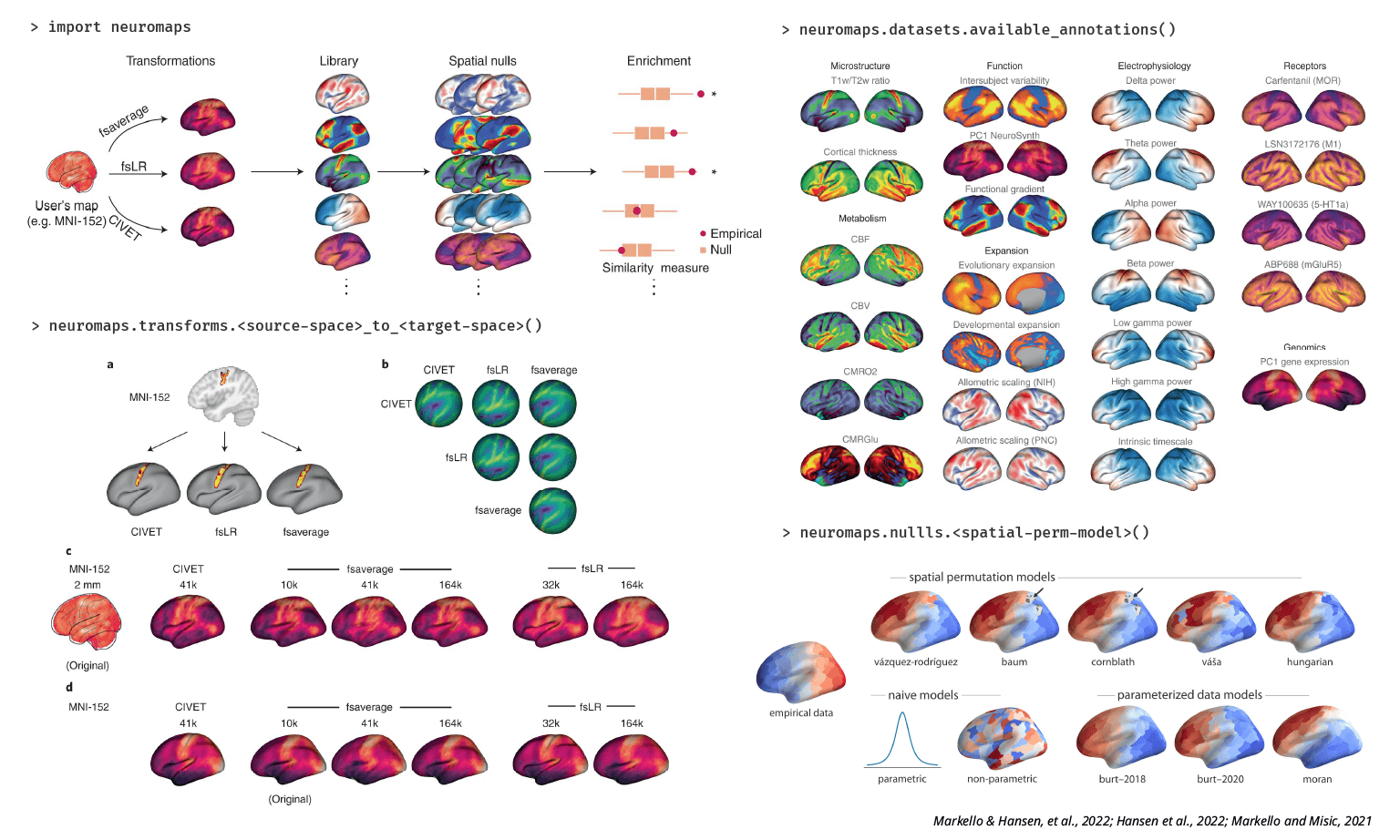
The neuromaps toolbox is designed to help researchers make easy, statistically-rigorous comparisons between brain maps (or brain annotations). Documentation can be found here.
The accompanying paper is published in Nature Methods (postprint).
Check all the brain maps we have here!
Features
A growing library of brain maps (“annotations”) in their original coordinate space, including microstructure, function, electrophysiology, receptors, and more
Robust transforms between MNI-152, fsaverage, fsLR, and CIVET spaces
Integrated spatial null models for statistically assessing correspondences between brain maps
Installation requirements
Currently, neuromaps works with Python 3.8+. You can install stable versions of neuromaps from PyPI with pip install neuromaps. However, we recommend installing from the source repository to get the latest features and bug fixes.
You can install neuromaps from the source repository with pip install git+https://github.com/netneurolab/neuromaps.git or by cloning the repository and installing from the local directory:
git clone https://github.com/netneurolab/neuromaps
cd neuromaps
pip install .
You will also need to have Connectome Workbench installed and available on your path in order to use most of the transformation / resampling functionality of neuromaps.
Citation
Importantly, neuromaps implements and builds on tools that have been previously developed, and we redistribute data that was acquired elsewhere. If you use the neuromaps toolbox, please ensure proper attribution of the original data sources. Here’s a quick checklist:
Cite the neuromaps paper.
Cite the original papers that publish the data you are using. A complete list with references for each brain annotation can be found in the documentation, or in this Google Sheet. We also provide a standalone bibliography file and a helper function to generate the citations.
Cite the transformations used
Volume-to-surface transformations (registration fusion): Buckner et al 2011 (original proposition) and Wu et al 2018 (first implementation of MNI152 to fsaverage transformation).
Surface-to-surface transformations (multimodal surface matching): Robinson et al 2014 and Robinson et al 2018.
Cite the spatial null models used (see API documentation)
License information
This work is licensed under a Creative Commons Attribution-NonCommercial-ShareAlike 4.0 International License cc-by-nc-sa. The full license can be found in the LICENSE file in the neuromaps distribution.


Download files
Download the file for your platform. If you're not sure which to choose, learn more about installing packages.
Source Distribution
Built Distribution
Filter files by name, interpreter, ABI, and platform.
If you're not sure about the file name format, learn more about wheel file names.
Copy a direct link to the current filters
File details
Details for the file neuromaps-0.0.7.tar.gz.
File metadata
- Download URL: neuromaps-0.0.7.tar.gz
- Upload date:
- Size: 136.8 kB
- Tags: Source
- Uploaded using Trusted Publishing? No
- Uploaded via: twine/6.2.0 CPython/3.13.5
File hashes
| Algorithm | Hash digest | |
|---|---|---|
| SHA256 |
e0b8b426fd53963e61b9336738697d32abb82266c761b63b1b3a8408bce99c4d
|
|
| MD5 |
aa1c8068afdd932af639ecc08b21d80c
|
|
| BLAKE2b-256 |
d17ed11453ea1d63e11cb4789a76571bfcd8f24d34e3a50cd95ae5c5fda90485
|
File details
Details for the file neuromaps-0.0.7-py3-none-any.whl.
File metadata
- Download URL: neuromaps-0.0.7-py3-none-any.whl
- Upload date:
- Size: 126.5 kB
- Tags: Python 3
- Uploaded using Trusted Publishing? No
- Uploaded via: twine/6.2.0 CPython/3.13.5
File hashes
| Algorithm | Hash digest | |
|---|---|---|
| SHA256 |
8fa6e0f39e58fea6ef93b8ae07461d7fe3f7dcb10c64ef9ecc5aadf81c64d540
|
|
| MD5 |
c83fac5cf40f8e2d7d7992735dc1f291
|
|
| BLAKE2b-256 |
fdc7ab3d4797f751368f4c810b712d88ce711bc85af2e5cb0f6ea4390beb1ed9
|






