
NeuronSwitch
Dual-model detection for YOLO backbones.
Installation
Install my-project with pip
pip install neuronswitch
requires ultralytics==8.3.164, ultralytics-thop==2.0.18, torch==2.9.1, torchvision==0.24.1
License
Screenshots
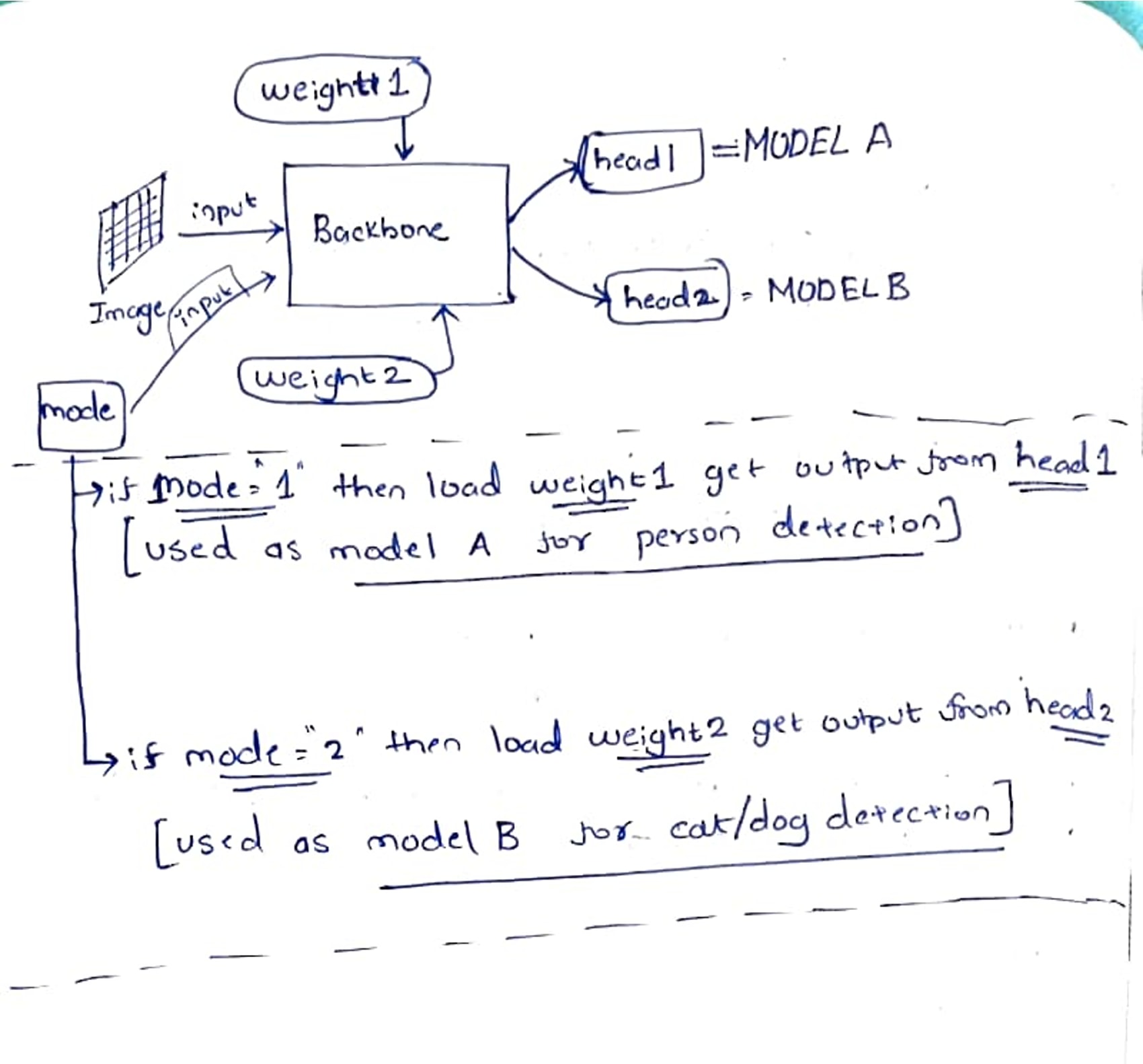
Documentation
# IMPORTS
from neuronswitch.farida_DualYOLO import DualYOLO
from neuronswitch.farida_DualConv import farida_convert_backbone_to_dual,farida_activate_weight_set, run_dual_inference

# ✔ Converting backbone to Dual Mode
converted_backbone = farida_convert_backbone_to_dual(model_one_yolo.model, model_two_yolo.model)
dual_model = DualYOLO(converted_backbone, model_one_head, model_two_head)
dual_yolo = YOLO()
dual_yolo.model = dual_model

# Set Model, if mode = 1 then Model A else if model =2 then Model B
dual_model.mode = 1
farida_activate_weight_set(dual_model, 1)

# INFERENCE
results = run_dual_inference(dual_yolo , 1, model_one_yolo.names, "test.jpeg", conf=0.25)


# POST PROCESSING
results[0].show()
# Print clean detections to console
for box in results[0].boxes:
    print(f"✅ Verified Detection: {model_one_yolo.names[int(box.cls[0])]}")
Usage/Examples
from ultralytics import YOLO
from neuronswitch.farida_DualYOLO import DualYOLO
from neuronswitch.farida_DualConv import farida_convert_backbone_to_dual,farida_activate_weight_set, run_dual_inference

# --- MAIN ---

if __name__ == "__main__":
    model_one_path = "yolov8n.pt"
    model_two_path = "catdog.pt"

    model_one_yolo = YOLO(model_one_path)
    model_two_yolo = YOLO(model_two_path)

    model_one_head = model_one_yolo.model.model[-1]
    model_two_head = model_two_yolo.model.model[-1]

    print("✔ Converting backbone to Dual Mode...")
    converted_backbone = farida_convert_backbone_to_dual(model_one_yolo.model, model_two_yolo.model)
    dual_model = DualYOLO(converted_backbone, model_one_head, model_two_head)

    dual_yolo = YOLO()
    dual_yolo.model = dual_model

    # --- MODEL 1 OUTPUT  MODE 1  ---
    print("\n🟢 MODE 1: MODEL 1 OUTPUT")
    try:
        dual_model.mode = 1
        farida_activate_weight_set(dual_model, 1)
        results = run_dual_inference(dual_yolo , 1, model_one_yolo.names, "test.jpeg", conf=0.25)
        results[0].show()

        # Print clean detections to console
        for box in results[0].boxes:
            print(f"✅ Verified Detection: {model_one_yolo.names[int(box.cls[0])]}")


    except Exception as e:
        print(f"Error in Human Mode: {e}")

    # --- MODEL 2 OUTPUT MODE 2 ---
    print("\n🟣 MODE 2: MODEL 2 OUTPUT")
    try:
        dual_model.mode = 2
        farida_activate_weight_set(dual_model, 2)
        results = run_dual_inference(dual_yolo , 2, model_two_yolo.names, "catdog.jpeg", conf=0.25)
        results[0].show()

        # Print clean detections to console
        for box in results[0].boxes:
            print(f"✅ Verified Detection: {model_two_yolo.names[int(box.cls[0])]}")

    except Exception as e:
        print(f"Error in Human Mode: {e}")


    print("\n✔ DONE.")
🚀 About Me
SHREYAS POTDAR (shreyasapp9@gmail.com)
I'm a developer addressing real world problem
my work:
NeuronSwitch : https://pypi.org/project/neuronswitch/
https://github.com/SHREYAS1188/neuronswitch
https://github.com/SHREYAS1188/neuronswitchpublic
myvectors : https://pypi.org/project/myvectors/
https://github.com/SHREYAS1188/vector_python_package
AI App using Pose estimation : https://play.google.com/store/apps/details?id=com.shreyas.take3_mod2&pcampaignid=web_share
Acknowledgements
I Would Like to Thank Everyone
Feedback
If you have any feedback, please reach out to us at shreyasapp9@gmail.com
Or raise an issue at github. https://github.com/SHREYAS1188/neuronswitchpublic/issues
1 maintainer

Release files for neuronswitch 2.0.4
For a detailed explanation of source distributions (sdists) and built distributions (wheels), please see the package formats documentation.
Source distribution (sdist)
| File | Size | Uploaded | |
|---|---|---|---|
| neuronswitch-2.0.4.tar.gz | 8.8 kB | Details |
Built distribution (wheel)
| File | Interpreter | ABI | Platform | Reset |
|---|---|---|---|---|
| neuronswitch-2.0.4-py3-none-any.whl | Python 3 | none | any | Details |
Total release size:18.2 kB
Release files / neuronswitch-2.0.4.tar.gz
| Download URL | neuronswitch-2.0.4.tar.gz |
|---|---|
| Size | 8.8 kB |
| Tags | Source |
|
SHA-256 checksum How to use checksums |
9d420e7ae9bf893bc5a16544d58bdea6db5868f479d0fb78b7cf043230316220
|
|
BLAKE2b-256 checksum How to use checksums |
21f2833818c7b8c05ee1d836131ab1541a5e8bd1241b56f057e0251966f06785
|
| Upload date | |
|
Uploaded using Trusted Publishing? What is trusted publishing? |
No |
| Uploaded via |
twine/6.2.0 CPython/3.14.0
|
Release files / neuronswitch-2.0.4-py3-none-any.whl
| Download URL | neuronswitch-2.0.4-py3-none-any.whl |
|---|---|
| Size | 9.3 kB |
| Tags | Python 3 |
|
SHA-256 checksum How to use checksums |
89f7237c513740d39408a489a20dbddaf46f773c8c30f43551987046f493b989
|
|
BLAKE2b-256 checksum How to use checksums |
430a4af675adf49341982c05293e9464dab38d6686f4eabe03e9fef2f5ee6bcc
|
| Upload date | |
|
Uploaded using Trusted Publishing? What is trusted publishing? |
No |
| Uploaded via |
twine/6.2.0 CPython/3.14.0
|














