
Neurostates is a tool for analyzing patterns of functional connectivity in EEG and fMRI.


Project description
NeuroStates



NeuroStates is a Python package for detecting recurrent functional connectivity patterns (also known as brain states) and estimating their ocurrence probabilities in EEG and fMRI.
Install
Before installing, make sure you have the following:
- Python 3.9 or later.
- pip (Python's package installer).
- A virtual environment (optional, but recommended).
From PyPI repo, simply run:
pip install neurostates
You can install it in development mode by running:
pip install -e .
Basic Usage
Load data
We load two groups of subjects — controls and patients — where each subject's data is a time series of brain activity (e.g., from fMRI or EEG).
It must be of size (subjects x regions x time).
import numpy as np
import scipy.io as sio

group_controls = sio.loadmat("path/to/control/data")["ts"]
group_patients = sio.loadmat("path/to/patient/data")["ts"]

groups = {
    "controls": group_controls,
    "patients": group_patients
}

print(f"Control group shape (subjects, regions, time): {group_controls.shape}")
print(f"Patient group shape (subjects, regions, time): {group_patients.shape}")
Control group shape (subjects, regions, time): (10, 90, 500)
Patient group shape (subjects, regions, time): (10, 90, 500)
Build the pipeline
Neurostates implements a scikit-learn-compatible pipeline that includes all of the important steps required for brain state analysis.
The pipeline includes:
- A sliding window that segments the time series
- Dynamic connectivity estimation (e.g., Pearson, cosine similarity, Spearman’s R, or a custom metric)
- Concatenation of all matrices across subjects
- Clustering using KMeans to extract brain states
from sklearn.cluster import KMeans
from sklearn.pipeline import Pipeline

from neurostates.core.clustering import Concatenator
from neurostates.core.connectivity import DynamicConnectivityGroup
from neurostates.core.window import SecondsWindowerGroup

brain_state_pipeline = Pipeline(
    [
        (
            "windower",
            SecondsWindowerGroup(length=20, step=5, sample_rate=1)
        ),
        (
            "connectivity",
            DynamicConnectivityGroup(method="pearson")
        ),
        (
            "preclustering",
            Concatenator()
        ),
        (
            "clustering",
            KMeans(n_clusters=3, random_state=42)
        ),
    ]
)
Then you can use the fit_transform() method to transform your input data and get the centroids (brain states):
brain_state_pipeline.fit_transform(groups)
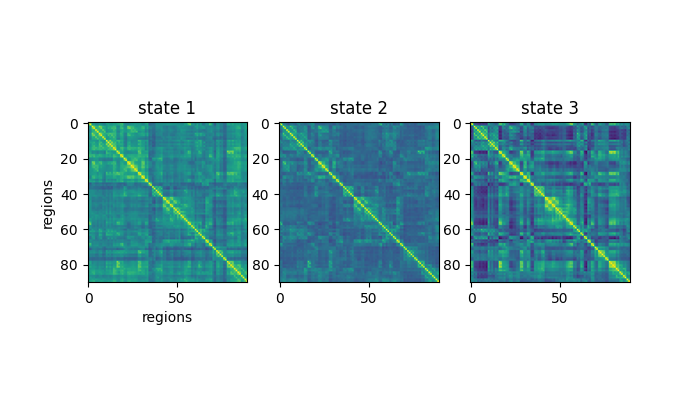
brain_states = brain_state_pipeline["clustering"].cluster_centers_

# Originally brain_states will be a 3 by 8100 matrix.
# We reshape them to get the matrix structure back
brain_states = brain_states.reshape(3, 90, 90)
And you can plot them like so:
import matplotlib.pyplot as plt

fig, ax = plt.subplots(1, 3)
ax[0].imshow(brain_states[0], vmin=-0.5, vmax=1)
ax[0].set_title("state 1")
ax[0].set_ylabel("regions")
ax[0].set_xlabel("regions")

ax[1].imshow(brain_states[1], vmin=-0.5, vmax=1)
ax[1].set_title("state 2")

ax[2].imshow(brain_states[2], vmin=-0.5, vmax=1)
ax[2].set_title("state 3")

plt.show()
You can also access intermediate results from the pipeline, such as the windowed timeseries or the connectivity matrices:
connectivity_matrices = brain_state_pipeline["connectivity"].dict_of_groups_
print(f"Connectivity matrices has keys: {connectivity_matrices.keys()}")
print(f"Control has size: {connectivity_matrices['controls'].shape}")
Connectivity matrices has keys: dict_keys(['controls', 'patients'])
Control has size (subjects, windows, regions, regions): (10, 97, 90, 90)
Compute brain state frequencies
To evaluate how often each brain state occurs for each subject, we use the Frequencies transformer:
from neurostates.core.classification import Frequencies

frequencies = Frequencies(
    centroids=brain_state_pipeline["clustering"].cluster_centers_
)
freqs = frequencies.transform(connectivity_matrices)

print(f"freqs has keys: {freqs.keys()}")
print(f"Control has size (subjects, states): {freqs['controls'].shape}")
freqs has keys: dict_keys(['controls', 'patients'])
Control has size (subjects, states): (10, 3)
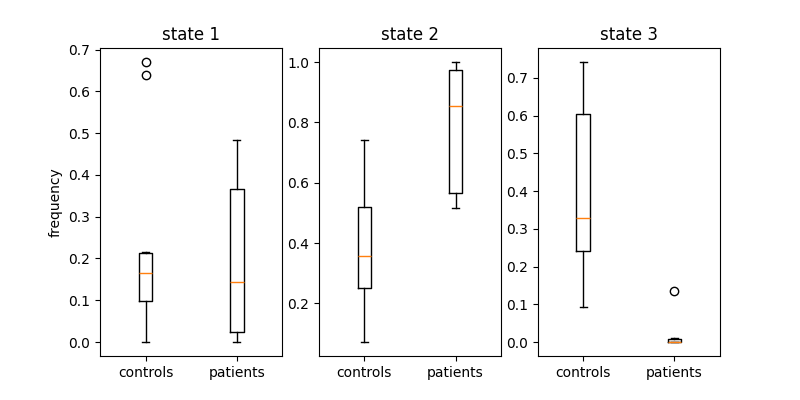
Finally, you can plot the frequency of each brain state in the data:
fig, ax = plt.subplots(1, 3, figsize=(8, 4))

ax[0].boxplot(
    [freqs["controls"][:, 0], freqs["patients"][:, 0]],
    labels=["controls", "patients"]
)
ax[0].set_ylabel("frequency")
ax[0].set_title("state 1")

ax[1].boxplot(
    [freqs["controls"][:, 1], freqs["patients"][:, 1]],
    labels=["controls", "patients"]
)
ax[1].set_title("state 2")

ax[2].boxplot(
    [freqs["controls"][:, 2], freqs["patients"][:, 2]],
    labels=["controls", "patients"]
)
ax[2].set_title("state 3")

plt.show()
Documentation
If you want to see the full documentation please visit https://neurostates.readthedocs.io/en/latest/index.html.
License
Neurostates is under The 3-Clause BSD License
This license allows unlimited redistribution for any purpose as long as its copyright notices and the license's disclaimers of warranty are maintained.
Contact Us
If you have any questions, feel free to check out our Github issues or write us an email to: dellabellagabriel@gmail.com or natirodriguez114@gmail.com
Release history Release notifications | RSS feed

Download files
Download the file for your platform. If you're not sure which to choose, learn more about installing packages.
Source Distribution
Built Distribution
Filter files by name, interpreter, ABI, and platform.
If you're not sure about the file name format, learn more about wheel file names.
Copy a direct link to the current filters
File details
Details for the file neurostates-0.1.2.tar.gz.
File metadata
- Download URL: neurostates-0.1.2.tar.gz
- Upload date:
- Size: 12.3 kB
- Tags: Source
- Uploaded using Trusted Publishing? No
- Uploaded via: twine/6.1.0 CPython/3.12.7
File hashes
| Algorithm | Hash digest | |
|---|---|---|
| SHA256 |
1c903fba08bd31253e8dccffd9a3d5e75cd79884af68f1f4fa36b5f014b7fc7c
|
|
| MD5 |
c8227edc803739b4802f970e31f01c11
|
|
| BLAKE2b-256 |
bc79034f06d5ca1db21f17f6bc5ff9a6f4f3016a928bdb4a60ddc4c089418d97
|
File details
Details for the file neurostates-0.1.2-py3-none-any.whl.
File metadata
- Download URL: neurostates-0.1.2-py3-none-any.whl
- Upload date:
- Size: 13.2 kB
- Tags: Python 3
- Uploaded using Trusted Publishing? No
- Uploaded via: twine/6.1.0 CPython/3.12.7
File hashes
| Algorithm | Hash digest | |
|---|---|---|
| SHA256 |
cde90fad17cd5b06e5f9f9abfe5a6112f60fc6c202735d6bc9f8ded782ca2466
|
|
| MD5 |
c759434ac6f969ea936e130f8b3ec750
|
|
| BLAKE2b-256 |
73fc006dfe05da1e4bd7d9f3755ade9824b8fc4a7434efad4ff5e0378f31c250
|






