


Never4gA, short for never forget again, is memory for you and every AI agent you work with. It keeps your notes, decisions and project history as plain Markdown on your machine, and hands each agent session exactly the part it needs before the session starts.
Early days. This is version 0.1, in daily use by the person who built it and new to everyone else. Expect rough edges and interfaces that still move, and tell us when you hit one.
It does that without a model. Finding the right context is lookups, queries and file reads, so it costs no tokens, takes seconds, and gives the same answer every time. Your agent spends its budget on the work, not on searching for what it should already know.
Why it's built this way
Most agent memory asks a model to decide what's relevant, or lets the agent go looking with its own tool calls. Both spend tokens and turns before any work happens. Never4gA does that part first, mechanically:
- Fewer tokens. In the vault it was built in, 2,153 files and about 3 million tokens of notes, a session starts with a pack of about 10,000 tokens. That's what the agent reads. Nothing else is loaded.
- Faster starts. That pack is assembled in about four seconds, including live Git and tracker state, with zero model calls.
- You can see why. Every item in a pack names the reason it was included. The same question gets the same pack.
What it does
| Remembers across sessions | Each session opens with what the project is, the rules it follows, what was decided, and what the last session left open. |
| Remembers across tools | Claude Code, Codex, Antigravity and any MCP client read the same memory. Switch tools and nothing is lost. |
| Writes back what happened | Sessions record progress and decisions as dated logs, so the next one picks up where this one stopped. |
| Keeps your notes yours | Everything is Markdown in a normal Obsidian vault. Uninstall Never4gA and your notes are exactly as they were. |
| Starts from the notes you have | Point it at an existing folder. Your files stay where they are, and your notes are searchable on the first run. |
| Brings in your tracker | Open work items from OpenProject join the pack, and a session can update them. |
How it works
flowchart LR
    V[("Your Markdown<br/>vault")] --> I["Local index"]
    subgraph M["Found by lookup, not by a model"]
        direction TB
        S1["Where you are<br/>repo → workspace"] --> S2["Types and metadata"]
        S2 --> S3["Full-text search"]
        S3 --> S4["Links and relations"]
        S4 --> S5["Git and tracker state"]
    end
    I --> M
    M --> P["Context pack<br/>every item says why"]
    P --> A["Claude Code · Codex<br/>Antigravity · MCP"]
    A -. "what the session did" .-> V
A pack is built in stages, and each stage is a query: which workspace this repository belongs to, which documents that workspace holds, what full-text search finds, what those documents link to, and what Git and your tracker say right now. A pack never grows past its budget. A model gets involved when you ask for judgment, and never for work a lookup can do.
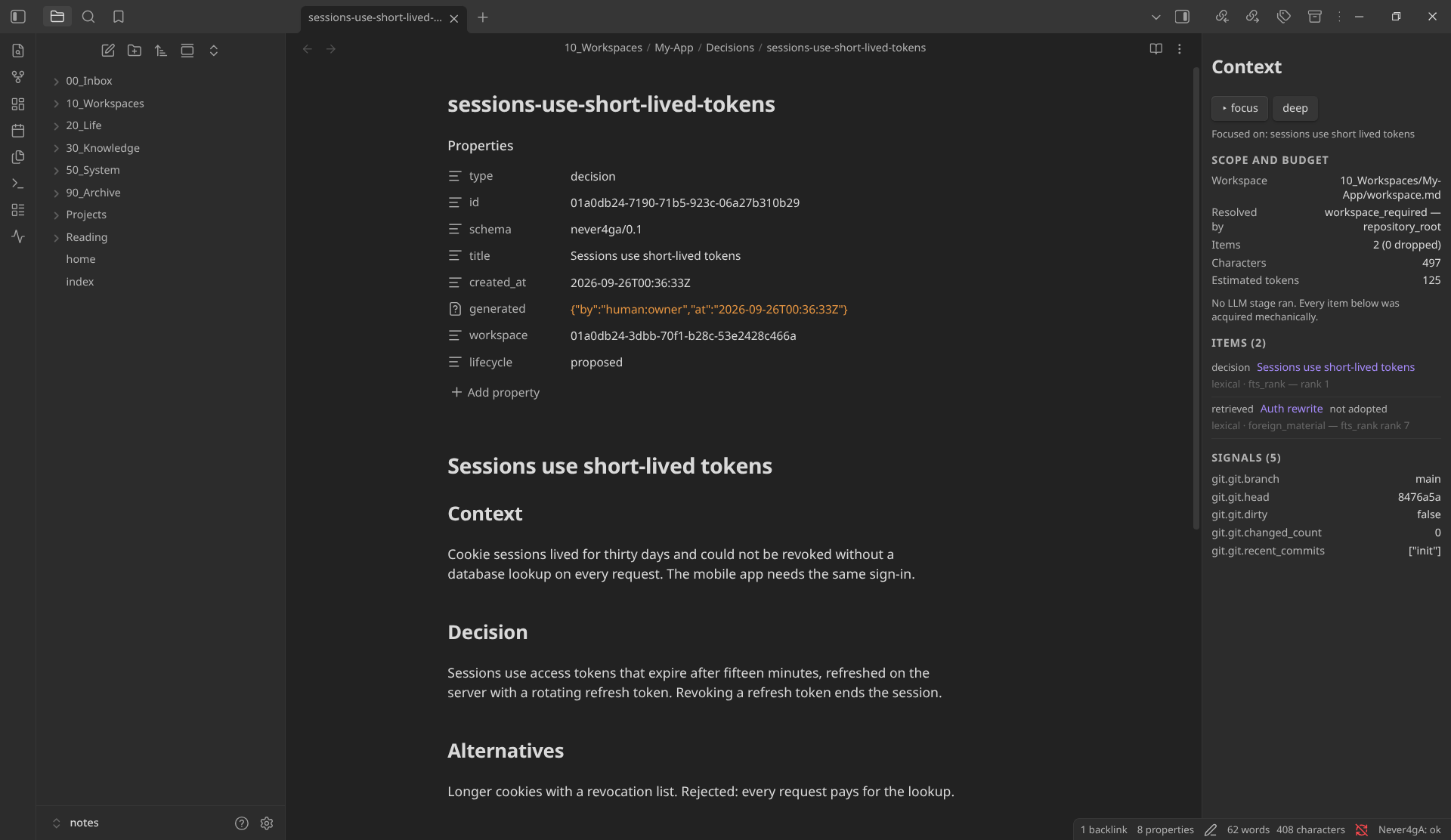
Coming soon: an Obsidian companion plugin that shows the same pack beside the note you're reading, with the reason each item is there. It isn't published yet, so there's nothing to install today. This is what it looks like:
Quick start
uv tool install never4ga
export NEVER4GA_VAULT=~/notes
uv installs the Python version Never4gA needs if you don't already have it.
never4ga init                        # a new vault, or around the notes already there
never4ga index
never4ga search "what we decided about auth"
Then connect a project and your agents:
cd ~/code/my-project
never4ga workspace create "My Project" --type project
never4ga workspace map <workspace-id>
never4ga adapters sync --apply --repositories   # skills, and this repository's pointer files
never4ga adapters mcp --apply                    # the MCP server
adapters sync --apply on its own only updates your agents. --repositories
also writes a small pointer file into each mapped repository, ignored by Git, so
agents working there know to ask Never4gA for context.
Your next agent session in that repository starts with its context pack.
What it won't do
- Call a model for you. It has no API key and never meters your usage. You bring the AI tools you already pay for.
- Send your notes anywhere. Everything runs on your machine, and the service only listens on localhost.
- Take over your files. The index is disposable and rebuilt from your Markdown. Your files are the only source of truth, and nothing is committed to Git for you.
Good to know
- Context packs follow repositories. A workspace is attached to a Git repository, and a pack is built for the repository you're in. Notes that aren't tied to one are fully searchable but don't get a pack yet.
- Platforms. Built and tested on Linux, where the background service runs
under systemd. On macOS and Windows, run
never4ga servein a terminal instead. - Four ways in. The
never4gaCLI, an MCP server (never4ga-mcp), a local HTTP API, and an Obsidian plugin that isn't published yet. All four run the same code.
Tell us where it's wrong
If something didn't make sense, or didn't work the way this page says it does, open an issue. That's the most useful thing you can send.
GitHub is Never4gA's only public home. Issues and pull requests go there. To report a security problem, see SECURITY.md rather than opening an issue.
Working on Never4gA
The design is written down. docs/specs/ holds the
specifications; start with
00-spec-index.md. They're generated from the
maintainer's notes, so propose a change in an issue rather than editing them.
AGENTS.md is the contract for AI agents working in this
repository, and a fair summary of the rules for people too.
uv venv --python 3.14 .venv
VIRTUAL_ENV=.venv uv pip install -e '.[dev]'
.venv/bin/ruff check . && .venv/bin/ruff format --check . && .venv/bin/mypy && .venv/bin/pytest
That last line is the gate, and every pull request runs it.
License
Apache License 2.0. Never4gA, by BezaCore Labs.
1 maintainer

Metadata
1 maintainer
Release files for never4ga 0.1.0
For a detailed explanation of source distributions (sdists) and built distributions (wheels), please see the package formats documentation.
Source distribution (sdist)
| File | Size | Uploaded | |
|---|---|---|---|
| never4ga-0.1.0.tar.gz | 507.9 kB | Details |
Built distribution (wheel)
| File | Interpreter | ABI | Platform | Reset |
|---|---|---|---|---|
| never4ga-0.1.0-py3-none-any.whl | Python 3 | none | any | Details |
Total release size: 1.1 MB
Release files / never4ga-0.1.0.tar.gz
| Download URL | never4ga-0.1.0.tar.gz |
|---|---|
| Size | 507.9 kB |
| Tags | Source |
|
SHA-256 checksum How to use checksums |
80ad1f9cee5b206793ddcbbeea172ac236869ad22ca6f9b8fb495bbe2f6b3384
|
|
BLAKE2b-256 checksum How to use checksums |
8d6f952148d9f4bcd50c9c5b9befe33e08858c4d0ccb8ad337276e19e3a5f458
|
| Upload date | |
|
Uploaded using Trusted Publishing? What is trusted publishing? |
Yes |
| Uploaded via |
twine/7.0.0 CPython/3.13.14
|
Provenance
Provenance describes where a file came from. On PyPI, provenance is shared via attestations, which provide a verifiable record of the build or publishing details. View details, limitations and caveats.


PyPI Publish Attestation
PyPI verified that this artifact, at this checksum, originated from the publisher listed below.
Signed by GitHub Actions, verified by PyPI on Oct 2, 2026.
Transparency logRelease files / never4ga-0.1.0-py3-none-any.whl
| Download URL | never4ga-0.1.0-py3-none-any.whl |
|---|---|
| Size | 632.8 kB |
| Tags | Python 3 |
|
SHA-256 checksum How to use checksums |
82725373546ea74549b92f0aefe9332a3ab6c66f9dbd333b26e82e9960f4848f
|
|
BLAKE2b-256 checksum How to use checksums |
c239589f8dedd0a6118ff3760154b0994c94f62d4606a6cf23852329a5619ee2
|
| Upload date | |
|
Uploaded using Trusted Publishing? What is trusted publishing? |
Yes |
| Uploaded via |
twine/7.0.0 CPython/3.13.14
|
Provenance
Provenance describes where a file came from. On PyPI, provenance is shared via attestations, which provide a verifiable record of the build or publishing details. View details, limitations and caveats.
PyPI Publish Attestation
PyPI verified that this artifact, at this checksum, originated from the publisher listed below.
Signed by GitHub Actions, verified by PyPI on Oct 2, 2026.
Transparency log












