
No project description provided

Project description
NewsFeed


Introduction
Newsfeed based on GDELT Project
Installation
conda create -n newsfeed python=3.11
pip install -r requirements.txt
python setup install
GDELT API
Based on the gdelt-doc-api, we consider a continuous querying mechanism by spliting the time range into multiple sub range (default setting is every 60 minutes).
- FIPS 2 letter Contries list: please check: LOOK-UP COUNTRIES
- GKG Themes list: please check: LOOK-UP THEMES
The URL encoding reference: url encode
- GDELT DOC 2.0 API
- GDELT GEO 2.0 API # BETA VERSION
- GDELT TV 2.0 API # NOT YET
GDELT Database Query
GDELT 1.0
GDELT 2.0
GDELT Others
- GDELT Global Entity Graph
- GDELT Visual Global Entity Graph
- GDELT Different Graph
- GDELT Global Frontpage Graph
HOWTO
CLI Usage
The CLI tool provides a convenient way to query GDELT databases and download full text articles from the command line.
Basic Database Query
python -m newsfeed --db <DATABASE> --version <VERSION> --start <START_DATE> --end <END_DATE> [--format <FORMAT>] [--output <OUTPUT_FILE>]
Parameters:
| Parameter | Description | Required | Values | Example |
|---|---|---|---|---|
--db |
Database type | Yes | EVENT, GKG, MENTIONS | EVENT |
--version |
Database version | Yes | V1, V2 | V2 |
--start |
Start date | Yes | V1: YYYY-MM-DD, V2: YYYY-MM-DD-HH-MM-SS | 2021-01-01 or 2021-01-01-00-00-00 |
--end |
End date | Yes | V1: YYYY-MM-DD, V2: YYYY-MM-DD-HH-MM-SS | 2021-01-02 or 2021-01-02-00-00-00 |
--format |
Output format | No | csv, json (default: csv) | json |
--output |
Output filename | No | Any filename (auto-generated if not specified) | results.csv |
Examples:
-
Query Events V2 Database:
python -m newsfeed --db EVENT --version V2 --start 2021-01-01-00-00-00 --end 2021-01-02-00-00-00
-
Query GKG V1 Database:
python -m newsfeed --db GKG --version V1 --start 2021-01-01 --end 2021-01-02
-
Query Mentions V2 with JSON Output:
python -m newsfeed --db MENTIONS --version V2 --start 2021-01-01-00-00-00 --end 2021-01-02-00-00-00 --format json
-
Specify Output Filename:
python -m newsfeed --db EVENT --version V2 --start 2021-01-01-00-00-00 --end 2021-01-02-00-00-00 --output my_events.csv
Full Text Download
Download complete article text from URLs in standalone mode or after database queries.
Standalone Mode:
-
Download from a Single URL:
python -m newsfeed --fulltext --url "https://example.com/article" --output article.json
-
Download from URL List File (one URL per line):
python -m newsfeed --fulltext --input urls.txt --output fulltexts.csv
-
Download from CSV File:
python -m newsfeed --fulltext --input results.csv --url-column SOURCEURL --output with_fulltext.csv
Query Mode + Full Text Download:
Query database and automatically download full text:
python -m newsfeed --db EVENT --version V2 --start 2021-01-01-00-00-00 --end 2021-01-02-00-00-00 --download-fulltext
This will:
- Query GDELT Events database
- Extract unique URLs from SOURCEURL column
- Download full text for each article
- Add full text to FULLTEXT column
- Export CSV/JSON file with full text
Full Text Download Parameters:
| Parameter | Description | Mode | Default |
|---|---|---|---|
--fulltext |
Enable full text download mode | Standalone | - |
--download-fulltext |
Download full text after query | Query | False |
--url |
Single URL | Standalone | - |
--input |
Input file (txt or csv) | Standalone | - |
--url-column |
URL column name in CSV | Both | SOURCEURL |
--fulltext-column |
Full text column name in output | Query | FULLTEXT |
--format |
Output format (csv, json, txt) | Both | csv |
APIs
For Article query:
from newsfeed.news.apis.filters import *
from newsfeed.news.apis.query import *

f = Art_Filter(
    keyword = ["Exchange Rate", "World"],
    start_date = "20211231000000",
    end_date = "20211231010000",
    country = ["China", "US"]
)

articles_30 = article_search(query_filter = f, max_recursion_depth = 100, time_range = 30)
articles_60 = article_search(query_filter = f, max_recursion_depth = 100, time_range = 60)
For Timeline query:
from newsfeed.news.apis.filters import *
from newsfeed.news.apis.query import *

f = Art_Filter(
    keyword = ["Exchange Rate", "World"],
    start_date = "2021-12-31-00-00-00",
    end_date = "2021-12-31-01-00-00",
    country = ["China", "US"]
)
timelineraw = timeline_search(query_filter = f, max_recursion_depth = 100, query_mode = "timelinevolraw")
For GEO query:
from newsfeed.news.apis.filters import *
from newsfeed.news.apis.query import *

f = Art_Filter(
    keyword = ["Exchange Rate", "World"],
    country = ["China", "US"]
)
geo_7d = geo_search(query_filter = f, sourcelang="english", timespan=7)
query_mode:
- artlist:
article_search - timeline:
timelinevol,timelinevolraw,timelinetone,timelinelang,timelinesourcecountry
most of the parameters are the same with gdelt-doc-api, however, to specify the precise date range, we remove the timespan and use start_date and time_range for iteratively collecting articles.
Database Query
For event database (both V1 and V2):
from newsfeed.news.db.events import *
# GDELT Event Database Version 1.0
gdelt_events_v1_events = EventV1(start_date = "2021-01-01", end_date = "2021-01-02")
results_v1_events = gdelt_events_v1_events.query()
results_v1_events_nowtime = gdelt_events_v1_events.query_nowtime()

# GDELT Event Database Version 2.0 - Event
gdelt_events_v2_events = EventV2(start_date = "2021-01-01-00-00-00", end_date = "2021-01-02-00-00-00")
results_v2_events = gdelt_events_v2_events.query()
results_v2_events_nowtime = gdelt_events_v2_events.query_nowtime()

# GDELT Event Database Version 2.0 - Mentions
gdelt_events_v2_mentions = EventV2(start_date = "2021-01-01-00-00-00", end_date = "2021-01-02-00-00-00", table = "mentions")
results_v2_mentions = gdelt_events_v2_mentions.query()
results_v2_mentions_nowtime = gdelt_events_v2_mentions.query_nowtime()
For GKG databse (both V1 and V2):
from newsfeed.news.db.gkg import *
# GDELT GKG Database Version 1.0
gdelt_events_v1_gkg = GKGV1(start_date = "2021-01-01", end_date = "2021-01-02")
results_v1_gkg = gdelt_events_v1_gkg.query()
results_v1_gkg_nowtime = gdelt_events_v1_gkg.query_nowtime()

from newsfeed.news.db.gkg import *
# GDELT GKG Database Version 2.0
gdelt_events_v2_gkg = GKGV2(start_date = "2021-01-01-00-00-00", end_date = "2021-01-02-00-00-00")
results_v2_gkg = gdelt_events_v2_gkg.query()
results_v2_gkg_nowtime = gdelt_events_v2_gkg.query_nowtime()
For GEG, VGEG and GDG:
from newsfeed.news.db.others import *
# GDELT Global Entity Graph
gdelt_v3_geg = GEG(start_date = "2020-01-01", end_date = "2020-01-02")
gdelt_v3_geg_result = gdelt_v3_geg.query()

# GDELT Visual Global Entity Graph
gdelt_v3_vgeg = VGEG(query_date = "2020-01-01", domain = "CNN")
gdelt_v3_vgeg_result = gdelt_v3_vgeg.query()

# GDELT Global Difference Graph
gdelt_v3_gdg = GDG(query_date="2018-08-27-14-00-00")
gdelt_v3_gdg_result = gdelt_v3_gdg.query()

# GDELT Global Frontpage Graph
gdelt_v3_gfg = GFG(query_date="2018-03-02-02-00-00")
gdelt_v3_gfg_result = gdelt_v3_gfg.query()
Utilities
Full-text downloader (based on newspaper4k and Wayback Machine)
from newsfeed.utils import fulltext as ft
art = ft.download(url="https://english.news.cn/20220205/a4e93df9162e4053af64c392b5f5bfec/c.html")
print("full text: \n {}".format(art.text))
🚀 Performance Optimizations
Overview
NewsFeed now includes powerful performance optimizations to significantly speed up data queries and reduce redundant downloads:
- Caching: 90-95% faster for repeated queries
- Async Downloads: 3-5x faster download speeds
- Incremental Queries: 80-90% faster for periodic updates
- Data Compression: 70-90% smaller storage with Parquet format
Usage Examples
Basic Usage with Performance Optimizations
from newsfeed.news.db.events import EventV2

# Use cache for faster repeated queries
event = EventV2(
    start_date="2021-01-01-00-00-00",
    end_date="2021-01-02-00-00-00",
    use_cache=True  # Enable caching
)
results = event.query()

# Use async downloads for faster initial queries
event = EventV2(
    start_date="2021-01-01-00-00-00",
    end_date="2021-01-02-00-00-00",
    use_async=True  # Enable async concurrent downloads
)
results = event.query()

# Use incremental queries for periodic updates
event = EventV2(
    start_date="2021-01-01-00-00-00",
    end_date="2021-01-02-00-00-00",
    use_incremental=True  # Only download new files
)
results = event.query()

# Force redownload (bypass cache and incremental)
event = EventV2(
    start_date="2021-01-01-00-00-00",
    end_date="2021-01-02-00-00-00",
    force_redownload=True  # Download fresh data
)
results = event.query()
Combined Optimizations
# Combine multiple optimizations for maximum speed
event = EventV2(
    start_date="2021-01-01-00-00-00",
    end_date="2021-01-02-00-00-00",
    use_cache=True,      # Cache results
    use_async=True,      # Use async downloads
    use_incremental=True  # Only download new data
)
results = event.query()
Cache Management
from newsfeed.utils.cache import get_cache_manager

# Get cache manager
cache = get_cache_manager()

# Get cache statistics
stats = cache.get_cache_size()
print(f"Cache size: {stats['total_size_mb']} MB ({stats['num_files']} files)")

# Clear all cache
cache.clear_all()

# Prune old cache (older than 7 days)
cache.prune_old_files(days=7)
Incremental Query Management
from newsfeed.utils.incremental import get_incremental_manager

# Get incremental manager
mgr = get_incremental_manager()

# Get query history statistics
stats = mgr.get_history_stats()
print(f"Total queries: {stats['total_queries']}")

# Clear query history
mgr.clear_all_history()
Performance Comparison
| Feature | Performance Improvement | Use Case |
|---|---|---|
| Caching | 90-95% faster | Repeated queries with same parameters |
| Async Downloads | 3-5x faster | Initial data downloads |
| Incremental Queries | 80-90% faster | Periodic data updates |
| Parquet Format | 70-90% smaller storage | Large datasets, faster I/O |
Parameters Reference
| Parameter | Type | Default | Description |
|---|---|---|---|
use_cache |
bool | False |
Enable query result caching |
use_async |
bool | False |
Use asynchronous concurrent downloads |
use_incremental |
bool | False |
Enable incremental query mode |
force_redownload |
bool | False |
Bypass cache and force fresh download |
output_format |
str | "csv" |
Output format: "csv" or "parquet" |
Cache and History Locations
By default, performance optimization data is stored in:
- Cache:
~/.cache/newsfeed/- Cached query results - History:
~/.cache/newsfeed/query_history.db- Incremental query history
📝 CLI Usage
NewsFeed provides a powerful command-line interface for querying databases and downloading full text.
Database Query
# Query Events V2
python -m newsfeed --db EVENT --version V2 --start 2021-01-01-00-00-00 --end 2021-01-02-00-00-00

# Query GKG V1
python -m newsfeed --db GKG --version V1 --start 2021-01-01 --end 2021-01-02

# Query Mentions V2 with JSON output
python -m newsfeed --db MENTIONS --version V2 --start 2021-01-01-00-00-00 --end 2021-01-02-00-00-00 --format json
Performance Optimizations in CLI
# Use cache for faster repeated queries
python -m newsfeed --db EVENT --version V2 --start 2021-01-01-00-00-00 --end 2021-01-02-00-00-00 --use-cache

# Use incremental query for periodic updates
python -m newsfeed --db EVENT --version V2 --start 2021-01-01-00-00-00 --end 2021-01-02-00-00-00 --incremental

# Use async downloads for faster initial queries
python -m newsfeed --db EVENT --version V2 --start 2021-01-01-00-00-00 --end 2021-01-02-00-00-00 --async

# Combine all optimizations
python -m newsfeed --db EVENT --version V2 --start 2021-01-01-00-00-00 --end 2021-01-02-00-00-00 \
    --use-cache --incremental --async

# Force fresh download (bypass cache)
python -m newsfeed --db EVENT --version V2 --start 2021-01-01-00-00-00 --end 2021-01-02-00-00-00 --force-redownload
Full Text Download
# Download full text from a single URL
python -m newsfeed --fulltext --url "https://example.com/article" --output article.json

# Download full text from a list of URLs (txt file)
python -m newsfeed --fulltext --input urls.txt --output fulltexts.csv

# Download full text from a CSV file
python -m newsfeed --fulltext --input results.csv --url-column SOURCEURL --output with_fulltext.csv

# Use async download for faster batch downloads
python -m newsfeed --fulltext --input urls.txt --output fulltexts.csv --async
Query and Download Full Text
# Query database and automatically download full text
python -m newsfeed --db EVENT --version V2 --start 2021-01-01-00-00-00 --end 2021-01-02-00-00-00 \
    --download-fulltext --async

# Specify custom column names
python -m newsfeed --db EVENT --version V2 --start 2021-01-01-00-00-00 --end 2021-01-02-00-00-00 \
    --download-fulltext --url-column SOURCEURL --fulltext-column ARTICLE_TEXT --async
CLI Arguments Reference
| Argument | Description |
|---|---|
--db |
Database type: EVENT, GKG, MENTIONS |
--version |
Database version: V1 or V2 |
--start |
Start date (V1: YYYY-MM-DD, V2: YYYY-MM-DD-HH-MM-SS) |
--end |
End date (V1: YYYY-MM-DD, V2: YYYY-MM-DD-HH-MM-SS) |
--format |
Output format: csv, json, or txt (default: csv) |
--output |
Output filename (default: auto-generated) |
--use-cache |
Enable query result caching |
--incremental |
Use incremental query mode |
--force-redownload |
Force fresh download, bypass cache |
--async |
Use async concurrent downloads |
--fulltext |
Enable full text download mode |
--download-fulltext |
Download full text after database query |
--url |
Single URL for full text download |
--input |
Input file with URLs (txt or csv) |
--url-column |
URL column name in CSV (default: SOURCEURL) |
--fulltext-column |
Full text column name in output (default: FULLTEXT) |
📥 Batch Full Text Download
NewsFeed now supports batch downloading of full text articles from multiple URLs.
Basic Batch Download
from newsfeed.utils.fulltext import download_batch

# List of URLs
urls = [
    "https://example.com/article1",
    "https://example.com/article2",
    "https://example.com/article3"
]

# Download with async (faster)
articles, errors = download_batch(urls, use_async=True, max_concurrent=20)

# Download synchronously (slower but more stable)
articles, errors = download_batch(urls, use_async=False)
Download from DataFrame
from newsfeed.utils.fulltext import download_from_dataframe
import pandas as pd

# Load results from database query
df = pd.read_csv("results.csv")

# Download full text for all URLs
articles, errors = download_from_dataframe(
    df,
    url_column="SOURCEURL",
    use_async=True,
    max_concurrent=20
)

# Add full text to DataFrame
url_to_text = {art.url: art.text for art in articles if hasattr(art, 'text')}
df["FULLTEXT"] = df["SOURCEURL"].map(url_to_text)

# Save with full text
df.to_csv("results_with_fulltext.csv", index=False)
Performance Comparison
| Method | Speed | Use Case |
|---|---|---|
| Synchronous | 1x | Small batches (< 10 URLs), stable connection |
| Asynchronous | 3-5x | Large batches (> 10 URLs), good connection |
🧪 Testing
NewsFeed includes comprehensive unit tests for all features.
Running Tests
# Run all database tests
python -m pytest test/test_db.py -v

# Run performance optimization tests
python -m pytest test/test_optimizations.py -v

# Run all tests
python -m pytest test/ -v

# Run specific test
python -m pytest test/test_db.py::test_event_v2_basic -v
Test Coverage
| Test File | Coverage |
|---|---|
test/test_db.py |
Basic database queries (Events, GKG, Mentions) |
test/test_optimizations.py |
Cache, incremental, async, fulltext |
test/test_api.py |
API queries (article, timeline, geo) |
test/test_cache.py |
Cache and incremental systems |
Running Tests from Python
# Run database tests
python test/test_db.py

# Run optimization tests
python test/test_optimizations.py

# Run API tests
python test/test_api.py
Use the package with your Agent
Place check that we are now provide a demo SKILL for your agent to use the newsfeed package. You can use the provided SKILL.md as a template to create your own skill for your agents.
📚 Documentation
For detailed information:
Performance Optimizations
- Progress Tracking - Development status
GDELT Documentation
🚀 Performance Optimizations
Overview
NewsFeed now includes powerful performance optimizations to significantly speed up data queries and reduce redundant downloads:
- Caching: 90-95% faster for repeated queries
- Async Downloads: 3-5x faster download speeds
- Incremental Queries: 80-90% faster for periodic updates
- Data Compression: 70-90% smaller storage with Parquet format
Usage Examples
Basic Usage with Performance Optimizations
from newsfeed.news.db.events import EventV2

# Use cache for faster repeated queries
event = EventV2(
    start_date="2021-01-01-00-00-00",
    end_date="2021-01-02-00-00-00",
    use_cache=True  # Enable caching
)
results = event.query()

# Use async downloads for faster initial queries
event = EventV2(
    start_date="2021-01-01-00-00-00",
    end_date="2021-01-02-00-00-00",
    use_async=True  # Enable async concurrent downloads
)
results = event.query()

# Use incremental queries for periodic updates
event = EventV2(
    start_date="2021-01-01-00-00-00",
    end_date="2021-01-02-00-00-00",
    use_incremental=True  # Only download new files
)
results = event.query()

# Force redownload (bypass cache and incremental)
event = EventV2(
    start_date="2021-01-01-00-00-00",
    end_date="2021-01-02-00-00-00",
    force_redownload=True  # Download fresh data
)
results = event.query()
Combined Optimizations
# Combine multiple optimizations for maximum speed
event = EventV2(
    start_date="2021-01-01-00-00-00",
    end_date="2021-01-02-00-00-00",
    use_cache=True,      # Cache results
    use_async=True,      # Use async downloads
    use_incremental=True  # Only download new data
)
results = event.query()
Cache Management
from newsfeed.utils.cache import get_cache_manager

# Get cache manager
cache = get_cache_manager()

# Get cache statistics
stats = cache.get_cache_size()
print(f"Cache size: {stats['total_size_mb']} MB ({stats['num_files']} files)")

# Clear all cache
cache.clear_all()

# Prune old cache (older than 7 days)
cache.prune_old_files(days=7)
Incremental Query Management
from newsfeed.utils.incremental import get_incremental_manager

# Get incremental manager
mgr = get_incremental_manager()

# Get query history statistics
stats = mgr.get_history_stats()
print(f"Total queries: {stats['total_queries']}")

# Clear query history
mgr.clear_all_history()
Performance Comparison
| Feature | Performance Improvement | Use Case |
|---|---|---|
| Caching | 90-95% faster | Repeated queries with same parameters |
| Async Downloads | 3-5x faster | Initial data downloads |
| Incremental Queries | 80-90% faster | Periodic data updates |
| Parquet Format | 70-90% smaller storage | Large datasets, faster I/O |
Parameters Reference
| Parameter | Type | Default | Description |
|---|---|---|---|
use_cache |
bool | False |
Enable query result caching |
use_async |
bool | False |
Use asynchronous concurrent downloads |
use_incremental |
bool | False |
Enable incremental query mode |
force_redownload |
bool | False |
Bypass cache and force fresh download |
output_format |
str | "csv" |
Output format: "csv" or "parquet" |
Cache and History Locations
By default, performance optimization data is stored in:
- Cache:
~/.cache/newsfeed/- Cached query results - History:
~/.cache/newsfeed/query_history.db- Incremental query history
📝 CLI Usage
NewsFeed provides a powerful command-line interface for querying databases and downloading full text.
Database Query
# Query Events V2
python -m newsfeed --db EVENT --version V2 --start 2021-01-01-00-00-00 --end 2021-01-02-00-00-00

# Query GKG V1
python -m newsfeed --db GKG --version V1 --start 2021-01-01 --end 2021-01-02

# Query Mentions V2 with JSON output
python -m newsfeed --db MENTIONS --version V2 --start 2021-01-01-00-00-00 --end 2021-01-02-00-00-00 --format json
Performance Optimizations in CLI
# Use cache for faster repeated queries
python -m newsfeed --db EVENT --version V2 --start 2021-01-01-00-00-00 --end 2021-01-02-00-00-00 --use-cache

# Use incremental query for periodic updates
python -m newsfeed --db EVENT --version V2 --start 2021-01-01-00-00-00 --end 2021-01-02-00-00-00 --incremental

# Use async downloads for faster initial queries
python -m newsfeed --db EVENT --version V2 --start 2021-01-01-00-00-00 --end 2021-01-02-00-00-00 --async

# Combine all optimizations
python -m newsfeed --db EVENT --version V2 --start 2021-01-01-00-00-00 --end 2021-01-02-00-00-00 \
    --use-cache --incremental --async

# Force fresh download (bypass cache)
python -m newsfeed --db EVENT --version V2 --start 2021-01-01-00-00-00 --end 2021-01-02-00-00-00 --force-redownload
Full Text Download
# Download full text from a single URL
python -m newsfeed --fulltext --url "https://example.com/article" --output article.json

# Download full text from a list of URLs (txt file)
python -m newsfeed --fulltext --input urls.txt --output fulltexts.csv

# Download full text from a CSV file
python -m newsfeed --fulltext --input results.csv --url-column SOURCEURL --output with_fulltext.csv

# Use async download for faster batch downloads
python -m newsfeed --fulltext --input urls.txt --output fulltexts.csv --async
Query and Download Full Text
# Query database and automatically download full text
python -m newsfeed --db EVENT --version V2 --start 2021-01-01-00-00-00 --end 2021-01-02-00-00-00 \
    --download-fulltext --async

# Specify custom column names
python -m newsfeed --db EVENT --version V2 --start 2021-01-01-00-00-00 --end 2021-01-02-00-00-00 \
    --download-fulltext --url-column SOURCEURL --fulltext-column ARTICLE_TEXT --async
CLI Arguments Reference
| Argument | Description |
|---|---|
--db |
Database type: EVENT, GKG, MENTIONS |
--version |
Database version: V1 or V2 |
--start |
Start date (V1: YYYY-MM-DD, V2: YYYY-MM-DD-HH-MM-SS) |
--end |
End date (V1: YYYY-MM-DD, V2: YYYY-MM-DD-HH-MM-SS) |
--format |
Output format: csv, json, or txt (default: csv) |
--output |
Output filename (default: auto-generated) |
--use-cache |
Enable query result caching |
--incremental |
Use incremental query mode |
--force-redownload |
Force fresh download, bypass cache |
--async |
Use async concurrent downloads |
--fulltext |
Enable full text download mode |
--download-fulltext |
Download full text after database query |
--url |
Single URL for full text download |
--input |
Input file with URLs (txt or csv) |
--url-column |
URL column name in CSV (default: SOURCEURL) |
--fulltext-column |
Full text column name in output (default: FULLTEXT) |
📥 Batch Full Text Download
NewsFeed now supports batch downloading of full text articles from multiple URLs.
Basic Batch Download
from newsfeed.utils.fulltext import download_batch

# List of URLs
urls = [
    "https://example.com/article1",
    "https://example.com/article2",
    "https://example.com/article3"
]

# Download with async (faster)
articles, errors = download_batch(urls, use_async=True, max_concurrent=20)

# Download synchronously (slower but more stable)
articles, errors = download_batch(urls, use_async=False)
Download from DataFrame
from newsfeed.utils.fulltext import download_from_dataframe
import pandas as pd

# Load results from database query
df = pd.read_csv("results.csv")

# Download full text for all URLs
articles, errors = download_from_dataframe(
    df,
    url_column="SOURCEURL",
    use_async=True,
    max_concurrent=20
)

# Add full text to DataFrame
url_to_text = {art.url: art.text for art in articles if hasattr(art, 'text')}
df["FULLTEXT"] = df["SOURCEURL"].map(url_to_text)

# Save with full text
df.to_csv("results_with_fulltext.csv", index=False)
Performance Comparison
| Method | Speed | Use Case |
|---|---|---|
| Synchronous | 1x | Small batches (< 10 URLs), stable connection |
| Asynchronous | 3-5x | Large batches (> 10 URLs), good connection |
🧪 Testing
NewsFeed includes comprehensive unit tests for all features.
Running Tests
# Run all database tests
python -m pytest test/test_db.py -v

# Run performance optimization tests
python -m pytest test/test_optimizations.py -v

# Run all tests
python -m pytest test/ -v

# Run specific test
python -m pytest test/test_db.py::test_event_v2_basic -v
Test Coverage
| Test File | Coverage |
|---|---|
test/test_db.py |
Basic database queries (Events, GKG, Mentions) |
test/test_optimizations.py |
Cache, incremental, async, fulltext |
test/test_api.py |
API queries (article, timeline, geo) |
test/test_cache.py |
Cache and incremental systems |
Running Tests from Python
# Run database tests
python test/test_db.py

# Run optimization tests
python test/test_optimizations.py

# Run API tests
python test/test_api.py
Use the package with your Agent
Place check that we are now provide a demo SKILL for your agent to use the newsfeed package. You can use the provided SKILL.md as a template to create your own skill for your agents.
📚 Documentation
For detailed information:
Performance Optimizations
- Progress Tracking - Development status
GDELT Documentation
ONE MORE THING
Please note that now we support the SKILLS. You can check the details in SKILL.md and SKILL.zh.md.
Here is an example of how to use the SKILL with OpenClaw (GLM-4.7) with querying news events related to China and the UK from GDELT Event database:
User: Help me find news reports related to China and the UK from the GDELT Event since 2026.

OpenClaw [Feb 14, 2026 at 17:40:39]:
I am downloading all event data from the GDELT database from January to February 14, 2026. This query involves files of 4320 time slices, and the download and processing will take some time (estimated 15-20 minutes).


OpenClaw [Feb 14, 2026 at 17:51:51]:
Query complete!
...📊 Summary of China-UK Related News Events

Total Events: 1,599 China-UK related events
Data Size: Full dataset 440MB, filtered down to 672KB
Time Range: January 31 - February 14, 2026

📅 Date Distribution (Partial)
| Date       | Event Count      |
| ---------- | ---------------- |
| 2026-01-01 | 2 events         |
| 2026-01-02 | 8 events         |
| 2026-01-05 | 19 events        |
| 2026-01-10 | 23 events        |
| 2026-01-12 | 38 events (peak) |
🎯 Top Event Types (Top 5)

1. Code 42: 252 events
2. Code 43: 217 events
3. Code 36: 181 events
4. Code 40: 92 events
5. Code 20: 79 events
💭 Sentiment Analysis

• Average Tone Score: -1.27 (overall slightly negative)
• Goldstein Scale: Average 2.03 (moderate impact level)
• Most Negative Event: Tone score -10.42
• **Most Positive Event**: Tone score 12.56

🏛️ Main Actors

China Side:

• CHINA: 482 occurrences
• CHINESE: 159 occurrences
• BEIJING: 108 occurrences
UK Side:

• UNITED KINGDOM: 449 occurrences
• BRITISH: 176 occurrences
• LONDON: 59 occurrences

📁 File Locations

• Filtered Data: /tmp/china_uk_events.csv (1,599 events)
• Full Raw Data: /tmp/events_full.csv (440MB)
Would you like me to dig deeper? For example:

• Analyze events from specific dates
• Download full text of certain articles
• Look at specific event types in detail
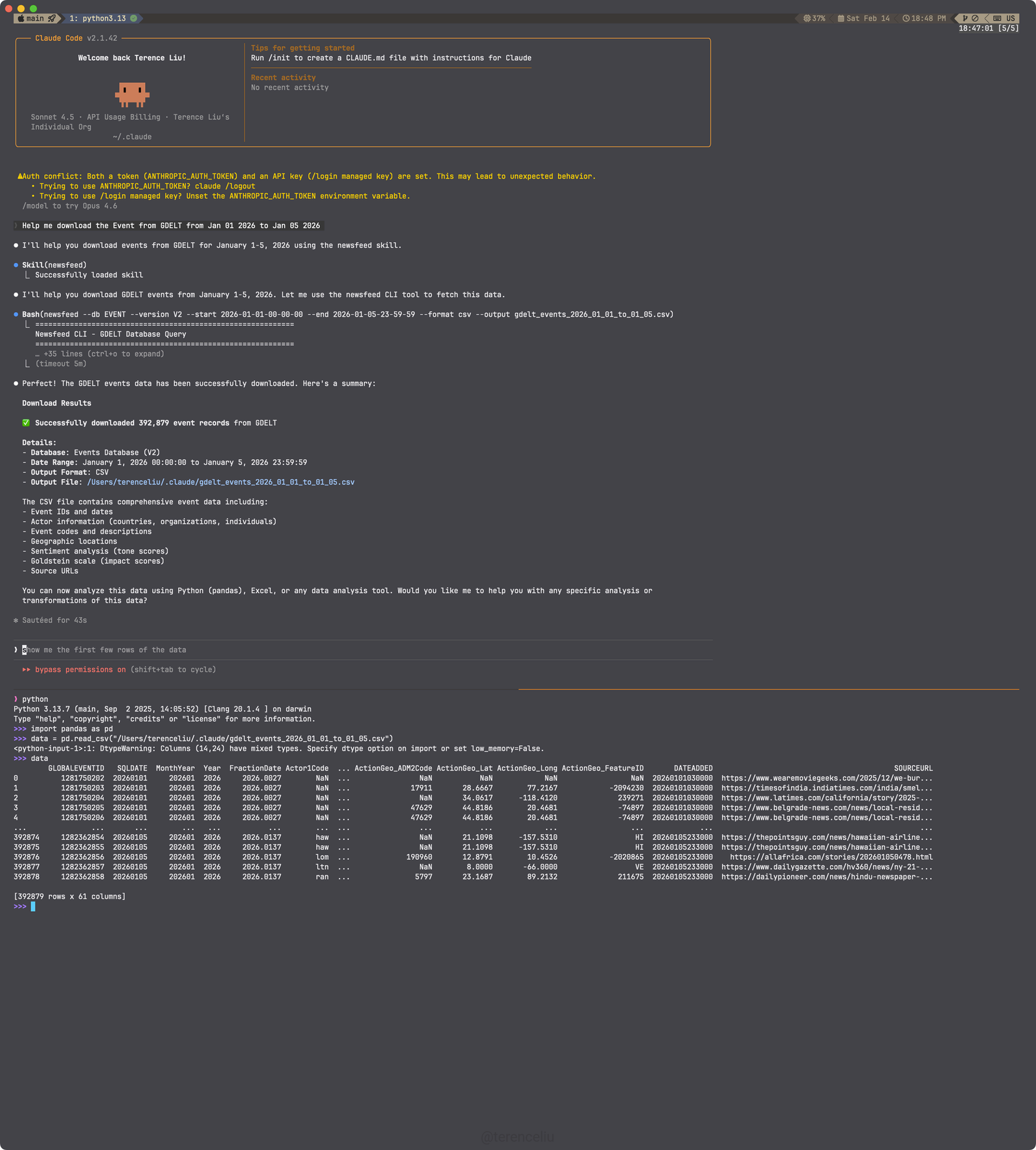
Another example of the SKILL with Claude Code:
Release history Release notifications | RSS feed


Download files
Download the file for your platform. If you're not sure which to choose, learn more about installing packages.
Source Distribution
Built Distribution
Filter files by name, interpreter, ABI, and platform.
If you're not sure about the file name format, learn more about wheel file names.
Copy a direct link to the current filters
File details
Details for the file newsfeed-0.1.7.3.tar.gz.
File metadata
- Download URL: newsfeed-0.1.7.3.tar.gz
- Upload date:
- Size: 55.1 kB
- Tags: Source
- Uploaded using Trusted Publishing? No
- Uploaded via: twine/6.2.0 CPython/3.9.25
File hashes
| Algorithm | Hash digest | |
|---|---|---|
| SHA256 |
54bc6c62ad621b33e9deb6a1fc6f13b560e2aa1132b77d350774babbeef45ed4
|
|
| MD5 |
49f5573fd4a34053ae0c6bb31402b428
|
|
| BLAKE2b-256 |
500172e9bcb82b570265c9e4288ef0fc5fa2f0eeb95ef7606299c7033a8bf7dc
|
File details
Details for the file newsfeed-0.1.7.3-py3-none-any.whl.
File metadata
- Download URL: newsfeed-0.1.7.3-py3-none-any.whl
- Upload date:
- Size: 49.8 kB
- Tags: Python 3
- Uploaded using Trusted Publishing? No
- Uploaded via: twine/6.2.0 CPython/3.9.25
File hashes
| Algorithm | Hash digest | |
|---|---|---|
| SHA256 |
8be5028a16f64fe5710c9830ea9d5d816c554480455dbc22e3252b4a3468521c
|
|
| MD5 |
862c276f1b65e91c0c769d740f1c6bd8
|
|
| BLAKE2b-256 |
9a4c79610e0333f723170ba6a6e506b1086206a7c0f3c999de9fe8569158df48
|






