
nexa (nexa-ui)
nexa (pip install nexa-ui) is a Python port of CUI—a lightweight, zero-dependency C99 immediate-mode desktop UI library with spring motion, Flexbox/Grid layout, and crisp SDF rendering.
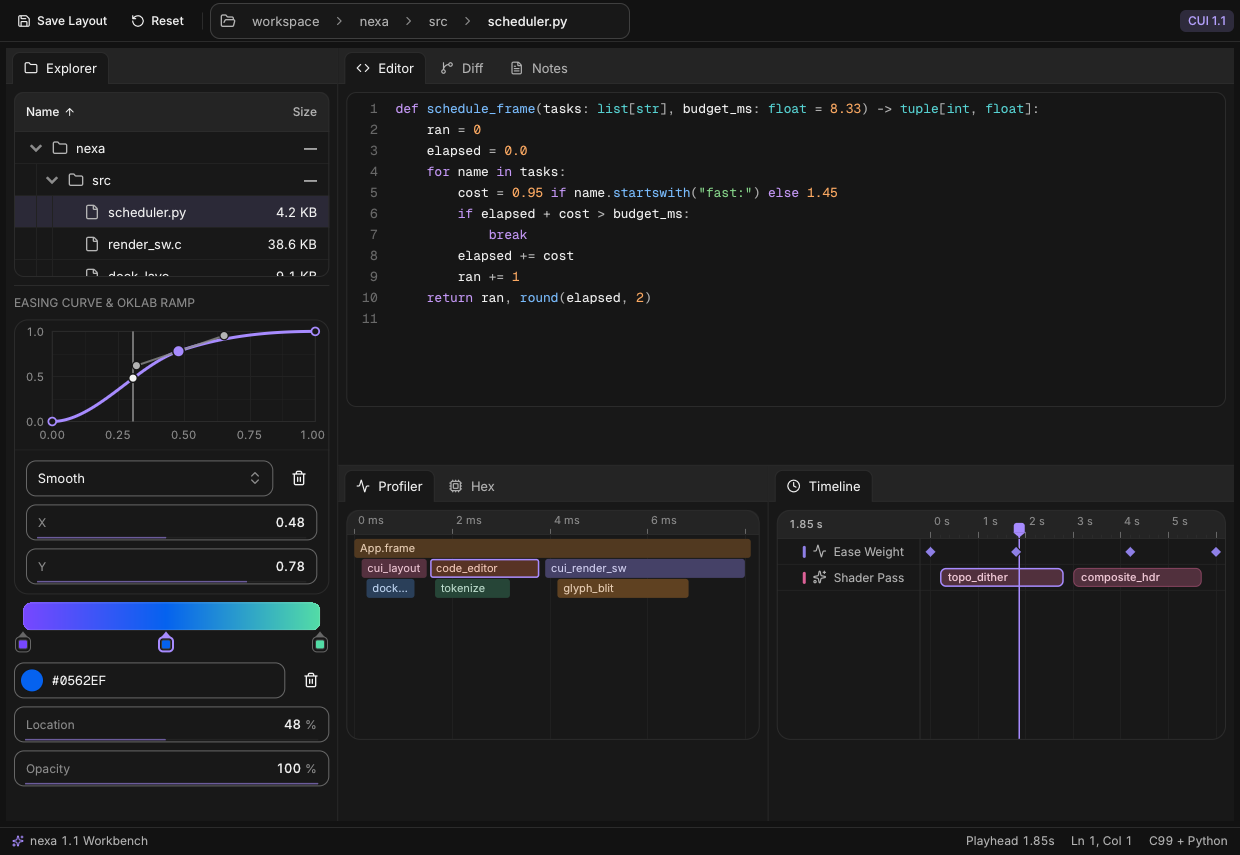
- Sub-megabyte native core: 820 KB stripped shared library (
libnexa_cui) including embedded Inter, Geist Mono, 168 Lucide icons, OpenGL 3.3 + multi-threaded CPU software rasterizer, PNG/JPEG loader, optional BiDi & Arabic OpenType text shaping (--rtl), and OS windowing (660 KB in minimal LTO builds). - Zero runtime Python dependencies: Pure Python standard library (
ctypesABI releasing the GIL on every native call,__slots__value types, ~48 ms warm import). - 160+ components across 20 domains (synced with CUI v1.1): Flexbox & grid layouts, multi-split docking workspaces (
dockspace), hierarchicaltree_table&path_bar, rich CommonMark/GFMmarkdown, multi-linecode_editor, side-by-sidediff_view,hex_view, profilerflame_graph,curve_editor, OKLabgradient_editor, NLEtimeline_editor, virtualized 1M-row lists & editable data grids, 16 chart types, Kanban/Gantt/week calendars, AI agent/chat widgets, media, motion text, property inspector, Bezier node editor, and custom vector canvas. - Value-returning Pythonic API with full control: Widgets accept and return plain Python values (
str,bool,int,float,Color,Date) while exposing transition flags (changed,submitted,focused,blurred), hit rects, persistentstate_buffer, customPlatformhooks, andCustomRendererGPU callbacks. - Functional, Procedural, and OOP styles: Write concise scripts with
import nexa as ui, modular procedural apps withctx: ui.UI, or multi-screen architectures withApplication,Router,View,Component, andStore. - First-class Concurrency,
asyncio, & Networking: 0%-CPU idle sleep with OS-level cross-threadapp.wake(),BackgroundRunner(submit,stream,fetch_json,fetch_bytes), MPSCChannel, cooperativeawait app.run_async(...), and threadedAsyncBridge.
Documentation & Step-by-Step Guides
Read the interactive documentation at x017.github.io/yapps or browse docs/:
- Zero to Hero: The Complete
nexaFull Tutorial — Comprehensive 11-module masterclass taking you from your first 15-line native window through Flexbox/Grid layouts, forms & pickers, desktop chrome, 50k virtualized grids, code & diff editors, studio canvases, OOP architecture, OKLCH theming, async worker streams, headlesspytest, and building Pulse Studio (examples/zero_to_hero.py). - Getting Started & Core Mental Model — Installation, value-returning immediate mode, widget IDs &
id_scope, conditional vs. unconditionalwithscopes, and transition flags. - Tutorial: Functional & Procedural Coding — Top-level
ui.run(draw), flexbox/grid sizing (FIT,FILL,GROW,PX,PCT), procedural helper decomposition, manualwhile app.frame():loops, and a complete Budget Tracker project. - Tutorial: Object-Oriented (OOP) Architecture —
Application, reusable auto-ID-scopedComponents, multi-viewRouter&Viewnavigation, reactiveStore[T], and a complete Incident Console project. - Theming, Accents, Tones, Colors & Typography — All 8 built-in
Accentpalettes, 9 semanticTones, custom OKLCH/hexTokenoverrides,.ttffont loading, and 168Iconconstants. - Concurrency, Multithreading,
asyncio, & Networking —BackgroundRunner, token streaming,Channel,LogBuffer,await app.run_async(...), andAsyncBridge. - Complete 160+ Component Reference — Signatures and usage across all 20 widget domains.
- Custom Canvas, Headless Testing, Custom GPU & Packaging — Vector
canvas, automatedpytestUI testing, Vulkan/Metal/wgpuDrawData, minimal LTO builds, and PyInstaller/Nuitka freezing.
Installation
Install prebuilt wheels from PyPI (imported in Python as import nexa as ui):
pip install nexa-ui
Or install directly from a local git checkout:
pip install -e .
Only a C99 compiler (gcc, clang, or MSVC cl) is required when building from source—no python3-dev headers, CMake, or libx11-dev packages are needed (libX11.so.6 is loaded dynamically via dlopen on Linux, with automatic headless SoftwareRenderer fallback on CI/servers without a display).
Quickstart: Functional, OOP, & Headless Styles
Every snippet below is 100% standalone and runnable as-is.
1. Functional / Procedural Style
import nexa as ui

def main() -> None:
    count = 0
    name = "world"

    def draw() -> None:
        nonlocal count, name
        with ui.column(width=ui.FILL, height=ui.FILL, pad=24, gap=14, bg=ui.Color.BACKGROUND):
            ui.heading(f"Hello, {name or 'stranger'}!", level=1)
            name = ui.input("name", name, placeholder="Type your name...", clearable=True)
            with ui.row(gap=10, align=ui.Align.CENTER):
                if ui.button("Increment", variant=ui.ButtonVariant.PRIMARY, icon=ui.Icon.PLUS):
                    count += 1
                ui.badge(f"Count: {count}", tone=ui.Tone.ACCENT)

    ui.run(draw, title="Hello — nexa", width=560, height=340, accent=ui.Accent.BLUE)

if __name__ == "__main__":
    main()
2. Object-Oriented Style (Application, Router, View, Component, Store)
import nexa as ui

class CounterCard(ui.Component):
    def __init__(self, key: str, title: str) -> None:
        super().__init__(key)
        self.title = title
        self.count = 0

    def build(self, ctx: ui.UI) -> None:
        # Automatic ID-scope isolation: multiple instances never collide!
        with ctx.card(pad=18, gap=10, width=ui.GROW(1)):
            ctx.heading(self.title, level=4)
            if ctx.button("Increment", icon=ui.Icon.PLUS, variant=ui.ButtonVariant.PRIMARY):
                self.count += 1
            ctx.secondary(f"Value: {self.count}")

class DashboardApp(ui.Application):
    def __init__(self) -> None:
        super().__init__("OOP Demo", width=720, height=380, theme=ui.ThemeMode.DARK, accent=ui.Accent.GREEN)

    def setup(self) -> None:
        self.left = CounterCard("left", "Pipeline A")
        self.right = CounterCard("right", "Pipeline B")

    def build(self, ctx: ui.UI) -> None:
        with ctx.row(width=ui.FILL, height=ui.FILL, pad=24, gap=16, bg=ui.Color.BACKGROUND):
            self.left(ctx)
            self.right(ctx)

if __name__ == "__main__":
    DashboardApp().run()
3. Explicit Headless / Custom GPU Control
import nexa as ui

with ui.SoftwareRenderer(threads=4) as sw:
    with ui.UI(width=800, height=450, theme=ui.ThemeMode.DARK, accent=ui.Accent.VIOLET, renderer=sw) as ctx:
        with ctx.frame(dt=1 / 60):
            with ctx.column(width=ui.FILL, height=ui.FILL, pad=24, gap=12, bg=ui.Color.BACKGROUND):
                ctx.metric("Throughput", "124,800 req/s", delta=14.2, spark=[82, 91, 96, 110, 124])

        # Save directly to PNG or inspect raw 64-byte SDF vertices & draw commands
        ctx.render_to_png("snapshot.png")
        dd = ctx.draw_data()
        print(dd.vertex_count, dd.index_count, len(dd.commands()))
Built-In Theme Accents (ui.Accent)
nexa includes 8 perceptually balanced OKLCH accents (ThemeMode.LIGHT & ThemeMode.DARK):
| Accent Enum | Dark Hex | Light Hex |
|---|---|---|
ui.Accent.NEUTRAL |
#e8e8e8 |
#1d1d1d |
ui.Accent.VIOLET |
#a78bff |
#7747ff |
ui.Accent.BLUE (default) |
#6ba3ff |
#0562ef |
ui.Accent.GREEN |
#53dca6 |
#00864b |
ui.Accent.AMBER |
#ffcb62 |
#f3ad20 |
ui.Accent.ORANGE |
#ffad5e |
#c25300 |
ui.Accent.CORAL |
#ff9386 |
#d1403a |
ui.Accent.ROSE |
#ff8bc5 |
#d23286 |
Need a custom hex or OKLCH brand accent? Set ctx.theme[ui.Token.ACCENT] = ui.Color.hex("#14b8a6") at any time—see Theming & Styling.
Concurrency, asyncio, & Background Streaming
Cooperative Single-Thread asyncio
import asyncio
import nexa as ui

async def main() -> None:
    status = "Connecting..."
    app = ui.App("Async Demo", width=640, height=320, theme=ui.ThemeMode.DARK, accent=ui.Accent.VIOLET)

    async def worker() -> None:
        nonlocal status
        await asyncio.sleep(0.2)
        status = "Live stream active"
        app.wake()

    task = asyncio.create_task(worker())
    try:
        await app.run_async(lambda ctx: ctx.heading(status, level=2))
    finally:
        task.cancel()
        app.close()

if __name__ == "__main__":
    asyncio.run(main())
Background Worker Pool & Token Streaming (BackgroundRunner)
import time
import nexa as ui

def main() -> None:
    app = ui.App("Streaming Demo", width=640, height=320, theme=ui.ThemeMode.DARK)
    runner = ui.BackgroundRunner.for_app(app)
    chunks: list[str] = []

    def generate_tokens():
        for word in ["Zero-bloat", "native", "UI", "streaming", "in", "Python!"]:
            time.sleep(0.05)
            yield word

    def draw(ctx: ui.UI) -> None:
        with ctx.column(width=ui.FILL, height=ui.FILL, pad=24, gap=14, bg=ui.Color.BACKGROUND):
            if ctx.button("Stream Response", icon=ui.Icon.SPARKLES, variant=ui.ButtonVariant.PRIMARY):
                chunks.clear()
                runner.stream(generate_tokens, on_item=chunks.append)
            ctx.text(" ".join(chunks) or "Click Stream Response to begin.")

    try:
        app.run(draw)
    finally:
        runner.close()
        app.close()

if __name__ == "__main__":
    main()
Examples & Tests
Run any of the 13 complete example apps in examples/:
| Example | Highlights |
|---|---|
examples/zero_to_hero.py |
0-to-Hero Capstone (Pulse Studio): OOP Application + Component + Store, dockspace, path_bar, tree_table, code_editor, diff_view, GFM markdown, line_chart, flame_graph, BackgroundRunner & command_palette |
examples/workbench.py |
New in 1.1: Multi-split dockspace, path_bar, tree_table, code_editor, diff_view, markdown, flame_graph, curve_editor, gradient_editor, timeline_editor & hex_view |
examples/hello.py |
Functional quickstart, input, switch, toast, theme_toggle |
examples/notes.py |
Split-view notes editor, search, tags, dialog, command_palette (Ctrl+K) |
examples/settings.py |
OOP Application + Router + View + Component + all 8 Accent presets |
examples/dashboard.py |
KPI number_roll, sparkline, line_chart, donut_chart, 250-row data_grid |
examples/assistant.py |
AI workspace + BackgroundRunner.stream, reasoning, tool_call, voice_orb |
examples/tracker.py |
Drag-and-drop kanban board, gantt timeline, week_calendar, presence |
examples/finance.py |
Live ticker, odometer counter, treemap, sankey, money_input |
examples/mail.py |
swipe_item inbox, chip filters, comment, dropzone, slide-over sheet |
examples/music.py |
carousel, now_playing transport, scrubbable waveform, reorder queue |
examples/gallery.py |
IDE menu_bar/toolbar/doc_tabs, Bezier node_editor, canvas, inspector, LogBuffer |
examples/async_network.py |
Cooperative await app.run_async + loopback HTTP server + Channel |
Render headless screenshots on any machine or CI runner:
NEXA_HEADLESS=1 CUI_SCREENSHOT=dashboard.png CUI_SCREENSHOT_FRAMES=12 python3 examples/dashboard.py
Run the test suite:
pytest -v
License
MIT License. Bundled fonts (Inter, Geist Mono, Lucide) and single-header libraries (stb_*) are permissive open-source; see LICENSE, THIRD_PARTY.md, and RELEASING.md.
1 maintainer

Metadata
1 maintainer
Release files for nexa-ui 1.1.0
For a detailed explanation of source distributions (sdists) and built distributions (wheels), please see the package formats documentation.
Built distributions (wheels)
| File | Interpreter | ABI | Platform | Actions Reset |
|---|---|---|---|---|
| nexa_ui-1.1.0-py3-none-musllinux_1_2_x86_64.whl | Python 3 | none | Linux musl 1.2+ x86-64 | Details for nexa_ui-1.1.0-py3-none-musllinux_1_2_x86_64.whl |
| nexa_ui-1.1.0-py3-none-manylinux_2_27_x86_64.manylinux_2_28_x86_64.whl | Python 3 | none | Linux glibc 2.28+ x86-64, Linux glibc 2.27+ x86-64 | Details for nexa_ui-1.1.0-py3-none-manylinux_2_27_x86_64.manylinux_2_28_x86_64.whl |
Total release size: 1.3 MB
Release files / nexa_ui-1.1.0-py3-none-musllinux_1_2_x86_64.whl
| Download URL | nexa_ui-1.1.0-py3-none-musllinux_1_2_x86_64.whl |
|---|---|
| Size | 654.2 kB |
| Tags | Linux musl 1.2+ x86-64 Python 3 |
|
SHA-256 checksum How to use checksums |
e9b4b413a136cb790bfe5c517ef61cd8db9e71bcc23b996e0dd1698a62e5b0b4
|
|
BLAKE2b-256 checksum How to use checksums |
0c3a9601f353bf7460bb045b0a65e77ee507a9326ecb6c47d2af33a0971e1033
|
| Upload date | |
|
Uploaded using Trusted Publishing? What is trusted publishing? |
No |
| Uploaded via |
twine/7.0.0 CPython/3.12.12
|
Release files / nexa_ui-1.1.0-py3-none-manylinux_2_27_x86_64.manylinux_2_28_x86_64.whl
| Download URL | nexa_ui-1.1.0-py3-none-manylinux_2_27_x86_64.manylinux_2_28_x86_64.whl |
|---|---|
| Size | 649.2 kB |
| Tags | Linux glibc 2.27+ x86-64 Linux glibc 2.28+ x86-64 Python 3 |
|
SHA-256 checksum How to use checksums |
c3696a72249f01258352de9ffbe025d53983f19b7b38aa6c967cf14e07c62662
|
|
BLAKE2b-256 checksum How to use checksums |
ebc7ac0713fc0700d9632adb2abb992a4fe986e6132f941bfe41f88ac9684d7e
|
| Upload date | |
|
Uploaded using Trusted Publishing? What is trusted publishing? |
No |
| Uploaded via |
twine/7.0.0 CPython/3.12.12
|
Security for nexa-ui 1.1.0
Provenance
Provenance describes where a file came from. On PyPI, provenance is shared via attestations, which provide a verifiable record of the build or publishing details. View details, limitations and caveats.
No provenance found
None of the files in this release were uploaded with provenance metadata.
A note on package security
PyPI is a repository for distributing packages, not a service for auditing them. While third-party security researchers and our staff do their best to detect and remove malicious packages, PyPI cannot guarantee the quality, security or suitability of any given package.
To learn more about protecting yourself from malicious actors, visit our package security documentation.













