
This project has been archived by its maintainers, and is no longer receiving any updates.
♡ Nexium Google
Welcome to the documentation for the nexium_google module. This module provides functionality for interacting with various Google services, including Spreadsheet and YouTube.
Table of Contents:
Introduction
The nexium_google module is a powerful tool for interacting with various services using Python. This module is asynchronous and leverages the Google API to provide an abstract interface for performing operations with Google services.
Installation
To install the nexium_google module, you can use pip.
pip install nexium_google
Spreadsheet
Setting up a Spreadsheet instance
At this point, make sure you have your Google Cloud Service account credentials and the necessary permissions to access Google Sheets. You will need a JSON file with your credentials as well as the Google Sheet ID.
Now, we need to initialize a Spreadsheet instance using your service account and sheet ID.
from nexium_google.utils import ServiceAccount
from nexium_google.spreadsheet import Spreadsheet

google_sheet = Spreadsheet(
   service_account=ServiceAccount(filename='creds.json'),
   id_='your-spreadsheet-id',
   models=[],
)
Configuring a Row model
The BaseRowModel functionality allows you to define models for the structure of your Google Sheet, similar to how ORM platforms work with databases. This includes defining columns and their types in Python, such as:
- String
- Integer
- Float
- DateTime
- Boolean
At this stage, ensure that the corresponding sheet in Google Sheets is already created. Additionally, the title in the Field must match the column name exactly.
from nexium_google.spreadsheet import BaseRowModel, Field, FieldType

class UserRowModel(BaseRowModel):
    __sheet__ = 'Users'
    id = Field(title='ID', type_=FieldType.INTEGER, nullable=False)
    fullname = Field(title='Full Name', type_=FieldType.STRING, nullable=False)
    salary = Field(title='Salary', type_=FieldType.FLOAT)
    created_at = Field(title='DateTime', type_=FieldType.DATETIME, format_='%Y-%m-%d %H:%M')
Once you've created all the necessary models, add them to the models field in the Spreadsheet instance you previously initialized. This will link the sheets to your table.
Usage example
from asyncio import run, sleep
from datetime import datetime

from nexium_google.utils import ServiceAccount
from nexium_google.spreadsheet import Spreadsheet
from nexium_google.spreadsheet import BaseRowModel, Field, FieldType


class UserRowModel(BaseRowModel):
    __sheet__ = 'Users'
    id = Field(title='ID', type_=FieldType.INTEGER, nullable=False)
    fullname = Field(title='Full Name', type_=FieldType.STRING, nullable=False)
    salary = Field(title='Salary', type_=FieldType.FLOAT)
    created_at = Field(title='DateTime', type_=FieldType.DATETIME, format_='%Y-%m-%d %H:%M')


google_sheet = Spreadsheet(
    service_account=ServiceAccount(filename='creds.json'),
    id_='your-spreadsheet-id',
    models=[UserRowModel],
)


async def main():
    # Create new user
    user = UserRowModel(
        id=3,
        fullname='Yegor Yakubovich',
        salary=1000000,
        created_at=datetime.now(),
    )
    await user.create()
    await sleep(2)

    # Get all users
    for user in await UserRowModel().get_all():
        # Print data
        print(f'Full Name: {user.fullname}, Salary: {user.salary}')

        # Update salary
        if user.id == 3:
            continue

        user.salary = 0
        await user.update()
        await sleep(1)


if __name__ == '__main__':
    run(main())
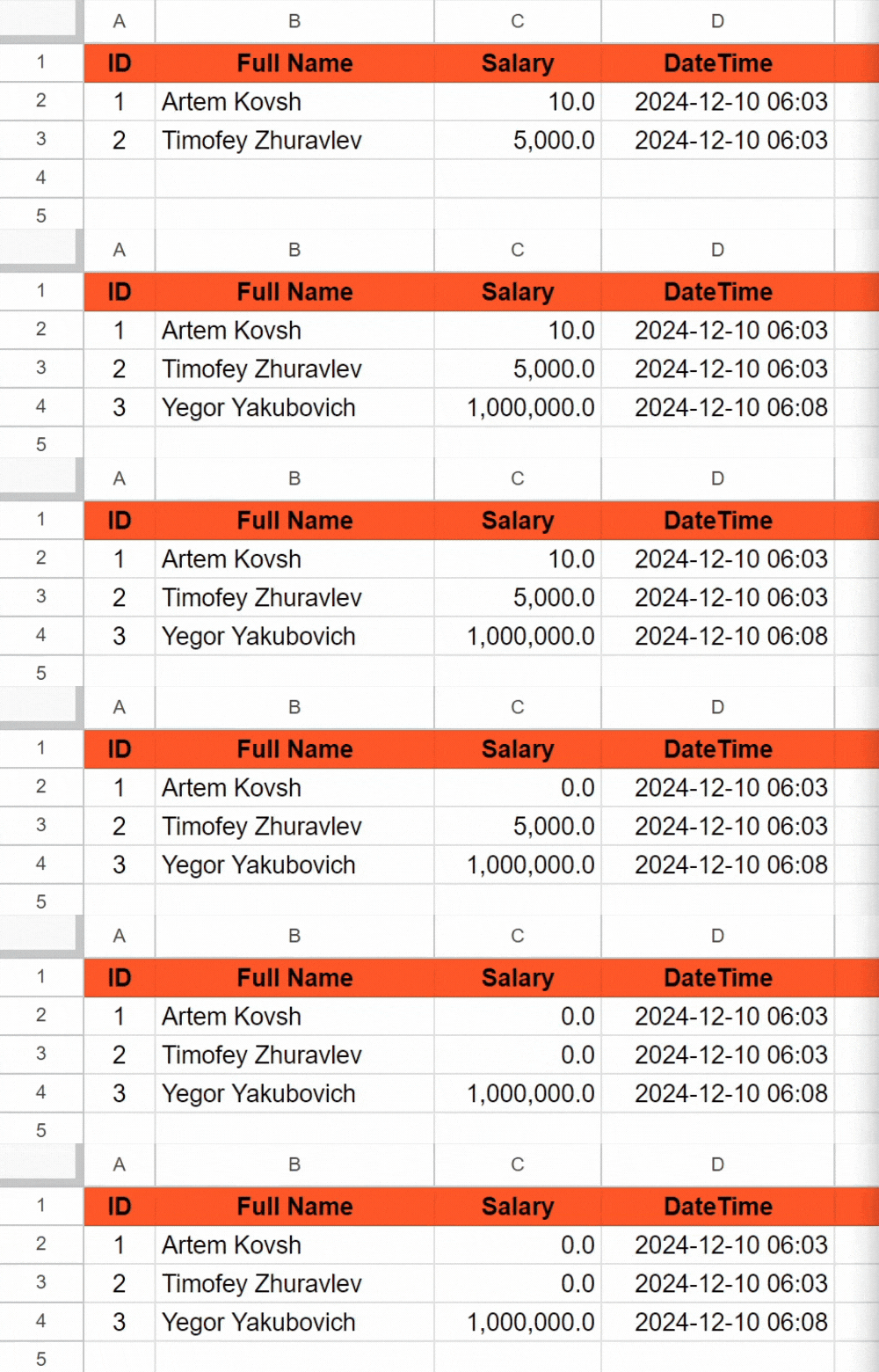
The example below demonstrates an algorithm where a new user is added, followed by a for loop iterating through all users to update their salaries.
YouTube
In Development
Conclusion
The nexium_google module's Spreadsheet functionality provides a powerful and flexible way to manage Google Spreadsheets in Python. By defining models and leveraging asynchronous methods, you can efficiently perform CRUD operations on your spreadsheets.
Feel free to explore and expand the capabilities of the module to suit your specific needs. Good luck! ♡
License
This project is licensed under the MIT License. See the LICENSE file for details.
Copyright © 2024 Yegor Yakubovich
1 maintainer

Metadata
1 maintainer
Release files for nexium-google 0.1.1
For a detailed explanation of source distributions (sdists) and built distributions (wheels), please see the package formats documentation.
Source distribution (sdist)
| File | Size | Uploaded | |
|---|---|---|---|
| nexium_google-0.1.1.tar.gz | 9.6 kB | Details |
Built distribution (wheel)
| File | Interpreter | ABI | Platform | Reset |
|---|---|---|---|---|
| nexium_google-0.1.1-py3-none-any.whl | Python 3 | none | any | Details |
Total release size: 19.3 kB
Release files / nexium_google-0.1.1.tar.gz
| Download URL | nexium_google-0.1.1.tar.gz |
|---|---|
| Size | 9.6 kB |
| Tags | Source |
|
SHA-256 checksum How to use checksums |
4b0a305d11841cb41c88a31b75717432dc91ae2d496b31d1c2f952ad151d9172
|
|
BLAKE2b-256 checksum How to use checksums |
439f22d090f9903a461cc67e6ddb85873693de188b2417e20092c65e7ec9248e
|
| Upload date | |
|
Uploaded using Trusted Publishing? What is trusted publishing? |
No |
| Uploaded via |
twine/6.0.1 CPython/3.13.2
|
Release files / nexium_google-0.1.1-py3-none-any.whl
| Download URL | nexium_google-0.1.1-py3-none-any.whl |
|---|---|
| Size | 9.6 kB |
| Tags | Python 3 |
|
SHA-256 checksum How to use checksums |
33c850977720c948112851e22db55eee703e1614f5e3bfd090c03021802942c5
|
|
BLAKE2b-256 checksum How to use checksums |
5629a1deb0b2af01372cfb36d00e6235602b47b8f34e9d519256a93df4af3c94
|
| Upload date | |
|
Uploaded using Trusted Publishing? What is trusted publishing? |
No |
| Uploaded via |
twine/6.0.1 CPython/3.13.2
|














