
nextion-tools
Tools for Nextion HMI displays: the Nextion Editor's project files, the TFTs it compiles, and an emulator of the display itself for testing the firmware that drives one.
Try it
git clone https://github.com/jamesmulcahy/nextion-tools
cd nextion-tools
pip install -e ".[images]"
python demo/run.py
Then open http://127.0.0.1:8080/ and use the panel with your mouse.
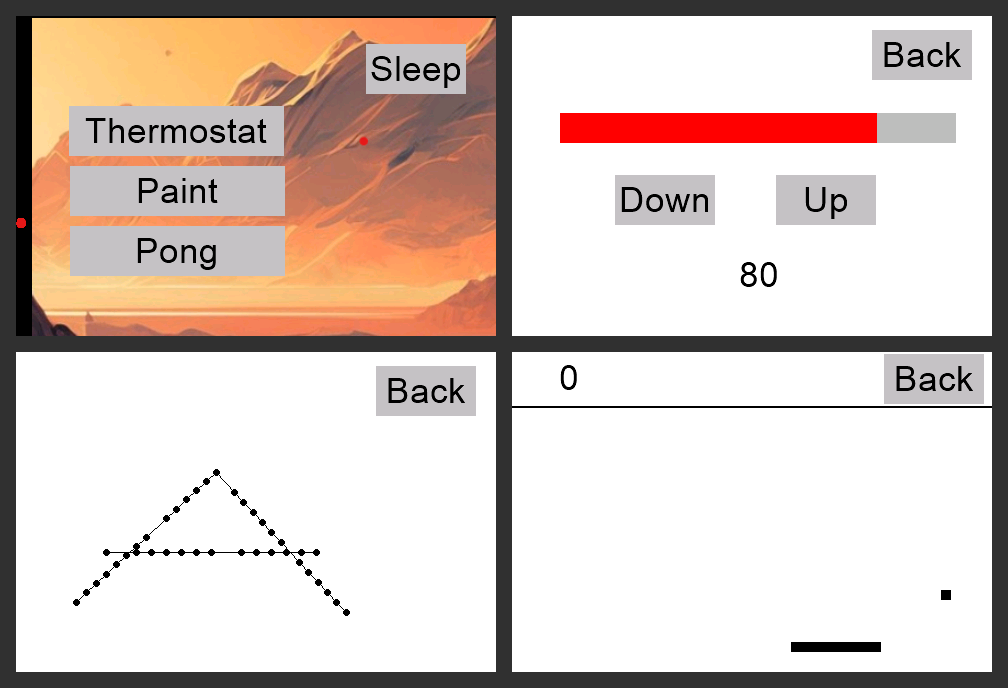
That is an emulated Nextion display running a project made in the Nextion Editor
(demo/demo.HMI), with its own touch handling, scripts and timers, and a small Python program
(demo/companion.py) as the microcontroller behind it: the menu's buttons change page, the
thermostat's bar turns red near the top, Paint draws where you drag, and Pong plays against a
paddle that follows the pointer. The same companion drives a real display flashed with
demo/demo.tft. See The demo and demo/README.md.
| Module | What |
|---|---|
nextion_tools.hmi |
.HMI projects: pages, components, ids, geometry, attributes, event code, Program.s; numeric edits with re-stamping |
nextion_tools.fonts |
.zi fonts: metrics and glyph bitmaps, and which font a component's font index means |
nextion_tools.images |
pictures as RGB arrays, and the panel's RGB565 |
nextion_tools.tft |
a compiled .tft: its picture table, checksums and orientation, and same-size picture swaps |
nextion_tools.crc |
the CRC behind TFT checksums and HMI page stamps |
nextion_tools.render |
draws a page as the display shows it, from the HMI and the values its components hold |
nextion_tools.emu |
an emulated display, driven by the project's HMI (below) |
pip install nextion-tools            # hmi, tft, crc and the emulator: no dependencies
pip install nextion-tools[images]    # fonts, pictures, rendering and the viewer: numpy and Pillow
pip install nextion-tools[serial]    # the emulator on a real serial port: pyserial
from nextion_tools.hmi import Project

project = Project.load("gui.HMI")
home = project.page("home")                 # KeyError if there is none; find_page() gives None
print(home.id, [(c.id, c.name, c.kind, c.rect) for c in home.components])
print(home.component("tm0").events["timer"])
print(project.program)                      # Program.s, line by line
The format notes are in the module docstrings, and were checked against files the Editor saved.
The demo
demo/ holds a small project made in the Nextion Editor (demo.HMI, and demo.tft compiled
from it) and companion.py, a Python program that plays the MCU. python demo/run.py runs the
whole thing (the emulated display, the companion and the browser viewer) in one process, and
takes --http PORT and --rotation 90 (the screen as the LCD itself holds it).
python demo/companion.py --serial /dev/ttyUSB0 --fps 8 drives a real display running
demo.tft, which needs the serial extra. demo/README.md has what each page does and what
the project turned up.
Nextion and the Nextion Editor are ITEAD's; this project is not affiliated with them.
The emulator
An emulated Nextion HMI display, for testing the firmware that drives one. Point the MCU's UART
at it (QEMU's -serial tcp:, a pty, or a real serial port). It executes what it is sent, keeps a
model of what the screen would show, replies as a real display does, and lets a test act as the
user.
from nextion_tools.emu import Display, TcpServer
from nextion_tools.hmi import Project

display = Display(TcpServer(port=4000), hmi=Project.load("gui.HMI"))  # qemu ... -serial tcp:127.0.0.1:4000
display.wait_for_page("home")
display.press("h_ceiling")                  # a finger on it, by name or id: display.press(22)
display.wait_for_value("home.room.txt", "Kitchen")
assert not display.errors                   # nothing the display would have rejected
Or from a shell, to watch what firmware sends:
python -m nextion_tools.emu --tcp 4000
python -m nextion_tools.emu --pty                 # prints /dev/pts/N
python -m nextion_tools.emu --serial /dev/ttyUSB0 # needs pyserial: pip install nextion-tools[serial]
python -m nextion_tools.emu --tcp 4000 --hmi gui.HMI   # with the project's pages and code
python -m nextion_tools.emu.script gui.HMI        # can every event of this HMI be run?
What it models
Replies follow what an NX4832T035 (the Sonoff NSPanel's display) was measured to do, which differs from Nextion's documentation in places:
| Instruction | bkcmd=3 |
bkcmd=0 |
|---|---|---|
| assignment | 01 |
nothing |
get x |
71 + 4 bytes (or 70 + text), no 01 |
the same |
printh … |
the bytes, no 01 |
the same |
| unknown component, variable, or bad syntax | 1a (never 02/1b) |
nothing |
page / ref |
01 at once, then the redraw blocks the next instruction ~400 ms |
— |
delay=N |
01 when it ends |
— |
bkcmd starts at 2, as on a display that has just powered on, and power_cycle() puts it back.
Ideal or flow model. By default every instruction executes the moment it arrives, so tests
see exactly what the firmware meant to draw. With flow_model=True the display behaves as the
real one does:
- input arrives at line rate (QEMU's UART does not pace writes);
- it waits in a buffer of 1088 bytes;
- the display stalls on page changes,
refanddelay; - a burst that overruns the buffer during a stall loses commands (
display.lost), and the display sends0x24when it resumes.
tests/emu/test_calibration.py replays the hardware measurements against the model, so it cannot
drift from them unnoticed.
TFT uploads (whmi-wri, whmi-wris): the display acknowledges 4096-byte chunks, answers
v1.2's first chunk with a jump, and keeps the image in display.flash. It can be told to
misbehave: slow, dropped or duplicated acks, jumps, stray bytes, a power cycle mid-upload.
The HMI. Given the project (hmi=Project.load(...), read straight from the Nextion Editor's
.HMI), the display knows what exists and resolves names as the real one does:
comp.attrwithout a page means the current page;page.comp.attrreaches another page only for a global component;- the attribute must be one the component has, and a literal must suit it (text or number);
- page and component ids, for
page Nand touch events, are the HMI's; getanswers the HMI's value for anything not yet assigned (display.value(key));- loading a page resets its local components;
- the display starts on page 0.
Anything that does not resolve fails with 1a and is recorded in display.errors. On a real
display running bkcmd=0, that is a label that is silently never drawn. Without an HMI every
name is accepted. resolver= overrides the HMI with a function of your own.
The TFT's own code. With an HMI, the display also runs the code in it (emu/script.py):
Program.satboot(): its globals, thenpage 0, whose load code may print a banner;- each page's
unload,loadandloadendon a page change, whoever asked for it; - the current page's timers, every
timms whileenis set, on the display's clock; - touches.
touch_down(x, y)/touch_move/touch_upare a finger on the screen, andpress(name),slide(name, value),drag,swipeandtapare built on them. The touch lands on the visible component drawn last at that point (else the page). It sends the 0x65 edges the component'ssendkeyasks for, then runs the component'sdown/up(and a slider'sslide), then the page's touch capture's, withtch0..3and the capture'svalset as the display sets them. Withsendxy=1each press and release is also reported with its coordinates (0x67). - sleep: with
sleep=1the screen is dark and touches reach nothing; withthup=1the first one wakes the display (0x87) and is used up doing it.
All of an HMI's code is compiled when the display loads it, and code outside what the
interpreter supports is refused then (UnsupportedCode, naming the event and line).
python -m nextion_tools.emu.script gui.HMI lists what an HMI uses and what it cannot run. An override
(overrides={"page.component.event": fn}, logged at startup) runs Python instead of an event's
code; scripts=False turns the code off, and touches are then bare 0x65 frames
(send_touch_event). A statement that fails when it runs (an unknown name, say) is reported as
an instruction would be (1a, display.errors, display.script_errors), and the code carries on.
For tests that need timers to fire exactly, pass clock=ManualClock(), then clock.advance(s)
and display.tick(). expire_timer(name) runs a timer out now, whatever the clock.
Observed on a real NSPanel: assigning en=1 to a running timer restarts its countdown (tapping
keeps NSPanel Manager's screensaver off, and each tap runs sleep_display.en=1). The Editor's
Debug simulator does not restart it, so it is not a guide to this. Assigning tim restarts it
too, which is not observed either way.
Not measured on hardware yet, so each is a choice (see emu/script.py and display.py):
- the order on a touch: the 0x65 frame, then the component's code, then the touch capture's;
&&and||stop at the first operand that decides; a failed condition skips itsif;- an expression mixing
+/-with*//is refused, since precedence is not known; pageends the event that ran it;- a slider's value is linear in the touch position, ignoring the thumb's width;
- whether a failed statement in event code sends
1aatbkcmd2 and 3 (assumed yes); sendxyand sleep follow Nextion's instruction set: 0x67 on press and release only (whether a drag streams them is not known), its order before the 0x65 frame, and the waking touch going nowhere.
What the screen shows. display.snapshot() draws the current page as a numpy array, and
display.save_png(path) saves it (both need [images]). They draw from the HMI and what the
display holds now: pictures, crop pictures, text in the HMI's own fonts, buttons in their
pressed or second state, sliders, progress bars, hidden components left out, and the drawing
instructions sent since the page was shown (fill, cls, pic, xstr, line, draw,
cir, cirs). A sleeping display is black. See render.py for what is and is not drawn.
In a browser. python -m nextion_tools.emu.viewer --hmi gui.HMI --tcp 4000 runs a display
and serves it on http://127.0.0.1:8080/. A press on the screen is a finger going down there, a
drag moves it, and the side panel shows the page, the last instructions, rejected ones, and the
input buffer when the flow model is on. Viewer(display) attaches one to a display a test or rig
already has.
Orientation. A page's coordinates are the view of someone looking at a panel mounted as its
TFT intends (NSPanel's US pages are 320 x 480, its EU pages 480 x 320), and touches use the same
frame, so pictures and the viewer are upright by default. Display(rotation=90) turns snapshots
and the viewer clockwise, and maps clicks back, to show a panel as it actually hangs.
render.native_rotation(tft.orientation(data)) gives the rotation that shows the LCD's own
frame, the one a TFT stores its pictures in: a TFT made at 90 holds them turned 90 degrees
clockwise (demo/demo.tft). Project.direction is the same setting, read from the HMI.
Fonts from recent Editors are stored turned that way too, and are read upright.
Not modelled (yet)
- Pixel-exact rendering. Pictures and glyphs are exact; borders, the Editor's compressed pictures (drawn from the file they were imported from) and some component types are not.
- Drawing instructions in event code (
xstr,fill, ...) andclick,tsw, loops: the HMIs tested do not use them, so they are refused rather than guessed at.
Tests
pip install -e ".[images,serial,test]"
python -m pytest
Most tests build small projects in code (tests/hmi_builder.py), and some use the demo's
files, which the Editor made. The rest need NSPanel Manager's project and TFT, and are skipped
unless given them:
NEXTION_TOOLS_HMI=path/to/gui.HMI NEXTION_TOOLS_TFT=path/to/gui.tft python -m pytest
License
MIT; see LICENSE.
1 maintainer

Metadata
1 maintainer
Release files for nextion-tools 0.1.0
For a detailed explanation of source distributions (sdists) and built distributions (wheels), please see the package formats documentation.
Source distribution (sdist)
| File | Size | Uploaded | Provenance | |
|---|---|---|---|---|
| nextion_tools-0.1.0.tar.gz | 75.2 kB | With provenance | Details |
Built distribution (wheel)
| File | Interpreter | ABI | Platform | Reset |
|---|---|---|---|---|
| nextion_tools-0.1.0-py3-none-any.whl | Python 3 | none | any | Details |
Total release size: 145.2 kB
Release files / nextion_tools-0.1.0.tar.gz
| Download URL | nextion_tools-0.1.0.tar.gz |
|---|---|
| Size | 75.2 kB |
| Tags | Source |
|
SHA-256 checksum How to use checksums |
6646af4921a653a53ce735422453dbfc225d5077db4a6e74e6a6687a789acee5
|
|
BLAKE2b-256 checksum How to use checksums |
8d3952854e310425bf07d1c90f50ba17e38bae817d4b5375df2253672ed5529d
|
| Upload date | |
|
Uploaded using Trusted Publishing? What is trusted publishing? |
Yes |
| Uploaded via |
twine/6.1.0 CPython/3.12.8
|
Provenance
Provenance describes where a file came from. On PyPI, provenance is shared via attestations, which provide a verifiable record of the build or publishing details. View details, limitations and caveats.


PyPI Publish Attestation
PyPI verified that this artifact, at this checksum, originated from the publisher listed below.
Signed by GitHub Actions, verified by PyPI on Oct 25, 2026.
Transparency logRelease files / nextion_tools-0.1.0-py3-none-any.whl
| Download URL | nextion_tools-0.1.0-py3-none-any.whl |
|---|---|
| Size | 70.0 kB |
| Tags | Python 3 |
|
SHA-256 checksum How to use checksums |
5e51be01e5a16eb5c355995a7cb2b4e8f15fc70a140c02fa97cc8d4d7af894b6
|
|
BLAKE2b-256 checksum How to use checksums |
b451a4161e23d3a78a2d34c5b720d1cf86f9000d799eedf708d3c66535e3006b
|
| Upload date | |
|
Uploaded using Trusted Publishing? What is trusted publishing? |
Yes |
| Uploaded via |
twine/6.1.0 CPython/3.12.8
|
Provenance
Provenance describes where a file came from. On PyPI, provenance is shared via attestations, which provide a verifiable record of the build or publishing details. View details, limitations and caveats.
PyPI Publish Attestation
PyPI verified that this artifact, at this checksum, originated from the publisher listed below.
Signed by GitHub Actions, verified by PyPI on Oct 25, 2026.
Transparency logSecurity for nextion-tools 0.1.0
Provenance
Provenance describes where a file came from. On PyPI, provenance is shared via attestations, which provide a verifiable record of the build or publishing details. View details, limitations and caveats.
Full provenance
All 2 files in this release have been uploaded with provenance metadata.
Attestation for nextion_tools-0.1.0.tar.gz
PyPI Publish Attestation
PyPI verified that this artifact, at this checksum, originated from the publisher listed below.
Signed by GitHub Actions, verified by PyPI on Oct 25, 2026.
Transparency logA note on package security
PyPI is a repository for distributing packages, not a service for auditing them. While third-party security researchers and our staff do their best to detect and remove malicious packages, PyPI cannot guarantee the quality, security or suitability of any given package.
To learn more about protecting yourself from malicious actors, visit our package security documentation.













