
Nexura
Nexura is a typed Python SDK for operational agents and approval-gated workflows, with an optional local REST service, TypeScript API client and browser Studio. Use nexura-agents for the standalone agent SDK (just httpx and pydantic), or nexura-runtime for durable workflows, RAG, evaluations and the service. Python runs the workflows; Studio and the TypeScript client use the same API.
Review the exact action
Pause before a risky tool or workflow step and review its resolved inputs. Approval is bound to the action digest and expiry; editing the inputs requires a fresh approval, and a decision cannot be used twice. See Human approval for the supported paths and limits.
Reproduce a failure offline
Export a recorded run and replay it with scripted models and tool fixtures, without provider keys. Recordings use best-effort redaction of known secret shapes; review every bundle before sharing it. See Reproducing failures.
Control shared spending
Agents and workflow steps can share a budget that reserves estimated cost before dispatch. Unknown usage and prices stay unknown; this is admission control, not a provider-invoice ceiling, and actual billed usage can exceed an estimate before later calls are refused. See Budgets and usage.
Install
Alpha (0.4). nexura-runtime and its add-ons need Python 3.12; nexura-agents, nexura-guardrails and nexura-vertex run on Python 3.11-3.13. Install from PyPI and npm:
pip install "nexura-runtime[studio]"   # platform + REST service and Studio
pip install nexura-agents                # or only the standalone agent SDK
Each Python package is independent; the runtime does not require every add-on. The TypeScript package is an HTTP client, with no runtime of its own.
| Package | Purpose | Install |
|---|---|---|
nexura-agents |
Standalone agents, tools, teams, providers | pip install nexura-agents |
nexura-runtime |
Durable workflows, RAG, evaluations | pip install nexura-runtime |
nexura-connectors |
15 SaaS/database/mail workflow connectors | pip install nexura-connectors |
nexura-postgres |
PostgreSQL storage and pgvector | pip install nexura-postgres |
nexura-qdrant |
Qdrant vector store | pip install nexura-qdrant |
nexura-sandbox |
WASI, bubblewrap and gVisor backends | pip install nexura-sandbox |
nexura-vertex |
Google Vertex AI provider | pip install nexura-vertex |
nexura-guardrails |
LLM judge, pre-filters, tiered checks | pip install nexura-guardrails |
nexura-studio |
Older built-in Studio and launcher | pip install nexura-studio |
@liceron/nexura-sdk |
TypeScript REST API client | npm install @liceron/nexura-sdk |
To work from a source checkout instead, run git clone https://github.com/Liceron/nexura && cd nexura && uv sync. See Packages and installation for dependencies, source installs and backend requirements.
Core runtime dependencies are httpx, pydantic, packaging and cryptography. Optional extras:
| Extra | Adds | Needed for |
|---|---|---|
studio |
fastapi, uvicorn | REST service, serve, worker, create_api_app; the older launcher is a separate package |
knowledge |
pypdf | PDF ingestion |
secrets |
(nothing; cryptography is core since 0.4.0) |
Compatibility with old install commands |
sandbox |
pydantic-monty | Default Monty code-execution backend |
nexura-agents[litellm] adds LiteLLM and nexura-agents[otel] adds tracing. Use nexura-sandbox[wasi] for WASI. Earlier postgres, vector, vertex and sandbox-wasi extras became the separate packages above. Missing dependencies are reported as MODULE_UNAVAILABLE rather than silently skipped.
Five-minute quickstart (keyless)
After uv sync, save this as quickstart.py and run uv run python quickstart.py. FakeModel is a deterministic local fake: no API keys or network calls.
from nexura_runtime import Agent, FakeModel, Runner, ToolCall, tool


@tool
async def lookup_order(order_id: str) -> dict[str, str]:
    """Look up order delivery status."""
    return {"order_id": order_id, "status": "Out for Delivery"}


agent = Agent(
    name="SupportBot",
    instructions="You are a helpful customer support agent.",
    model=FakeModel(
        responses=[
            [ToolCall(id="call_1", name="lookup_order", arguments={"order_id": "ORD-101"})],
            "Order ORD-101 is out for delivery.",
        ]
    ),
    tools=[lookup_order],
)
result = Runner().run(agent, "Where is my order ORD-101?")
print(result.tool_calls_count, result.final_output)
Output: 1 Order ORD-101 is out for delivery. To try approval next, save this independent example as approval.py and run uv run python approval.py:
import asyncio
from nexura_runtime.workflow import (
    MemoryWorkflowStore, ModuleRegistry, WorkflowEngine, WorkflowNode, WorkflowSpec,
)

registry = ModuleRegistry()


@registry.register_handler("refund")
async def refund(state: dict) -> dict:
    return {"refund_id": "REF-9901"}  # local fake action, no payment is sent


async def main() -> None:
    spec = WorkflowSpec(
        name="Refund", entry_node="refund",
        nodes={"refund": WorkflowNode(id="refund", handler="refund", requires_approval=True)},
        terminal_nodes=["refund"],
    )
    engine = WorkflowEngine(spec, registry, store=MemoryWorkflowStore())
    paused = await engine.run({"order_id": "ORD-1"})
    print(paused.status)
    done = await engine.resume(
        paused.workflow_run_id, paused.pending_approval.approval_id, decision="approve",
    )
    print(done.status, done.state["refund_id"])


asyncio.run(main())
Output is paused, then completed REF-9901. The full approval workflow tutorial adds SQLite persistence and resumes through a new engine after a restart. Getting started covers async use and further keyless examples.
Running Studio
Short recordings of the local Studio, offline with fake models (click a picture to play the video):
| Build and run a workflow, no API key | Review the exact action before approving | Agents, knowledge, traces, evaluations |
|---|---|---|
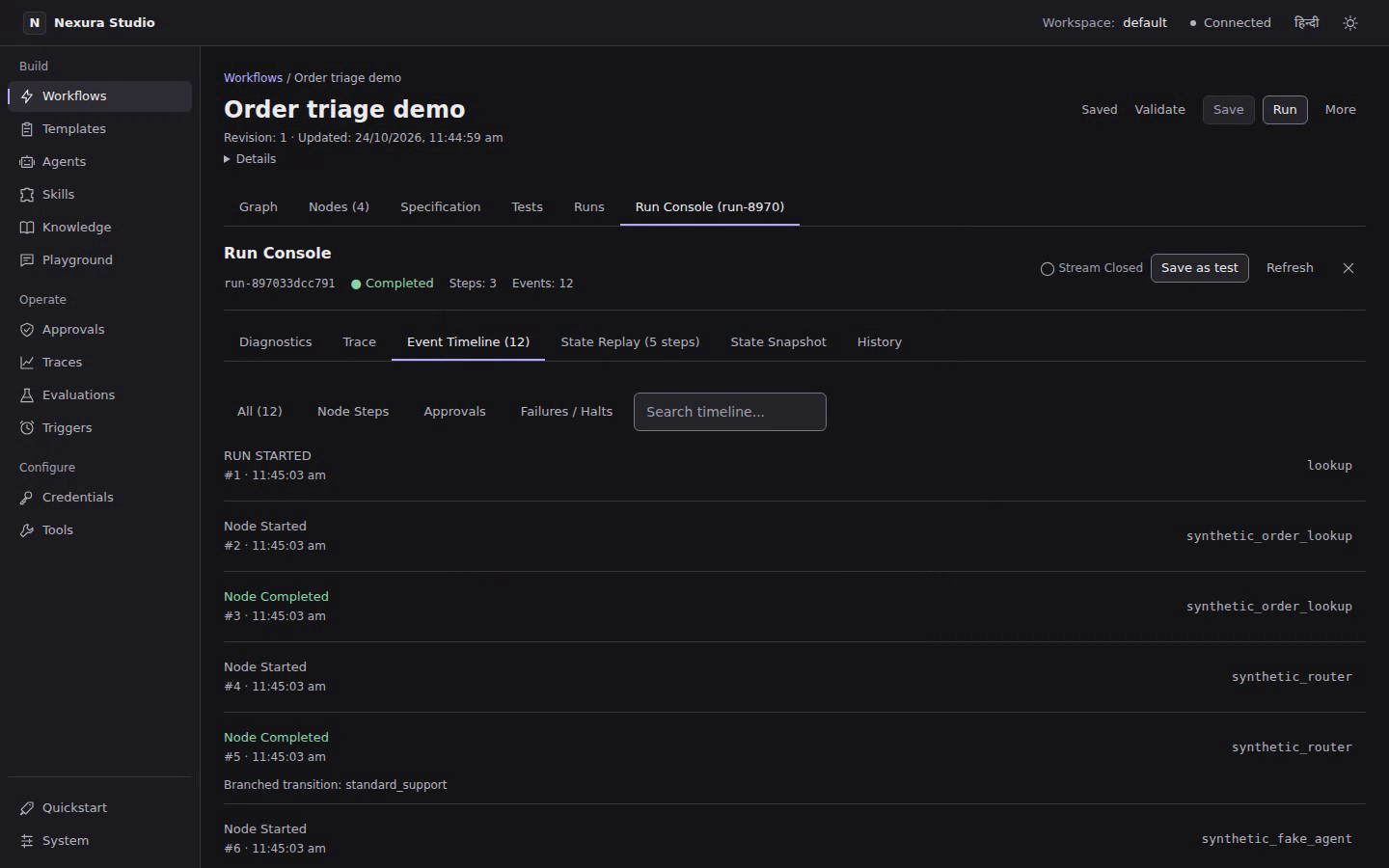 |
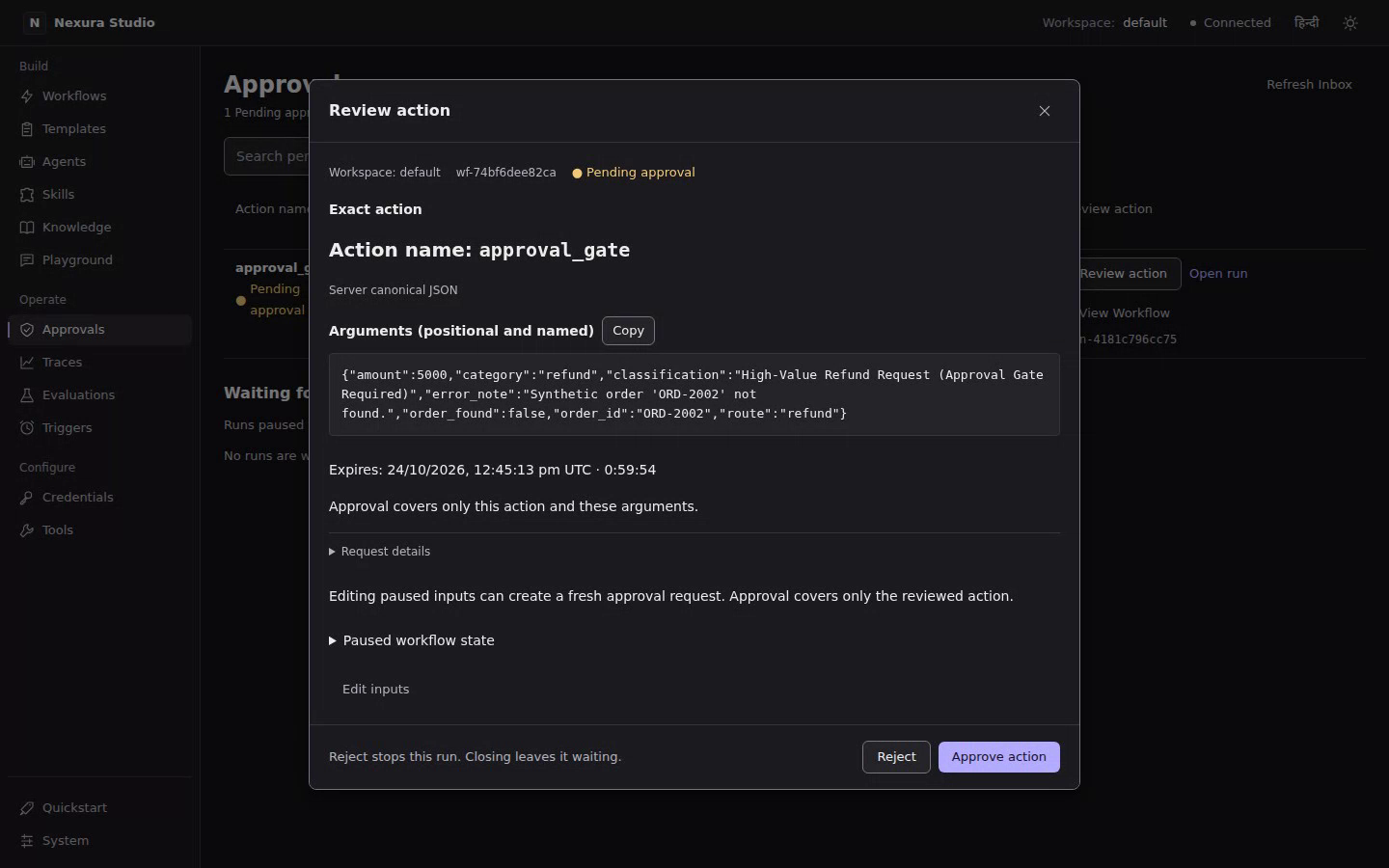 |
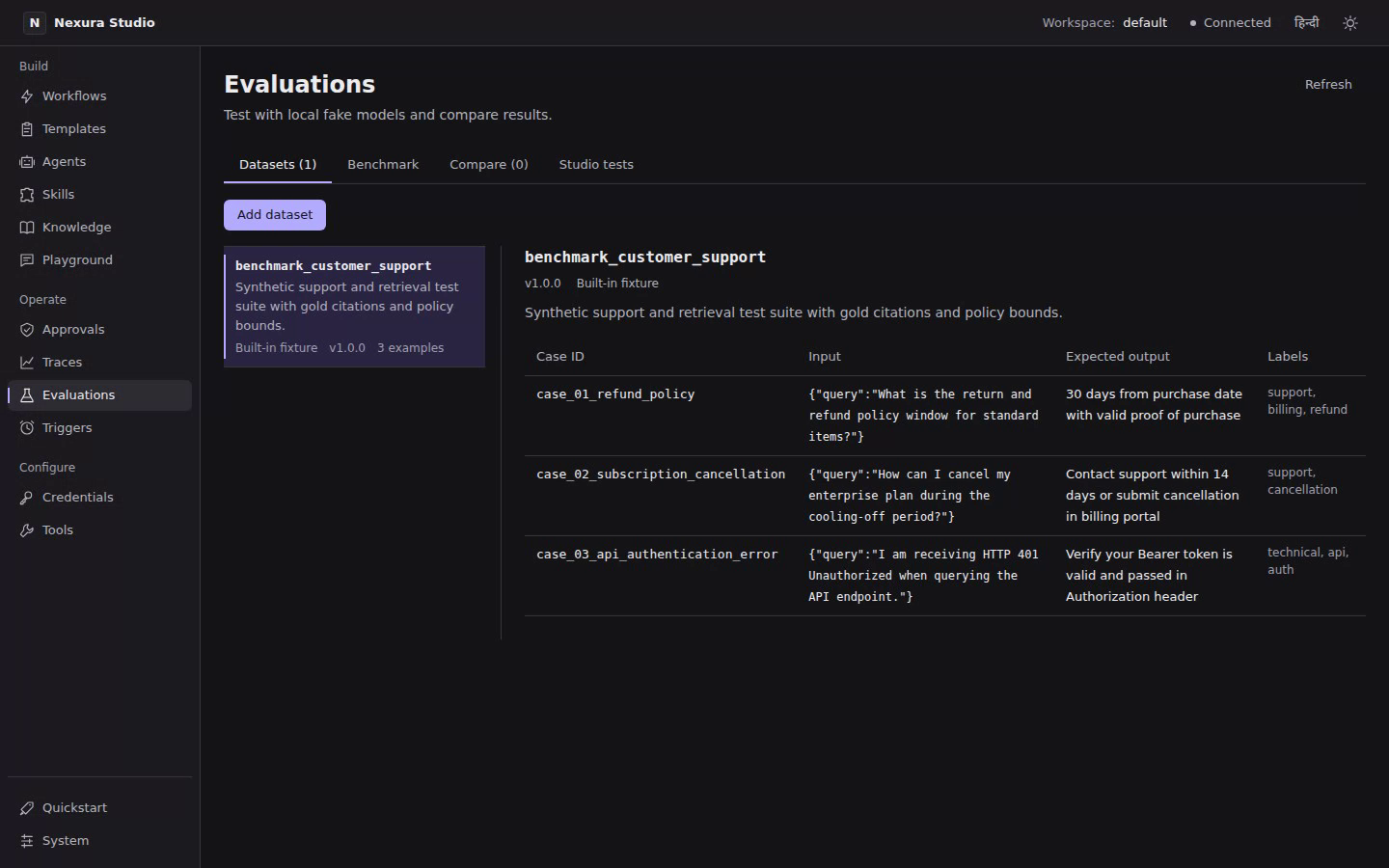 |
From the source checkout, start the API and Studio in separate terminals:
uv sync --extra studio
uv run nexura-runtime serve --port 8765 --db ./nexura_service.sqlite3
cd studio-web
npm ci
npm run dev
Open the Vite URL printed in the second terminal. Studio proxies /api to http://127.0.0.1:8765; override with VITE_BACKEND_URL. Chat uses an offline fixture by default. The service uses the single-owner local-owner profile and loopback binding; do not expose it on a network as is.
For schedules, workers, model allowlists, streaming chat, exports, pending input and the older built-in Studio, see Service and Studio.
Two editions
| Edition | Includes | Boundary |
|---|---|---|
| MIT open source | Agents, workflows, local Studio/service, local credentials, approvals, budgets, sandbox safety, Langflow import/export and trace export | single user, this machine only; for a team or a public endpoint use the hosted or enterprise edition |
| Enterprise (private) | Authentication, workspace members, organisations/invites, hosted secrets and rotation, publishing/widget, Nexura V2 compatibility, client and Studio add-ons | Proprietary; no external security review; installing MIT packages alone does not enable these features |
Local workspaces organise one owner's projects; they are not tenant or member accounts. The open-source service has no account logins, authentication tokens or API keys. Even when embedded, create_api_app() refuses non-loopback peers and requires X-Nexura-Session for state-changing requests. The session token stops other web pages, not local programs on this machine, which can read it. An insecure network opt-in adds no authentication and does not make a public endpoint safe. A single-user local Docker setup is in deployment/.
What is verified, and what is not
The latest recorded local gate, 2026-10-20, reported Ready: True, 21/21 required checks: 5110 Python tests + 89 browser tests, on one machine. It included disposable Postgres/Qdrant, the real gVisor test profile, lint/types, keyless examples, external Python/TypeScript consumers, standalone installs of all eight packages, service load, Studio unit/build checks and the enforced edition boundary. This is a historical local result, not release approval, production readiness or security certification; this README edit does not rerun that gate.
Provider adapters are mock-verified except for owner-run Vertex AI (Gemini 2.5 Flash), 2026-10-08 (reply, tool call, streaming) and Gemini API, 2026-10-20 (reply, tool call, streaming, structured answer). OpenAI, Anthropic and Sarvam live checks have not run. LiteLLM is checked only with the real library's offline mock-response mode, not live providers.
| Component | Supported | Verified scope |
|---|---|---|
| Python | 3.12 only (>=3.12,<3.13) |
Runtime on CPython 3.12.14 |
nexura-agents alone |
3.11, 3.12, 3.13 (>=3.11,<3.14) |
295 SDK tests from wheels on 3.11 and 3.13, 2026-10-09; 4 platform-importing files excluded |
| Node.js | 24.x | Node 24.20.0, npm 11.19.0 |
| OS | Linux; macOS and Windows smoke-tested | Full suite on Linux x86_64 (kernel 7.0 and GitHub's ubuntu-24.04); on macOS and Windows, GitHub Actions runs the nexura-agents wheel suite, an offline runtime workflow example and a generated project's tests (first green 2026-10-21) |
| Storage | SQLite by default; Postgres/pgvector and Qdrant need services | SQLite and disposable local services; no managed-cloud claim |
GitHub Actions runs on every push: the full suite on Linux (vector-store tests in their own job against Postgres/pgvector and Qdrant services), the nexura-agents wheel on Python 3.11–3.13, the TypeScript client, Studio, the edition boundary and the macOS/Windows smoke checks; all jobs first passed together on 2026-10-21. There has been no external security audit/review, including of the closed edition's shared-service path. MCP speaks revision 2026-07-28 (stateless) with fallback to the 2025-11-25 ... 2024-11-05 handshake; offline interop tests (experiments/interop) pass against the official MCP Python SDK (mcp 2.3.0 and the handshake-only 1.30.0) in both directions over stdio and localhost HTTP. Public MCP servers, live image calls and desktop MCP client apps remain unverified. A2A supports the 1.0 JSON-RPC binding (0.3 method names accepted) and signed agent cards, tested offline against the official a2a-sdk 1.2.3 in both directions; there are no push notifications, OAuth or gRPC, and no MCP extensions (Tasks, Apps, Enterprise Managed Authorization).
Workflow JSON never contains code: only trusted registered handlers run. Approvals cover supported connector writes and gated nodes, bind resolved inputs (low-level gates also bind run/node/spec/action/payload, including positional tool arguments), enforce expiry on claim and before execution, refuse non-string mapping keys in canonical digests and return 409 for duplicate decisions. Plain @tool functions need requires_approval=True; Python setting ExecutionContext.approval_granted itself is trusted. Side-effecting handlers/tools are never retried automatically; a crash can leave their outcome uncertain, recorded rather than replayed. See SECURITY_MODEL.md for controls and open gaps.
Historical fake-model measurements establish neither real-model quality, provider bills/cache savings, production scale, customer demand nor superiority over other frameworks. The older gate that skipped a required browser check remains documented separately. The approximately 135 ms SDK import on 2026-10-09 (Python 3.12, warm cache, lazy provider loading) is a single local measurement, not a benchmark. See the verification record for the complete chronology and limitations.
Version 0.4.0 was published to PyPI and npm on 2026-10-25. Copyright holder and security contact: Liceron, info@liceron.in.
Documentation map
Documentation index: 46 guides plus the generated API reference. Offline Python examples are executed by tests; blocks needing a real model or running service are marked and skipped.
| Start with | Continue to |
|---|---|
| Getting started | Agents, tools, teams, structured output |
| Human approval | Durable runs, reproducing failures, workflows (retries, input, forks, sub-workflows, parallel steps) |
| Models and providers | Vertex AI, LiteLLM, settings, retry/fallback; budgets and usage |
| Service and Studio | Extending, local secrets, troubleshooting |
| Packages and installation | Add-on backends and their caveats; historical comparisons |
| Testing | Verification history and public backend catalog |
Contributing
See CONTRIBUTING.md for setup, test profiles and support/deprecation policy. Contributions require the CLA: it is a draft awaiting lawyer review, and outside pull requests cannot be merged until the reviewed version is published. The automated CLA check is planned; current signing instructions are in the contributing guide.
uv run pytest
uv run ruff check src tests examples
uv run mypy src packages/*/src
Security policy
Report vulnerabilities privately using SECURITY.md (info@liceron.in). Read the security model before enabling tools, connectors or code execution.
Licence
MIT. Copyright (c) 2026 Liceron. See LICENSE and third-party notices.
1 maintainer

Metadata
1 maintainer
Release files for nexura-runtime 0.4.0
For a detailed explanation of source distributions (sdists) and built distributions (wheels), please see the package formats documentation.
Source distribution (sdist)
| File | Size | Uploaded | Provenance | |
|---|---|---|---|---|
| nexura_runtime-0.4.0.tar.gz | 747.8 kB | Without provenance | Details |
Built distribution (wheel)
| File | Interpreter | ABI | Platform | Reset |
|---|---|---|---|---|
| nexura_runtime-0.4.0-py3-none-any.whl | Python 3 | none | any | Details |
Total release size: 1.7 MB
Release files / nexura_runtime-0.4.0.tar.gz
| Download URL | nexura_runtime-0.4.0.tar.gz |
|---|---|
| Size | 747.8 kB |
| Tags | Source |
|
SHA-256 checksum How to use checksums |
4ba49f7465d8f5524882cba7764ff92e8abaacd3ec2470da8c5d67d14afc51ec
|
|
BLAKE2b-256 checksum How to use checksums |
48fd009e1c6146bc20472a897b80c9d4e4fedb23c9d86d6404fd0f51262703aa
|
| Upload date | |
|
Uploaded using Trusted Publishing? What is trusted publishing? |
No |
| Uploaded via |
uv/0.12.8 {"installer":{"name":"uv","version":"0.12.8","subcommand":["publish"]},"python":null,"implementation":{"name":null,"version":null},"distro":{"name":"Ubuntu","version":"26.04","id":"resolute","libc":null},"system":{"name":null,"release":null},"cpu":null,"openssl_version":null,"setuptools_version":null,"rustc_version":null,"ci":null}
|
Release files / nexura_runtime-0.4.0-py3-none-any.whl
| Download URL | nexura_runtime-0.4.0-py3-none-any.whl |
|---|---|
| Size | 921.1 kB |
| Tags | Python 3 |
|
SHA-256 checksum How to use checksums |
d371912c58a17eb9e63e4be85a80a450bf75853bdfc83298c4dfbf525ba447b6
|
|
BLAKE2b-256 checksum How to use checksums |
a28ad33ec46b608f13624545c477d2ce836789856e5fb36cf05caee8594e7c02
|
| Upload date | |
|
Uploaded using Trusted Publishing? What is trusted publishing? |
No |
| Uploaded via |
uv/0.12.8 {"installer":{"name":"uv","version":"0.12.8","subcommand":["publish"]},"python":null,"implementation":{"name":null,"version":null},"distro":{"name":"Ubuntu","version":"26.04","id":"resolute","libc":null},"system":{"name":null,"release":null},"cpu":null,"openssl_version":null,"setuptools_version":null,"rustc_version":null,"ci":null}
|
Security for nexura-runtime 0.4.0
Provenance
Provenance describes where a file came from. On PyPI, provenance is shared via attestations, which provide a verifiable record of the build or publishing details. View details, limitations and caveats.
No provenance found
None of the files in this release were uploaded with provenance metadata.
A note on package security
PyPI is a repository for distributing packages, not a service for auditing them. While third-party security researchers and our staff do their best to detect and remove malicious packages, PyPI cannot guarantee the quality, security or suitability of any given package.
To learn more about protecting yourself from malicious actors, visit our package security documentation.













