
nf-docs
Generate beautiful API documentation for Nextflow pipelines


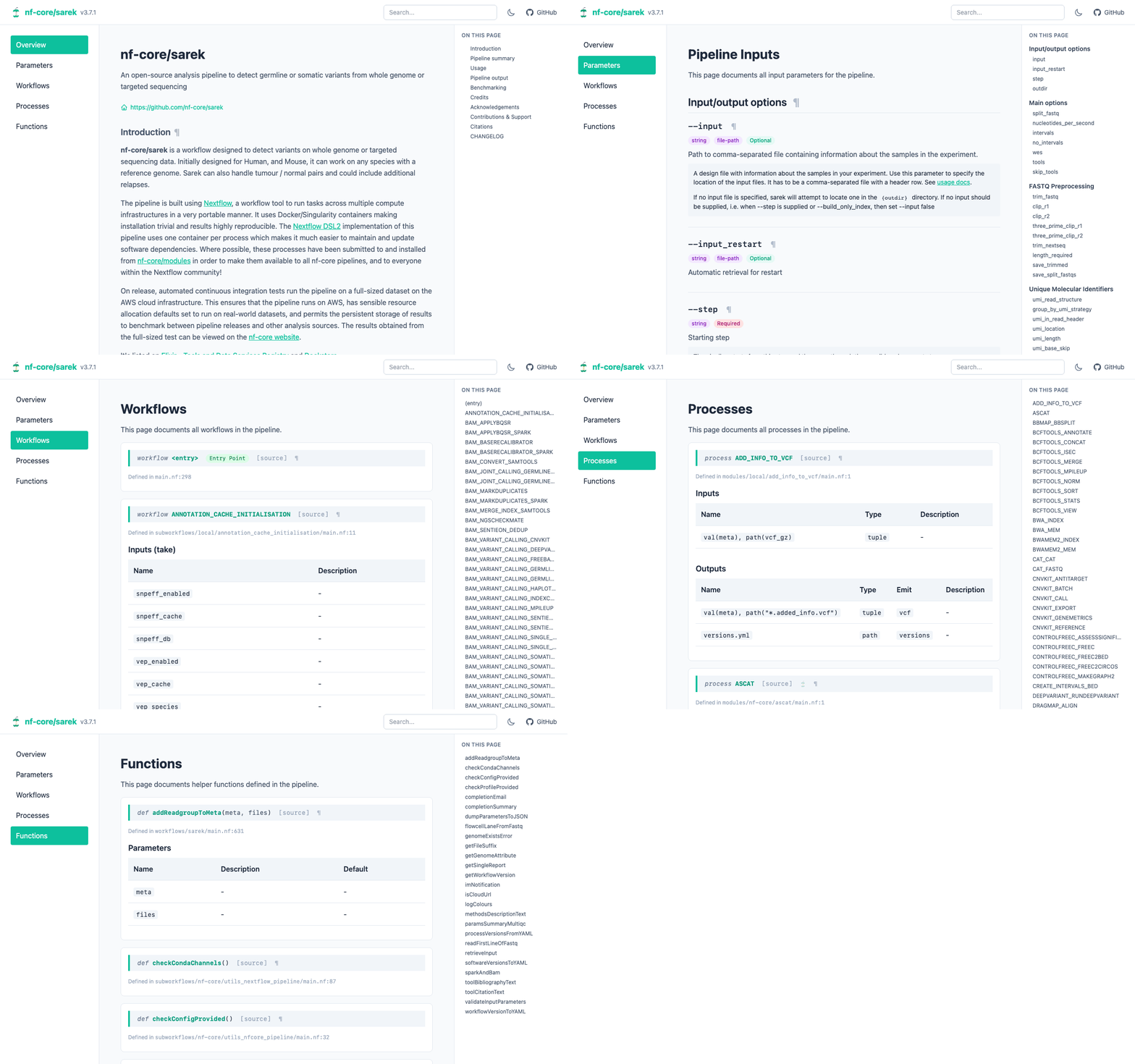
Choose from 4 different output formats:
HTML
|
Markdown
|
JSON / YAML
|
What is nf-docs?
[!IMPORTANT] This is not an official Nextflow project. It's a fun side-project by Phil Ewels. Please use at your own risk :)
Information is pulled from multiple sources to construct the docs (each only if available):
- README.md - Pipeline overview and description
- nextflow.config - Runtime configuration defaults
- nextflow_schema.json - Typed input parameters with descriptions and validation rules
- Language Server - Processes, workflows, functions with their Groovydoc comments
- meta.yml - nf-core module metadata (tools, keywords, authors)
The documentation for workflows, processes and functions is relatively unique. nf-docs extracts
this from your Nextflow pipelines by querying the
Nextflow Language Server. It produces structured
API documentation similar to Sphinx for Python or Javadoc for Java.
Examples and docs
See https://ewels.github.io/nf-docs
Quick Start
With uv:
uvx nf-docs generate ./my_pipeline
With pip:
# Install
pip install nf-docs

# Generate HTML documentation
nf-docs generate ./my_pipeline
With Bioconda (requires channel setup):
pixi global install nf-docs
# or
conda install nf-docs
That's it! Open docs/index.html in your browser.
Document a single module
Pass a single .nf file to generate a focused, module-style README:
nf-docs generate modules/mytool/subtools/main.nf --format md
By default this writes README.md next to main.nf. Use --output to pick a different path, or
--format json / --format yaml to print structured output to stdout instead.
Prek / pre-commit hook
nf-docs can generate pipeline documentation automatically before each commit using
Prek or pre-commit:
repos:
  - repo: https://github.com/ewels/nf-docs
    rev: v0.3.0
    hooks:
      - id: nf-docs
Install the hook into your repo:
# With Prek (recommended)
prek install

# Or with pre-commit
pre-commit install
The hook defaults to nf-docs generate . --format html, which writes HTML output to docs/.
Override args in your .pre-commit-config.yaml to use another format or output path:
repos:
  - repo: https://github.com/ewels/nf-docs
    rev: v0.3.0
    hooks:
      - id: nf-docs
        args: [., --format, markdown, --output, docs/api]
Development
See CONTRIBUTING.md for development setup, testing, and contribution guidelines.
License
Apache 2.0 - see LICENSE for details.
1 maintainer

Metadata
1 maintainer
Release files for nf-docs 0.4.0
For a detailed explanation of source distributions (sdists) and built distributions (wheels), please see the package formats documentation.
Source distribution (sdist)
| File | Size | Uploaded | Provenance | Actions |
|---|---|---|---|---|
| nf_docs-0.4.0.tar.gz | 127.4 kB | With provenance | Details for nf_docs-0.4.0.tar.gz |
Built distribution (wheel)
| File | Interpreter | ABI | Platform | Actions Reset |
|---|---|---|---|---|
| nf_docs-0.4.0-py3-none-any.whl | Python 3 | none | any | Details for nf_docs-0.4.0-py3-none-any.whl |
Total release size: 240.8 kB
Release files / nf_docs-0.4.0.tar.gz
| Download URL | nf_docs-0.4.0.tar.gz |
|---|---|
| Size | 127.4 kB |
| Tags | Source |
|
SHA-256 checksum How to use checksums |
3e2edd5f105f8d149659fc362a9e35d03718aa0fe255e8fbdcc1353cc9b73274
|
|
BLAKE2b-256 checksum How to use checksums |
98ec26d91ce0eea4c5881344a781bc94893181b17b89cdbc086afd8020f043c9
|
| Upload date | |
|
Uploaded using Trusted Publishing? What is trusted publishing? |
Yes |
| Uploaded via |
twine/6.1.0 CPython/3.13.13
|
Provenance
Provenance describes where a file came from. On PyPI, provenance is shared via attestations, which provide a verifiable record of the build or publishing details. View details, limitations and caveats.


PyPI Publish Attestation
PyPI verified that this artifact, at this checksum, originated from the publisher listed below.
Signed by GitHub Actions, verified by PyPI on May 29, 2026.
Transparency logRelease files / nf_docs-0.4.0-py3-none-any.whl
| Download URL | nf_docs-0.4.0-py3-none-any.whl |
|---|---|
| Size | 113.4 kB |
| Tags | Python 3 |
|
SHA-256 checksum How to use checksums |
97046e2887a1a2e603e8b4f6a03f484f0652abb6cbe7424aeada8aa89b379541
|
|
BLAKE2b-256 checksum How to use checksums |
8863d8370be6ed86ecef280eadc511b7c8eb1f3a17c222052e6429d90ae85ae2
|
| Upload date | |
|
Uploaded using Trusted Publishing? What is trusted publishing? |
Yes |
| Uploaded via |
twine/6.1.0 CPython/3.13.13
|
Provenance
Provenance describes where a file came from. On PyPI, provenance is shared via attestations, which provide a verifiable record of the build or publishing details. View details, limitations and caveats.
PyPI Publish Attestation
PyPI verified that this artifact, at this checksum, originated from the publisher listed below.
Signed by GitHub Actions, verified by PyPI on May 29, 2026.
Transparency logSecurity for nf-docs 0.4.0
Provenance
Provenance describes where a file came from. On PyPI, provenance is shared via attestations, which provide a verifiable record of the build or publishing details. View details, limitations and caveats.
Full provenance
All 2 files in this release have been uploaded with provenance metadata.
Attestation for nf_docs-0.4.0.tar.gz
PyPI Publish Attestation
PyPI verified that this artifact, at this checksum, originated from the publisher listed below.
Signed by GitHub Actions, verified by PyPI on May 29, 2026.
Transparency logA note on package security
PyPI is a repository for distributing packages, not a service for auditing them. While third-party security researchers and our staff do their best to detect and remove malicious packages, PyPI cannot guarantee the quality, security or suitability of any given package.
To learn more about protecting yourself from malicious actors, visit our package security documentation.














