
nf_robot
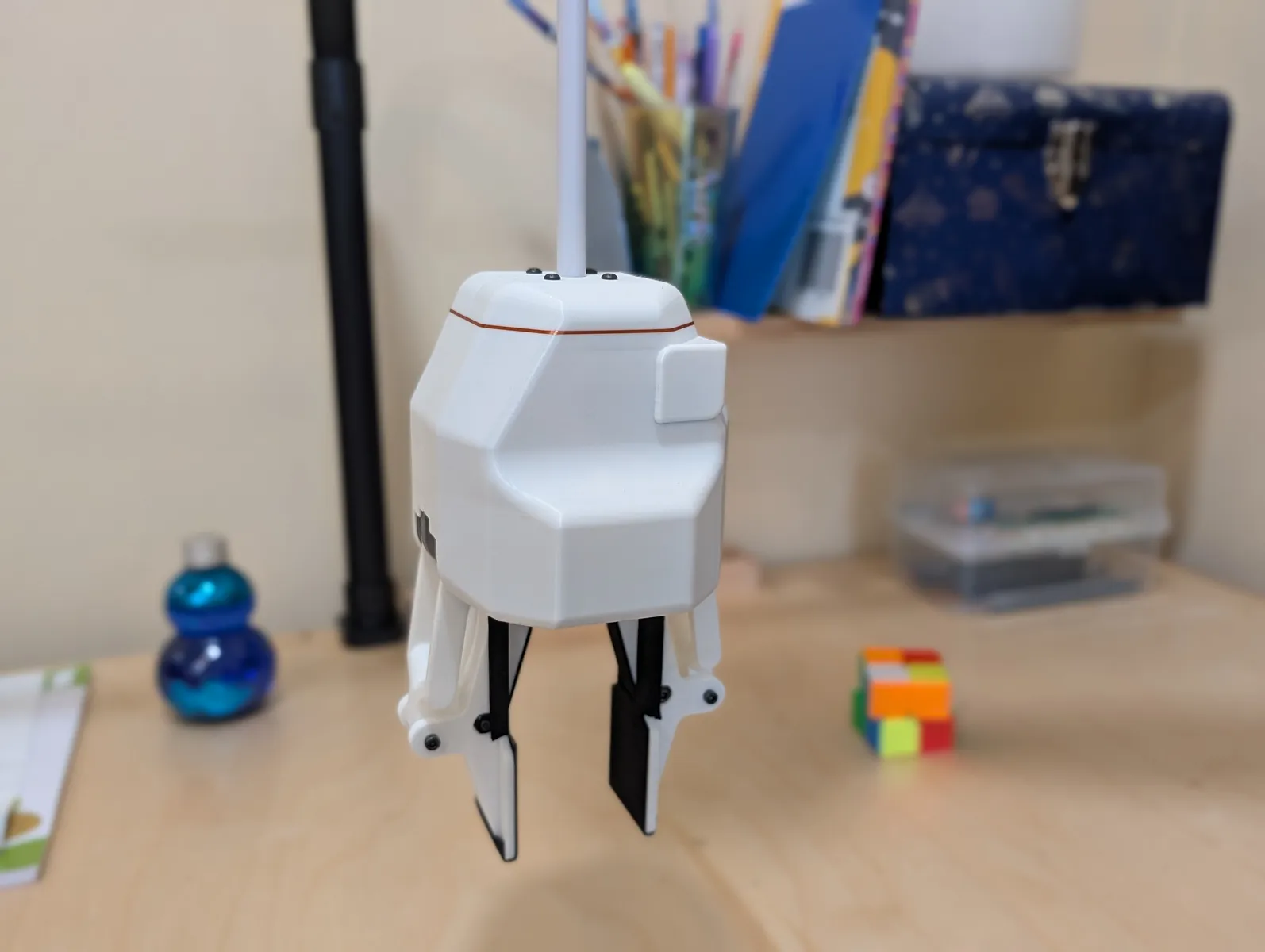
Control code for the Stringman household robotic crane from Neufangled Robotics
Build Guides and Documentation
Purchase assembled robots or kits at neufangled.com
Installation of stringman controller (Users)
Cloing the repo is not required. Only installation from pip. Note that Pytorch and CUDA are dependencies which is around 5.5GB
Linux
sudo apt install python3-dev python3-virtualenv python3-pip ffmpeg
python3.13 -m virtualenv venv
source venv/bin/activate
pip install "nf_robot[host]"
Mac
brew install ffmpeg python@3.13
python3.13 -m venv venv
source venv/bin/activate
pip install "nf_robot[host]"
Windows
Type "Microsft Store" in the start menu, Search for python, Install python 3.13, then open powershell
cd ~
python3.13.exe -m pip install "nf_robot[host]"
Start robot controller in LAN-only mode.
stringman-headless
The stringman motion controller (stringman-headless) is the program which communicates with the robot components over wifi and acts as the central brain of a single robot. It must be running on the same network as the powered on anchors and gripper in order for the robot to be active and controllable. The main entrypoint is observer.py
It listens on port 4245 for a connection from a UI or local AI policy. By default the UI is also hosted locally and is accessed at http://localhost:8090/?robotid=lan
Binding a robot to an account on neufangled.com
The same UI can also be opened at neufangled.com/playroom which offers a relay for remote teleoperation.
Selecting LAN mode opens the robot in the same way, but a "Bind robot to account" option is available in the run menu. Choosing this asks you to log in with an identity provider such as google, and binds your robot to neufangled.com. It can then be controlled by you or users whom you share it with from anywhere, and managed at neufangled.com/my-robots whenever it is running with --prod.
This extra service is free and completely optional. We understand that privacy and convenience exist in a tradeoff and that decision is yours to make, not ours. Nevertheless, we do not collect or save any of your video even if you do use our relay.
Refer to the Usage Guide for more detailed instructions on setup and use.
Calibration and Use
Before stringman can be used in a new room, it must be calibrated so the locations of the anchors and eyelets are known. This is done by selecting "Full Calibration" from the "Maintenence and Calibration" submenu.
A more detailed guide on first time setup is available at neufangled.com/docs/usage_guide
Arguments to stringman-headless
options:
--config              A json file where the robot's ID and calibration data are stored. You may use one for a bedroom and one for a playroom for example, even if it is the same hardware being taken
                        down and put back up in another room
--prod                Shorthand for --telemetry_env=production
--telemetry_env {local,staging,production}
                        The cloud telemetry server to connect to (choices: local, staging, production) The default is None, which allows local connections on port 4245 only
--no_ortho            Disable orthographic floor projection and its video streams
--stream_heatmap      Generate and stream the target heatmap video feed (off by default)
--auto_start          Automatically unpark and start cleaning when all components connect (experimental)
--local_models        Use local models from models/ for the targeting and centering models rather than downloading the production models from huggingface
--debug               Enable DEBUG level logging
--rec_diagnostics     Record the arguments of every optimize_arp_anchors call during full_auto_calibration
                        to calibration_diagnostics.pkl, for offline analysis. Arpeggio hardware only.
--bind_address        Interface for the local telemetry websocket (port 4245) and all local mjpeg video
                        streams. Set to 0.0.0.0 to access from elsewhere on your network.
--no_serve_ui         Don't serve the playroom-ui frontend from this machine.
--ui_port             Port to serve the self-hosted UI on, unless --no_serve_ui is set. Defaults to 8090.
Minimum system specs
At least 8 cores and 8GB of ram. In order to perform local inference, some kind of pytorch accelertion is necessary. Mini PC's or laptops based on the Ryzen 7 7840HS are probably about the cheapest machines that can run stringman's motion controller since it has an NPU that can be used to accelerate pytorch. A mac mini is also a viable, though more expensive option.
Otherwise, any gaming desktop is usually more than enough.
Telemetry stream
stringman-headless listens on port 4245 locally for telemetry connections. This is a websocket sending and receiving protobufs defined in src/nf_robot/protos
Every message sent by stringman-headless is a serialized TelemetryBatchUpdate and every message received is expected to be a ControlBatchUpdate.
Within the telemetry stream, there are VideoReady messages containing URIs for connecting to the robot's video streams.
The UI hosted locally or at neufangled.com/playroom sends controls and receives telemetry.
Any AI policy served by src/nf_robot/ml/stringman_lerobot.py also sends controls and receives telemetry.
Agents wishing to write code to interface with a stringman robot may also follow this pattern.
The expected inputs are basically marker box velocity and finger and wrist speeds. The gripper hangs 50 cm below the marker box.
Higher level control is achived by having a policy such as DIT or a VLA connected to the robot, and having another client sending nf.common.EpisodeControl commands with prompts.
See Imitation Learning for a more detailed guide.
Installation (developers)
git clone https://github.com/nhnifong/cranebot3-firmware.git
if your python version is 3.13 or above, go for it. otherwise make the venv with a specific version.
sudo apt install python3-dev python3-virtualenv python3-pip ffmpeg build-essential git-lfs
python3 -m virtualenv venv
source venv/bin/activate
pip install -e ".[host,dev,pi]"
If you have an RTX 5090
pip install --force-reinstall torch==2.8.0 torchvision==0.23.0 torchaudio==2.8.0 torchcodec==0.6.0 --index-url https://download.pytorch.org/whl/cu129
Run tests
for certain tests, image files are required
git lfs install
git lfs pull
run all tests
pytest tests
Rebuilding the python module
within a venv install the build tools
python3 -m pip install --upgrade build twine
Bump the version number in pyproject.toml then at this repo's root, run the release build script.
scripts/build_release.sh
Upload the particular version you just built to PyPi
python3 -m twine upload dist/nf_robot-4.0.5*
Robot components
Anchors and grippers contain raspberry pi's running an image defined and built in stringman-pilot-rpi-image. The latest release of this image can be downloaded at
Stringman Raspberry Pi Image (1.6 GB)
By default components have the user pi and password Fo0bar!!. Users can upload keys and disable password auth on thier robot components with
experiments/deploy_ssh_keys.py <robot conf.json file>
When assembling components from scratch, a self test checkout script must be run on them, and since the cranebot service always starts at boot and may talk to the motors, it must be disabled first.
sudo systemctl stop cranebot.service
Run QA scripts for the specific component type
/opt/robot/env/bin/qa-gripper-arp
/opt/robot/env/bin/qa-anchor-arp
These scripts both check whether everything is connected as it should be and interactively help wind the spools with the correct amount of wire.
To update to the lastest nf_robot version in a component
/opt/robot/env/bin/pip install --upgrade "nf_robot[pi]"
Support this project
1 maintainer

Release files for nf-robot 5.3.0
For a detailed explanation of source distributions (sdists) and built distributions (wheels), please see the package formats documentation.
Source distribution (sdist)
| File | Size | Uploaded | |
|---|---|---|---|
| nf_robot-5.3.0.tar.gz | 4.0 MB | Details |
Built distribution (wheel)
| File | Interpreter | ABI | Platform | Reset |
|---|---|---|---|---|
| nf_robot-5.3.0-py3-none-any.whl | Python 3 | none | any | Details |
Total release size: 8.0 MB
Release files / nf_robot-5.3.0.tar.gz
| Download URL | nf_robot-5.3.0.tar.gz |
|---|---|
| Size | 4.0 MB |
| Tags | Source |
|
SHA-256 checksum How to use checksums |
f36f4e618489c2268edefc6f7e84398b2760d58243edc38b1bb12dcdd654d666
|
|
BLAKE2b-256 checksum How to use checksums |
4264e072078d7eb08a3a7de381958092716da713a6e50bb91f4dbf10441059e5
|
| Upload date | |
|
Uploaded using Trusted Publishing? What is trusted publishing? |
No |
| Uploaded via |
twine/7.0.0 CPython/3.13.14
|
Release files / nf_robot-5.3.0-py3-none-any.whl
| Download URL | nf_robot-5.3.0-py3-none-any.whl |
|---|---|
| Size | 4.0 MB |
| Tags | Python 3 |
|
SHA-256 checksum How to use checksums |
599dbdd33cbcdb0a53ab46f809b14c5064df68633ddc8af242123171f02486b9
|
|
BLAKE2b-256 checksum How to use checksums |
e8e87b8f3481feee2db5d1cd0d5cd8ae7f4d6e6fd72fd194518e78e523c6af67
|
| Upload date | |
|
Uploaded using Trusted Publishing? What is trusted publishing? |
No |
| Uploaded via |
twine/7.0.0 CPython/3.13.14
|














