
Neural Graphics Model Gym






NOTE: Please be aware that this is a beta release. Beta means that the product may not be functionally or feature complete. At this early phase the product is not yet expected to fully meet the quality, testing or performance requirements of a full release. These aspects will evolve and improve over time, up to and beyond the full release. We welcome your feedback.
Table of contents
- Introduction
- Quick Start
- Monitoring and profiling
- Logging
- Testing
- Adding custom models, datasets, and usecases
- Generating new training data
- Troubleshooting
- Code contributions
- Security
- License
- Trademarks and copyrights
Introduction
Neural Graphics Model Gym is a Python® toolkit for developing real-time Neural Graphics machine learning models.
With Neural Graphics Model Gym you can train, finetune and evaluate your Neural Graphics models. Neural Graphics Model Gym also enables you to perform quantization of your model before exporting it to a format compatible with ML extensions for Vulkan® - allowing you to run on the latest mobile devices.
Currently, we include the following Neural Graphics use cases:
- Neural Super Sampling (NSS)
- NSS allows for high-fidelity, real-time graphics in game engines. By feeding low-resolution frames, along with spatial and motion information, into a neural network we are able to construct high-resolution frames that suffer no loss in quality.
- Neural Frame Rate Upscaling (NFRU)
- NFRU allows for higher frame-rate real-time graphics in game engines. By feeding low-frame-rate frames, along with spatial and motion information, into a neural network we are able to construct intermediate frames that increase the output frame rate.
Quick Start
Prerequisites
To build and run Neural Graphics Model Gym, the following are required:
- Ubuntu® >= 22.04
- Neural Graphics Model Gym has been tested on 22.04 LTS and 24.04 LTS, but should work on other Linux® distributions
- 3.10 <= Python < 3.13
- Python development package (e.g.
python3-dev) - NVIDIA® CUDA® capable GPU
- CUDA Toolkit v13.1.1 or later
- Git LFS
Setup
- Clone the repository:
git clone https://github.com/arm/neural-graphics-model-gym.git
- Install the project:
pip install .
For more details including how to install in development mode and how to run using Docker see setup.md.
Usage
Neural Graphics Model Gym can be used either as a command line tool or as a package which may be imported into a Python application.
Basic usage is shown here. More detailed commands can be found in usage.md.
Command line usage
Most commands use a configuration file and require the following steps:
-
List model configuration templates: Each model (NSS, NFRU, etc.) requires a different type of JSON configuration file. These files are initialized from templates. List available templates using this command:
ng-model-gym init --list
-
Generate a model configuration file from a template: Use a command of the following form. The optional
save_dirmust already exist. If it is omitted, the configuration file will be saved to the current directory.ng-model-gym init <model-template> [save_dir]
Example: NSS v1 and NFRU v1 configuration files are created from the
nss-v1andnfru-v1templates. The following commands will create NSS and NFRU configuration files in the current directory:ng-model-gym init nss-v1 ng-model-gym init nfru-v1
-
Edit your model configuration file: Configuration files contain paths to local datasets and options for the different usage modes (training, evaluation, and exporting). Some entries initially contain placeholder values (e.g.
<...>); make sure to replace those with your own settings.For Windows users:
Paths must either use forward slashes (
path/to/location) or escaped backslashes (path\\to\\location). Single backslashes (e.g.path\to\location) are invalid JSON and will cause aJSONDecodeError. -
Run Model Gym commands: Provide the path to the configuration file using the
--config-path/-cflag. For example:# Perform model training and evaluation ng-model-gym --config-path=<path/to/config/file> train # Evaluate a previously trained model ng-model-gym -c <path/to/config/file> evaluate --model-path=<path/to/model.pt> --model-type=<fp32|qat_int8> # Perform quantization aware training (QAT) and evaluation ng-model-gym -c <path/to/config/file> qat # Export a trained model to VGF file ng-model-gym -c <path/to/config/file> export --model-path=<path/to/model.pt> --export-type=<fp32|qat_int8|ptq_int8>
Pre-trained models can be viewed and downloaded without --config-path/-c:
# List downloadable models hosted on the configured repositories
ng-model-gym list-models

# Download a specific model to a directory of your choice
# ng-model-gym download <repo_name>/<file_name> <destination>
ng-model-gym download neural-super-sampling/nss_v1_0_1_high_fp32.pt ./myfolder
The remote string identifier (e.g. @neural-super-sampling/nss_v1_0_1_high_fp32.pt) can also be used directly to automatically fetch and use models when running certain CLI commands. See the commands in usage.md for more details.
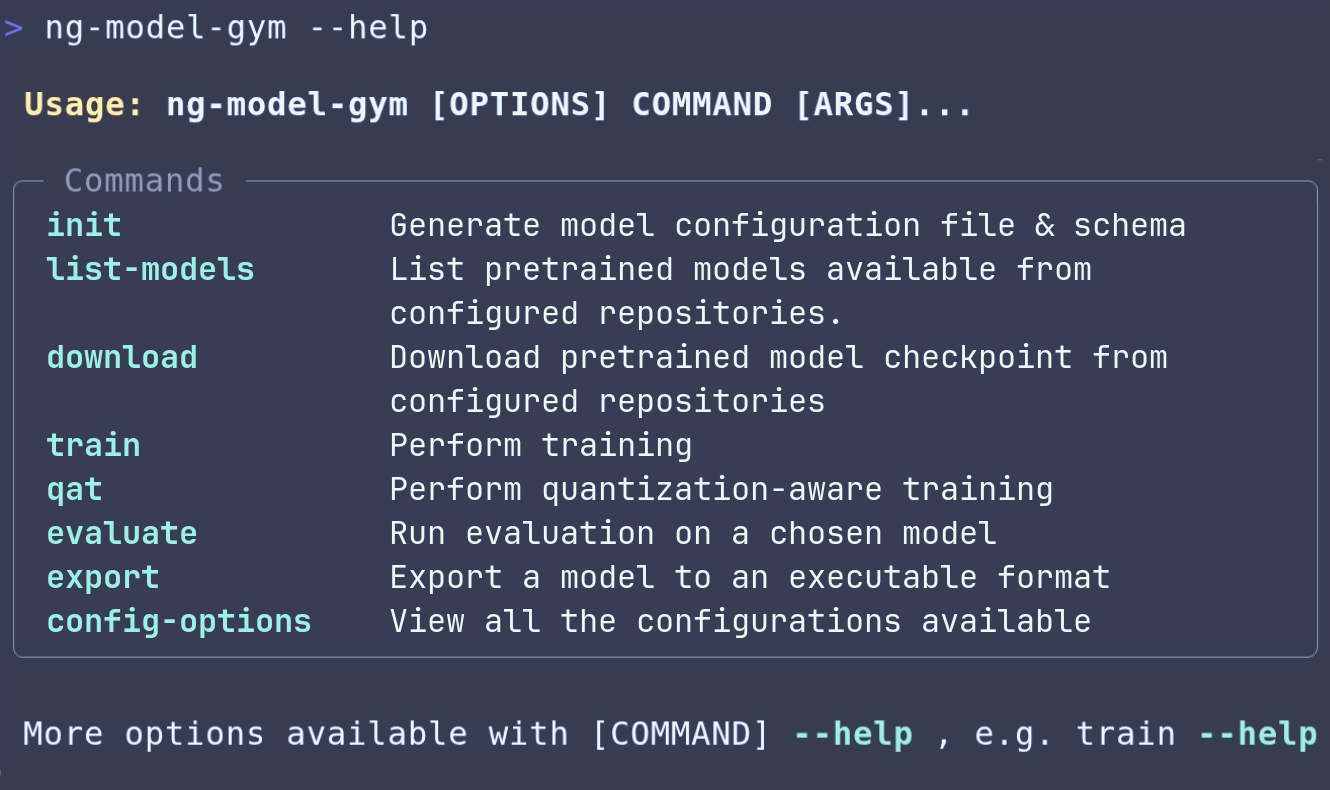
The complete list of CLI commands can be seen by running ng-model-gym --help and more detailed information about the commands can be found in usage.md.
Usage as a Python package
The second way to use Neural Graphics Model Gym is to import it as a Python package.
The following snippet shows how to use the package to generate a config, perform training, evaluation and exporting the model.
import ng_model_gym as ngmg

# Generate a config file in an existing directory using the API or CLI
# Note: The config file must be filled in before use.
ngmg.generate_config_file("nss-v1", "/save/dir")
import ng_model_gym as ngmg
from pathlib import Path

# Create a Config object using path to a configuration file
# and extract parameters from it.
config = ngmg.load_config_file(Path("/path/to/config/file"))

# Enable logging for ng_model_gym
ngmg.logging_config(config)

# Do training and evaluation.
trained_model_path = ngmg.do_training(config, ngmg.TrainEvalMode.FP32)
ngmg.do_evaluate(config, trained_model_path, ngmg.TrainEvalMode.FP32)

# Export the trained fp32 model to a VGF file.
ngmg.do_export(config, trained_model_path, export_type=ngmg.ExportType.FP32)
Jupyter® Notebook tutorials on how to use the package, including:
- Training
- Quantization-aware training and exporting
- Evaluation
- Fine-tuning
- Adding a custom model
can be found in the neural-graphics-model-gym-examples repository.
Monitoring and profiling
The following tools have been set up to track models during training and to capture performance profiles:
- TensorBoard
- Trace profiler
- GPU memory profiler
Their usage is demonstrated in monitoring-and-profiling.md.
Logging
By default, logging is enabled and set to INFO mode, which will print helpful information during execution.
All logs will be written to an output.log file located within the output directory specified in the configuration file.
The logging mode is customizable by using flags with the ng-model-gym CLI command. See the options below for examples.
--log-level=quiet can be added to silence all logs, except errors.
ng-model-gym --log-level=quiet -c <path/to/config/file> train
--log-level=debug can be added to print even more information during the process.
ng-model-gym --log-level=debug -c <path/to/config/file> train
Logging can also be specified when importing the package as follows.
import ng_model_gym as ngmg
from pathlib import Path

# Create a Config object using path to a configuration file
parameters = ngmg.load_config_file(Path("/path/to/config"))

# Enable logging for ng_model_gym
ngmg.logging_config(parameters)
Testing
A collection of unit and integration tests are provided to ensure the functionality of Neural Graphics Model Gym.
Git LFS assets used for testing are not cloned by default. Tests that depend on LFS files require running the following pull command:
git lfs pull --include="tests/**" --exclude=""
Testing can be run using Hatch commands. First install Hatch and create a dev environment. This will install all the dependencies for Neural Graphics Model Gym, plus the additional dependencies required for testing. The list of testing commands can be found here.
Adding custom models, datasets, and usecases
Neural Graphics Model Gym supports adding custom models and datasets, enabling their use across all workflows. Detailed documentation on how to implement this can be found in custom-models-and-datasets.md.
We also support defining custom use cases to group together related models, datasets, configurations, and any additional required code. See model and dataset discovery for the required layout and registration behavior.
Generating new training data
To train the Neural Super Sampling model, you will first need to capture training data from your game engine in the format expected by the model. A data capture guide for NSS explaining the steps required to capture datasets is available and the expected layout of the dataset can been seen at nss_dataset_specification.md. A plugin for Unreal® Engine is also available here that can capture datasets for NSS from a game.
For information regarding the types of data to capture for Neural Frame Rate Upscaling and how to convert your captured frames, see nfru_data_generation.md.
Troubleshooting
A list of common known issues and their workarounds can be found at troubleshooting.md.
Code contributions
The Neural Graphics Model Gym project welcomes contributions. For more details on contributing to the project, please see CONTRIBUTING.md.
Security
Arm takes security issues seriously: please see SECURITY.md for more details.
After creating an editable installation using Hatch, you can run the security vulnerabilities checker with the following command:
hatch run static-analysis:bandit-check
License
Neural Graphics Model Gym is licensed under Apache License 2.0.
Trademarks and copyrights
- Linux® is the registered trademark of Linus Torvalds in the U.S. and elsewhere.
- Python® is a registered trademark of the Python Software Foundation.
- Ubuntu® is a registered trademark of Canonical.
- Docker and the Docker logo are trademarks or registered trademarks of Docker, Inc. in the United States and/or other countries. Docker, Inc. and other parties may also have trademark rights in other terms used herein.
- NVIDIA and the NVIDIA logo are trademarks and/or registered trademarks of NVIDIA Corporation in the U.S. and other countries.
- Jupyter and the Jupyter logos are trademarks or registered trademarks of LF Charities.
- Vulkan is a registered trademark and the Vulkan SC logo is a trademark of the Khronos Group Inc.
- Microsoft, Windows are trademarks of the Microsoft group of companies
- Unreal® is a trademark or registered trademark of Epic Games, Inc. in the United States of America and elsewhere.
2 maintainers


Metadata
2 maintainers
Release files for ng-model-gym 0.4.0
For a detailed explanation of source distributions (sdists) and built distributions (wheels), please see the package formats documentation.
Source distribution (sdist)
| File | Size | Uploaded | |
|---|---|---|---|
| ng_model_gym-0.4.0.tar.gz | 184.0 kB | Details |
Built distribution (wheel)
| File | Interpreter | ABI | Platform | Reset |
|---|---|---|---|---|
| ng_model_gym-0.4.0-py3-none-any.whl | Python 3 | none | any | Details |
Total release size: 424.3 kB
Release files / ng_model_gym-0.4.0.tar.gz
| Download URL | ng_model_gym-0.4.0.tar.gz |
|---|---|
| Size | 184.0 kB |
| Tags | Source |
|
SHA-256 checksum How to use checksums |
58960b7468d3f899fe32d12402780ac37f741e600476ba412b8110c6d58914cc
|
|
BLAKE2b-256 checksum How to use checksums |
31e4d03eba458bb1cbd4b7aca4326f0babcffc00ac9498f266e337def1d1a0c8
|
| Upload date | |
|
Uploaded using Trusted Publishing? What is trusted publishing? |
No |
| Uploaded via |
twine/6.2.0 CPython/3.10.18
|
Release files / ng_model_gym-0.4.0-py3-none-any.whl
| Download URL | ng_model_gym-0.4.0-py3-none-any.whl |
|---|---|
| Size | 240.3 kB |
| Tags | Python 3 |
|
SHA-256 checksum How to use checksums |
695b0001b772c00ccb2fdd3cc346101b4458c9d91b434416243bdfd3cf3f870b
|
|
BLAKE2b-256 checksum How to use checksums |
b2f45d3047c7ecb90e8b33bd0349ab112c77a90d96d217d10f3c565555de40ea
|
| Upload date | |
|
Uploaded using Trusted Publishing? What is trusted publishing? |
No |
| Uploaded via |
twine/6.2.0 CPython/3.10.18
|














