
nethuds desktop — a single-HUD SSH triage cockpit for Arista, Juniper, Cisco IOS, and Linux

Project description
nethuds desktop (nhd) — proof of concept
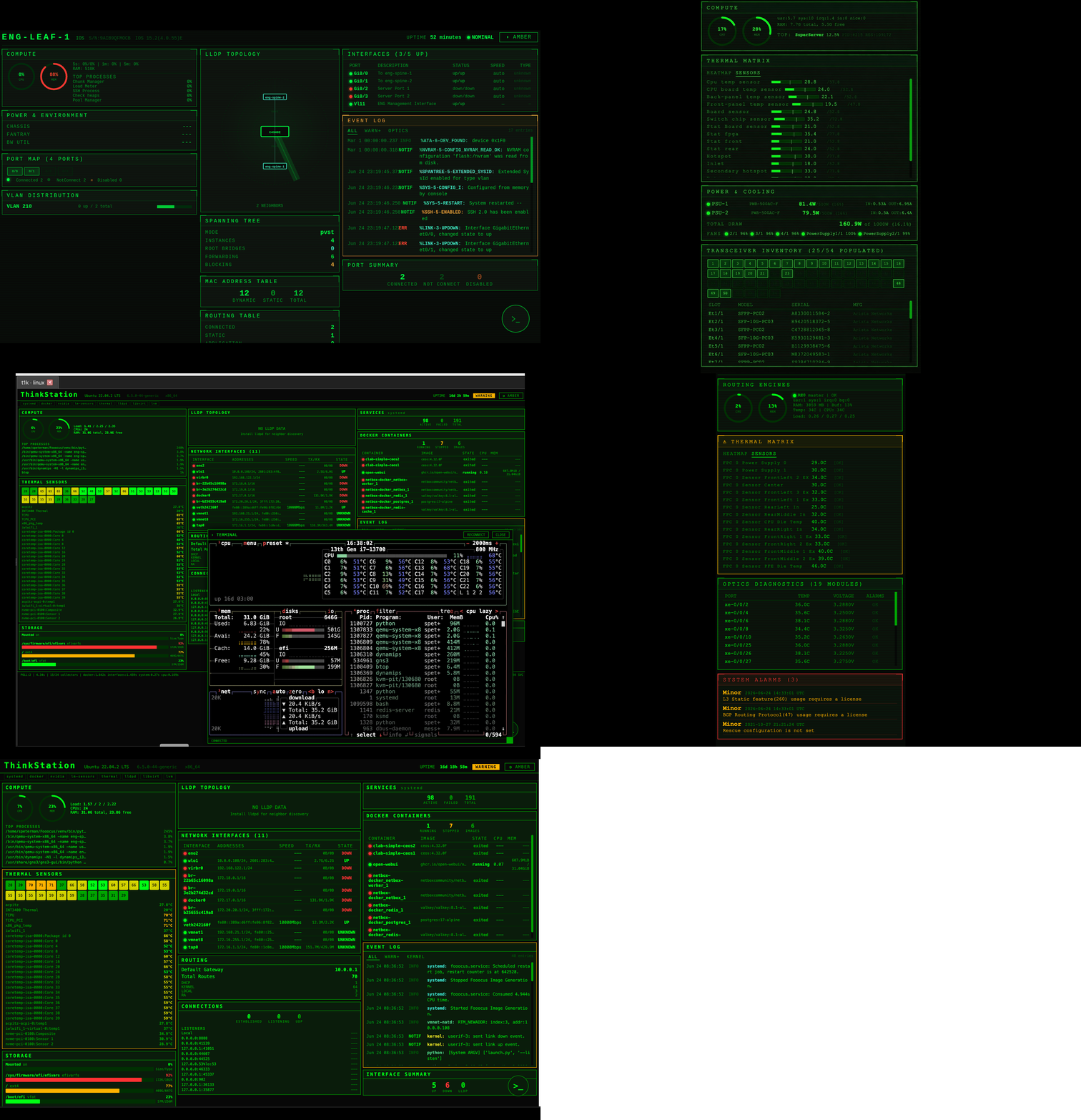
A triage cockpit for network devices. Log into a box you've never seen — with
nothing but an IP and credentials — and nhd renders that device's live health
as a single HUD: routing engines, BGP, thermals, optics, interfaces, OSPF
adjacencies, the event log, all read at a glance and the same method - SSH across
Arista, Juniper, Cisco IOS, and Linux.
The point is that it assumes no prior instrumentation. The device doesn't
have to be in an inventory, streaming telemetry, or wired into a dashboard
someone built ahead of time — the only prerequisite is SSH access. That's the
one moment every poll-and-store tool has already missed: the cold open on an
unfamiliar box, mid-incident, when you have no baseline in your head and a
terminal would make you interrogate the device one show command at a time. The
HUD orients you instead — and because each reading carries its own reference
frame (35.4°C against a 77.8 ceiling, 51 peers / 0 down), a value means
something even on a box you've never met.
Around that core it adds the chrome a server-only HUD lacks: an editable, filterable session tree, an encrypted credential vault with a full management UI, key-based SSH auth, zoomable tabbed multi-device views, a dark UI, and window state that persists across restarts — all without rewriting the nethuds HUD pages.
 |
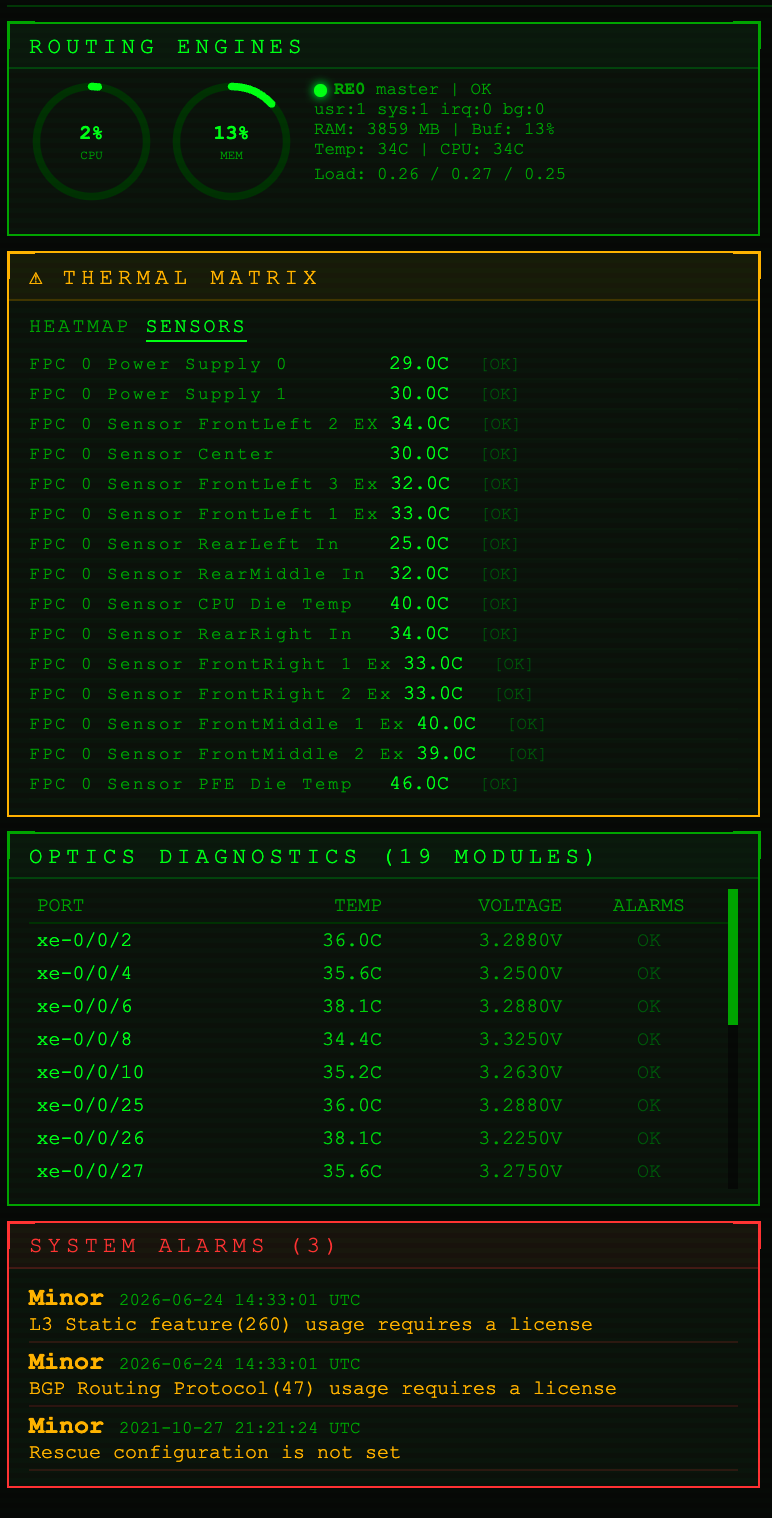 |
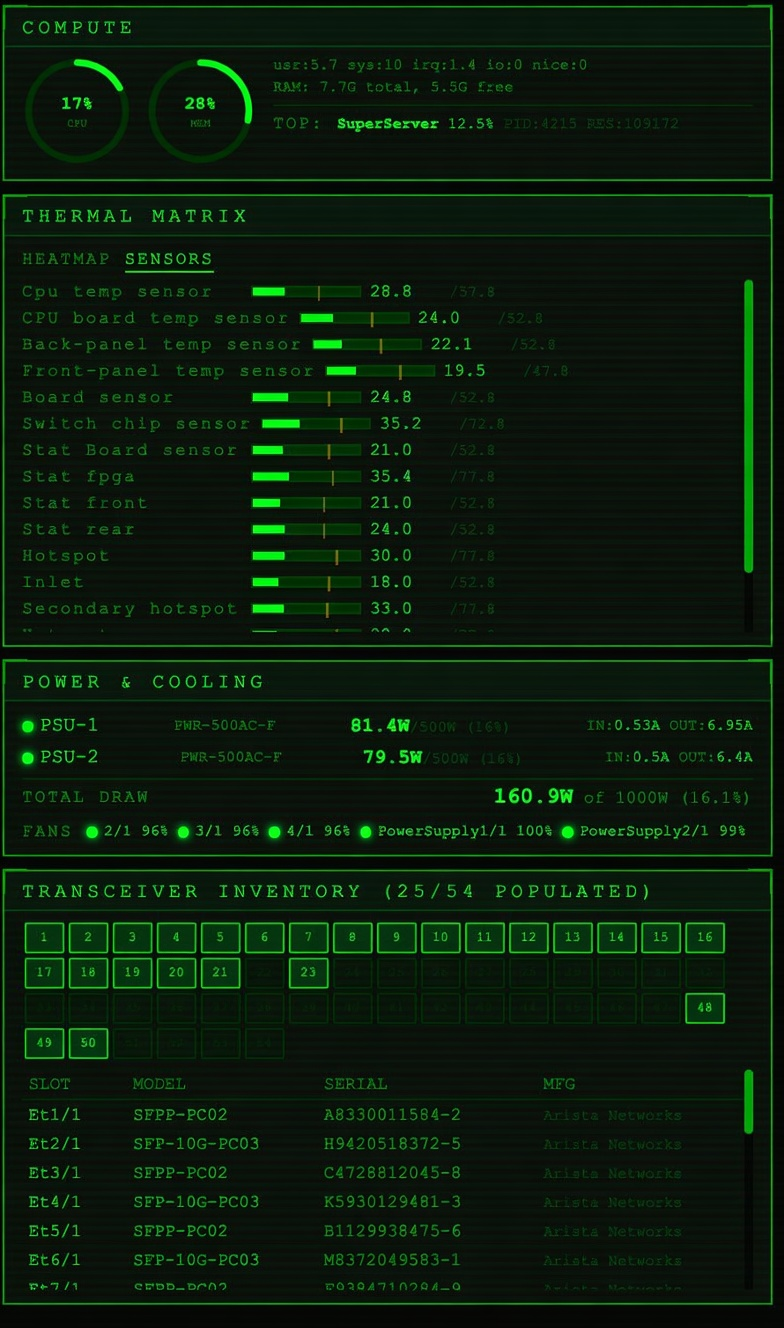
| Arista EOS — compute, thermal matrix, power & cooling, transceiver inventory | Juniper Junos — routing engines, FPC sensors, optics diagnostics, system alarms |
Different gear, the same reading frame: every value carries its own reference (35.4 °C against a 77.8 ceiling, 51 peers / 0 down), so a number means something on a box you've never met.
What this is
nethuds ships each vendor dashboard as its own FastAPI server that serves a self-contained HTML/JS HUD and proxies a live SSH session. That is excellent for one device in a browser tab, but it is server-only: there is no session manager, no credential store, and no desktop chrome.
nhd wraps those servers in a PyQt6 application. It loads a session file
(terminal-telemetry format, or a nethuds devices.yaml), shows the devices in
a grouped tree you can edit in place, and opens each one in its own tab backed
by a QWebEngineView. Authentication is resolved from an encrypted vault (or
prompted for at connect time) and the wrapper establishes the SSH session
itself, so a private key never has to ride a URL.
It is still a proof of concept — the roadmap below lists what is deliberately unfinished — but the three things that made the original POC a "file viewer" rather than a tool are now done: CRUD session editing with persistence, an encrypted credential vault, and key-capable auth wired into the login path.
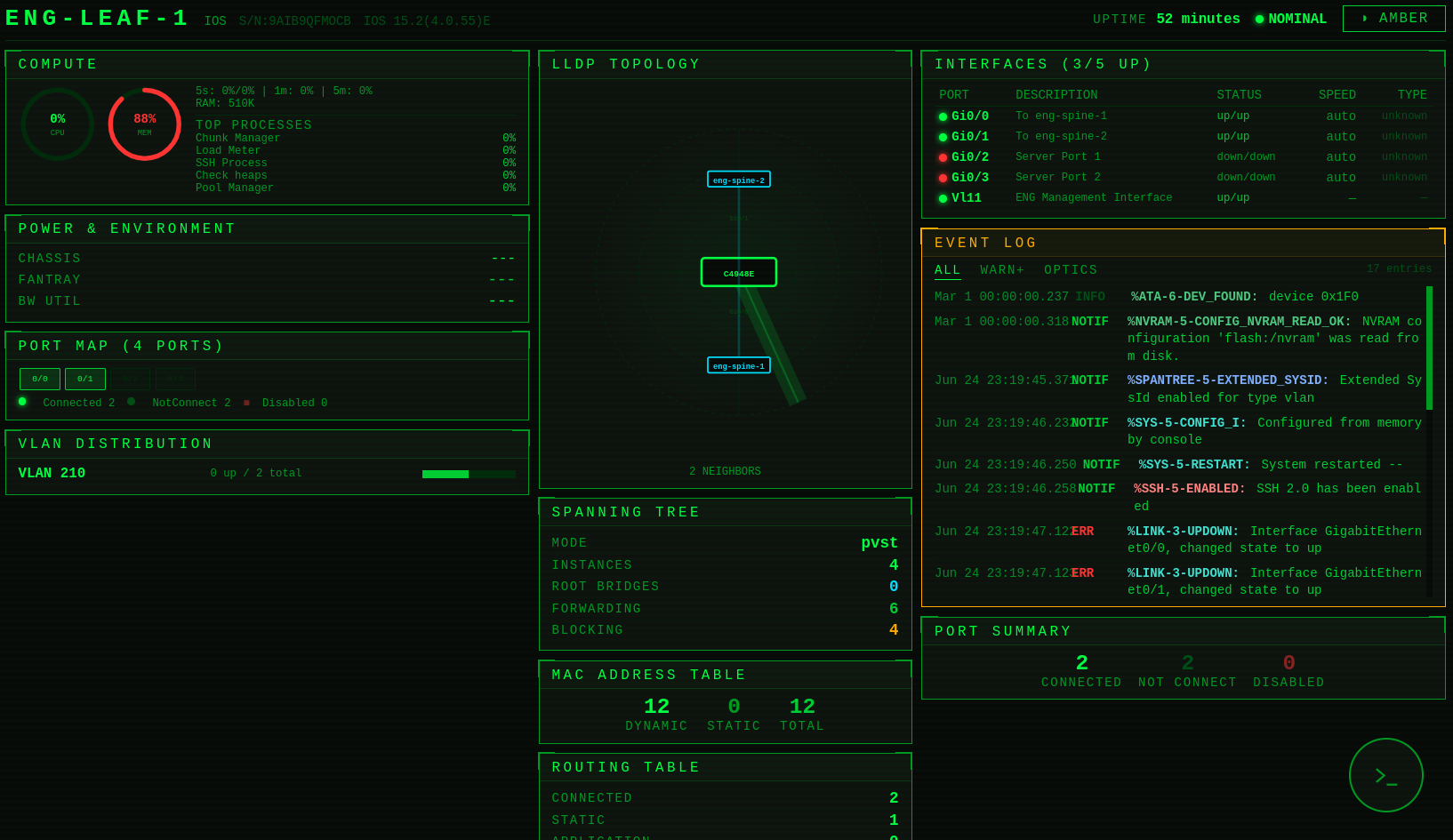
A Cisco IOS leaf on a cold open — LLDP topology, spanning tree, MAC and
routing tables, interfaces and the live event log, all from one SSH session.
How it works
Three observations make the HUD-hosting an "easy path" rather than a rewrite:
The servers run in-process — mostly. Rather than spawning subprocesses for
everything (what nethuds' own CLI launcher does), the wrapper imports each
vendor's FastAPI app and runs it on a background thread via uvicorn, bound to
127.0.0.1 only. That gives direct control of the bound port, keeps no listener
exposed off-box on a laptop that holds SSH credentials, and ties every server's
lifecycle to the window. Servers start lazily — a vendor only spins up when its
first tab opens. The one exception is Linux, which runs as a subprocess per
tab (see Process model below); the session vendors share one thread server
each.
The HUD pages are origin-relative. Each page derives its WebSocket target
from location.host, so it reconnects to whatever port the wrapper bound. The
chosen port never has to be threaded into the JavaScript — serving the page from
that port is enough. If the preferred vendor port is taken, the wrapper walks
forward to the next free one.
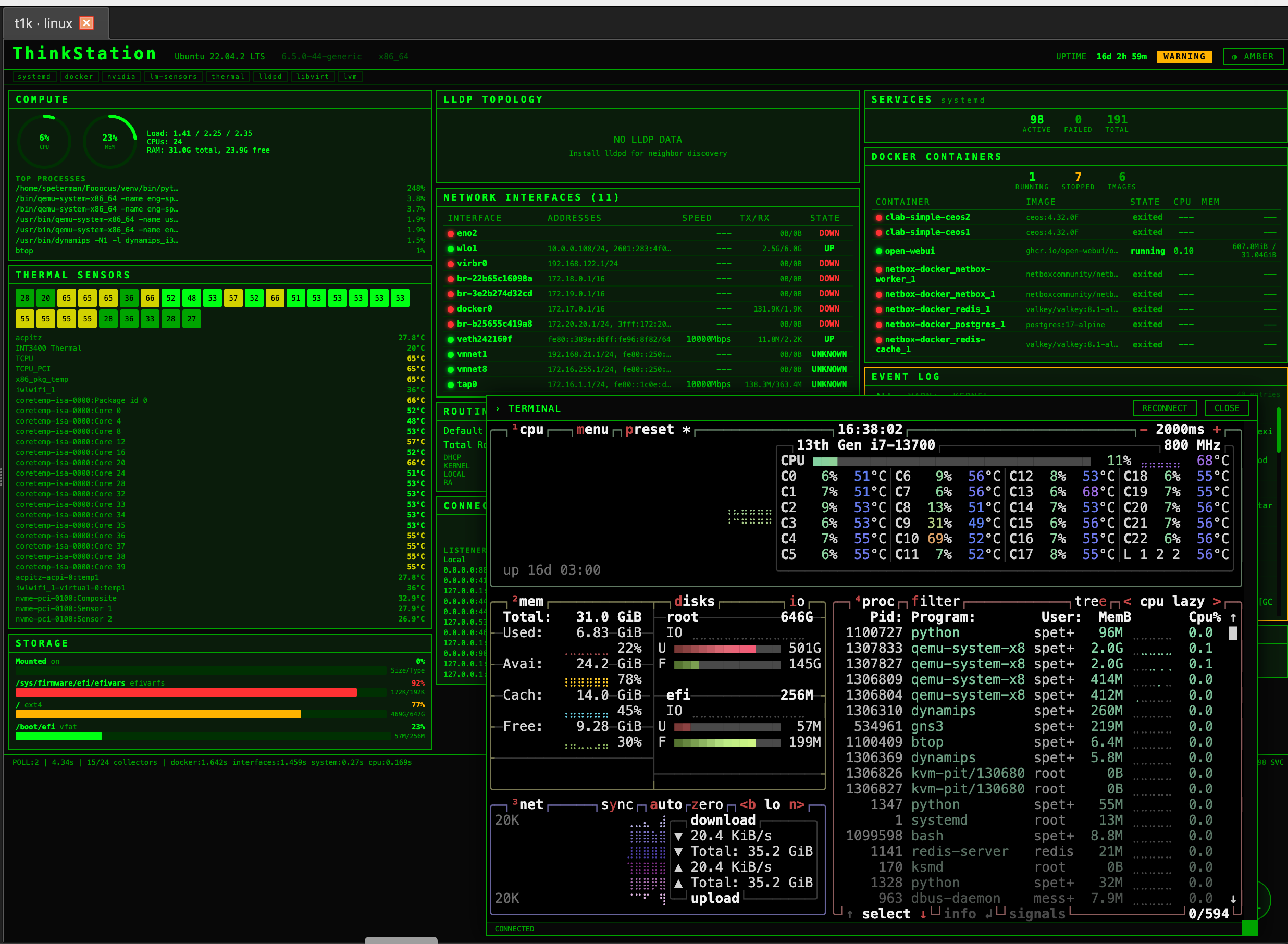
The wrapper-established session, attached: the Linux HUD with a live
terminal (here btop) running over the very SSH connection the HUD reads.
Connection: the wrapper establishes, the page attaches. This is the part
that changed from the original POC. Each HUD's /api/connect accepts a key's
contents (key_text) but the login modal can only forward a key from a file
<input>, never a path or stored secret — so a key cannot travel through the
page. Instead, for any session with a resolved identity (vault credential,
inline key, or a connect-time prompt), the wrapper POSTs /api/connect itself
over loopback with the key/password and legacy_ssh, gets back a session_id,
and loads the page pointed at that session so it attaches rather than
reconnecting. The decrypted secret lives only in that loopback POST body — never
in the URL, the page's JavaScript, or sessionStorage.
- Session vendors (Arista/Juniper/Cisco) return a
session_id; the page is loaded as/?session=<id>&name=…and its resume path (/api/status?session=…) attaches. This needed a ~5-line addition to each of the three pages so they read?session=from the URL into_sessionId(see Front-end patch below). - Linux is single-target, returns no id, and needs no page change: the
wrapper establishes its one device and loads the page bare (
/?name=…), whose existing no-params branch attaches telemetry to the live collector.
The blocking SSH handshake runs off the UI thread in a ConnectWorker, and a
bad login surfaces as the tab's error splash because the wrapper sees the
server's status: error response (see Authentication below).
The vendor-default path still uses the page's original
?host=…&autoconnect=truemechanism, where the page authenticates from the server's own vendor yaml. It is now an explicit, opt-in mode rather than a silent fallback, because it is the one path the wrapper can't validate (it doesn't hold the yaml's secret).
Process model: shared vs dedicated
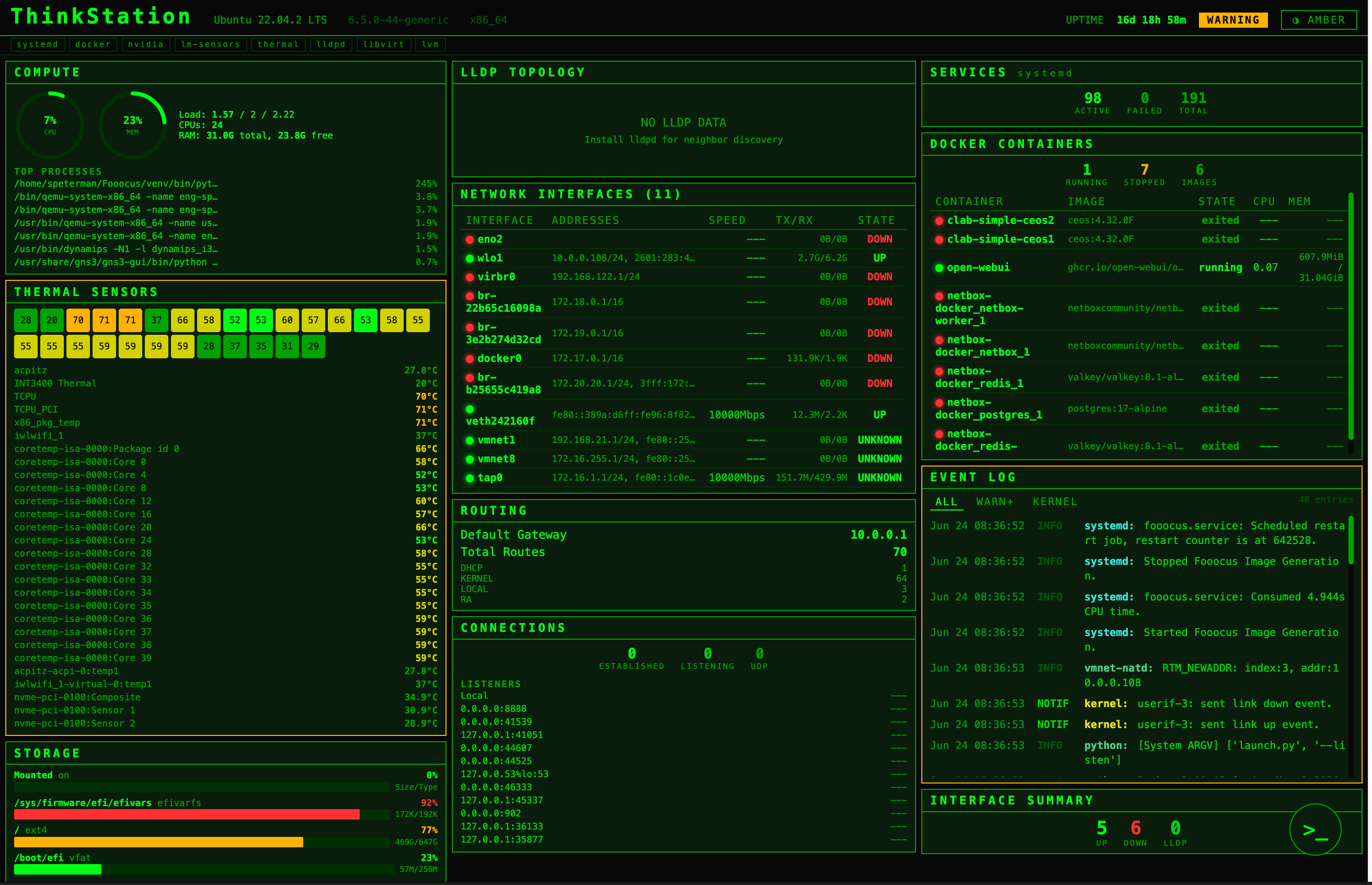
The full Linux cockpit — systemd services, Docker, network interfaces,
routing and thermals from one SSH login. Each Linux tab runs as its own
subprocess (below).
ServerManager runs two kinds of server:
- Shared (Arista, Juniper, Cisco) — one in-process thread server per vendor,
reused by every tab. These servers isolate devices by
session_id, so many tabs to many devices coexist on one server. Kept warm until the app exits. - Dedicated (Linux) — a fresh subprocess per tab. The Linux server is
single-target:
CONFIG["device"], the collector, and the poll task are module-level globals, so two tabs in one process would collide. A separate OS process gives each Linux tab its own globals and loop.release()terminates the subprocess when its tab closes;stop_all()(also wired toatexit) reaps any survivors.
A Linux tab therefore costs one Python process (~60–80 MB) and a ~1–2 s cold start while the child imports and binds.
Authentication & the credential vault
Authentication is no longer a single plaintext identity per vendor yaml. Each
session declares how it authenticates via its credential field, resolved
on the UI thread before any server is touched:
credential value |
behaviour |
|---|---|
| a vault name | use that stored credential (vault must be unlocked) |
@prompt |
always ask for username + password/key at connect; nothing stored |
"" (none) |
a matching/default vault credential if the vault is unlocked, else an inline secret, else prompt |
@vendor |
the HUD server authenticates from its own vendor yaml (the only in-page auth path) |
The important property: a session with nothing to authenticate with prompts rather than silently failing. Connect-time prompts and stored credentials both go through the wrapper-establishes path, so a wrong password/key shows as the tab's red error splash instead of a dead HUD.
The vault (nhd/vault.py)
A direct descendant of the nterm-qt
vault: SQLite for storage, Fernet for encryption, a master password stretched
with PBKDF2-HMAC-SHA256 (480k iterations) and a verify-token unlock check.
Credentials store a key's contents (not a path), which is exactly what
/api/connect consumes. cryptography is already in the dependency tree
(paramiko depends on it), so the vault adds no new dependency. The vault lives
at ~/.nhd/vault.db.
CredentialResolver matches a device to a credential — a pinned name wins
outright; otherwise the most-specific host glob beats a tag match beats the
is_default catch-all — and emits a ResolvedIdentity carrying just the
/api/connect identity subset (username + password XOR key_text, use_keys,
legacy_ssh).
legacy_ssh is deliberately not stored on the credential — it is a property
of the device (does this box speak only old KEX/host-key algorithms), so it
lives on the session and is supplied at resolve time. The IOSv-era gear needs it.
Managing credentials — the vault manager
Vault → Manage credentials… opens the manager dialog that retires the CLI
for day-to-day use. It lists every credential (name, username, auth type, host
globs, tags, default) and offers add / edit / delete / set-default — plus the
two edits vaultctl has no path for: rename and username change in
place. Change master… re-keys the vault, re-encrypting every secret under a
new master password (the GUI equivalent of rekey).
The manager is honest about the vault's lock state, because the store is. The
metadata listing, delete, and set-default all work while the vault is locked
— they touch no ciphertext — so the dialog opens and stays useful before an
unlock, with an inline banner offering to unlock. Add and edit decrypt and
re-encrypt secrets, so they stay disabled until the vault is unlocked, behind
the same gate the connect path uses. Editing a credential pre-fills its
decrypted secrets (only reachable unlocked), so what you see is what gets
stored: clear the password or key field and that secret is removed. A credential
must keep at least one secret — the invariant vaultctl add already enforces —
and a passphrase-looking key draws the same non-blocking warning, since the HUD
server can't forward a passphrase to paramiko. The editor reads a key's
contents from a file (never a path), matching what the vault stores and what
/api/connect consumes.
Managing credentials from the CLI — nhd.vaultctl
The scriptable front door to the vault, for headless setup and automation. The manager above covers the same ground interactively (and adds rename / username change), so the CLI is no longer the only way in:
python -m nhd.vaultctl init
python -m nhd.vaultctl add lab --user admin \
      --key-file ~/.ssh/lab_ed25519 --hosts '172.16.*,10.0.0.*' --default
python -m nhd.vaultctl add netops --user oxidize --password --hosts '10.7.*'
python -m nhd.vaultctl list                 # NAME is the first column
python -m nhd.vaultctl show lab
python -m nhd.vaultctl set-default lab
python -m nhd.vaultctl remove old-cred
python -m nhd.vaultctl rekey                # change master password
remove/show/set-default take the credential NAME (the first column of
list), not its username. --hosts/--tags only matter for automatic
resolution; a session that pins a credential by name skips scoring. The master
password is prompted interactively, or read from $NHD_VAULT_PASSWORD for
scripting; the db path can be overridden with --db or $NHD_VAULT_DB.
Session management
The session tree is editable. Right-click for a context menu:
- on a session: Connect · Edit… · Duplicate · Delete · New session… · New folder…
- on a folder: New session in folder… · Rename folder… · Delete folder · New folder…
- on empty space: New session… · New folder…
Folders. A folder is just a session's group, so historically a folder
could only exist once something lived in it. New folder… creates an empty
one up front — name it, then drop sessions in. An empty folder persists across a
save/reload as {folder_name: …, sessions: []}; it stops being "empty" the
moment a session joins it and becomes an ordinary derived group again. (Deleting
a folder's last session still removes the folder; only folders you create
explicitly stick around while empty.)
Double-click still connects. The editor covers name, host, device type (dropdown → routes to the right HUD), group (editable combo), credential (dropdown of vault names + the modes above), username, tags, port, and the legacy-SSH checkbox.
Filtering. A filter box sits above the tree. Typing narrows it to matching
sessions, and the match runs against the whole session — name, host, vendor,
device type, group, username, credential, and tags — not just the visible
label, so arista, 10.7, a tag, a credential name, or @prompt all work.
Whitespace-separated terms are ANDed (spine prod keeps only sessions matching
both) and matching is case-insensitive. Groups with no surviving session are
hidden and groups with a hit auto-expand, so results surface without clicking;
an empty box restores everything and a filter that matches nothing tints the
box. The filter re-applies itself after an edit rebuilds the tree, so it
survives a rename or a new session. Ctrl+F focuses the box, Esc clears
it.
Edits persist back to the loaded file automatically (Ctrl+S, or File → Save
sessions as… to choose a location), in the same termtels format the loaders
read, so a saved file reloads identically. Secrets never round-trip — the
file stores a credential name, never a password. The title bar shows a •
when there are unsaved changes. A devices.yaml is treated as an import (not
the native save format), so it won't be silently rewritten in a different shape.
File → New session file (Ctrl/Cmd+N) starts an empty, unsaved set — build it
up with New folder… / New session…, and the first save picks a location, after
which edits auto-persist like any loaded file. Anything that would discard
pending edits — New file, opening another file, or quitting — first offers to
save / discard / cancel, so an unsaved set (or an edited devices.yaml
import, which has no auto-save target) can't vanish silently on exit.
Editing a session mutates the object in place, so an open tab keeps pointing at the right session — but a live connection isn't retroactively changed; close and reconnect to pick up a new host or credential.
Tabs. Each device opens in its own closable, movable tab. Right-clicking the tab bar offers Close, Close Others, Close to the Right, and Close All (right-clicking empty bar space offers just Close All). The bulk closers run the same teardown as a single close, so a Linux tab's dedicated subprocess is still reaped when it goes.
Window state. Window geometry, the tree/tab splitter position, the HUD zoom
level, the application scale factor, and the path of the last-loaded session
file are remembered between runs via QSettings (the platform-native backend —
registry / plist / .conf). Launch with no --session-file/--devices and the
file open at last exit is reopened — a devices.yaml is re-imported (never
silently rewritten), and a CLI path always wins over the remembered one. Nothing
stored here is a secret — geometry, a zoom factor, a file path — so the vault
stays the only store of credentials.
High-DPI & scaling. Two independent knobs, both under View:
- Zoom (Ctrl/Cmd +/-/0) is the HUD page zoom — Chromium-level, applied live to every tab and re-applied across the connect navigation. This is the one to reach for moment to moment.
- Scale Factor is the application scale (Qt's
QT_SCALE_FACTOR): Auto (detect from the display) or a forced preset. Qt fixes the UI scale when the process starts, so a change here is saved toQSettingsand applies on the next launch, not live — the menu says as much when you pick one. It's the fix for a display whose auto-detected scaling is wrong, and it scales the chrome and the web views together.--scale FACTORdoes the same from the CLI (and persists it);--scale 0clears the override back to Auto.
Qt6 enables high-DPI scaling by default (the Qt5 AA_EnableHighDpiScaling /
AA_UseHighDpiPixmaps attributes are no-ops now), and the wrapper sets the
scale-factor rounding policy to PassThrough so fractional display scales
(125 % / 150 % / 175 % on Windows & Linux 4K panels) stay crisp instead of
rounding to the nearest integer. On macOS Retina (integer 2×) none of this is
needed; it's there for the mixed-DPI desktops the tool also runs on.
Layout
nhd/
├── app.py             # PyQt6 main window, editable tree, tabs, connect flow,
│                       #   window-state persistence, CLI
├── server_manager.py  # in-process vendor servers + dynamic port binding
├── sessions.py        # session-file parsing -> DeviceSession objects
├── session_store.py   # load/save persistence + CRUD over the session list
├── connect.py         # establish_session() + ConnectWorker (wrapper-side connect)
├── vault.py           # encrypted credential store + resolver
├── vaultctl.py        # CLI for vault management
├── dialogs.py         # vault unlock, session editor, connect-time auth prompt,
│                       #   the credential manager (CRUD + rekey), and About
├── __init__.py
├── assets/            # logo.svg, shown in the About dialog
└── nethuds/           # vendored nethuds package (the four vendor HUD servers)
Front-end patch
The three session-vendor pages (nethuds/<vendor>/static/index.html for
arista, juniper, cisco_ios) carry one small addition in the login modal's
init(): read ?session= from the URL into _sessionId so the page attaches
to a wrapper-established session. The Linux page is unchanged. The Linux
server got one change — /api/connect now runs test_connect() before it
returns (like the session vendors already did), so a bad login is reported to
the caller instead of failing silently inside the poll loop. Since you own
nethuds, both are clean upstream changes to make there and re-vendor.
Install & run
Requires Python 3.10+. From the project root (the parent of nhd/):
python -m venv .venv && source .venv/bin/activate
pip install -r requirements.txt        # PyQt6 + the vendor HUD servers' deps
python -m nhd.app --session-file sessions/sessions.yaml
requirements.txt lists only the direct dependencies (PyQt6, PyQt6-WebEngine,
fastapi, uvicorn[standard], httpx, paramiko, netmiko, cryptography, PyYAML); the
rest resolve transitively. For a byte-for-byte reproducible environment, pin
against the bundled lockfile: pip install -r requirements.txt -c constraints.txt.
Alternative inputs:
python -m nhd.app --devices path/to/devices.yaml   # a nethuds devices.yaml
python -m nhd.app                                   # reopen last session (empty on first run)
python -m nhd.app --scale 1.5                       # force a UI scale (persists; see View → Scale Factor)
Open a device by double-clicking it, or right-click → Connect.
Session file format
--session-file parses a terminal-telemetry YAML. The loader is permissive: it
walks folder-nested or flat structures and accepts a range of field-name
aliases. Secrets are not stored here — credential references a vault entry.
sessions:
  - folder_name: Eng Lab
    sessions:
      - display_name: eng-spine1
        host: 172.16.11.2
        device_type: arista_eos     # or Vendor: arista
        credential: lab             # vault credential name (or @prompt / @vendor)
        tags: [lab, spine]
      - display_name: eng-rtr-1
        host: 172.16.2.1
        device_type: cisco_ios
        credential: lab
        legacy_ssh: true            # IOSv only offers legacy KEX/host-key algos
  - folder_name: Hosts
    sessions:
      - display_name: t1k
        host: 10.0.0.108
        device_type: linux
        credential: lab
Recognised aliases (first match wins):
| field | accepted keys |
|---|---|
| host | host, hostname, ip, address |
| name | display_name, name, label |
| username | username, user |
| port | port, ssh_port |
| vendor | device_type, Vendor, Model, platform, os |
| legacy | legacy_ssh, legacy |
| key file | key_file, keyfile, identity_file |
| credential | credential, cred, credential_name |
| tags | tags, labels |
| group | folder_name, group, folder |
The vendor hint is mapped to a netmiko device_type, which selects the HUD
server (arista_eos → Arista, juniper_junos → Juniper, cisco_* → Cisco,
anything else → Linux). All alias tables live in sessions.py.
Ports
Each vendor server binds its preferred port on 127.0.0.1, walking forward if
it's in use:
| vendor | preferred port |
|---|---|
| Arista | 8470 |
| Juniper | 8471 |
| Cisco | 8472 |
| Linux | 8478 |
Remote debugging
python -m nhd.app --remote-debug 9921 --session-file sessions/sessions.yaml
Point a Chromium-based browser at http://127.0.0.1:9921. The Network tab
(filter to WS) shows the telemetry and terminal sockets and the /api/connect
request/response. The flag sets QTWEBENGINE_REMOTE_DEBUGGING before Qt
initialises; setting it after has no effect.
Known limitations / roadmap
Done since the first POC. Credential management (encrypted vault + resolver),
key-capable auth wired into the login path, the editable session tree with
persistence, and uniform connect-failure reporting across all four vendors. Then
the Qt credential manager — Vault → Manage credentials…, full CRUD plus
rename and username change in place and a master-password rekey, lock-state
aware so it sits next to the existing unlock/lock — and a session-tree filter
that narrows the tree across every session field with ANDed, case-insensitive
terms and survives edits, and HUD zoom (View → Zoom, Ctrl/Cmd
+/-/0) — a global zoom level applied to every tab and re-applied across the
connect navigation — so the HUD scales on macOS, where the page's own
Ctrl+scroll never fired. Most recently, persisted UI state (QSettings:
window geometry, the splitter position, the zoom level, and the last-loaded
session file, reopened on launch when no file is given on the CLI), a tab-bar
context menu for closing the current / other / right-hand / all tabs, and a
Help → About dialog showing the logo, a short description, and the project
link. And most recently still: first-class folders — New folder… creates
an empty folder that persists through save/reload ({folder_name, sessions: []})
until a session joins it — File → New session file for starting a fresh set
from scratch, an unsaved-changes guard (save / discard / cancel) on new-file,
open, and quit so an in-memory or imported set can't be lost on exit, and a
View → Scale Factor application-scaling control (Auto + presets, persisted
in QSettings, applied at next launch) alongside a PassThrough rounding policy
for crisp fractional high-DPI on Windows/Linux.
Passphrase-protected keys don't work. The HUD server writes key_text to a
temp file and never passes a passphrase to paramiko, so an encrypted key fails.
connect.py warns when it resolves one, and the credential manager warns when
you paste or load one. Use a passphrase-less key for the vault, or hold the key
in an agent and use @vendor for those boxes.
Server-side session GC. Closing a tab on a shared vendor leaves its
/api/connect session alive on the server until app exit. Dedicated Linux
subprocesses are reaped on tab close; the shared vendors aren't.
Richer connect errors. A failed login surfaces, but the paramiko message can
be terse ("Authentication failed."). Mapping auth-failure vs unreachable-host vs
host-key-mismatch to clearer text is a small enhancement in connect.py.
Clean shutdown. stop_all() runs on window close and atexit, so a terminal
Ctrl-C no longer orphans Linux subprocesses. A hard SIGKILL still bypasses
cleanup; a process-group / SIGTERM handler would close that last gap.
License
Inherits the license of the bundled nethuds package (GPL).
Release history Release notifications | RSS feed


Download files
Download the file for your platform. If you're not sure which to choose, learn more about installing packages.
Source Distribution
Built Distribution
Filter files by name, interpreter, ABI, and platform.
If you're not sure about the file name format, learn more about wheel file names.
Copy a direct link to the current filters
File details
Details for the file nhd-0.1.2.tar.gz.
File metadata
- Download URL: nhd-0.1.2.tar.gz
- Upload date:
- Size: 200.9 kB
- Tags: Source
- Uploaded using Trusted Publishing? No
- Uploaded via: twine/6.2.0 CPython/3.10.12
File hashes
| Algorithm | Hash digest | |
|---|---|---|
| SHA256 |
f06782b9d8d64f737fecb4106b5f27c9ab14641ea3fd64803f7d86dfdd8de813
|
|
| MD5 |
3a164b5c536c8bd516f9d9ca6db8c3d0
|
|
| BLAKE2b-256 |
47f1ef244419a4cabc15894b629a731b7a821e5c7940e547287df24cc0d258fe
|
File details
Details for the file nhd-0.1.2-py3-none-any.whl.
File metadata
- Download URL: nhd-0.1.2-py3-none-any.whl
- Upload date:
- Size: 201.7 kB
- Tags: Python 3
- Uploaded using Trusted Publishing? No
- Uploaded via: twine/6.2.0 CPython/3.10.12
File hashes
| Algorithm | Hash digest | |
|---|---|---|
| SHA256 |
e1be603165510a30601f469cd1d00ffca9fb52de84a0605f1ec37cf6e0999e1b
|
|
| MD5 |
9936f11a5d40bbafb42fc7eb662884a5
|
|
| BLAKE2b-256 |
f8dec4073aa486dbcfc4741d0fc258210d7600d88cd027346a699074f70b2d59
|






