
あなたも変態。 いいね?




nhentai is a CLI tool for downloading doujinshi from nhentai.net
GUI version: https://github.com/edgar1016/nhentai-GUI
Manual Installation
From Github:
git clone https://github.com/RicterZ/nhentai
cd nhentai
pip install --no-cache-dir .
Build Docker container:
git clone https://github.com/RicterZ/nhentai
cd nhentai
docker build -t nhentai:latest .
docker run --rm -it -v ~/Downloads/doujinshi:/output -v ~/.nhentai/:/root/.nhentai nhentai --id 123855
Installation
From PyPI with pip:
pip install nhentaiFor a self-contained installation, use pipx:
pipx install nhentaiPull from Dockerhub:
docker pull ricterz/nhentai
docker run --rm -it -v ~/Downloads/doujinshi:/output -v ~/.nhentai/:/root/.nhentai ricterz/nhentai --id 123855
On Gentoo Linux:
layman -fa glibOne
sudo emerge net-misc/nhentai
On NixOS:
nix-env -iA nixos.nhentaiUsage
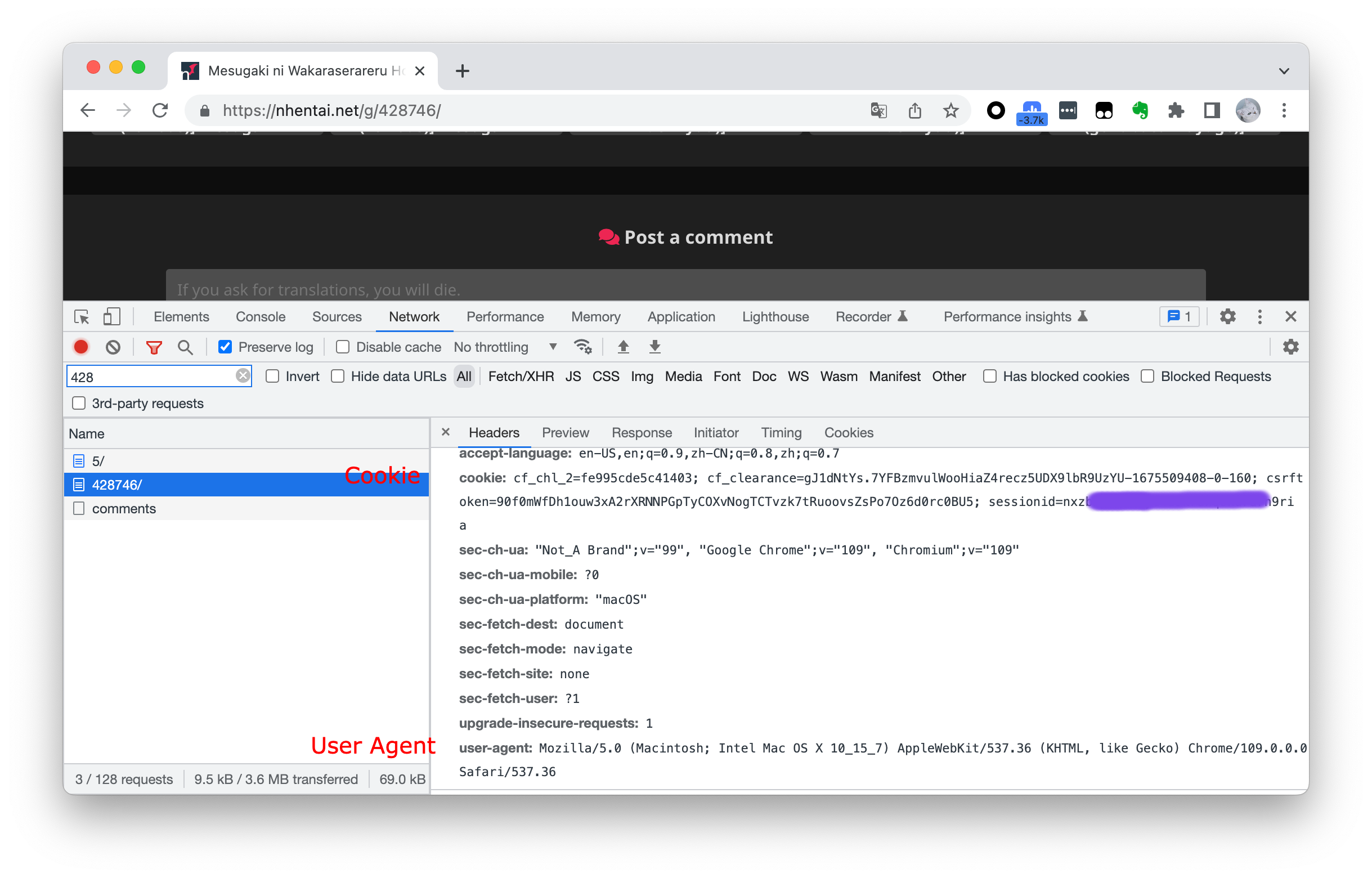
⚠️IMPORTANT⚠️: To bypass the nhentai frequency limit, you should use –cookie and –useragent options to store your cookie and your user-agent.
nhentai --useragent "USER AGENT of YOUR BROWSER"
nhentai --cookie "YOUR COOKIE FROM nhentai.net"
NOTE:
The format of the cookie is “csrftoken=TOKEN; sessionid=ID; cf_clearance=CLOUDFLARE”
cf_clearance cookie and useragent must be set if you encounter “blocked by cloudflare captcha” error. Make sure you use the same IP and useragent as when you got it
The default download folder will be the path where you run the command (%cd% or $PWD).
Download specified doujinshi:
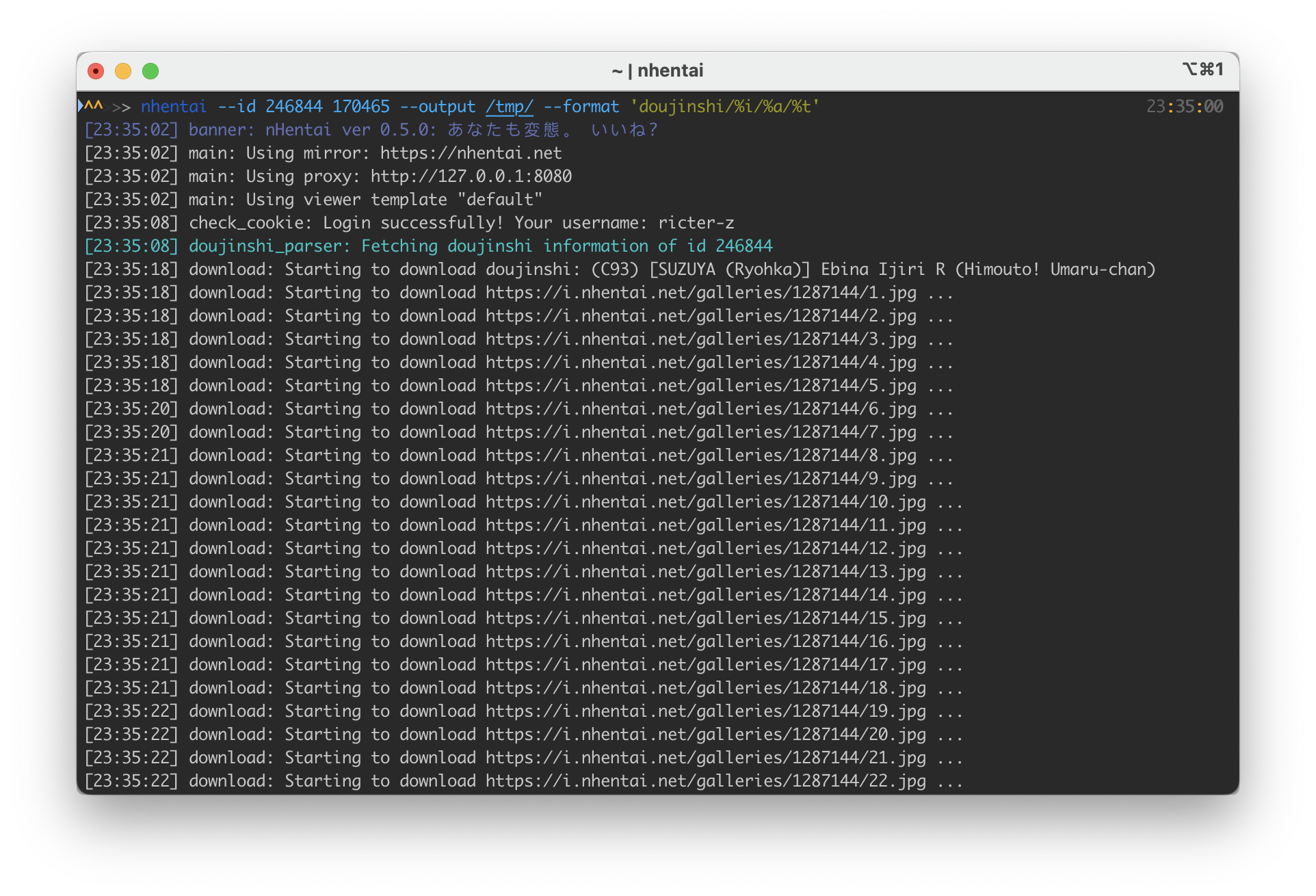
nhentai --id 123855 123866 123877Download doujinshi with ids specified in a file (doujinshi ids split by line):
nhentai --file=doujinshi.txtSet search default language
nhentai --language=englishSearch a keyword and download the first page:
nhentai --search="tomori" --page=1 --download
# you also can download by tags and multiple keywords
nhentai --search="tag:lolicon, artist:henreader, tag:full color"
nhentai --search="lolicon, henreader, full color"
Download your favorites with delay:
nhentai --favorites --download --delay 1 --page 3-5,7Format output doujinshi folder name:
nhentai --id 261100 --format '[%i]%s'
# for Windows
nhentai --id 261100 --format "[%%i]%%s"
Supported doujinshi folder formatter:
%i: Doujinshi id
%f: Doujinshi favorite count
%t: Doujinshi name
%s: Doujinshi subtitle (translated name)
%a: Doujinshi authors’ name
%g: Doujinshi groups name
%p: Doujinshi pretty name
%ag: Doujinshi authors name or groups name
Note: for Windows operation system, please use double “%”, such as “%%i”.
Other options:
Usage:
  nhentai --search [keyword] --download
  NHENTAI=https://nhentai-mirror-url/ nhentai --id [ID ...]
  nhentai --file [filename]

Environment Variable:
  NHENTAI                 nhentai mirror url

Options:
  -h, --help            show this help message and exit
  -D, --download        download doujinshi (for search results)
  -S, --show            just show the doujinshi information
  --id                  doujinshi ids set, e.g. 167680 167681 167682
  -s KEYWORD, --search=KEYWORD
                        search doujinshi by keyword
  -F, --favorites       list or download your favorites
  -a ARTIST, --artist=ARTIST
                        list doujinshi by artist name
  --page-all            all search results
  --page=PAGE, --page-range=PAGE
                        page number of search results. e.g. 1,2-5,14
  --sorting=SORTING, --sort=SORTING
                        sorting of doujinshi (recent / popular /
                        popular-[today|week])
  -o OUTPUT_DIR, --output=OUTPUT_DIR
                        output dir
  -t THREADS, --threads=THREADS
                        thread count for downloading doujinshi
  -T TIMEOUT, --timeout=TIMEOUT
                        timeout for downloading doujinshi
  -d DELAY, --delay=DELAY
                        slow down between downloading every doujinshi
  --retry=RETRY         retry times when downloading failed
  --exit-on-fail        exit on fail to prevent generating incomplete files
  --proxy=PROXY         store a proxy, for example: -p "http://127.0.0.1:1080"
  -f FILE, --file=FILE  read gallery IDs from file.
  --format=NAME_FORMAT  format the saved folder name
  --dry-run             Dry run, skip file download
  --html                generate a html viewer at current directory
  --no-html             don't generate HTML after downloading
  --gen-main            generate a main viewer contain all the doujin in the
                        folder
  -C, --cbz             generate Comic Book CBZ File
  -P, --pdf             generate PDF file
  --rm-origin-dir       remove downloaded doujinshi dir when generated CBZ or
                        PDF file
  --move-to-folder      remove files in doujinshi dir then move new file to
                        folder when generated CBZ or PDF file
  --meta                generate a metadata file in doujinshi format
  --regenerate          regenerate the cbz or pdf file if exists
  --cookie=COOKIE       set cookie of nhentai to bypass Cloudflare captcha
  --useragent=USERAGENT, --user-agent=USERAGENT
                        set useragent to bypass Cloudflare captcha
  --language=LANGUAGE   set default language to parse doujinshis
  --clean-language      set DEFAULT as language to parse doujinshis
  --save-download-history
                        save downloaded doujinshis, whose will be skipped if
                        you re-download them
  --clean-download-history
                        clean download history
  --template=VIEWER_TEMPLATE
                        set viewer template
  --legacy              use legacy searching method
nHentai Mirror
If you want to use a mirror, you should set up a reverse proxy of nhentai.net and i.nhentai.net. For example:
i.h.loli.club -> i.nhentai.net
i3.h.loli.club -> i3.nhentai.net
i5.h.loli.club -> i5.nhentai.net
i7.h.loli.club -> i7.nhentai.net
h.loli.club -> nhentai.net
Set NHENTAI env var to your nhentai mirror.
NHENTAI=https://h.loli.club nhentai --id 123456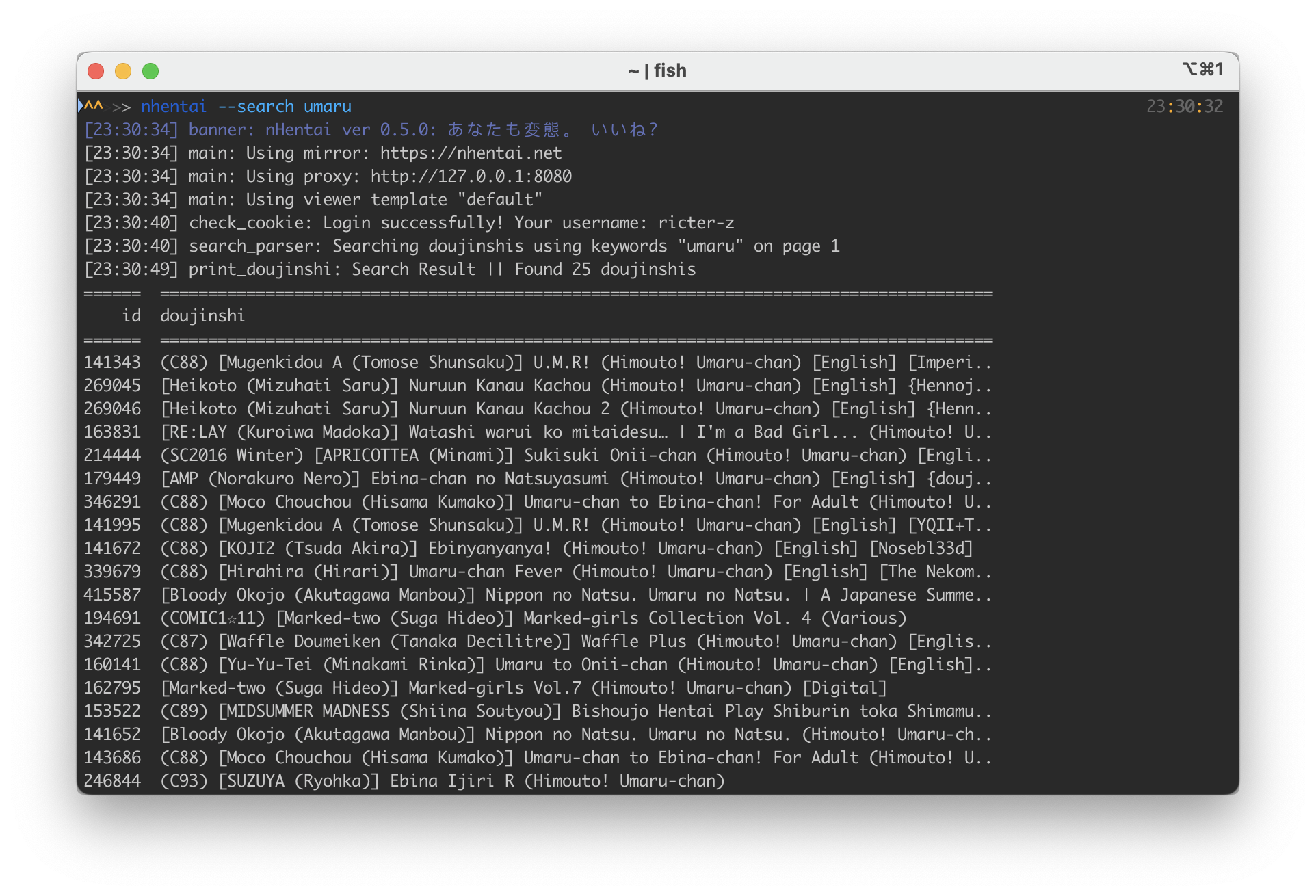
1 maintainer

Metadata
1 maintainer
Release files for nhentai 0.5.25
For a detailed explanation of source distributions (sdists) and built distributions (wheels), please see the package formats documentation.
Source distribution (sdist)
| File | Size | Uploaded | |
|---|---|---|---|
| nhentai-0.5.25.tar.gz | 42.7 kB | Details |
Built distribution (wheel)
| File | Interpreter | ABI | Platform | Reset |
|---|---|---|---|---|
| nhentai-0.5.25-py3-none-any.whl | Python 3 | none | any | Details |
Total release size: 87.8 kB
Release files / nhentai-0.5.25.tar.gz
| Download URL | nhentai-0.5.25.tar.gz |
|---|---|
| Size | 42.7 kB |
| Tags | Source |
|
SHA-256 checksum How to use checksums |
8112518f7bcdc68367b326763ae305152dae8965a8aac35afe0f9314b900a911
|
|
BLAKE2b-256 checksum How to use checksums |
8e9a87ba89a09fac62119e19d65063d8caf98ab4b7a561594bf142218488abdb
|
| Upload date | |
|
Uploaded using Trusted Publishing? What is trusted publishing? |
No |
| Uploaded via |
twine/5.1.1 CPython/3.12.3
|
Release files / nhentai-0.5.25-py3-none-any.whl
| Download URL | nhentai-0.5.25-py3-none-any.whl |
|---|---|
| Size | 45.1 kB |
| Tags | Python 3 |
|
SHA-256 checksum How to use checksums |
b3fa7bd0950e9c3fcb691ae92a60ad3e101c602449363711dd2a5188e58ee526
|
|
BLAKE2b-256 checksum How to use checksums |
5829814eeac43a94471b14eeb949c0b7810ee77fcd726d1708870a23a4a3e140
|
| Upload date | |
|
Uploaded using Trusted Publishing? What is trusted publishing? |
No |
| Uploaded via |
twine/5.1.1 CPython/3.12.3
|














