
Developing beautiful NiceGUI applications with AI

Project description

Nice Vibes - Teach AI agents to build beautiful NiceGUI applications


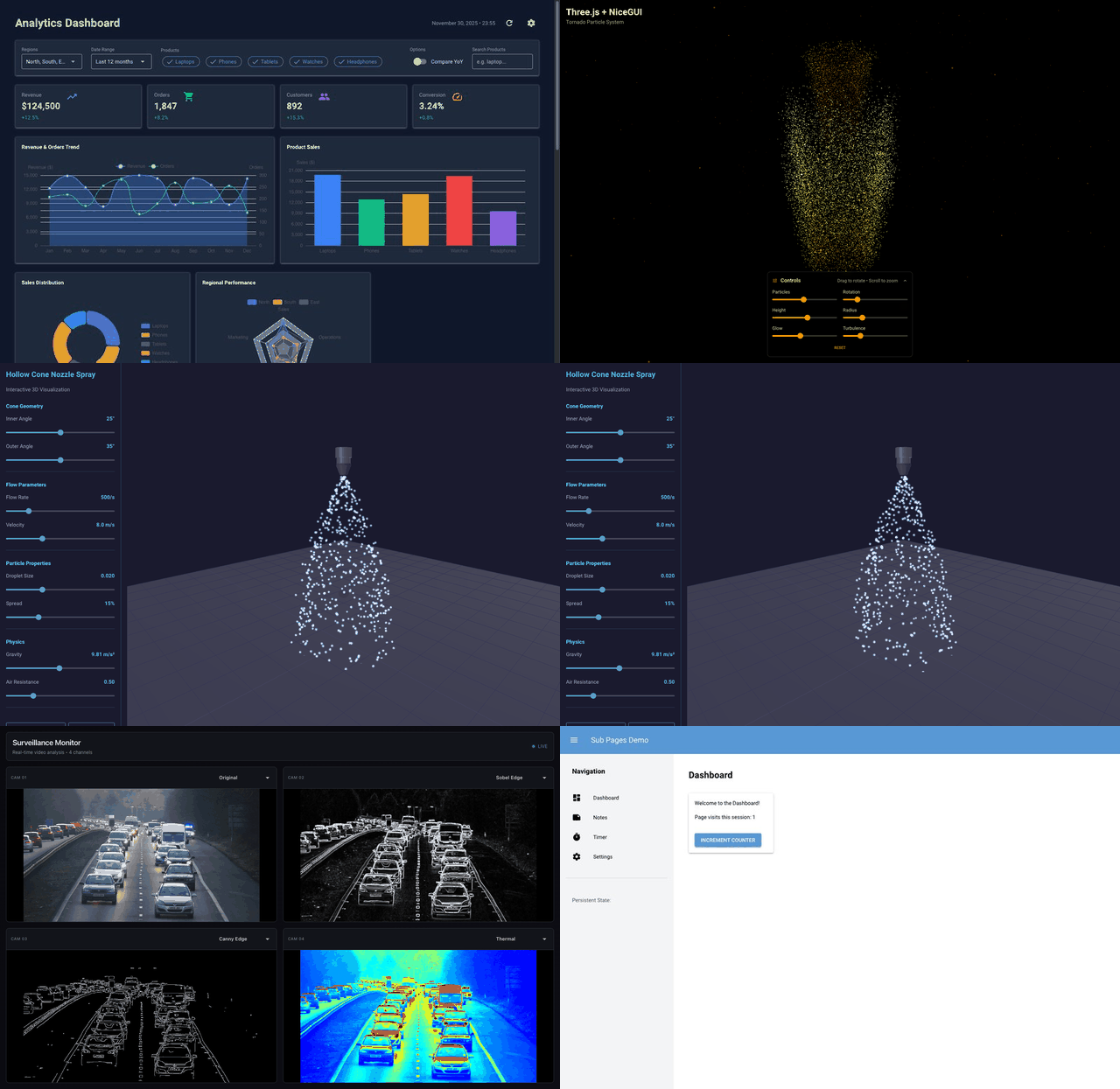
A comprehensive toolkit of prompts, patterns, and examples that help AI coding assistants generate correct, idiomatic NiceGUI code.
✨ Features
- 📚 Complete Documentation - Events, mechanics, styling, and class references
- 🔐 Authentication Patterns - Signed cookie persistence, role-based permissions, login flows
- 🧭 SPA Navigation -
ui.sub_pages, header/drawer visibility, back button handling - 🧪 Working Samples - Full multi-dashboard app, stock analysis, custom components
- 🤖 AI-Optimized - Single master prompt (~23K tokens) for context injection
- ✅ Validated - All class references and URLs verified
- 🧩 Modular - Pick what you need or use the full prompt
🚀 Quick Start
Use Pre-Built Prompts (Recommended)
Just download and use the pre-built master prompt directly:
| Variant | Tokens | Use Case | Download |
|---|---|---|---|
| Compact | ~14K | Quick tasks, simple UI | nice_vibes_compact.md |
| Optimum | ~23K | Most use cases | nice_vibes.md |
| Extended | ~34K | Custom components, deployment | nice_vibes_extended.md |
When using tools such as Windsurf or Claude Code, point it to the master prompt of your choice before providing the task description.
Choose of one the urls above depending on the complexity of the task.
Alternatively, you can add the global and local rules below to your tool of choice to let it fetch the corresponding master prompt automatically.
Build From Source (Optional)
Only needed if you want to customize or extend the documentation:
git clone https://github.com/Alyxion/nice-vibes.git
cd nice-vibes
poetry install
poetry run python scripts/build_master_prompt.py
📋 Requirements
For building from source:
- Python 3.12+
- Poetry
📖 Documentation
| Folder | Description |
|---|---|
| docs/ | Main documentation |
| docs/events/ | Event handling patterns |
| docs/mechanics/ | Core patterns (SPA, authentication, styling) |
| docs/classes/ | UI element reference by category |
📂 Other Folders
| Folder | Description |
|---|---|
| samples/ | Working example applications |
| output/ | Generated master prompts |
| scripts/ | Build and validation tools |
| tests/ | Example NiceGUI tests |
🧪 Testing
poetry run pytest -v
🤖 Prompt Variants
Each variant is available in online (GitHub URLs) and offline (local paths) versions:
| Content | Compact | Optimum | Extended |
|---|---|---|---|
| Main guide | ✓ | ✓ | ✓ |
| Core mechanics | ✓ | ✓ | ✓ |
| Events | ref | ✓ | ✓ |
| Class reference | ref | ✓ | ✓ |
| Custom components | ref | ref | ✓ |
| Configuration & deployment | ref | ref | ✓ |
| Testing | ✓ | ✓ | ✓ |
| Sample references | ✓ | ✓ | ✓ |
ref = Not included but referenced with summary (AI knows where to look)
Configure file order and summaries in docs/prompt_config.yaml.
🖥️ Command Line Interface
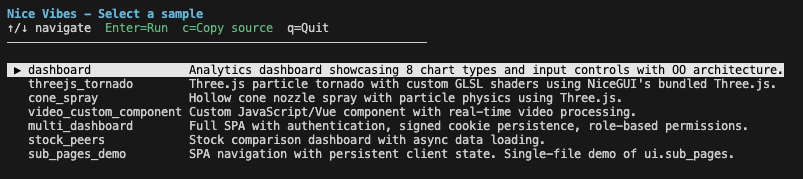
Nice Vibes includes a CLI to explore and run sample applications:
# Install the package
pip install nice-vibes

# Interactive sample selector
nice-vibes

# List available samples
nice-vibes list

# Run a sample
nice-vibes run dashboard

# Copy sample source code to current directory
nice-vibes copy dashboard
nice-vibes copy video_custom_component -o my_video_app
🔌 MCP Server (Optional)
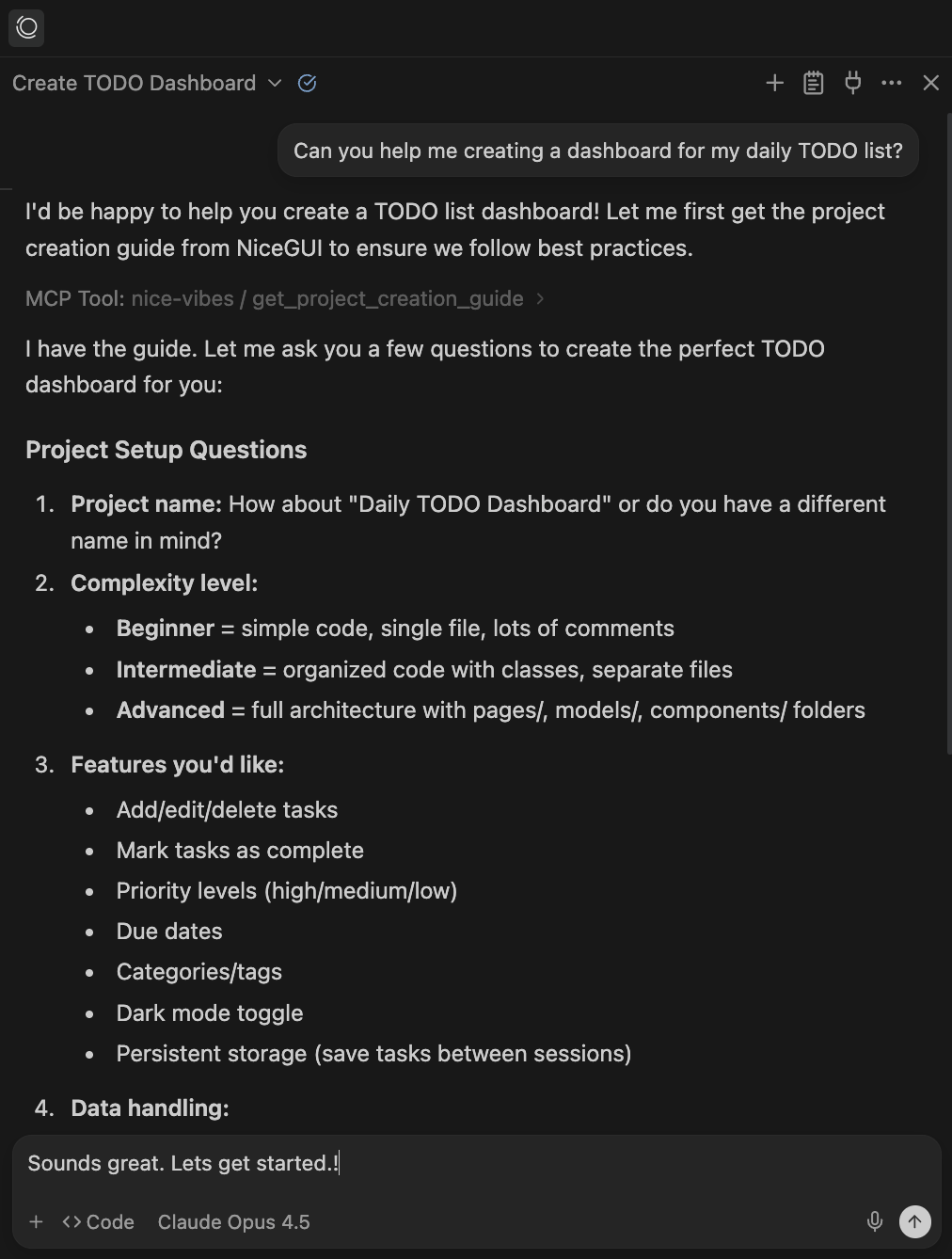
NiceVibes includes an optional Model Context Protocol server that gives AI assistants dynamic access to:
- Guided project creation - Step-by-step questionnaire with best practices
- Documentation search - Find topics without loading everything into context
- Source code inspection - Read NiceGUI component source directly
- Visual debugging - Capture screenshots of running or newly created applications
- Sample exploration - Browse and copy working examples
Get your configuration with nice-vibes mcp-config:
{
  "mcpServers": {
    "nice-vibes": {
      "command": "/path/to/python",
      "args": ["-m", "nice_vibes.mcp"]
    }
  }
}
Add this to your MCP client config (Windsurf, Claude Desktop, etc.).
This is how it works:
See nice_vibes/mcp/README.md for detailed setup instructions.
🧠 Recommended Editor Rules (Windsurf / Claude Code)
Use the snippets below as Global Rules / Global Instructions and Local Rules / Local Instructions.
Version A (recommended): MCP-enabled
Global (copy/paste)
When I ask you to build a new Python dashboard or web UI, default to NiceGUI and Poetry (Python 3.12+).
Assume the app runs on http://localhost:8080. If the nice-vibes MCP server is available, you can refer
to it for sample apps and initial project setup.
Local (copy/paste)
This repository uses NiceGUI and Poetry.

Rules:
- Always use `poetry run ...`.
- Keep NiceGUI on port 8080. If the port is blocked you can kill the process using nice-vibes MCP tools.
- NiceGUI hot-reloads on file-changes, you do usually not need to restart the server.
- Do not open a browser automatically.
- Prefer the nice-vibes MCP tools for docs, samples, and NiceGUI component details.
- If you want to verify visual impact of your changes you can use the nice-vibes MCP tools to capture screenshots using `capture_url_screenshot` (defaults to http://localhost:8080).
Version B: No MCP (GitHub markdown only)
Global (copy/paste)
When I ask you to build a new Python dashboard or web UI, default to NiceGUI and Poetry (Python 3.12+).
For documentation, samples, and NiceGUI component details use the Nice Vibes GitHub markdown prompts.
They are available in the following variants:
- https://raw.githubusercontent.com/Alyxion/nice-vibes/refs/heads/main/output/nice_vibes_compact.md
- https://raw.githubusercontent.com/Alyxion/nice-vibes/refs/heads/main/output/nice_vibes.md
- https://raw.githubusercontent.com/Alyxion/nice-vibes/refs/heads/main/output/nice_vibes_extended.md
Local (copy/paste)
This repository uses NiceGUI and Poetry.

Rules:
- Always use `poetry run ...`.
- Keep NiceGUI on port 8080. Do not open a browser automatically.
- Use the Nice Vibes GitHub markdown prompts as your primary reference for NiceGUI component details.
- NiceGUI hot-reloads on file-changes, you do usually not need to restart the server.
🙏 Credits
Created by Michael Ikemann


Built for use with NiceGUI - a Python UI framework by Zauberzeug.
📄 License
This project is licensed under the MIT License - see the LICENSE file for details.
Free to use, modify, and distribute.


Download files
Download the file for your platform. If you're not sure which to choose, learn more about installing packages.
Source Distribution
Built Distribution
Filter files by name, interpreter, ABI, and platform.
If you're not sure about the file name format, learn more about wheel file names.
Copy a direct link to the current filters
File details
Details for the file nice_vibes-0.1.5.tar.gz.
File metadata
- Download URL: nice_vibes-0.1.5.tar.gz
- Upload date:
- Size: 16.3 MB
- Tags: Source
- Uploaded using Trusted Publishing? No
- Uploaded via: poetry/2.1.1 CPython/3.13.11 Darwin/25.2.0
File hashes
| Algorithm | Hash digest | |
|---|---|---|
| SHA256 |
2c4e3fbc421da18a1d18ba374dc20969d926e13e519cc882d9c32f42d07db138
|
|
| MD5 |
8af228c9815dd2ab32972d245d919027
|
|
| BLAKE2b-256 |
75a6ffb8594a7951e6de1b8ba72e548ffc027e26691772ed4cdf5bb07eb42559
|
File details
Details for the file nice_vibes-0.1.5-py3-none-any.whl.
File metadata
- Download URL: nice_vibes-0.1.5-py3-none-any.whl
- Upload date:
- Size: 16.3 MB
- Tags: Python 3
- Uploaded using Trusted Publishing? No
- Uploaded via: poetry/2.1.1 CPython/3.13.11 Darwin/25.2.0
File hashes
| Algorithm | Hash digest | |
|---|---|---|
| SHA256 |
2955c5e299b8c3c3d75dc529a5cbced872d6871ca2fef059df91ca8c212c8aae
|
|
| MD5 |
10a9fa50777ece3ebfbef8cc3a005ae6
|
|
| BLAKE2b-256 |
3143b22d3240893150f647ca1cca501e937555fd5e6d514251f8600ab05fa534
|






