
Embed and interact with React components from NiceGUI, in Python.

Project description
NiceGUI React Integration





Embed and interact with React components from NiceGUI, in Python.
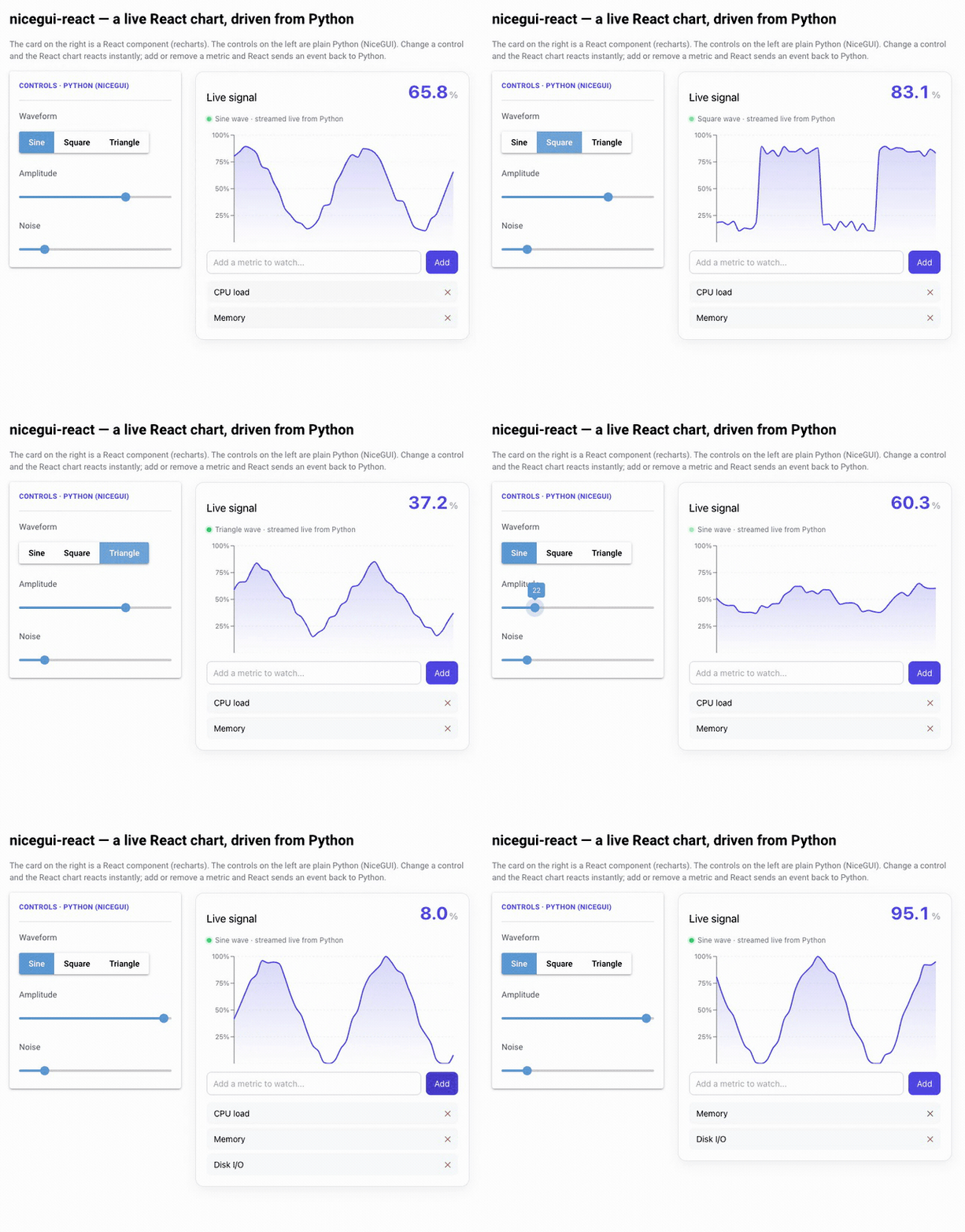
Everything above is a single NiceGUI page. The chart and list on the right are a React component (built on recharts); the controls on the left are plain Python (NiceGUI). Moving a Python control updates the React chart instantly, live data streams in through a ui.timer, and adding/removing a metric sends an event back to Python — see the complex example.
nicegui-react builds your React project with Vite, serves the
compiled bundle as a static asset, and mounts it inside a native NiceGUI component. Props
flow from Python to React, and events flow from React back to Python - both over NiceGUI's
regular websocket channel.
Features
- Easy integration - drop a React component into any NiceGUI page.
- Reactive props - update props from Python (timers, events, background tasks, bindings) and the React component re-renders immediately. This works in every mode, not just during development.
- Events - handle events emitted from React in your Python code (sync or async handlers).
- Multiple components & instances per page - render as many different React projects, and as many instances of each, on a single page as you like. Each bundle is isolated.
- Automatic bundling - your React code is built with Vite into a single, self-contained ES module.
- Fast, content-addressed caching - builds are skipped when nothing changed, and the served URL changes only when the bundle content changes, so browsers never serve a stale bundle.
- Live reload (dev mode) - edit your React code and see the change in the browser without restarting your Python app.
Installation
pip install nicegui-react
Requirements
- Python 3.8+
- NiceGUI 2.3+ (works with NiceGUI 2.x and 3.x)
- Node.js and npm (used to build the React project)
Usage
from nicegui import ui
from nicegui_react import React


@ui.page("/")
def index():
    with ui.card():
        ui.label("Here is the React component:")

        react = (
            React(
                react_project_path="./my_react_project",
                main_component="App",  # your main component's name
            )
            .props(title="Hello from Python!")
            .on("onClick", lambda data: ui.notify(f"React said: {data}"))
        )

        ui.button("Update from Python", on_click=lambda: react.props(title="Updated!"))


ui.run()
Your React component receives the props you pass from Python, plus a handler function for
every event you register with .on(...):
export default function App({ title, onClick }) {
  return (
    <div>
      <h3>{title}</h3>
      <button onClick={() => onClick({ clickedAt: Date.now() })}>Click me</button>
    </div>
  );
}
Parameters
react_project_path(str): path to your React project directory, resolved relative to the calling Python file.main_component(str): name of the main React component to render.component_id(str, optional): identifier for the component (defaults to the project folder name). Used to key the build cache.env(dict, optional): environment variables exposed to the React app at build time asprocess.env.*.use_legacy_peer_deps(bool, optional): pass--legacy-peer-depstonpm install.dev(bool, optional): enable development mode with live reload (see below).
Methods
props(**kwargs): merge and update the props passed to the React component. Returnsselffor chaining.on(event_name, handler): register a handler for an event emitted from React. The handler is called with the event payload. Returnsselffor chaining.React.prebuild(react_project_path, main_component, ...)(classmethod): build and cache a project ahead of time so the first page visit does not pay the build cost. Arguments match the constructor. Call it fromapp.on_startup:
from nicegui import app
from nicegui_react import React

@app.on_startup
def _build_react():
    React.prebuild("./my_react_project", "App")
Development mode (live reload)
Pass dev=True to build your project in place and watch it for changes. When you edit a
source file, Vite rebuilds and the component hot-reloads in the browser without a page refresh
(current props are preserved):
React("./my_react_project", "App", dev=True)
In dev mode the following files are generated inside your project (add them to .gitignore):
.nicegui_react_dist/         # Vite build output
.nicegui_react/              # build metadata
_nicegui_react_main.jsx      # generated entry point
_nicegui_react_vite.config.mjs
package-lock.json            # if npm created it
In normal (non-dev) mode, none of these are written into your project. The build happens in a
cache directory under ~/.nicegui/react_cache/.
How it works
- Your project is copied into a cache directory (or built in place in dev mode).
- A small entry module and a Vite config are generated. The entry exports a
mount()function and imports your component. - Vite builds a single, self-contained ES module (
bundle.js) with React bundled in, plus a singlebundle.css. - The bundle is served as a static file, and a native NiceGUI Vue component dynamically imports it and mounts your component into its own DOM element.
- Props are passed as reactive component props; events are forwarded via the component's native event mechanism. No polling, no custom HTTP endpoints.
Because each component gets its own isolated bundle and its own element, any number of different components and instances can coexist on one page.
Setting up your React project
- Place your React project in a directory relative to your Python script.
- Your main component should be exported (default or named export both work).
- A
package.jsonwithreact,react-dom,viteand@vitejs/plugin-reactis recommended. If it is missing or incomplete,nicegui-reactwill fill in sensible defaults and runnpm installfor you.
See the examples/ folder for complete demos:
app.py- two different React components (a counter and a clock), multiple instances of each on one page, timer-driven props, and events.complex_app.py- a live dashboard built on the third-partyrechartslibrary, showing that arbitrary npm dependencies are bundled automatically. It streams array data from aui.timerinto a chart, keeps React-internal state (a controlled input) alongside Python-driven props, handles multiple events with different payloads, and uses anasyncPython event handler.
Upgrading from 0.1.x
Version 0.2.0 rewrites the internals for performance and correctness while keeping the public API
(React(...), .props(), .on()) unchanged. No changes are required to your Python code or your
React projects. Notable internal changes:
- The bundle now loads as an ES module instead of being injected inline over the websocket.
- Events use NiceGUI's native event system; the internal
/react_event/*HTTP endpoint is gone. - Builds run in production mode by default (smaller, faster bundles).
- Multiple different components and multiple instances per page are now supported.
- The wrapper element no longer uses
component_idas its DOMid(this is what enables multiple instances). If you targeted thatidfrom external CSS/JS, style your React component from within its own bundle instead.
License
MIT. See the LICENSE file for details.
Contributing
Contributions are welcome. Please fork the repository and open a pull request from a feature branch.
Release history Release notifications | RSS feed


Download files
Download the file for your platform. If you're not sure which to choose, learn more about installing packages.
Source Distribution
Built Distribution
Filter files by name, interpreter, ABI, and platform.
If you're not sure about the file name format, learn more about wheel file names.
Copy a direct link to the current filters
File details
Details for the file nicegui_react-0.2.1.tar.gz.
File metadata
- Download URL: nicegui_react-0.2.1.tar.gz
- Upload date:
- Size: 18.3 kB
- Tags: Source
- Uploaded using Trusted Publishing? No
- Uploaded via: twine/6.1.0 CPython/3.12.2
File hashes
| Algorithm | Hash digest | |
|---|---|---|
| SHA256 |
8f1056397f6f0f0e5dc0772f6e5daa7f2ecc48c226766cd28d550da052eada2f
|
|
| MD5 |
69680901451b0ab1eb31c65c8ff55c72
|
|
| BLAKE2b-256 |
938b3b6140f560968b9f5eba225e434b6e3fce522bbdd5f79d4486ee12653b3d
|
File details
Details for the file nicegui_react-0.2.1-py3-none-any.whl.
File metadata
- Download URL: nicegui_react-0.2.1-py3-none-any.whl
- Upload date:
- Size: 16.3 kB
- Tags: Python 3
- Uploaded using Trusted Publishing? No
- Uploaded via: twine/6.1.0 CPython/3.12.2
File hashes
| Algorithm | Hash digest | |
|---|---|---|
| SHA256 |
ff760ac0a1d2292999f130174910d73633a464eb8a00d22eefbd2420b39379b1
|
|
| MD5 |
bcf20887a134372ef25426221710712f
|
|
| BLAKE2b-256 |
9d166f209bd800920685c4c5114a78678b0664c2fbbf7f90326249ce0e41055b
|






