
NI-DMM Python API


Project description
master branch status |
|
|
GitHub status |
|
|
Versions |
NI-DCPower |
|
NI-DMM |
|
|
NI-FGEN |
|
|
NI-SCOPE |
|
|
NI-SWITCH |
|
|
NI-ModInst |
|
|
















Info |
Python bindings for NI Modular Instrument drivers. See GitHub for the latest source. |
Author |
National Instruments |
WARNING!! |
NI Modular Instruments Python API is currently under development. You are welcome to use it, and we welcome feedback, but be prepared for changes to the APIs. |
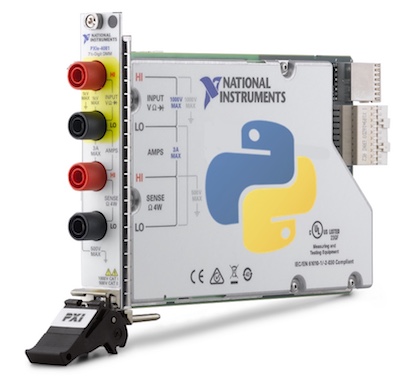
About
The nimi-python repository generates Python bindings (Application Programming Interface) for interacting with the Modular Instrument drivers. Currently, the following drivers are supported:
NI-DCPower (Python module: nidcpower)
NI-DMM (Python module: nidmm)
NI-FGEN (Python module: nifgen)
NI-SCOPE (Python module: niscope)
NI-SWITCH (Python module: niswitch)
NI-ModInst (Python module: nimodinst)
It is implemented as a set of Mako templates and per-driver metafiles that produce a Python module for each driver. The driver is called through its public C API using the ctypes Python library.
nimi-python supports all the Operating Systems supported by the underlying driver.
nimi-python supports Python 2.7, 3.4 and later using CPython or PyPy.
Installation
As a prerequisite to using nimi-python modules, you must install the corresponding driver runtime on your system. Visit ni.com/downloads to download the driver runtime for your devices.
The nimi-python modules (i.e. for NI-DMM) can be installed with pip:
$ python -m pip install nidmm
Or easy_install from setuptools:
$ python -m easy_install nidmm
You also can clone the project repository, build it, and install it:
$ git clone https://github.com/ni/nimi-python.git
$ make
$ pip install -U bin\nidmm\dist\nidmm-0.1-py2.py3-none-any.whl
Usage
The following is a basic example of using the nidmm module to open a session to a DMM and perform a 5.5 digits of resolution voltage measurement in the 10 V range.
import nidmm
with nidmm.Session("Dev1") as session:
    session.configureMeasurementDigits(nidmm.Function.DC_VOLTS, 10, 5.5)
    print("Measurement: " + str(session.read()))
Additional examples for each driver are located in src/<driver>/examples/ directory.
Support / Feedback
The packages included in nimi-python package are supported by NI. For support, open a request through the NI support portal at ni.com.
Bugs / Feature Requests
To report a bug or submit a feature request, please use the GitHub issues page.
Information to Include When Asking for Help
Please include all of the following information when opening an issue:
Detailed steps on how to reproduce the problem and full traceback, if applicable. Code samples are encouraged!
The python version used:
$ python -c "import sys; print(sys.version)"
The module (i.e. nidmm) and its version:
$ python -m pip list
The version of the driver used (i.e. NI-DMM 17.1). Follow this KB article to determine the version you have installed.
The operating system, version, and bitness. For example 64-bit Windows 7.
Documentation
Documentation is available here.
Additional Documentation
Refer to your driver documentation for device-specific information and detailed API documentation.
License
nimi-python is licensed under an MIT-style license (see LICENSE). Other incorporated projects may be licensed under different licenses. All licenses allow for non-commercial and commercial use.
Release history Release notifications | RSS feed


Download files
Download the file for your platform. If you're not sure which to choose, learn more about installing packages.
Source Distribution
Built Distribution
Filter files by name, interpreter, ABI, and platform.
If you're not sure about the file name format, learn more about wheel file names.
Copy a direct link to the current filters
File details
Details for the file nidmm-0.4.0.tar.gz.
File metadata
- Download URL: nidmm-0.4.0.tar.gz
- Upload date:
- Size: 32.4 kB
- Tags: Source
- Uploaded using Trusted Publishing? No
File hashes
| Algorithm | Hash digest | |
|---|---|---|
| SHA256 |
f535908ce183a481f3ab073441814cbb8250c0c44f96ef2e48414aa24edbe288
|
|
| MD5 |
acbc6f7c4930ad91712d336ceeb07fb5
|
|
| BLAKE2b-256 |
3057fccbdf932b8f3570e45895f4d27df2aa007493c115001b153bde61e9bc05
|
File details
Details for the file nidmm-0.4.0-py2.py3-none-any.whl.
File metadata
- Download URL: nidmm-0.4.0-py2.py3-none-any.whl
- Upload date:
- Size: 37.0 kB
- Tags: Python 2, Python 3
- Uploaded using Trusted Publishing? No
File hashes
| Algorithm | Hash digest | |
|---|---|---|
| SHA256 |
a411d5389451c9ea75ca973a1b0cfa3cfea5a23a00aaae7ece314dc0fee6cc2f
|
|
| MD5 |
44e9ef6a83c6b805f23f099d6ee83f69
|
|
| BLAKE2b-256 |
45005e1ea475175255313d06669ac56b54178d29d5c409b7c6499fcbd992af21
|






