

Nimbo: Machine Learning on AWS with a single command
Nimbo is a dead-simple command-line tool that allows you to run code on AWS as if you were running it locally. It abstracts away the complexity of AWS, allowing you to build, iterate, and deliver machine learning models faster than ever.
Example - nimbo run "python -u train.py --lr=3e-4
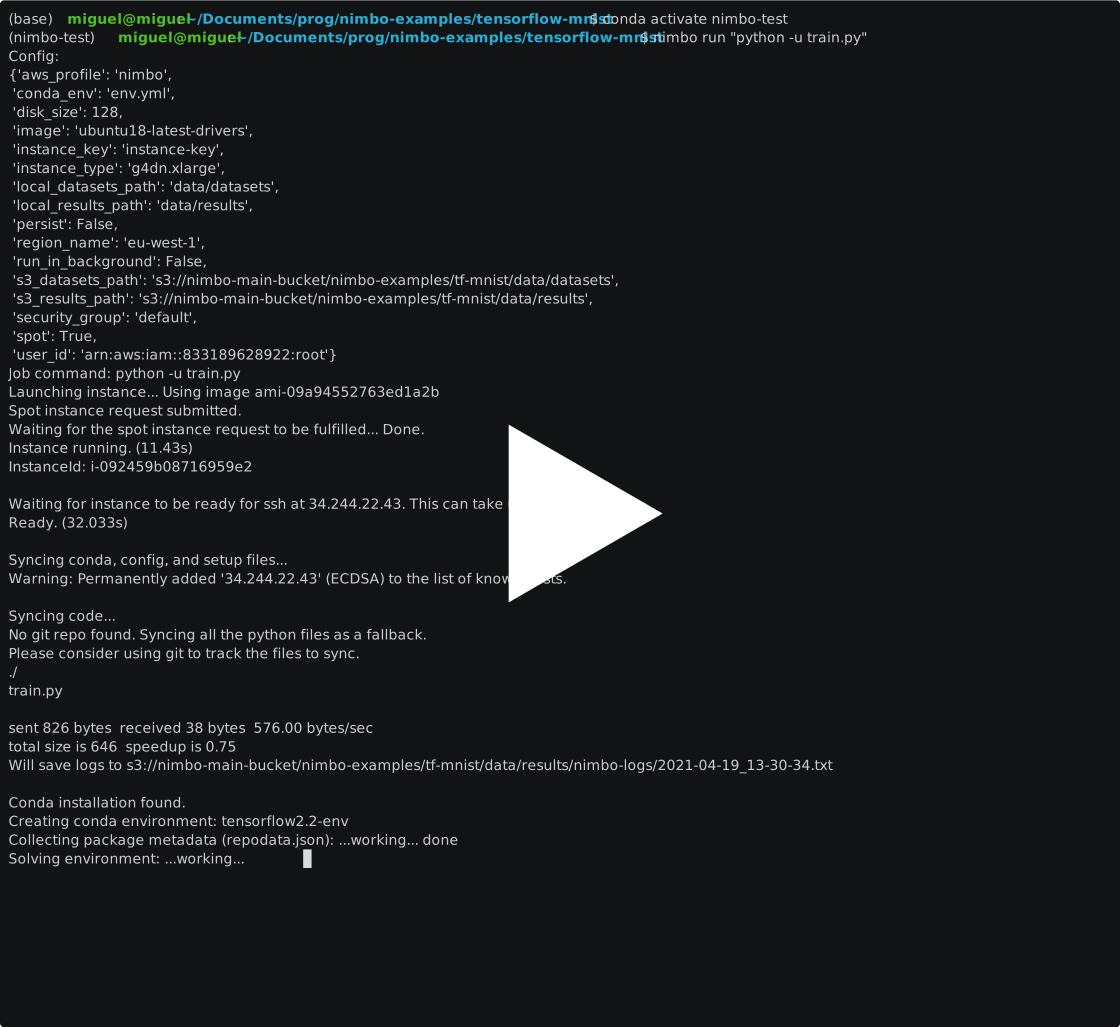
The fastest way to prototype on AWS
Nimbo drastically simplifies your AWS workflow by taking care of instance, environment, data, and IAM management - no changes to your codebase needed. Whether you're just getting started with AWS or are a seasoned veteran, Nimbo takes the pain out of doing Machine Learning in the cloud, allowing you to focus on what matters - building great models for your team and clients.
Powerful commands
Nimbo provides many useful commands to supercharge your productivity when working with AWS, such as easily launching notebooks, checking prices, logging onto an instance, or syncing data. Some examples include :
nimbo ls-spot-pricesnimbo ssh <instance-id>nimbo push datasetsnimbo pull logsnimbo rm-all-instances
Key Features
- Your Infrastructure: Code runs on your EC2 instances and data is stored in your S3 buckets. This means that you can easily use the resulting models and data from anywhere within your AWS organization, and use your existing permissions and credentials.
- User Experience: Nimbo gives you the command line tools to make working with AWS as easy as working with local resources. No more complicated SDKs and never-ending documentation.
- Customizable: Want to use a custom AMI? Just change the image ID in the Nimbo config file. Want to use a specific conda package? Just add it to your environment file. Nimbo is built with customization in mind, so you can use any setup you want.
- Seamless Spot Instances With Nimbo, using spot instances is as simples as changing a single value on the config file. Enjoy the 70-90% savings with AWS spot instances with no changes to your workflow.
- Managed Images We provide managed AMIs with the latest drivers, with unified naming across all regions. We will also release AMIs that come preloaded with ImageNet and other large datasets, so that you can simply spin up an instance and start training.
You can find more information at nimbo.sh, or read the docs at docs.nimbo.sh.
Getting started
Please visit the Getting started page in the docs.
Examples
Sample projects can be found at our examples repo, nimbo-examples. Current examples include:
- Finetuning an object segmentation network with Detectron2
- Training a neural network on MNIST with Pytorch
- Training a neural network on MNIST with Tensorflow, on a spot instance
Product roadmap
- GCP support: Use the same commands to run jobs on AWS or GCP.
- Deployment: Deploy ML models to AWS/GCP with a single command. Automatically create an API endpoint for providing video/audio/text and getting results from your model back.
- Add Docker support: Right now we assume you are using a conda environment, but many people use docker to run jobs. This feature would allow you to run a command such as
nimbo run "docker-compose up", where the docker image would be fetched from DockerHub (or equivalent repository) through adocker_imageparameter on thenimbo-config.ymlfile. - Add AMIs with preloaded large datasets: Downloading and storing large datasets like ImageNet is a time consuming process. We will make available AMIs that come with an extra EBS volume mounted on
/datasets, so that you can use large datasets without worrying about storing them or waiting for them to be fetched from your S3 bucket. Get in touch if you have datasets you would like to see preloaded with the instances.
Developing
If you want to make changes to the codebase, you can clone this repo and
pip install -e .to install nimbo locally. As you make code changes, your local nimbo installation will automatically update.pip install -r requirements/dev.txtfor installing all dependencies for development.
Running Tests
Create two instance keys, one for eu-west-1 and one for us-east-2. The keys should
begin with the zone name, e.g. eu-west-1-dave.pem. Do not forget to chmod 400 the
created keys. Place these keys in src/nimbo/tests/aws/assets.
Create a nimbo-config.yml file in src/nimbo/tests/assets with only the aws_profile,
security_group, and cloud_provider: AWS fields set.
Make sure that the security_group that you put in test nimbo-config.yml allows
your IP for all regions, otherwise, the tests will fail.
Use pytest to run the tests
NIMBO_ENV=test pytest -x
1 maintainer

Metadata
1 maintainer
Release files for nimbo 0.3.2
For a detailed explanation of source distributions (sdists) and built distributions (wheels), please see the package formats documentation.
Source distribution (sdist)
| File | Size | Uploaded | Provenance | Actions |
|---|---|---|---|---|
| nimbo-0.3.2.tar.gz | 45.6 kB | Without provenance | Details for nimbo-0.3.2.tar.gz |
Built distribution (wheel)
| File | Interpreter | ABI | Platform | Actions Reset |
|---|---|---|---|---|
| nimbo-0.3.2-py3-none-any.whl | Python 3 | none | any | Details for nimbo-0.3.2-py3-none-any.whl |
Total release size: 100.2 kB
Release files / nimbo-0.3.2.tar.gz
| Download URL | nimbo-0.3.2.tar.gz |
|---|---|
| Size | 45.6 kB |
| Tags | Source |
|
SHA-256 checksum How to use checksums |
f285fc08243b8630f010cb147ffca28dd79419c85c7f0c6f12867801f10df106
|
|
BLAKE2b-256 checksum How to use checksums |
e34fc16e9b23fa06c95362d9d8423c262fa0d28cf3c704e742ee2d2498d67be4
|
| Upload date | |
|
Uploaded using Trusted Publishing? What is trusted publishing? |
No |
| Uploaded via |
twine/3.4.1 importlib_metadata/3.7.3 pkginfo/1.7.0 requests/2.25.0 requests-toolbelt/0.9.1 tqdm/4.59.0 CPython/3.8.8
|
Release files / nimbo-0.3.2-py3-none-any.whl
| Download URL | nimbo-0.3.2-py3-none-any.whl |
|---|---|
| Size | 54.6 kB |
| Tags | Python 3 |
|
SHA-256 checksum How to use checksums |
38844a2bde15b274eb510729867d232e1013926855f9ea2dd99cfa712e2d4cb7
|
|
BLAKE2b-256 checksum How to use checksums |
d473bd703176aa3a00a44ca5a2c2eb9d0cf56f61b98784c837ef16eb94fb2177
|
| Upload date | |
|
Uploaded using Trusted Publishing? What is trusted publishing? |
No |
| Uploaded via |
twine/3.4.1 importlib_metadata/3.7.3 pkginfo/1.7.0 requests/2.25.0 requests-toolbelt/0.9.1 tqdm/4.59.0 CPython/3.8.8
|
Security for nimbo 0.3.2
Provenance
Provenance describes where a file came from. On PyPI, provenance is shared via attestations, which provide a verifiable record of the build or publishing details. View details, limitations and caveats.
No provenance found
None of the files in this release were uploaded with provenance metadata.
A note on package security
PyPI is a repository for distributing packages, not a service for auditing them. While third-party security researchers and our staff do their best to detect and remove malicious packages, PyPI cannot guarantee the quality, security or suitability of any given package.
To learn more about protecting yourself from malicious actors, visit our package security documentation.














