
Info |
A python based package providing a set of generation, measurement and communication building blocks, that can be used to perform PCB Assembly tests. |
Author |
National Instruments |
About
The nipcbatt package provides APIs (Application Programming Interface) for interacting with the NI-DCPOWER, NI-DMM, NI-SWITCH, NI-DAQmx driver and with LabVIEW runtime to perform measurement, generation and communication operations. The package is implemented in Python, as a highly object-oriented package.
Python PCB Assembly Test Toolkit or nipcbatt is a collection of Measurement Libraries, Automation Examples, Test Demo Examples developed in Python along with Documentation for PCB Assembly electrical functional test.
nipcbatt package is focused on NI PXI Programmable Power Supplies (PPS) and Source Measure Units (SMUs), NI PXI and PC-based DAQ devices, CompactDAQ systems, NI PXI and PCIe Digital Multimeters (DMMs), NI Switch modules, TestScale platform and high level enough to be applicable or scalable for other instruments with similar functionality and resources on any platform.
Documentation
Refer to the Python PCB Assembly Test Toolkit - Getting Started guide for getting started steps including installation and setup procedures, and steps to run example test sequences. Refer to the User Manual for an overview of Toolkit concepts and measurement fundamentals, including a brief overview of each library and automation sequences.
Supported Features
Feature name |
Description |
Acronym |
A collection of methods to perform power, source/sink and measurements using NI-DCPOWER driver. |
dcpower |
|
A collection of methods to perform DMM measurements using NI-DMM driver. |
dmm |
|
A collection of methods to perform generations and measurements using NI-DAQmx driver. |
daq |
|
A collection of methods to control Switch hardware, and switch paths using the NI-SWITCH driver. |
switch |
|
A collection of methods to perform multiple measurements in a scan using NI-DMM and NI-SWITCH driver. |
dmm_scan |
|
A collection of methods to perform communication operations (for example I2C, SPI, and serial) using NI-845x and NI-VISA drivers. |
comm |
Library imports and migrations
In the release 2.x and above the instrument-specific measurement libraries are exposed as subpackages under the top-level nipcbatt package. Example usage:
from nipcbatt import daq
drvg = daq.DcVoltageGeneration()
drvg.initialize(analog_output_channel_expression="Sim_PC_basedDAQ/ao0")
Few classes remain accessible directly from nipcbatt (for example nipcbatt.MeasurementExecutionType). However, explicit subpackage imports are the recommended approach for all new code. To migrate existing code, update imports and references from:
# Not recommended ❌
import nipcbatt
drvg = nipcbatt.DcVoltageGeneration()
to the explicit subpackage form:
# Recommended ✅
from nipcbatt import daq
drvg = daq.DcVoltageGeneration()
See Migration Guide for nipcbatt 2.x for a complete list of class mappings, and all available subpackage classes.
Required Drivers
NI-DCPOWER: 2025 Q4 and above
NI-DMM: 2023 Q4 and above
NI-SWITCH: 2023 Q4 and above
NI-DAQmx: 2023 Q3 and above
LabVIEW Runtime: 2022 Q3 and above (64 bit)
NI-845x: 2022 Q3 and above
NI-VISA: 2023 Q2 and above
NI-Serial: 2023 Q2 and above
Visit ni.com/downloads or visit NI Package Manager to download the Required Drivers.
Supported Hardware
PPS/SMU devices compatible with the NI-DCPOWER driver
DMM devices compatible with the NI-DMM driver
Switch devices compatible with the NI-SWITCH driver
Any DAQmx devices with similar functionality and resources
NI PC-Based DAQ
CompactDAQ
TestScale
Operating System Support
nipcbatt supports Windows 10 and 11 systems where the supported drivers are installed. Refer to NI Hardware and Operating System Compatibility for which versions of the driver support your hardware on a given operating system.
Python Version Support
nipcbatt supports Python 3.10 to 3.12 (64 bit)
Installation
You can use pip to download nipcbatt from PyPI and install it:
$ python -m pip install nipcbatt
Getting Started
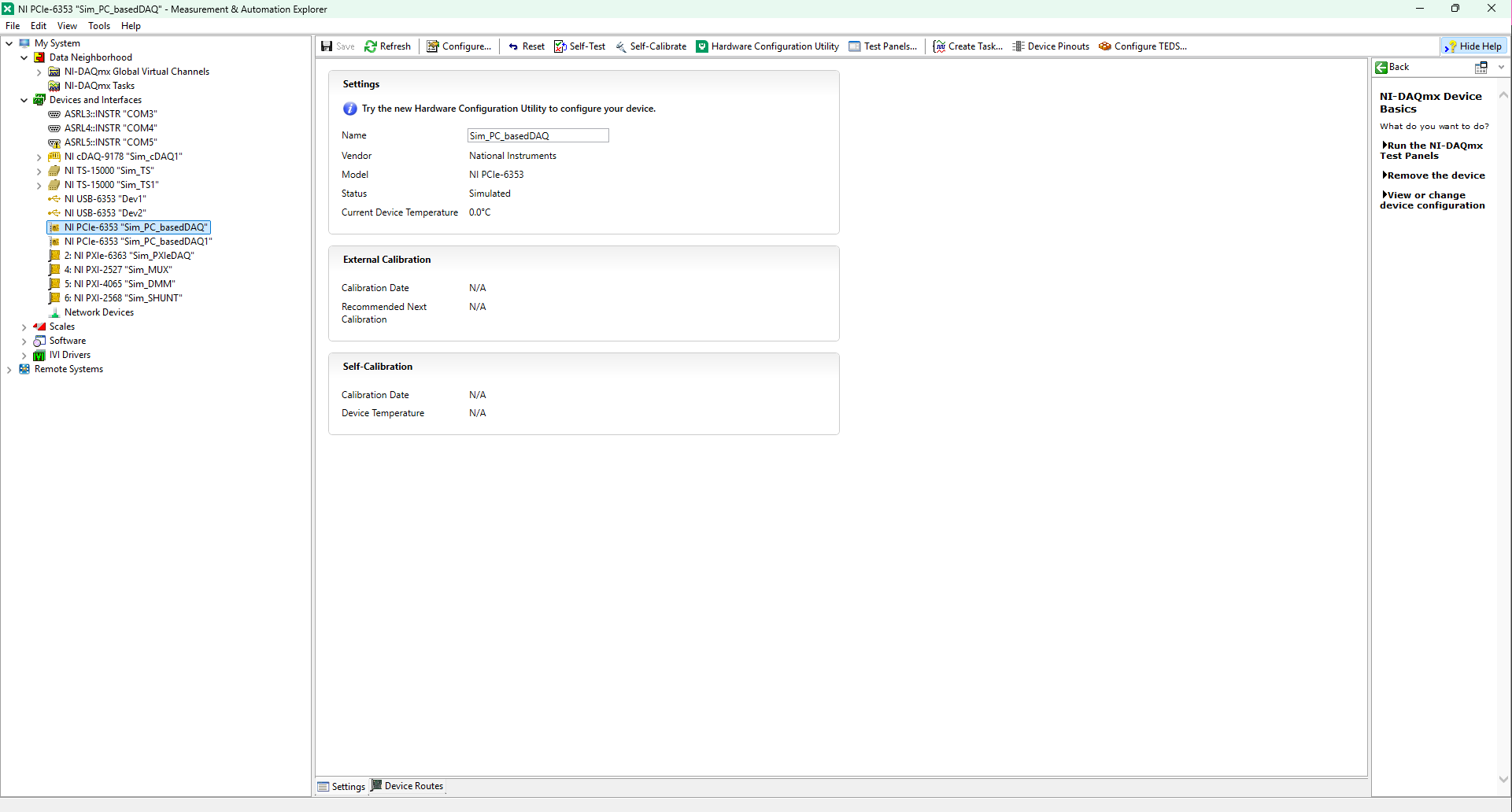
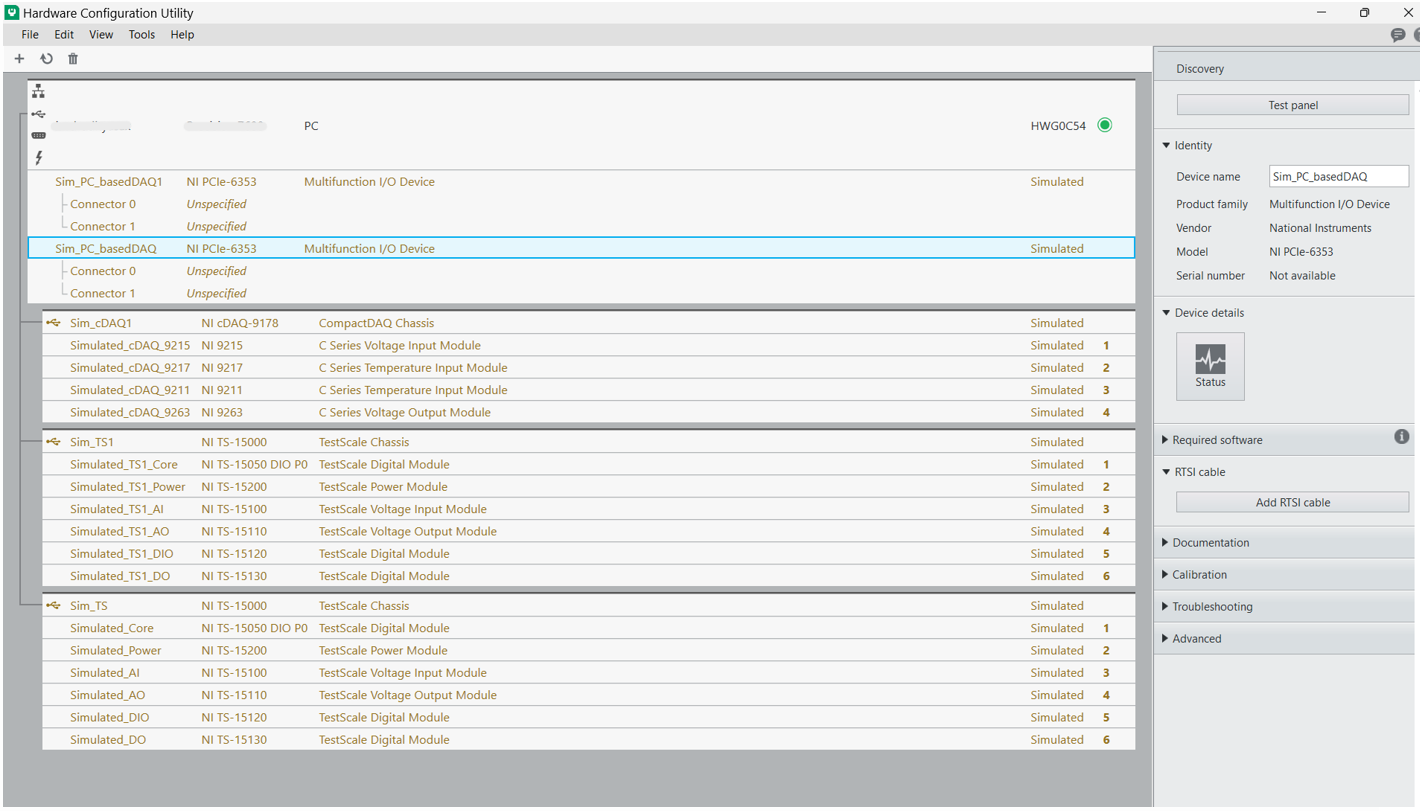
In order to use the nipcbatt package, you must have at least one DAQ (Data Acquisition) device installed on your system. Both physical and simulated devices are supported. The examples below use PC based DAQ device (PCIe-6353). You can use NI MAX or NI Hardware Configuration Utility to verify and configure your devices.
Finding and configuring device name in NI MAX:
Finding and configuring device name in NI Hardware Configuration Utility:
Then refer to the Validation examples and Automation sequences to start testing. Refer to the Getting Started Guide for information.
Key Concepts in Python PCBATT
1. Libraries
All the measurement libraries consist of three main methods which have to be used in the following order:
Initialize:
Used to initialize a measurement instance (for DAQmx use either physical or global virtual channels to perform the respective task).
This is done by calling the initialize() method on the class instance.
Example code to initialize an instance of DC RMS voltage measurement:
>>> from nipcbatt import dmm
>>> dmm_voltage_measurement = dmm.DcRmsVoltageMeasurement()
>>> dmm_voltage_measurement.initialize("Sim_DMM", 50)
Configure and Generate/Configure and Measure:
Configures and executes measurement or generation tasks. For measurements, this method can return both raw data for custom analysis and processed results from built-in analysis functions (configurable via measurement options).
This is done by calling the configure_and_measure()/configure_and_generate() method on the class instance.
Example code to configure and measure DC voltage using the class instance:
>>> measurement = dmm_voltage_measurement.configure_and_measure(
>>>   configuration=dmm.DEFAULT_DC_RMS_VOLTAGE_MEASUREMENT_CONFIGURATION
>>> )
... # Default voltage measurement configuration
Close:
Closes the measurement or generation session and releases hardware resources.
This is done by calling the close() method on the class instance.
Example code to close the session and clear resources:
>>> dmm_voltage_measurement.close()1. Features and Utilities
Virtual Channels
Virtual channels, or sometimes referred to generically as channels, are software entities that encapsulate the physical channel along with other channel specific information (e.g.: range, terminal configuration, and custom scaling) that formats the data. A physical channel is a terminal or pin at which you can measure or generate an analog or digital signal. A single physical channel can include more than one terminal, as in the case of a differential analog input channel or a digital port of eight lines. Every physical channel on a device has a unique name (for instance, cDAQ1Mod4/ai0, Dev2/ao5, and Dev6/ctr3) that follows the NI-DAQmx physical channel naming convention. Refer to NI-DAQmx Channel for more information.
Logger
The logger is a feature which comes along with the package as a part of PCBATT Utilities and helps in storing configuration details and results for every run of the sequences. It can be used to store results in the .txt or .csv file formats. The logger stores results for every run in the same file. Example usage of the logger can be found in the automation sequences.
Save Traces
This Utility works in a similar manner as the logger but it saves configuration settings and results for each run in separate files. Example usage of the save_traces module can be found in the validation examples.
Usage
1. Validation Examples
Validation examples are created as examples for testing and validating one or more libraries together, covering generation, measurement, communication, or a combination of these. The validation examples can be found in this location pcbatt_validation_examples.
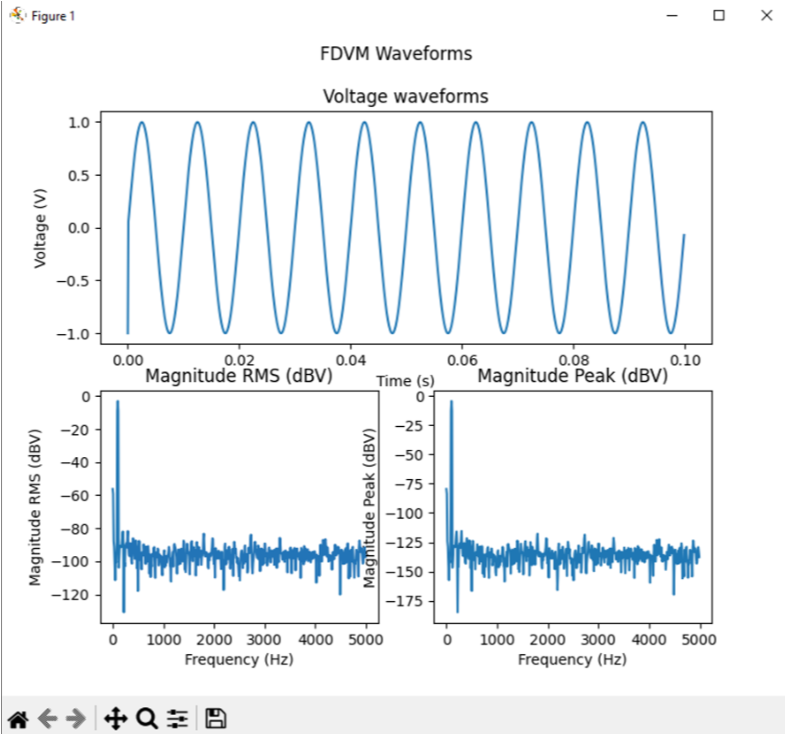
The following images shows sample results for Signal Voltage Generation to Frequency Domain Voltage Measurement Validation example which is located at “/pcbatt_validation_examples/PC_Based_Examples/PC_SVG_FDVM.py”:
2. Automation Sequences
Automation sequences are examples of using libraries for real time scenarios like microphone tests, LED tests and so on. Automation sequences are tested in simulation mode.
Following is the list of Automation Sequences provided as a part of the package.
action_button_tests
audio_tests
communication_tests
digital_io_tests
led_tests
microphone_tests
power_supply_tests
sensor_tests
synchronization_tests
The Automation Sequences can be found in this location pcbatt_automation.
3. Functional Test Demo Sequence
FT demo sequence is an example for creating a test sequence using libraries with applying test limits on the results to determine whether the test is a pass or a fail.
Please refer to the FT Demo Sequence in the location pcbatt_ft_demo_test_sequence.
Bugs / Feature Requests
To report a bug or submit a feature request, please use GitHub Issues.
License
nipcbatt is licensed under an MIT-style license. Other incorporated projects may be licensed under different licenses. All licenses allow for non-commercial and commercial use.
4 maintainers


Release files for nipcbatt 2.1.0
For a detailed explanation of source distributions (sdists) and built distributions (wheels), please see the package formats documentation.
Source distribution (sdist)
| File | Size | Uploaded | |
|---|---|---|---|
| nipcbatt-2.1.0.tar.gz | 16.0 MB | Details |
Built distribution (wheel)
| File | Interpreter | ABI | Platform | Reset |
|---|---|---|---|---|
| nipcbatt-2.1.0-py3-none-any.whl | Python 3 | none | any | Details |
Total release size: 32.3 MB
Release files / nipcbatt-2.1.0.tar.gz
| Download URL | nipcbatt-2.1.0.tar.gz |
|---|---|
| Size | 16.0 MB |
| Tags | Source |
|
SHA-256 checksum How to use checksums |
a9b43ae463f6ffcafb5a5cbfaa4f29366203b0fed059ae96773a400988b808a3
|
|
BLAKE2b-256 checksum How to use checksums |
96b5c2c2a762db9525930111d2903ddee6813d2d50407043dd1120a8693c23ba
|
| Upload date | |
|
Uploaded using Trusted Publishing? What is trusted publishing? |
No |
| Uploaded via |
poetry/1.8.4 CPython/3.10.11 Windows/10
|
Release files / nipcbatt-2.1.0-py3-none-any.whl
| Download URL | nipcbatt-2.1.0-py3-none-any.whl |
|---|---|
| Size | 16.3 MB |
| Tags | Python 3 |
|
SHA-256 checksum How to use checksums |
80c461a152afb98002298ef4964c2eaaea1457674437994cd2799adda6d1ddb2
|
|
BLAKE2b-256 checksum How to use checksums |
8c691e862260af4160582141f75b7b65852db00c06459a4e7acd294786d4cbbb
|
| Upload date | |
|
Uploaded using Trusted Publishing? What is trusted publishing? |
No |
| Uploaded via |
poetry/1.8.4 CPython/3.10.11 Windows/10
|














