
niri-desktop-continuity



Reboot, log in, and your niri desktop comes back. Windows reopen on their workspaces in their column order, Claude Code and Pi sessions resume by id, and anything that cannot be reopened safely is reported, never guessed.
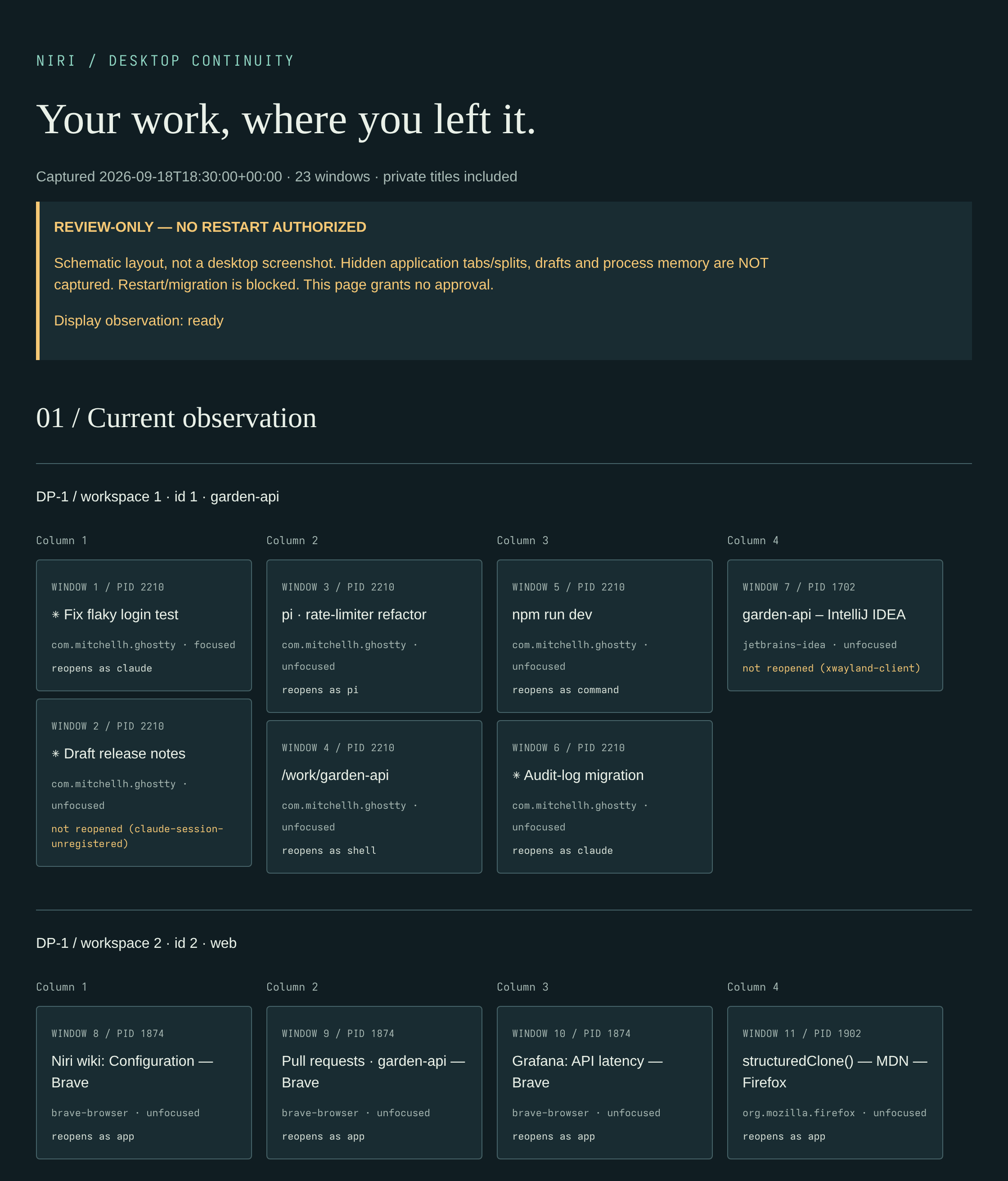
The offline preview page for a fabricated demo desktop (not anyone's real one): the first two of its five workspaces, 23 windows in all. Every tile says how it comes back after a reboot, or why it will not.
Why
niri's scrolling columns make it easy to build a desktop that is worth keeping: a workspace per project, terminals running agents and dev servers, a browser and notes beside them. A reboot or a crash throws all of it away, and rebuilding it by hand, window by window and column by column, takes longer than the reboot did.
This small tool saves the shape of your desktop every 15 minutes and, at your next login, puts it back. From a real reboot of the maintainer's desktop:
- 26 windows saved, 25 reopened at login in 49 seconds, every one on its saved workspace in its saved column order.
- Claude Code and Pi sessions resumed by id.
- Two sessions that could not be resumed came back as fresh sessions started from their handoff
notes (
declare), instead of replaying their opening prompts. - The one miss, an X11 app, was reported in the receipt, not guessed.
Quickstart
Requires Linux, niri and Python 3.11+, with Ghostty as your terminal. No runtime dependencies.
pipx install niri-desktop-continuity
# or: uv tool install niri-desktop-continuity
Every release is also on GitHub Releases with checksums; what changed is in the changelog.
Save your desktop and check what would come back:
niri-desktop-continuity capture    # save windows, workspaces and a reopen recipe per window
niri-desktop-continuity preview    # write an offline HTML map of the latest capture; open the printed path
niri-desktop-continuity restore    # dry run: the placement plan, as JSON; nothing is launched
Reopen it: automatically at every login, or by hand after a reboot or crash:
niri-desktop-continuity autostart --enable   # capture every 15 min, reopen at login; --disable removes it
niri-desktop-continuity restore --apply      # reopen the latest capture now
restore --apply launches every reopenable saved window that is not already open as a Claude or
Pi session, so run it on a desktop that has lost those windows. In the session you just captured,
it would open second copies. The login service checks this for you: it reopens only when the
capture came from a different niri instance, such as the one before a reboot.
A session that cannot be resumed (for example, a Claude Code session started from inside another one, which keeps no transcript) is not reopened. If you would rather it came back as a fresh session, say so while it is still running:
niri-desktop-continuity declare --pid <pid> -- claude "Continue from docs/handoff.md"
<pid> is any process in that terminal (for example from pgrep -a claude). The declaration
lives until the next reboot, applies only to that exact process, and declare --pid <pid> --clear
removes it.
Check before you restart
preview writes a standalone HTML page and prints its path. Its After a reboot section lists
every saved window: whether it reopens, as what, with the exact command and directory, or why it
will not.
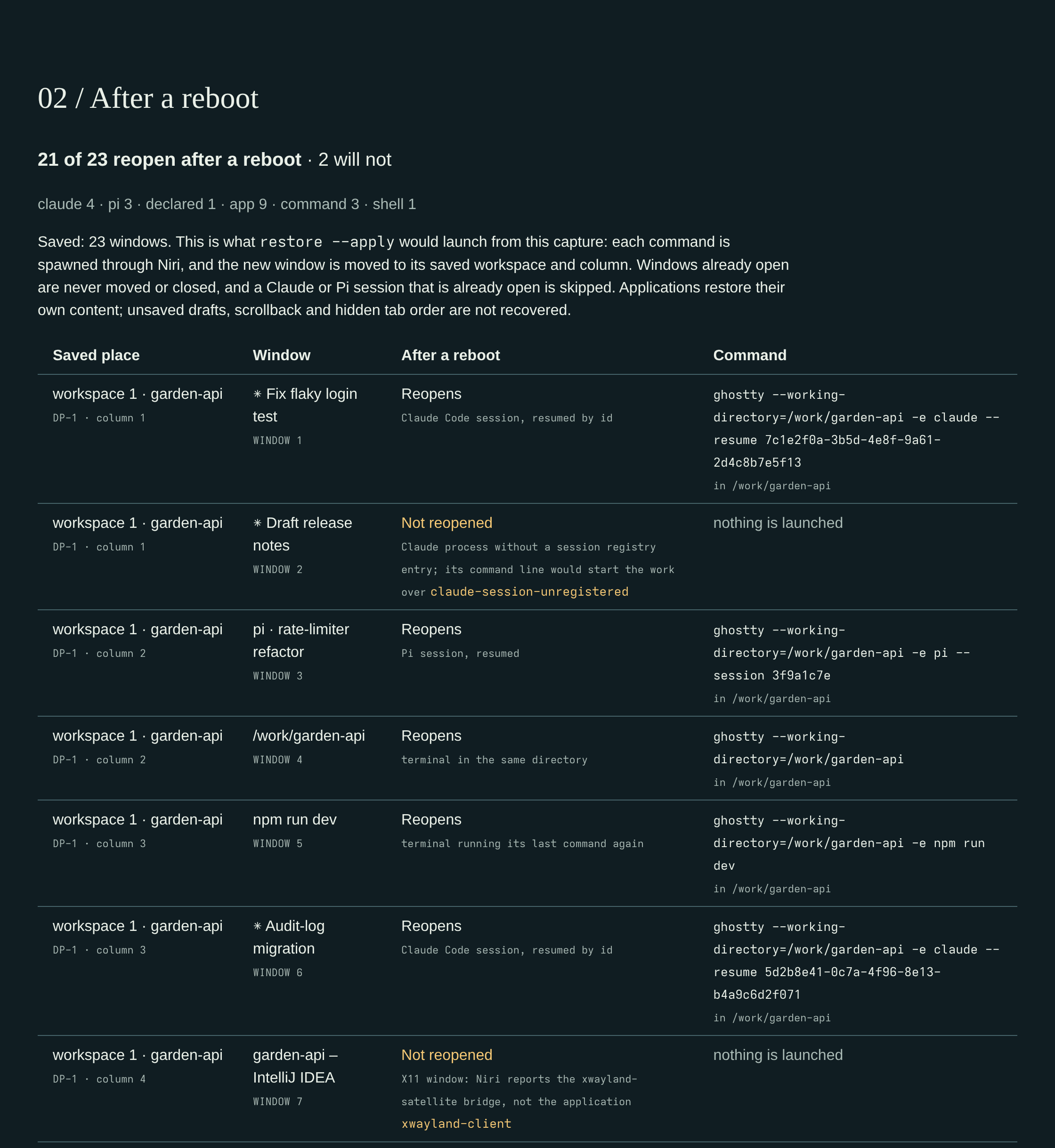
Same fabricated demo desktop, first workspace's rows. restore prints the same plan as
JSON.
How it works
Each capture reads niri's IPC and same-user process metadata, and records a private reopen
recipe per window:
| Kind | How it comes back |
|---|---|
claude |
Ghostty, running claude --resume <id> in the session's directory (from Claude Code's per-process session registry) |
pi |
Ghostty, running Pi's own resume command (from Pi's presence directory) |
declared |
Ghostty, running the command you gave declare |
app |
the application's command line and working directory |
command |
Ghostty, running its last command again (for example btop or npm run dev) |
shell |
Ghostty, opened in the same directory |
unknown |
not reopened. The reason is recorded, for example xwayland-client or claude-session-unregistered |
restore --apply spawns each recipe through niri, waits for its window, moves it to its workspace,
then rebuilds the saved column order and widths and re-applies workspace names. Browsers,
Thunderbird and Obsidian restore their own windows, so they are launched once. Every run writes a
receipt (history --kind receipts); exit status 2 means a partial or interrupted run.
Details: usage.
What it never does
- Never closes a window, and never moves one that was open before the run. Reopened columns go after them.
- Never replays what it cannot resume. A Claude process without a session registry entry is not relaunched from its command line, which would start the same work over.
- Never guesses. An X11 window (niri reports only the
xwayland-satellitebridge), an unresolvable AppImage mount or an unreadable process is reported with a reason, not launched. - Never runs anything at login unless you opt in.
autostart --enablewrites three systemd user units,--disableremoves them. Nothing else installs a service or edits your configuration. - Never executes a discovered binary while capturing. Executables are hashed, not run.
- Makes no network requests of its own. No telemetry, no daemon. The preview is static HTML with no scripts or remote assets, and no browser is launched for you.
- Never reads terminal contents or browser profiles. Session ids come from Claude Code's session registry and Pi's presence files. From a Claude Code transcript it takes only the session title, to tell apart windows of one terminal process.
Records stay private: 0700 directories and 0600 files under
$XDG_STATE_HOME/niri-desktop-continuity (default ~/.local/state/niri-desktop-continuity, or
--state-root <dir>). Window titles and session titles are redacted unless you
capture --include-titles. Recipes still contain command lines and working directories, so treat
captures and previews as private and do not publish them.
Honest limits
- niri on Linux only. No other compositor or platform is planned. Alpha software.
- Reopening is not restoring memory. Applications bring back their own content. Unsaved drafts, scrollback, shell state and the order of hidden tabs are not recovered.
- X11 applications are not reopened, because niri does not reveal which X11 program owns a window.
- Ghostty only, by design. Sessions inside terminals are read and resumed in Ghostty. Other terminals (kitty, WezTerm, foot, Alacritty) reopen as plain applications, without what ran in them; if you use one, fork it. Claude Code and Pi resume by id; other programs in Ghostty get their last command run again, or a shell in the same directory. Sessions found in extra tabs of one Ghostty window reopen as separate windows.
- Placement is by workspace index. Saved workspaces are compacted to consecutive indices, and which monitor a workspace was on is not restored.
- Stay idle while it arranges columns (usually under a minute). niri has no atomic focus-and-move, so input during the run can land in the wrong column.
- Exact restart or migration of a still-running window is not supported and stays blocked.
Beyond reopening
The same CLI also plans blocked restart proposals and has a loss-bounded saved-conversation reconstruction path, which needs a separately owned adapter that does not ship here. It also has an experimental single-column reorder. None of these is needed to save and reopen a desktop. See planning, reconstruction and resolution.
Develop
uv sync --group dev
just check         # lint, formatting, tests, portable-source/privacy check
just build         # wheel + sdist
just ci            # check + build
just screenshots   # re-render docs/assets from the fabricated demo desktop (Chromium + ImageMagick)
Tests never contact a real compositor; releasing describes versions, tags and
rollback. Architecture explains the module
boundaries, DESIGN.md is the preview's visual contract and usage has
every command's details. Screenshots come only from scripts/demo-desktop.py, and
just check refuses PNG metadata that could carry private text.
Scaffolded from tpl-project-repo, then adapted for a standalone Python package. Copier answers
retain relative template provenance only; template updates are a maintainer concern, not an
installation prerequisite. Private template snapshot context is excluded from version control
and distribution. Apache-2.0: see LICENSE.
1 maintainer

Metadata
1 maintainer
Release files for niri-desktop-continuity 0.1.1
For a detailed explanation of source distributions (sdists) and built distributions (wheels), please see the package formats documentation.
Source distribution (sdist)
| File | Size | Uploaded | |
|---|---|---|---|
| niri_desktop_continuity-0.1.1.tar.gz | 225.6 kB | Details |
Built distribution (wheel)
| File | Interpreter | ABI | Platform | Reset |
|---|---|---|---|---|
| niri_desktop_continuity-0.1.1-py3-none-any.whl | Python 3 | none | any | Details |
Total release size: 338.1 kB
Release files / niri_desktop_continuity-0.1.1.tar.gz
| Download URL | niri_desktop_continuity-0.1.1.tar.gz |
|---|---|
| Size | 225.6 kB |
| Tags | Source |
|
SHA-256 checksum How to use checksums |
5061bbb1390be5d8ee642c3f4b719ff5753e043fc30906300a547ee2a5b9713a
|
|
BLAKE2b-256 checksum How to use checksums |
0c94576c6886a38067dfdcdd6a498864f484189dcf35835c3245d9fe93f9cf9c
|
| Upload date | |
|
Uploaded using Trusted Publishing? What is trusted publishing? |
Yes |
| Uploaded via |
twine/7.0.0 CPython/3.13.14
|
Provenance
Provenance describes where a file came from. On PyPI, provenance is shared via attestations, which provide a verifiable record of the build or publishing details. View details, limitations and caveats.


PyPI Publish Attestation
PyPI verified that this artifact, at this checksum, originated from the publisher listed below.
Signed by GitHub Actions, verified by PyPI on Sep 19, 2026.
Transparency logRelease files / niri_desktop_continuity-0.1.1-py3-none-any.whl
| Download URL | niri_desktop_continuity-0.1.1-py3-none-any.whl |
|---|---|
| Size | 112.5 kB |
| Tags | Python 3 |
|
SHA-256 checksum How to use checksums |
5bdf69ba0b3c89fa1f4fa339a6367cff10b4e5d06e1ba65153ae8ac9bbc95f98
|
|
BLAKE2b-256 checksum How to use checksums |
15d40a51d0d24b3e444931b33fa96f7ea0808e1ead4d3ed81af9f0a05e96ece7
|
| Upload date | |
|
Uploaded using Trusted Publishing? What is trusted publishing? |
Yes |
| Uploaded via |
twine/7.0.0 CPython/3.13.14
|
Provenance
Provenance describes where a file came from. On PyPI, provenance is shared via attestations, which provide a verifiable record of the build or publishing details. View details, limitations and caveats.
PyPI Publish Attestation
PyPI verified that this artifact, at this checksum, originated from the publisher listed below.
Signed by GitHub Actions, verified by PyPI on Sep 19, 2026.
Transparency log













