
Visualisation tool for the Neuromorphic Intermediate Representation
Verified details
These details have been verified by PyPIProject links
GitHub Statistics
Maintainers

Project description
Neuromorphic Intermediate Representation Visualisation Tool
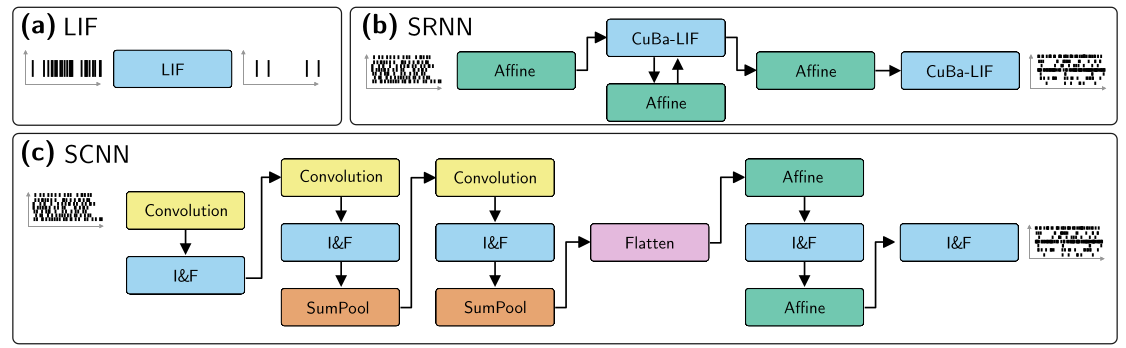
Turn your NIR definitions into a nice graph, the original publication serving as a template.
Customise your node colour preferences in style.yml, and quickly generate graphs from your neuromorphic networks.
This work is in progress.
Running Example (Jupyter Notebook)
By running the following code (from a notebook),
import nir
import nirviz
import numpy as np


a = np.random.randn(2)
ir = nir.NIRGraph(
    nodes={
        "input": nir.Input(input_type=np.array([2])),
        "affine1": nir.Affine(weight=np.zeros((2,2)), bias=False),
        "cu1": nir.CubaLIF(tau_mem=a, tau_syn=a, r=a, v_leak=a, v_threshold=a, v_reset=a),
        "affine_rec": nir.Affine(weight=np.zeros((2,2)), bias=False),
        "affine2": nir.Affine(weight=np.zeros((2,2)), bias=False),
        "cu2": nir.CubaLIF(tau_mem=a, tau_syn=a, r=a, v_leak=a, v_threshold=a, v_reset=a),
        "output": nir.Output(output_type=np.array([2]))
    },
    edges=[("input", "affine1"), ("affine1", "cu1"), ("affine_rec", "cu1"),  ("cu1", "affine_rec"), ("cu1", "affine2"), ("affine2", "cu2"), ("cu2", "output")])

viz = nirviz.visualize(ir)
viz.show()
You would get the following visualisation

Similar to Figure 3 of the publication.
Running example (CLI)
To convert a saved NIR graph (e.g. srnn.nir) to a PNG or SVG, you can use one of the following commands:
python -m nirviz srnn.nir              # SVG -> stdout
python -m nirviz srnn.nir img/srnn.png # PNG -> file
python -m nirviz srnn.nir img/srnn.svg # SVG -> file
Customising the style
You can customise the style you see via the style file.
Style file location
The style file is defined in YAML. You can find the default location by running:
import nirviz
print(f"nirviz style file location: {nirviz.visualize.default_style_file()}")
or by passing your own style.yml:
import python
viz = nirviz.visualize(nir_graph, style_file="style.yml")
viz.show()
python -m nirviz --yaml './style.yml' srnn.nir
Style file format
The format currently only supports setting node attributes. The node attributes correspond to Graphviz node attributes.. An example file would contain:
node-categories:
    category-name: # User defined
        patterns: ["Affine", "IF"]
        attributes:
            # Corresponds to node attributes of graphviz
            # https://graphviz.org/docs/nodes/
            color: "red"
            style: "filled"
            shape: "box"
Which would paint all "Affine" and "IF" NIR nodes red.
Project details
Verified details
These details have been verified by PyPIProject links
GitHub Statistics
Maintainers
Release history Release notifications | RSS feed


Download files
Download the file for your platform. If you're not sure which to choose, learn more about installing packages.
Source Distribution
Built Distribution
Filter files by name, interpreter, ABI, and platform.
If you're not sure about the file name format, learn more about wheel file names.
Copy a direct link to the current filters
File details
Details for the file nirviz-0.1.3.tar.gz.
File metadata
- Download URL: nirviz-0.1.3.tar.gz
- Upload date:
- Size: 70.9 kB
- Tags: Source
- Uploaded using Trusted Publishing? Yes
- Uploaded via: twine/6.1.0 CPython/3.12.9
File hashes
| Algorithm | Hash digest | |
|---|---|---|
| SHA256 |
bcd6fd84984b12c98727203adce570c2931d0e5444f803bbaa388ea65733edda
|
|
| MD5 |
c546d8f813a9eedbbaa24adf1425332b
|
|
| BLAKE2b-256 |
5830e440a6c84e2ca0e4467065c585a8979dd7d89ad5747dccba5be7be8b4813
|
Provenance
The following attestation bundles were made for nirviz-0.1.3.tar.gz:
Publisher:
pypi.yml on open-neuromorphic/nirviz
-
Statement:
-
Statement type:
https://in-toto.io/Statement/v1 -
Predicate type:
https://docs.pypi.org/attestations/publish/v1 -
Subject name:
nirviz-0.1.3.tar.gz -
Subject digest:
bcd6fd84984b12c98727203adce570c2931d0e5444f803bbaa388ea65733edda - Sigstore transparency entry: 245882644
- Sigstore integration time:
-
Permalink:
open-neuromorphic/nirviz@36939adae3972f030f81e2e899dd33a37a3d126d -
Branch / Tag:
refs/tags/v0.1.3 - Owner: https://github.com/open-neuromorphic
-
Access:
public
-
Token Issuer:
https://token.actions.githubusercontent.com -
Runner Environment:
github-hosted -
Publication workflow:
pypi.yml@36939adae3972f030f81e2e899dd33a37a3d126d -
Trigger Event:
release
-
Statement type:
File details
Details for the file nirviz-0.1.3-py3-none-any.whl.
File metadata
- Download URL: nirviz-0.1.3-py3-none-any.whl
- Upload date:
- Size: 6.1 kB
- Tags: Python 3
- Uploaded using Trusted Publishing? Yes
- Uploaded via: twine/6.1.0 CPython/3.12.9
File hashes
| Algorithm | Hash digest | |
|---|---|---|
| SHA256 |
b7e694c4c476e2dd4fcb6f6ecbb6b28bd7c306a1086941f6450c42a82ae15b55
|
|
| MD5 |
6f852f05d1687d2b7a345d85696f7e10
|
|
| BLAKE2b-256 |
3926fbc307bc6b5cff33001659d48af45f3f138cb484d46d53887875d90800a3
|
Provenance
The following attestation bundles were made for nirviz-0.1.3-py3-none-any.whl:
Publisher:
pypi.yml on open-neuromorphic/nirviz
-
Statement:
-
Statement type:
https://in-toto.io/Statement/v1 -
Predicate type:
https://docs.pypi.org/attestations/publish/v1 -
Subject name:
nirviz-0.1.3-py3-none-any.whl -
Subject digest:
b7e694c4c476e2dd4fcb6f6ecbb6b28bd7c306a1086941f6450c42a82ae15b55 - Sigstore transparency entry: 245882646
- Sigstore integration time:
-
Permalink:
open-neuromorphic/nirviz@36939adae3972f030f81e2e899dd33a37a3d126d -
Branch / Tag:
refs/tags/v0.1.3 - Owner: https://github.com/open-neuromorphic
-
Access:
public
-
Token Issuer:
https://token.actions.githubusercontent.com -
Runner Environment:
github-hosted -
Publication workflow:
pypi.yml@36939adae3972f030f81e2e899dd33a37a3d126d -
Trigger Event:
release
-
Statement type:






