
NI-Sync Python API


Project description
| Info | NI-Sync Python API |
|---|---|
| Author | National Instruments |
Table of Contents
About
The nisync package allows you to develop timing and synchronization applications for both time-based and signal-based synchronizations with NI-Sync devices in Python. NI created and supports this package.
Documentation
Refer to the NI-Sync User Manual for API-agnostic information about NI-Sync concepts.
Implementation
The package is implemented in Python as an object-oriented wrapper around the NI-Sync C API using the ctypes Python library.
Supported NI-Sync Driver Versions
nisync supports all versions of NI-Sync. Some functions in the nisync package may be unavailable with earlier versions of NI-Sync driver. Refer to the Installation section for details on how to install the latest version of the NI-Sync driver.
Operating System Support
nisync supports Windows and Linux operating systems where the NI-Sync driver is supported. Refer to NI Hardware and Operating System Compatibility for which versions of the driver support your hardware on a given operating system.
Python Version Support
nisync supports CPython 3.9+ and PyPy3.
Installation
Running nisync requires NI-Sync to be installed. nisync can be installed with pip:
python -m pip install nisync
Manual Driver Installation
Visit ni.com/downloads to download the latest version of NI-Sync. None of the recommended Additional items are required for nisync to function, and they can be removed to minimize installation size. It is recommended you continue to install the NI Certificates package to allow your Operating System to trust NI built binaries, improving your software and hardware installation experience.
Getting Started
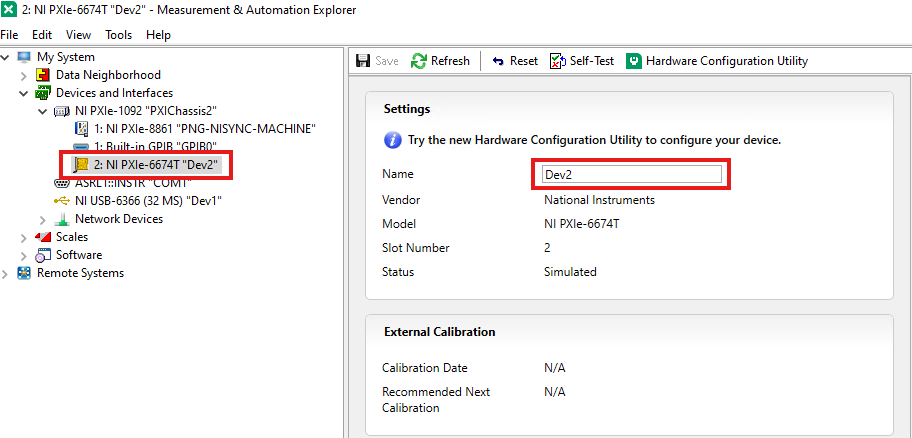
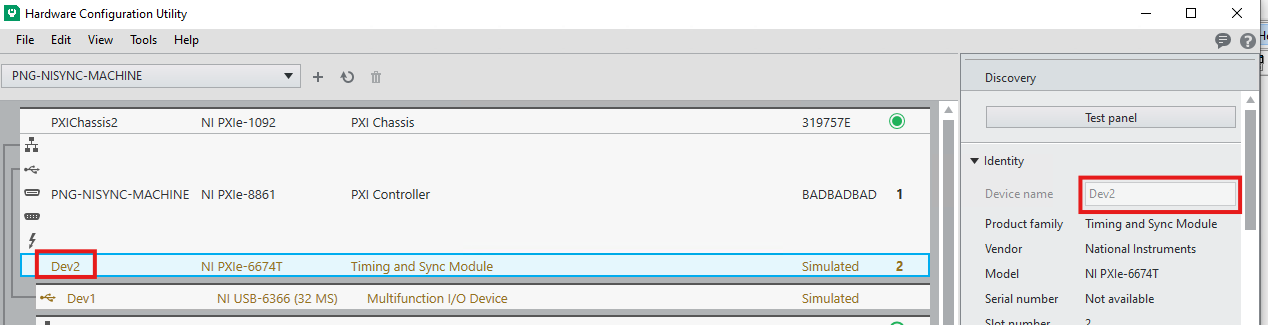
In order to use the nisync package, you must have at least one device that supports NI-Sync installed on your system. Both physical and simulated devices are supported. You can use NI MAX or NI Hardware Configuration Utility to verify and configure your devices.
Finding and configuring device name in NI MAX:
Finding and configuring device name in NI Hardware Configuration Utility:
Usage
The following is a basic example of using an nisync.nisync.Session object. This example illustrates how to connect and disconnect clock terminals to synchronize devices using the onboard oscillator as the clock source. This is particularly useful in applications requiring precise timing and synchronization across multiple devices.
Python Examples
import nisync
from nisync.constants import PXI_CLK10_IN, OSCILLATOR

# Create a new session with the nisync library
with nisync.Session(resource_name="PXI1Slot10") as session:
    # Connect the onboard oscillator to the PXI_CLK10_IN terminal
    # This setup is typically used for synchronizing measurements across devices
    session.connect_clock_terminals(OSCILLATOR, PXI_CLK10_IN)

    # Perform measurements or operations that require synchronization

    # Once operations are complete, disconnect the terminals
    session.disconnect_clock_terminals(OSCILLATOR, PXI_CLK10_IN)
License
nisync is licensed under an MIT-style license (see LICENSE). Other incorporated projects may be licensed under different licenses. All licenses allow for non-commercial and commercial use.
Release history Release notifications | RSS feed


Download files
Download the file for your platform. If you're not sure which to choose, learn more about installing packages.
Source Distribution
Built Distribution
Filter files by name, interpreter, ABI, and platform.
If you're not sure about the file name format, learn more about wheel file names.
Copy a direct link to the current filters
File details
Details for the file nisync-0.2.1.tar.gz.
File metadata
- Download URL: nisync-0.2.1.tar.gz
- Upload date:
- Size: 25.8 kB
- Tags: Source
- Uploaded using Trusted Publishing? No
- Uploaded via: twine/6.2.0 CPython/3.12.1
File hashes
| Algorithm | Hash digest | |
|---|---|---|
| SHA256 |
caefa864515e834b1375801b843bb16d9c697d72b735c8918279518205edd87f
|
|
| MD5 |
7abe54305b5e9177e0abd051144f92ca
|
|
| BLAKE2b-256 |
5734a9c1a14137202dc6f05c6133aa92cfd2c0572176e90d94bb45d46a193677
|
File details
Details for the file nisync-0.2.1-py3-none-any.whl.
File metadata
- Download URL: nisync-0.2.1-py3-none-any.whl
- Upload date:
- Size: 26.3 kB
- Tags: Python 3
- Uploaded using Trusted Publishing? No
- Uploaded via: twine/6.2.0 CPython/3.12.1
File hashes
| Algorithm | Hash digest | |
|---|---|---|
| SHA256 |
436c72d80954c23b1cd5f6bdd434b94de464a3b8593fcca65bd314cb02fd6534
|
|
| MD5 |
6eeb5bcc8e1732d74810b194e93ac145
|
|
| BLAKE2b-256 |
1b8fd9945e14817c6771c18f84be2bcd2bbcca68c97b74c2b6ac26d990b103e6
|






